Generative fill, expand and remove used to be a headline feature. In 2026 nearly every editor on the leaderboard has some version of them, so the useful question has changed. It isn't "does it have AI?" but "how much control do I get, what does a generation cost me, and does the tool fit the job I actually do?"
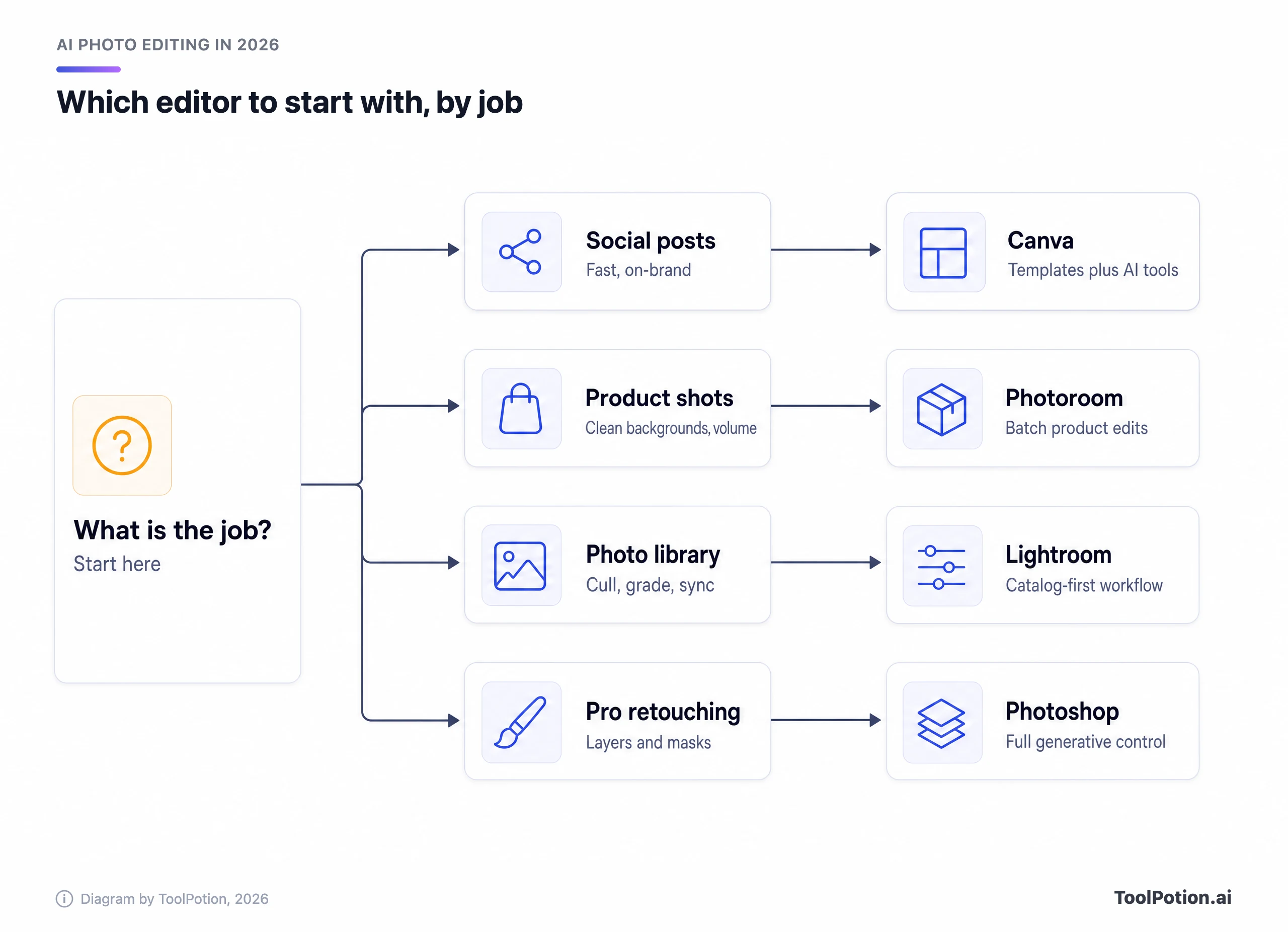
That job varies more than any other category we rank. A seller cutting out forty sneakers, a wedding photographer sorting 2,000 frames and a social manager resizing a post for five platforms need different software, even though all of them say "photo editor." This guide sorts the field by those jobs. It uses the Top 200 AI Photo Editors leaderboard as the spine, vendor pricing pages for the numbers, and a few cited facts about what changed this year.
The ranked list sits in the leaderboard below. Everything after it is judgment: who to pick, what the catch is, and what you'd pay.
The top 25 right now
- # 1Top PickCanvaAI AppCanva is a free online graphic design tool that allows users to create social media posts, presentations, posters, videos, logos, and more. It offers a variety of templates and features to enhance creativity and productivity.92ToolRankElite
- # 2Runner UpAdobe PhotoshopAI AppAdobe Photoshop is a powerful online photo and design app that allows users to create, edit, and combine images. With advanced tools and AI-powered features, it enhances creativity and productivity for professionals and enthusiasts alike.89ToolRankElite
- # 3Third PlaceAdobe LightroomAI AppAdobe Lightroom is an online photo editor that allows users to make nondestructive edits, apply sliders and filters, and manage photos efficiently. Integrated AI features help in organizing and sharing photos seamlessly. Users can try it for free.75ToolRankStrong



- 4PicsartAI AppPicsart is an all-in-one AI creative platform for photo and video editing, image and video generation, and design, offering 130M+ creators templates, asset libraries, 140+ AI models, and generative AI tools on mobile and web.73ToolRankStrong
- 5Google PhotosAI AppGoogle Photos offers AI-powered tools like Magic Eraser and Unblur to enhance your photos. Easily remove distractions, fix blurs, and improve lighting with intuitive editing features. Store, organize, and search your memories effortlessly.71ToolRankStrong
- 6PhotoroomAI AppPhotoroom is an AI-powered photo editing tool designed for e-commerce businesses and social media creators. It automates image creation, background removal, and produces professional-quality visuals quickly, helping users enhance their product listings and social media presence.71ToolRankStrong
- 7Fotor Photo EditorAI AppFotor is a free online photo editing tool that allows users to enhance and edit images effortlessly. With features like cropping, adding text, and retouching, it caters to both amateurs and professionals seeking to improve their photos.70ToolRankStrong
- 8RefaceAI AppReface is a Ukrainian AI company whose face-swap tool, Unboring, lets anyone swap a face into a photo or video in a few clicks using its proprietary RefaceAI technology. Users pick a clip or image from Reface's catalog or upload their own, then get a shareable result for memes, family photos or nostalgic edits.69ToolRankStrong
- 9Remini - AI Photo EnhancerMobile AppRemini is an AI-powered photo enhancement app that improves the quality of images by restoring details and reducing noise. It is suitable for enhancing both modern and vintage photos, making them clearer and more vibrant.68ToolRankStrong
- 10VSCOAI AppVSCO is a connected platform for photographers combining professional photo and video editing with iconic presets and AI tools, a global creative community, portfolio websites, client galleries, and business management tools.66ToolRankStrong
- 11Facetune: Photo & Video Editor AppMobile AppFacetune is a powerful photo and video editing app that utilizes AI technology to enhance images. It offers a range of tools for retouching and fine-tuning photos, making it ideal for users seeking subtle or dramatic edits.64ToolRankStrong
- 12Photoshop ExpressMobile AppPhotoshop Express is a free mobile app that allows users to edit and enhance photos with beauty filters, face retouching, and AI editing tools. It offers a user-friendly interface and powerful features for quick and professional photo editing.62ToolRankStrong
- 13Topaz PhotoAI AppTopaz Photo is an AI-powered image enhancement application that sharpens, denoises, and upscales images for both professionals and enthusiasts. It integrates seamlessly with popular editing software, providing a comprehensive suite of tools for image correction and enhancement.60ToolRankStrong
- 14MyHeritage Photo EnhancerAI AppThe MyHeritage Photo Enhancer uses advanced deep learning technology to enhance and upscale photo resolutions, particularly improving the clarity of faces in historical and modern photos.58ToolRankSolid
- 15PowerDirector: AI Video Editing SoftwareAI AppPowerDirector is an AI-powered video editing software offering intuitive tools, creative effects, and a vast stock media library. Ideal for beginners and professionals, it enables fast-paced video creation with features like AI storytelling, object removal, and direct social media uploads.58ToolRankSolid
- 16Cutout.proAI AppCutout.Pro is an all-in-one AI visual content generation platform offering photo and video editing, background removal, image restoration, graphic design, and AI image generation. It simplifies complex design tasks, transforming ideas into professional assets with a single click for creators and businesses.58ToolRankSolid
- 17AI MirrorMobile AppAI Mirror: AI Art Photo Editor is a mobile application that offers various AI-powered features for photo and video editing. Users can apply anime filters, enhance images, and create dance videos, all while enjoying a user-friendly interface.58ToolRankSolid
- 18Erase.bgAI AppErase.bg is a free AI-powered tool that removes backgrounds from images in seconds. It supports various formats and is ideal for personal and e-commerce use, allowing users to download high-resolution images without any fees.57ToolRankSolid
- 19ON1 Portrait AIAI AppON1 Portrait AI is a photo retouching software that uses AI to enhance portraits. It automatically detects faces, smooths skin, whitens teeth, and enhances eyes, providing professional results quickly. Available as a standalone app or plugin, it integrates with popular photo editors.57ToolRankSolid
- 20Cleanup.picturesAI AppCleanup.pictures is a free online tool that uses AI to remove unwanted objects, people, text, and defects from any image. It offers a simple, intuitive interface for quick edits, making professional-quality retouching accessible to everyone. Enhance your photos effortlessly in just a few clicks.57ToolRankSolid
- 21Clipdrop AI VisualsAI AppClipdrop offers a suite of AI-powered tools to create and edit stunning visuals quickly. Features include background removal, object cleanup, image upscaling, and text-to-image generation. Enhance your photos or generate new ones with ease, making professional-level visual content accessible to everyone.57ToolRankSolid
- 22ON1 NoNoise AIAI AppON1 NoNoise AI 2027 offers advanced AI-powered noise reduction and sharpening for photos. Available as a standalone app or plugin, it enhances image quality by removing noise while preserving detail. Pre-order now for a one-time purchase price of USD 69.99.56ToolRankSolid
- 23Photomyne: Family Memories AppAI AppPhotomyne is an app designed to scan, enhance, and preserve old photos. It offers tools for photo sharpening, colorizing black and white images, and organizing digital albums, making it easy to cherish family memories.55ToolRankSolid
- 24Pixelcut AI Photo EditorMobile AppPixelcut is an AI-powered photo editing app that allows users to easily remove backgrounds and enhance images. With a user-friendly interface and a variety of editing tools, it simplifies the photo editing process for both casual users and professionals.55ToolRankSolid
- 25BeFunkyAI AppBeFunky is an all-in-one online creative platform that combines an easy photo editor, a one-click collage maker, and a graphic designer, with AI tools like background removal, upscaling, object erasing, and photo-to-art effects.55ToolRankSolid



















How ToolRank works
ToolRank is ToolPotion’s proprietary ranking engine.
It continuously evaluates hundreds of signals across the open web — real traffic and popularity, audience and community strength, authority and longevity, adoption and engagement — processing millions of data points to place every tool where it has earned to be.
Every AI type is measured by its own tailored model: what proves traction for a SaaS app is not what proves it for an open-source framework or a creator channel. Missing a platform never counts against a tool — ToolRank judges the evidence that exists.
No paid placement. No self-reported numbers.
Quick picks
- If you want one app for everything and don't want to think about it, start with Canva, which sits at #1 on the 2026 board.
- For serious retouching and compositing, Adobe Photoshop (#2) is still the reference point, and it now lets you pick the generative model.
- For a photo library you shoot constantly, Adobe Lightroom (#3) wins on organization, culling and consistent grading.
- For product photos, Photoroom is the clearest specialist. It's #4 and has the highest ToolRank score among the top 25, 73.
- For a free desktop editor with real layers, Affinity Photo (#17) costs nothing for the core app.
- For rescuing a blurry or noisy file on your phone, Remini climbed from #16 to #8 on the 2026 board.
What changed in 2026
Adobe changed how Generative Fill works. Its release notes describe a model picker in the contextual task bar that swaps the old scrolling list for a curated set of models, "making it faster to switch between Firefly, Gemini, and other available options." The default is now Firefly Fill & Expand, and your credit balance shows while you work (Adobe release notes). Adobe also added a Remove tool in Photoshop that runs a generative model locally and offline, so the image never leaves your machine (DPReview).
Canva went the other way. Its Canva AI 2.0, launched as a research preview, is a conversational editor that generates "fully layered, editable output from a single prompt" (Canva). The announcement is about design rather than photo retouching, but it shows where the biggest all-rounder is heading: describe the result, then fix it by hand.
The third shift is price. Canva bought Affinity, and the combined Affinity app is now free. The core is free on Windows and macOS, while Canva's online AI tools inside it need a paid Canva plan (CGChannel). A pro-grade layered editor with no subscription is a real change for anyone who resented paying Adobe just to retouch a handful of photos.
Under every one of these edits sits the same sequence, whatever the brand. The diagram below shows it, and it's useful because most disappointing AI edits fail at a single step. A rough mask gives you a halo. A good fill that doesn't match the grain looks pasted in.
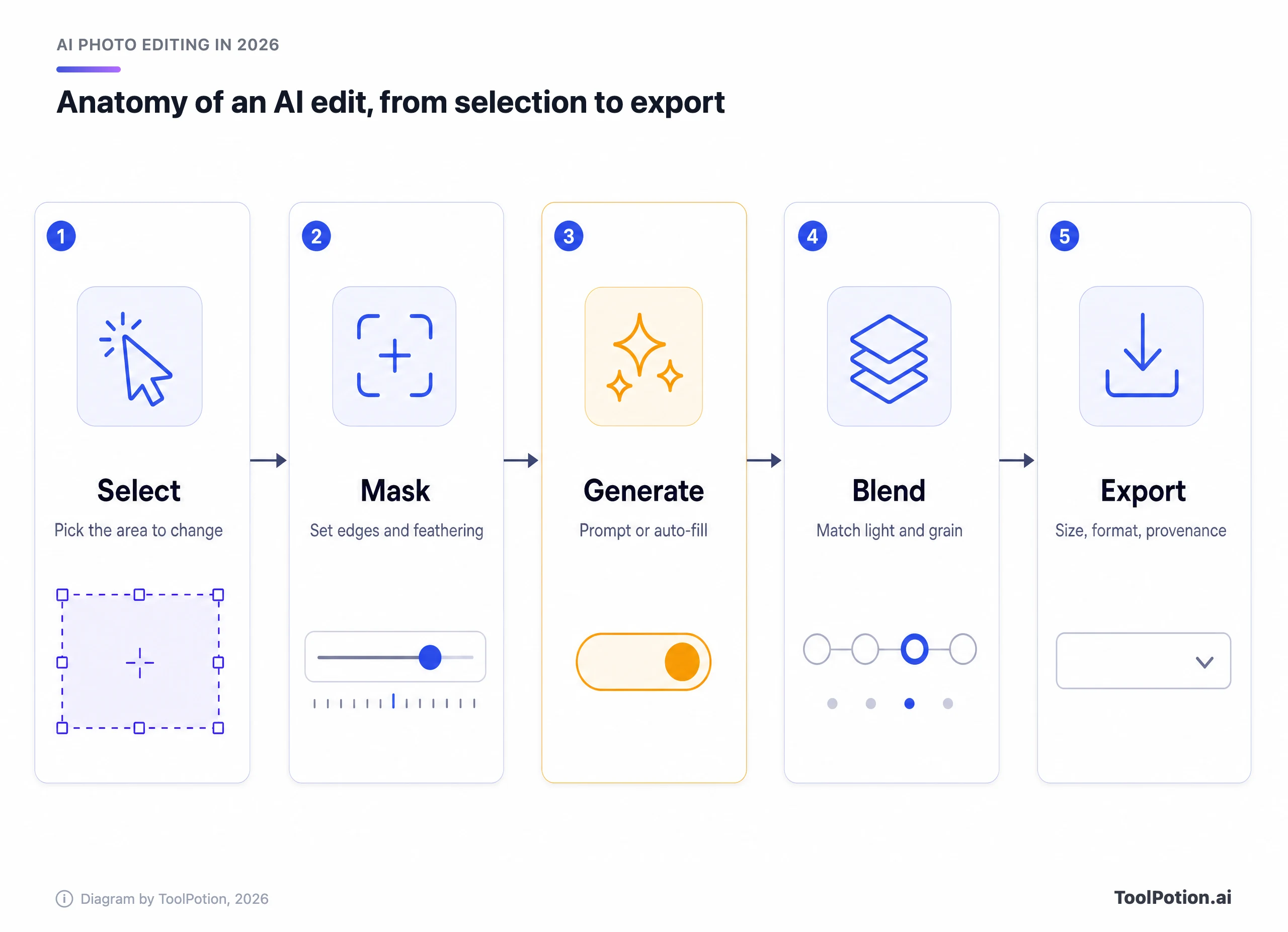
Cheap tools automate steps one and two and leave you with whatever the model produced. Better ones let you intervene at the mask and at the blend. That's where the control we mentioned at the start lives, and where the money goes.
There's a pricing habit to watch for in all of this. Vendors quote a monthly figure that assumes an annual commitment, then meter generation in credits that mean different things in each product. A plan that looks like $12 a month and a plan that looks like $23 a month can both be the cheaper one, depending on whether you generate ten images a week or a thousand. We quote each vendor's own numbers below and say what they cover.
The leaders, reviewed
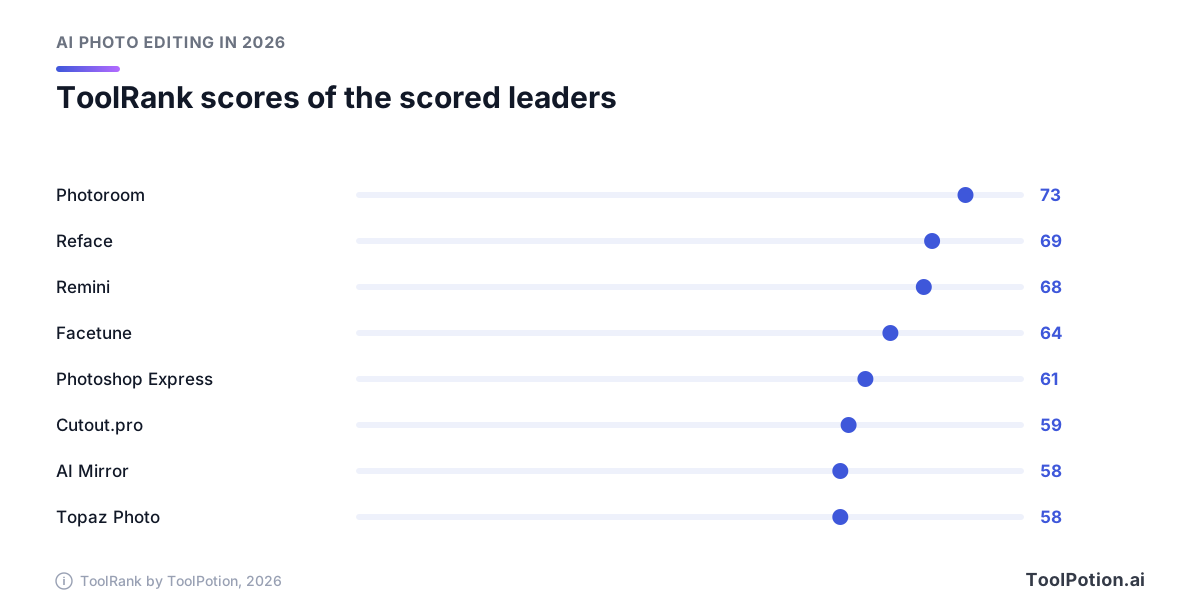
Not every entry on the board has a ToolRank score yet. Where one exists we give it, and where it doesn't we only give the rank. The chart shows the eight highest-ranked entries that are scored. Photoroom leads that group, with Reface and Remini close behind.
Canva: best all-rounder
Canva is #1 on the 2026 board. It's a design tool first, so your photo lands inside templates, brand kits and text layouts, with the AI editing one click away. That's the right shape for social posts, decks and anything with words on it.
It's the wrong shape for pixel-level retouching. You get quick fixes, not a layer stack. On pricing, Canva's own page lists a free plan with "up to 20 uses" of its AI tools, and Pro at $144 a year with up to 200 Premium AI uses a month (Canva pricing). Heavy AI users can buy an AI Pass add-on for more.
Adobe Photoshop: best for control
Photoshop holds #2. If an edit needs a precise selection, a mask you can repaint, or three generated variations stacked on layers, nothing on the board matches it. The new model picker also means you're no longer locked to one engine.
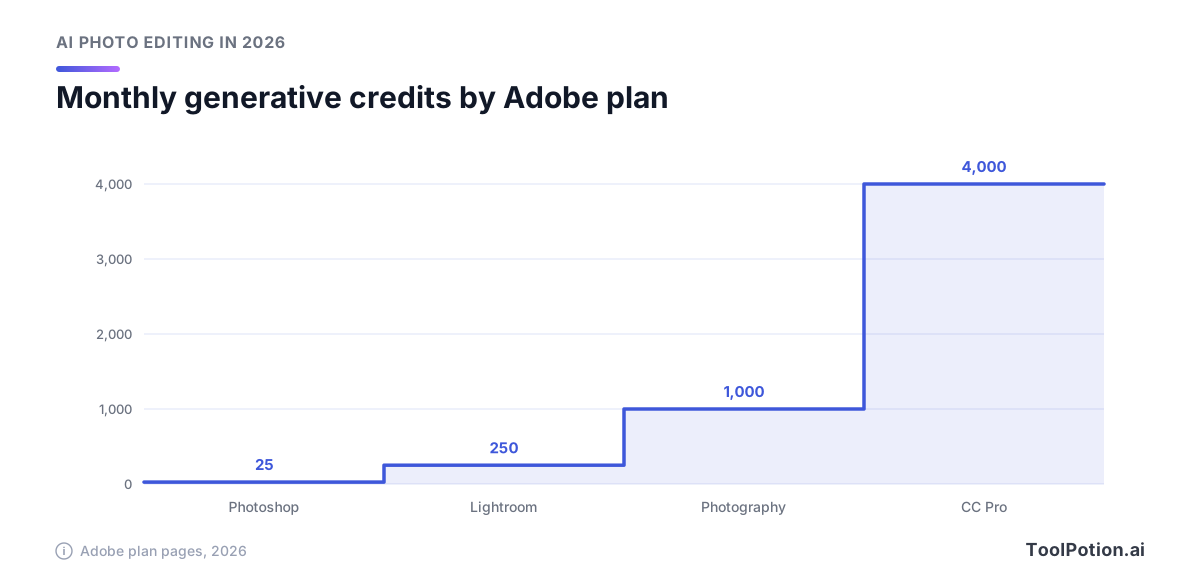
The catch is credits. Adobe's page lists standalone Photoshop at $22.99 a month on an annual plan billed monthly, with 25 monthly generative credits. Creative Cloud Pro is $34.99 a month for the first three months, then $69.99, and includes 4,000 credits for premium video and audio AI features. Adobe says standard image and vector features such as Generative Fill are unlimited on that plan (Adobe). That 25 is small if you treat generation as your main workflow, so check which features draw on credits before you commit.
Adobe Lightroom: best for a photo library
Lightroom is #3, and it's a different product from Photoshop even though they share a logo style. It edits nondestructively, organizes with AI, and syncs across desktop, mobile and web. Its 2026 updates lean into volume: Assisted Culling is generally available, with a Face View for checking focus and eye sharpness, and AI Sharpen uses a Topaz Labs model to recover fine detail (DPReview).
Adobe lists Lightroom from $11.99 a month on an annual plan billed monthly, with 1TB of storage and 250 monthly generative credits. The Photography plan is $19.99 and adds Photoshop plus 1,000 credits (Adobe). That makes it the better value of the two for photographers, and an odd quirk of the pricing: the cheaper app comes with ten times the credits of standalone Photoshop.
Photoroom: best for product photos
Photoroom is #4 with a ToolRank score of 73 (strong tier). It also moved up from #6 on the 2026 board, a climb that fits a clear niche. It does one thing for sellers: cut out the product, put it on a clean or generated background, and do that to a catalog.
Its own 2026 recap says batch tools now process up to 250 images at once, and a Product Fixer corrects AI-generated images using your original photo as a reference at zero credit cost (Photoroom). Its Pro plan, billed yearly, includes 8,000 AI credits and 1,000 exports a month (Photoroom pricing). We couldn't read a dollar price off the page, so check it there. Note the export cap: every saved image counts against it.
Fotor: best for a free online editor
Fotor is #5 and has no ToolRank score yet. It runs in the browser and covers cropping, retouching, text and background removal. The free tier is limited by credits and allows one generation at a time. Paid plans (Pro, Pro+ and Max) add concurrency and watermark-free exports. We couldn't read dollar prices off its pricing page when we checked, so we won't quote any. What the page does say is that AI models burn between 1 and 250 credits per generation depending on the model you choose (Fotor pricing). Read that number before you pick a model.
Picsart: best for creators who want many models
Picsart takes #6 and is unscored. Its pitch is breadth: the directory listing counts 140+ AI models across image, video and audio, plus editing and design tools on mobile and web. Its pricing page lists a Pro plan at $10.50 a month billed yearly (Picsart pricing), though the page showed another currency for the Ultra tier, so prices vary by region. Pick it if you like experimenting with different models in one place. Skip it if you want one dependable workflow.
Remini: best for rescuing a bad photo
Remini climbed from #16 to #8 on the 2026 board and has a ToolRank score of 68 (strong). It restores detail, reduces noise and cleans up old or low-resolution images, and it does it with almost no setup. That's the use case: a blurry family photo, not a portfolio. The mobile-first design means you won't get fine control, and results on faces can drift from the original, so compare before you share.
Mobile apps are where consumer volume lives, but they trade control for speed. Expect a few taps, a result and a paywall for full resolution or unlimited use. That is fine for a keepsake and risky for client work.
Facetune: best for portrait retouching on a phone
Facetune rose from #17 to #10 and scores 64 (strong). Its AI edits cover natural hair changes and outfit swaps alongside classic retouching, and it sells through in-app purchases. Retouching faces is sensitive territory, so read the consent note further down before you edit anyone else's photo.
Topaz Photo: best for sharpening and upscaling
Topaz Photo is #14 with a score of 58 (solid). It sharpens, denoises and upscales, and it plugs into editors you already use. That fits well with Lightroom, which uses a Topaz Labs model for its own AI Sharpen. It's subscription-only: Topaz lists Personal at $199 a year on an annual payment, limited to organizations under $1M in revenue, and Pro at $599 a year for full commercial use (Topaz pricing).
Affinity Photo: best free layered editor
Affinity Photo is #17. The core application is free, and the 3.1 update added a Tone Brush, a Live Tone Blend Group for compositing and the ability to turn pixel selections into curves for mask work (CGChannel). You register a free account to download, and only Canva's online AI tools cost money. It lacks Lightroom's library tools. If your edits are layers and masks rather than catalogs, it's the easy choice on a budget.
Imagen: best for high-volume professional shoots
Imagen is #22 with a score of 54 (solid). It was built for working photographers: the listing describes automated editing and culling that keeps a look consistent across a whole shoot. We couldn't verify its pricing from the vendor, so check it against your yearly shoot count. If you deliver 1,500 images a weekend, that's the kind of tool that pays for itself. If you shoot 50 a month, it doesn't.
How to choose
Start with the job, not the brand. The map below puts the tools on two axes: how much manual control you get, and how well they handle volume.
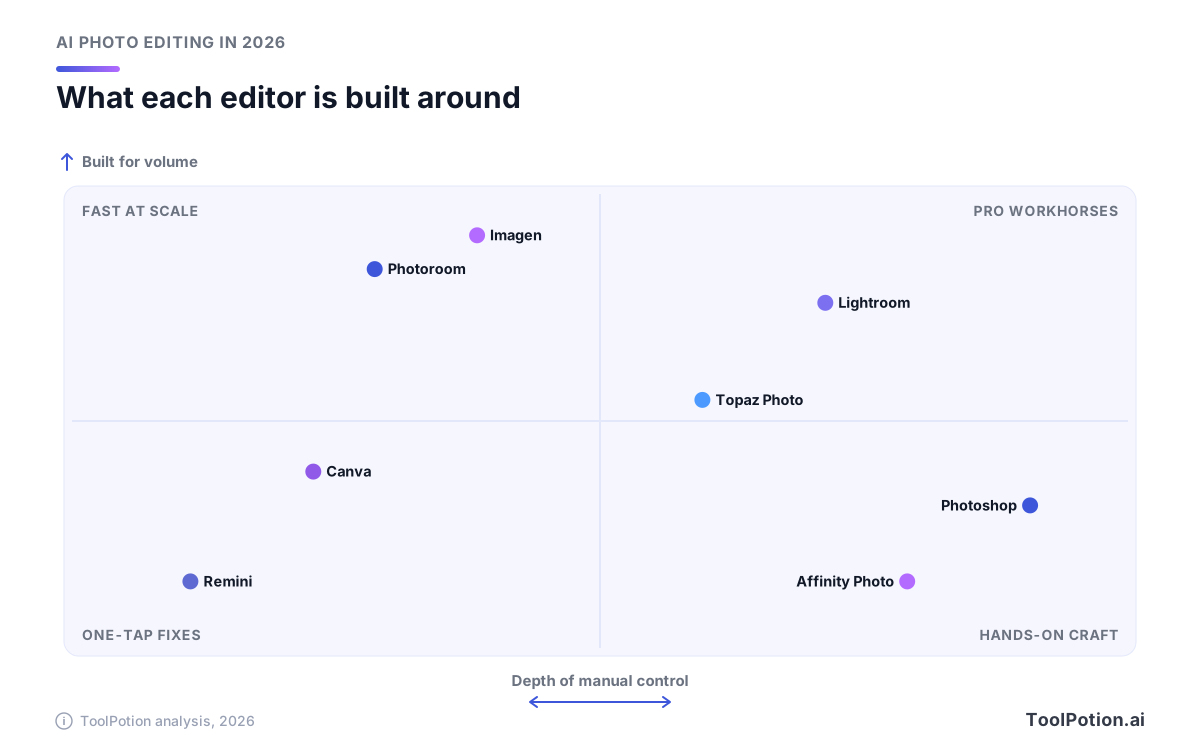
The placements are our editorial read, not a score. Most people end up in one of the two top quadrants or in the bottom left, and the bottom right is for people who enjoy the work itself.
Then check the money. Allowances are not comparable between vendors, because a credit buys a different amount everywhere. A table is the honest way to see it. Sort by price or by free option and notice how little the headline numbers tell you without the billing details.
A few situations are worth spelling out. If you sell physical products, price your volume: Photoroom's 1,000-export cap on Pro is the number to watch. If you're a photographer, test culling before editing, since sorting is where hours disappear. Evoto AI Photo Editor (#20) is another option built around portrait workflows from culling to delivery.
If you only edit photos now and then, don't buy anything first. Canva's free plan, Fotor's free tier and Affinity Photo cover most one-off jobs. The map and the quick quiz below say the same thing in different ways.
Prefer to answer a few questions? The tool below recommends a starting point from the work you do most.
VSCO (#9) deserves a mention here because it sits between worlds. It offers 200+ film-inspired presets, AI-assisted editing with monthly credits, portfolio sites and client galleries. If your goal is a look rather than a repair, it's a better fit than any of the above.
Provenance and consent
As AI edits get easier, readers and platforms want to know what was changed. Content Credentials, the open C2PA standard, attach a record of how a file was made and edited. Support is spreading across editors and cameras. On the capture side, Google says Pixel 10 phones attach Content Credentials to every JPEG the camera takes (Google). If your photos go to clients, press or a marketplace, turn it on.
One more point. When you edit photos of real people, especially faces, get their consent first. That covers face swapping apps like Reface (#7, score 69), and it applies to portrait retouching too.
About ToolRank
ToolRank is ToolPotion's independent ranking engine. Placement can't be bought, and every board shows a score and a tier. You can browse all of them on the ToolRank leaderboards page, or see the full AI photo editors board for the entries past the top 25.
Rising and newer names
The 2026 board's biggest climbers are mostly mobile. Besides Remini and Facetune, Pixelcut went from #25 to #19, and Cutout.pro from #14 to #12. Cutout.pro and Cleanup.pictures (#15) are single-purpose and fast, which suits one-off cutouts and object removal. If that's your main need, the object removal board goes deeper.
Just past the top 25, VanceAI Photo Tools (#26) and Luminar Neo (#27) are the ones to watch, with Bazaart (#30) aimed at small businesses making product photos and ads. Related boards are worth a look as well: AI tools for photographers, for graphic designers and for restoring old photos. Everything in the directory sits in the AI Photo Editors hub.
Frequently asked questions
What's the best AI photo editor overall in 2026?
Canva is #1 on the 2026 board and the safest all-rounder. For raw editing power, Adobe Photoshop at #2 is stronger. The best one depends on the job, which is why the guide splits them that way.
Is there a free AI photo editor worth using?
Yes. Canva's free plan includes up to 20 AI uses, Fotor has a limited free tier, and Affinity Photo is free for its core app. Free AI generation is always capped, so heavy use leads to a paid plan.
Do I need Photoshop for generative fill?
No. Many tools offer fill, expand and remove. Photoshop gives the most control, a choice of models and layers, but it comes with a monthly credit allowance that can run out.
Which tool is best for e-commerce product photos?
Photoroom, #4 on the board, is built for it, with batch editing up to 250 images and background tools. Check the export cap on your plan. The e-commerce sellers board lists alternatives.
What are generative credits?
They're units that pay for AI generations. Each vendor sets its own price per feature, so 1,000 credits at one company isn't comparable to 1,000 at another. Check which features are unlimited before you subscribe.
Can I tell if a photo was edited with AI?
Sometimes. Content Credentials record edits when a tool attaches them, but a lot of images carry none, and a screenshot or re-export can strip them.