Most "best transcription tool" advice treats the category as one thing. It isn't. The board holds meeting notetakers that sit in your calls, upload-and-wait services for podcasts and interviews, human-verified shops for records that must be right, dictation apps, and a clinical scribe that ranks #3. Pick from the wrong group and no feature list will save you.
In the leaderboard below, Otter.ai leads at 74 with Fireflies.ai close behind at 72, and both are meeting products first. If your audio is a folder of recordings, the useful names sit further down. This guide sorts the field by job, checks prices against vendor pages, and tells you where the marketing numbers deserve suspicion.
Treat every accuracy percentage here as a claim. Nobody on this page has been scored on your audio, and the gap between a clean studio file and a noisy conference line is larger than the gap between most vendors.
The top 25 right now
- # 1Top PickOtter.aiAI AppOtter Meeting Agent is an AI-powered notetaker that provides real-time transcription, automated summaries, insights, and action items, enhancing productivity for teams and individuals during meetings.74ToolRankStrong
- # 2Runner UpFireflies.aiAI AppFireflies.ai is an AI-powered assistant that takes notes, manages tasks, and automates workflows across meetings, email, chat, and CRM. It helps teams build a searchable knowledge base of their work in one centralized location.72ToolRankStrong
- # 3Third PlaceAbridgeAI AppAbridge leverages generative AI to transform clinical conversations into structured documentation, enhancing healthcare understanding and improving patient care. It streamlines workflows for clinicians, nurses, and revenue cycle teams, making documentation efficient and effective.67ToolRankStrong
- 4RevAI AppRev is a subscription platform for legal and investigative teams that turns audio, video, image, and document evidence into searchable, citable case material. It combines AI and human transcription, multi-file evidence search, image-inconsistency flagging, and a built-in document editor for drafting reports and motions. It serves criminal prosecutors and defense attorneys, law enforcement, and civil litigators.58ToolRankSolid
- 5Qwen Assistant (千问)AI AppQwen Assistant is Alibaba's official AI tool designed to enhance productivity in work, study, and daily life. It offers AI search, web summarization, AI PPT creation, image generation, and transcription services to streamline creative and analytical tasks.56ToolRankSolid
- 6NottaAI AppNotta is an AI-powered note-taker that transcribes, summarizes, and generates visual deliverables from meetings, interviews, and lectures. It supports 58 languages and offers 200 free minutes for transcription, making it easy to extract insights and stay productive.56ToolRankSolid
- 7TactiqAI AppTactiq is an AI meeting assistant for Google Meet, Zoom, and Microsoft Teams that captures live transcripts and generates AI summaries and action items. It is for professionals and teams who run frequent virtual meetings.55ToolRankSolid
- 8SonioxAI AppSoniox is a multilingual speech AI platform offering real-time speech-to-text, text-to-speech, and translation services in over 60 languages. It provides low-latency streaming and native-speaker accuracy, making it ideal for live voice applications.54ToolRankSolid
- 9Transkriptor AI TranscriptionAI AppTranskriptor offers AI-powered audio and video transcription in over 100 languages. Convert recordings to text accurately and quickly for meetings, interviews, and lectures. Features include custom vocabulary, speaker diarization, and AI-driven summaries, making it a versatile tool for professionals and students.54ToolRankSolid
- 10iFLYRECAI AppiFLYREC is a speech-to-text service powered by iFLYTEK's technology, offering fast and secure transcription of audio into text. It supports multiple languages and provides real-time insights, making it ideal for meeting minutes, interviews, and more.53ToolRankSolid
- 11Envato VoiceGen AI Voiceover GeneratorAI AppEnvato VoiceGen offers studio-quality AI voiceovers in 25 languages. It allows users to create natural-sounding voiceovers quickly and easily, making it ideal for various projects. With a subscription, users also access unlimited creative assets.53ToolRankSolid
- 12HappyScribeAI AppHappyScribe is an AI transcription and notetaking platform that converts audio and video into text in over 150 languages. It offers features like live transcription, meeting notes, and cloud sync, making it ideal for businesses and individuals alike.53ToolRankSolid
- 13TrintAI AppTrint’s AI-powered software quickly transcribes video and audio files to text. It allows users to transcribe, edit, share, and collaborate, enhancing team productivity and streamlining workflows across various industries.52ToolRankSolid
- 14Wispr FlowAI AppWispr Flow is an AI-powered voice dictation tool that enhances writing speed and clarity. It allows users to dictate text seamlessly across various applications and devices, making it a convenient solution for anyone looking to improve their writing efficiency.52ToolRankSolid
- 15TranscribeMeAI AppTranscribeMe offers fast, affordable, and highly accurate human transcription services. Utilizing a hybrid of Automatic Speech Recognition and human transcriptionists, it provides transcripts in multiple languages, ensuring high accuracy and security for various industries.52ToolRankSolid
- 16SonixAI AppSonix is an AI transcription software that converts audio and video to text with 99% accuracy in over 49 languages. It offers features like speaker detection and AI summaries, making it ideal for various industries. Try it free with no credit card required.51ToolRankSolid
- 17Temi Transcription ServiceAI AppTemi provides fast and accurate transcripts for video and audio files, making it easier for users to access and utilize their content. It is designed to handle various file types and deliver results quickly.49ToolRankSolid
- 18Smart NoterAI AppSmart Noter is an AI-powered transcription platform that converts speech to text, generating structured notes, summaries, and insights from meetings and recordings. It integrates with major video conferencing tools for seamless transcription.49ToolRankSolid
- 19TurboScribeAI AppTurboScribe is an AI transcription service that converts audio and video to accurate text in 98+ languages, with unlimited transcription, speaker recognition, built-in translation, and export to PDF, DOCX, SRT, and TXT.49ToolRankSolid
- 20WhisperXGitHub RepoWhisperX is an open-source tool for automatic speech recognition, providing word-level timestamps and diarization. It is designed to enhance transcription accuracy and speaker identification in audio recordings.48ToolRankSolid
- 21Google RecorderMobile AppGoogle Recorder is a free mobile app that uses AI to transcribe audio recordings. It offers real-time transcription and data encryption, ensuring privacy and security for users.48ToolRankSolid
- 22AmberscriptAI AppAmberscript offers secure transcription and subtitling services, trusted across Europe. With ISO 27001 & 9001 certifications, it ensures GDPR compliance and delivers over 99% accuracy. Ideal for businesses needing precise, secure, and compliant transcription solutions.48ToolRankSolid
- 23Dragon ProfessionalAI AppDragon Professional is Nuance and Microsoft's desktop speech recognition software for Windows, letting professionals dictate documents by voice at up to 99% accuracy. Built on Nuance's Deep Learning speech engine, it supports custom voice commands, batch audio transcription, and volume licensing for teams in finance, education, and health and human services.48ToolRankSolid
- 24VoiceToNotes.aiAI AppVoiceToNotes.ai is an AI-powered transcription service that converts speech into structured notes. It offers real-time transcription, note organization, and AI-driven summaries, making it ideal for professionals, students, and teams looking to streamline their note-taking process.47ToolRankSolid
- 25Speak AIAI AppSpeak AI transcribes, analyzes, and deploys AI agents from audio and video conversations. It structures insights into defined fields and themes, offering a unified workspace for teams. Trusted by over 250,000 teams, it integrates with popular tools and supports multiple AI assistants.47ToolRankSolid















How ToolRank works
ToolRank is ToolPotion’s proprietary ranking engine.
It continuously evaluates hundreds of signals across the open web — real traffic and popularity, audience and community strength, authority and longevity, adoption and engagement — processing millions of data points to place every tool where it has earned to be.
Every AI type is measured by its own tailored model: what proves traction for a SaaS app is not what proves it for an open-source framework or a creator channel. Missing a platform never counts against a tool — ToolRank judges the evidence that exists.
No paid placement. No self-reported numbers.
Quick picks
- Best for team meetings: Otter.ai. It has the top ToolRank score on the 2026 board, a free plan with 300 minutes a month, and the most polished live workflow.
- Best for a searchable archive of every call: Fireflies.ai, which transcribes on every plan and supports 100+ languages.
- Best when a person must stand behind the text: Rev, with human-verified transcripts at $1.99 a minute.
- Best for podcasts, interviews and lectures: Transkriptor for an upload-first workflow in 100+ languages, or HappyScribe if you need 150+.
- Best for avoiding a bot in the call: Tactiq, which captures transcripts without a bot joining.
- Best for clinics: Abridge, though you buy it through a health system, not a credit card.
What changed in 2026
The first change is that the category split into jobs. Notetakers stopped selling transcripts and started selling what happens after: summaries, follow-ups, a searchable memory of everything your team said. That is a long way from a transcript you export as a text file.
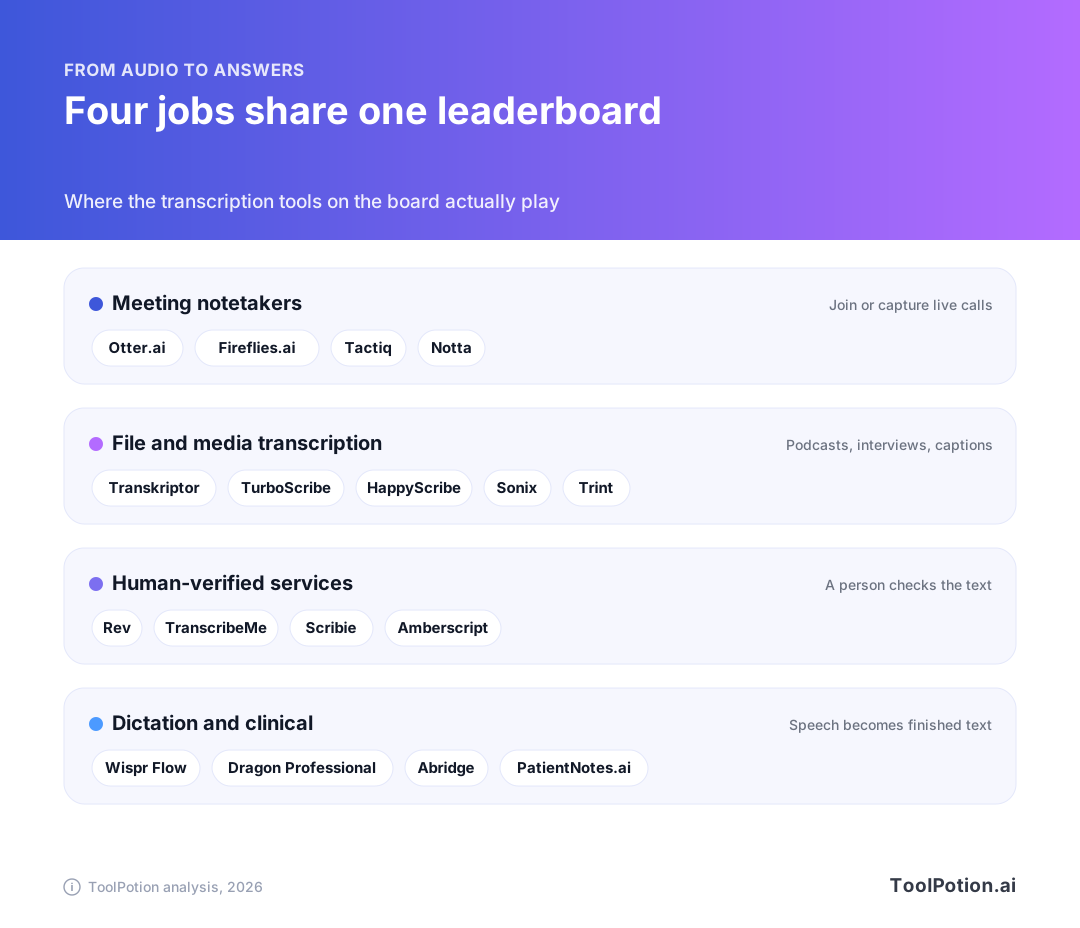
The second change is legal. A 2025 class action in California, In re Otter.AI Privacy Litigation, alleges Otter recorded meeting participants without the consent of everyone present and used recordings to train its models. In 2026 a federal judge allowed the federal wiretap, two California recording-privacy and Illinois voiceprint claims to proceed and dismissed others, including computer-fraud claims, with leave to amend. Those are allegations at the pleading stage, not findings. But the message for buyers is concrete: a bot that auto-joins calls creates obligations. Law firm Fisher Phillips tells employers to get consent from every participant, outsiders included. Recording people needs their consent, and the rules vary by place, so check yours before rolling anything out.
The third change is in healthcare. Epic launched AI Charting in 2026, and STAT reported that it could disrupt the market for ambient scribes, with features similar to Abridge's and Microsoft's products and Epic holding 42% of the acute hospital EHR market. Abridge still landed the VA: it was picked under a multi-vendor ambient AI contract with a $775.72 million ceiling over five years, shared across all eligible vendors.
Under all of it sits the same pipeline. Every tool on this board does some version of the steps below, and the differences are in which steps they own and how well each one holds up on messy audio.
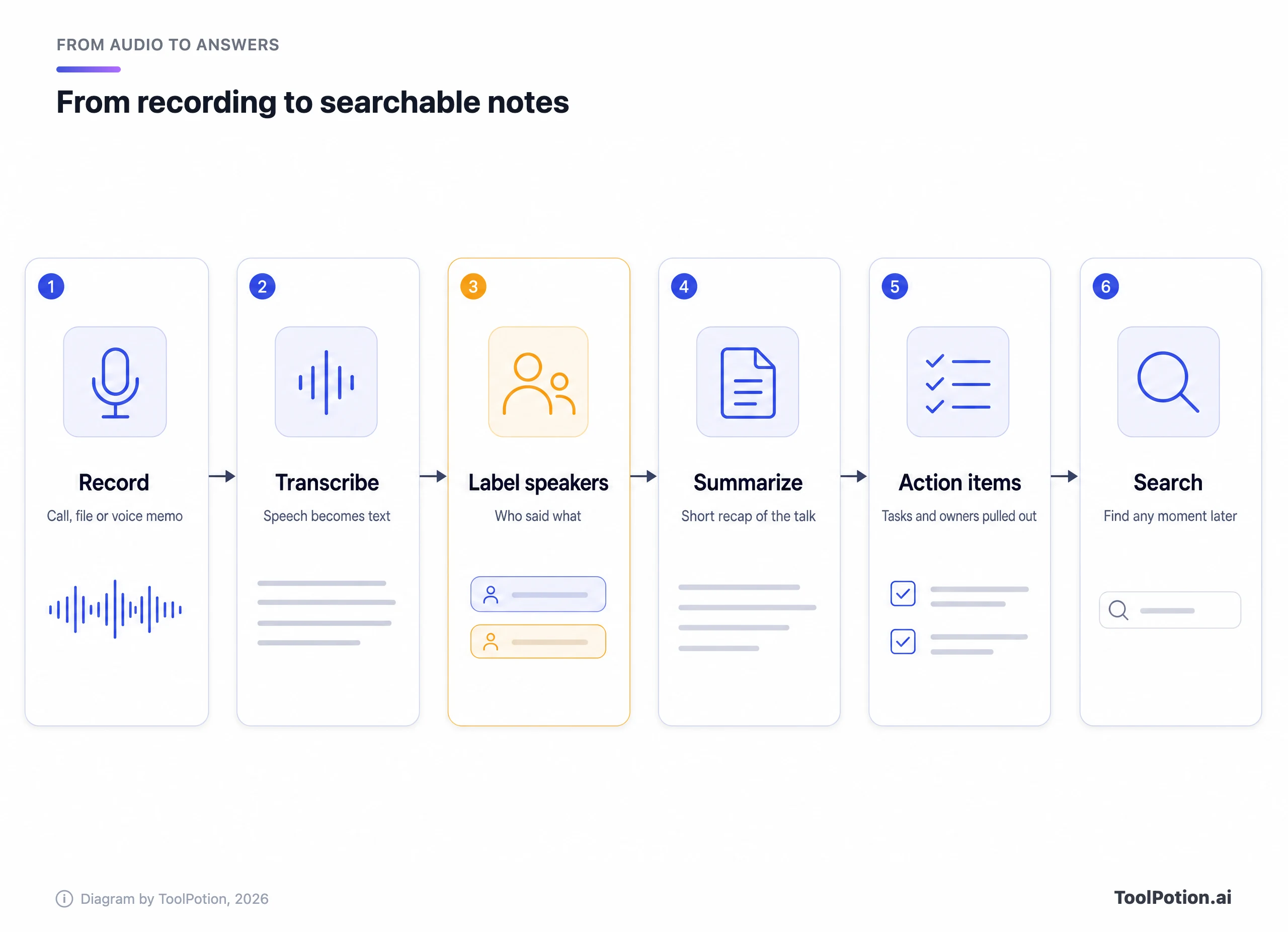
Speaker labels are the step that breaks first, and they're also where tools differ most. Otter, Fireflies, Transkriptor and Sonix all list speaker identification or diarization, but none of them publishes how it copes with ten people talking over each other. Google's Recorder app, for instance, only labels speakers in US English. Check that before you assume a tool handles your language the way it handles English.
As for accuracy, AssemblyAI (a speech vendor, so read it with that in mind) puts the best models at 95 to 98% word accuracy on clean audio and says accented and noisy audio typically lands between 70 and 90%. That spread is the point: the same tool can look excellent or poor depending on your recording.
The leaders, reviewed
Thirteen tools get a closer look. Eight of the scored leaders are charted here. Rev, Trint and Sonix rank high on the board but aren't scored yet, so they're left off the chart and discussed on their merits.
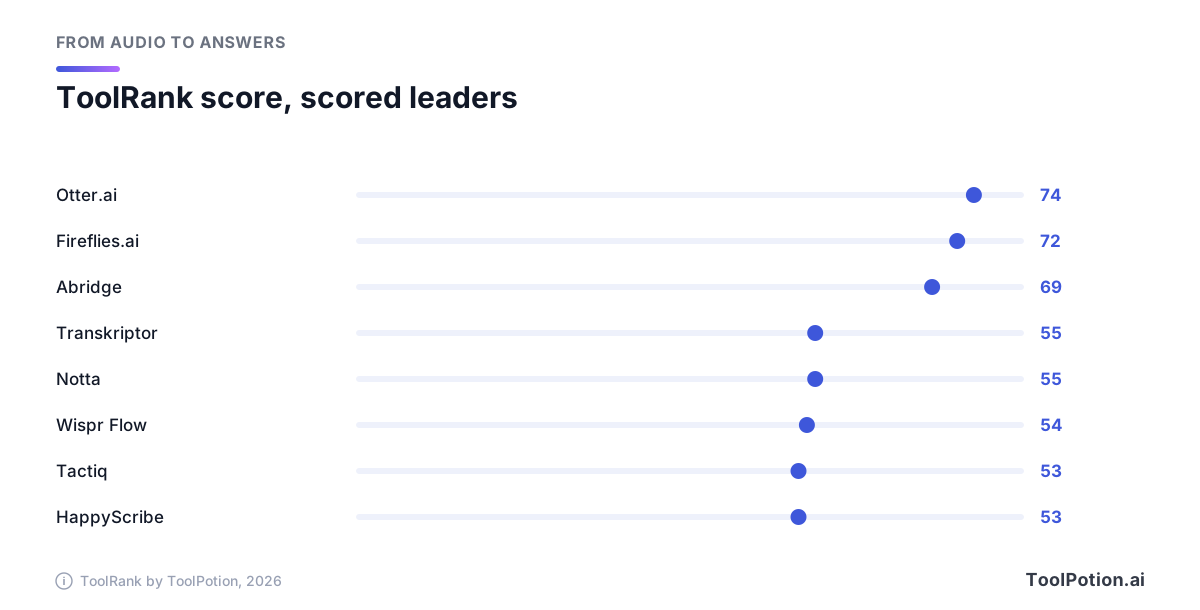
Otter.ai: best for meetings you actually attend
Otter is #1 on the 2026 board with a score of 74, in the strong tier. It does real-time transcription, speaker identification, summaries and action items, and plugs into Slack, Zoom, Salesforce and Google Drive. Its pricing page lists a free Basic plan with 300 minutes a month capped at 30 minutes per conversation, Pro at $8.33 a month billed annually (1,200 minutes, 90 minutes per conversation) and Business at $19.99 with unlimited monthly minutes.
The catch is the lawsuit covered above. If you use Otter's auto-join with clients or candidates, tell them first. The language list on the free plan is also short: English, Spanish, French, German, Japanese and Chinese.
Fireflies.ai: best for turning calls into a knowledge base
Fireflies sits at #2 with a 72, also strong. Its pitch is breadth: notes across meetings, email, chat and CRM, in 100+ languages with 100+ integrations. Its pricing page lists unlimited transcription on every plan, with Pro at $10 per seat a month billed annually ($18 monthly) and Business at $19 ($29 monthly). Its pricing guide says storage is where plans differ: 400 minutes per team on Free, 8,000 per seat on Pro, unlimited on Business.
It claims 95% accuracy, which is typical for the category and still a vendor figure. Watch the AI credits too. Summaries are unlimited, but the assistant that answers questions runs on a monthly credit pool.
Abridge: clinical documentation, a different product entirely
Abridge is #3 at 69 and has no business in a podcaster's shortlist. It listens to patient visits and drafts structured notes inside the EHR workflow. It's sold to health systems, not individuals, so there's no public price to quote. The 2026 questions are strategic: Epic's own charting tool arrived, and the VA contract suggests Abridge isn't being squeezed out yet.
Rev: best when the transcript has to hold up
Rev ranks #4 and isn't scored yet. It has repositioned toward legal and investigative work, with multi-file evidence search and both AI and human transcription. Rev's pricing page lists human transcription at $1.99 a minute with 99%+ accuracy in 12 hours or less, a free tier of 45 AI minutes a month, and subscription plans that discount the human service. That's the clearest price of any human option here. It's overkill for brainstorm recordings and fair for anything going to a court, a regulator or print.
Transkriptor: best all-rounder for files
Transkriptor is #5 at 55 (solid). It handles audio and video in 100+ languages with speaker diarization and AI summaries. Its pricing page lists Lite at $9.99 a month for 300 minutes, Pro at $19.99 for 2,400 minutes ($99.99 a year, or $8.33 a month), and a Team plan at $30 a seat with custom vocabulary. There's a free plan with 90 minutes. Pro's minute allowance is the generous part of the deal. Custom vocabulary being Team-only is the annoying part, since that's the feature that fixes recurring name errors.
Notta: cheap, with a small-print limit
Notta, also at 55 and #6, supports 58 languages and does meeting notes, summaries and file transcription. On its pricing page Pro is $8.17 a month billed annually for 1,800 minutes and recordings up to five hours. Read the free plan closely: 120 minutes a month sounds fine until you see the cap of 3 minutes per conversation. That is a trial, not a free tier.
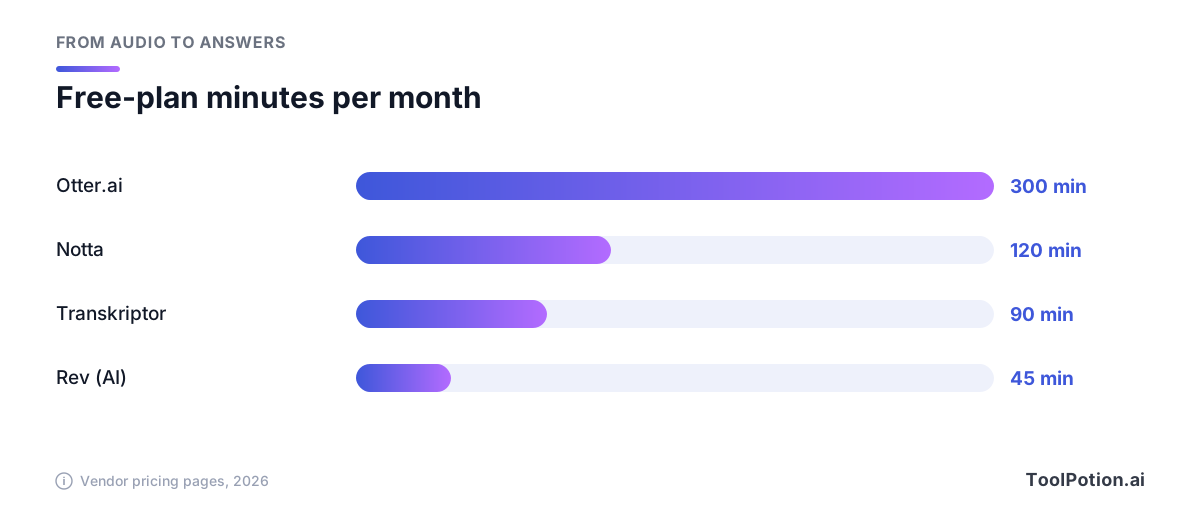
The chart shows headline minutes only. Per-conversation caps (30 at Otter, 3 at Notta) matter more than the monthly total if you record anything longer than a phone call.
Tactiq: best if a visible bot is a dealbreaker
Tactiq is #9 at 53. It works inside Google Meet, Zoom and Microsoft Teams and captures a live transcript without a bot joining. That helps with clients who object to notetakers, though the consent question stays. It also supports 60+ languages. Its free plan allows 10 transcripts a month.
HappyScribe and Sonix: upload-first, priced by the minute
HappyScribe (#10, 53) covers 150+ languages for AI transcription and adds a notetaker for the big three meeting apps. Its pricing starts with Basic at $8.50 a month for 120 minutes, and human transcription runs from $2.00 a minute. The free plan is a 10-minute trial.
Sonix (#11, unscored) claims 99% accuracy in its listing and supports 54+ languages. Its pricing is the most honest about cost: $10 an hour pay-as-you-go, or Core at $25 a month for five hours. That's expensive per minute next to the subscriptions above and sensible if you transcribe twice a year.
Trint: built for newsrooms
Trint ranks #8 without a score yet. It's built around editing and sharing transcripts with a team: live transcription, speaker detection, collaboration, newsroom and podcast production use cases. Its price is left out of the comparison here because its plans page couldn't be read for this guide. Check what it charges per seat before you shortlist it.
Wispr Flow: dictation, not transcription
Wispr Flow is #7 at 54 and the odd one out. You speak, it types into any app, formatted as you go. Its free plan caps dictation at 2,000 words a week on desktop. It belongs on this board because writers and journalists increasingly draft by voice instead of transcribing someone else's.
TurboScribe and Google Recorder: the free-leaning options
TurboScribe is #13 at 50. Its listing describes unlimited transcription in 98+ languages with speaker recognition and exports to PDF, DOCX and SRT. Google Recorder, #14 at 49, is free and transcribes on-device with no upload, which is a privacy win, but it lives on Pixel phones, and speaker labels work only in US English.
Rest of the field
Several more names do one thing well. TranscribeMe, Scribie and Amberscript lean on human review, and Amberscript sells to European buyers who want ISO-certified handling. Dragon Professional is the old-school desktop dictation tool for Windows. PatientNotes.ai is a smaller clinical scribe at #20. Speechmatics is an API for developers, not a consumer app. The full list is on the AI transcription board, and the category hub has every listing.
How to choose
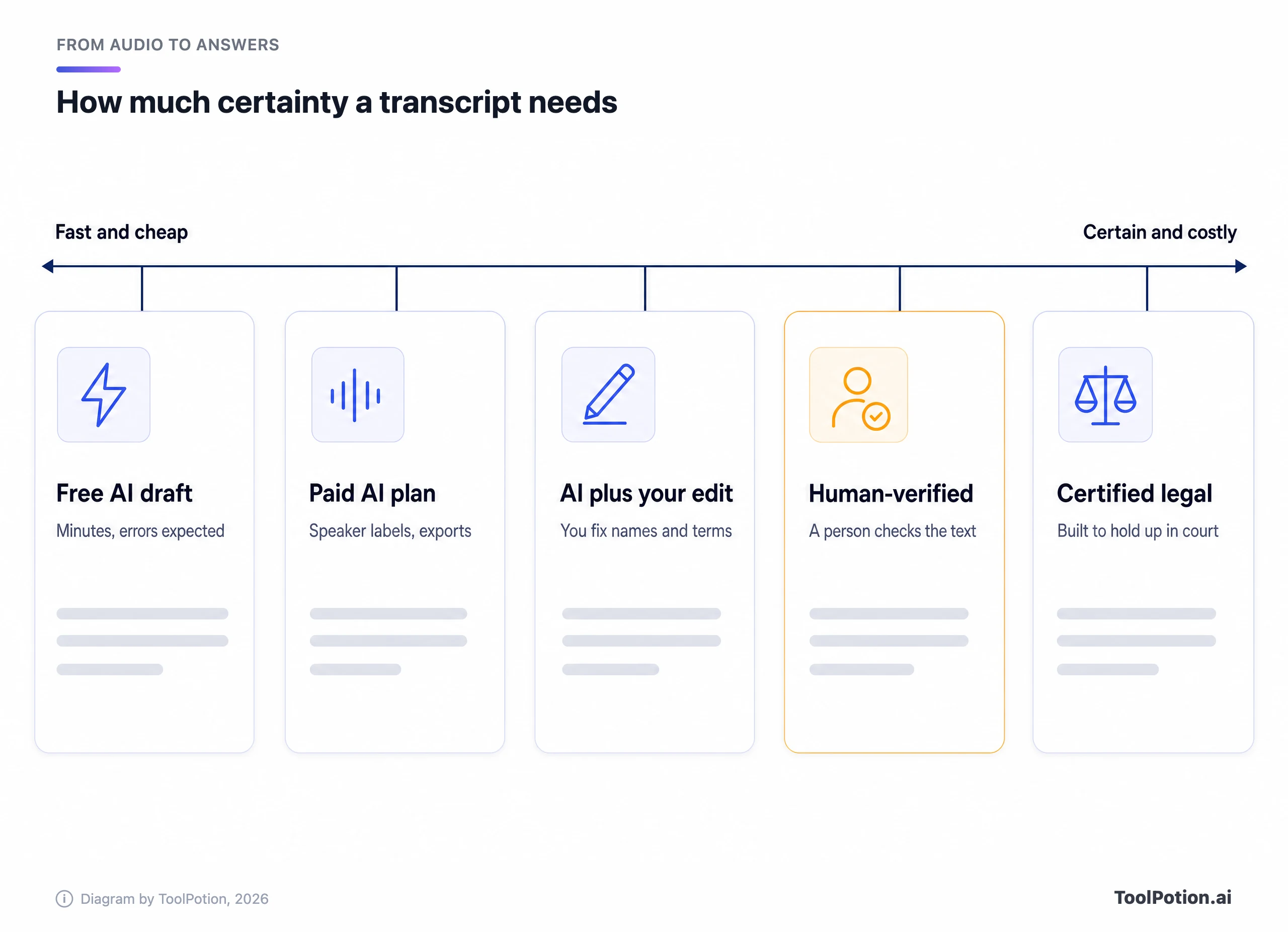
Start with the audio, not the feature list. Ask where it comes from, who is in it and what a wrong word would cost you. The decision tree below covers most readers in two clicks.
A few rules of thumb sit behind it. Live calls with outsiders call for consent first and a tool second. Podcasts and interviews reward file-first tools with generous minutes and custom vocabulary, since names are where AI stumbles. Anything legal, medical or published under your name needs a human check, whether that's yours or Rev's. For journalists and podcasters, the journalist board and the podcaster board overlap this one heavily.
If you mostly want notes, not transcripts, the AI meeting assistants board and the meeting notes board rank the notetaker side on its own.
Prices move often, so here is the side-by-side as published on each vendor's page. Sort by whatever matters to you.
Two warnings from the table. Most entry prices cluster around $8 to $10 a month, so price rarely decides it. Free tiers differ wildly in what they allow, and the real cost shows up in per-file limits and the plan that unlocks speaker labels or custom vocabulary.
Privacy deserves its own pass. Transkriptor's pricing page says data isn't used for training on Pro, which is the kind of line worth hunting for in any vendor's terms, since the Otter plaintiffs allege recordings were used to train its models. Google Recorder avoids the issue by transcribing on the phone. Local apps lower in the ranking do the same on a Mac. If you handle sources, patients or clients, ask each vendor three plain questions: where audio is stored, how long, and whether it trains models.
Finally, run a fair trial. Pick one ten-minute clip with two speakers, one with background noise and one with names and jargon. Feed all three to every free plan you're considering and count the corrections. Ten minutes of cleanup tells you more than any accuracy badge, and it's the only comparison that uses your voices.
About ToolRank
ToolRank is ToolPotion's independent ranking of AI tools, and placement can't be bought. See every board on the leaderboards page.
Rising and newer names worth watching
Just below the top 25 on the full board, a local-first group is forming. MacWhisper (#35) transcribes on your Mac without sending audio anywhere, and Whisper Web (#36) runs OpenAI's Whisper model in the browser. Superwhisper (#32) offers offline and cloud recognition on Mac, Windows and iOS. Good Tape (#34) is a GDPR-oriented option with speaker labels in 100+ languages. Audionotes (#27) and Speechnotes (#26) are simpler voice-to-notes tools, and Tongyi Tingwu (#31) is Alibaba Cloud's take for Chinese-language work. If privacy shapes your decision, start with the local ones.
Frequently asked questions
What is the most accurate AI transcription tool?
Nobody can say from vendor claims alone. Published figures such as 95% or 99% usually come from clean audio. Independent write-ups put noisy and accented speech much lower, so test two or three tools on a recording that sounds like yours.
Is there a free AI transcription tool worth using?
Yes, within limits. Otter's free plan gives 300 minutes a month with a 30-minute cap per conversation, Transkriptor gives 90 minutes, and Google Recorder is free on Pixel phones. Notta's free plan is capped at 3 minutes per conversation.
Do I need consent to record a meeting with an AI notetaker?
Often, yes, and some places require every participant to agree. The Otter case above is about exactly this, so tell people and check local law.
Can an AI scribe replace a doctor's notes?
No. A clinical scribe like Abridge drafts documentation and a clinician reviews it. These tools don't replace clinical judgment or a doctor's own notes.
Which tool is best for podcasts and interviews?
A file-first service, not a meeting bot. Transkriptor and HappyScribe both cover 100+ languages, and a human-verified service like Rev makes sense for quotes you'll publish.
Should I pick a bot or a bot-free tool?
Pick bot-free when clients or candidates dislike a visible notetaker, and look at Tactiq-style capture. Pick a bot when you want recordings to happen even if you're late or absent, and Otter or Fireflies fit there.