If your sources are the product, pick NotebookLM. It's the one whose own help pages promise inline citations back into your files, and it has the biggest documented source caps. If your work is a conversation that happens to need files, ChatGPT Projects or Claude Projects fit better.
That's the short version. The longer one matters because all three vendors now sell some form of "upload your pile and ask questions," the plans keep shifting, and the differences that hurt are the boring ones: how many files, how big, who can see them, and whether your client's PDF ends up in a training set.
One naming note before the details. Google's help center and its AI plan pages now call the product "Gemini Notebook," while most of the web (and this directory) still says NotebookLM. It's the same product. We use the familiar name here.
Everything below comes from each vendor's own help center or pricing page, read in 2026. We haven't run benchmarks, so there are no accuracy scores. Where a page didn't say something, we say it didn't.
How each one grounds an answer in your files
Grounding is the whole point of this category. You want the model to answer from your sources, not from whatever it half remembers about the topic.
Google describes NotebookLM as built around exactly that. Its help page says you chat with a notebook "to get grounded information based on your sources with clear in-line citations" (Google). Pick a subset of sources in the panel and the chat stays inside them. The docs also admit the limits: when a notebook holds many sources, it retrieves the most relevant passages first and builds the reply from those, so a vague question can miss the passage you wanted. Very short sources get referenced whole, without a citation to a specific span.
Claude Projects work differently. A project is a workspace with its own chats and a knowledge base, plus instructions you write once (Anthropic). On paid plans, when the knowledge approaches the context limit, Claude switches to retrieval and Anthropic says that expands capacity by up to 10x. The help pages we read describe this as context and retrieval, and none of them mention a click-through citation to the exact passage the way Google's do. Anthropic is also rolling out a newer version of projects in beta, starting with Claude Code. This piece covers the current one.
ChatGPT Projects sit closest to Claude's model: chats, files and instructions kept together in one place, so ChatGPT can reuse the same context (OpenAI). Shared projects switch to project-only memory, so they can't see anyone's memories from outside the project.
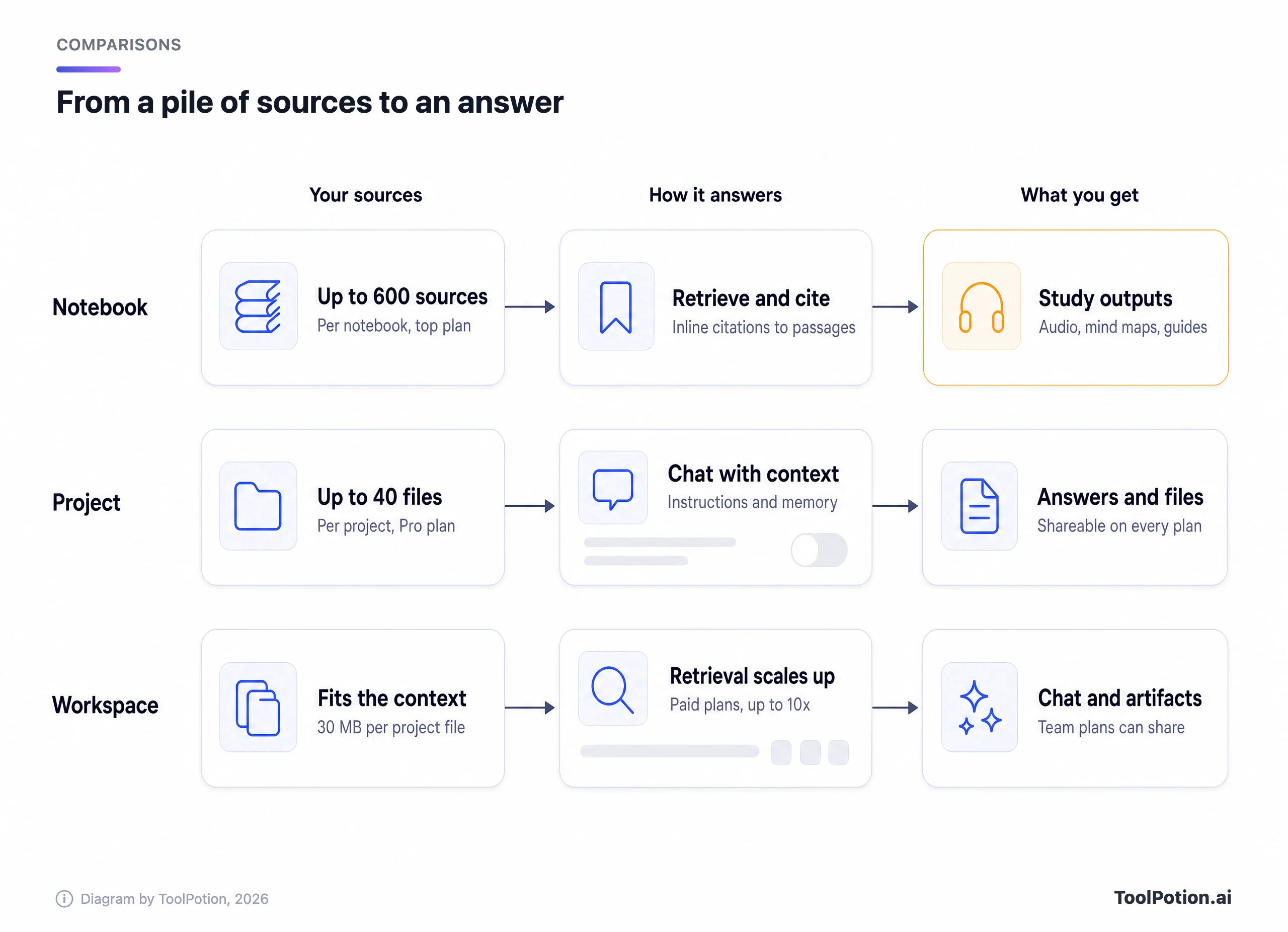
The practical upshot is simple. If you need to check every claim against a page number, you want a tool built around citations. If you need a collaborator that remembers your thesis structure and house style across thirty chats, you want a project with good instructions. Those are different jobs.
Documented limits
Here's where the three diverge most. NotebookLM counts sources per notebook and publishes the ladder: 50 on the free plan, 100 with Google AI Plus, 300 with Google AI Pro, and 500 or 600 on the two Ultra tiers (Google). Notebooks per user go from 100 up to 500. Each source can hold up to 500,000 words or 200 MB for an uploaded file (Google). Google Sheets sources top out at 100,000 tokens, and Slides at 100 slides.
What counts as a source is wide. PDFs, Word and text files, Markdown, CSV, PowerPoint, EPUB, audio files (transcribed on import), Google Docs and Slides, web URLs and public YouTube videos with captions. Paywalled pages aren't supported, and a URL import only pulls the page's text.
ChatGPT Projects count files, and the number is small. Per OpenAI's Projects page, a project holds 5 files on Free, 25 on Go and Plus, and 40 on Edu, Pro, Business and Enterprise, with only 10 uploaded at a time (OpenAI). The page doesn't list a per-file size. Claude sets a 30 MB cap per project file and no file-count limit, but the total has to fit the context window, and project files are text extraction only (except multimodal PDFs) (Anthropic). Free Claude accounts can create up to five projects (Anthropic).
Claude's context window is the other half of that story. Anthropic says the newest models on paid plans reach 1M tokens, while others sit at 500K or 200K (Anthropic). It's a different kind of cap. A 600-source notebook and a 40-file project aren't directly comparable, because the units differ: one NotebookLM source can run to 500,000 words.
Outputs: study tools versus a working memory
This is where NotebookLM pulls ahead of the other two for students. Its Studio panel lists Audio Overviews, Video Overviews, Mind Maps, flashcards and quizzes, and Reports, with report types that include FAQs, study guides and briefing documents you can export to Docs (Google). Google also says some users see a report, flashcards, an infographic, slide deck, audio or video overview generated automatically when sources are first added, and those first generations don't count against limits.
ChatGPT and Claude don't list an equivalent bundle on their project pages. What they offer is the other thing: standing instructions, a project that keeps its chats together, and the model's general tools. Both can write a study guide if you ask, but nothing is pre-built for it.
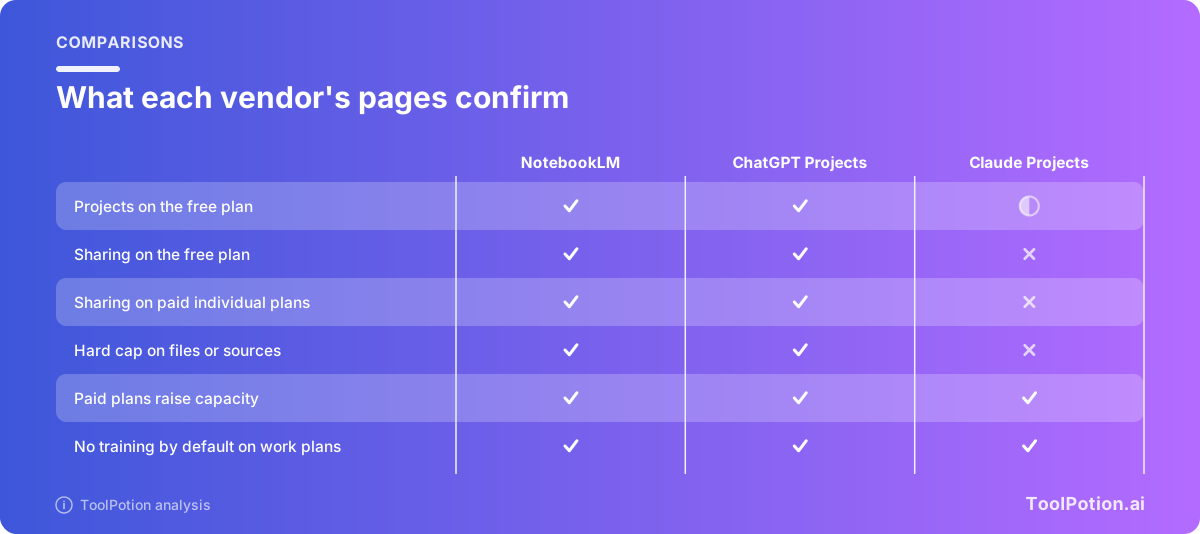
A half circle on Claude's free-plan projects reflects the five-project cap. Every cell comes from a vendor page we opened, and Claude's pricing page marks project sharing as unavailable on Free, Pro and Max.
Sharing and collaboration
Sharing splits the field. In NotebookLM, a Viewer gets read-only access to sources and notes and an Editor can add or remove sources and reshare. There's also a chat-only link, though Google warns viewers may still find ways to reach hidden materials. Personal Gmail accounts can share with up to 50 people, not Google Groups. Sharing doesn't change anyone's source limit. Advanced sharing is paid, while custom chat and analytics are available to everyone.
For ChatGPT, OpenAI's Projects page says sharing is open to signed-in users, subject to plan and workspace settings. Owners invite people with chat or edit access, or share a link. Collaborator caps are 5 on Free, 10 on Plus and Go, and 100 on Pro and in workspace projects (OpenAI).
Claude is the odd one out. The pricing page shows project sharing as a Team and Enterprise feature (Anthropic). Team members get Can view or Can edit permissions, and projects can be private or organization-wide (Anthropic). Even in a public project, your chats stay private unless you share them. A solo researcher on Pro can't hand a project to a co-author.
Privacy: who trains on your files
Read this before uploading anything a client owns.
Google says that for NotebookLM on personal accounts, data is "not used to train" the product unless you send feedback, in which case reviewers may see the full interaction, including your uploads. For Workspace and Education accounts, content isn't reviewed by humans and isn't used to train models (Google). Google Cloud's enterprise version adds that files stay in your project.
Anthropic's consumer rule runs the other direction. On Free, Pro and Max, Claude uses your chats to improve models only if you allow it, if a conversation is flagged for safety review, or if you opt in some other way, and incognito chats are excluded (Anthropic). Anthropic says its commercial products, which include Team, don't train on your inputs or outputs by default (Anthropic).
ChatGPT gives you a switch. Settings, Data controls, "Improve the model for everyone." Turn it off and new conversations stop feeding training, and project chats stay in their projects. Business, Enterprise, Edu and Healthcare workspaces aren't used for training by default (OpenAI). On personal accounts, a shared project can feed training only if the owner and every contributor have the setting on (OpenAI).
The pattern is the same everywhere. Consumer plans put the burden on you, and work plans take it off. If the files belong to someone else, use a work plan or check the setting first.
What the higher plans cost
NotebookLM is free at the start, and its limits rise through Google's AI plans. Google's US page lists AI Plus at $4.99 a month and AI Pro at $19.99, with Ultra from $99.99 (Google). Google's pages show local currency elsewhere, so check yours.
ChatGPT lists Go at $8 a month, Plus at $20, and Pro from $100, with $200 and $500 options (OpenAI). Claude Pro is $17 a month on annual billing or $20 monthly, Max starts at $100, and Team standard seats are $20 annual or $25 monthly (Anthropic).
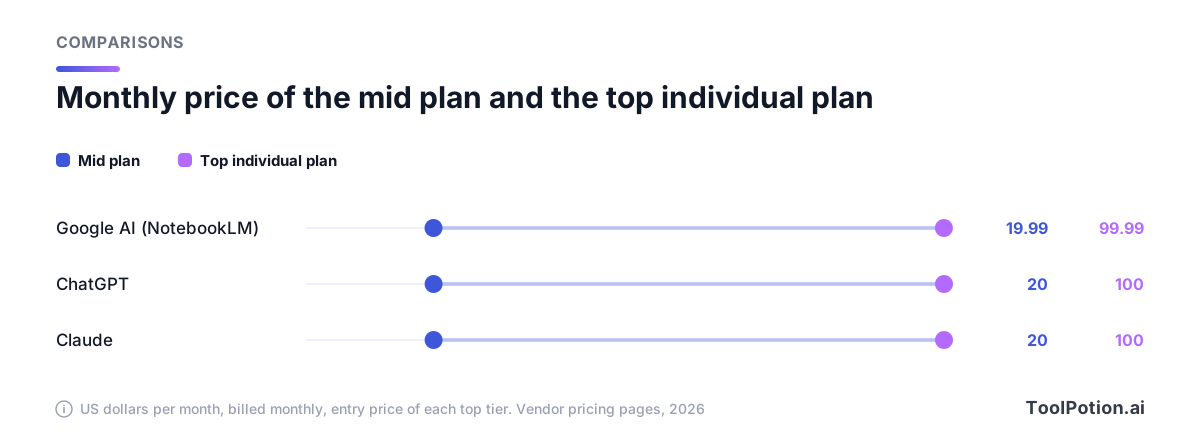
The money part is easy to misread. Google's ladder is the steepest, from 50 sources free to 600 at the top. For ChatGPT, the jump from Plus to Pro moves a project from 25 files to 40. For Claude, the paid plans add retrieval capacity and bigger context, not a new file count. At about $20 a month, Google AI Pro is the cheapest way to get past 100 sources.
Which one for which job
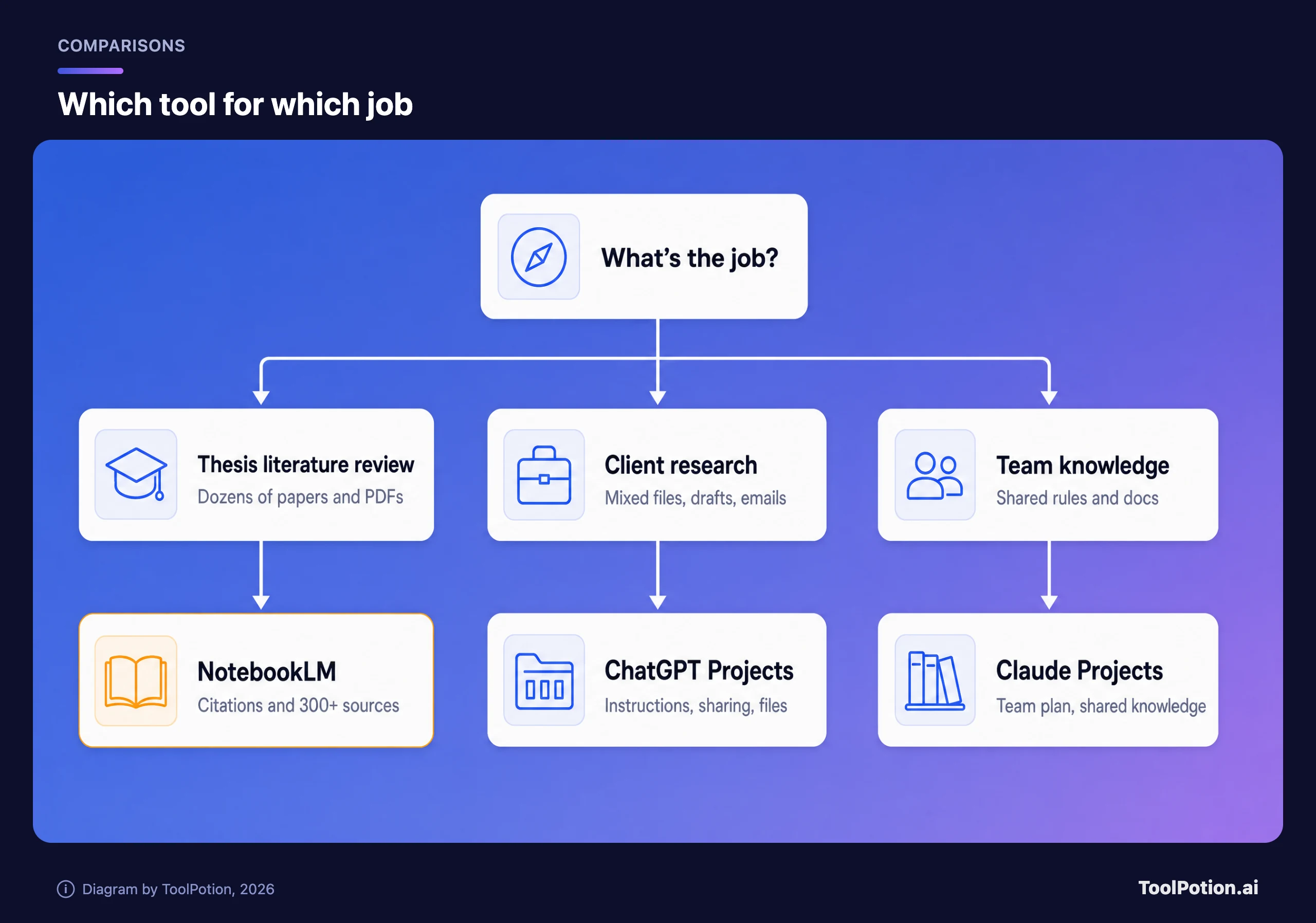
Three jobs cover most of what people buy these for. The map below sends each to a default pick, and the notes after it say when to break the rule.
A thesis literature review
Go with NotebookLM. You'll have dozens to hundreds of PDFs, you'll need to check each claim, and you may want a mind map or audio overview to rehearse for a committee. The free plan's 50 sources is a start. Google AI Pro's 300 gives a full reading list far more room. If you also need to find new papers, Google's source help says you can run Deep Research from inside a notebook, and Gemini Deep Research is the standalone version.
Client research
Here ChatGPT Projects or Claude Projects usually win, as long as the client set is smaller than 40 files. You write instructions once (tone, format, what to flag), drop in briefs and notes, and keep every chat for that client together. Choose Claude if you want long documents read whole inside a large context window. Choose ChatGPT if you want to share the project with a few collaborators without a team plan. Either way, set the training toggle first.
Team knowledge
Claude Team is built for this, since shared projects with view or edit roles are the point of the plan. ChatGPT Business is the comparable route and Google's Workspace route works if your team lives in Docs and Drive, where sources can sync automatically every few minutes. For a few people on a budget, a shared notebook costs less.
Looking beyond these three? ToolPotion's Top 100 AI Research Assistants board ranks tools like Paperguide and Chunk, and our guide to the best AI research assistants goes deeper on them. For the chat side, see ChatGPT alternatives.
Habits that matter more than the tool
Whichever you pick, a few habits carry over. Name files so the citation reads sensibly, split giant books, ask for the passage and read it yourself, and keep your own master copy.
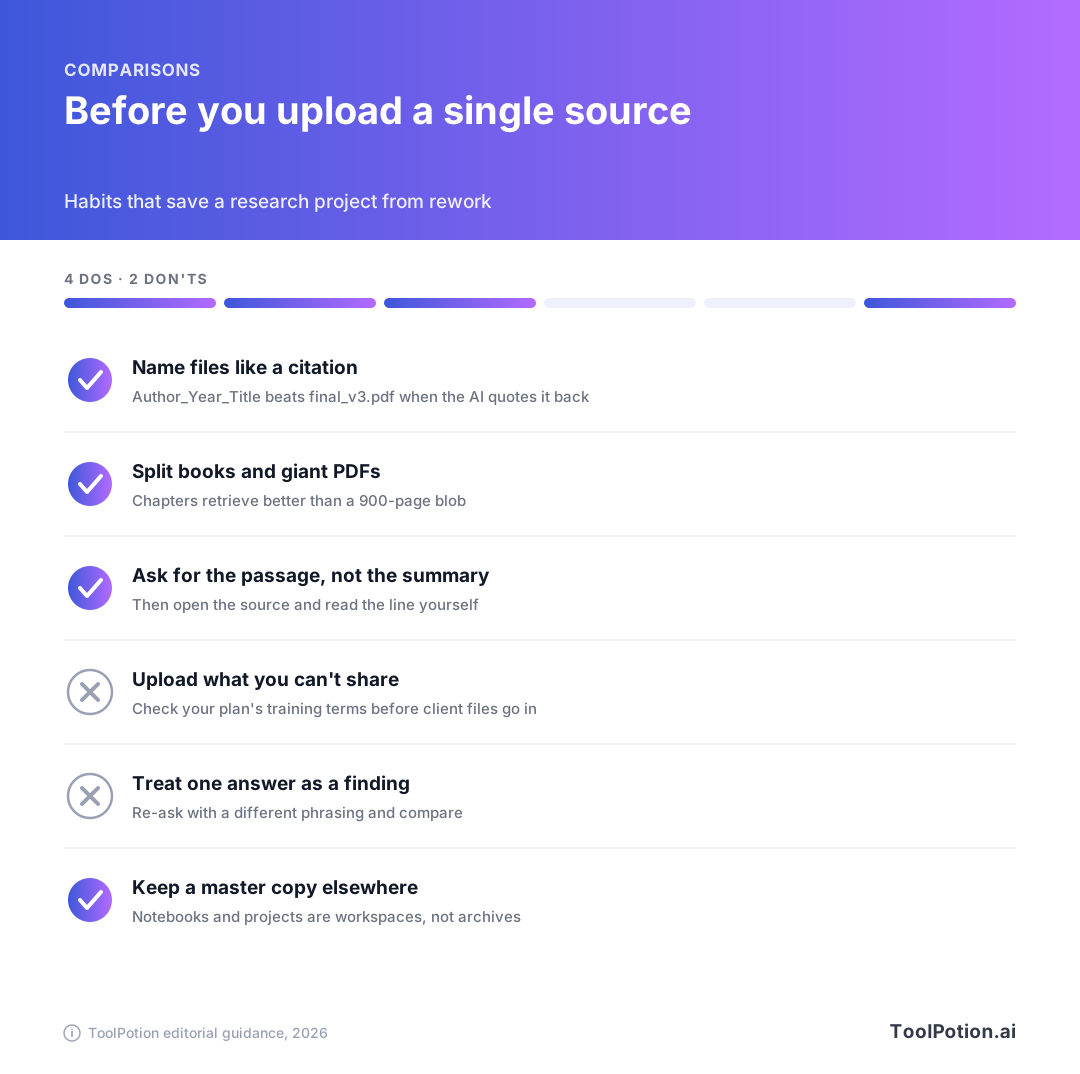
Budget a little time for cleanup too. Scanned PDFs with no text layer, paywalled pages and videos without captions all fail quietly or import as nothing, so open each source in the viewer after you add it and confirm it actually landed. A notebook that looks full of sources but holds blank pages will give you confident answers from a thinner library than you think.
One more rule. Treat a single answer as a lead, not a finding. Every tool here can retrieve the wrong passage, and a citation proves where text came from, not that the summary is right.
Frequently asked questions
Is NotebookLM free?
Yes. The standard plan is free with a Gmail account and gives you 100 notebooks and 50 sources per notebook. Higher limits come through Google AI plans or a qualifying Workspace license.
Does NotebookLM train on my documents?
Google says your data isn't used to train it unless you send feedback, and that Workspace content isn't reviewed by humans or used for training. Check which account type you're on.
Can I share a Claude Project on the Pro plan?
Not according to Anthropic's pricing page, which lists project sharing under Team and Enterprise. Free accounts get up to five projects.
How many files can I put in a ChatGPT Project?
OpenAI's Projects page lists 5 on Free, 25 on Go and Plus, and 40 on Pro, Edu, Business and Enterprise, with no more than 10 uploaded at once. OpenAI changes these, so check the live page.
Which is best for a thesis?
NotebookLM, mainly for its source count and citations. Add a project-style chat tool later for drafting if you want standing instructions.