Grammarly is the better pick for checking and polishing your own writing. QuillBot is the better pick for rewording text and costs less. If you only buy one, buy Grammarly when most of your work is emails, reports and documents, and buy QuillBot when you rewrite a lot or want the cheaper yearly plan. Many people end up using both, and the free tiers make that easy to try.
The two tools overlap more than they used to. Grammarly now has a paraphraser, an AI detector and a plagiarism checker. QuillBot now has a grammar checker, a humanizer and a summarizer. The difference is where each one started: Grammarly began as a proofreader and QuillBot began as a paraphraser, and you can still feel that in the details.
Prices are the other thing that changed the comparison. Grammarly Pro costs $12 a month on the annual plan, and QuillBot Premium costs $8.33 a month on its annual plan (Grammarly plans, QuillBot Premium). Below you'll find what each plan includes, where the limits bite, how the AI detection claims hold up, and a quick way to pick.
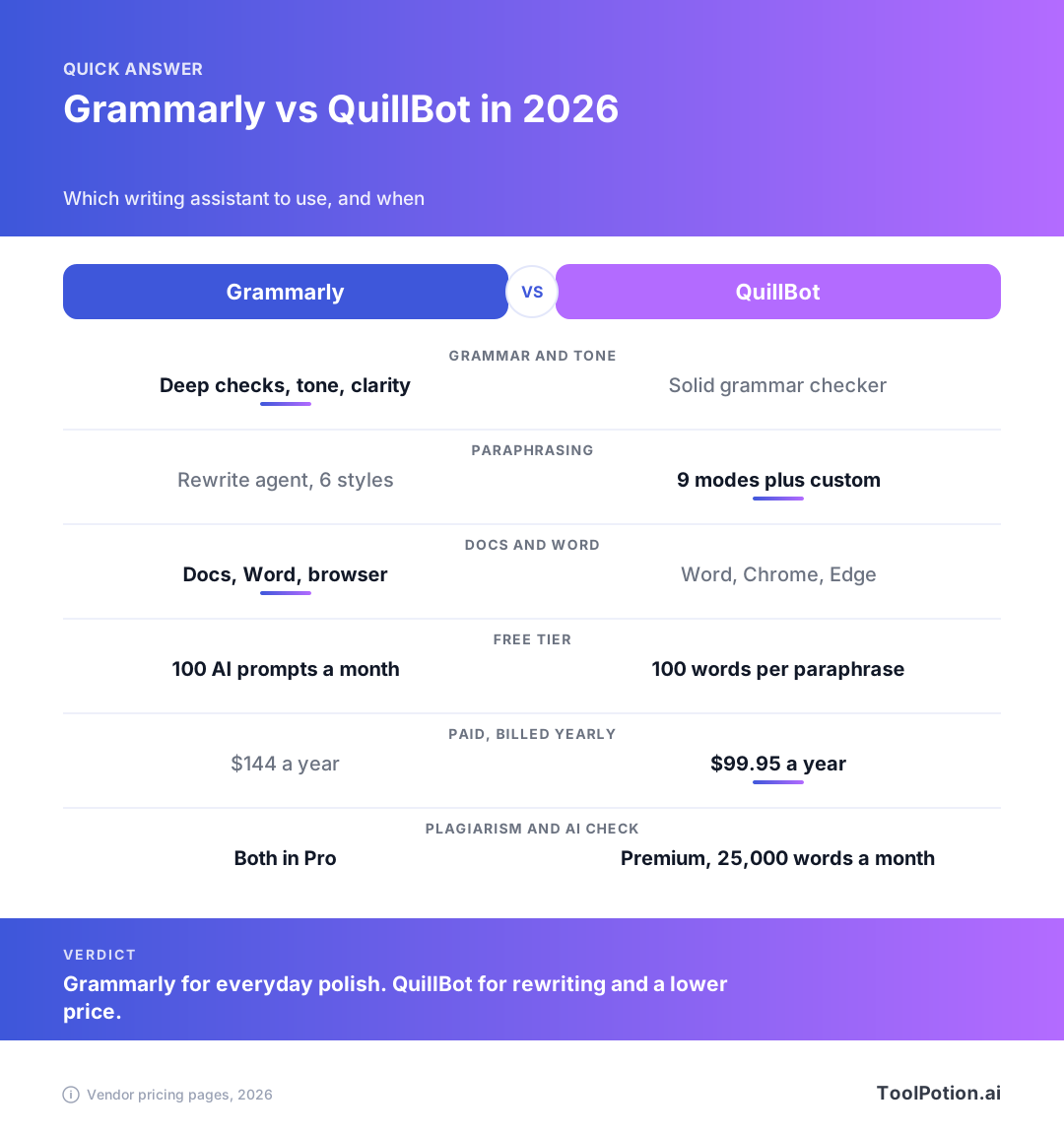
Grammarly vs QuillBot at a glance
Grammarly is aimed at anyone who writes for other people: students, managers, support teams, non-native English speakers. Its free plan fixes spelling and grammar mistakes and shows your tone. The paid plan adds full-sentence rewrites, tone adjustment, plagiarism and AI text checks, and a much bigger monthly allowance of AI prompts.
QuillBot is built around the Paraphraser. The free plan lets you reword up to 100 words at a time in two modes. Premium opens up nine modes, custom modes, a longer summarizer and a plagiarism checker with a 25,000-word monthly allowance (QuillBot Premium).
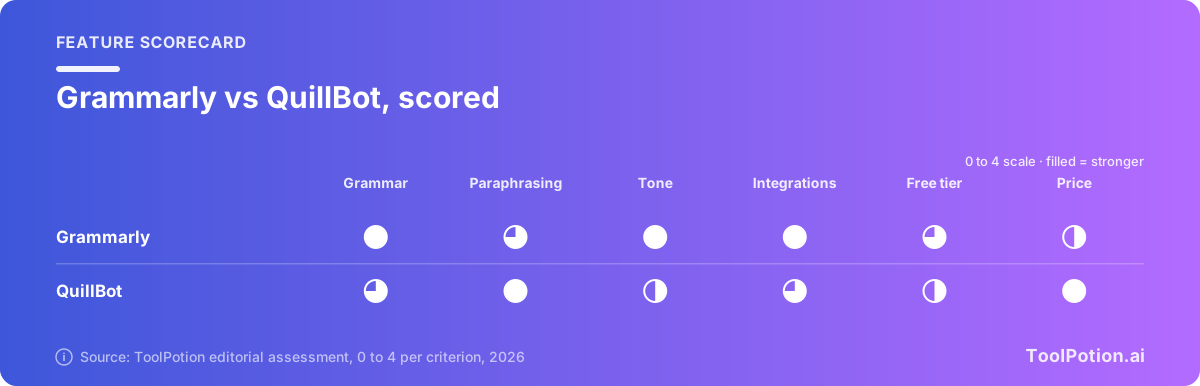
The scorecard below is an editorial judgment, not a lab result. It rewards Grammarly for depth of checking, tone and where it runs, and rewards QuillBot for paraphrasing choices and price. Read it as a starting point and use the sections after it to check the reasoning.
On ToolPotion's own rankings, Grammarly's Chrome extension sits at #2 among browser plugins, and QuillBot is at #32 among AI apps. Both appear on the Top 25 Grammar Checkers board, and the wider AI writing assistants board shows what else competes for the same job.
One naming note, since search results can confuse it. Grammarly's parent company now calls itself Superhuman, and its own announcement describes Superhuman as "formerly Grammarly" (Grammarly newsroom). The writing product is still called Grammarly, and the plans page still sells Grammarly Free, Pro and Enterprise. Its footer credits the Superhuman Platform. Nothing about the plans in this article depends on the rename.
Grammar, clarity and tone checks
This is Grammarly's home ground. Free accounts get spelling, grammar and punctuation fixes plus a read of your tone. Pro adds the things people pay for: rewriting a whole sentence in one click, adjusting tone, inclusive-language suggestions, consistent citations, and an option that helps you write fluently in English (Grammarly plans). Pro also lists unlimited personalized suggestions.
QuillBot's grammar checker is solid for the basics. On Premium it adds advanced writing suggestions, tone insights and grammar correction in six languages, which matters if you don't write only in English (QuillBot Premium). What the pricing page doesn't show is anything as developed as Grammarly's tone and full-sentence rewrite controls, so for polishing a high-stakes email or a client report, Grammarly has the edge.
There is one catch on the Grammarly side. The language support is narrower. Its Pro plan talks about writing fluently in English, and its paraphraser lists English, Spanish, French, German, Portuguese and Italian. If you write in several languages, LanguageTool is worth a look. Its site lists more than 30 languages and dialects beyond the headline ones (LanguageTool), and its Premium plan checks text up to 150,000 characters per text field (LanguageTool Premium).
Paraphrasing and rewriting
QuillBot wins this section, and it isn't close for heavy rewriting. The free plan caps you at 100 words per paraphrase and two modes. Premium removes the word cap and gives you nine built-in modes, unlimited custom modes, a history of past paraphrases, and the ability to compare modes side by side. It also lists paraphrasing in 23 languages and translation into more than 40 (QuillBot Premium). A synonym slider lets you decide how far it strays from your original wording.
Grammarly's paraphrasing tool works differently. It is a Paraphraser agent with six preset styles, a custom voice you can describe, and rewrites in six languages, all available with a free Grammarly account (Grammarly Paraphrasing Tool). That's enough for a stubborn sentence or a tone shift. It is less suited to rewriting a whole document in different registers, which is what QuillBot's mode picker is for.
Whichever one you use, read the output against your original before you accept it. Paraphrasers swap words for near-synonyms, and a swap can shift a technical meaning, a number or a name. A rewrite of "statistically significant" into "notably important" reads fine and says something different.
A practical rule: if you paraphrase a paragraph or two a week, the free tier of either tool is enough. If you paraphrase every day, QuillBot Premium pays for itself in time saved. And if what you really want is text that reads less like it came from a chatbot, see our guide to AI humanizers. Both companies sell one, and QuillBot has a free humanizer with a 100-word cap on the free plan.
AI writing and generation
Both tools can draft text, but neither is a chatbot replacement. Grammarly's free plan includes 100 AI prompts a month, and Pro raises that to 2,000 per member per month (Grammarly plans). That's a number you can plan around. Grammarly also sells narrow generators, such as a cover letter generator and a job description generator.
QuillBot lists chat and write with AI as "limited usage" on the free plan and "higher usage" on Premium, with no number attached, plus AI image creation with usage limits (QuillBot Premium). Without a published cap, it's hard to say how far it stretches. If AI drafting is your main need, a dedicated assistant from our writing assistants roundup will do more than either of these.
AI detection and plagiarism checks
Both vendors sell detection as part of the package, and both come with a warning you should take seriously. Grammarly says its AI Detector reaches 99% detection accuracy and ranks first on the independent RAID benchmark (Grammarly AI Detector). That is the vendor's claim, and the same page says plainly that "AI detectors can get it wrong". Treat any percentage as a hint about style, not proof of who wrote the text.
On the plagiarism side, Grammarly's checker compares your text against billions of web pages and gives an originality score (Grammarly Plagiarism Checker). In its plans comparison, plagiarism and AI text detection both sit in Pro, not Free, though Grammarly also offers a free standalone AI detector and a basic free plagiarism check on its own pages. QuillBot's Premium plan lists a plagiarism checker with a 25,000-word monthly allowance and full access to its AI detector, with only limited access on the free plan.
Where Grammarly goes further is process evidence. Its Authorship feature records which parts of a document were typed, pasted, AI-generated or AI-edited. Earlier this year it added attribution by specific agent, and Grammarly says students have generated more than 5 million Authorship reports (Grammarly newsroom). The same release cites one college reporting a 96% drop in academic integrity violations in a semester, which is a vendor-supplied figure from a single institution. It's an interesting direction, because a record of how you wrote something is harder to dispute than a probability score.
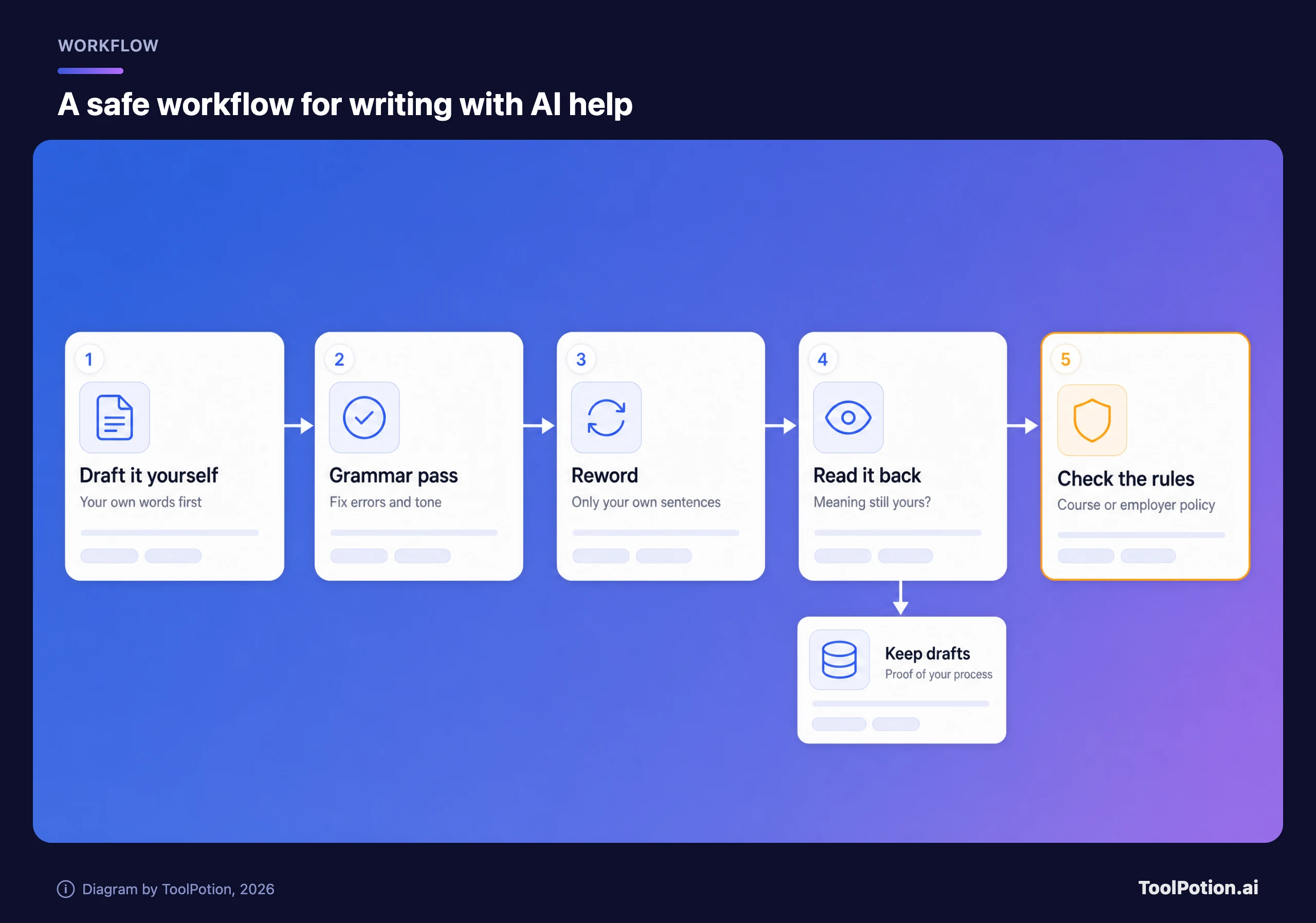
The academic integrity part nobody reads
Using a paraphraser on your own sentences is a different act from running someone else's paragraph through one to dodge a plagiarism check. The second is plagiarism whichever tool does it, and a plagiarism checker is built to catch that. Rules about AI help vary by course and by employer: some allow grammar tools and ban generation, others allow both with disclosure.
So read the policy first. Keep your drafts. If a detector flags honest work, version history and Authorship-style records are your best defense. And don't submit text you can't explain, because a teacher or editor will ask you to.
Integrations: Google Docs, Word and the browser
Grammarly lists the broadest set of places it runs: desktop apps for Windows and Mac, browser extensions for Chrome, Safari, Firefox and Edge, add-ins for Microsoft Office and Google Docs, and apps for iPhone, iPad and Android (Grammarly plans). If you write in Google Docs all day, that matters more than any feature in this article.
QuillBot lists a Chrome extension, an Edge extension, a macOS app, a Word add-in, and Android and iOS keyboards (QuillBot Premium). Google Docs and Firefox don't appear in that list, so confirm that your setup is covered before paying. On the mobile side, Grammarly also has a keyboard app with voice dictation.
Grammarly vs QuillBot pricing in 2026
List prices are straightforward. Both free plans cost nothing. Both paid plans are far cheaper if you commit to a year, and both charge more per month if you don't.
| Grammarly | QuillBot | |
|---|---|---|
| Free plan | Grammar and spelling fixes, tone reading, 100 AI prompts a month | Paraphrase up to 100 words in 2 modes, basic grammar, limited AI detector |
| Paid plan name | Pro | Premium |
| Billed yearly | $144 a year ($12 a month) | $99.95 a year ($8.33 a month) |
| Billed monthly | $30 a month | $19.95 a month |
| AI prompts or generation | 2,000 prompts a month | Higher usage, no number published |
| Plagiarism check | Included in Pro | 25,000 words a month |
| Trial | 7 days free | Not shown on the plans page |
Sources: Grammarly plans and QuillBot Premium, US list prices. QuillBot also shows quarterly and six-month prices, which fall between the two. QuillBot's monthly price varies by page variant (we saw $19.95, $21.95 and $23.95); the $99.95 annual price was the same in the variants we saw except one that showed $119.95, and we use the default $19.95 and $99.95. Regional prices, student discounts and promotions can change what you see at checkout.
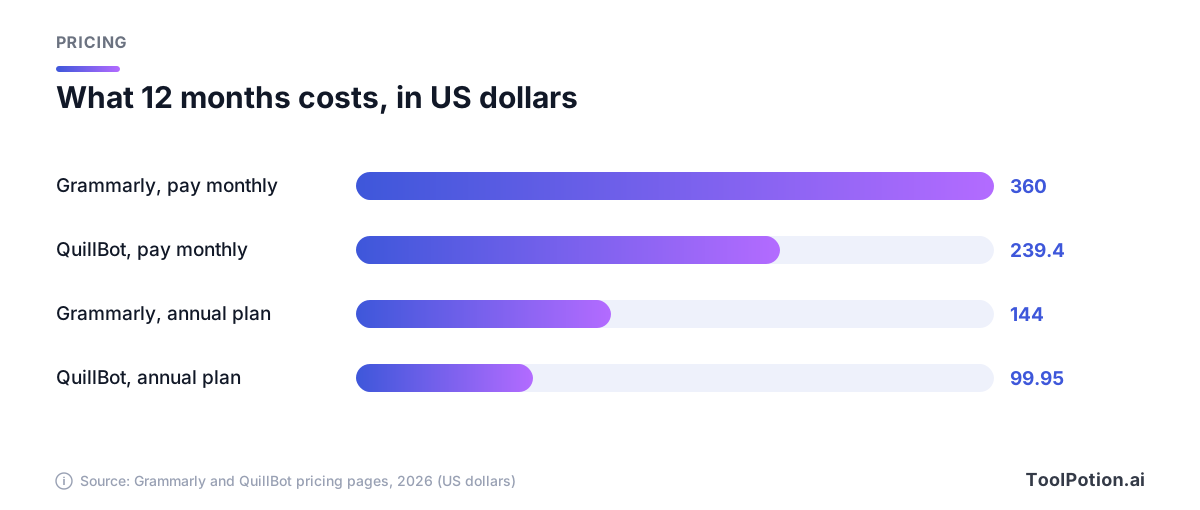
The gap at the annual level is $44 a year. Paying monthly, the gap is about $10 a month, so the sensible approach is to buy only for the months you need. If you're writing a thesis over four months, paying monthly is cheaper than a year of either, and you can cancel. If you write every working day, the annual plan is the better deal.
Use the calculator to try your own numbers. Slide the months to see where the annual plan starts to win, and add people if you're buying for a small group. Team plans exist for both tools, with different pricing, so check those pages for more than a few seats.
Privacy and training settings
Both tools read your text, so what they do with it matters, especially for client work or unpublished writing. Grammarly says it doesn't sell your content and doesn't allow its large language model providers to train on user content (Grammarly privacy FAQs).
Grammarly itself is another matter. Its Product Improvement and Training control lets Grammarly use content to train its own models, and it is on by default for Free, Premium and single-user Pro accounts. You can turn it off in your account's privacy settings (Grammarly support). If you handle confidential documents, switch it off on day one.
For QuillBot, we could not load its current privacy policy or help center to check how it handles your text, so we make no claim either way. Read its privacy policy and your account settings before you paste anything sensitive.
Which one should you pick?
Start with the job, not the brand. Writing assistants do three things: fix mistakes, rewrite text, and check where text came from. Grammarly is stronger at the first, QuillBot at the second, and both do a version of the third.
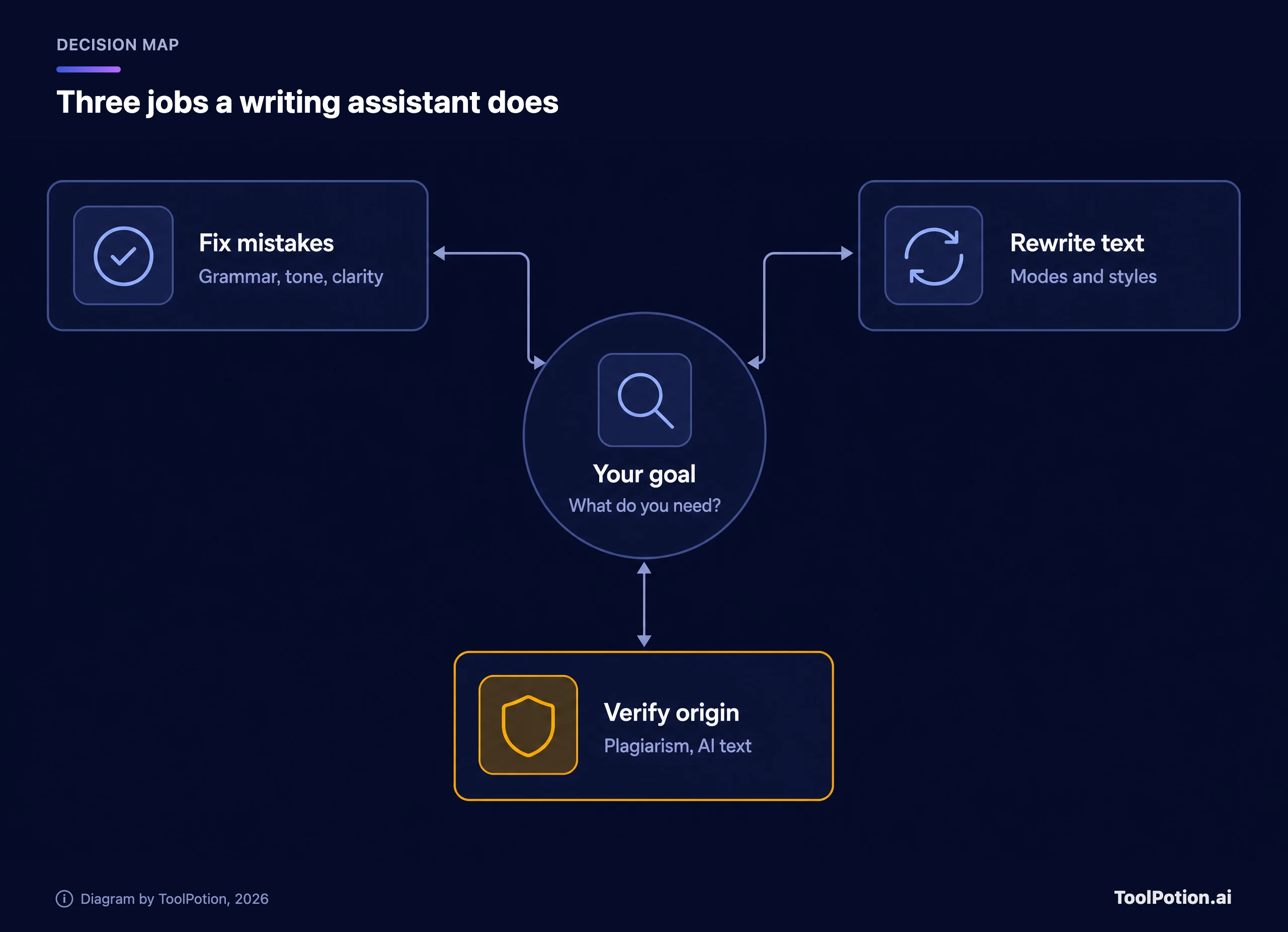
The decision tree below turns that into a recommendation. It takes three questions or fewer.
Here is how that plays out for the readers most likely to be searching for this. These picks are ToolPotion's editorial judgment, not vendor guidance.
- Students should start with the free tier of both. If you can only pay for one, QuillBot Premium is cheaper and covers rewriting and a plagiarism check, while Grammarly Pro is better if your marks depend on clean, well-toned prose. Our guide to AI tools for students and the student board cover more options.
- Professionals who write all day should pick Grammarly. The tone controls, the Google Docs and Word coverage and the 2,000 monthly prompts do more for email and reports than a paraphraser does.
- Non-native English speakers get the most out of Grammarly's fluency and tone features, but QuillBot's paraphraser is a good second tool for finding a phrasing you couldn't think of yourself.
- Anyone checking other people's text, such as teachers and editors, should use detector scores only as a prompt for a conversation. Neither vendor claims perfection.
Alternatives worth a look
If neither fits, LanguageTool is the multilingual option and has its own browser extension. For a plagiarism-only check, see the plagiarism checking board, and for academic citations see the academic writing and citations board.
Frequently asked questions
Is QuillBot better than Grammarly?
For rewording, yes: it has nine modes, custom modes and a lower price. For grammar, tone and coverage in Docs, Word and the browser, Grammarly is the stronger tool. Which is better depends on whether you mostly fix text or mostly reword it.
Is Grammarly free or paid?
Both. The free plan fixes basic mistakes, shows your tone and includes 100 AI prompts a month. Pro adds full-sentence rewrites, tone adjustment, plagiarism and AI text checks and 2,000 prompts. It starts with a 7-day free trial.
Can QuillBot or Grammarly detect AI-written text?
Both sell a detector, and both are probabilistic. Grammarly's page admits that detectors can get it wrong. A flagged paragraph is a reason to look closer, never a verdict, and false flags on human writing are a known risk.
Will using Grammarly or QuillBot count as cheating?
It depends on the rules you're under. Fixing grammar is accepted almost everywhere, while generating or heavily rewording text may need disclosure or may be banned. Ask your instructor or employer, and keep your drafts.
Do Grammarly and QuillBot use my writing to train AI?
Grammarly's training control is on by default for individual accounts, and you can turn it off in settings. It says its model providers aren't allowed to train on your content. For QuillBot, check the current privacy settings in your account.
Can I use both together?
Yes, and many people do. Reword a clumsy paragraph in QuillBot, then run the result through Grammarly for a final polish. Just keep your own voice in the final text, because stacked rewrites can flatten it.