Apple says the new iMac with M6 delivers up to 12x faster on-device AI performance for prompt processing in LM Studio than an iMac with M1, and up to 5x faster than M4. Two details in that sentence decide whether you should care. The comparison is against old hardware, and it measures how fast the model reads your prompt, not how fast it writes the answer.
We read Apple's two M6 announcements, the tech specs and the store pages. Our view: the M6 is a good, fairly priced chip, and for local AI it's the wrong place to spend extra. Memory is the spec that matters, and the M6 tops out at 32GB.
What Apple actually shipped
Only two machines got the M6. The 14-inch MacBook Pro with M6 starts at $1,999 in the US, and the iMac with M6 starts at $1,499 (10-core) or $1,699 (12-core). Both have a dual 16-core Neural Engine and Neural Accelerators in each GPU core. Apple puts the laptop's GPU AI workloads at up to 25 percent faster than M5, and says the Neural Engine is up to 1.9x faster.
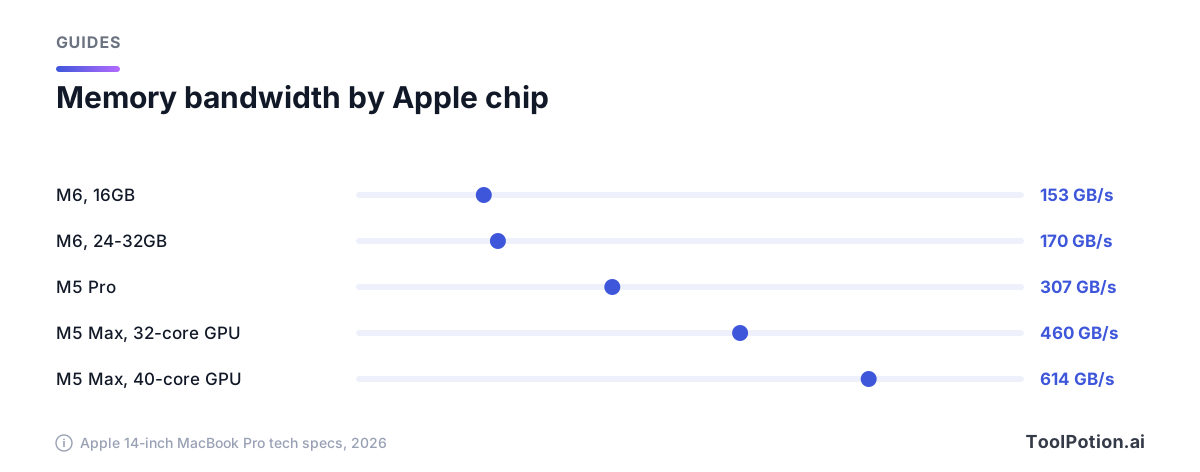
The laptop gets 16GB of unified memory as standard, configurable up to 32GB, with bandwidth of 153GB/s at 16GB and 170GB/s at 24GB or 32GB, per Apple's tech specs. The iMac is listed with bandwidth up to 170GB/s as well; Apple's iMac announcement does not state a maximum memory, so we don't give one.
Shelly Goldberg, Apple's vice president of Hardware Engineering, is quoted in the announcement promising "even more powerful capabilities for on-device AI." That's fair as far as it goes. It's also a sentence about capability, and the capability that matters most to a local-model user, memory, is the one Apple left alone at 32GB.
The pricing story is better than the performance story. Both machines start at the same price as the models they replace, which 9to5Mac notes came after price rises earlier this year took the iMac from $1,299 to $1,499 and the MacBook Pro from $1,699 to $1,999. The site's verdict: the new M6-powered Macs are "far from cheap" but didn't get another increase.
The other new MacBook Pro, the one with the OLED touch display, doesn't use the M6 at all. It runs M5 Pro and M5 Max, with up to 128GB of unified memory on the Max (64GB on the Pro), from $2,899 in the US. If local AI is your reason to shop, that's the machine Apple is pointing at. Apple's press release says with M5 Max, pros can "run LLMs with hundreds of billions of parameters entirely on device."
Two kinds of on-device AI, and only one needs your help
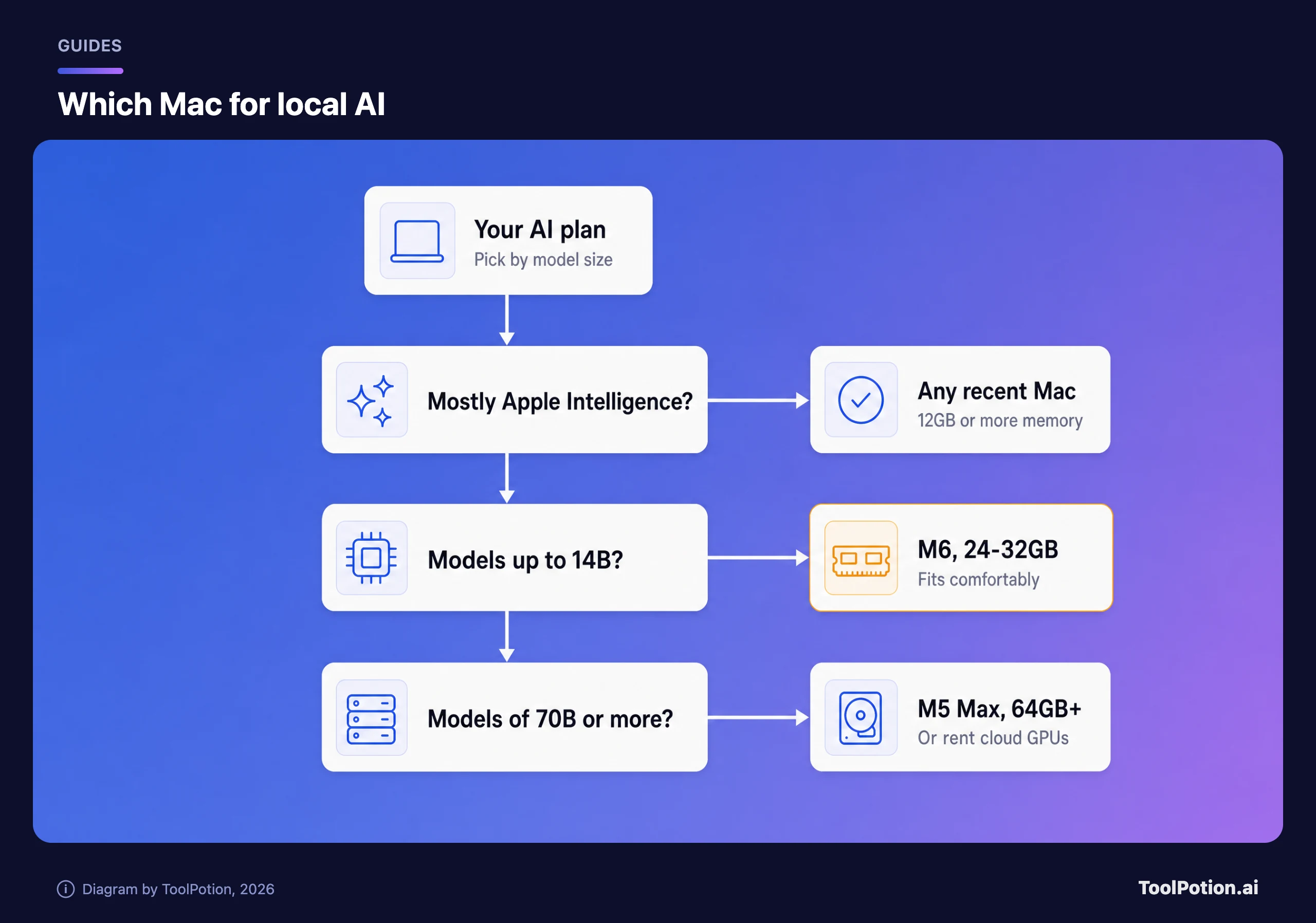
Apple Intelligence runs a small model on the Mac for writing tools, dictation, photo editing and the like, and sends harder requests to Private Cloud Compute, Apple's server system. Apple's privacy line is that "Apple Intelligence is aware of your personal information without collecting your personal information." You don't choose a model or manage memory. The price of entry is any Mac with M3 or later and at least 12GB of unified memory, so an M6 adds speed, not access. Our write-up of Siri AI and where Gemini fits covers the cloud half.
Apple also lets any app call those on-device models through its Foundation Models framework, which the company says works offline at no cost per request. That's the quiet reason a Mac with more memory gets more useful over time.
The second kind is the one the benchmark was about: downloading an open model and running it yourself in LM Studio (Apple's iMac post also names LM Studio Bionic among apps optimized for Apple silicon) or Ollama. Nothing leaves the machine, nothing is metered, and nothing is as good as the biggest cloud models. Which open models are worth the disk space is a separate question we cover in our open-weight roundup.
Memory decides what runs, so read that line first
A model has to sit in memory to run, and on a Mac the CPU and GPU share one pool. An older Ollama README suggested a rule of thumb: at least 8GB of RAM for 7B models, 16GB for 13B models, and 32GB for 33B models. (That line is from an older tagged release and isn't in the current README, so treat it as a rough floor from the tool's history, not a promise.) LM Studio's system requirements say 16GB or more is recommended, and that 8GB Macs should stick to smaller models and modest context sizes.
Then look at a real big one. Ollama's FAQ shows ollama ps listing llama3:70b at 42 GB. By our inference from that model size, it won't fit in a 32GB Mac, whatever the chip; it would need 64GB, which means an M5 Pro or M5 Max, not an M6.
Speed is a different limit. Apple's AI claims for the M6 are about prompt processing, such as up to 1.3x faster time to first token than M5 in the laptop's footnoted tests. Those are Apple's numbers, run on Apple's setups. In our reasoning, memory bandwidth is what to watch for the writing-the-answer part, and the M6 sits in the lowest rows of the chart above.
Who should pay for 32GB, and who shouldn't
Buy the M6 with 24GB or 32GB if you want to run models around 7B to 14B for drafting, summarizing private documents or coding help, and you'd rather own a quiet, long-battery laptop than rent a GPU. For that job the extra memory is the best money on the configurator. We'd skip the $1,999 base model's 16GB for this use. It runs small models, but you'll be closing apps to make room.
Don't buy the M6 for 70B-class models, and don't expect a dramatic jump over last year's chip on anything you run day to day. If that's the goal, price an M5 Pro or Max, and then price the alternative, because MacRumors reports a Mac Studio with 512GB of memory starts at $22,299 in the US. At that point the bill for a cloud service you use a few hours a week looks small. Our comparison of local and cloud AI walks through where the break-even sits, and matching model tiers to tasks helps if most of your work doesn't need a frontier model anyway.
The case for keeping your older Mac
Apple's headline gains are mostly against M1. Against an M5 the laptop's prompt processing is up to 1.3x faster, which you'll notice in a benchmark and barely in a chat. If you own an M4 or M5 Mac with 24GB or more, we'd keep it and put the money toward more memory next time. If you own an M1 with 8GB, the upgrade is real, but a used or refurbished M-series with 32GB would run the same models for less than $1,999. The new Macs have a Wi-Fi 7 radio and a better battery. Neither runs a model.
One open question: Apple hasn't said how much of the 25 percent GPU gain shows up in token generation, and none of the coverage we read could say either. Independent LM Studio and Ollama numbers should appear once the machines reach customers.
Frequently asked questions
Does Apple Intelligence need an M6?
No. Apple lists Mac models with M3 or later and at least 12GB of unified memory. The M6 makes it faster, not available.
Is 16GB enough to run local AI models?
For small models and modest context, yes. LM Studio recommends 16GB or more, and an older Ollama README suggested 16GB for 13B models. You'll have little room left for other apps.
Should I wait for third-party benchmarks?
If you're buying for local AI specifically, yes. Apple's tests compare against M1 and M5 on its own setups, and they measure prompt processing.