Non-developers can safely vibe-code a lot in 2026, up to a line you can name. Below it sit prototypes, landing pages, internal tools and simple apps with a login and a database. Above it sit custom payment logic, health or financial records, apps shared by many companies, and anything with serious traffic. Those still need an engineer.
The audience is already here. Lovable says 80% of its builders describe themselves as non-technical, and that people use it for internal tools, CRMs and storefronts as well as websites (The Next Web). The failures came with them. This year UpGuard found 16,326 databases on Supabase, the backend many of these apps run on, with tables anyone on the internet could read (UpGuard). Veracode has tested more than 100 AI models over four years and puts the average security pass rate of AI-written code at 56%. In its words, "It hasn't moved" (Veracode).
Most of the damage traces back to one mistake you can check for without reading code: a database that hands rows to whoever asks. Fix that, keep secret keys out of the browser, and most of what a founder, marketer or analyst wants to build is fair game.
What vibe coding looks like in 2026
You describe what you want in plain language, the tool writes the code, you click through a live preview, and you ask for the next change. The tools aimed at non-developers now go well past the screen. They create the database, the sign-up system and the hosting too, so an app with real accounts can exist after an afternoon of prompting.
Read the diagram as a loop with one exit. The exit is the part people skip.
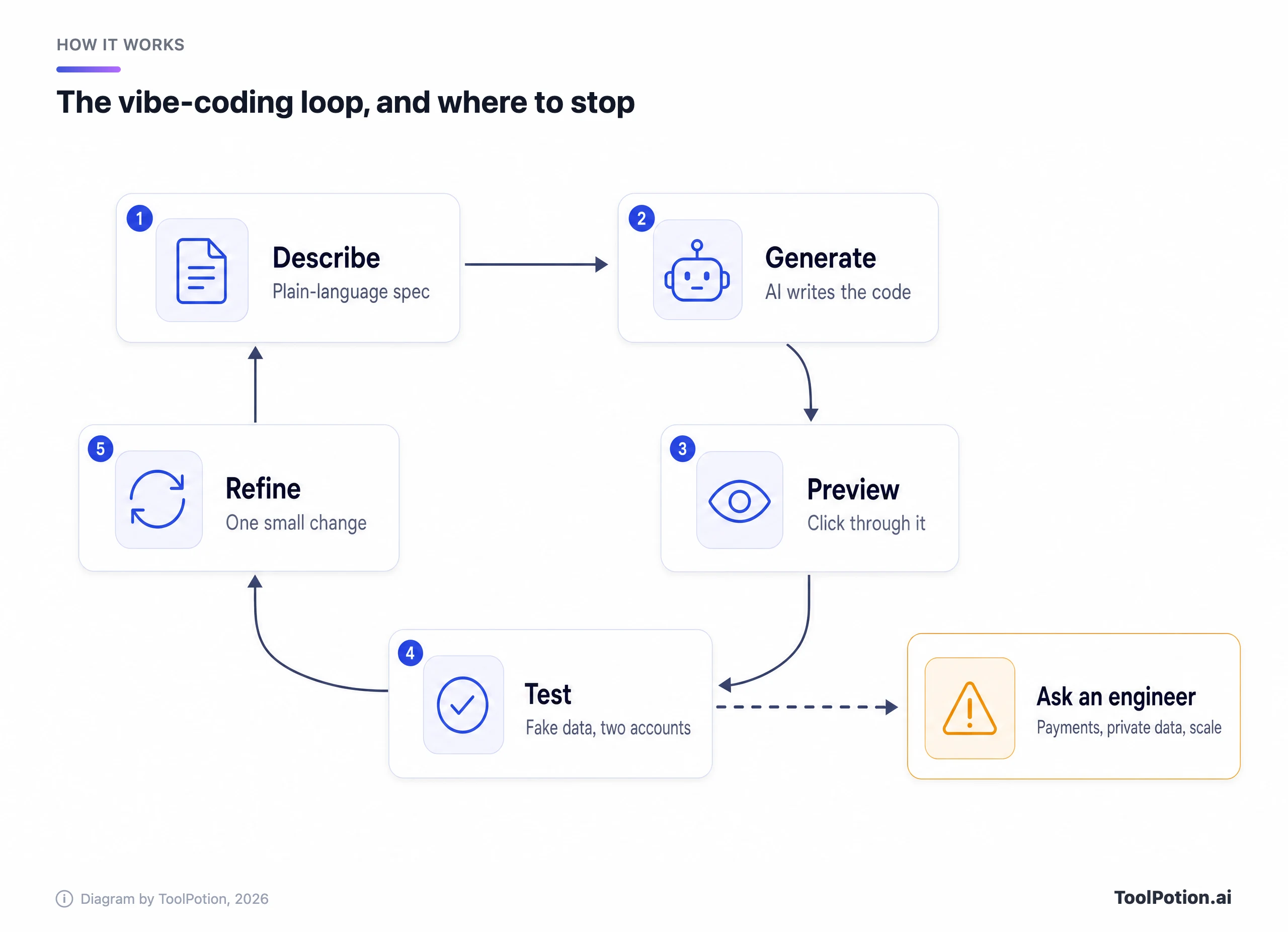
The dashed arrow leaves from testing on purpose. You can't judge generated code by reading it, but you can judge what it does: whether a second account sees the first account's records, or whether a page opens without logging in. When a test touches money, other people's private data or real scale, stop and bring in someone who reads code.
A lot moved this year. Lovable now lets a single build message run for up to 10 hours, and added a /goal command that keeps going until a task is done, at a noticeably higher price (Lovable changelog). Replit shipped Agent 4 with parallel agents, and its AI now runs in a Free Mode plus paid Power and Max modes. Vercel rebuilt v0 around GitHub branches and pull requests, with its product chief saying 90% of real work means changing an existing codebase. Wix's Base44 trained its own model, Base1, which its founder expects to be faster and cheaper for customers than frontier models eventually.
Google AI Studio now spots when an app needs a database or a login and, once you approve, sets up Firebase for both. Its older builder, Firebase Studio, is being shut down, so any tutorial built on it is already out of date.
The risk ladder: what you can build on your own
Risk climbs with two things, whose data the app holds and whether money moves through it. A prototype full of made-up records can't leak anything. A sign-up app holding strangers' email addresses can, and this year plenty did.
The ladder sorts common projects by that risk. The bottom three rungs are fair game for anyone. The amber one is where most of this year's leaks happened.
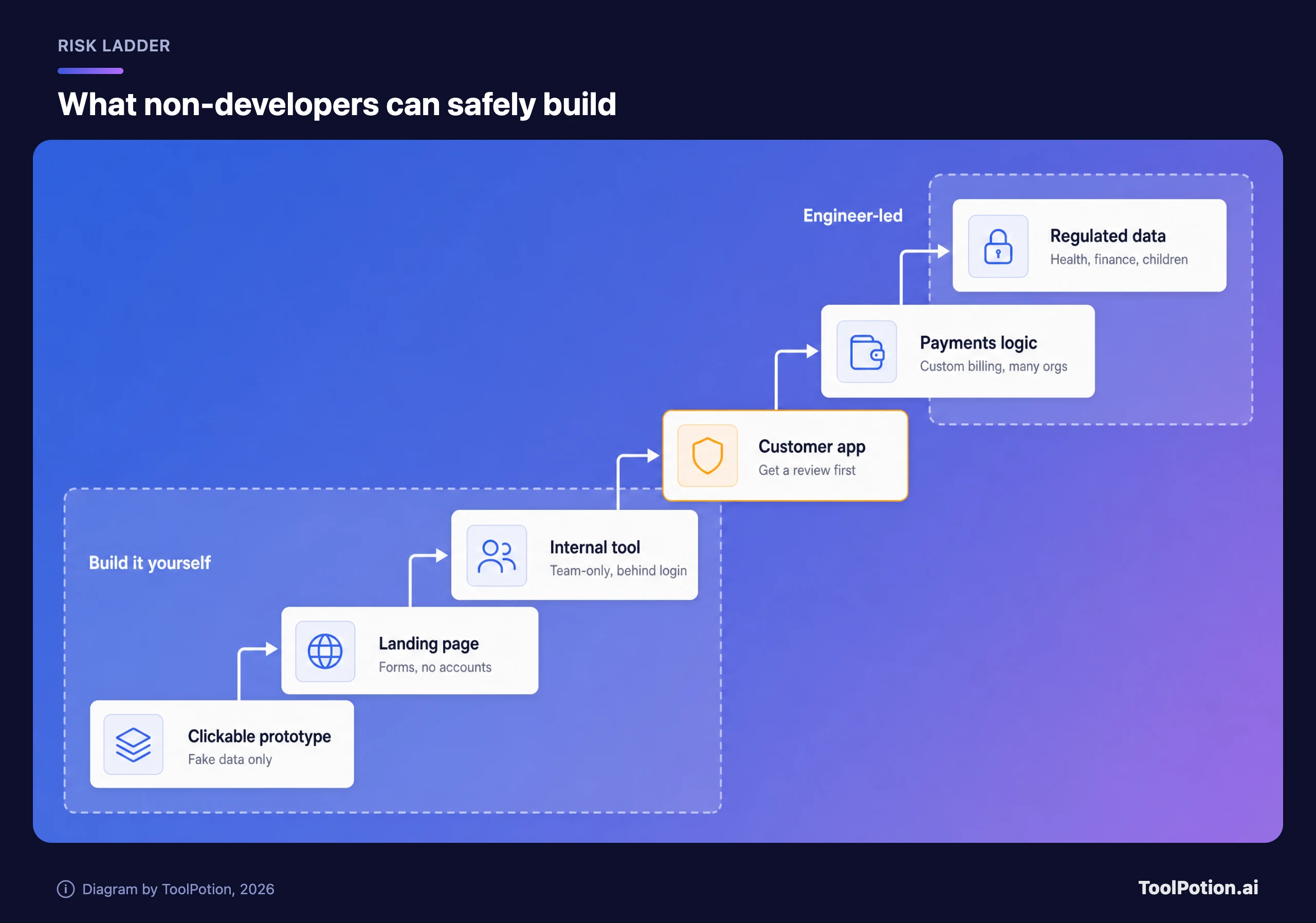
Clickable prototypes, landing pages with a contact form and team-only internal tools are the sweet spot. A prototype answers "should we build this?" before anyone writes a ticket. An internal tracker for a sales or ops team can replace a spreadsheet nobody trusts, and if it's set to workspace-only with a login, the people who could misuse it are your colleagues. Simple automations sit on this rung too, though a workflow tool such as n8n or Zapier often does the job without building an app at all (see the workflow automation board).
Customer apps with accounts are the amber rung. The tools can build them fine. The problem is that one wrong database rule exposes every user at once, so build it, then pay an engineer to review it before real people sign up.
The top two rungs belong to engineers. Payments come first. A buy button that opens Stripe's hosted checkout is fine, because card details go straight to Stripe and never pass through your app. Stripe's own security guide warns that a business taking card data directly may have to meet more than 300 security controls under PCI DSS. Usage-based billing and apps where several companies share one database both depend on authorization logic, which is exactly where researchers keep finding AI-built apps broken.
Regulated data is the other one. Lovable's enterprise FAQ says it doesn't sign business associate agreements, isn't HIPAA-compliant, and asks users not to upload protected health information. Health, financial and children's data carry legal duties that no pre-publish scan can cover.
The tools that matter now, and how each one bills you
Five builders cover most of what this reader needs, and they differ less in what they can make than in how they charge and how easily you can leave. Bolt and v0 sit alongside Lovable, Replit and Base44. Prices are entry paid plans from each vendor's pricing page.
| Tool | Entry paid plan | What you're billed for | Backend included | Getting the code out |
|---|---|---|---|---|
| Lovable | $25 a month, 100 credits | Credits per message, priced by the work done | Database, login and storage (Lovable Cloud) | Two-way GitHub sync on every plan |
| Bolt | $25 a month, from 10M tokens | Tokens, more per message as the project grows | Bolt Database with login | GitHub sync |
| Replit | $20 a month (Core, billed monthly) | Free Mode allowance, then credits in Power or Max mode | Postgres database, Replit Auth, hosting | Push to a Git remote such as GitHub |
| v0 | $30 per user a month (shown as a discount from $90), $30 of credits | Dollar credits spent on tokens | Plugs into Neon, Supabase and others | GitHub repo becomes the source of truth |
| Base44 | $16 a month billed annually, 100 message credits | Message credits plus integration credits | Built-in database, login and hosting | Two-way GitHub sync from the Builder plan |
For most non-developers Lovable is the sensible default. It publishes sample costs per message, scans for security problems on every publish, and its code syncs to GitHub on any plan, free included. Base44 suits people who never want to see code, with one catch covered in the handover section below. Replit makes sense if you want one workspace for apps, slides and data dashboards, and its Free Mode is the gentlest way to start. Bolt fits people who build in bursts, since unused paid tokens roll over for a month. v0 is the pick when your company already deploys on Vercel and engineers will take the project over.
Two older no-code options still cover similar ground with visual editors: Bubble builds web and mobile apps, and Glide turns spreadsheets into apps. The live board below shows how the wider category ranks today, and our AI app builders roundup goes deeper on a dozen of them.
Top AI app builders right now
- # 1Top PickLovableAI AppLovable's AI App Builder empowers users to create apps and websites rapidly through conversational prompts. Describe your vision, and the AI transforms it into a working prototype. Refine with feedback and deploy with a single click, making app development accessible without deep coding expertise.79ToolRankStrong
- # 2Runner UpBolt AI BuilderAI AppBolt AI Builder empowers you to create websites, apps, and prototypes by simply chatting with AI. It handles complex coding tasks, integrates with design systems, and offers enterprise-grade infrastructure, allowing product builders to focus on their vision and launch products faster.77ToolRankStrong
- # 3Third PlaceReplitAI AppReplit is an AI app and website builder that turns a written prompt into a working app, complete with authentication, a database, hosting and monitoring. It targets founders, product managers, designers, engineers, operations and IT teams who want to build software without writing the code by hand.75ToolRankStrong



- 4Base44AI AppA no-code AI platform that turns plain-language descriptions into fully functional apps, websites, and AI agents, handling design, logic, and backend automatically.73ToolRankStrong
- 5StackBlitzAI AppStackBlitz is a collaborative browser-based IDE for web developers, eliminating local configuration to focus on building. It uses WebContainers for fast, secure development environments directly in your browser.72ToolRankStrong
- 6v0 by VercelAI Appv0 by Vercel is an AI-powered platform that enables users to design, build, and deploy full-stack web applications quickly. With its collaborative features, users can create applications from templates, integrate with APIs, and publish live sites in seconds.71ToolRankStrong
- 7Bolt.newGitHub RepoBolt.new is an AI-powered agent for building full-stack web applications directly in your browser. It allows users to prompt, run, edit, and deploy applications without local setup, integrating AI with a development environment powered by StackBlitz WebContainers for a seamless workflow.69ToolRankStrong
- 8AirtableAI AppAirtable is an AI-native app-building platform where teams turn their data into custom apps, interfaces, automations, and AI agents using conversational, no-code tools.69ToolRankStrong
- 9BlinkAI AppAn all-in-one AI website and app builder that turns a prompt into a live, full-stack web or mobile app, with database, authentication, and hosting included.57ToolRankSolid
- 10BubbleAI AppBubble is a no-code AI app builder that enables users to create web and mobile applications quickly and efficiently. It allows for visual design and database management without needing to write code, making app development accessible to everyone.57ToolRankSolid







How ToolRank works
ToolRank is ToolPotion’s proprietary ranking engine.
It continuously evaluates hundreds of signals across the open web — real traffic and popularity, audience and community strength, authority and longevity, adoption and engagement — processing millions of data points to place every tool where it has earned to be.
Every AI type is measured by its own tailored model: what proves traction for a SaaS app is not what proves it for an open-source framework or a creator channel. Missing a platform never counts against a tool — ToolRank judges the evidence that exists.
No paid placement. No self-reported numbers.
The board covers builders aimed at developers too, so use it for discovery and the table for budgeting.
Why credits burn faster than you planned
Every one of these tools now bills for the work the AI does, not the message you send. That's fair for small edits and expensive for vague ones.
Lovable publishes the clearest examples. "Make the button gray" cost 0.50 credits, "Add authentication" 1.20 and "Build a landing page with images" 2.00, while a plan-mode message costs 1 credit (Lovable). Since one build message can now run for hours, Lovable pauses to check in once a single message passes 20 credits, a default you can raise or switch off. Top-ups on Pro cost $15 per 50 credits, which is $0.30 a credit against $0.25 inside the 100-credit plan.
The others work the same way under different names. Bolt's help center says most token use comes from reading and syncing your project files, so the same prompt costs more as the app grows. v0 counts chat history and source files as input tokens. Base44 says there's no set cost per message and puts typical changes between about 0.5 and 4 credits. Replit's Free Mode costs nothing within an allowance, but Power and Max modes draw on monthly credits, and its extra credit packs expire six months after purchase.
Lovable's price ladder shows what that means for a budget.
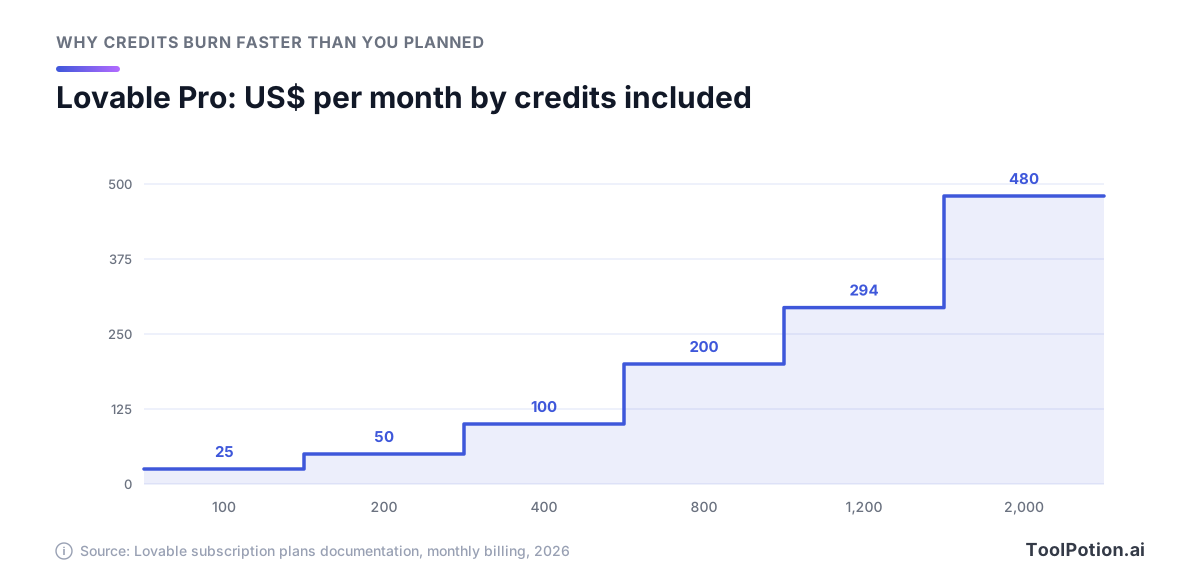
There's almost no volume discount. Every tier up to 800 credits works out at $0.25 a credit, and the 2,000-credit tier is still $0.24. Doubling how much you prompt doubles the bill, so the lever that matters is wasted messages.
Most waste comes from fix loops: the AI breaks something, its fix breaks something else, and every round is billed. Planning first helps, since a plan-mode message in Lovable costs a flat credit and Bolt says plan mode uses fewer tokens because it changes nothing. Buttons help too: Bolt notes that publishing or restoring a version by button costs nothing, while asking the AI to do it spends tokens. When a session goes sideways, roll back to a checkpoint instead of prompting your way out.
Plug your own habits into the estimator below. It uses Lovable's sample costs, so treat the answer as a budget range rather than a quote.
At the defaults you need about 162 credits a month, which the $50 tier covers. Push rework to 60% and even the cheaper route, the $25 plan plus top-ups, climbs to $70. Set a cap too: Lovable's auto top-up takes a monthly spend limit instead of "No limit", and Replit lets you cap spending beyond your included credits. If credit pricing still feels slippery, our explainer on AI tool pricing models walks through credits, seats and tokens.
The incident record points at one mistake
Put this year's incident reports side by side and the same failure keeps turning up. It isn't clever hacking. It's a database that answers anyone who asks.
UpGuard's study found about 300,000 domains showing signs of Supabase and 16,326 databases exposing readable tables, more than half with signs of personal data (UpGuard). Its explanation is specific: tables created through the API, which is how coding agents talk to Supabase, don't get row-level security switched on by default. Supabase's security chief told TechCrunch that projects are secure by default and that security is a shared responsibility.
Moltbook, a social network for AI agents whose founder said he "didn't write a single line of code", shipped with its Supabase key in the page and no row-level security policies. Wiz researchers reached 1.5 million API tokens, 35,000 email addresses and thousands of private messages before the team patched it a few hours after being told (Wiz).
A Lovable-hosted app exposed 18,697 user records, thousands of them student accounts, according to researcher Taimur Khan. He found the access check written backwards: "The guard blocks the people it should allow and allows the people it should block" (The Register). Lovable said it offers a free security scan before publishing, that acting on it is up to the user, and that the vulnerable database wasn't hosted by Lovable and the project held code Lovable hadn't generated.
Platforms slip too. Later in the year a researcher showed that a free Lovable account could pull source code, database credentials and AI chat histories from other people's public projects. Lovable first called the behavior intentional and by design. It then conceded that pointing to unclear documentation wasn't enough, said "We'll do better", and said it had patched its API so public-project chats can't be accessed (The Register). Security firm RedAccess counted about 380,000 publicly reachable apps built on Lovable, Base44, Replit and Netlify, around 5,000 of them exposing sensitive data. Replit's CEO replied that public apps being reachable is expected behavior and privacy is a one-click setting.
The research says the same thing from the other side. Veracode's long-running test shows how little smarter models have helped.
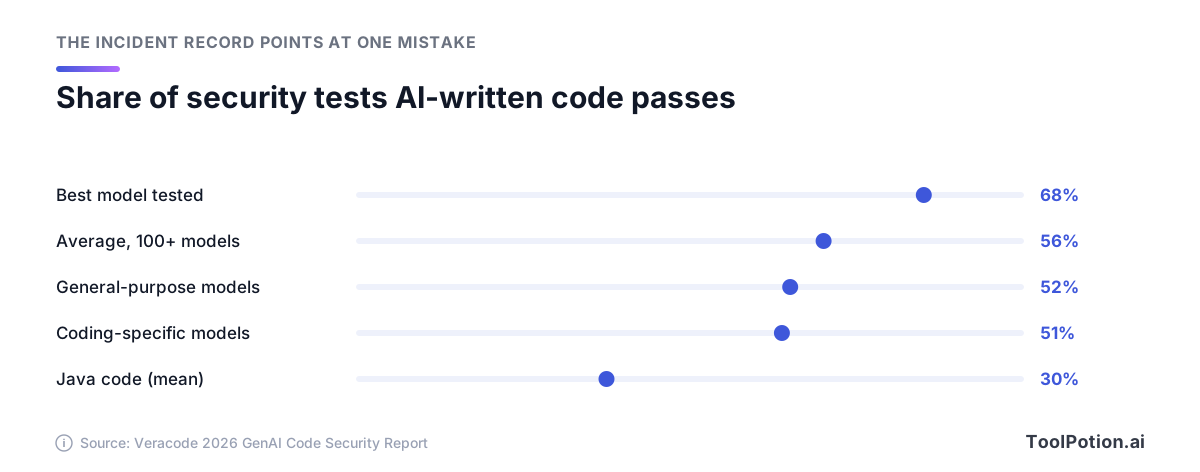
Even the best model in Veracode's 2026 round fails nearly one security task in three, and models built for coding do no better than general ones. A separate study by the startup Tenzai built 15 apps with five coding agents and found 69 vulnerabilities. The worst involved authorization and business logic, and classic injection bugs didn't show up at all. That matches the incidents. AI writes code that works, but it doesn't ask who should be allowed to use it unless you tell it to.
Row-level security in plain English
Apps built this way often talk to the database straight from the browser, using a key that is public by design. What stops a stranger from using that key to read everything is row-level security: rules inside the database that decide, row by row, who may read or change what. Lovable's built-in backend and Bolt's database both use these Postgres rules, the same model Supabase uses.
Supabase's documentation is blunt. A table in an exposed schema without RLS "is readable and writable by any role with a grant on it" (Supabase). Once it's switched on, the public key sees nothing until a policy allows it. A policy is short. This one, the kind your builder should write for an orders table, lets each signed-in user read only their own rows:
create policy "Users read their own orders"
on orders for select
to authenticated
using ( (select auth.uid()) = user_id );
You don't have to write it. You do have to confirm one exists for every table. The secret or "service role" key skips these rules entirely, so it must never sit in browser code. And anything in your front end, including a check like "is this user an admin?", can be edited by the person using it, which is why Lovable's docs say frontend code should never make security decisions.
A safe build process, step by step
This order keeps mistakes cheap: fake data until the last step, real people only at the end.
- Write a one-page spec before the first prompt. Say who uses the app, list the five or six screens, spell out what each kind of user may see and change, and name what's out of scope. Paste it in plan mode and ask the tool to poke holes in it.
- Prototype with fake data. Build the screens and flows with made-up records, keep the project private, and show it to the people who'll use it. Change direction now, while a change costs one message.
- Describe the data model in plain words. List each kind of record (customers, orders, notes) and who owns it, then ask the tool to create the tables and explain, table by table, who can read and change rows. If any answer is "anyone", fix it before moving on.
- Add sign-up and permissions in the same step, then read the rules back. Base44, for example, accepts rules written as sentences such as "Only the person who submitted an order should be able to see it."
- Test with two accounts and fake data. Sign up as Alice and as Bob. As Bob, try to open Alice's records, edit the record number in the address bar and use the app while signed out. Anything Bob reaches that he shouldn't is a bug, whatever the code looks like.
- Run the security pass. Use the built-in scan, fix every critical finding, then work through the checklist in the next section. Bolt's full audit costs no tokens when run from the Publish menu. If the app holds customers' personal data, this is where an engineer reviews it.
- Launch small, with limits. Invite a handful of real users first, set spend limits, confirm that backups and rollback work, and delete the fake accounts.
Not sure which rung your idea sits on? The tree below gets you an answer in three questions or fewer.
If the tree sends you to an engineer, the prototype isn't wasted. A working mock-up plus a spec is the clearest brief a developer can get.
The pre-launch security checklist
Run this before anyone outside your test accounts gets a link. None of it needs you to read code. Each item is a setting to look at, a scan to run or a test to do.
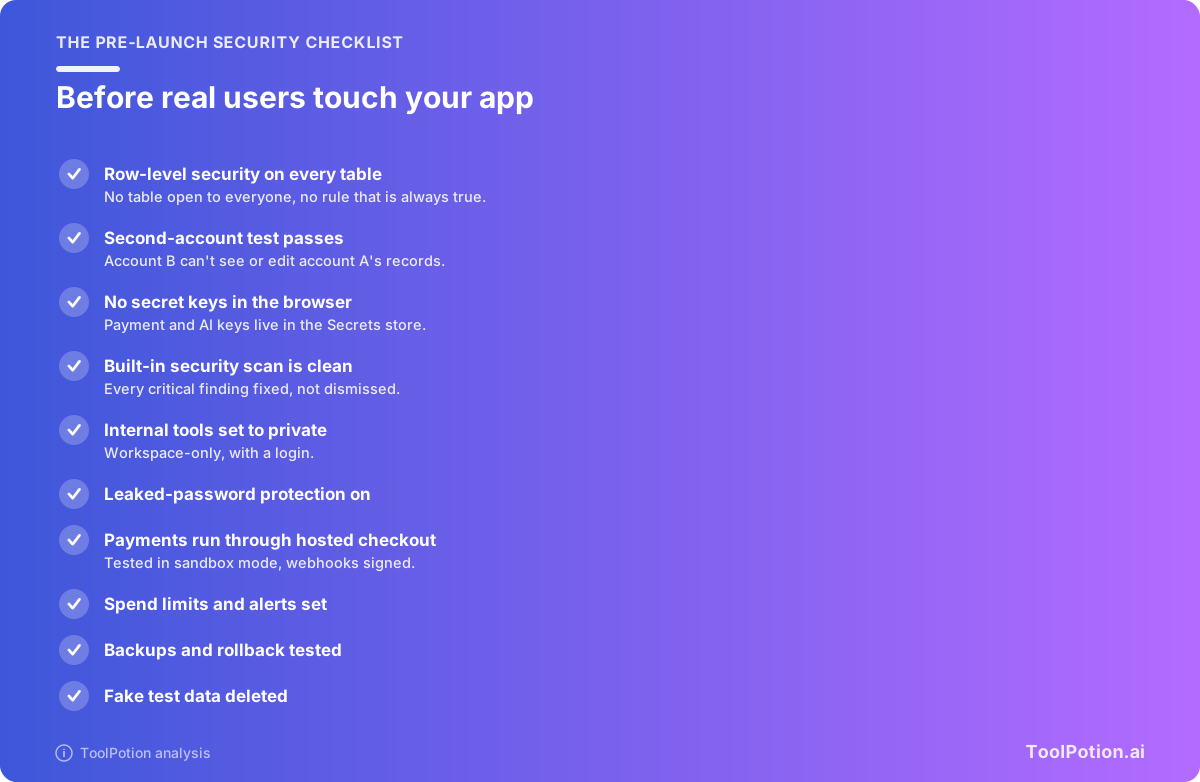
Two items do most of the work. Row-level security on every table is checked in your builder's database or security view, and Bolt flags rules that are "always true", meaning they let everyone in. The second-account test catches what scanners miss, like the backwards access check in the Lovable app above.
The rest are quick. Bolt turns leaked-password protection on by default, and Lovable's pre-publish scan flags it when it's off. In Lovable, anything named with a VITE_ prefix ends up in the browser, so a secret key must never carry it.
Scans have limits, and the vendors say so. Lovable's documentation says its tools "cannot guarantee complete security" and suggests a professional review for apps that handle sensitive data. Base44's docs are shorter: you are responsible for your app's security settings.
Handing the project to a developer
A vibe-coded app that works will need an engineer sooner or later, to review it or to own it. Plan the handover from day one.
Connect a GitHub repository early. Lovable's two-way sync works on every plan, and a developer can clone the repository and keep working in their own editor. Base44's two-way sync starts on its Builder plan. In v0 a connected repository becomes the source of truth, and v0 pushes its changes to a working branch rather than straight onto the branch it started from. Bolt syncs commits to GitHub as well.
Know what the code leaves behind. Lovable's docs say neither Git sync nor a code download includes the data inside your database, and its guide to hosting elsewhere has you move storage files by hand. Base44 says nothing is locked to its platform and that GitHub sync exports the full source. Its developer docs also describe an SDK that exported projects use to reach Base44's own services for data and backend functions. Our reading, not Base44's claim: a full move off Base44 may mean replacing that layer.
Give the developer a short handover pack:
- The spec, with every screen and who may use it.
- Access to the repository and to the builder project.
- A plain-English list of each table and who should be able to read and change it.
- The integrations you added and the names of the secrets they use, never the values themselves in chat or email.
- Known bugs, any odd workarounds you prompted in, and what the project has cost in credits so far.
Ask for a security review before new features: access rules, server-side functions and where secrets live. Most developers will open the repository in a coding tool such as Cursor or Claude Code. Our coding assistants roundup and AI coding assistants vs agent builders explain how those tools differ from app builders, and the AI coding assistants board ranks the field.
Frequently asked questions
Do I own the code a vibe-coding tool writes?
Lovable, Base44, Bolt and v0 all sync code to a GitHub repository you control, Base44 from its Builder plan. Owning the code isn't the same as owning the running app, though. Your data, stored files and backend services can stay on the platform until someone migrates them.
Which vibe-coding tool is cheapest to start with?
All five have a free tier. Lovable gives free users 5 build credits a day, capped at 30 a month, and Replit's Free Mode runs on its free and paid individual plans, with limits set by the plan. Among paid plans, Base44's Starter is listed at $16 a month billed annually and Replit Core at $20 a month.
Can I take payments in a vibe-coded app?
Yes, through hosted checkout. Lovable's Stripe integration opens Stripe Checkout and stores your secret key as a backend secret, not in the app's code. Test with sandbox keys and Stripe's test card first. Usage billing, payouts to other users and billing for multi-company accounts are engineer territory.
Can the AI check its own code for security?
Partly. Built-in scans catch common problems such as missing access rules, exposed keys and vulnerable packages. But the vendors say scans can't guarantee security, and the app that leaked 18,697 records sat on a platform offering a free pre-publish scan. Treat the scan as a floor, not a sign-off.
What happened to Firebase Studio?
Google is shutting it down. It no longer creates new workspaces, it closes in 2027, and Google tells users they can migrate existing workspaces to Google AI Studio or Antigravity. Firebase services such as Firestore and Authentication carry on as before.