Your phone already has AI watching for scams, and most of it takes about five minutes to switch on. Android users get on-device scam alerts in Google Messages and optional ones for calls, while iPhone users get call screening and filtering that stops unknown numbers from ever ringing through.
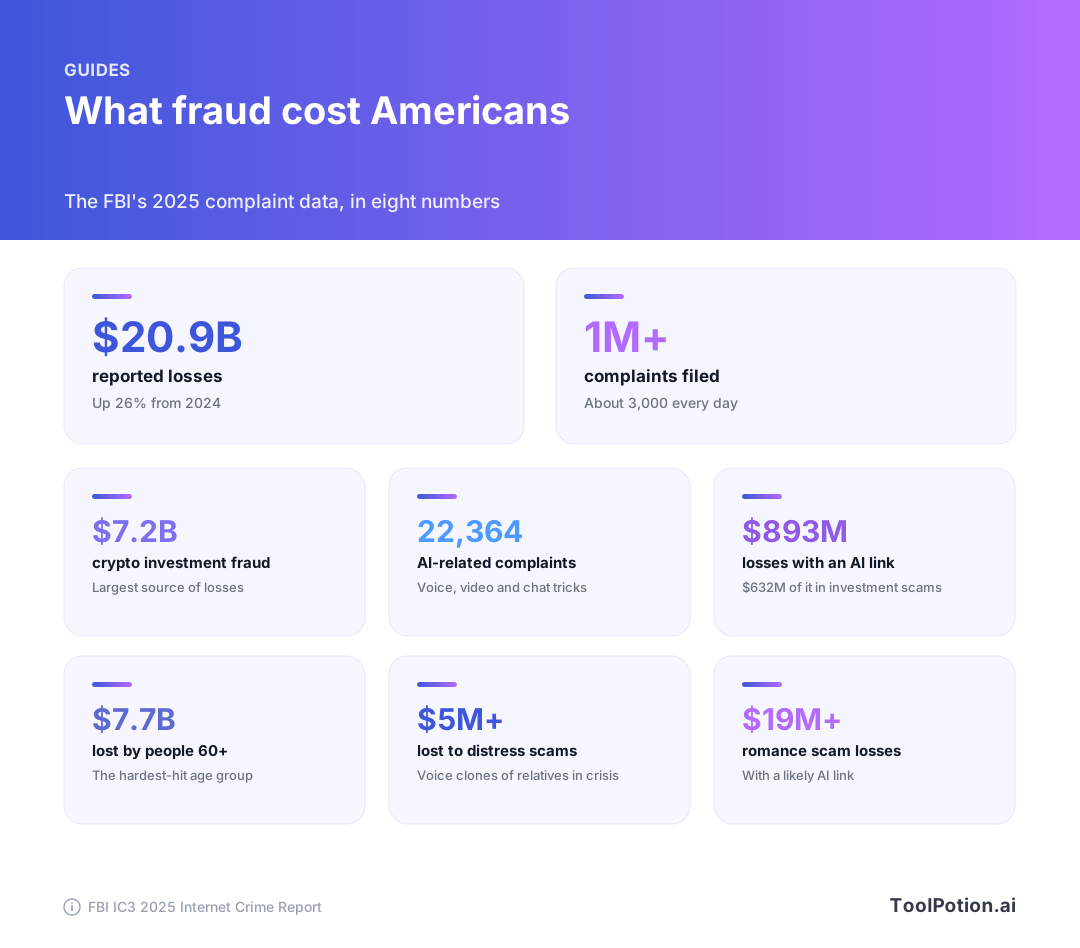
The timing matters. The FBI's 2025 complaint data put reported losses above $20 billion, and it counted more than 22,000 complaints that mentioned AI, with over $893 million in losses (FBI IC3 2025 report). Scammers use cloned voices, fake video calls and chatbots that never get tired. The defenses are free, built in and mostly ignored.
This guide covers what each platform gives you, the exact settings to flip, what the scams look like in 2026, and the low-tech habit that beats all of it. Near the middle there's a scorer that grades your own setup in about a minute.
What AI scams look like in 2026
The FBI's own taxonomy is a good place to start. Its warning on generative AI fraud lists four weapons: AI-written text, AI images, cloned audio and AI video (FBI IC3). Each one fixes a weakness that used to give scammers away. Bad grammar is gone. Fake profile photos look real. A clip of someone's voice is enough to impersonate them.
Voice cloning is the one that scares families, and the FTC raised the alarm early. It warned that a scammer needs only a short audio clip, often lifted from something posted online, to make a call that sounds like your child or grandchild in trouble (FTC). Cloning tools are easy to find. Apps such as AnyVoice advertise free cloning from a short sample, which is fine for narrators and dubbing but shows how low the bar sits.
The IC3 report calls these "distress" scams. Victims reported more than $5 million in losses to them in 2025, and the FBI says the scam is evolving to mimic other relatives and close friends in different emergencies (FBI IC3 2025 report).
Deepfake video calls
Video is catching up. The FBI says scammers generate videos for real-time chats with supposed executives or law enforcement officers, and send clips privately to "prove" the contact is a real person (FBI IC3). In 2026 it warned about fake FBI videos promoting a spoofed complaint site, aimed at people who had already lost money (FBI IC3).
The old advice to look for glitches still applies. The FBI lists distorted hands, odd teeth or eyes, wrong shadows, lag and voices that don't match the lips. It also concedes that AI-generated content can be difficult to identify. So don't rely on your eyes. Rely on a process.
Chat-based investment fraud
The costliest scam isn't a call at all. The IC3 report says cryptocurrency investment fraud was the largest source of losses to Americans in 2025, at $7.2 billion. It usually begins with a text, ad or dating app message, moves quickly to a private messaging app, then walks the victim through fake profits and loans until withdrawals trigger "taxes and fees" (FBI IC3 2025 report). The FBI says these operations are largely run by organized criminal groups in Southeast Asia, some using trafficking victims as forced labor, and that AI helps scammers hold thousands of different-looking conversations at once. Overall investment losses topped $8 billion.
That's why the best phone protection reads conversations, not just caller IDs. A scam that unfolds over two weeks of friendly texts never trips a spam list.
Android: turn on scam detection in Messages and Phone
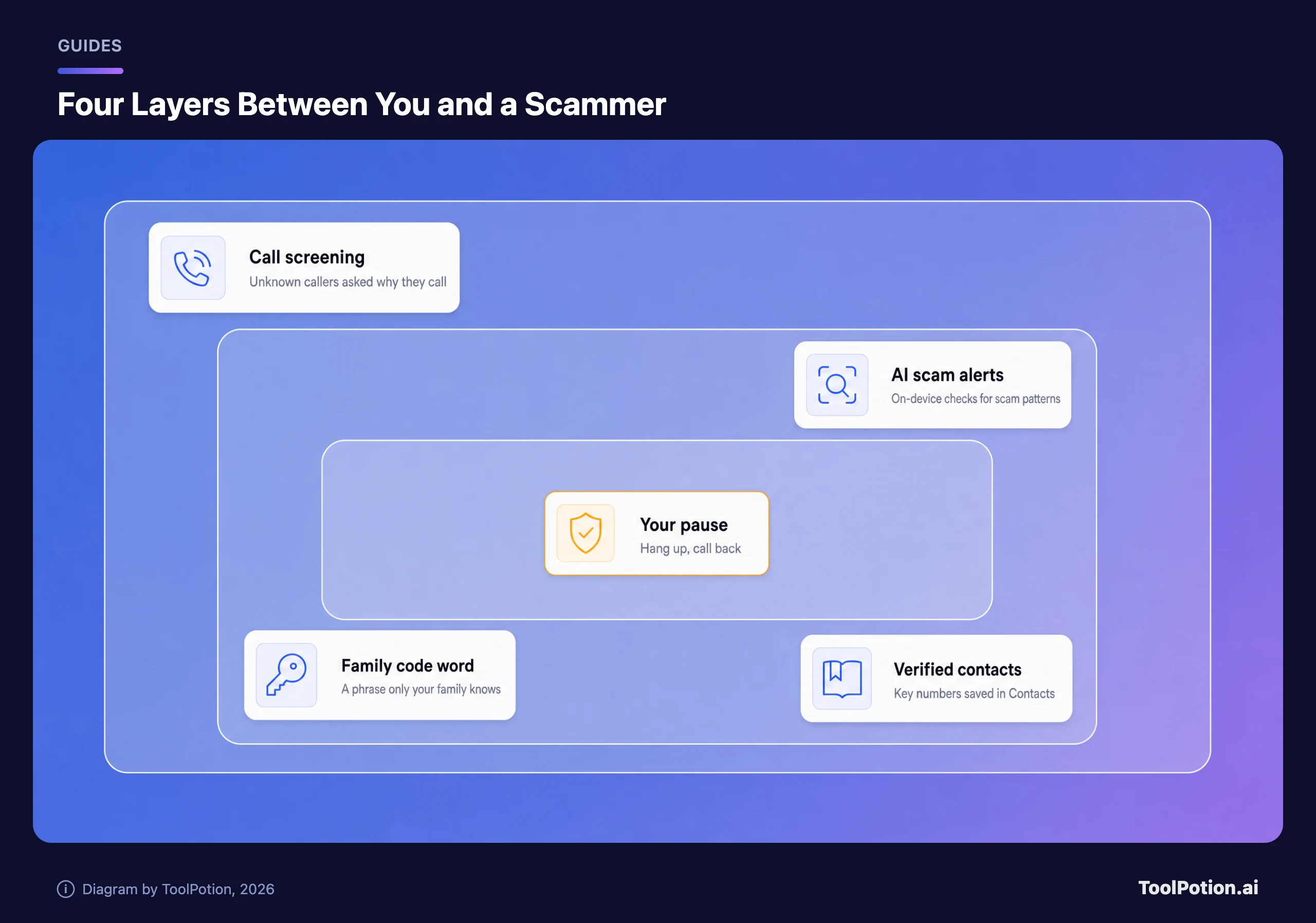
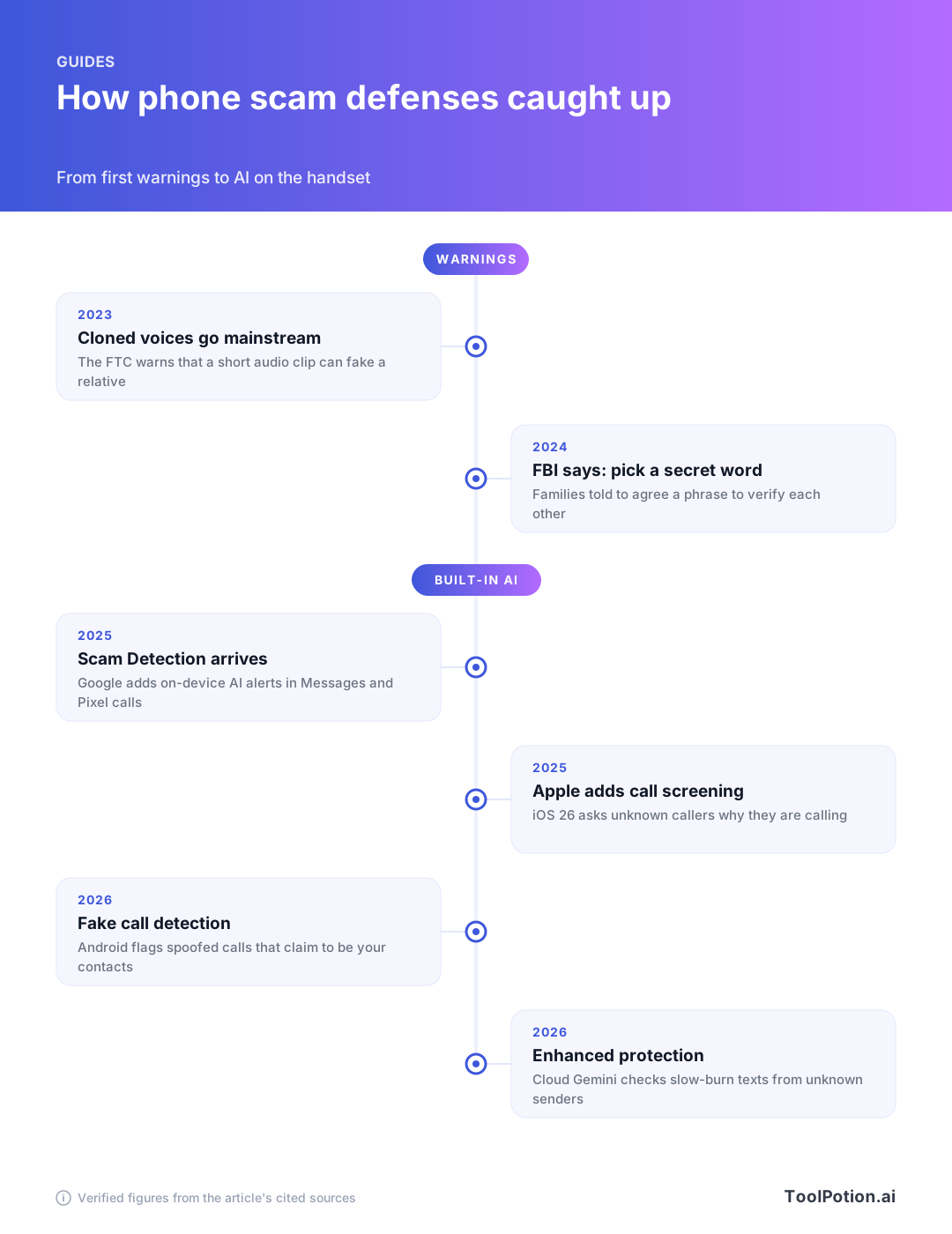
Google's Scam Detection in Messages watches for conversational scams, the slow-burn kind that start harmlessly. When the on-device AI spots a suspicious pattern in SMS, MMS or RCS, it shows a warning with options to dismiss, or report and block. Google says it's on by default as part of Spam Protection, applies only to chats with people who aren't your contacts, and keeps message processing on the device (Google).
Check that it's actually on, because carriers, phone makers and older app versions vary. Open Google Messages, go into its settings and look for Spam protection. Menu names shift between versions and devices, so use the settings search if you don't see it.
Some Android phones also scan chat notifications. Google says Scam Detection for chat messages is on by default on select devices, and you can adjust it by opening Settings, searching for Scam Detection and toggling Message scams (Android Help).
Calls are a separate switch. Google ships Scam Detection in Phone by Google switched off, because call audio is more fleeting than texts. When you turn it on, it analyzes calls from unknown numbers on the device, never during calls with your contacts, and beeps at the start and during the call so both sides know. Google says no audio or transcript is stored or sent to it (Google). To switch it on, open the Phone app, tap More, then Settings, then Scam Detection (Phone app Help).
Availability has widened. At launch it was for English-speaking Pixel 9 and newer users in the U.S. By 2026 Google described Pixel and Samsung users as able to enable call Scam Detection in the Phone by Google app (Google). If your phone uses another dialer, installing Phone by Google and making it your default is the route Google suggests.
Two newer Android protections
Fake call detection targets the voice-clone-plus-spoofing combo. When a contact calls and you both use Phone by Google, their device sends a silent confirmation over encrypted RCS. If it's missing, your phone checks with the real contact's device, and if that device says it isn't calling, you get a warning to hang up. Google says it's on by default, rolling out to Android 12 and newer, and can be switched off in the app's settings (Google).
The latest addition is an opt-in Enhanced protection mode in Google Messages, which sends conversations with unknown senders to cloud Gemini models for faster intent checks. Google says it runs in Private AI Compute with encryption, and adds Gemini Nano link checks and warnings before you tap links from unsaved numbers. It was rolling out in the coming weeks, so it may not be on your phone yet (Google, The Verge).
Google's latest post also says Android now blocks apps from quietly turning on call forwarding, which scammers use to intercept one-time passcodes. It warns you if someone talks you into typing a forwarding code, and it blanks login and payment fields during screen sharing in Chrome and WebView (Google). Those need no setup.
One caveat on the bragging. Google cites a Google-commissioned test by Leviathan Security Group that found Android's built-in protections beat iOS. That's a vendor-funded comparison, so treat it as Google's view rather than a neutral ranking (Google).
iPhone: screen and filter the calls that matter
Apple's tools are about who gets to ring your phone. In Settings, tap Apps, then Phone, and look for Screen Unknown Callers. Apple gives three choices. Never lets unsaved numbers ring as usual. Ask Reason for Calling screens them, so the caller is asked why they're calling before your phone rings. Silence sends them straight to voicemail (Apple Support).
Apple says Call Screening builds on Live Voicemail and gathers information from the caller, so you can decide whether to pick up or ignore the call ([Apple Newsroom]({APPLEN})). For most people who don't want to miss a delivery driver, Ask Reason for Calling is the sweet spot, because a real caller can answer and a script can't.
A second setting sits further down. Under Call Filtering, turn on Unknown Callers to move missed calls and voicemails from unsaved numbers into their own list, and turn on the spam filter to silence spam callers. You can view both lists with the Filter button in the Phone app (Apple Support).
Texts get a similar filter. In Messages, open the filter menu in your conversation list, choose Manage Filtering and turn on Screen Unknown Senders. Their messages land in a separate Unknown Senders folder, and until you mark a sender as known you can't open their links or see blurred images (Apple Support). Menu names vary by iOS version.
Apple lists a few limits. Calls aren't screened while you're roaming. Screening switches off for 24 hours after you call emergency services. FaceTime has its own Silence Unknown Callers toggle (Apple Support).
Because call screening depends on a number being unsaved, your contacts list is part of the defense. Save family, your doctor, your child's school and your bank's real number. Those are the callers scammers like to imitate, and a saved number is something you can call back.
Carrier and third-party apps
Check what your carrier gives you first. T-Mobile says its Scam Shield is built into the network at no extra cost (T-Mobile), and Verizon says its basic Call Filter is free, with a paid Plus tier (Verizon). Other carriers and countries differ, so look in your carrier's app or account page.
Third-party apps are optional. StopScam markets itself as an AI scam protection app that blocks scam calls and checks suspicious texts, links and files, and ScamAlert describes AI-powered analysis of potential scams. Before installing any of them, read what permissions they ask for. A scam-blocking app that wants broad access to your calls and messages is a trade you should make on purpose.
If you want to examine a suspicious photo, clip or recording, deepfake checkers exist, such as DeepfakeDetection.io and Sensity. Business-focused tools like Pindrop and BitMind sell deepfake detection to companies rather than families. For browsing, UncovAI is a Chrome extension that flags deepfake images and phishing URLs. None of these can verify who is on a live call, which is why the habits below matter more. For wider app picks, see our roundup of the best AI mobile apps for iPhone and Android in 2026 and the AI apps hub.
Set a family code word
Software can't tell you whether the crying voice on the phone is your daughter. The FBI's advice is blunt: create a secret word or phrase with your family to verify identity (FBI IC3).
Make it work with a few rules:
- Pick something nobody could guess from social media, so skip pet names, street names and team mascots.
- Use a short phrase, two or three unrelated words, that's easy to say under stress.
- Agree on it in person or on a call you made yourself, never by text.
- Tell grandparents first. They're the usual targets of distress scams, and the FBI's data shows people 60 and over lost $7.7 billion in 2025.
- Decide in advance what happens if someone can't produce it: the call ends and you ring back.
Rehearse once. It feels silly for about thirty seconds. Then it feels like a seatbelt.
Check your own setup
Tick what's true for you. The score is a rough guide built from the guidance above, and it weights the family agreements as heavily as the phone settings, because they are.
What to do during and after a scam call
The FTC's advice has barely changed since voice cloning appeared. Don't trust the voice. Call the person who supposedly contacted you, on a number you know is theirs, and verify the story. If you can't reach them, try another relative or a friend. Wire transfers, cryptocurrency, and gift card numbers read over the phone are warning signs (FTC).
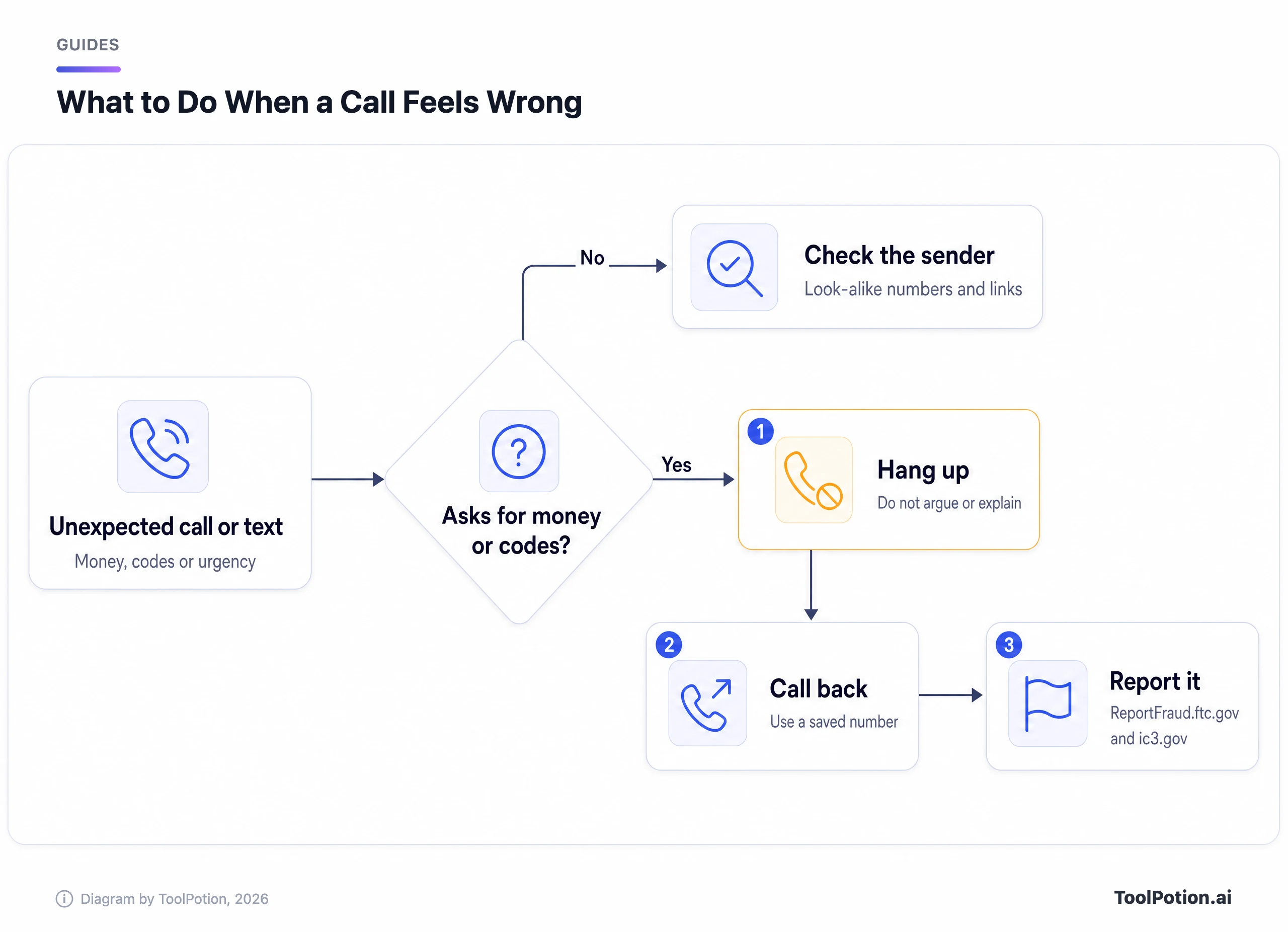
If you already paid or shared something, move quickly and in this order:
- Stop all contact with the caller. Don't argue, don't threaten, don't hang on for "one more question."
- Call your bank or card issuer using the number on your card or in the official app, and ask them to flag or reverse the transaction if they can.
- If you shared a password or a code, change that password and turn on two-step verification where you can.
- Report it at ReportFraud.ftc.gov (FTC) and to the FBI's Internet Crime Complaint Center at ic3.gov (FBI IC3). Include names, numbers, payment details, and how the contact started.
- Warn the relative who was impersonated, since the same clone may be used on others.
Be wary of the second wave. The FBI says scammers pose as FBI personnel or IC3 staff to "help" victims recover lost money. IC3 doesn't contact people through social media, phone, email or chat, and never asks for payment to recover funds. Type www.ic3.gov into the address bar yourself and skip sponsored search results (FBI IC3).
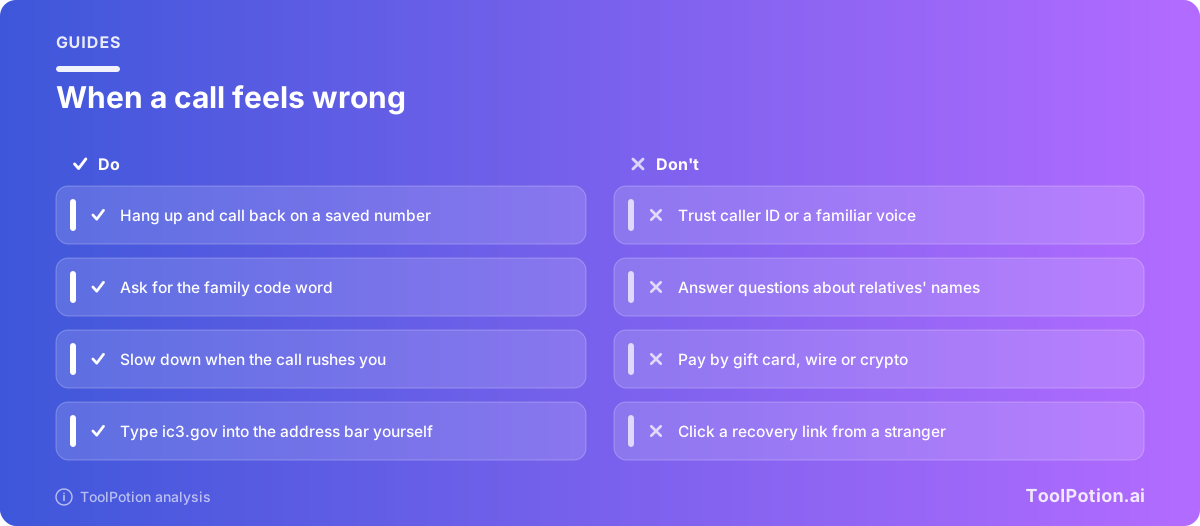
A few small habits cut the supply of raw material. The FBI suggests limiting public content of your voice and image, setting social accounts to private and limiting followers to people you know (FBI IC3).
Frequently asked questions
Does Google Messages scam detection read my texts?
Google says the processing happens on the device and applies to conversations with non-contacts. If you report a conversation, only sender details and recent messages with that sender are shared with Google and carriers (Google). The new Enhanced protection mode is opt-in and uses cloud analysis in an encrypted environment (Google).
Can my iPhone detect a cloned voice?
Apple's call settings, as documented, screen and filter unknown callers. They don't analyze whether a voice is real. If a cloned voice calls from a number in your contacts, or spoofs one, you still need the call-back habit and the code word.
Is call Scam Detection on by default on Android?
No. Google says Scam Detection in Phone by Google is off by default and beeps during calls when enabled. Text scam detection in Messages is on by default (Google).
What if a caller knows personal details about me?
That proves little. Scammers use data from breaches and social media, and the FBI notes that AI helps them create believable profiles and messages at scale (FBI IC3).
Where do I report a scam?
The FTC takes reports at ReportFraud.ftc.gov (FTC), and the FBI takes them at ic3.gov (FBI IC3).