If an AI company goes under, your chat history doesn't vanish politely. It becomes part of the estate, and a court may decide who gets it. The latest example is Character.AI, a five-year-old chatbot platform that filed for Chapter 11 and agreed to sell some assets to Disney for $20 million (TechCrunch). The platform says it will keep running during the sale, and if no bid arrives, it says it will be wound down.
You don't need to use that app to care. Every assistant you rely on keeps a pile of your writing, files and personal details on servers you don't control, and the only copy you can guarantee is the one you saved yourself. The good news is that most of the big assistants have an export button. The bad news is that each one hides it somewhere different, expires the download link fast, and leaves a few things out.
This guide covers why shutdowns and sales put data at risk, five clauses worth checking in any privacy policy, exact export routes for five major assistants, what those exports leave behind, and how to delete safely once you have your copy. Nothing here is a prediction that any of these companies is in trouble. It's a habit that costs an hour and pays off only if you ever need it.
Why a bankruptcy puts your chats on the table
When a company files for bankruptcy, its assets get sold to pay creditors. For a software business, the assets are code, brand, contracts and data. If the data includes millions of private conversations, a buyer may see it as the most valuable part of the deal.
Regulators noticed this in the Character.AI case almost immediately. New York's attorney general and 39 others, a bipartisan coalition of 40, filed in the bankruptcy to warn that Character.AI shouldn't be sold without strong protections for the people whose private conversations it holds (NY Attorney General). Letitia James put it bluntly: "now those conversations could be sold off to the highest bidder" (NY Attorney General).
The coalition's asks are a useful template for what users should want from any company. Among other things, they want any sale to include a real privacy program, clear disclosures about how data is used, limits on using private conversations for AI training or other commercial purposes without valid consent, and a chance for consumers to access and delete their information before a sale (NY Attorney General).
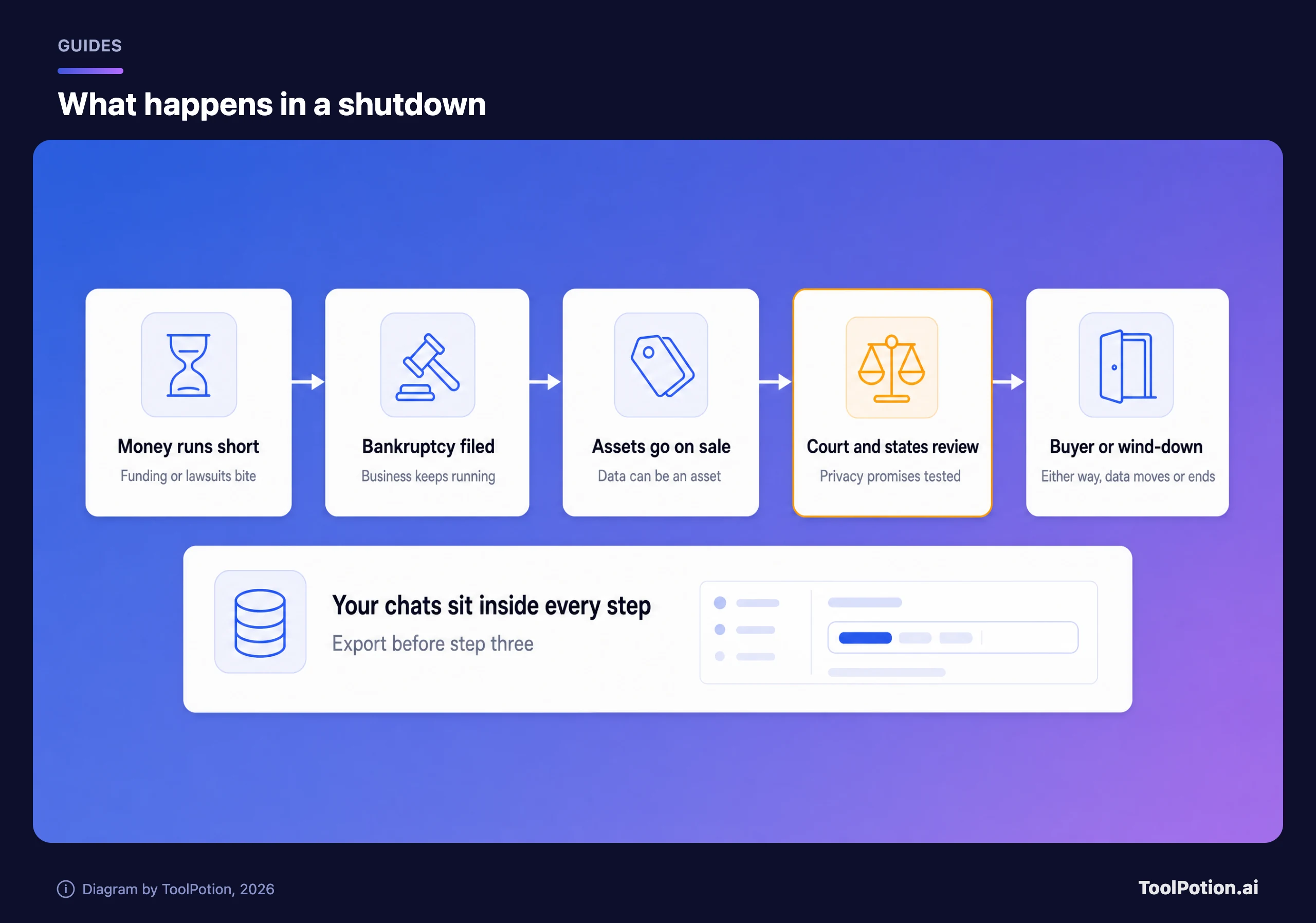
There's a precedent from outside AI. When 23andMe went bankrupt, 27 states and the District of Columbia sued in bankruptcy court, arguing the company couldn't sell customer data without each customer's express informed consent. 23andMe's spokesperson answered that the sale was "permitted under 23andMe privacy policies and applicable law" (Fox 29). Both sides pointed at the same document, the privacy policy. The judge approved the sale anyway, to a nonprofit led by co-founder Anne Wojcicki for $305 million, though California, Kentucky, Tennessee, Texas and Utah stayed opposed (AP).
US bankruptcy law gives that document real weight. Under 11 U.S.C. 363(b)(1), if a company promised in its policy not to transfer personal information to unaffiliated parties, the trustee generally can't sell it unless the sale fits that policy, or a court first appoints a consumer privacy ombudsman and approves the deal after a hearing (Cornell Law).
Most AI privacy policies don't promise silence, though. They reserve the right to transfer data in a deal. OpenAI's policy lists "Business Transfers" and names bankruptcy, saying your personal data may be "transferred to a successor or affiliate as part of that Transaction along with other assets" (OpenAI). Anthropic's privacy policy has comparable language about mergers, bankruptcy and transfers of business assets.
That language is standard, and it doesn't mean those companies are shaky. It means the policy alone won't save your data if something goes wrong. Your own copy will.
What an AI account holds
Most people think of the chat sidebar and stop there. An assistant account is usually five layers deep, and each layer has a different export story.
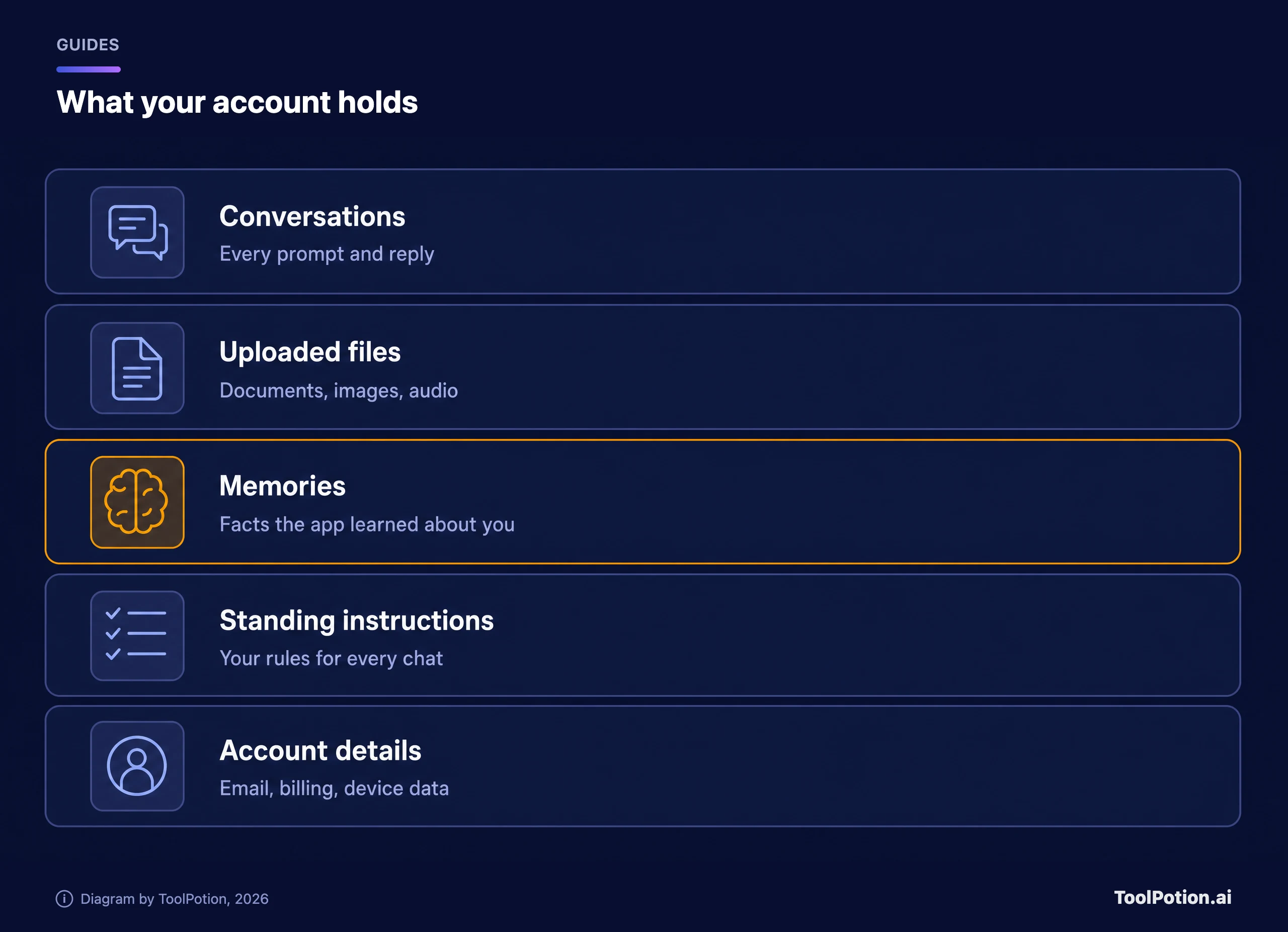
Conversations are the easy part. Uploaded files and generated media are next, and they're where exports get patchy. Memories are the odd one out, because they're not something you wrote. They're facts the assistant inferred or saved, such as your job, your dietary needs or the way you like emails phrased. OpenAI's help page says ChatGPT memory can draw on past chats, saved memories, custom instructions, files in Library and connected apps such as Gmail (OpenAI).
Standing instructions are the rules you typed into a settings box once and forgot. They're short, they took you an afternoon to get right, and they're the easiest layer to lose. Account details sit at the bottom: email, billing records and device data, the part a bankruptcy buyer might find least interesting and a thief most interesting.
Keep this list in mind through the rest of the guide, and see our AI chatbots board if you're still picking an assistant. For each assistant below, the real question is which of the five layers the official export covers.
Five clauses to check in a privacy policy
You don't need a law degree. Open the policy, search for the words below, and see what each one says. Ten minutes per service is plenty.
- Search for "merger", "bankruptcy" or "business transfer". Look for any promise that a buyer must honor the same policy, or that you'll get notice and a chance to delete first. A bare reservation of the right to transfer is what most companies write.
- Find the deletion rules. Can you delete a chat, a memory and the whole account yourself, in settings, without emailing anyone? How long until it's gone from backups?
- Find the export right. A self-serve export is better than a promise to answer a request within weeks. Check whether it covers memories and files, or only chats.
- Check what happens to chats for model training, and whether there's an opt-out. A buyer inherits the same data, and the training rules should travel with it.
- Check how changes are announced. A promise to give notice before new terms apply gives you time to export. Silence gives you none.
The scorer below turns those clauses, plus two related ones, into a quick tally. It doesn't grade any company. It grades the document you're holding, so run it on whichever policy you're reading.
A low score isn't a reason to panic or leave. It's a reason to export more often and keep anything sensitive out of that tool.
How to export from each assistant
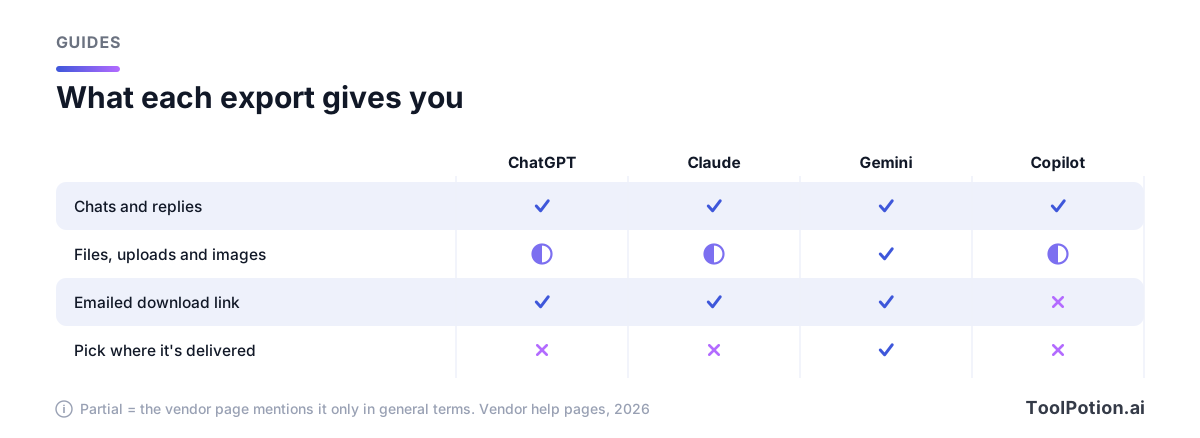
The steps below come from each vendor's own help pages and were current when this was written. Menu names change, so if a label doesn't match, search the vendor's help center for "export". The matrix shows the shape of the options for four of the five, and "partial" means the vendor's page mentions that item only in general terms ("other relevant account data", say) without promising it. Perplexity gets its own short section below.
ChatGPT
ChatGPT offers two routes. In the app, open your profile menu, choose Settings, then Data controls, and select Export under Export data. Then select Confirm export, and OpenAI sends an email or SMS when the file is ready. Exports can take up to 7 days, the download link expires 24 hours after it arrives, and you must download while signed in to the account that requested it (OpenAI Help).
The second route is OpenAI's Privacy Portal, where you choose Make a Privacy Request, then "I have a consumer ChatGPT account," then "Download my data." It's the fallback if you can't sign in. The help page says the file is a ZIP with your chat history and other relevant account data, and that self-serve export isn't available in Business, Enterprise or ChatGPT for Healthcare workspaces (OpenAI Help).
One warning from that page is worth repeating. If you're moving a personal workspace into a managed one, export first. After the personal workspace is removed, you may not be able to open an earlier link or request another.
Claude
On Claude, go to Settings, then Privacy, on the web app or Claude Desktop, and click Export data. A download link arrives by email, and it expires after 24 hours. Exports can't be started from the iOS or Android apps (Claude Help).
Two details matter. Anthropic's page says the export covers "conversation data and the user data for your account" and doesn't state a file format or mention memory or projects, so open the file and check what you got. It also says exported data can't be imported into another personal Claude account. On Team or Enterprise plans, an owner has to switch on member exports first, and uploaded file contents aren't included in a member's export.
Gemini
Google Gemini uses Google Takeout, which means your exports live outside the Gemini app. At takeout.google.com, click Deselect all. Tick Gemini to include Gems. For chats, generated media and uploads, tick My Activity, open its options, deselect everything, and tick Gemini Apps. Then pick a delivery method, either an email link or a transfer to Google Drive, Dropbox, OneDrive or Box (Google Help).
That's the most flexible setup of the five. You can export once or on a schedule (not under Advanced Protection), choose .zip or .tgz, and set a maximum archive size so big exports split into pieces. Google says delivery can take a few hours to a few days and that email links stay active for 7 days. Selecting only the top-level Gemini box and skipping My Activity is the classic mistake, because the chats live under My Activity.
Microsoft Copilot
For personal accounts, Microsoft Copilot history sits in the Microsoft privacy dashboard at account.microsoft.com/privacy. Go to Privacy, Empower your productivity, Copilot, then Your Copilot app activity history, and choose Copilot apps. Pick Export all activity history, and a CSV file downloads to your device (Microsoft Support).
That CSV is your typed prompts and the responses, which is useful and plain. If the history includes images, Microsoft points to a separate guide for viewing them. The same page says its steps cover personal Microsoft accounts only, so a work or school account follows a different article. Note too that the delete option wipes everything at once. There's no pick-and-choose.
Perplexity
Perplexity documents its export in a GDPR article, not a how-to page. Sign in, open perplexity.ai/account/details and click the Export my data button. Perplexity says you'll get an email with a download link to your data (Perplexity Help Center).
The page doesn't say what's inside the file, what format it uses or how long the link lasts, so the same advice applies as everywhere else: open it and look. Don't rely on the export for individual research threads you'd hate to lose. Copy those out yourself as you go.
If your assistant isn't on this list, the same pattern probably applies. Look for a data or privacy section in settings, then for a request form in the privacy policy. If neither exists, that tells you something about the company too.
What an export won't give you
Exports are snapshots, not mirrors. They don't update, they don't undo deletions, and they often skip things that feel like part of your account. OpenAI's own page says an export cannot restore chats that have already been deleted (OpenAI Help).
Memories are the biggest gap. None of the help pages quoted above says its export includes saved memories as a separate file. OpenAI's memory page shows you where to view and manage them (Settings, Personalization, Memory) and lets you ask ChatGPT what it remembers about you (OpenAI Help). So do that, and paste the answer into a text file. It's a manual step, but it's the only way to be sure.
Custom instructions have the same problem. They're short enough to copy by hand, so copy them. Do the same for any Projects, Gems or custom assistants where you wrote a long system prompt. Those are your work product, and they're the part you can reuse in a different tool.
Then there's the clock. These links die quickly, and some exports take days.
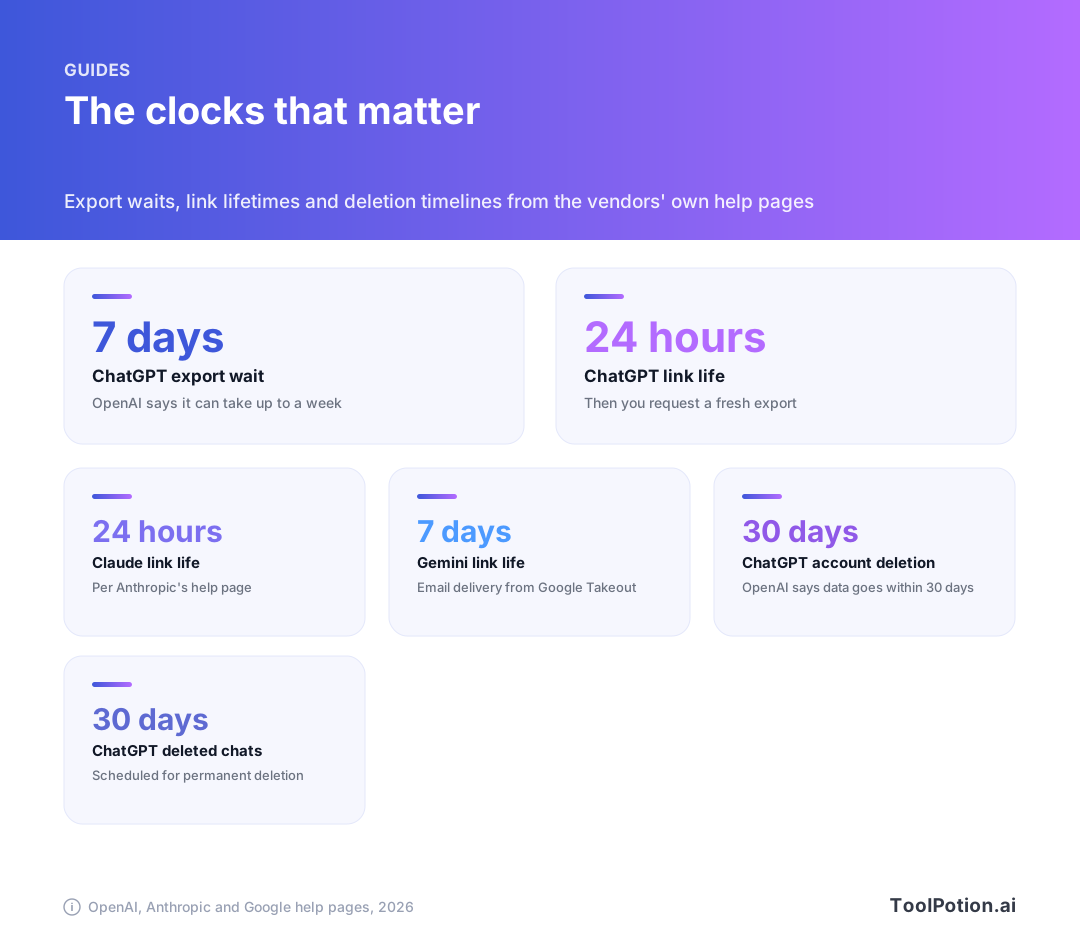
The practical rule from those numbers is to start the export when you have a few minutes, then set a reminder for the day it should arrive. A link that expires in 24 hours is easy to miss if the email lands in spam.
Build an archive you can reopen
A ZIP in your downloads folder isn't an archive. In a year you won't remember which account it came from, and the file may not open without a tool you no longer have. A little structure fixes that.
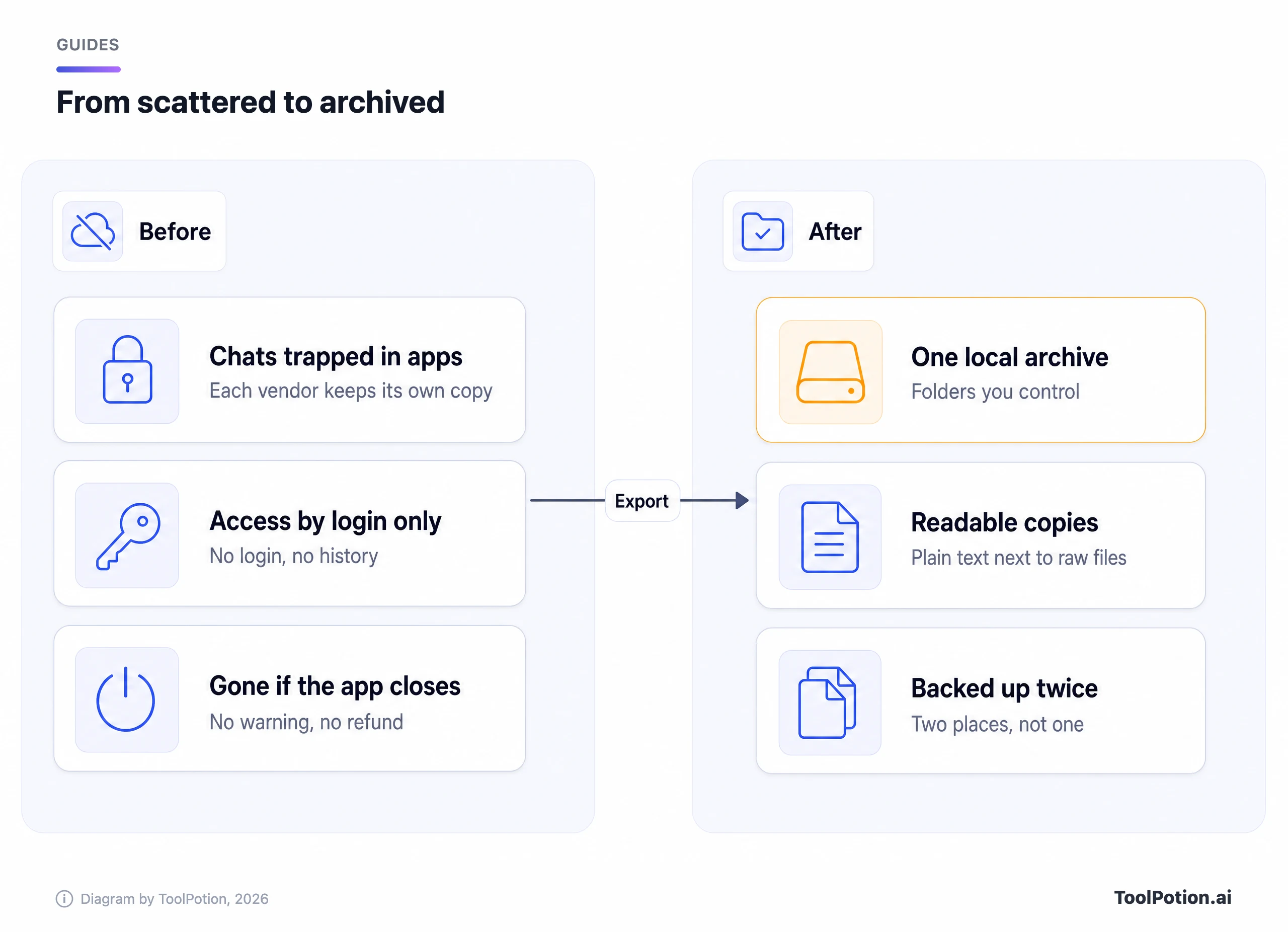
- Make one folder per service, and name each export with the date, such as chatgpt-2026-export.zip. Keep the original file untouched.
- Unzip a copy next to it and open it. Confirm the conversations you care about are there. This is the step people skip, and it's the only one that proves the export worked.
- Make a readable copy of anything important. Chats often come as JSON or HTML, which is fine for machines and miserable for people. Paste your best conversations into plain text or Markdown notes, or use a converter.
- Write down your memories and custom instructions in a single notes file. Date it. This is the file you'll use to set up the next assistant.
- Back up the folder in two places, such as an external drive and a cloud folder you control. Encrypt anything sensitive.
Plain text outlives every app. A Markdown file opens in anything, and note apps like Obsidian and Notion can index a folder of them. If you already live in Obsidian, the Claude to Obsidian Export browser extension is one way to save individual Claude chats as notes.
About re-importing. There's no universal import format between assistants. Anthropic's page says personal Claude exports can't be imported into another personal Claude account, and none of the other help pages quoted here describes a way to re-import an export into the same assistant. The realistic route is manual. Paste your instructions into the new tool's settings and give it your memory notes as a first message. Treat your archive as a reference library, not a restore point.
When you're comparing replacement tools, our AI chatbots board and the top AI chatbots guide are a decent place to start. Check each shortlisted tool's export page before you move in, not after.
Delete after you've checked the export
Exporting protects you from losing data. Deleting protects you from the company keeping it. Do them in that order, and only after you've opened the file.
Deletion is cleaner than it sounds, but it isn't instant. OpenAI says a deleted chat disappears from your view immediately and is scheduled for permanent deletion within 30 days, unless it was already de-identified or must be kept for security or legal reasons (OpenAI Help). For account deletion, it says it deletes your data within 30 days, except a limited set it may retain where required or permitted by law (OpenAI Help).
A few cautions apply across vendors. Canceling a subscription isn't the same as deleting an account, and OpenAI warns that deleting your account doesn't cancel an Apple subscription, so cancel mobile subscriptions first. Google says downloading your Gemini activity doesn't delete it from Google's servers, so you'll need the separate deletion steps (Google Help). Anthropic's export page doesn't cover deletion, so find those steps in the Claude help center before you click anything.
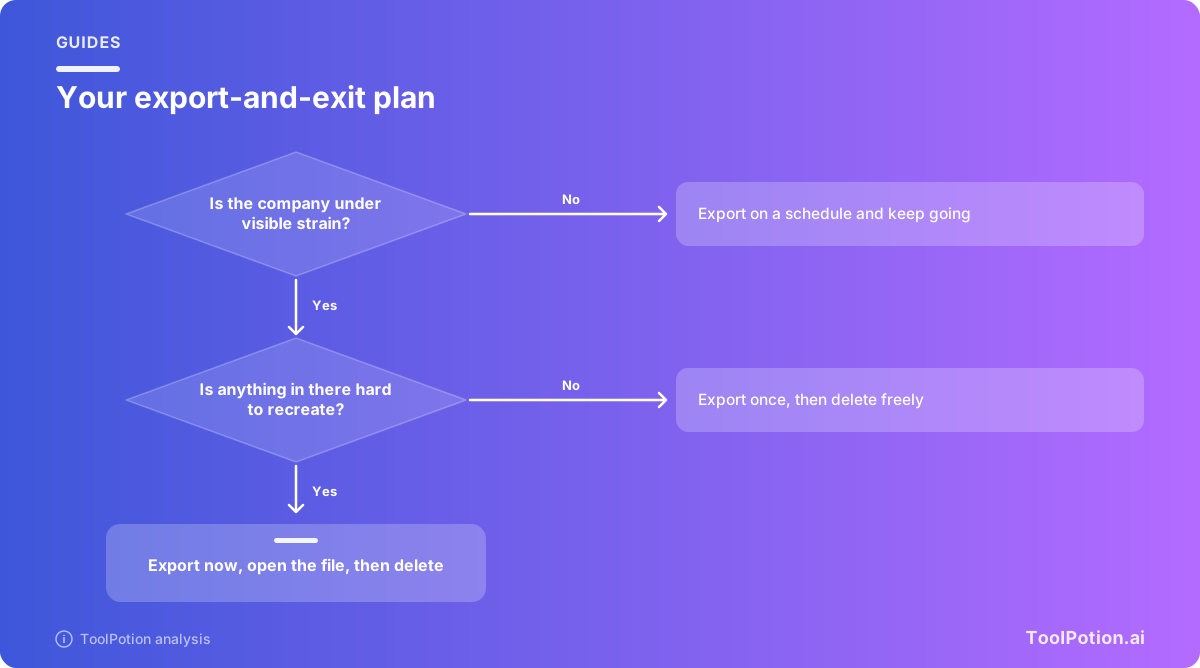
If the company is already in bankruptcy, the order changes. Export immediately, then ask for deletion as soon as you've verified the file. The attorneys general in the Character.AI case specifically asked that consumers get a chance to access and delete their information before any sale, which tells you how time-sensitive it is.
Frequently asked questions
Can a bankrupt AI company really sell my chats?
It can try. Bankruptcy law lets a trustee sell assets, and data is an asset. But if the privacy policy promised not to transfer personal information, the sale generally has to fit that promise or pass a court review with a consumer privacy ombudsman. Regulators in the 23andMe and Character.AI cases pushed for extra consent and protections, so outcomes vary.
How often should I export my data?
Pick a rhythm that matches how much you'd hate to lose it. For heavy daily use of ChatGPT or similar, quarterly is reasonable. For occasional use, once a year and any time you hear a company is in trouble. Because links expire in a day or a week, only start an export when you can download it.
Does deleting a chat delete it everywhere?
Not instantly. OpenAI says deleted chats leave your view immediately and are scheduled for permanent deletion within 30 days, with exceptions for security and legal needs. Other vendors have their own windows, so read the deletion section of each policy.
Can I move my history into a different assistant?
Not directly. No help page reviewed here describes importing a full export into another assistant. You can paste in instructions and memory notes, and use old conversations as reference. For personal Claude accounts, Anthropic says importing an export into another personal account isn't supported.
What if the service won't let me export at all?
Look for a privacy request form, which is the fallback route for privacy laws in places like the EU and California. OpenAI's Privacy Portal is an example. If there's no form either, copy the conversations you need by hand and take that as a reason to move your important work elsewhere.