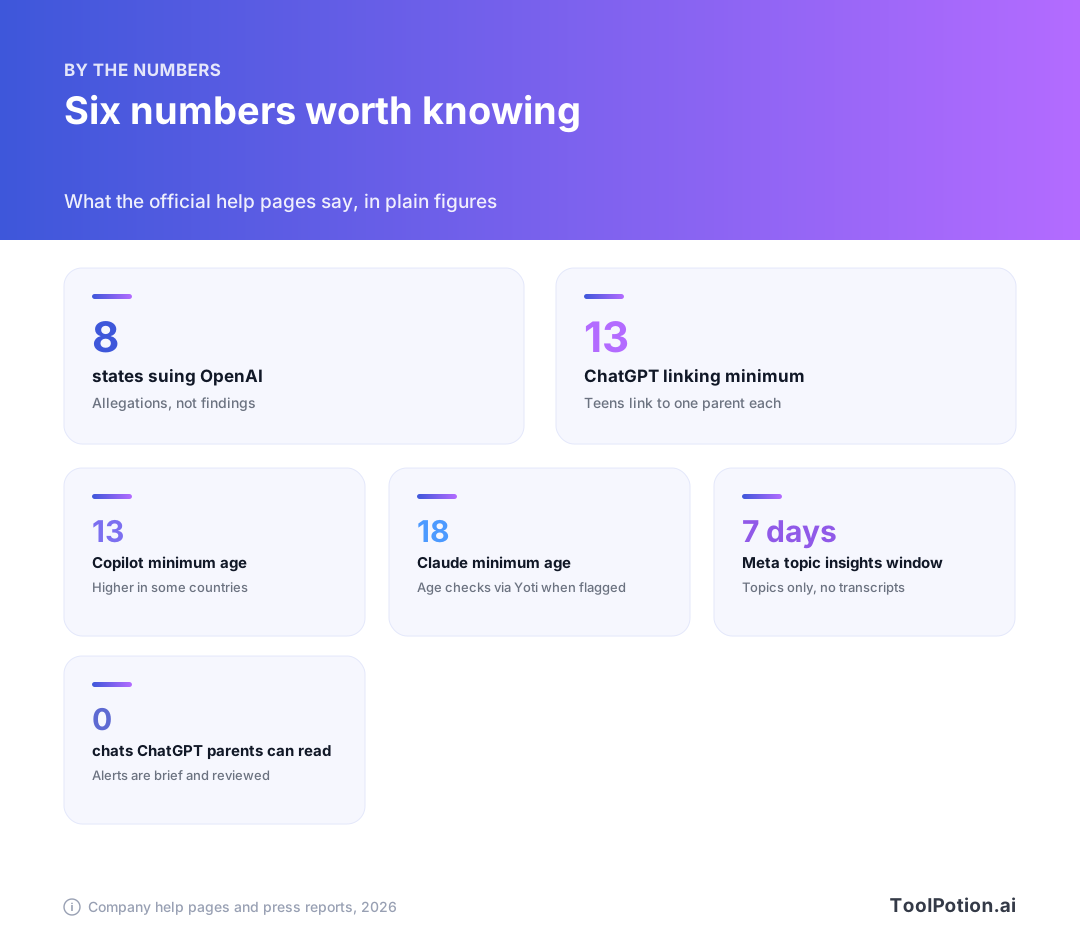
Parental controls for AI chatbots exist now, they differ a lot from app to app, and none of them lets you read your teen's chats. In 2026, eight US states sued OpenAI over how safe ChatGPT is for kids (The Verge), and that is a good reason to spend twenty minutes on something many families haven't touched.
The lawsuits are allegations, not findings. This guide covers what ChatGPT, Gemini, Meta AI, Copilot, Claude and Snapchat's My AI offer parents, based on each company's own help pages and reputable reporting. It also gives you a setup list for tonight and a few ways to start the conversation with your teen.
One note on scope. We didn't test any of these ourselves, and settings change often, so treat the menu names as a map rather than a manual.
What the eight states allege, and what OpenAI says
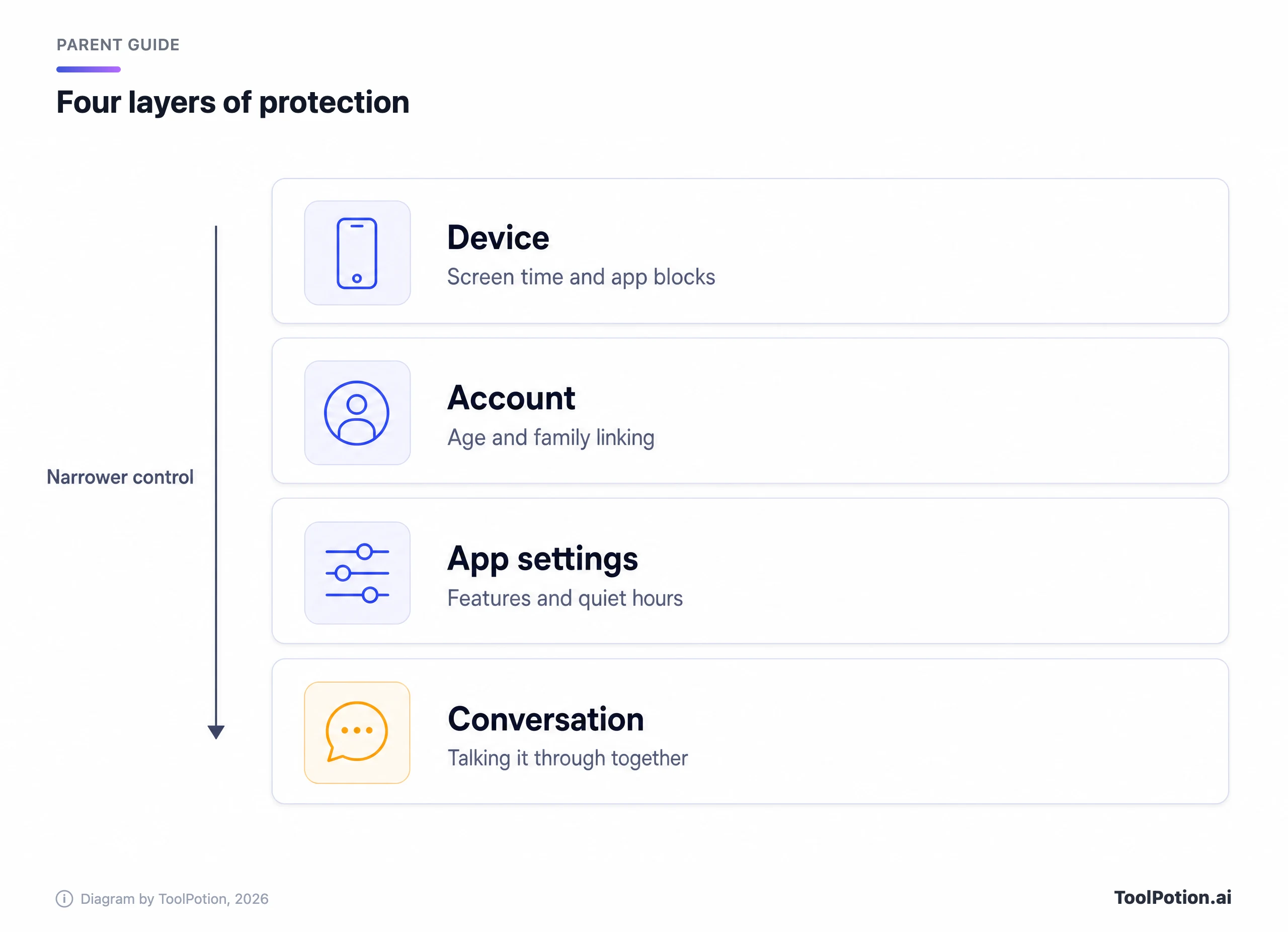
Iowa, Kansas, Nebraska, West Virginia, Arkansas, Arizona, Idaho and Montana filed separate suits. According to The Verge, they allege OpenAI put profits over safety and broke consumer protection laws by failing to warn customers about ChatGPT's dangers. The complaints point to earlier lawsuits from families who say the chatbot played a role in the deaths of loved ones. They also say OpenAI presented ChatGPT as a "safe, youth-appropriate tool that puts safety first" when it was "dangerous to vulnerable users" (The Verge).
The states further accuse the company of collecting data from minors and not doing enough to keep underage users out. They are asking courts to order civil penalties and to stop what they call misleading statements about safety. Some also want unlawfully collected personal data deleted.
OpenAI disagrees with the picture. In an emailed statement, spokesperson Drew Pusateri said the company has "built industry-leading age-specific protections" into ChatGPT. He added that no system is perfect, and that OpenAI will keep working with experts on more safeguards, citing the parental controls, break reminders and age-appropriate model protections that exist today. The company also said it wants to work with states on policies that apply to the whole AI industry, not just one company.
None of this has been tested in court. What you can act on today is simpler: the controls OpenAI documents are real, and the rest of this guide shows where they live.
Protection comes in layers, and no single layer is enough
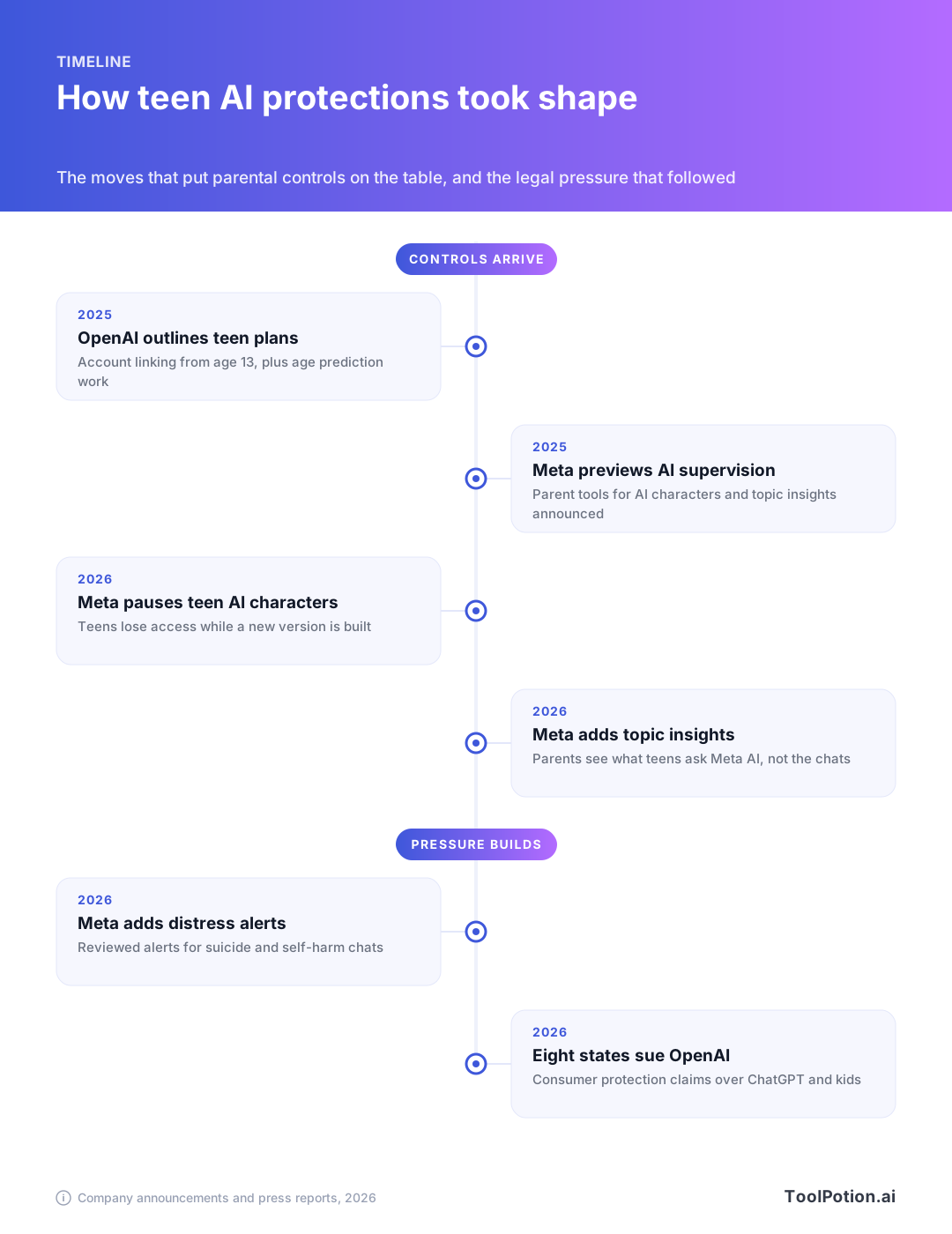
It helps to stop thinking of "the parental control" as one switch. There are four places a family can add friction, and they work best together.
The outermost layer is the device. Apple's Screen Time, Google's Family Link and Microsoft's Family Safety can block an app, cap hours or stop a website from loading. They don't know what a chatbot says, but they're the only layer that works on every app, including ones that offer no controls at all.
Next is the account. Most assistants decide how to treat someone partly by the birth date on the account, so getting that right matters more than it sounds. An account that says its owner is 25 gets adult behavior, whatever the real age.
After that come the app's own settings, which is where the features live: voice, images, memory, schedules. The innermost layer is the conversation you have with your teen, and it's the only one that still works when a kid borrows a friend's phone.
What each assistant offers
ChatGPT has the most detailed controls and a firm privacy wall
ChatGPT has the most developed parent system of the group. OpenAI said in its age prediction announcement that linking a parent account to a teen's account has a minimum age of 13 (OpenAI). A parent can link with several teens, but each teen can link to only one parent or guardian (OpenAI Help Center).
Either side can start the link. A parent opens Settings, then Parental controls, then Add family member, and enters the teen's phone number or email. The teen gets a text or email with a link and may also see a notification in the app. Once the teen accepts, the parent's name appears under Family members and the settings open up. A teen can start it too, under Invite a parent.
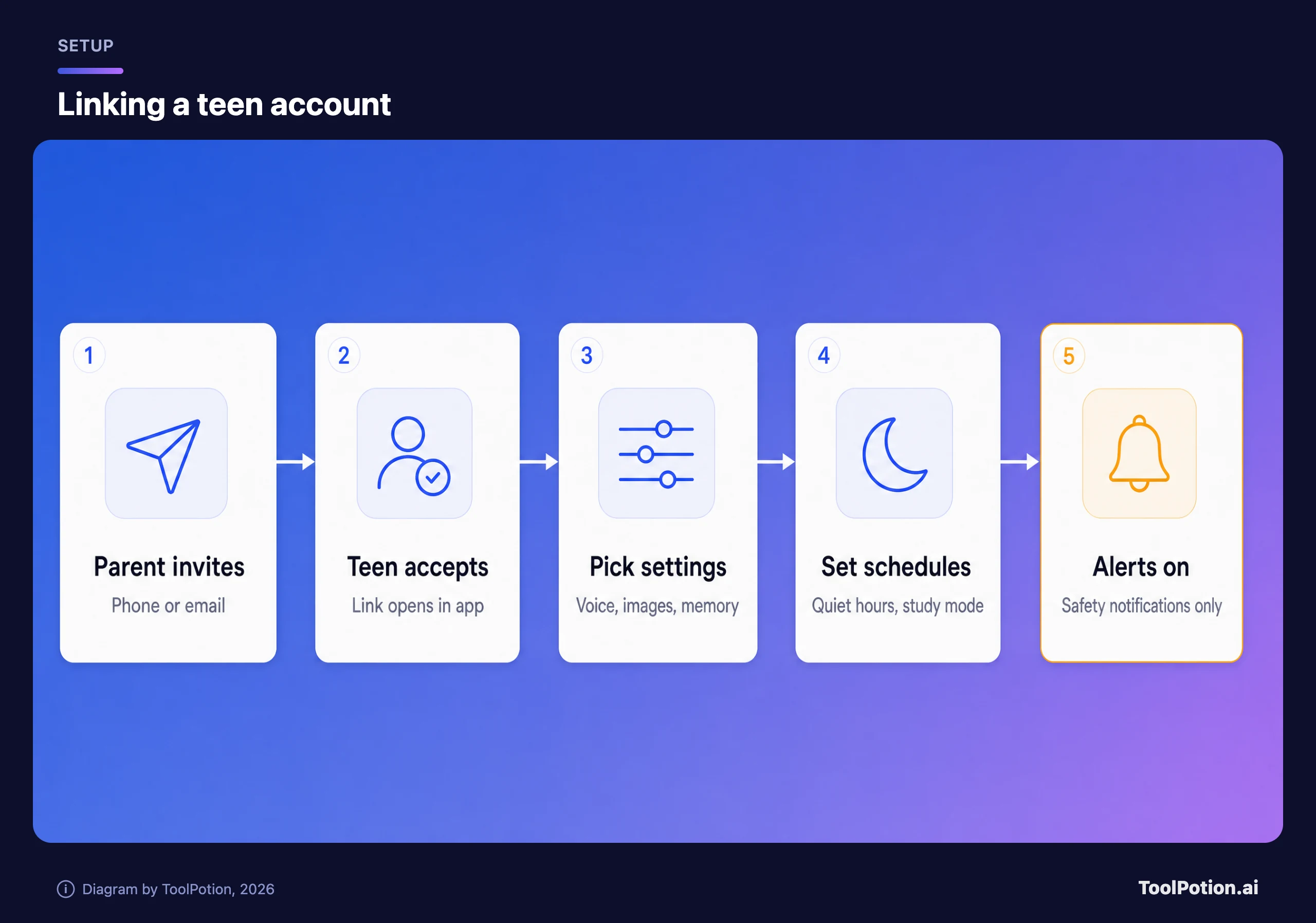
According to OpenAI's help page, linking adds safeguards that help reduce graphic content, viral challenges, sexual or romantic roleplay, violent roleplay and extreme beauty ideals. A parent can then adjust a list of switches: reduced sensitive content, whether conversations help improve the models, whether ChatGPT references saved memories, Voice Mode, image generation, and the controls for ChatGPT Work such as its cloud browser and code network access. Nearly all of them default to on, so a newly linked account isn't locked down until you go through the list.
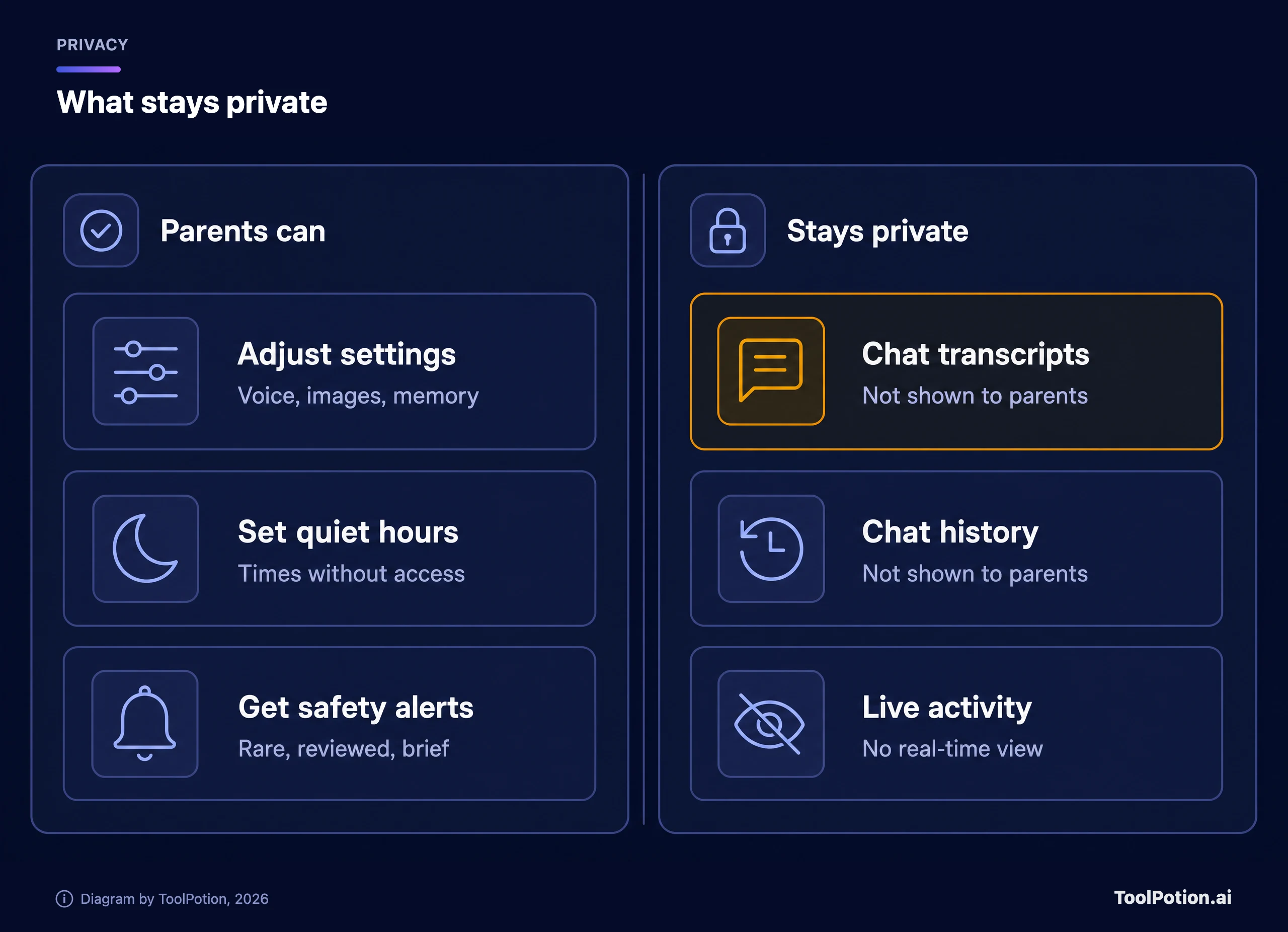
Two scheduling tools help on school nights. Quiet hours block ChatGPT entirely during times you choose, and you can add more than one block. Study mode and study hours are softer, since they only start new conversations in study mode without blocking access. Parents can also ask ChatGPT itself to change a supported setting, then approve or deny the change when it appears. Turning off "reduce sensitive content" is allowed, but OpenAI says that changes only that one safeguard. It doesn't turn the account into an adult one.
Linking doesn't give a parent access to a teen's conversations, chat history or real-time activity. The help page says so plainly.
What you do get is a short list of safety notifications. They can go out when specially trained reviewers identify a serious self-harm concern, when reviewers spot behavior that may point to disordered eating (in the main chat only), or when a teen's account is deactivated over conversations about acts of violence. A notification holds a brief description and support resources, never a transcript. OpenAI also says these alerts aren't real-time monitoring and may miss things, and that after linking it can take up to a few hours before they can be sent.
A teen can unlink at any time, and the parent is told when that happens. When ChatGPT identifies a linked account as belonging to someone 18 or older, the teen experience ends and the parental connection is removed.
Gemini has Family Link controls for kids, and little written for teens
Google's help page for Gemini and kids covers children under 13, or the applicable age in your country, who have a supervised Google account. A parent must switch Gemini on before the child can use it, and the child's first activation triggers an email to the parent (Gemini Apps Help). To manage it, open the Family Link app or familylink.google.com, pick your child, then go to Controls, Gemini, Gemini Apps and turn it on or off.
We searched Google's Gemini, Family and Education help centers for a separate parent-controls page for teens aged 13 and up and didn't find one. What Google does document is that when a child turns 13, both the child and the supervising parent get an email, and they can keep the current supervision or switch to supervision for older kids. A teen needs a parent's approval to stop supervision until 18 (Google For Families Help). So for a teen, supervision runs through Family Link rather than a Gemini-specific menu, and it's worth opening the app to see what your teen's account actually shows.
The protections are real but modest. For minors signed in to a Google account, Gemini applies extra filters, including ones meant to stop it claiming to be a person, claiming human emotions, or role-playing as a harmful character. Google is candid that the filters aren't perfect and a child may still see things a parent wouldn't want. It tells parents to explore the tool together and to remind kids that Gemini isn't a person to confide in.
Some limits to know. Google says it is rolling out access gradually, so a child might not have it even when you've enabled it. Supervised accounts can't use Gemini Apps in the European Economic Area, Switzerland or the United Kingdom. "Hey Google" and Voice Match don't work with Gemini for under-13 users, and the Keep Activity setting isn't available to them. Check what your child's account can use, including voice features such as Gemini Live.
Meta AI shows parents the most, with one catch
Meta has gone further than most on telling parents what's happening. Teen Accounts start in a 13+ content setting that also applies to Meta AI. In that default, Meta says the assistant is trained not to hold sexual or romantic conversations with teens or give recipes for alcoholic drinks (Meta).
Parents who supervise a teen's account can see the topics the teen asked Meta AI about over the past seven days, but not the conversations themselves (Meta). Topics are grouped into broad areas such as School, Entertainment, Travel and Health and Wellbeing, and a parent can tap one to see sub-categories like fitness or mental health. Meta says it still shows the topic even when Meta AI declined to answer. Supervision can be set up in the Meta AI app or in Family Center, and parents who want something tighter can move a teen from the default 13+ setting to Limited Content.
The newest addition is an alert. Meta says it now tells supervising parents when a teen's Meta AI chat suggests possible suicide or self-harm risk, and that every flagged chat is manually reviewed before an alert goes out. If a teen's intent is unclear, Meta says it will lean toward alerting, so some alerts may turn out to be false alarms. The alerts are live for Instagram supervision in the US, UK, Australia and Canada, with a global rollout promised by the end of the year (Meta). Read one as a nudge to check in, not a verdict.
The catch is AI characters. Meta announced it would let parents switch off one-on-one chats with characters or block specific ones (Meta). It then said it was temporarily pausing teen access to existing AI characters while it builds a new version, and that the parent controls will apply to whatever comes back. Meta says its main AI assistant remains available to teens, with default age-appropriate protections.
Copilot leans on the device, not the chat
Microsoft's page says you must be at least 13 to use Microsoft Copilot with a personal Microsoft account, and the age is higher in some countries (Microsoft Support). For young people, Microsoft says Copilot doesn't personalize results, doesn't show personalized ads and doesn't use conversations to train models. Ads can still appear, based on what's being asked right then. Humans may review conversations for safety, legal, product improvement or troubleshooting reasons.
Parent controls run through Microsoft Family Safety or the settings on the device itself (Google or Apple). Microsoft's page says they can block the Copilot app or the browser version, set times when it can be used, and pick which features are available, such as image generation, voice mode, group chat or AI companions. Some of these controls may require adding the teen to a family group.
Microsoft doesn't document any view into chats, topics or alerts for parents. That makes Copilot the most hands-off of the big assistants from a visibility standpoint, though its time and feature limits suit a parent who mainly wants a school-night boundary. One caution: the page says it describes the older version of the Copilot app, and a newer app has since replaced it. Check the controls in whichever version your teen has.
Claude is adults only, so the control is the age gate
Claude is the odd one out because Anthropic doesn't offer a teen version at all. Its consumer product is only available to people over 18, you confirm that during signup, and the company says it looks for signs of someone under 18 and then disables the account (Anthropic Help Center). A flagged person can verify their age through the third party Yoti, using a selfie estimate, an ID or the Yoti app, and Anthropic says it receives only a pass or fail result.
On phones there's a second check. In some US states, new laws require app stores to share age information with developers, and Anthropic uses that to block people the store says are under 18 (Anthropic Help Center). If you run Google Family Link or Apple Family Sharing, the birth date a parent entered when creating the child's account can be what trips this. Correct ages on the account layer do real work here.
There is nothing for a parent to link, because the product isn't meant for your teen. That's a clear design choice, though not a guarantee. A determined fifteen-year-old can lie at signup, which is why the device layer and the conversation matter for every assistant, this one included.
Snapchat's My AI has controls around it, not for it
Snapchat My AI sits inside an app many teens already use daily, so it deserves a look even though it isn't a standalone assistant. Snap says My AI runs on large language models such as those from OpenAI and Google, that its answers can be wrong or misleading, and that everything shared with it is stored until the user deletes it. A user can clear that data under Settings, Privacy Controls, Clear Data, Clear My AI Data (Snapchat Support).
Parents get Snap's Family Center. A parent invites the teen, and the teen has to opt in. The parent can then see the teen's friends, who they chat with and how much time they spend in the app, plus share location and report accounts, all without seeing private conversations (Snapchat Parents). The feature list on that page doesn't mention My AI, so we can't say a parent can switch it off from there. Treat My AI as something to discuss rather than to configure.
How they compare
The table below sorts what each company documents. Click a column header to re-sort it. It only includes things we found on official pages, and "not documented" means we found nothing, not that nothing exists.
Two patterns jump out. Nobody lets parents read chats, and the tools that exist cluster around time and features, not around what the chatbot says. If you want to compare how well these assistants perform as tools, not just how they handle teens, our top AI chatbots roundup and the live AI chatbots leaderboard cover that.
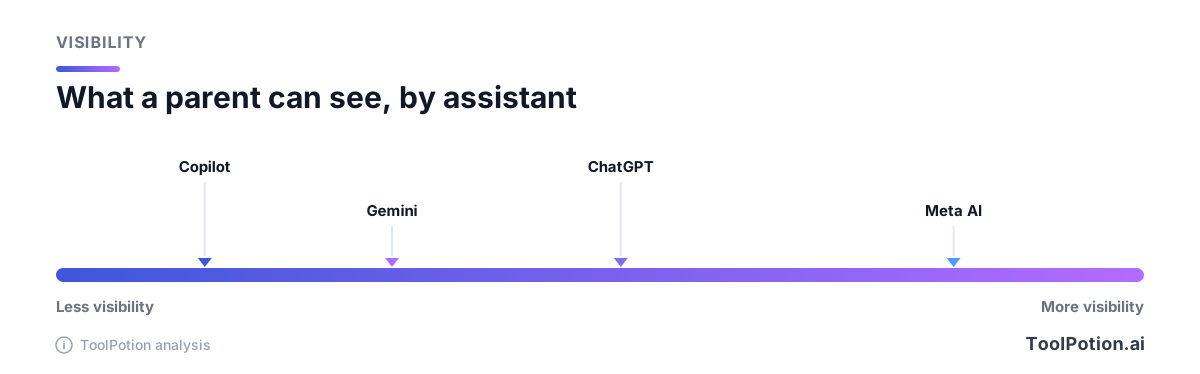
That chart is our own editorial read of documented visibility, not a safety rating. More visibility doesn't mean a safer product. It means you'll hear about more things, and you'll need a plan for them.
What no setting covers
Even with every switch flipped, there are gaps no help page can close. Filters are imperfect, and the companies that publish them say so. A teen can open a second account, use a friend's device or try a different app you've never heard of. Companion apps, built around ongoing relationships with a character, are where regulators focus. A study from Common Sense Media, reported by the Associated Press, found that more than 70 percent of teens have used AI companions and half use them regularly (AP via ABC7).
Think of all this as risk reduction, not risk removal. The conversation layer is the one that tells you something when the other three are quiet.
If you want a dedicated tool for the device layer, the directory lists a few, such as Mobicip, ScreenShanti and LockMyApps Screen Time Control. We haven't evaluated them for this guide, so read their privacy terms before installing anything on a child's phone.
Set it up tonight
Most of this takes five minutes per app, and it goes better sitting next to your teen than behind their back.
- Check the birth date on your teen's Google, Apple and Microsoft accounts. Fix it if it's wrong, because the other settings depend on it.
- Open the assistants your teen actually uses and ask them to show you. Don't guess from the app store.
- For ChatGPT, link accounts from Settings, Parental controls, then review each switch and decide on voice, images and memory.
- Set quiet hours or study hours for school nights, and say out loud what they are.
- For Gemini, open Family Link and look under Controls, Gemini for a child under 13, or see what supervision shows for an older teen. For Meta AI, turn on supervision in the Meta AI app or Family Center and look at the Insights tab.
- Use Family Safety, Screen Time or Family Link to block any assistant you've decided against, including its web address.
- Read the safety notification options so you know what an alert looks like before one arrives.
- Write down one rule you both agree on, such as no real names, school or addresses in a chat.
When you're done, run through the checklist below. It's a quick self-check, not a grade of your parenting.
Revisit the list every few months. Settings move, and your teen changes faster than any menu.
Talking with your teen about it
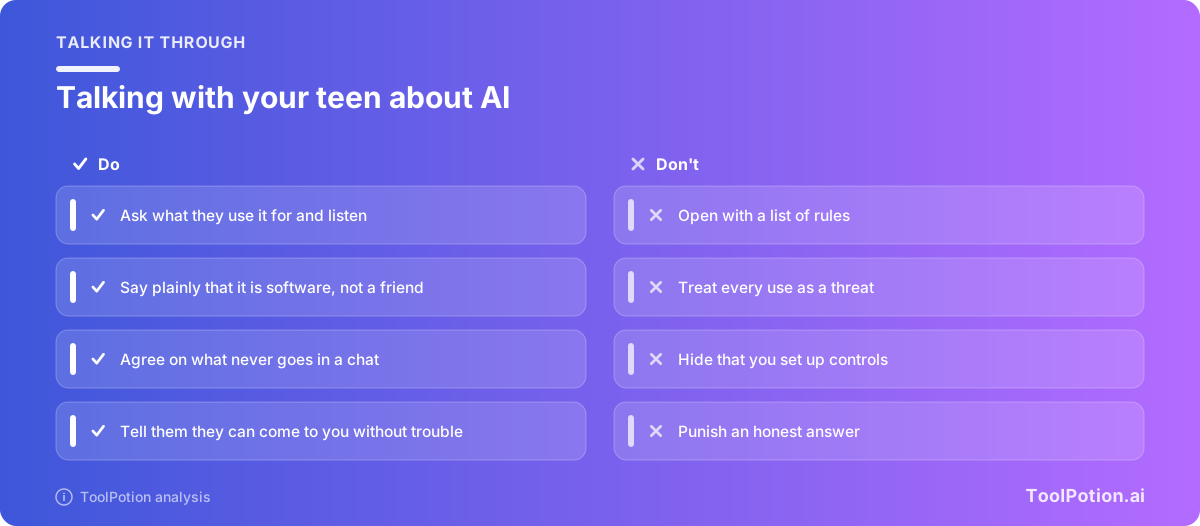
The settings buy you time. The conversation does the lasting work. Start with curiosity and ask what they use it for. You'll learn more from a teen who's happy to show you a homework trick than from one who feels audited.
Say the plain things. It's software, not a person. It can be wrong with total confidence. It isn't a place for secrets, and it can feel more caring than it is, as Google's own page notes. Tell them what you've turned on and why, and don't pretend you can see more than you can. If you get a safety alert, lead with concern instead of punishment.
Meta has published conversation starters developed with the Cyberbullying Research Center, available through Family Center, if you'd like a few ready-made questions (Meta). And if your teen ever tells you something frightening, the response is the same as with any other part of their life. Listen first, and contact a professional or local emergency services if there's immediate danger.
If study help is the main reason your family wants an assistant, the directory's AI study tools and AI tutors and homework help leaderboards list tools built for it, and the AI chatbots hub is a good place to browse more.
Frequently asked questions
Can I read my teen's ChatGPT conversations through parental controls?
No. OpenAI's help page says linking doesn't give a parent access to conversations, chat history or real-time activity. You can receive brief safety notifications, which don't include transcripts.
What happens if my teen unlinks the account?
Either side can unlink at any time. OpenAI says the parent is notified if the teen does it, and after that the parent can't manage settings or get safety notifications for that account.
Is there a parent dashboard for Claude?
No. Claude's consumer product is for adults 18 and over, and Anthropic uses age checks instead of a teen mode. If an account is flagged as possibly belonging to a minor, it's disabled until the person verifies their age.
Which assistant gives parents the most information?
Of the ones covered here, Meta AI documents the most: weekly topic insights and alerts for suicide or self-harm risk. More information isn't the same as more safety, though, and the alerts are limited to supervising parents in the regions Meta lists.
Do these controls work on every country's version of the apps?
Not always. Gemini for supervised accounts isn't available in the EEA, Switzerland or the UK according to Google, Copilot's minimum age is higher in some countries, and Meta is rolling features out region by region. Check the help page for your country.
Should I ban AI chatbots altogether?
That's your call, and some families will. A ban is hard to enforce without device blocks and can push use out of sight. A middle path of supervised accounts, clear limits and check-ins is easier to keep up.