Google Antigravity is Google's agent-first coding platform. At its center is a free desktop app where you hand tasks to AI agents and review their plans before they touch your code. Around it sit a terminal tool called agy, an AI editor, plug-ins for other IDEs and a Python SDK, all driven by the same agent underneath. If you used Gemini CLI on a personal Google account, it's also where Google moved you this year.
That move is why the name keeps coming up. At Google I/O this year the company shipped Antigravity 2.0 and a new Antigravity CLI, and about a month later it stopped serving Gemini CLI to free users and to Google AI Pro and Ultra subscribers (Google Developers Blog). Companies on Gemini Code Assist Standard or Enterprise kept the old tool, and so did developers paying through Gemini API keys. Everyone else got a closed-source replacement with weekly limits.
Our verdict: install Antigravity if you build on Gemini or Google Cloud, or if you already pay for Google AI Pro or Ultra and want Claude models on that same bill. Its desktop app also sandboxes terminal commands by default on macOS and Linux, which Claude Code and Copilot don't. Don't move if you need an open-source client or published usage numbers, and think twice if your team works mainly on Windows. Prices in this guide are US list prices read from Google's own pages.
What Google Antigravity is now
Antigravity launched last year as an IDE. Google released it in free public preview alongside Gemini 3, with a familiar AI editor plus a second window, the Agent Manager, which Google pitched as mission control for running several agents across workspaces at once. Claude Sonnet 4.5 and OpenAI's open-weight GPT-OSS were in the model menu from day one.
This year Google turned that second window into the product. Antigravity 2.0 is a standalone desktop app with no editor in it: you start agents, read what they produce and approve their work (Antigravity blog). Google says millions of developers adopted the original IDE. It still ships, but Google plans to strip the Agent Manager out of it and leave a plain AI-powered editor.
The current lineup has five parts:
- Antigravity 2.0, the desktop agent manager for macOS, Windows, Linux and Googlebook, with projects, subagents, scheduled tasks and voice input.
- Antigravity CLI, a terminal app written in Go that you start with
agy. It shares settings with the desktop app, and a long terminal session can be exported there. - Antigravity IDE, the original editor with Tab completions and inline commands.
- IDE extensions for VS Code, Visual Studio 2026, JetBrains IDEs, Zed and Xcode, added this year so you can keep the editor you already use.
- Antigravity SDK, a Python library in research preview that exposes the same agent to your own code.
Two smaller pieces round it out. Remote Control lets you drive sessions running on your own machines from any browser, with push notifications when an agent needs you. Google also exposes the agent through the Gemini API for programmatic use.
What ties all of this together is one shared core, which Google calls the agent harness. Change a permission rule in the CLI and the desktop app picks it up, because both read the same settings.
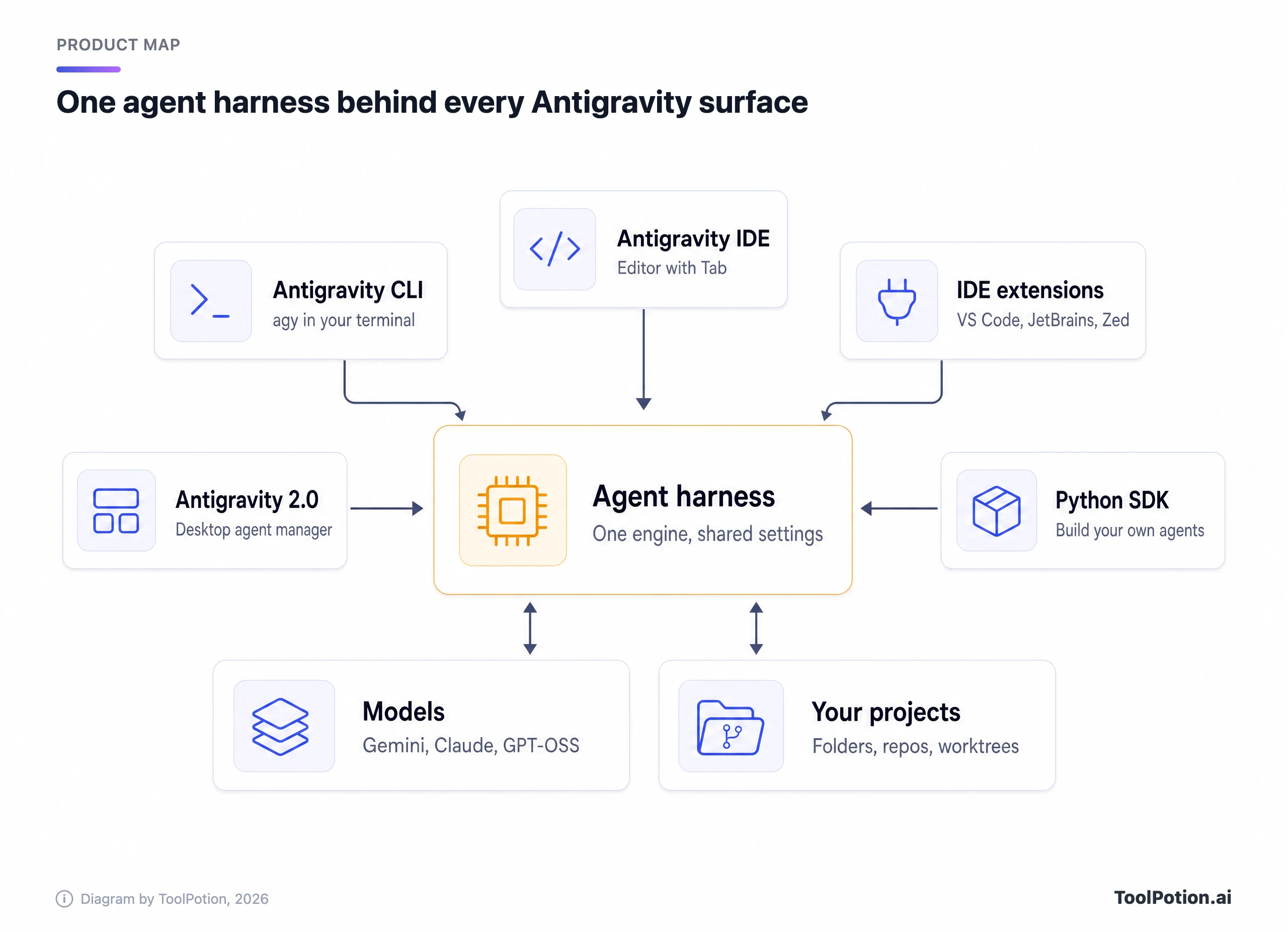
Pick the surface that fits how you work. Every surface reaches the same agent and the same models, and your sign-in decides model access and quota wherever you use it.
How Antigravity agents work
Work starts in a project: one or more local folders or repositories with their own settings and permissions. When you start a task you choose local mode, where the agent edits your folders directly, or new worktree mode, where it works in a separate Git worktree and leaves your checkout alone.
The agent reports through artifacts rather than a wall of tool calls. Those are implementation plans, code diffs, architecture diagrams, images and browser recordings. You can comment on a plan before any file changes, and the agent folds your notes in. That review step is the best habit Antigravity teaches, and it's worth keeping even once you trust the agent.
Under the hood, the main agent can spin up subagents for parallel subtasks and push slow jobs such as package installs into the background. It also runs your hooks, which are shell scripts defined in JSON that fire before or after tool and model calls. Scheduled tasks run a prompt on a cron schedule, though at launch Google fixed those runs to Gemini 3.5 Flash, so you can't pick a heavier model for an overnight job.
Which models you get on each plan
Gemini is the default, and new Flash models arrive fast: Gemini 3.8 Flash was Google's third Flash release in six weeks, and Gemini 3.1 Pro is on every plan. The bigger surprise is that the menu isn't Google-only.
| Model | Free and AI Plus | AI Pro | AI Ultra | Enterprise |
|---|---|---|---|---|
| Gemini 3.8, 3.7 and 3.6 Flash, Gemini 3.1 Pro | Yes | Yes | Yes | Yes |
| Claude Sonnet 5.5 and Opus 5.5 | No | Yes, not on trials | Yes | No |
| Claude Sonnet 4.6 and Opus 4.6 | Until removal | Until removal | No | No |
| GPT-OSS-120b | Until removal | Until removal | Until removal | No |
Google says the Claude 4.6 models and GPT-OSS-120b leave the menu later this year, which takes away the only Claude option on the free tier. Enterprise sign-ins get Gemini only. Image work such as UI mockups and diagrams goes to Nano Banana 2, and you can't swap it out.
What the agent can do without asking
On macOS and Linux the desktop app ships three permission presets, and the default is sensible. Under Default, terminal commands run in an OS-level sandbox (Linux namespaces, or Seatbelt on macOS) that can write to your project and temp folders, can't see ~/.ssh or .env files and has no network unless you approve a domain (Antigravity docs). Anything that needs to leave the sandbox asks first, and so do web browsing and MCP tools. Request Review turns the sandbox off and asks before every command. Turbo lets the agent run anything, anywhere on your disk.
That picture has two holes. The CLI's own settings list the sandbox as off by default, with every command going to review until you launch it with the --sandbox flag or change the setting. And Windows still runs the older permission system, where none of the presets switches the sandbox on.
What Antigravity costs in 2026
Antigravity has no price of its own. Your Google AI plan sets how much agent time you get, and the free tier is real but thin: Google's pricing page promises "basic weekly rate limits" next to unlimited Tab completions (Antigravity pricing). Paid capacity comes from the same subscriptions that cover the Gemini app.
The US price ladder looks like this, with prices from Google's subscription page (Google).
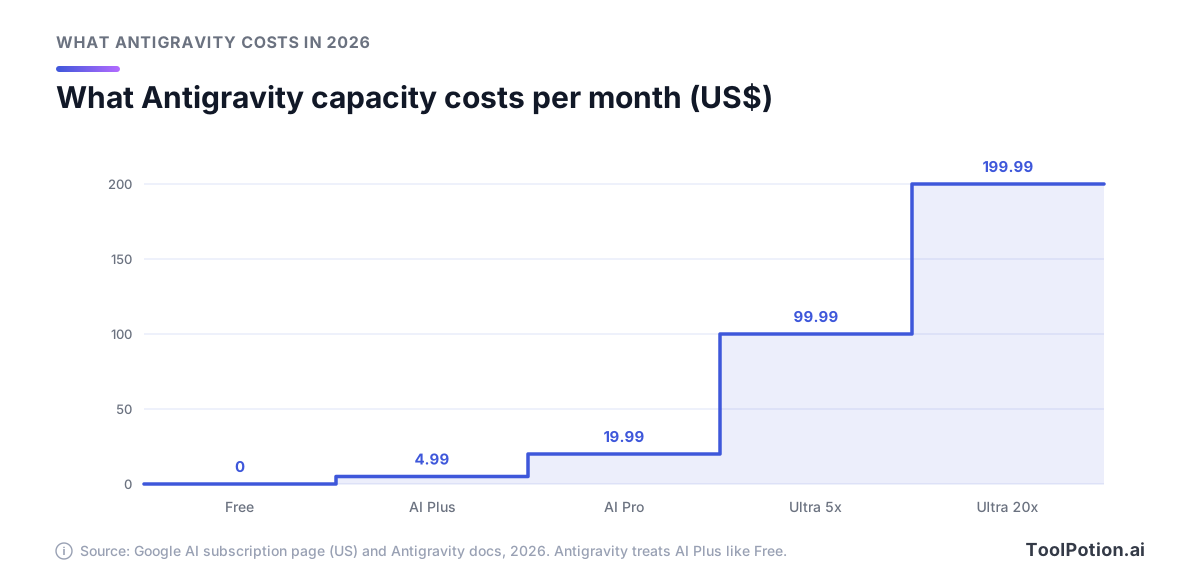
The step that matters is Pro to Ultra. Google says the $99.99 Ultra tier carries five times Pro's token budget and the $199.99 tier twenty times. The top tier cost $250 until Google cut it at I/O and added the cheaper Ultra. Google AI Plus, at $4.99, barely registers: Antigravity's own model table files it next to the free tier.
A few mechanics decide what a plan buys. Gemini Flash and Pro draw from one shared pool that's debited at API prices, so a cheap Flash model stretches further than Pro. Claude and GPT-OSS sit on a separate fixed limit, because Google has less capacity for other labs' models. Pro and Ultra refresh every five hours (Pro until it reaches a weekly cap), while free accounts refresh once a week. Run dry on Pro or Ultra and you can spend purchased AI credits at Gemini Enterprise rates, with a setting that decides whether that happens automatically or never.
What Google won't give you is a number. Google's docs say limits track "the amount of work done by the agent," so a plan buys more quick fixes than long refactors, and Google can change them to manage capacity. There's no bring-your-own-key option for extra capacity in the desktop app. The CLI is the exception: point it at a Gemini API key and it bills per token, outside your plan.
Companies buy through Google Cloud. Gemini Enterprise Standard and Plus seats start at $30 a month and now include Antigravity, and a pay-as-you-go route skips the seat fee and bills consumption. Spend caps cover both routes, and the subscription plans add central admin controls.
For individuals the order is simple. Start free, and upgrade to Pro only when the weekly limit starts cutting off real work. Ultra at $99.99 is the daily-driver plan, priced against Claude Max and the cheapest ChatGPT Pro tier, both $100. If credits, seats and token pools blur together, our guide to AI tool pricing models untangles them.
What happened to Gemini CLI
Gemini CLI was Google's open-source terminal agent, released last year under Apache-2.0. By Google's count it drew more than 100,000 GitHub stars and 6,000 merged pull requests. At I/O this year Google said it would pour that effort into Antigravity. About a month later Gemini CLI stopped answering requests from Google AI Pro and Ultra subscribers and from free users on Gemini Code Assist for individuals, and the Code Assist IDE extensions went dark for the same people (Google Developers Blog).
Which side you landed on depended on how you paid.
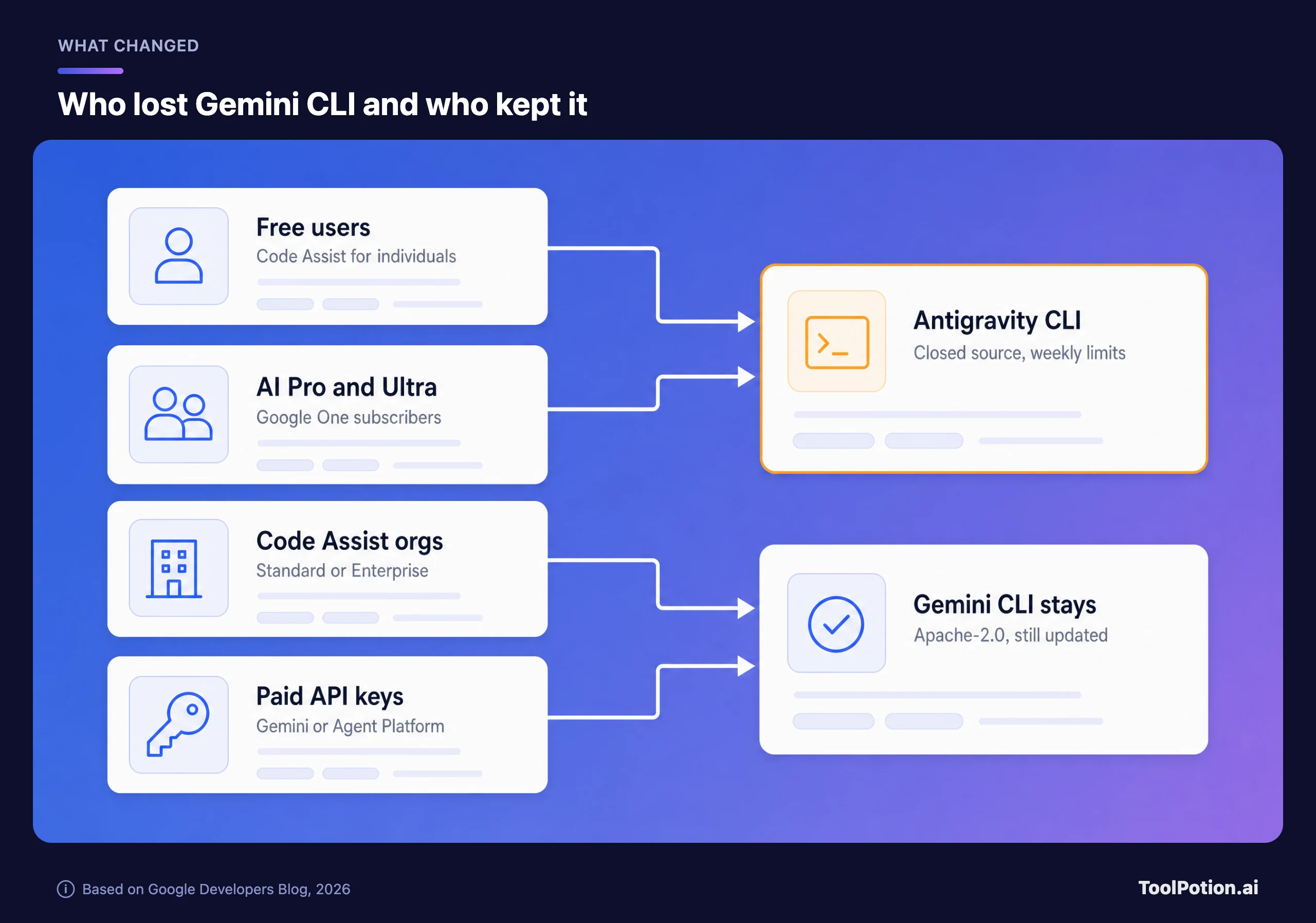
Organizations on Gemini Code Assist Standard or Enterprise kept the CLI along with model updates, and so did developers on paid Gemini or Gemini Enterprise Agent Platform API keys. The Code Assist app for GitHub stopped taking new installs and then stopped serving requests, except for companies that run it through Google Cloud.
The code didn't vanish. The repository is still Apache-2.0 and still ships releases, with v0.62.0 landing in the past week, (GitHub). Its docs site now carries a banner saying Antigravity CLI replaced it for unpaid and Google One users (Gemini CLI docs), yet the README still advertises 1,000 free requests a day on a Google sign-in.
The replacement is a different kind of product. Antigravity CLI's public repository holds a changelog, a readme, a demo GIF and a folder of examples, with no source code and no license file. Tech Times reported that contributors called the switch a bait and switch, and that users on the new CLI's issue tracker said they burned through a week's quota in a handful of requests (Tech Times). Google's side is that terminal tools now need the same backend as its other agents to coordinate several of them at once. It concedes the new CLI launched without 1:1 feature parity, though skills, hooks, subagents and extensions (now called plugins) made the move.
Antigravity vs Cursor, Claude Code, Codex and Copilot
Every big lab now sells an agent that edits files and runs commands, so the differences sit in models, money and defaults. This table sticks to facts on each vendor's own pages.
| Tool | Free option | Cheapest paid | Top individual plan | Models from |
|---|---|---|---|---|
| Antigravity | Yes, weekly limits | Google AI Pro, $19.99 | Ultra 20x, $199.99 | Google, plus Anthropic and open-weight OpenAI by plan |
| Cursor | Hobby, limited agent requests | $20 a month | Ultra, $200 | OpenAI, Anthropic, Google, SpaceXAI, Cursor |
| Claude Code | No, Claude Free excludes it | Claude Pro, $20 ($17 yearly) | Max, from $100 | Anthropic |
| Codex | Desktop app only, rolling out | Go for the app, Plus for the CLI | Pro, up to $500 | OpenAI |
| GitHub Copilot | Yes, a credit allowance, automatic model choice only | Pro, $10 | Max, $100 | OpenAI, Anthropic, Google, xAI, Microsoft |
Prices come from Cursor, Anthropic, OpenAI and GitHub. The finer differences show up in which models you can mix and how each tool protects your machine by default.
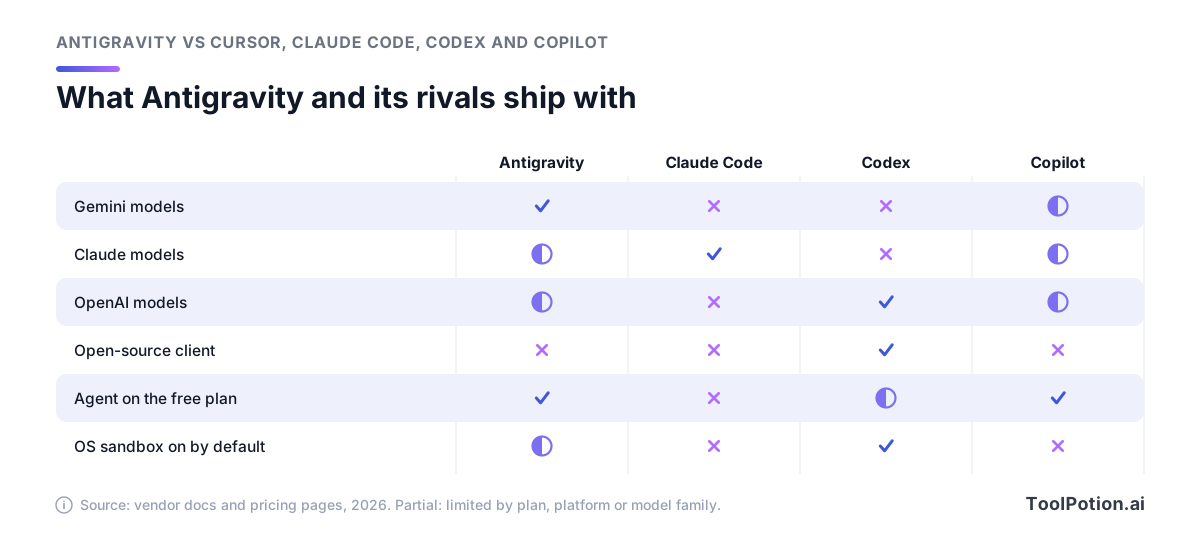
Antigravity and Cursor put Gemini and Claude under one subscription. Copilot lists models from all three labs, but GitHub's plans page gives Free automatic model selection only and Pro "a selection of models", so check which ones your plan includes. Codex alone pairs an open-source client (the openai/codex repository is Apache-2.0) with a sandbox that's on by default. Antigravity's desktop app comes close on macOS and Linux, but that default doesn't carry over to its CLI or to Windows.
Cursor is the closest match in shape: an editor, a CLI and cloud agents, with several labs' models on one bill. Choose Cursor if your day lives in an editor and you want OpenAI models next to Claude. Choose Antigravity if you'd rather run agents from a dashboard and Gemini as the default suits you.
Claude Code is the better buy if Claude is the model you want. Claude Pro at $20 includes it, it runs in the terminal, VS Code, JetBrains, a desktop app and the web, and its cloud routines keep going with your laptop shut. Reaching Claude through Google AI Pro only makes sense if you also want Gemini, since Claude sits on a separate fixed limit there.
Codex has the most consistent defaults of the group, with network access off and writes confined to the workspace in both its CLI and its IDE extension. Its free and Go tiers get only the desktop app, so the CLI starts at ChatGPT Plus or an API key. Copilot is the cheapest paid way in at $10, every plan includes Copilot CLI, and its local sandbox is opt-in through /sandbox enable and still in public preview.
For the wider field, the AI coding assistants board and the AI agents board track how these tools rank, and our AI coding assistants roundup covers editor-first options.
Privacy terms and the weak spots
What Google does with your code
On a personal account, Antigravity's terms say Google records your interactions (your data, usage data, metadata and feedback) and uses them to improve Google and Alphabet products and machine learning. Google employees and contractors may review them (Antigravity terms). You can switch collection off with the Enable Telemetry setting under Account, and request deletion by emailing [email protected]. Do that before you open a client's repository.
Business sign-ins run under different rules. Through Gemini Enterprise or a Google Cloud project, the terms your administrator signed apply, and Google says your code is never used to train its base models. On the Google Cloud route, prompts, code and telemetry aren't stored outside your private environment, and admins on eligible Gemini Enterprise subscriptions can switch on full audit logging with one toggle. Pick a Claude model on a personal plan and you also agree to Anthropic's commercial terms.
Two rules catch people out. Google treats using your Antigravity login inside third-party agents such as OpenCode or Claude Code as a terms violation that can get the account suspended, and points you to a Google AI Studio or Gemini Enterprise API key instead. The service is also limited to adults and approved countries, and Google suggests a plain Gmail address if a Workspace account won't sign in.
Where Antigravity falls short
Most of the weak spots come down to control.
- The clients are closed. You can't audit what the CLI or desktop app sends, and you can't fork them if Google changes course again, which is exactly what Gemini CLI users lived through.
- Quotas are opaque. Google publishes multipliers and refresh windows, not request counts, and keeps the right to change them.
- Windows trails the Mac. It still uses the older permission system, no preset turns the sandbox on, and file and network sandboxing reached Windows only in a recent 2.0 release.
- The standalone IDE isn't supported for enterprise deployments, so companies get the desktop app, the CLI or the extensions.
- Permission bugs happen. Version 2.18.1 fixed a flaw that let the agent modify files in .git, .env and .vscode folders without a prompt under the Default and Request Review presets. Keep auto-updates on.
- The model menu shifts under you. Free users are about to lose their only Claude models, and anything you script against a specific model can be retired within months.
Who should switch, and who shouldn't
Switch now if you used Gemini CLI on a personal account and liked it. Antigravity CLI is now the only free way to run Google's terminal agent, and the import tool does most of the work. Google Cloud shops should move too, since Antigravity runs against a GCP project with consumption billing and comes bundled with Gemini Enterprise Standard and Plus.
Pro and Ultra subscribers who want Gemini and Claude side by side get both in one agent app without a second subscription. Check the limits before you lean on it. Claude runs on its own fixed allowance, and Pro trials don't include the 5.5 models at all.
Stay put if your team requires open-source tooling or plugs one subscription into several third-party agents. Windows-heavy teams that want sandboxed defaults today should wait, and so should heavy users who budget around published limits. If you're happy in Cursor, Claude Code or Codex, the free tier costs nothing to try on a side project, but there's no reason to rip anything out.
Still unsure? This tree asks at most two questions.
Few endings ask you to spend more, because the real switching cost is the time you spend on configuration. For a broader view of where agents earn their keep, see our piece on AI agents in production.
Get started in 30 minutes
Google's docs cover setup well. These five steps get you to a reviewed first task with sensible guardrails.
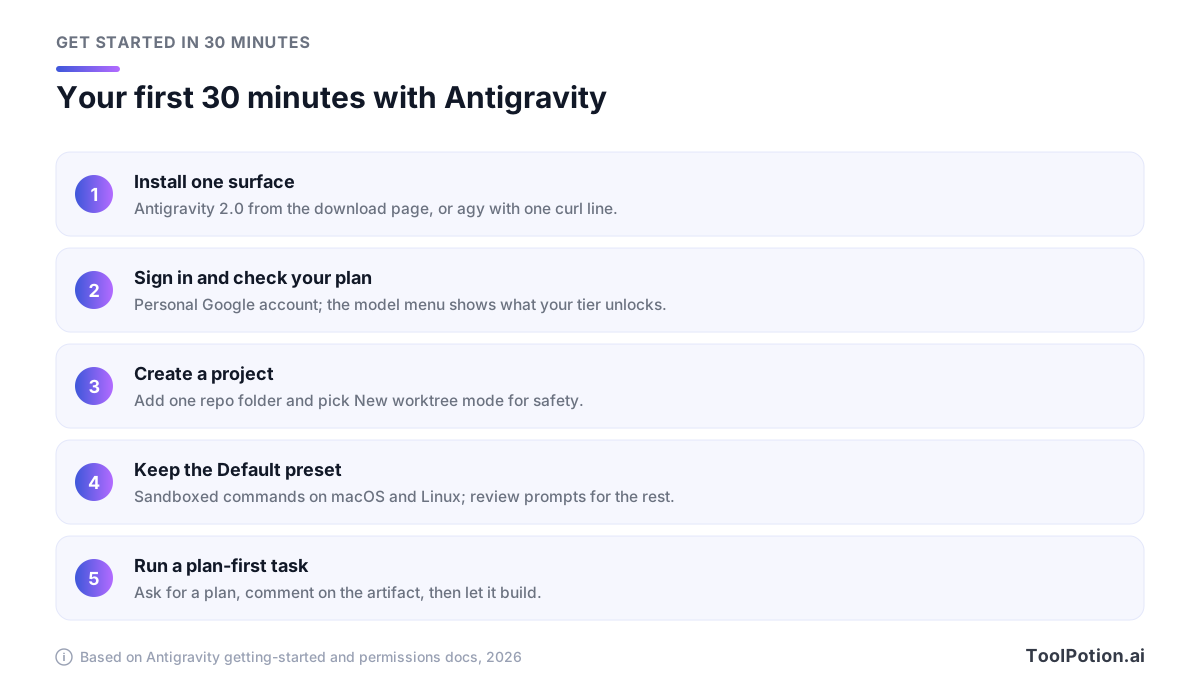
Install one surface first. The desktop app comes from antigravity.google/download and needs macOS 12 or later, 64-bit Windows 10, or Linux with glibc 2.28 (Ubuntu 20, Debian 10, Fedora 36 or newer). For the terminal, run curl -fsSL https://antigravity.google/cli/install.sh | bash on macOS or Linux, or irm https://antigravity.google/cli/install.ps1 | iex in PowerShell, then type agy inside a project folder.
Sign in with a personal Google account. The CLI keeps its token in your OS keyring, and over SSH it prints a URL you open on your local machine instead. Then open the model menu under the prompt box. What you see there is what your plan includes.
Create a project from the folder icon with a plus sign, add one repository, and start tasks in new worktree mode so the agent's edits land on a separate checkout. On macOS or Linux, leave the desktop app on the Default preset. In the CLI, add a few lines to ~/.gemini/antigravity-cli/settings.json to turn the sandbox on and block the obvious risks:
{
  "enableTerminalSandbox": true,
  "toolPermission": "proceed-in-sandbox",
  "permissions": {
    "deny": ["command(sudo)", "write_file(.git/)"]
  }
}
With that file, sandboxed commands run without prompting, anything that needs to escape the sandbox still asks, and sudo and writes to .git are refused outright.
Make the first task plan-first. In the desktop app, start your request with /grill-me so the agent asks clarifying questions and settles the plan with you before it writes code. In the CLI, launch agy --mode=plan, which has the agent read the relevant files and outline its steps for your approval first. Comment on the plan, let it build, and read the diff artifact before you merge. Save /goal, which runs until the task is finished without asking for input, for work you'd hand to a trusted colleague. In the CLI, agy -p "/usage" shows your quota and when it resets.
Migration checklist for Gemini CLI users
Google's migration guide is short, and much of it runs automatically (Antigravity docs). These are the steps that need your hands.
- Run
agyonce in a project. It detects your Gemini CLI setup, offers a checklist of what to convert and moves your sign-in token into the OS keyring. - Run
agy plugin import geminito turn extensions into Antigravity plugins. Old custom commands come across as skills. - Move each repo's
.gemini/skills/folder to.agents/skills/by hand. Global skills now live in~/.gemini/antigravity-cli/skills/. - Move MCP servers out of
~/.gemini/settings.jsoninto~/.gemini/config/mcp_config.json, or.agents/mcp_config.jsonper repo, and renameurlorhttpUrlkeys toserverUrl. - Leave
GEMINI.mdandAGENTS.mdalone. Both are read as before, including your global~/.gemini/GEMINI.md. - Fix CI. Scripts that call
geminiwith personal credentials will fail. Keep Gemini CLI on a paid API key, or runagyheadless with"modelProvider": "gemini"in settings andGEMINI_API_KEYexported (it ignores.envfiles). - Set permissions before the first unattended run, using the settings file shown above.
- Expect a few gaps. Google says parity isn't 1:1, and custom terminal themes or experimental overlays may not carry over.
Tick off what you've done to see how close you are.
The two-point items are the ones that fail without fuss: a skill folder in the old location or an MCP server with the old key just doesn't load, and you may not notice until the agent can't find a tool you rely on.
Frequently asked questions
Is Google Antigravity free?
Yes. The Individual plan costs $0 and includes several agent models, unlimited Tab completions and unlimited Command requests, with basic weekly limits on agent work. You pay only for more agent capacity, through Google AI Pro or Ultra.
Can I still use Gemini CLI?
Yes, if your organization holds a Gemini Code Assist Standard or Enterprise license, or if you use a paid Gemini or Gemini Enterprise Agent Platform API key. Antigravity CLI accepts a Gemini API key too, so key holders can run both side by side and compare.
Is Antigravity open source?
The desktop app, IDE and CLI are not. The Python SDK is Apache-2.0 licensed, but it relies on a compiled runtime binary bundled in its platform-specific wheels, so the engine underneath ships as a binary rather than as source.
Does Antigravity work over SSH or from a phone?
The CLI is built for SSH and tmux sessions, and its sign-in flow prints a URL you finish on your local machine. Remote Control lets you drive sessions on your own computers from a browser, and recent CLI builds include native Android binaries for Termux.
How is Antigravity different from Jules?
Jules is Google's experimental agent for GitHub repositories. It clones your code into a cloud virtual machine, works there and hands back a pull request. Antigravity runs agents on your own machine against local folders. Google AI Pro and Ultra raise the limits on both.