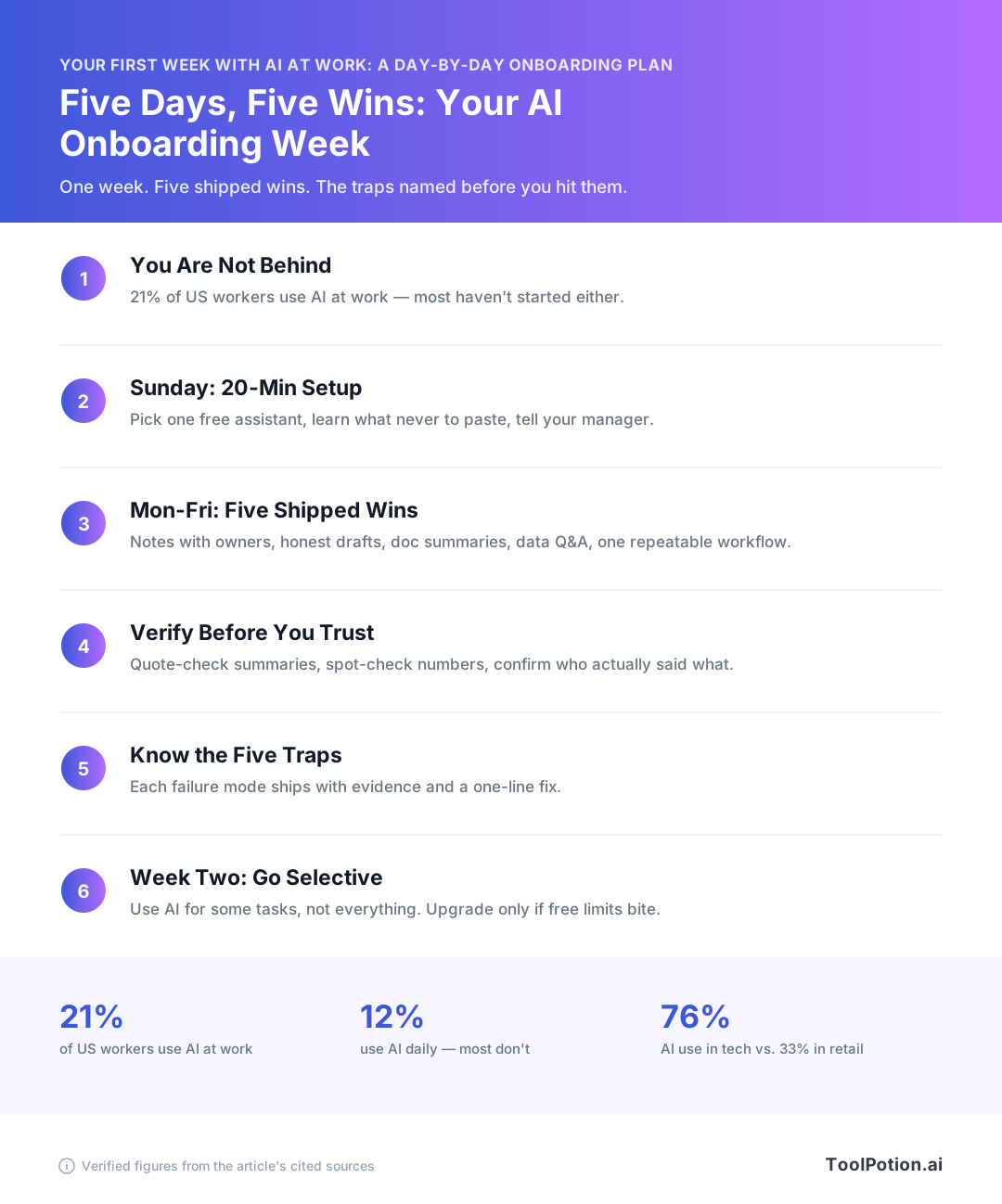
You can get five usable wins out of your first week with AI at work, one per day, without paying for anything and without pasting a single confidential document into a chatbot. Monday is meeting notes with owners attached. Tuesday is an email draft you edit instead of one you send. Wednesday is a 40-page document read in 15 minutes with quoted lines you can check. Thursday is asking questions of a small spreadsheet. Friday is turning whichever one worked into a three-line workflow you'll still run in November.
You're not late to this. Only 21% of U.S. workers used AI for any part of their job as of September 2025 (Pew Research Center), and Gallup put daily use at 12% (Gallup).
What follows names the free-tier limits before you hit them, gives you the prompts to paste, and flags where each day quietly goes wrong.
How to start using AI at work: you're not behind
Most of your coworkers aren't using AI either. As of September 2025, 21% of U.S. workers used AI for at least some part of their job, up from 16% the year before, and 65% said they don't use it much or at all. That's Pew's American Trends Panel, 5,010 employed adults, fielded Sept. 2 to 8, 2025. So the guilt you feel opening a chatbot for the first time is based on a story about your peers that isn't true.
What "normal" AI use at work looks like
Look at where the growth came from. The share of workers doing "all or most" of their work with AI didn't move at all, stuck at 2% between 2024 and 2025. Everything else came from people doing "some" of their work with it, 14% to 19%. Light touch is the normal pattern, and it's what this week aims at.
Gallup's Q4 2025 wave, 22,368 employed U.S. adults surveyed Oct. 30 to Nov. 14, 2025, puts daily AI use at 12% and never at 49%.
Why your industry probably has no one modeling it
Adoption is lumpy by sector. Gallup's Q3 2025 numbers show 76% in technology, 58% in finance and 57% in professional services against 38% in manufacturing, 37% in healthcare and 33% in retail. If you work in a hospital or a store, nobody near you is demonstrating this, and the workplace AI adoption reports you keep seeing were written from inside the 76% column.
Why five days is worth spending
It's the gap, not the hype. Managers who use AI in front of their teams produce a 17-point lift in how employees rate its value and 30 points more confidence toward agentic tools, per Microsoft's 2026 Work Trend Index. Your leadership is being coached on this. You're not. Five days closes enough of that distance to make you fluent in the room where the decisions happen.
Sunday night: the 20-minute setup that prevents four bad weeks
Twenty minutes tonight separates a week of small wins from a week of cleanup. Four things, in order.
Check your employer's policy first (41% of you won't find one)
Search your intranet for "acceptable use" and "generative AI" before you open anything. 41% of workers say their employer has done nothing to prepare them to use AI at work, and only 19% got full training. If you find nothing, default to this: no customer names, no colleague names, no unreleased numbers in a personal account. 38% of workers have already put company information into a personal AI account, and 64.4% didn't know it can be illegal.
Pick one assistant, not four
Start on Claude's free plan and stay there all week. It includes web chat plus the iOS, Android and desktop apps, web search, memory across conversations, file creation, connectors and extended thinking, with usage limits that reset on a rolling five-hour window (Claude pricing). Pro is $17/month billed annually, $20 monthly. Don't pay for anything on day one. You can browse free AI apps by category once you know what you reach for.
Know the free-tier walls before you hit them
| Tool | What free gives you |
|---|---|
| Otter.ai | 300 minutes a month, 30 minutes per conversation, 3 lifetime file imports (Otter) |
| Gemini Notebook | 50 sources per notebook, 50 chats a day, 3 Audio Overviews a day (Google) |
Wednesday's 45-minute recording is where the Otter cap bites.
Tell your manager what you're trying
Send one line: "I'm testing AI on meeting notes and first drafts this week, I'll tell you what worked." When managers model and discuss AI use, employees report 17 points higher perceived value and 30 points more confidence. If they ask where to start, point them at beginner AI learning resources.
Monday: Meeting notes you didn't have to type
Pick one recurring meeting on today's calendar. The status call, the client check-in, the team sync. That's your first artifact: a set of notes with decisions and owners, produced in about ten minutes of your time instead of forty.
The win: one recurring meeting, notes and action items in 10 minutes
Record the meeting, get a transcript, run one prompt over it, then read the output against your own memory of the call and fix what's wrong. Send it to the attendees the same afternoon. Ten minutes, one deliverable, and you've already done the thing 65% of workers say they don't do much or at all (Pew Research Center).
Tool pick: Otter free vs. your existing video platform's built-in notes
Use whatever your company already pays for. Zoom, Teams and Meet all ship transcription that your IT department has already blessed, which sidesteps the whole approval problem on day one.
If you have nothing, Otter's free plan gets you 300 minutes a month with a 30-minute cap on any single conversation and 3 lifetime file imports (Otter.ai). Check that 30-minute cap before you rely on it. Your hour-long Monday sync gets transcribed halfway and then stops, and the half it drops is usually the half where people commit to things. Sit your first test on a genuinely short meeting, or use the built-in one. Phone-based note-taking apps for your phone are a fallback for in-person calls, not a replacement for a platform recorder.
The prompt: turning a raw transcript into decisions and owners
Paste the transcript and ask for this, in these words:
Here's a raw meeting transcript. Give me three things:
1. Decisions made, one line each. If something was discussed but not decided, put it under "Open".
2. Action items as: owner - task - due date. Use "UNCLEAR" for any owner the transcript doesn't name explicitly.
3. Anything a person said they'd follow up on that has no date attached.
Don't summarize the discussion. Don't add anything not in the transcript.
The UNCLEAR instruction matters more than the rest. It forces the model to admit attribution gaps instead of guessing, and guessing is where this breaks.
Failure mode: silent recording, and the bot mis-assigns action items
Announce the recording before anything joins the call. Say it out loud, put a line in the invite that a notetaker will attend, and keep the invite. Recording and consent rules differ by jurisdiction, so check what applies where you and your attendees sit before you make this a habit. The invite is your log.
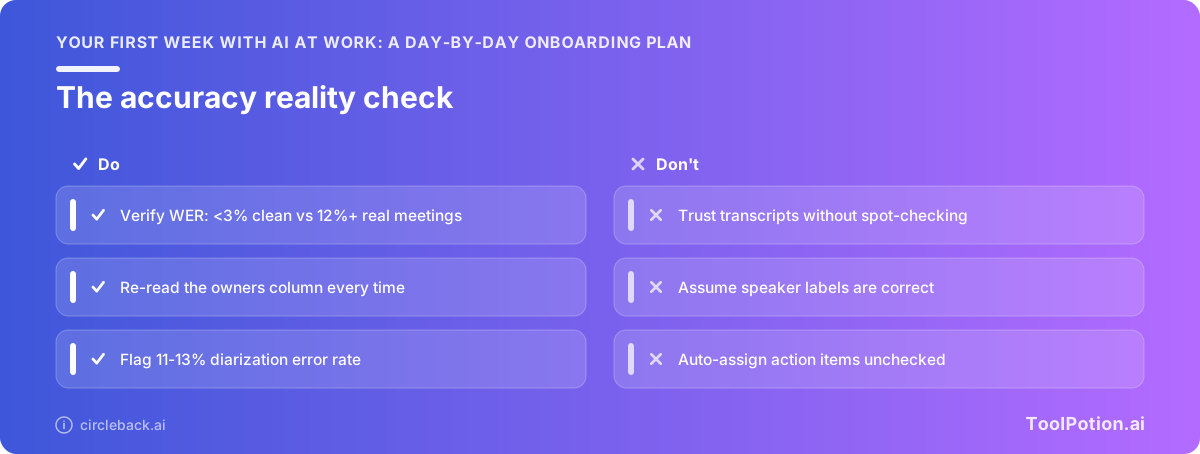
The second failure is quieter. Speaker diarization runs 11-13% error in real meetings, and word error rates jump from under 3% on clean audio to 12% and up once people talk over each other (Circleback). One in eight speaker labels is wrong, which means the tool will hand your colleague an action item they never agreed to. Check every owner line against your own memory before you hit send.
Tuesday: email drafts that still sound like you
The win: three replies you've been avoiding, drafted and sent
Open your inbox and find the three messages that have been sitting there longest. Those are today's targets. Not new emails, not anything sensitive, just the replies you keep postponing because writing the first sentence is the hard part.
Budget fifteen minutes total. If you're still fiddling with the third one at the half-hour mark, send it and move on.
The prompt: context, constraint, tone, and one sample of your own writing
Paste four things into the chat, in this order: what the email needs to accomplish, the hard limits (length, what you can't promise, the deadline you're proposing), how you want it to land, and one email you wrote yourself last month. That last piece is the part beginners skip, and it's why so many AI drafts read like a press release. The model matches what you give it.
A working version reads like this: "Reply to the message below declining the Thursday workshop. Keep it under 120 words, offer no alternative date, stay warm but final. Match the voice of this email I wrote: [paste]." Then paste the thread.
Draft-and-edit is the habit, not send-as-is
Anthropic's March 2026 Economic Index found that experienced users treat Claude as a collaborator to improve their own work while newcomers use it to do the work for them. Skip the beginner phase deliberately. Rewrite at least two sentences in every draft before it leaves your outbox, and set your expectation on speed rather than polish: among AI chatbot users, 40% called the tools extremely or very helpful for working faster versus 29% for work quality (fieldwork October 2024, so treat it as directional).
Editing is also the whole reason to stay in a chat window this week instead of installing one of the inbox and scheduling assistants that send on your behalf. Autonomy comes later.
Failure mode: the confident tone that commits you to something you didn't agree to
Models write agreeable prose. Ask for a polite decline and you'll often get a draft that softens it into "happy to look at other dates" or "I'll follow up with numbers by Friday." You never said either of those. Before you hit send, read the draft once looking only for verbs that promise: send, deliver, confirm, join, approve. Delete every one you didn't intend.
Wednesday: reading a 40-page document in 15 minutes
Today's target is the longest thing sitting in your queue. A vendor contract, a research report, a board deck, last quarter's postmortem. Something you've been avoiding because it needs a clear hour you don't have.
The win: a summary you can defend in a meeting
By the end of the day you want six bullets you'd be comfortable reading aloud when someone asks what the document says. That's a higher bar than "I got a summary." Defensible means you can point to the page where each bullet came from.
Set the expectation on speed, not brilliance. Workers who use AI chatbots are much likelier to say the tools help them work faster (40% call them extremely or very helpful there) than to say they improve the quality of their work (29%) (Pew Research Center, fieldwork October 2024, so treat it as older data). You're buying back 45 minutes. You aren't buying a better analyst.
Tool pick: Gemini Notebook for source-grounded answers, ChatGPT or Claude for one-off files
If the document is part of a set you'll come back to, use Gemini Notebook. It answers only from the sources you upload and puts a citation chip next to each claim, which is the exact behavior you need today. The free Standard tier gives you 100 notebooks, 50 sources per notebook, 50 chats a day and 3 Audio Overviews a day (Google Support). Fifty chats sounds generous until you're iterating on a contract, so front-load your important questions.
For a single PDF you'll never open again, paste it into Claude or ChatGPT and skip the setup. Claude's free plan covers web chat, file handling and extended thinking, with limits that reset on a rolling five-hour window (Claude pricing). Plenty for one document.
There are hundreds of dedicated document and PDF summarizers in our directory, and most of them are a worse version of what you already have access to for free.
The prompt: summary first, then make it quote the line
Ask for the summary in whatever plain language you'd use with a colleague: six bullets, what it says, what it asks of us, what's unresolved. Then run the verification move.
"For point 3, quote the exact sentence from the document that supports it, and give me the page number."
Do that for every bullet you plan to repeat to another human. It takes about four minutes. When the quote comes back and you can find it on the page, that bullet is yours to use. When the model paraphrases instead of quoting, or produces a sentence that isn't in the file, you've caught the problem before your VP did.
Failure mode: fluent summaries of things the document never said
Fabricated detail reads exactly like real detail. The court system has been learning this in public: documented cases involving AI-hallucinated citations went from roughly 200 in mid-2025 to 1,598 by June 9, 2026 (gc.ai). Those filings were written by lawyers who had every reason to check.
The pattern worth building is the one Anthropic found separates experienced users from new ones. Newcomers hand the work over. Experienced users treat the model as a collaborator on work they still own (Anthropic Economic Index). Today, owning it means the quote check.
Thursday: asking questions of your own numbers
Today you get one answer out of one spreadsheet without emailing anybody. Pick a small file you already own: the expense export, the pipeline sheet, last month's ticket log. Under a few hundred rows, no customer names, no salary column. The deliverable is a single number or a short ranked list you'd normally have waited two days for.
The win: one answer from one spreadsheet you'd normally hand to an analyst
Something like "which three accounts drove the most revenue drop between Q1 and Q2" or "what's the median days-to-close by rep." One question. If you find yourself typing "and also," stop and save it for tomorrow.
This is the day the collaborator habit matters most. Anthropic's March 2026 Economic Index found more experienced users treat the model as something that improves their own work, while newcomers hand it the whole job (Anthropic). On a spreadsheet, handing over the whole job means accepting a number you can't reproduce.
Tool pick: a chat window with file upload, not a button inside your spreadsheet
Free AI buttons inside desktop office apps change often and quietly, and a guide written a few months ago can point you at one that no longer does what it promises. Use a chat tool with file upload instead, where you can see exactly what you handed over. Claude's free plan includes file creation and code execution, with limits that reset on a rolling five-hour window (Claude).
Export your sheet to CSV first. Uploading a CSV also forces you to look at what's in the file, which is a good thing to be forced into.
The prompt: describe the columns, ask one question, request the steps
Three moves, in this order. Tell it what the columns mean in your own words, because a header called amt_net_adj means nothing to anyone. Ask your one question. Then add: "show me the steps you took and the rows you used."
That last clause is what makes Thursday checkable.
Failure mode: arithmetic that looks right, check two rows by hand
Wrong numbers arrive formatted, confident and plausible. Pick two rows from the output and verify them against the source sheet yourself. A sum, a date filter, one category assignment. Thirty seconds each.
Do this every time, including the tenth time it's been right. Speed is the documented benefit here anyway: 40% of chatbot users called the tools extremely or very helpful for working faster, against 29% for work quality (Pew Research Center). Two rows checked by hand is cheap insurance on a number you're about to put in front of your boss.
Friday: turn one win into a repeatable workflow
Today you don't try anything new. You look back at Monday through Thursday, pick the one thing that actually saved you time, and write it down so next week's version takes two minutes instead of twenty.
The win: your best prompt from this week, saved and named
Scroll back through your chat history and find the prompt that produced something you sent to a real person. Not the clever one. The useful one. Copy it into a note titled with the task, not the tool: "Weekly status notes" beats "Claude prompt 3." Keep the note wherever you already look on a Monday morning, which for most people is a pinned doc or a task manager, not a new app you'll forget by October.
If you're on Claude's Free plan, memory across conversations is included (Claude pricing), so the saved prompt is a backup rather than the only copy. Save it anyway. Free-tier usage limits reset on a rolling five-hour window (Claude pricing), and you don't want to be reconstructing wording from scratch while you wait.
Pick the task you'll do again next Tuesday
Frequency beats impressiveness. A prompt you run weekly for eight minutes of savings is worth more than a spectacular one-off you'll never repeat, and it's the pattern the data points at: the share of U.S. workers doing "all or most" of their work with AI held flat at 2% between 2024 and 2025, while the growth all came from people doing some of their work this way, 14% to 19% (Pew Research Center).
Write it down: inputs, prompt, check step
Three lines. What you paste in, the prompt itself, and how you verify the output before it leaves your hands. The check step matters most because it's the part you'll skip when you're busy, so name it concretely: "confirm every owner and date against the transcript" is checkable, "review carefully" isn't. Experienced users treat the model as a collaborator on their own work while newcomers hand it the work outright (Anthropic Economic Index). The check step is what moves you into the first group.
Once a workflow survives three or four runs unchanged, it's a candidate for something that runs on a schedule. That's the door into AI agents that run recurring tasks, and it's a month-two problem, not a week-one one.
Failure mode: automating a task you should have deleted instead
The weekly report nobody reads gets faster to produce and stays unread. Before you save any workflow, ask who consumes the output and what happens if it doesn't arrive. If the answer is "nothing," cancel the task rather than speeding it up. Microsoft found 45% of AI users say it feels safer to keep pushing on current goals than to redesign how the work happens (2026 Work Trend Index), and automating dead work is exactly what that looks like in practice.
Then tell your manager which one workflow you kept. When managers actively model AI use, their employees report a 17-point jump in perceived value from it and 22 points more critical thinking about how it's used (Microsoft WorkLab). Your five-minute Friday summary is what gives them something to model.
The five things that will go wrong (and the one-line fix for each)
Every failure below has already happened to someone this year. None of them requires you to stop using the tools. They require you to be suspicious in five specific places instead of anxious everywhere.
Confident wrong answers, and who has already been sanctioned for them
The count of documented court cases involving AI-hallucinated citations went from roughly 200 in mid-2025 to 1,598 by June 9, 2026. Those are lawyers, people whose whole job is checking sources. Fix: every name, number, date and citation the model produces gets checked against the original document before it leaves your machine.
Pasting company data into your personal account
Cyberhaven's telemetry found 39.7% of AI interactions expose sensitive data, with more than 60% of workplace AI use running through personal accounts. Separately, 38% of workers admitted putting company information into a personal AI account and 64.4% didn't know it can be illegal. Fix: use the work-provisioned account, and if there isn't one, redact names and figures before pasting.
Recording people without telling them
Monday's meeting-notes win is the one that involves other people's voices, which makes it the one most likely to produce a complaint rather than a correction. Recording rules differ by jurisdiction and vendors differ in what they do with your audio afterward. Fix: say out loud that you're recording, put it in the invite, check the rules that apply where you and your attendees sit, and turn off training on your transcripts in settings.
Silent free-tier walls mid-task
Free plans don't warn you before they cut out. Otter's free tier gives 300 minutes a month with a 30-minute cap per conversation and 3 lifetime file imports. Gemini Notebook's Standard tier caps 50 sources per notebook and 50 chats a day. Fix: check the limit before the meeting starts, not at minute 31.
Believing the speed gain is a quality gain
Among chatbot users, 40% called the tools extremely or very helpful for working faster, against 29% for improving work quality (fieldwork October 2024, so treat it as older than a year). Speed is what you're buying. Fix: judge this week on minutes saved, and keep your own editing pass on everything that ships.
What week two should look like
Do less next week than you did this week. That sounds backwards, and it's the pattern the data supports: between 2024 and 2025 the share of U.S. workers doing "all or most" of their work with AI stayed flat at 2%, while the share doing "some" of it climbed from 14% to 19% (Pew Research Center). Growth happens at the edges of a job, not the center of it.
Keep two of the five, drop three
Two habits you'll still be doing in November beat five you abandon by Friday. Most people keep the meeting notes and one writing task. If document summarizing was the one that stuck instead, keep that and drop the rest without guilt.
Aim for the collaborator pattern, not the outsourcing one. Anthropic's March 2026 Economic Index found experienced users bring Claude in to improve work they're already doing, while newcomers hand over the whole task (Anthropic). Draft, then edit. That's the habit.
Say out loud what you tried
Tell your manager one specific thing from this week, in one sentence, at your next one-on-one. Microsoft's 2026 Work Trend Index found that when managers model AI use themselves, their people report 17 points higher perceived value from it and 30 points more confidence toward agentic tools (Microsoft WorkLab). Somebody has to go first.
When to stop being free
Pay when a limit blocks work you'd otherwise do, not before. Claude Pro is $17/month billed annually, $20 monthly, and the free plan already covers web search, file creation, and memory across conversations on a rolling five-hour usage window (Claude). Hit that window three weeks running and the $17 is easy math. Until then, pick one AI newsletter to keep up without doomscrolling and spend the money on nothing.
Frequently Asked Questions
Is it safe to use ChatGPT or Claude for work if my company has no AI policy?
You're in common territory: 41% of workers say their employer has given them no AI tools, training or guidance, and only 19% got comprehensive training (Resume Now, June 2026). The risk sits in what you paste, not in the tool itself. About 38% of workers have put company information into a personal AI account and 64.4% didn't know that can be illegal, with 23% pasting internal emails or memos (Stacker, July 2026), and Cyberhaven telemetry puts sensitive data in 39.7% of AI interactions with over 60% of workplace AI use running through personal accounts (Cyberhaven, Feb. 2026). Use a company-provisioned account if one exists, strip client names, customer records and unreleased financials before you paste, and email your manager a one-line note about what you're trying.
Can I record a meeting with an AI notetaker without telling everyone?
Don't. Announce it at the top of the call, get a yes, and check the recording rules that apply where you and your attendees are before you rely on a notetaker at all. Announcing the bot also protects you from a quieter failure: speaker diarization in real meetings runs an 11 to 13% error rate, and word error rates climb past 12% in real rooms compared with under 3% on clean audio (Circleback, Feb. 2026), which means action items get assigned to the wrong colleague often enough to matter. Check whether the vendor trains on your recordings by default, and turn that off.
Do I need to pay for anything to complete this first week?
No, but you'll hit walls, so plan around them. Claude's Free plan covers web chat plus the iOS, Android and desktop apps, web search, memory across conversations, file creation, connectors and extended thinking, with limits that reset on a rolling five-hour window (Claude pricing). Otter's free tier gives you 300 minutes a month, cuts off at 30 minutes per conversation and allows 3 file imports for the life of the account (Otter pricing), and Gemini Notebook's Standard tier caps you at 50 sources per notebook, 50 chats a day and 3 Audio Overviews a day (Google Support). If you finish the week and want more headroom, Claude Pro is $17 a month billed annually or $20 monthly (Claude pricing).
How do I check whether an AI summary or answer is actually correct?
Treat every citation as unverified until you open it. The Charlotin database of court cases involving AI-hallucinated citations went from roughly 200 in mid-2025 to 719 in January 2026, 1,227 in early April, and 1,598 by June 9, 2026 (gc.ai, June 2026), and those are people whose job depends on getting references right. For a summary, keep the source document open beside it and check three things: any number, any name attached to a decision, and anything the summary presents as a deadline. For meeting notes specifically, re-listen to the sections where action items were assigned, because speaker attribution errors run 11 to 13% (Circleback, Feb. 2026).
Which AI tool should a complete beginner start with at work?
Start with one general chatbot and nothing else for the first week. Claude's Free plan is the one to pick if you have no employer tool, since it includes web search, memory across conversations, file creation and the desktop and mobile apps at no cost (Claude pricing). Point it at what workers already use chatbots for: research (57%), editing content (52%) and drafting reports (47%) were the top three uses in Pew's survey of workers who use AI chatbots on the job (Pew, Feb. 2025, fieldwork Oct. 2024). Anthropic's March 2026 Economic Index found that experienced users treat the model as a collaborator on their own work while newcomers hand the work over wholesale (Anthropic, Mar. 2026), so make draft-then-edit your default from day one. Our directory lists 13,174 AI apps (AI Apps) and you can ignore all of them this week.
How much time will I realistically save in the first week?
Minutes per task, not hours per day. Workers who use AI chatbots are much likelier to say the tools help them work faster (40% call them extremely or very helpful for speed) than to say they improve the quality of their work (29%) (Pew, Feb. 2025, fieldwork Oct. 2024), so judge week one on time back rather than better output. The realistic target is the pattern the data already shows: between 2024 and 2025 the share of U.S. workers doing some of their job with AI rose from 14% to 19%, while the share doing all or most of it stayed flat at 2% (Pew, Oct. 2025). Over a longer horizon the payoff gets bigger: 66% of AI users in Microsoft's 2026 Work Trend Index say it frees them for higher-value work (Microsoft WorkLab, May 2026).