Pick n8n if you want the cheapest way to run long, branching workflows and you're fine with a little engineering. Pick Zapier if you want the widest app coverage and the least setup. Pick Make if you want a visual canvas and the most billing units for the money. That's the short answer. The rest of this piece is the evidence.
The trouble with comparing them is that the headline prices measure different things. Zapier bills tasks, Make bills credits, and n8n bills whole executions. One workflow with a trigger and four steps is four tasks, five credits or one execution. Put an AI model call or an agent loop inside it and the gap gets wider, because AI steps now draw from the same meters.
Below: how each platform counts a run, what realistic workflows cost, what the n8n license allows, the AI features each vendor shipped in 2026, and how error handling and team controls compare. Every number comes from a vendor page, and nothing here comes from hands-on testing.
One run, three ways to count it
Start with Zapier because its rule is the simplest to state. A task is any successful action that runs. The trigger is free, and so are filters, paths, formatter steps, delays, loops and anything touching Zapier Tables or Forms (Zapier help center). Failed actions don't count either. So a Zap with a trigger and four actions that all succeed uses four tasks.
There are catches. Steps inside an error-handler path count. So do steps that rerun when you replay a whole Zap run. A tool call through Zapier MCP costs two tasks, a routed lead in Lead Router costs five, and AI by Zapier steps depend on the model tier you pick (same help page). Zapier's pricing page says AI steps, code and the SDK now all follow this task-based model, with one shared pool across the account.
Make's unit is the credit. By default one operation equals one credit, regardless of how much data moves through the module (Make help center). The trigger counts. Make's operations page says a trigger module runs once per check, which is one operation, however many bundles it returns (Make operations). Routers and error-handler modules (Rollback, Break, Resume, Commit, Ignore) cost nothing (Make pricing FAQ). A trigger plus four modules comes to five credits.
n8n counts the run. An execution is a single run of the entire workflow, and n8n's pricing page says it doesn't matter how many steps the workflow has or how much data it moves (n8n pricing). The vendor goes further and claims you can do things in one execution that would take 10,000 operations in other tools. That's a marketing line, though the mechanism behind it is real.
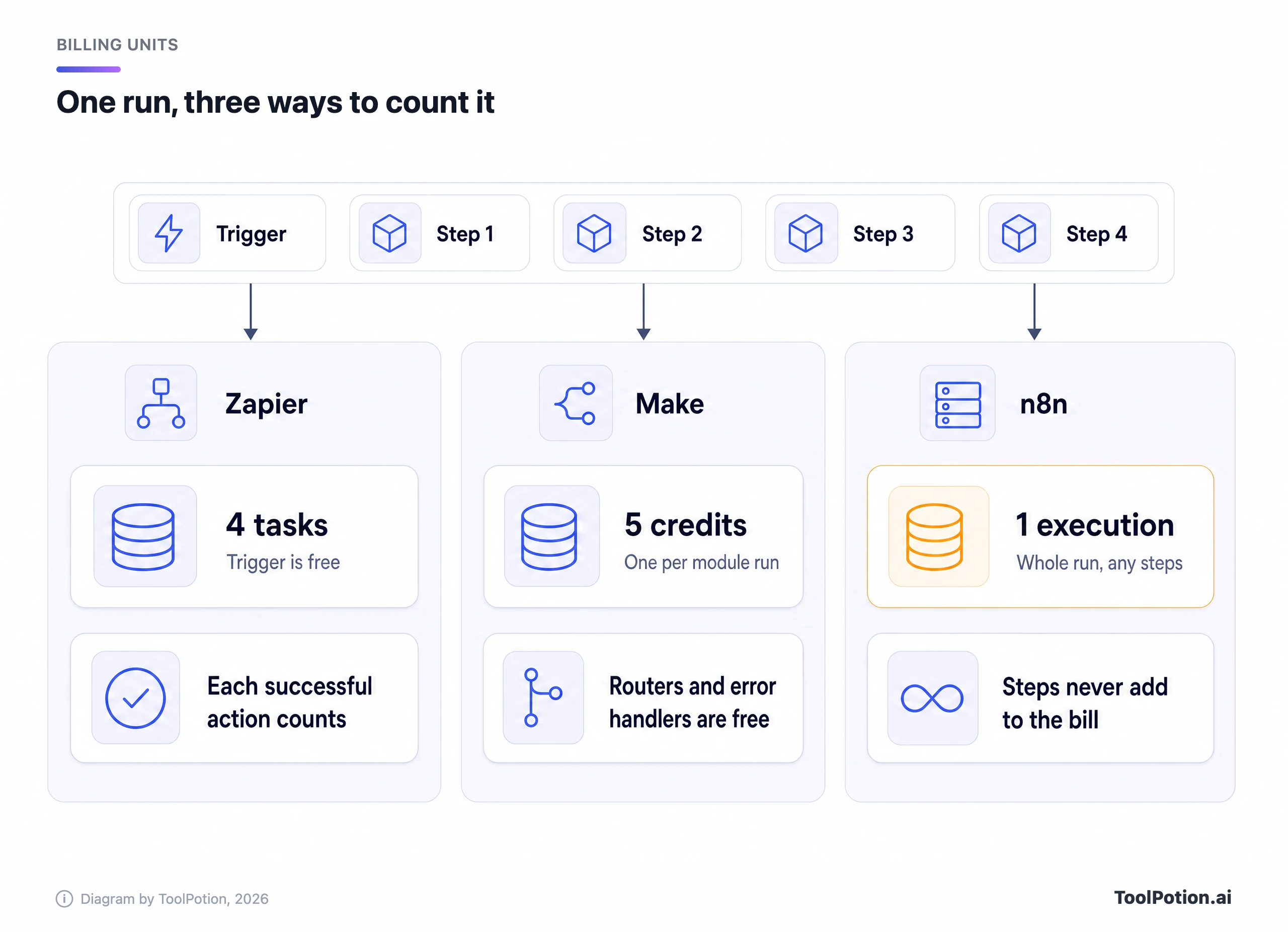
The lanes show why a step-heavy workflow punishes Zapier first and Make second. They also show where n8n's model bites back. A workflow that fires constantly with only one step still costs a full execution each time. If most of your automations are tiny two-step zaps, the per-run model buys you nothing.
What a realistic workflow costs
Take a lead-intake workflow. A form submission arrives, an AI step classifies it, a CRM record is created, a Slack message goes out, a row lands in a sheet and a follow-up email is queued. That's a trigger and six actions. Say 500 leads come in each month.
On Zapier that's 3,000 tasks at the very least, more if the AI step uses a higher model tier. On Make it's about 3,500 credits. On n8n it's 500 executions. Zapier's cheapest paid plan, which the pricing page lists as starting from $19.99 a month (annual billing, $29.99 if you pay monthly) for 750 tasks, doesn't cover it, and you'd move up its task selector (the page lists tiers at 1.5K, 2K, 5K and onward). Make Core's 10,000 credits cover it three times over. n8n's Starter plan, 2,500 executions for $20 a month billed annually, covers it five times over.
The picture changes at volume. Now run a four-step workflow 20,000 times a month, the kind of thing a busy webhook or a support inbox generates. That's 80,000 Zapier tasks, 100,000 Make credits and 20,000 n8n executions. Make still fits inside Core, which tops out at 300,000 credits per month after a pricing change in 2025 (Make community post). Zapier needs a 100K task tier. And n8n's hosted ladder gets awkward, because the plan the page lists above Pro's 10,000 executions is Business at 40,000, and Business is self-hosted only.
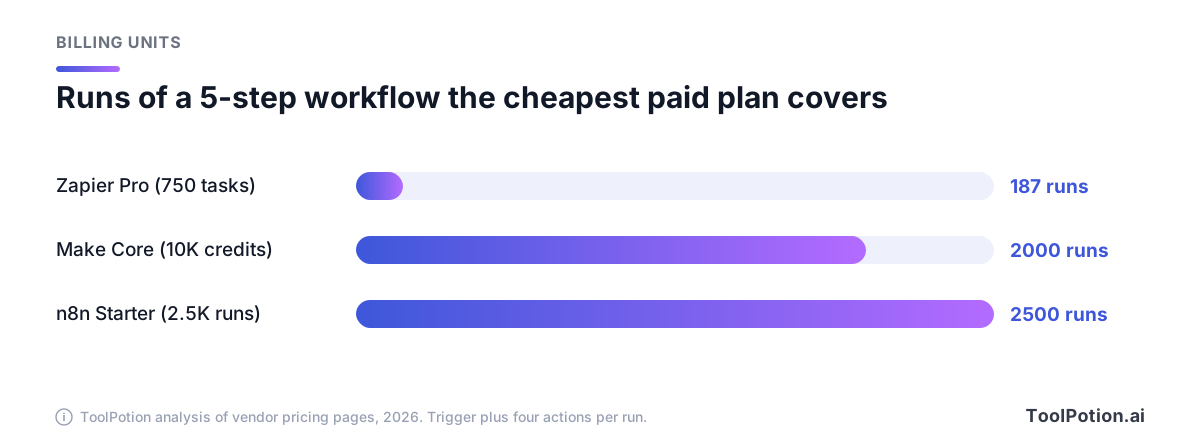
That chart is the whole argument in miniature, with a caveat that matters. It compares the cheapest paid plan on each platform, and those plans don't cost the same. On annual billing, Zapier's entry plan lists at $19.99, Make Core at $9 (or $12 for US visitors) and n8n Starter at $20. Runs per dollar still favors Make and n8n by a wide margin for this shape of workflow.
The calculator below lets you set your own run count and step count. It reports the billable units each platform would count, using the rules from the section above. It doesn't guess at tier prices, since only entry prices are published in a form we could check. Zapier's pricing page says the cost per task falls as you pick bigger tiers, so a straight-line scale-up would overstate the bill.
The AI step is the input to adjust by hand. On Zapier its task cost depends on the model tier. On Make, the built-in AI provider charges credits based on tokens and operations, per its help center. If you connect your own provider you pay Make credits for the operations and your provider bills the tokens. Since 2025 that option has been open on every paid Make plan, not just Pro.
The plan ladders and where they get steep
Here are the entry points as each vendor lists them. Sort by any column. Currencies and billing terms differ, so don't read the price column as a like-for-like ranking.
A few things the table can't show. Zapier's Free plan allows only two-step Zaps and checks for new data every 15 minutes, while Professional polls every two minutes and Team every minute. Hit your task limit and Zapier moves you to pay-per-task billing at a higher per-task rate, capped at three times your plan's limit, after which the Zaps pause until the next period.
Make behaves differently at the edge. When you run out of credits, scenarios stop and incoming webhooks queue up to your queue limit. Extra credits cost 25 percent more than the ones in your plan, and unused credits expire at the end of the term. If you're prepaying for a year, that expiry matters.
n8n has the sharpest cliff. Starter and Pro are cheap, then Business jumps to $800 a month billed annually for 40,000 executions, and it carries SSO, Git-based version control and multiple environments. n8n's startup program offers 50 percent off Business to companies under 20 employees, which softens it for small teams. And n8n's Starter plan caps a single execution at five minutes, Pro at 40, so long-running AI jobs need the bigger plans or your own server.
Self-hosting n8n and what the license allows
Zapier and Make are cloud-only. n8n is the one you can run on your own machine, and that's the single biggest reason people pick it. The catch is that it isn't open source in the OSI sense. n8n calls itself fair-code, and the code ships under its Sustainable Use License, version 1.0 (license text).
The license text says you may use or modify the software only for your own internal business purposes or for non-commercial or personal use. You may distribute it only free of charge for non-commercial purposes. Files marked .ee. in the repository sit outside that license entirely and need an Enterprise license.
n8n's license FAQ turns that into plain examples (n8n license FAQ). The short test it offers is that if workflows are only created or modified by you or people in your organization, you can use n8n for free. The allowed list includes:
- Running n8n to help operate your business, or for personal projects, learning and research.
- Building automations for clients on your own instance, as long as the clients can't create or edit them.
- Charging customers for workflow setup, maintenance, training and consulting.
- Using n8n behind the scenes in your own product, even letting users trigger automations and connect their own accounts to them.
- Running several instances of the community version.
The forbidden list is shorter and matters more if you're building a product. You can't host n8n as a service and let clients build workflows in it. You can't let outside users build or configure their own workflows through your product, whether through a custom UI, the API, MCP or an AI agent acting for them. You can't fork it to launch a competing automation product, white-label it, or use key-gated enterprise features without an Enterprise license.
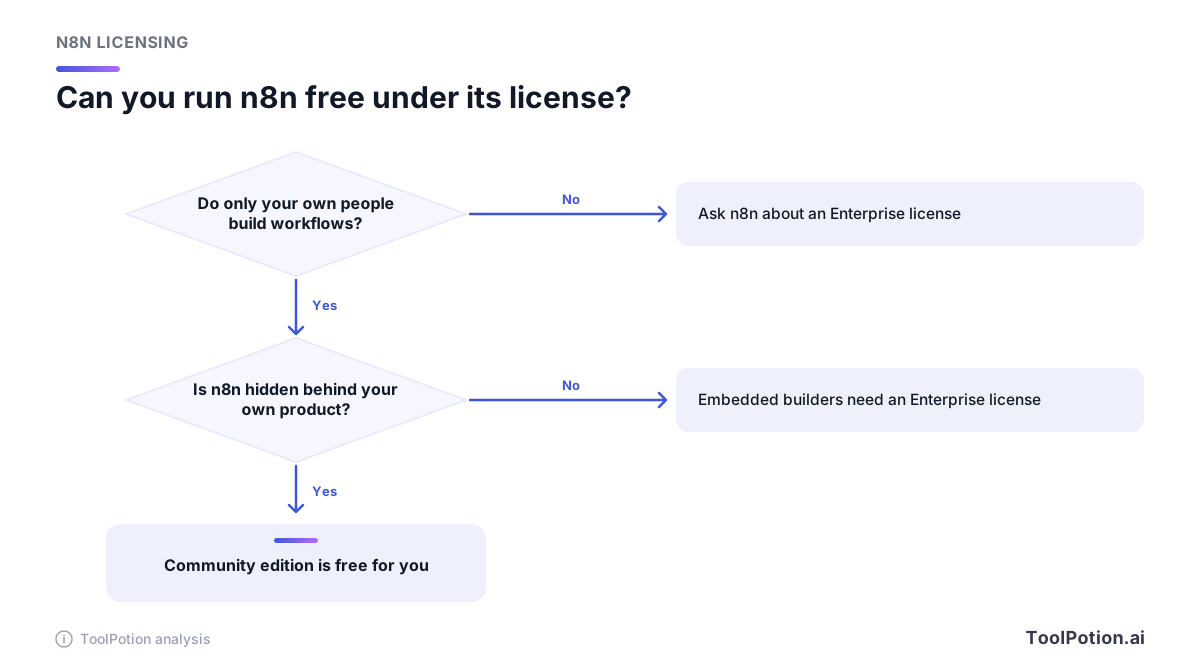
The FAQ is blunt about one case. A platform that gives users its own builder screen backed by n8n isn't allowed, even if they never see n8n's interface. The test is who controls the workflow logic. The route there is a sales conversation.
Free self-hosting also isn't the whole product. n8n's docs say the community edition leaves out custom variables, environments, external secrets, external binary storage, log streaming, multi-main mode, projects and sharing, SSO and Git version control (community edition features). Queue mode is included. Registering the free edition with an email unlocks folders, debug in editor and custom execution data. If you self-host a paid tier, its license key has to ping n8n's license server daily to stay active.
Self-hosting also means you own the uptime, the backups and the upgrades (the n8n Community Forum is where most of that gets discussed). Make, for its part, argues in its own comparison that self-hosting brings infrastructure and maintenance costs (Make vs n8n). It's a competitor saying so, but it isn't wrong.
The AI and agent features each vendor shipped in 2026
All three now sell agents, and all three speak MCP. The differences are in packaging and metering.
Zapier
Zapier's pricing page lists AI products as part of the platform: Agents, Chatbots, Canvas, Zapier MCP, and a Copilot assistant that helps build Zaps and agents. Zapier Chatbots is a separate directory listing with its own free plan. The SDK, which lets code and AI coding agents run actions across 9,000-plus apps, is free while in beta, and Zapier says it will give notice before that changes. The notable shift is billing. Zapier now puts AI steps, code and the SDK on the same task meter, but Zapier Agents use a separate activity quota, per its help center. Make's comparison page claims full Zapier agent access needs an extra package. Treat that as a competitor's framing, though the separate quota does mean a second thing to watch.
Make
Make says its AI Agents come with all paid plans, are built, run and debugged inside the scenario builder, and can be turned into callable tools through its MCP server (Make vs n8n). Its blog also describes Make Grid, a view of every automation and agent running across a business (Make blog). Make also has Maia, an assistant that builds scenarios from plain-language prompts, per its comparison pages and help center. Its limits and pricing aren't spelled out there. The metering is concrete. Agent chat uses credits, and some AI Content Extractor modules cost two or ten credits instead of one.
n8n
n8n's release notes show the fastest visible cadence of the three. Version 2.35 turned on enhanced human-in-the-loop approvals for Slack and Telegram for everyone. Version 2.36 added server instructions to the MCP Server Trigger. Version 2.37 added opt-in streaming for Message an Agent workflows and prompt caching for the Anthropic chat model. By 2.40 the AI Assistant had been renamed the n8n Assistant and an agent builder had its own capabilities cards, and 2.42 let agents pay for web search with Gateway credits (n8n release notes).
Its pricing page lists Agents as a preview feature and includes the AI Agent node, MCP server trigger, MCP client, instance-level MCP, human approval for tool calls and hosted chat on every cloud plan. Starter also includes AI models without your own API keys, with monthly Assistant credits that go from 1,600 on Starter up to 9,600 on larger Pro sizes. Self-hosters bring their own key and have no credit limits.
If you drive any of this from a coding agent, two community projects are worth knowing about. n8n-mcp lets tools such as Claude Code build n8n workflows, and n8n-skills packages a skillset for the same purpose. Our piece on AI agents vs automation tools covers when a plain workflow is the safer choice.
Integration counts, and why they don't compare
These are vendor claims, so read them as marketing. Zapier says it connects to 9,000-plus apps and calls itself the most connected AI orchestration platform. Make says 3,500-plus, though its own comparison pages wobble between 3,000-plus and 3,500-plus (Make vs n8n). n8n's integrations page says 2,366 (n8n), while Make's page about n8n puts the figure at 2,100-plus in one place and 1,200-plus in another.
Those counts aren't the same unit. Zapier counts apps. Make counts apps but argues depth, saying it often offers 30 or more actions for a given app against 10 to 15 on Zapier. n8n counts nodes and integrations, and it can call any HTTP API, run JavaScript or Python in a code step and import cURL commands, so a missing connector is a small job rather than a dead end.
The practical test is boring. List the five apps you can't live without and check each against the vendor's own directory. If all five exist everywhere, the count is irrelevant. If one is a niche vertical SaaS, Zapier's breadth is the likeliest to cover it with no code.
Error handling and debugging
Zapier's pricing page lists drafts, autoreplay, customized error settings, versions, version compare and alerts under Zap management. Failed actions don't use tasks, which is friendly to your bill, but a full replay of a run does use tasks again for the steps that had already succeeded (Zapier help center). Make's comparison page says its own pitch is Scenario Run Replay, which reruns a scenario from historical trigger data, and it also admits error handling takes new users time to learn. Make's help center confirms the cost model: router and error-handler modules are free.
n8n takes the most developer-flavored route. Any workflow can name an error workflow that starts with an Error Trigger node and receives the execution ID, the failing node and the stack trace, so you can post to Slack or open a ticket (n8n docs). Runs of the error workflow itself don't count against your quota. You can also load data from a previous execution into the editor and test a fix against the exact input that broke, and on higher plans you can search executions by the data they contain. Enterprise adds log streaming to tools like Datadog.
Going by the documentation alone, Zapier looks easiest when something simple fails and n8n strongest when something strange fails. Make sits between.
Teams, governance and who can touch what
Zapier's Team plan starts at $69 a month on annual billing ($103.50 monthly), covers 25 users, and includes shared Zaps and folders, shared app connections and SAML SSO. Enterprise adds SCIM provisioning, advanced admin permissions, app access controls, custom data retention, analytics and log streams. Make's comparison page says custom roles can be assigned at organization or team level, with an audit log, and puts SSO on Enterprise with a 99.5 percent uptime SLA. Zapier uses fixed roles in the same comparison.
n8n's pricing page says every plan includes unlimited users and workflows. Pro adds admin roles and three shared projects. Business adds SSO and LDAP, Git version control, multiple environments, queue mode and 30 days of insights. Enterprise adds unlimited projects, external secret stores, log streaming, extended data retention and a support SLA. For a company that wants dev, staging and prod promotion of workflows, n8n is the only one of the three whose pricing page describes that Git-backed flow.
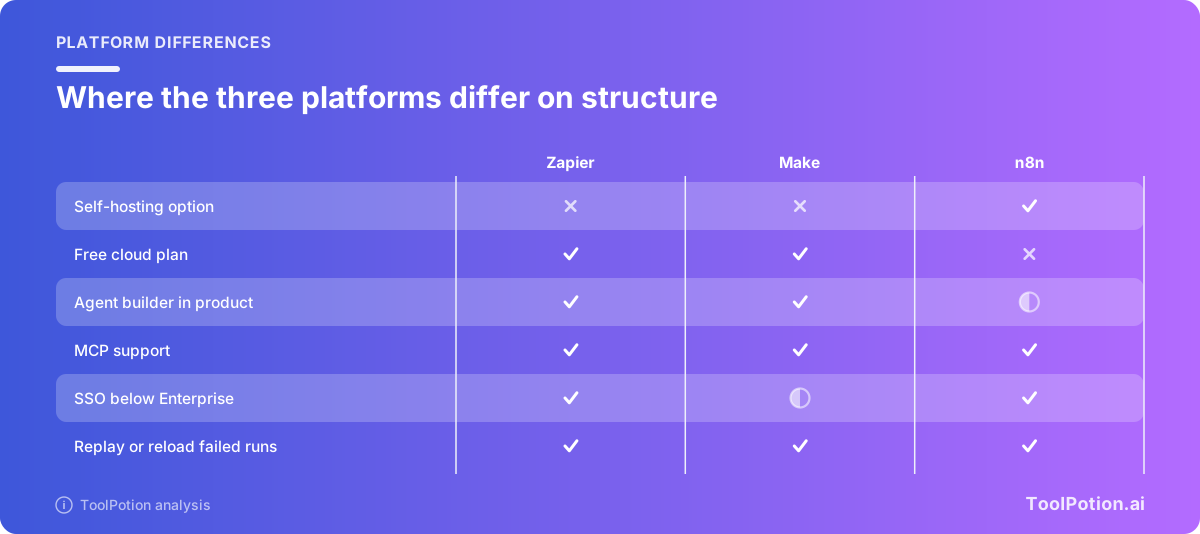
The matrix flattens a lot, so read it as a pointer, not a verdict. Make's SSO is partial because its own page ties SSO to Enterprise. n8n's agent builder is partial because its pricing page labels agents a preview. And n8n's missing free cloud plan only means you get a trial. The free route for n8n is self-hosting.
How to choose between them
If none of the three fits, our workflow automation board and hub rank the alternatives. For the three here, the decision comes down to a handful of questions.
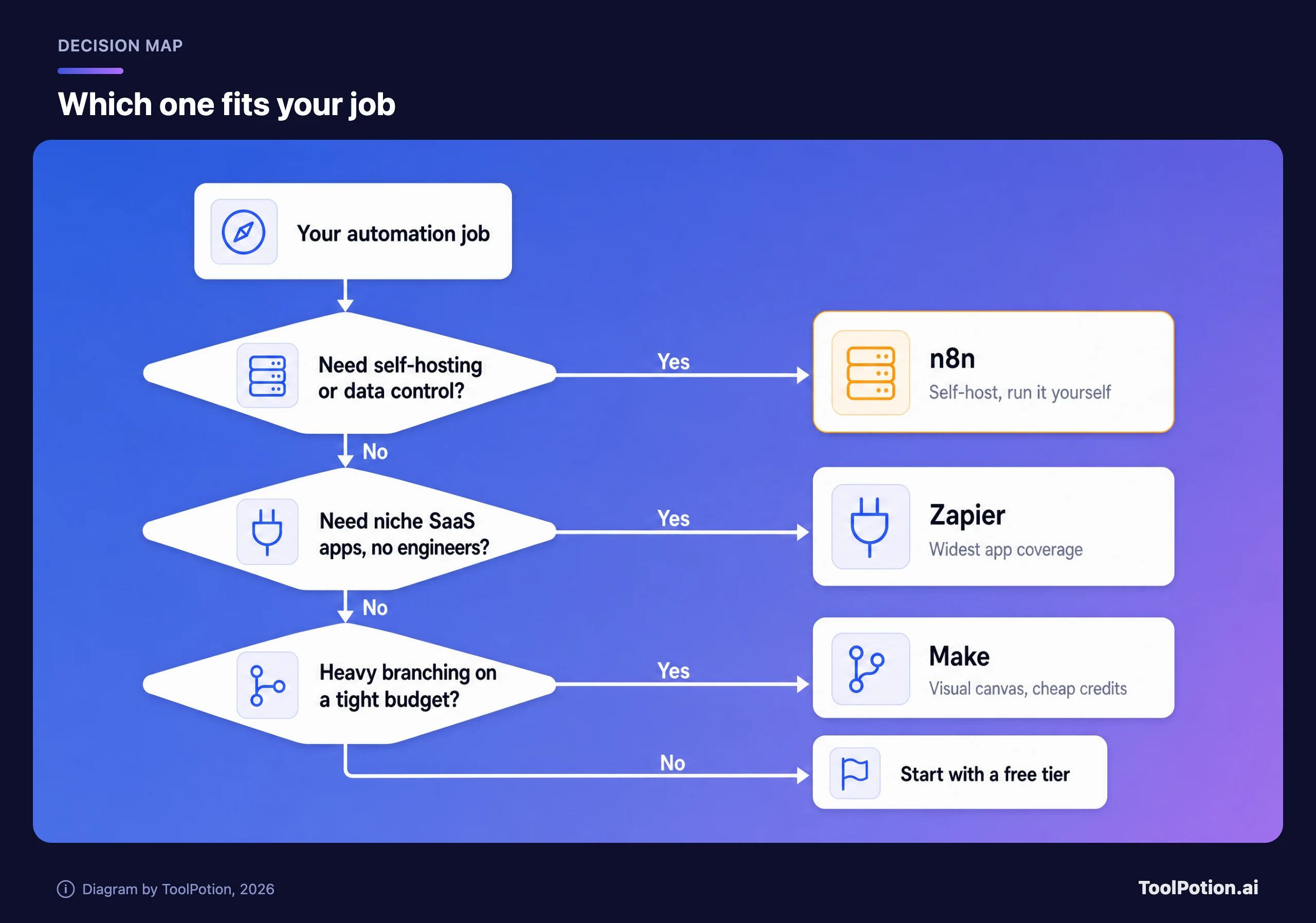
Pick Zapier if
- You want the broadest app coverage and a setup that a non-technical teammate can own.
- Your workflows are short, two to five steps, and run at modest volume.
- You need SSO and shared connections on a mid-priced plan without self-hosting anything.
- You'd rather pay more per task than debug an error yourself.
Pick Make if
- You build multi-branch scenarios and want to see them on a canvas.
- Your volume is high and your per-run steps are many, so credits per dollar decide the bill.
- You want agents built inside the same canvas as the rest of your automation.
- You're fine being cloud-only.
Pick n8n if
- Your workflows are long, loop over lists or call AI models repeatedly, so counting steps would hurt.
- Data must stay on your own servers, or you need to avoid per-run fees at large volume.
- You have someone who is comfortable with JSON, webhooks and a bit of code.
- Your use is internal. If you plan to let customers build workflows in your product, talk to n8n about an Enterprise license first.
Before committing, build the same two or three real workflows on the free tier of your top two picks and watch the usage meters for a week. For the agent layer above these tools, see our roundup of the best AI agents in 2026 and the build AI agents board.
Frequently asked questions
Is n8n really free?
The self-hosted community edition costs nothing in license fees, and you can use it for your own business under the Sustainable Use License. You still pay for the server, and some features such as SSO and Git version control need a paid plan. The cloud version has a 14-day trial but no free plan.
Which is cheapest for AI workflows?
It depends on how many steps and model calls each run has. On entry plans, n8n and Make give you far more runs per dollar than Zapier for a five-step workflow. Self-hosted n8n has no per-run fee at all. AI steps can raise the bill on Zapier and Make, because both meter them separately from plain actions.
Does Zapier charge for failed steps?
No. Zapier says only successful actions count toward task usage, and triggers, filters, paths and formatter steps are free. Steps that rerun on a full replay do count again.
What are Make operations and credits?
They're the same unit under two names. Make's help center says that by default one operation equals one credit, and credits are now the billing unit. A few AI modules use more than one credit per run.
Can I resell workflows built on n8n?
You can charge clients for building, setting up, maintaining and training them on workflows that run on your instance, as long as the clients can't create or edit the workflows themselves. Hosting n8n as a service for clients to build in is not allowed under the community license.
Do any of them support MCP?
Yes. Zapier MCP lets AI assistants act across its apps and costs two tasks per tool call. Make exposes agents as tools through its MCP server. n8n has an MCP server trigger, an MCP client and instance-level MCP.