An AI subscription bundle only saves money if it replaces something you already pay for. Most of the time it doesn't, and the newest bundles make it easier than ever to buy the same capability twice.
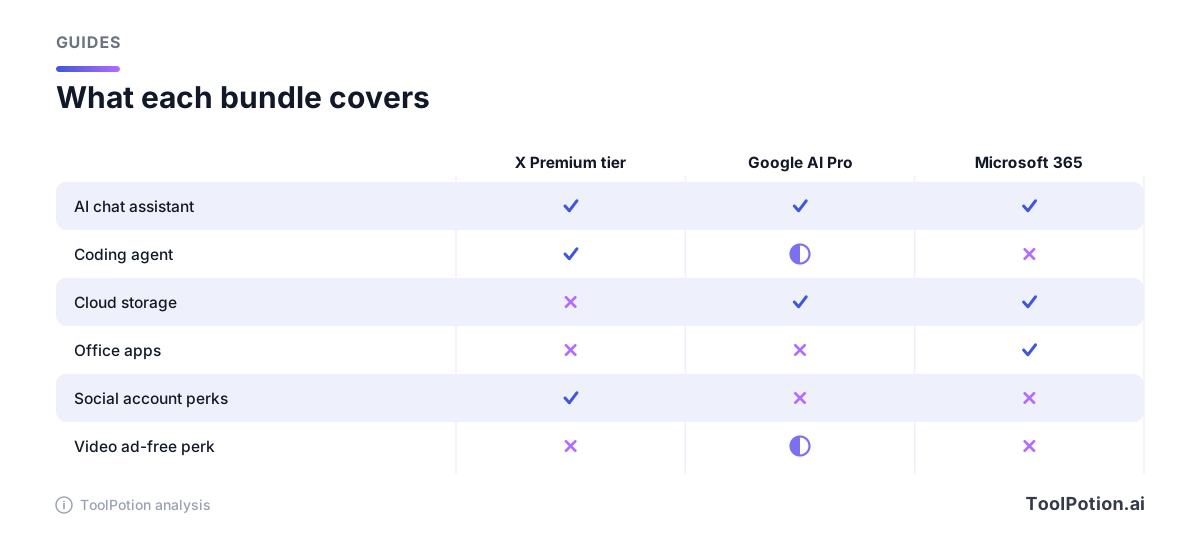
SpaceXSI, the company behind Grok and X, recently folded X Premium, Grok and Cursor into a single plan it calls The X Subscription (TechCrunch). Google has bundled Gemini with cloud storage for a while, and Microsoft sells Copilot inside Microsoft 365. This guide maps what each one includes, lists the prices as the vendors publish them, and gives you a short method for finding the charges you can cancel.
What The X Subscription actually bundles
TechCrunch reports five plans: free, Plus at $8 a month, Premium at $30, Super at $100 and Ultra at $200, with AI usage caps rising at each step. Premium or higher is required for the latest Grok models. The company told TechCrunch that existing X Premium+ subscribers will find the comparable plan costs the same or less. The upgrade is rolling out gradually in billing settings.
The details sit on Cursor's pricing page, which now lists the X plans. Plus includes a shared AI usage pool covering Cursor and Grok chat, voice, image generation, Grok Build and API access, but only Grok models run on that tier. Premium adds 4x the usage of Plus, cloud agents, code hosting, AI code reviews, video generation and third-party models at API list price. Those third-party models are billed separately by usage, and the listed prices exclude tax.
So the overlap is narrow. It only bites if you pay for X Premium and Cursor on separate bills. If you mostly run Claude or GPT models inside Cursor, the bundle doesn't cover that spend. X's help center says current X Premium subscribers keep their plan and price until they choose to switch (X Help), so nobody has to act.
Google AI plans: Gemini with storage attached
Google's US plans page lists AI Plus at $4.99 a month with 400 GB of storage, AI Pro at $19.99 with 5 TB, and AI Ultra from $99.99 (5x Pro's usage limits) or $199.99 (20x), with storage starting at 20 TB. All are listed per month (Google). Pro also includes the Standard tier of Google Home Premium and a YouTube Premium Lite plan. Ultra swaps in the full YouTube Premium individual plan, available in more than 40 countries, per Google.
Storage is the obvious overlap. If you keep a separate storage plan next to Pro's 5 TB, you're paying for space twice. The YouTube perk is narrower than it sounds: Lite is for the plan manager only and can't be shared across a family group, per Google's support page.
Microsoft 365: Copilot rides along with Office
Microsoft lists Personal at $99.99 a year or $9.99 a month, Family at $129.99 a year or $12.99 a month, and Premium at $199.99 a year or $19.99 a month (Microsoft). Personal has 1 TB of storage and Copilot with higher usage than the free tier. Family covers one to six people with 2 TB shared, but the AI features are for the subscription owner only. Premium adds extensive Copilot usage and agentic features.
Most people already own this bundle without thinking of it as an AI plan. If Microsoft 365 is on your card for Word and Excel, you already have Copilot chat with higher usage than free, so a second chat subscription needs a reason.
The prices side by side
| Plan | Listed price | Billing basis | AI included | Also bundled |
|---|---|---|---|---|
| X Subscription Plus | $8 | Per month | Grok and Cursor, shared pool (Grok models only) | Checkmark, fewer timeline ads |
| X Subscription Premium | $30 | Per month | Latest Grok, Cursor cloud agents, 4x Plus usage | Ad-free on most surfaces |
| Google AI Plus | $4.99 | Per month | Gemini, 2x free usage | 400 GB storage |
| Google AI Pro | $19.99 | Per month | Gemini 4 Argon, 4x free usage | 5 TB, YouTube Premium Lite |
| Microsoft 365 Personal | $99.99 | Per year ($9.99 monthly) | Copilot, higher usage than free | 1 TB, Office apps |
| Microsoft 365 Premium | $199.99 | Per year ($19.99 monthly) | Extensive Copilot, agentic features | Up to 6 people, 2 TB |
For anchors, ChatGPT Plus is $20 a month billed monthly (OpenAI). Claude Pro is $17 a month with the annual discount ($200 billed up front) or $20 billed monthly (Anthropic). Perplexity Pro is $17 a month equivalent when billed annually, and its page lists models from OpenAI, Google, Anthropic and xAI (Perplexity).
Perplexity is a different kind of overlap. One aggregator subscription can duplicate the chat in three others.
Find your double payments in four steps
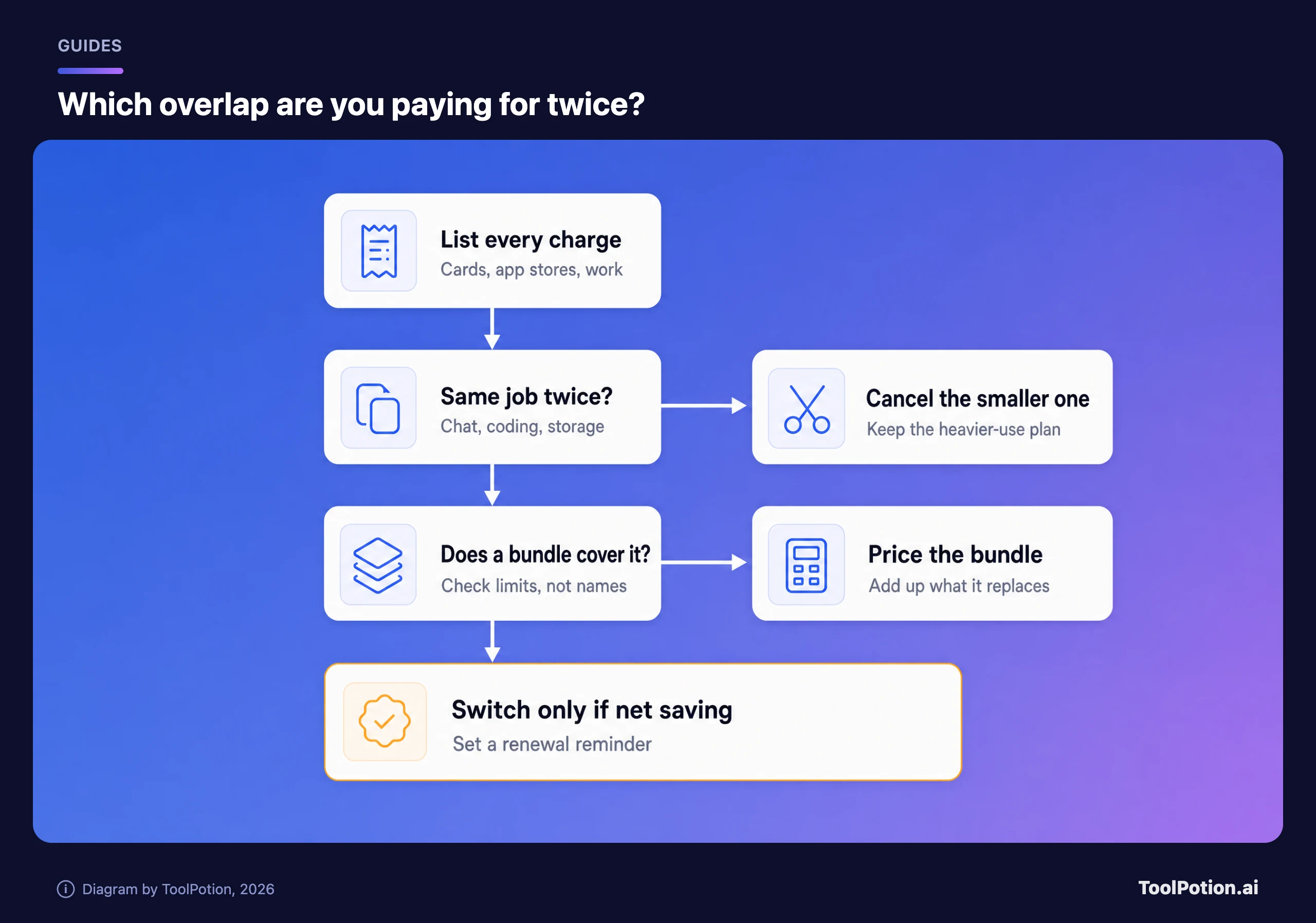
- Pull three months of card and app-store statements and write down every recurring charge for AI, storage or video. Charges billed through Apple or Google Play are the easiest to miss.
- Label each one with its job: chat, coding, storage, office apps or media.
- Circle any job that appears twice, including inside bundles you never think of as AI, like a Google storage plan or a Microsoft 365 family plan someone else pays for.
- Compare plans on usage limits and who can share them, not model names. Keep the one you open most and cancel the other at its next renewal. Paying for both ChatGPT Plus ($20) and Google AI Pro ($19.99) while using one wastes about $240 a year.
For the rest of your card, ToolPotion's AI tool stack audit covers the rest of the card, and AI tool pricing decoded explains why credits and seats make bills drift.
Run the numbers before you switch
Enter what you pay now and the bundle you're weighing. Set the slider to 50% if you'd keep one plan for its higher limits, because then the bundle only replaces half the spend.
Where a bundle wins and where it doesn't
Google AI Pro is the easiest case. If you already pay for a large storage plan, the Gemini side comes at a small premium. It's weakest when a Microsoft 365 plan already gives you 1 TB and a Copilot you use.
The X Subscription suits a narrow group: people paying for X Premium and Cursor today who also want Grok. At $30 for Premium, anyone who wants only the coding tool is buying social-platform perks they didn't ask for. Add up your own X and Cursor bills before switching, and check the coding assistants board for alternatives if you only want the editor.
Microsoft 365 is worth it for Office users and not worth it as an AI plan on its own. If chat is the only job, a standalone plan from the AI chatbots board or ChatGPT alternatives is simpler.
Frequently asked questions
Is The X Subscription cheaper than paying separately?
TechCrunch says the comparable plan costs the same or less for current Premium+ subscribers. For everyone else it depends on your Cursor and X bills, so put them into the calculator above.
Does Google AI Pro replace a separate storage plan?
Pro includes 5 TB, so open your Google One settings before the next renewal. If a second storage plan is still billing and you're under 5 TB, cancel it.
Can my family share these plans?
Google says family plan members on Pro can share select AI benefits, but the YouTube Premium Lite perk is plan-manager only. Microsoft 365 Family covers up to six people, though the AI features are for the owner.
Are ChatGPT and Claude part of any bundle?
On the pages we checked, both are sold as standalone plans. The overlap risk with them comes from tools that resell the same models, such as Perplexity, or from coding tools that bill third-party models separately.