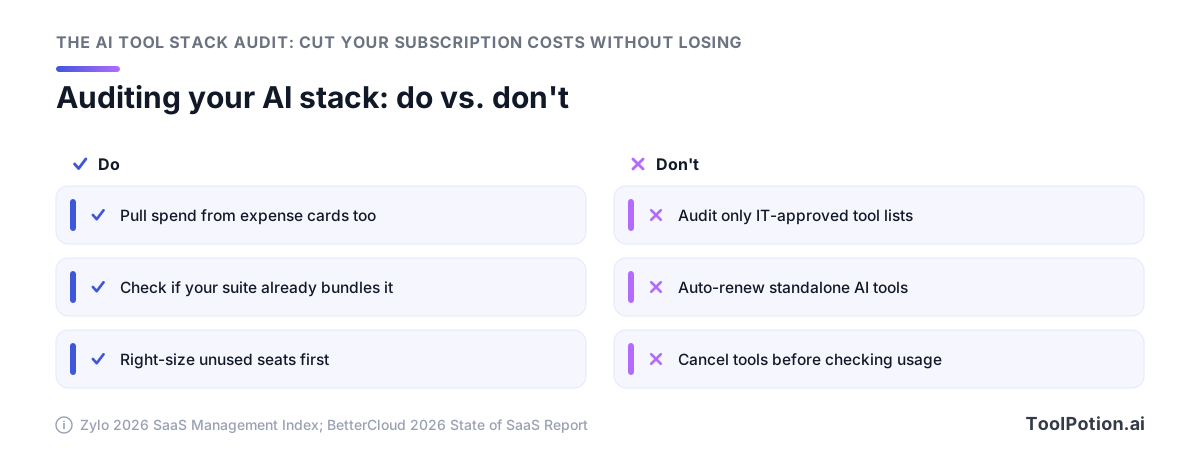
The biggest win in an AI tool stack audit is usually seat right-sizing. Most of what you'll cut is seats you already stopped using, plus a standalone subscription doing a job your existing suite absorbed. The average organization leaves 36% of SaaS licenses unused, so right-sizing frees more budget than cancelling anything.
The overlap is real and it's measurable. Generative AI entered the top ten most redundant software functions for the first time in 2026, with seven gen AI apps per portfolio. Meanwhile AI-native spend hit $1.2M a year per organization, up 108% while total app counts stayed flat. You're paying more for a stack that didn't grow.
This audit runs in five steps: inventory from card statements (not the IT list, which misses 81% of spend), diff against our directory's 19 tool types, check capability you already own, split spend into seats and usage and tokens, then benchmark before you touch a single contract.
What an AI tool stack audit turns up in 2026
In 2026 generative AI cracked the top ten most redundant software functions for the first time, with the average organization carrying seven generative AI apps (Zylo). Seven apps, and most of them answer the same prompt.
Seven generative AI apps, one job
Redundancy used to be a guess. Now it has a rank.
BetterCloud puts the wider number at 27 AI-powered SaaS applications per organization, roughly 22% of the whole portfolio, up from 7% the year before (BetterCloud). Triple in twelve months. Some of those 27 do distinct work, and some are three writing assistants bought by three teams who never compared notes. Across the 13,174 AI apps in our directory, the overlap is structural: writing, chat, summarizing and image generation each have hundreds of near-identical entries, so any two departments shopping independently will land on different vendors doing identical work.
Spend is rising without new tools being added
Organizations now spend an average of $1.2M a year on AI-native applications, up 108% year over year, and that figure leaves out AI features bundled into software they already pay for (Zylo). Doubling your spend on the same category of tool is the part worth staring at. If the tool count were flat and the price were flat, the bill would be flat. It isn't, which leaves two culprits: you're buying more seats of overlapping products, or your existing vendors repriced their AI tier and you paid it.
Both are fixable without losing a single capability.
The sprawl reflex has already reversed
Two years of consolidation ended in 2026. The average organization's app count rose 11% to 118 applications, the first meaningful increase after stacks had been shrinking (BetterCloud). Mid-market took the worst of it, jumping 41% in a single year from 116 apps to 164.
The industry-wide reflex you're fighting is re-expansion, with AI as the wedge driving it. That's why an audit built on "which tools do we have" produces a shrug, while one built on "which job does each tool do, and who else does it" produces cancellations.
Step 1: Build the inventory your IT list doesn't have
Start with the credit card statements. Business units control 81% of SaaS spend while IT directly manages just 15% (Zylo's 2026 SaaS Management Index), so an audit that opens with the IT-approved app list is auditing a fifth of the problem before it starts.
Start from the money, not the admin console
ChatGPT is now the most expensed application in the enterprise, and expense-based SaaS spend rose 267% year over year (Zylo). That's the shape of AI adoption right now. It arrives on someone's personal card, gets reimbursed as a $20 line item, and never touches procurement or your SSO tenant.
Pull twelve months of expense reports and filter for anything under $50 per transaction that recurs. Most AI subscriptions hide in that band. The average business pays for 4.5 AI tools and some carry as many as 16 (Cledara), and 85% of companies have at least one dedicated AI subscription, so if your first pass turns up two, you haven't finished looking.
Three sources that catch what SSO misses
Run these three pulls in parallel and reconcile them once all three are in:
- Corporate card and expense report exports for the last 12 months, filtered on recurring charges rather than vendor names (you don't know the vendor names yet, that's the point).
- Your identity provider's app list plus browser extension inventory if you manage endpoints, which catches the sanctioned half.
- A five-question form to every team lead asking what they personally pay for and what their team uses daily. This is the only source that reliably surfaces agent tools that rarely show up in SSO logs, since many run as CLI installs, IDE plugins, or API keys against a personal account.
Ask the finance team for the API and token line items too. Anthropic, OpenAI and Google usage often bills to one engineering card as a single opaque charge, and that charge grows on its own without anyone approving a new seat.
What to record for every line item
Six fields per tool, in a spreadsheet, nothing fancier. Tool name and vendor. Monthly cost and billing basis (per seat, flat, or consumption). Seats purchased versus seats with activity in the last 30 days. The job it does, written as a verb phrase like "drafts marketing copy" or "transcribes calls", not the vendor's category label. Who owns the contract. Renewal or cancellation date.
That verb phrase field is the one people skip, and it's the one the whole diff runs on. Vendor categories are marketing, so two tools that both say "AI productivity platform" tell you nothing. Two rows that both say "summarizes meeting notes" tell you exactly where to cut.
Step 2: Diff your stack against a real category taxonomy
Take the inventory you just built and force every line onto a fixed list of types and categories. Not the buckets you invent while staring at the spreadsheet. A list that already exists, that you didn't design around your own stack, and that you can't bend to make two tools look different when they aren't.
Why 'group by category' fails without a fixed list
Every audit guide tells you to group your tools by what they do. None of them hand you the groups. So you end up writing headers like "content stuff" and "dev tools," and the overlap you were hunting for disappears into the naming. Jasper goes under "marketing," Copy.ai goes under "content," and the ChatGPT Team seats go under "general AI," and now three tools that do the same job sit in three different rows and nothing collides.
That's the mechanism behind the waste. 30% of the 500-plus enterprise leaders Zapier surveyed said they're spending money on redundant AI software, and 28% are running more than ten AI applications (Zapier). Redundancy at that scale stays invisible because nobody's applying a consistent yardstick.
Mapping each tool to a type and a category
Use two columns, not one. Type answers what kind of thing this is: an app, an agent, a model, a platform, a framework. Our directory sorts 18,982 active listings across 19 types, and 13,174 of them are AI apps, which is where most of what's on a company card lands.
Category answers what job it does, and that's where the collisions live. The dense ones are predictable: 535 writing assistants in one category alone, 397 general-purpose chatbots, 260 coding assistants, 727 image generators. If a category holds hundreds of near-substitutes on the open market, your stack is statistically likely to hold two or three of them.
One rule keeps this honest. Assign each tool exactly one category, the one it's used for in practice, not the one its pricing page claims. Notion AI is a writing assistant in most companies regardless of how Notion markets it.
Reading the collision map: where three tools do one job
Sort by category and count. Any category with two or more entries is a candidate; any with three or more is almost certainly costing you money you can recover this quarter.
Then add a spend column and a seat-count column next to each collision, because the ranking that matters is dollars. A cell can hold four tools and almost no money. A category with four free-tier tools and one with two tools at $30/seat across 60 people are different problems, and only one of them is worth a migration.
Writing assistants and chatbots collide the hardest in practice, since a general chatbot subscription absorbs most of what a dedicated writing tool does. Coding assistants collide differently: engineers have real preferences there, and forcing consolidation buys you a small saving and a large argument. Rank your collisions by dollars at stake, then work down the list.
Step 3: Audit the capability you already bought
Before you compare two standalone tools in an overlap cell, check whether a suite you already pay for does that job now. In 2026 the answer is yes more often than it was a year ago, and the cancellation takes ten minutes instead of a migration project.
Suite bundling changed the math in 2026
Microsoft announced Microsoft 365 Business with Copilot on May 28, 2026, folding Copilot into the Business SKUs rather than selling it as a separate per-seat add-on (Microsoft 365 Blog). If your finance team is paying for a general-purpose writing assistant on top of a Business Premium licence, that line is now a duplicate of something already on the invoice.
So run the check in this order for every cell in your overlap grid: what does the suite include, what does the included version cover well, and only then which standalone tool wins. Our directory tracks platform-level AI suites as their own type for exactly this reason. They're the layer that quietly absorbs categories underneath them.
Finding AI features nobody switched on
Included capability doesn't show up in usage data, because nobody turned it on. Your admin console does know. Pull the feature-enablement report for each major platform and list every AI capability that's licensed but dormant, then match those against the standalone subscriptions in your inventory.
This is also where the shadow problem bites. Only 56% of apps in use carry IT approval, and 21% of organizations found new unsanctioned SaaS and AI tools in the past year (BetterCloud). An employee who expensed a $20 assistant usually did it because nobody told them the suite already had one.
The fastest cut is a tool your suite now replaces
Rank your candidate cuts by switching cost, not by sticker price. A standalone tool whose job moves to an already-licensed suite feature costs you a training email. A tool with its own data, workflows and integrations costs you a quarter.
With 36% of licenses sitting unused on average and median SaaS spend at $9,455 per employee (Zylo), the seat count on the duplicate matters more than the per-seat rate. Cancel the twelve seats nobody opened first.
Step 4: Split AI spend into three buckets, not one
Subscriptions are the smallest of the three. Ramp's August 2026 AI Index splits company AI spend into seat subscriptions, coding agents, and raw token/API usage, and the spread between firms is brutal: the median company spends $11.95 per employee per month, the top 10% spend $650, and the top 1% spend $7,400 (Ramp AI Index, August 2026). No seat count explains a 600x gap. Usage does.
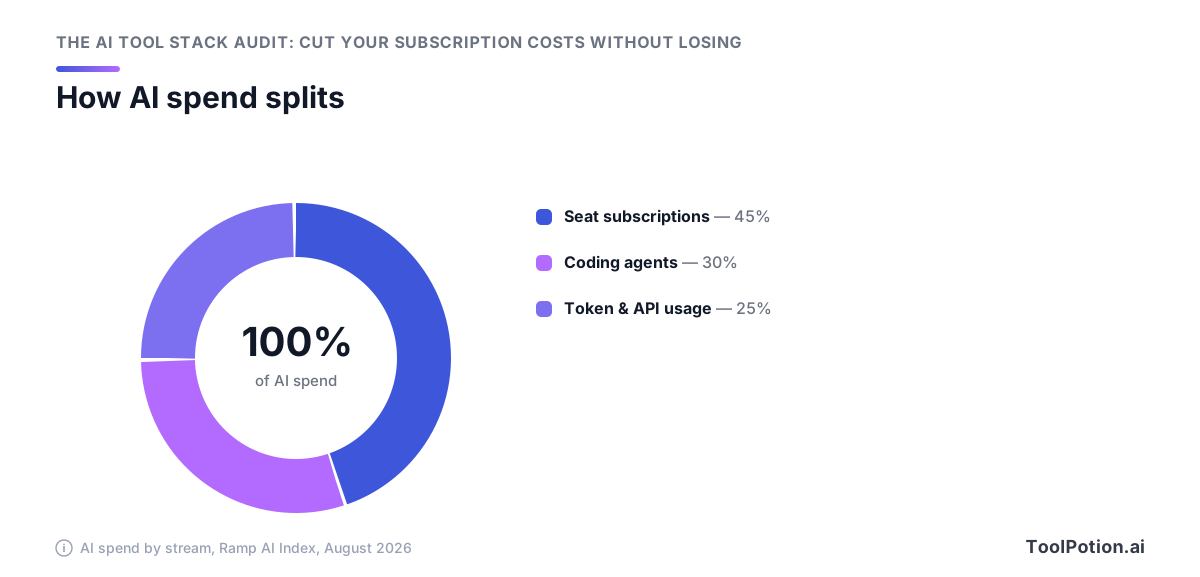
Subscriptions, coding agents, and token/API usage
Rebuild your inventory sheet with a bucket column and sort every line into one of the three.
- Seat subscriptions are the easy bucket: fixed per-user price, predictable monthly charge, and the one your finance team already tracks.
- Coding agents sit in the middle. They look like seats on the invoice and behave like usage once a team starts running them against a whole repo.
- Token and API usage is the bucket nobody owns. It's the model and API providers your engineers wired into internal tools, billed against a card that shows one vendor name and no per-team detail.
Why consumption pricing breaks the audit
A seat audit asks who's logging in. A usage audit asks what got called, by which service, at what volume, and that question has no answer in most companies right now. It shows up as damage after the fact: 78% of IT leaders got hit with unexpected charges tied to consumption-based or AI pricing in the last 12 months, and 61% had to cut projects to pay for the overrun (Zylo's 2026 SaaS Management Index). Those cut projects were funded work. They died because a bill nobody forecast came due.
If you cancel three redundant $30 seats and leave an unmonitored API key running, you saved $90 and kept the risk.
Assigning an owner to each bucket
Give each bucket one named person, not a committee. Subscriptions go to whoever runs procurement or finance ops. Coding agents go to an engineering manager who can read per-repo usage. Token spend goes to whoever holds the platform or API keys, with a monthly cap set in the provider console and an alert at 70% of it. Business units control 81% of SaaS spend against IT's 15% (Zylo), so the owner you pick has to be inside the unit spending the money, not adjacent to it.
Step 5: Benchmark before you cut anything
You need three numbers before you cancel a single subscription. Without them, every cut is an argument about taste, and the loudest team keeps its tool.
Is your stack bloated, or does it just feel that way?
Median SaaS spend per employee has reached $9,455, and organizations leave an average of 36% of SaaS licenses unused (Zylo). Those two figures are your yardstick. If your AI subscription line divided by headcount lands near the median and more than half your paid seats show activity, your stack isn't unusually bloated and you should stop hunting for tools to kill. If only 30% of your seats get opened, you have a seat problem, and it's a big one.
License utilization across the industry moved from 47% in 2024 to 54% in 2026, while waste per organization fell only 5.3%, from $20.9M to $19.8M (Zylo). Two years of effort, and roughly half of every seat purchased still goes unused. Beating that bar is not hard. Most teams have never tried.
The three ratios worth calculating
Pull these from the inventory and the taxonomy grid you already built:
- AI spend per employee per month, split by the three buckets from Step 4, so a heavy token bill doesn't get blamed on someone's $20 seat.
- Active seats divided by paid seats, per tool, measured over the last 30 days rather than the last 12 months. Anything under 60% is a renegotiation, not a debate.
- Tools per taxonomy cell. Two is normal. Four in one cell means you're funding a preference, not a capability.
Seat right-sizing usually beats cancellation
Cancelling a tool takes a migration, a champion who feels overruled, and weeks of workflow rebuilding. Dropping 40 unused seats off a renewal takes an email. At 36% unused licenses (Zylo), the seat lever is bigger on most stacks than the tool lever, and it costs nobody any capability at all.
Do the seat pass first. Then look at what's left in your overlap cells, because the ones that still look expensive after right-sizing are the real duplicates.
Making the call: survivor, right-size, or keep both
Every overlap cell gets one of three verdicts, and you write the verdict down before you touch a billing page.
Pick a survivor per taxonomy cell — and write down why
The survivor is the tool with the most workflows built on it, not the one that scores best on a feature grid. Count what's wired into it: integrations, saved prompts, shared assets, people who'd have to relearn something. Then check the cell against the wider market before you commit, because your two candidates might both be worse than a third option you never evaluated. The AI Apps type alone holds 13,174 listings, so you can compare survivors against the wider market in the same category rather than picking the better of two accidents.
Write one sentence per cell: what survives, what dies, who owns the migration, what the monthly saving is. That sentence is what you'll show the team that loses its tool.
Most cells won't end in cancellation. With 36% of licenses unused on average and median SaaS spend per employee at $9,455 (Zylo's 2026 SaaS Management Index), the right-size verdict beats the kill verdict on volume. Drop the seat count to actual weekly logins, keep the tool, bank the difference. It's a faster win and nobody fights you over it.
When duplication is legitimate
Two tools in one cell is correct when the users don't overlap, when one is a compliance-approved instance and the other isn't, or when a model swap would break output quality your customers see. Redundancy also buys you leverage at renewal. Keep both, and say so in the audit doc with the reason attached, otherwise someone re-runs this exercise in six months and cuts it blind.
Cancelling a shadow tool without replacing its job is how you end up in the 47% of genAI users working through personal, unmanaged accounts (Netskope, via SecurityBrief). The spend leaves your books. The work doesn't.
Migration, cancellation windows, and the 30-day reversal plan
- Export everything first: prompt libraries, chat history, generated assets, API keys in use. Do this while the account is still paid, because export access usually dies with the subscription.
- Move the workflows, then watch them run for two weeks on the survivor tool.
- Downgrade to the cheapest paid tier instead of cancelling outright. You keep the data and the login for one more cycle.
- Cancel at day 30 if nobody has asked for the old tool back. If someone has, you learned the cell was a keep-both.
Check the contract term before any of this. Annual plans with consumption riders are where 78% of IT leaders got hit with unexpected charges in the last 12 months (Zylo), and a mid-term cancellation on one of those can cost more than the year you're trying to save.
Keeping the stack from re-sprawling next quarter
Cancellations decay. Six months after a clean audit the same overlap cells refill, because nothing changed about how tools get bought in the first place.
A standing intake rule tied to the taxonomy
Make one question mandatory on every new AI tool request: which category does this land in, and what's already in that cell? Use the same taxonomy you diffed against in step 2, so the answer is checkable instead of a matter of opinion. If the cell is occupied, the requester has to say what the incumbent can't do. That's it. No committee, no procurement ticket, just a named category and a named gap.
Route it wherever requests already go. A field on the expense form works better than a new process nobody remembers, and since business units are the ones spending, the field has to live where they spend.
Quarterly re-audit on a 30-minute cadence
Once the inventory exists, refreshing it is cheap. Pull the card statements for the quarter, drop new line items onto the taxonomy grid, recheck your per-employee spend against the benchmark, and look at seat counts on anything you right-sized last time. Thirty minutes, four times a year. The expensive part was building the grid, and you already did that.
Shadow AI is a cost problem and a security problem
About 47% of generative AI users reach these tools through personal, unmanaged accounts, and 90% of organizations already block at least one gen AI app, averaging 10 blocked tools (Netskope Cloud and Threat Report 2026). Blocking pushes usage onto personal accounts you can't see, which keeps the spend off your books and puts company data somewhere you can't audit. Give people a sanctioned tool in every category that has real demand. Cheaper than the alternative, and you get the usage data back.
Frequently Asked Questions
How often should we run an AI tool stack audit?
Quarterly, with a lighter monthly scan of the invoice lines that move. Annual reviews can't keep up with usage-based billing: 78% of IT leaders were hit with unexpected charges tied to consumption-based or AI pricing in the last 12 months, and 61% had to cut projects because of unplanned SaaS cost increases. The spend curve backs up the cadence too, with AI-native app spend up 108% year over year overall and 393% at organizations above 10,000 employees while total app counts stayed flat. Time the deep audit to land 60 days before your two biggest renewals.
How much should a company spend on AI tools per employee?
Use Ramp's benchmark as your sanity check: the median firm spends $11.95 per employee per month, the top 10% spend $650, and the top 1% spend $7,400. That spread is so wide that the median works as a floor rather than a target, so what matters more is where you sit relative to peers with the same AI-heavy job mix. For context on the organization-level number, AI-native application spend averages $1.2M a year and median SaaS spend per employee has reached $9,455. If you're near the median and your licenses are being used, your stack isn't bloated even when it feels crowded.
What's the fastest way to find AI subscriptions nobody told IT about?
Start with corporate card and expense report data, not the IT app inventory. ChatGPT is now the most expensed application in the enterprise and expense-based SaaS spend rose 267% year over year, which is what happens when AI enters through employee credit cards instead of procurement. An IT-first list also misses most of the money, since business units control 81% of SaaS spend while IT directly manages 15% and only 56% of apps in use carry IT approval. Follow the expense sweep with an identity-provider and SSO log review, because 47% of generative AI users reach tools through personal, unmanaged accounts that never touch a company card at all.
Is it better to cancel a redundant AI tool or just reduce seats?
Right-size seats first. Organizations leave an average of 36% of SaaS licenses unused, and the share of licenses in active use has crawled from 47% in 2024 to 54% in the 2026 index while waste fell only 5.3%, from $20.9M to $19.8M per organization. Seat reduction is faster, reversible, and it doesn't force a migration, so it usually returns more money per hour of work than killing a tool does. Save cancellation for the case where a second tool fails the job test, meaning nobody can name a task it wins over the survivor.
When is paying for two AI tools in the same category actually justified?
When each one wins a task you can name out loud, and the overlap is in the category label rather than the work. Generative AI entered the top ten most redundant software functions for the first time in 2026, at seven generative AI apps per portfolio, and 30% of enterprise leaders say they're wasting money on redundant AI software, so the default assumption should be that the second subscription is dead weight until proven otherwise. Real justifications look like a coding agent sitting alongside a general assistant, or an API and token budget running next to seat licenses, which Ramp tracks as separate spend buckets. Category labels are coarse: our directory alone lists 13,174 AI apps, including 535 writing assistants and 397 chatbots, and plenty of those pairs genuinely do different jobs.
Do we still need a standalone AI writing or chat subscription if our suite includes AI?
Check what you already pay for before you renew, because the answer flipped in 2026. Microsoft folded Copilot into Microsoft 365 Business SKUs, so a standalone writing or chat tool may now be paying twice for capability that ships with your existing licenses. Keep the standalone one when it does something the bundle can't, like direct access to a specific model or a higher usage tier (compare plan levels before you decide). Cancelling a tool your suite already replaced is the cheapest cut in the audit, since there's no migration and no retraining.