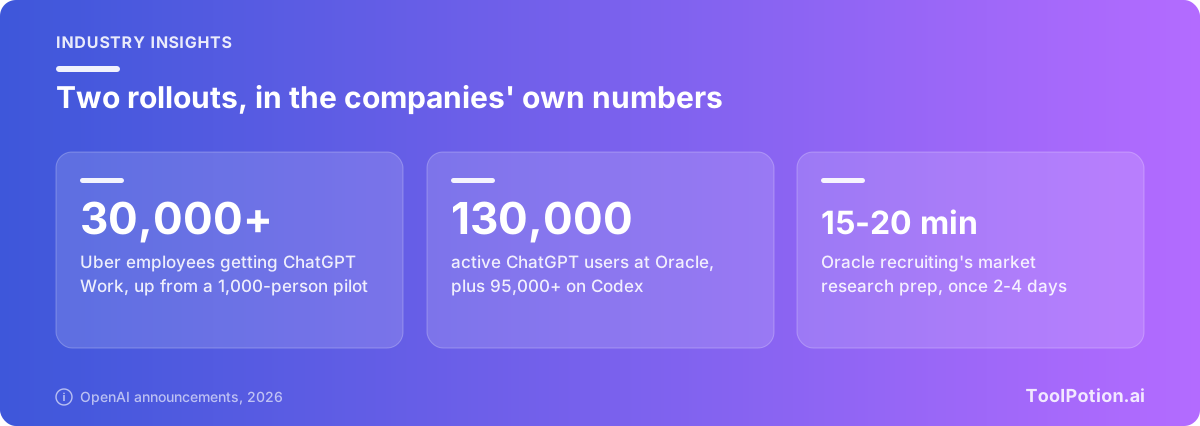
Uber started with 1,000 people. Now ChatGPT Work is going to more than 30,000 of its employees, which OpenAI says makes it Uber's "first company-wide deployment of an agentic platform tailored for knowledge work." Oracle, a few days later, said it has 130,000 active ChatGPT users and is building its own AI Workspace inside the product. Both stories use the same two words, and almost nobody explains what they refer to.
We read OpenAI's product pages, help center and release notes to find out. What we found is odd: ChatGPT Work isn't a plan, and you can't buy it by itself. It's a mode of ChatGPT that comes with every plan, in very different amounts. That changes how an IT buyer should price it.
It isn't a plan you buy
OpenAI's ChatGPT Work page describes it as a way to "turn scattered notes, drafts, and ideas into finished work" using context from your team's tools. You hand it a goal, it gathers material, makes a plan, and checks in when it needs a judgment call. The output is a deck, a spreadsheet, a report, an interactive site. The page says it's available on desktop in every plan, and on web and mobile for Plus, Pro, Business, Enterprise and Edu.
So the Free plan has it too, with "limited" access in the desktop app only, according to the pricing page. The cheaper Go tier lists the same limited desktop access. Plus gets "expanded access" on desktop, web and mobile. Pro adds longer Work and Codex sessions. The naming trips people up because Business and Enterprise are the plans companies think of as "the work ones," but the feature itself starts at zero dollars.
What the business plans add is the wrapper: shared context, admin controls, one bill and larger usage limits. That wrapper is what IT is actually buying.
What's inside the box
Work leans on a handful of pieces, and the product page treats them as one bundle. Plugins connect it to your tools (OpenAI says there are more than 1,400). A built-in browser in the desktop app lets it work across tabs and accounts. Plan mode shows you the steps before it starts. Space and Sites hold the shared pages and live dashboards. Team tasks run recurring work like a weekly report on a schedule, using tools your admin has approved.
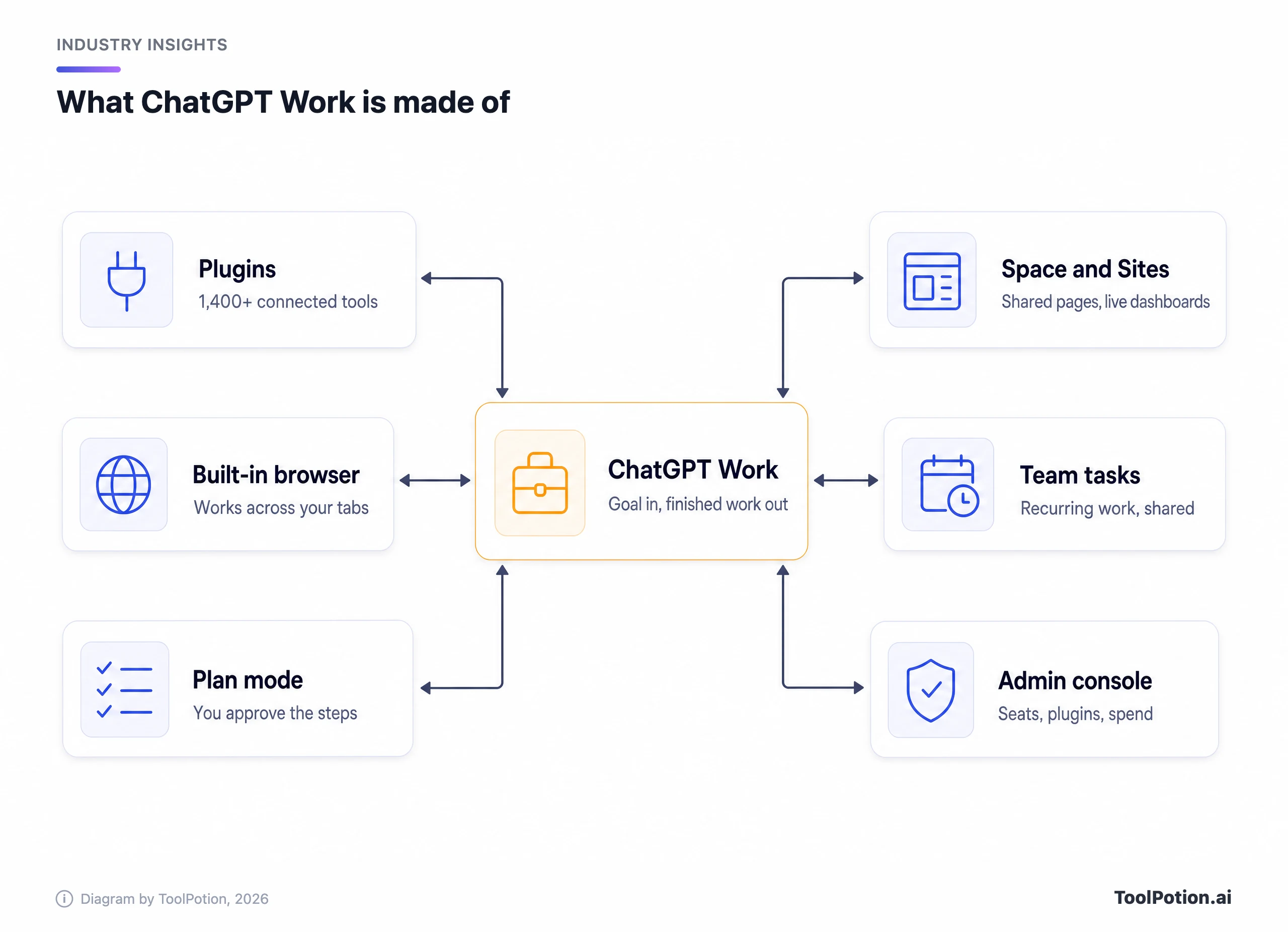
Codex, OpenAI's coding agent, sits beside Work rather than inside it. Uber's release says its engineers will keep using Codex for software, while everyone else gets Work. On Business seats both come with the same seat, which is the part we like: developers and the finance team draw on one bill.
New models don't always reach plain chat first. GPT-6.1 Terra is "rolling out in ChatGPT Work and Codex," per the Business release notes, which add that it's "available in Work and Codex, not Chat." Terra also doesn't support UAE inference residency. If your policy cares where inference runs, that's a line to read before you switch the model on.
Pay by card or by contract, and the price is the seat
Here is how the same feature is sold. Free, Plus and Pro are individual cards. Business is self-serve for teams and needs at least two seats. Enterprise is a sales contract. (Edu follows the Enterprise pattern, with its own pricing, and Go sits between Free and Plus with the same limited Work access as Free.)
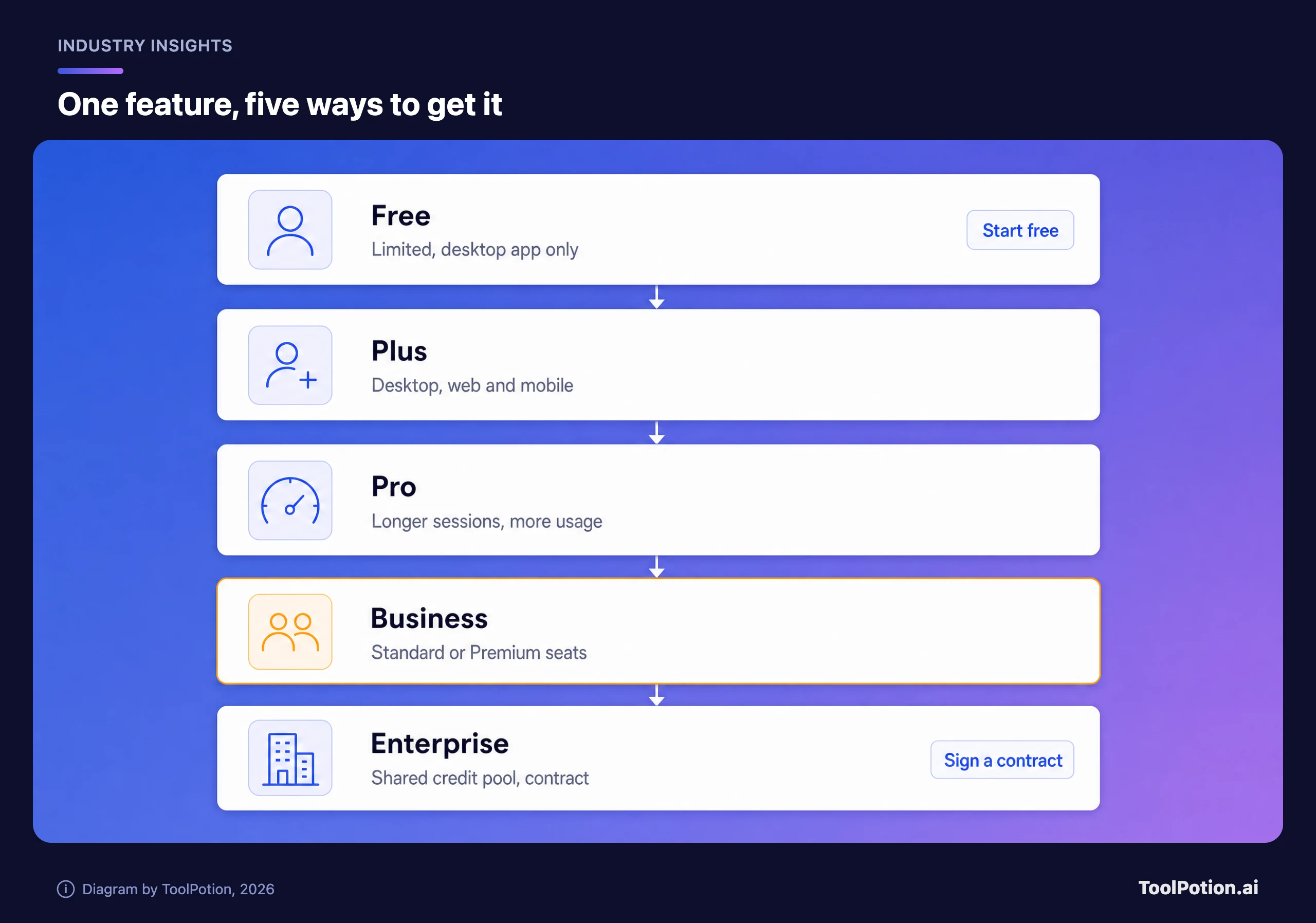
The Business numbers come straight from OpenAI's Business overview. A Standard seat is $25 per user per month billed monthly, or $20 billed annually, and includes ChatGPT, Work and Codex. A Premium seat is $125 monthly or $100 annually, with 5x more usage than Standard, no five-hour limit and access to dots, the always-on agents, which OpenAI's Business page says are offered to Premium users in eligible markets. You can mix seat types in one workspace and reassign them. ChatGPT Team was renamed Business in 2025, in case an older contract still says Team.
Going past the included limits is where the bill gets less tidy. Business workspaces can buy credits, pooled across the workspace and valid for 12 months, and users who run out are blocked until an owner adds more, per OpenAI's flexible pricing article. Enterprise works the other way. On credit-based agreements the workspace buys one shared credit pool at the contract level, "there are no per-seat usage caps by default," and admins use role-based access controls to set spend limits by group. Added seats are generally reconciled in quarterly true-ups. OpenAI doesn't publish an Enterprise price, and we won't guess one.
What nobody publishes is how much work a Standard seat buys. The pricing page says "expanded" and "limited" and never gives a task count. We'd treat the first month of any pilot as a measurement of your own usage, not a feature check.
What Uber and Oracle bought
The two announcements look alike and aren't. Uber's is a company-wide rollout inside ChatGPT Enterprise. Oracle's is a partnership with three separate layers.
Uber's post says Work connects to Google Drive, Gmail, Google Calendar and Slack, with GPT-6.1 Sol as the default model, "balancing frontier performance and cost efficiency." The company is pairing the rollout with an internal skills library, approved integrations and training. Its CTO, Praveen Neppalli Naga, said "Rolling out ChatGPT Work across the company is an exciting step toward that ambition, and I can't wait to see what our teams build with it." Notice what the release doesn't contain: a result. OpenAI says the companies "plan to share further insights into adoption, use cases and measurable outcomes as the rollout progresses."
Oracle's announcement has numbers, from Oracle's own reporting: 130,000 active ChatGPT users and more than 95,000 active Codex users. Its recruiting team uses Work for market research that once took two to four days to compile, with preparation now down to 15 to 20 minutes. The bigger move is Oracle AI Workspace, which is still being developed and aims to put Oracle's finance, procurement and planning apps inside ChatGPT, "governed by each organization's permissions and approvals." Oracle also sells the pieces through its marketplace to US customers, using "existing procurement processes and eligible Oracle Universal Credits."
The sharpest line came from Mahesh Thiagarajan, Oracle's president of cloud infrastructure, who told CNBC that using ChatGPT "allows anybody to build an application, deploy it, manage it." Greg Brockman, OpenAI's president, said in the press release that OpenAI is making it "easier to put AI to work through the tools and systems they already use." Both are vendor voices, and CNBC's piece doesn't include an independent customer or analyst on whether any of this lands. We couldn't find one in the coverage we could open.
The IT checklist, including what ships switched off
Start with data, because it decides most procurement debates. OpenAI's enterprise privacy page says it does not train on business data by default, that Business, Enterprise and Edu data is covered by a SOC 2 Type 2 audit, and that it will sign a data processing addendum for GDPR purposes. Connected apps respect your existing permissions, and each user authenticates to each app themselves.
Then look at the gap between Business and Enterprise, because OpenAI's Business page spells it out: SCIM provisioning, role-based access controls and data residency all sit behind "contact sales." On Enterprise, admins also get an audit log of conversations through the Compliance API and control retention. On Business, admins can view, export and delete members' conversations. Invoicing, purchase orders and zero data retention are contracted options only.
The Business release notes show a pattern we find reassuring. Several of the riskier connections arrive off by default. Letting Sites use members' connected apps is a setting admins must turn on per plugin. The new external access controls start off. Admins can manage up to 25 plugins at a time from the console.
The catch is a quieter one. The Business release notes say OpenAI plans to retire custom GPTs across ChatGPT plans and provide a migration path to plugins, and they tell teams to review their GPTs, creators and users now. If you built a library of internal GPTs, that migration is your work, and the notes we read give no retirement date. Pair it with a written rulebook before people start connecting tools. Our AI usage policy template is a reasonable starting point.
Against Copilot and Gemini
All three vendors now sell an agent inside the tools you already use, and they differ mostly in where those tools live. Microsoft's Copilot pricing page lists Microsoft 365 Business Standard with Copilot at $23.50 per user per month billed yearly and Business Premium with Copilot at $32. The Copilot add-on for existing Microsoft 365 plans is listed at $18, down from $21. It includes agents, access to "Cowork, Autopilot, and advanced AI experiences," and a footnote that some advanced features are billed by usage.
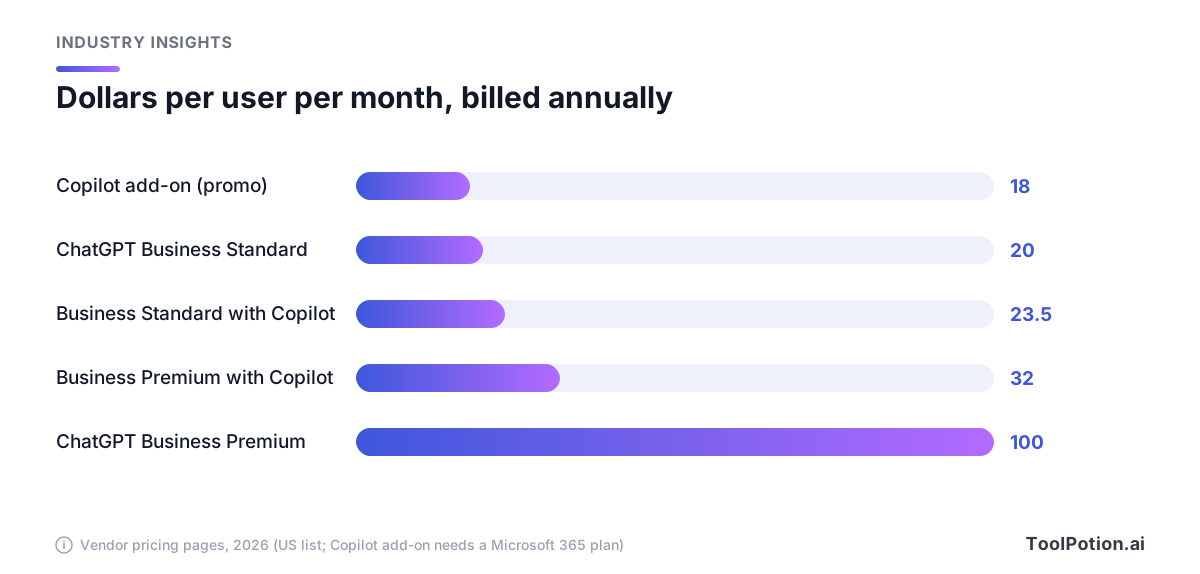
Read the chart with care, since Premium's $100 buys five times the usage, not a different product. A $20 ChatGPT seat doesn't include Word, Excel or Outlook. The $23.50 Microsoft seat does, because it's a whole office suite with Copilot inside. A fair comparison is Copilot's add-on against a ChatGPT seat on top of whatever you already pay Microsoft, and the two are nearly the same money. We'd lean toward Microsoft 365 Copilot when the work happens in Outlook and Teams, and toward ChatGPT Work when it has to cross tools.
Google is the third option. Its Workspace pricing page lists a Gemini assistant in Gmail on Business Starter, and Gemini in Gmail, Docs and Meet plus Gemini Notebook on Business Standard. We're not quoting its prices here, since the page we opened showed a regional currency and promotions. Our Copilot versus Gemini cost breakdown covers that matchup, and the three-assistant comparison covers model quality.
There's also Anthropic's Claude Cowork, the closest direct rival to Work, which we'd put on any shortlist.
And there's a governance wrinkle. Swedish government employees can no longer use the browser versions of ChatGPT or Claude on work computers, Euronews reported. A review of AI use at the Swedish Transport Administration had found "problematic" uses, and officials worried that sensitive data entered without a protecting agreement could end up stored and used for training. Mikael Wettercrantz of the Government Offices said unregulated tools, or shadow IT, could bring "consequences for our information security." Copilot is the recommended alternative because it has passed a security screening and is covered by an agreement between Microsoft and the government. A limited number of staff can still use ChatGPT and Claude, but only through a platform built by Swedish authorities. That is procurement picking the winner before any feature comparison starts.
Who we'd move, and who should wait
We'd move first if you run Google Workspace and a patchwork of other tools. Uber's rollout is the pattern: Drive, Gmail, Calendar and Slack feeding one agent. Gemini covers the Google apps, and the plugin route is what reaches the rest. Start with Standard seats for a pilot group and only upgrade to Premium for the handful of people who hit the limits.
We'd also move if engineers and non-engineers should share a budget. One seat covering Work and Codex is a simpler conversation with finance than two vendors. For the terminal side of that, see our coding agent comparison.
Microsoft shops with a security agreement in hand should wait. Copilot is already inside the apps and the paperwork is done. Run a small ChatGPT pilot on the side if you like, but we wouldn't standardize.
Premium is the easy one to skip. At $100 a month on annual billing it costs five times a Standard seat, so buy it only for people who've already hit a Standard limit.
If you need SCIM, role-based access or data residency, plan on Enterprise from the start. Business is a good pilot vehicle, but Enterprise is a separate sales contract, and OpenAI doesn't publish what it costs.
Whatever you choose, give people a first week that isn't a lecture. Our day-by-day onboarding plan is built for that. For an earlier company-wide ChatGPT Enterprise rollout, see the mixi case study, and browse every ToolRank board for the assistants and agents we rank.
Frequently asked questions
Is ChatGPT Work a separate product I have to buy?
No. OpenAI includes it in every ChatGPT plan, with limited desktop access on Free and fuller access on paid plans. Business Standard and Premium seats include both Work and Codex.
What does ChatGPT Business cost?
Standard seats are $25 per user per month billed monthly or $20 billed annually. Premium seats are $125 monthly or $100 annually. A workspace needs at least two seats, and extra usage is bought as credits.
Does OpenAI train on our company data?
By default, no. OpenAI says it does not train on business data from Business, Enterprise and Edu, unless you explicitly opt in to share it. Check your contract and workspace settings before relying on that.
Does ChatGPT Work connect to Google Drive and Slack?
Yes. Uber's rollout uses Google Drive, Gmail, Google Calendar and Slack. Admins decide which plugins are available in the workspace, and each user still signs in to each app.
When should we pick Enterprise over Business?
When you need SCIM, role-based access controls or data residency, or when invoicing, purchase orders and zero data retention are procurement requirements. OpenAI lists those as sales-led options.