For most developers in 2026 the real choice is between Claude Code and Codex, and on the hardest public benchmark for terminal work they're tied within the margin of error. Gemini CLI, the third name in every comparison from last year, is gone for free and consumer users: Google replaced it with a closed-source tool called Antigravity CLI earlier this year.
That shifts the decision. The top two trade the lead release by release, so model quality is a weak tiebreaker. What separates these tools now is what the agent may do on your machine without asking, how you pay for it, and whether a team lead can control both. Codex ships the safest defaults and an open-source client. Claude Code has the deepest toolkit for teams that want to script and extend it. The CLI from GitHub Copilot fits organizations that already live in GitHub and want several labs' models on one bill, and OpenCode is the pick if you want open source and any model you like.
Prices and features below come from vendor docs and pricing pages, and every benchmark number names its source.
What changed in terminal agents this year
Four shifts matter if you last looked at this category a year ago.
Google retired Gemini CLI for most people. At Google I/O it announced that Gemini CLI would stop serving requests for free users and for Google AI Pro and Ultra subscribers, with its IDE extensions switched off on the same day (Google Developers Blog). The replacement, Antigravity CLI, is written in Go and runs on the same agent backbone as Google's new Antigravity 2.0 desktop app. Organizations on Gemini Code Assist Standard or Enterprise, and developers paying through Gemini API keys, keep Gemini CLI.
GitHub made Copilot CLI generally available, then moved every Copilot plan to usage-based AI credits, so terminal sessions now draw down a metered allowance worth $0.01 per credit (GitHub Docs).
Anthropic changed what happens when you open a session. From Claude Code v2.1.283, interactive terminal sessions start in auto mode, where a second model, which Anthropic calls the classifier, reviews actions instead of prompting you for each one (Claude Code docs).
OpenAI refreshed the Codex CLI this week with voice control, an /agents view for tracking parallel tasks and reusable cloud environments that a team can share with approved settings and permissions (TechCrunch). Meanwhile Aider, the veteran open-source option, has shipped nothing since a minor patch release early this year, and its last feature release dates from last year (PyPI).
The loop every terminal agent runs
Strip away the branding and all of these tools do the same job. You describe a task in plain language. The agent reads the relevant files, drafts a plan, edits as many files as it needs, runs your build and tests, and loops on failures until it can show you a diff.
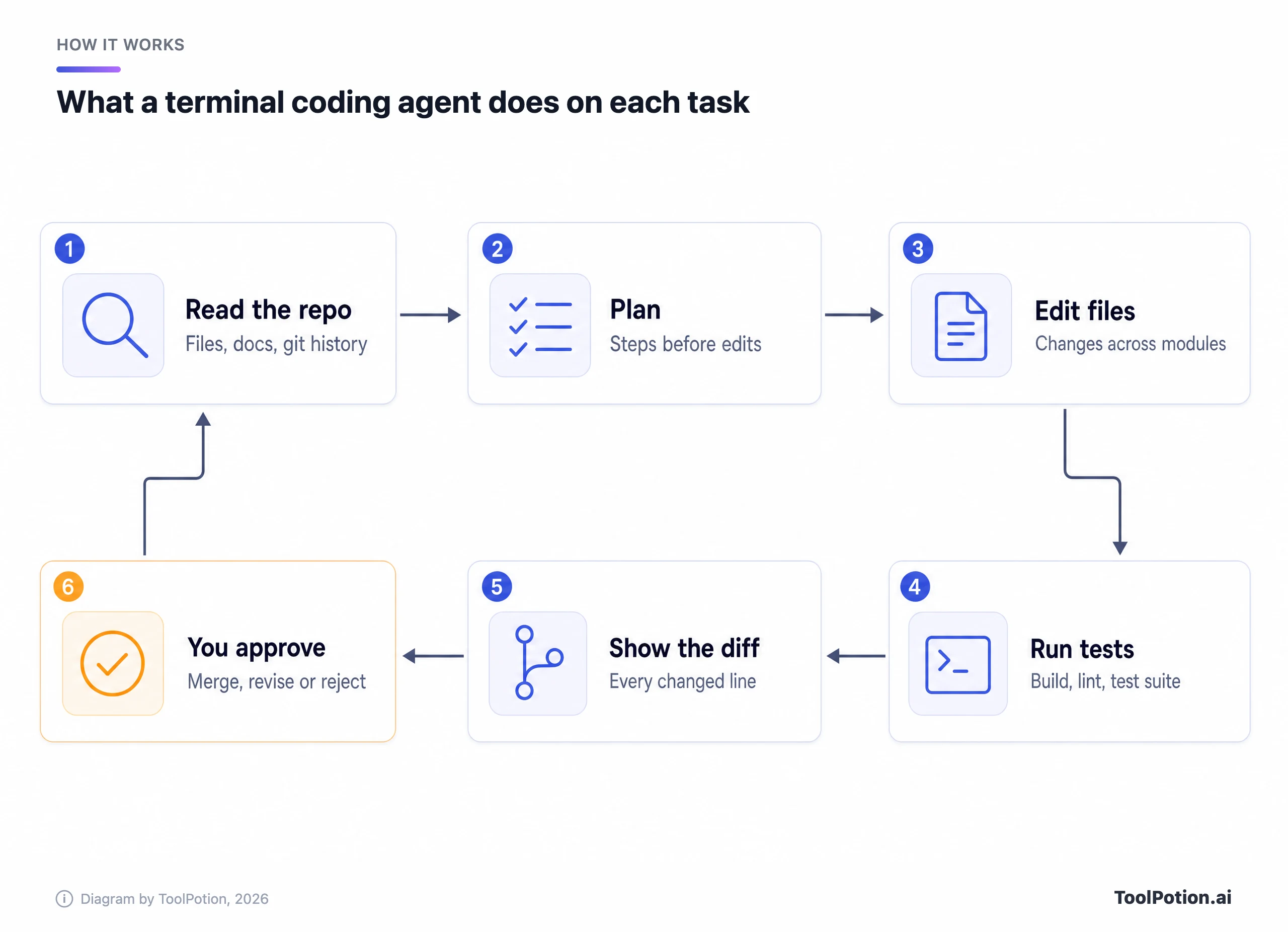
The highlighted step is the one to design around, because approval is where your judgment and your security policy live. The tools differ in three places around that loop: which models drive it, what the agent may do before you approve, and where it runs (your laptop, an OS sandbox or the vendor's cloud). Models get the headlines, but the other two decide whether a whole team can use it.
Claude Code vs Codex, head to head
These two are the defaults for good reasons. Both run on macOS, Linux and Windows, both read an AGENTS.md file, both support MCP servers, skills, hooks, plugins and subagents, both can push a task to the cloud, and both come with a $20 monthly plan. The differences sit in the details.
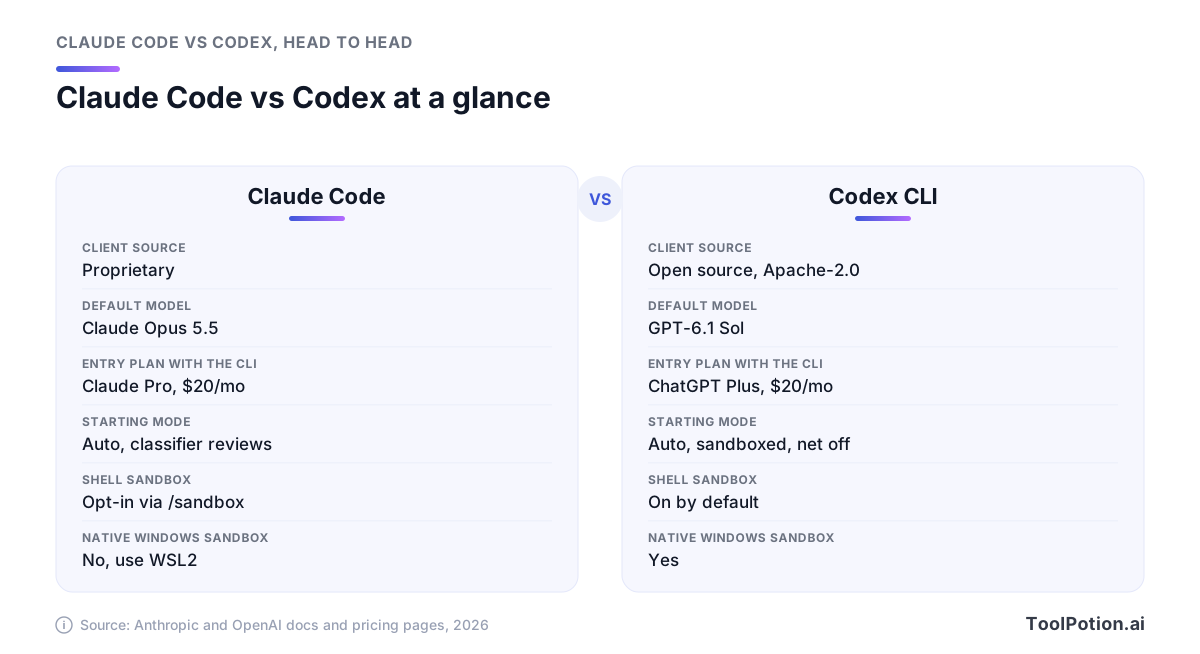
Start with models. Claude Code runs Anthropic's models only and defaults to Claude Opus 5.5 on every plan, with Sonnet 5.5 and Haiku as cheaper options and Fable 5.1, the most capable model in Claude Code, as an explicit opt-in that some plans bill to extra usage credits. Codex defaults to GPT-6.1 Sol, which OpenAI says nearly matches its flagship GPT-6 Astra on agentic coding at a fifth of the API price. The Codex client is open source under Apache-2.0 (the openai/codex repository is written in Rust), while Claude Code's license reads all rights reserved.
Safety defaults are the sharper split. Inside a git repository Codex starts in a preset it calls Auto: it can read, edit and run commands in the workspace, but an OS sandbox (Seatbelt on macOS, bubblewrap plus seccomp on Linux, a native sandbox on Windows) blocks network access and anything outside the project until you approve it (OpenAI docs). Outside a git repo it falls back to read-only.
Claude Code takes the other route. Its shell sandbox is off by default, and its first line of defense is the auto-mode classifier plus deny rules, which block in every mode. When you do switch the sandbox on, it wraps shell commands only, and sandboxed commands can still read most of the machine, including ~/.ssh and ~/.aws/credentials, until you add deny rules (Claude Code docs). On native Windows there's no sandbox at all, and Anthropic points you to WSL2.
Claude Code wins on depth. Plugins bundle skills, subagents, hooks and MCP servers and install from marketplaces that admins can allowlist or block. Routines run scheduled jobs in Anthropic's cloud, GitHub Actions and GitLab CI/CD integrations handle review and triage, and the Agent SDK lets you build agents on the same tools. Codex covers most of the same ground with less ceremony (hooks, skills, plugins, codex exec for scripts, a GitHub Action), and its automatic code review covers GitHub pull requests and GitLab merge requests.
So where is each weakest? Claude Code ties you to one lab and leans on a model's judgment rather than an OS boundary until you change a setting, which some security teams won't accept. Codex is tied to one lab too, and the flagship is rationed hard on the $20 plan: OpenAI estimates 5 to 45 local messages per five hours with GPT-6 Astra on Plus, against 15 to 160 with GPT-6.1 Sol (OpenAI pricing).
Antigravity CLI replaced Gemini CLI for most people
Search for Gemini CLI today and you'll still find the Apache-2.0 repository, still shipping releases (v0.62.0 landed this week). Its docs, though, now carry a banner telling free and Google One users that Gemini CLI was replaced. The people who can keep using it are organizations on Gemini Code Assist Standard or Enterprise licenses and developers with paid Gemini or Gemini Enterprise Agent Platform API keys.
The CLI that replaced it inside Google Antigravity is a different kind of product. It's closed source, and Tech Times reports that its public repository holds no source code at all, a sore point for a project that, by Google's own count, merged 6,000 pull requests. Google concedes there's no 1:1 feature parity yet, although skills, hooks, subagents and extensions (now called plugins) made the move.
There's real upside, too. Antigravity's model menu lists Gemini 3.8 Flash and Gemini 3.1 Pro next to Claude Sonnet 5.5, Claude Opus 5.5 and the open-weight GPT-OSS-120b, so one Google subscription can reach two labs' models, though availability varies by tier. Its default preset on macOS and Linux is also at least as strict as Codex's on paper: terminal commands run in a sandbox with no network, file access stops at the workspace and temp folders, ~/.ssh and .env files are blocked, and MCP and web actions ask first (Antigravity docs). On Windows that sandbox is off by default.
Quota is the catch. The free Individual tier lists basic weekly rate limits, a long way from the 1,000 free requests a day Gemini CLI used to give personal accounts. Paid capacity rides on the Google AI Pro and Ultra plans, and Google reshuffled those tiers when Antigravity launched, so read the current limits on Google's own plan page before you commit. Pick Antigravity CLI if you live on Google Cloud, want Claude models without a separate Anthropic contract, or want strict sandbox defaults out of the box. Skip it if an open-source client matters to you.
Copilot CLI, Cursor, OpenCode and the rest
Copilot CLI is the most underrated option for companies. It runs models from Anthropic, OpenAI and Google behind one bill, and it has the modern kit: a plan mode, an autopilot mode, built-in agents for exploring and reviewing code, MCP, plugins, skills, hooks, and an & prefix that hands a task to GitHub's cloud coding agent (GitHub Changelog). Every plan includes it: Free, Pro at $10 a month, Pro+ at $39 and Max at $100, plus Business at $19 and Enterprise at $39 per seat (GitHub Docs).
Its weak spot is permissions. Copilot asks you to trust a folder, then approves tools one at a time or for the whole session, and GitHub's own docs warn that approving rm for a session lets it delete any file in that directory tree without asking. The local sandbox is opt-in through /sandbox enable, and a --yolo flag switches every check off.
Here's how the four biggest names line up on attributes you can check in their docs and licenses rather than their marketing.
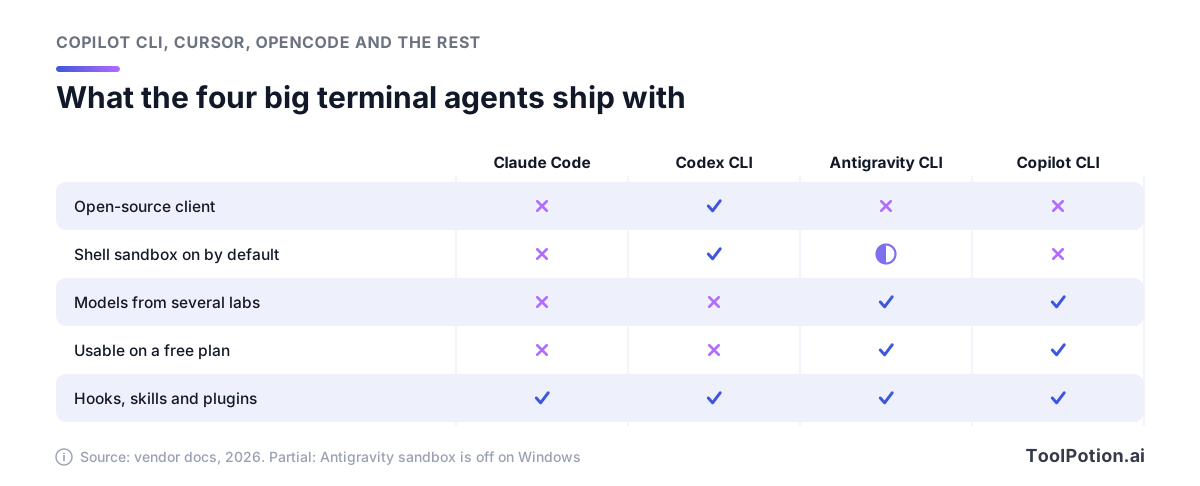
Only Codex pairs an open-source client with a sandbox that's on everywhere by default. Antigravity and Copilot are the two that mix labs' models without extra plumbing. Extensibility has converged, since all four take hooks, skills and plugins.
Cursor brings its editor agent to the terminal with agent, plan and ask modes, a print mode for scripts and CI, and the same & handoff to a cloud agent. It's the obvious add-on if your team already pays for Cursor (Individual from $20 a month, Teams at $40 per user) and a hard sell if you don't.
OpenCode is the open-source standout: MIT-licensed, past 211,000 GitHub stars, and wired to more than 75 model providers including local models. You can sign in with a GitHub Copilot or ChatGPT Plus or Pro account instead of paying twice. Mind its defaults, though. OpenCode lets the agent edit files and run shell commands without asking unless you write rules, it has no OS sandbox, and its built-in guards cover only .env files, paths outside the project and an agent stuck repeating itself (OpenCode docs).
Three more deserve a line each. Amp passes model costs through at provider prices with no markup for individuals, mixes GPT-5.6 and Claude Fable 5.1 under the hood, and has a free tier and a $20 plan. Warp is now an AGPL-licensed agentic terminal with its own agent, priced from free to $20 Build and $200 Max, and it says it works with any MCP-capable coding agent. Aider still has the cleanest git story, committing every change with a message you can diff and undo, but its release pace has stalled, so check that it supports the model you want before you commit to it. For the wider field, our AI coding assistants board and AI agents board track ranks as they move.
Benchmarks put Claude Code and Codex in a dead heat
The most useful public yardstick for this category is Terminal-Bench, hosted by Stanford, Harbor and the Laude Institute, which scores agent and model pairs on hard tasks inside a real terminal. On its current 4.0 leaderboard, Codex with GPT-6 Astra at max reasoning effort leads at 58.2%, and Claude Code with Fable 5.1 at max effort sits at 57.9% (Terminal-Bench). Each entry runs 330 trials with a confidence interval of roughly three points either way, so call it a tie.
The bigger story is the effort dial. Compare each pair at its lowest and highest reasoning setting.
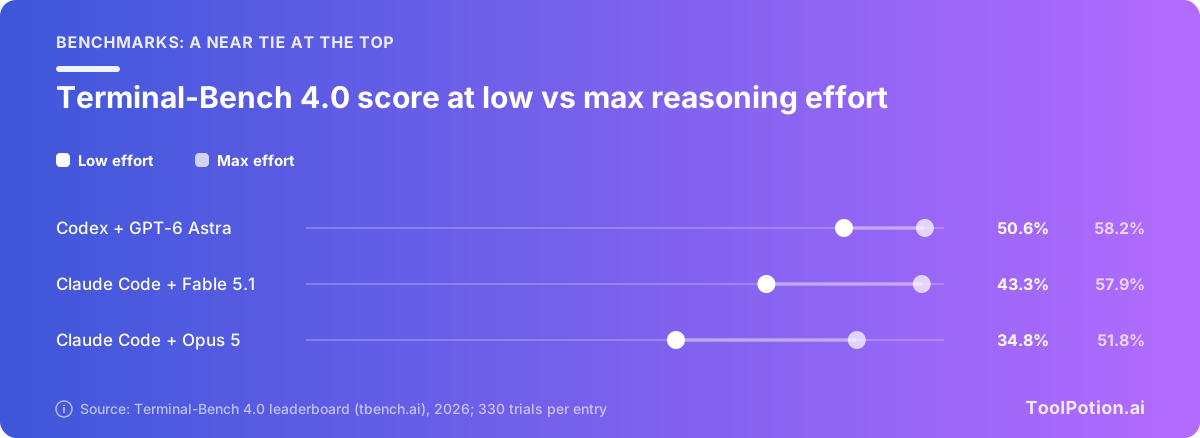
Dropping from max to low effort costs Codex with Astra under 8 points and Claude Code with Fable 5.1 nearly 15. Claude Code with the older Opus 5 falls 17. The setting you leave on default can matter as much as the brand on the box.
Cost tells a second story. The leaderboard logs what each run spent: $3,267 for Codex with Astra at max effort against $6,244 for Claude Code with Fable 5.1, roughly $9.90 versus $18.90 a task for the same score. Those are API-rate costs for long, hard tasks, not what a subscriber pays. No Google agent appears on the board at all, so the best entry running a Gemini model is a third-party agent with Gemini 3.8 Flash at 19.1%. Vendor claims, such as Anthropic's statement that Sonnet 5.5 beats Opus 5.5 on agentic coding, come from the vendors' own tests.
Permission modes, from read-only to full auto
Every tool now offers the same ladder of autonomy under different names. The rung you pick decides how often you're interrupted, and how much damage a bad instruction (or a prompt injection hidden in a README) can do.
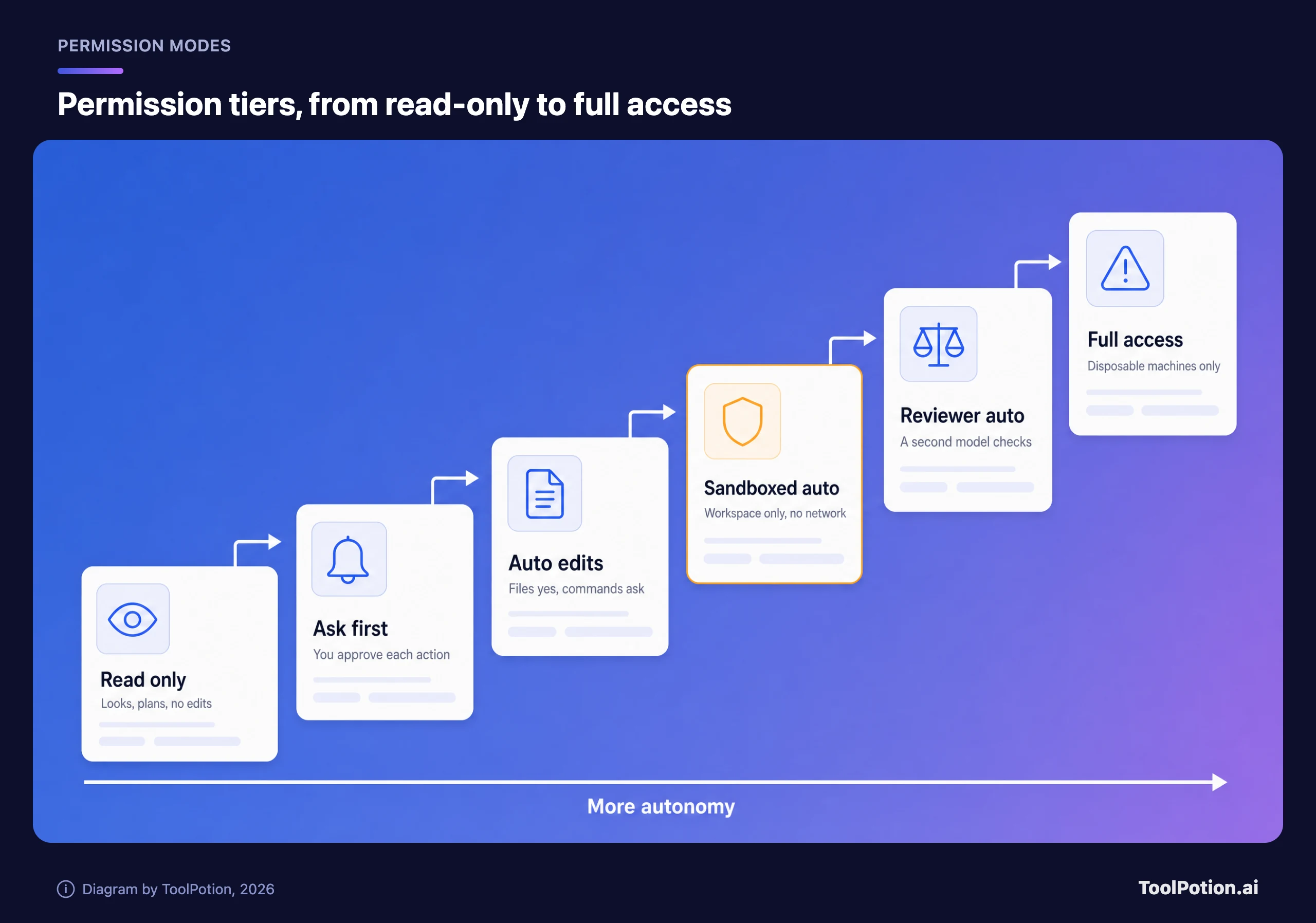
Sandboxed auto is the right daily default. The agent edits and runs commands freely inside the project, with no network and no reach into your home directory. Reviewer auto cuts prompts further but trusts a model's call. Full access belongs in throwaway containers and VMs, which is what Anthropic's docs say about bypassPermissions too. Here's what each rung is called in the four main tools.
| Tier | Claude Code | Codex CLI | Antigravity CLI | Copilot CLI |
|---|---|---|---|---|
| Read only | plan | read-only | Plan mode | Plan mode |
| Ask first | default (Manual) | Granular approvals | Request Review | Per-tool prompts |
| Auto edits | acceptEdits | None | Accept-Edits | Approve tool for session |
| Sandboxed auto | /sandbox auto-allow | Auto (default in git repos) | Default preset | /sandbox enable |
| Reviewer auto | auto (default) | Auto-review (opt-in) | None | None |
| Full access | bypassPermissions | danger-full-access | Turbo | --yolo |
Two defaults stand out. Codex and Antigravity start you inside a sandbox, while Claude Code and Copilot start you in modes that rely on prompts or a model's review. If you run Claude Code, switching the sandbox on is the single most useful setting change you can make.
Plans vs API keys: what you'll pay
Each vendor sells two ways in. A flat monthly plan caps your bill but meters you with five-hour and weekly limits that vendors describe as multipliers, not token counts. An API key bills every token at list price with no ceiling.
| Agent | Entry plan | Heavier tiers | Teams |
|---|---|---|---|
| Claude Code | Claude Pro, $20/mo ($17 billed yearly) | Max 5x $100, Max 20x $200 | Team seats $25 or $125/mo; Enterprise $20 seat plus API-rate usage |
| Codex | ChatGPT Plus, $20/mo (the CLI isn't on Free or Go) | Pro at $100, $200 or $500 | Business $20/user (yearly) |
| Copilot CLI | Pro $10/mo (Free has a small allowance) | Pro+ $39, Max $100 | Business $19, Enterprise $39 per seat |
| Antigravity CLI | Free Individual tier | Google AI Pro and Ultra | Business from $30/seat via Google Cloud |
| Cursor CLI | Individual $20/mo | Higher individual tiers | Teams $40/user |
Prices are from each vendor's pricing page, including Anthropic's. If plan math trips you up, our guide to AI tool pricing models explains credits, seats and tokens.
The API route matters most for heavy users and CI. Anthropic charges $4 per million input tokens and $20 per million output for Opus 5.5, and $2 and $10 for Sonnet 5.5. OpenAI charges $2 and $10 for GPT-6.1 Sol and $10 and $50 for GPT-6 Astra (OpenAI pricing). Caching moves the bill more than the headline rates, because agent loops resend the same context constantly. In the Terminal-Bench run above, about 96% of Codex's input tokens were cache reads, which OpenAI bills at a tenth of Astra's input rate.
Plug in your own numbers below. The defaults copy the token mix of one of those benchmark tasks (about $10 a task on Astra), and benchmark runs are long and hard, so replace them with figures from your own usage dashboard before you budget on them.
At the defaults, a developer running 40 of those tasks a month on Opus 5.5 would spend about $126 through an API key, so Claude Pro and Max 5x both come in cheaper if their limits hold. Switch the model to GPT-6 Astra and the same workload costs about $401. That gap is why Codex users should keep the flagship for the problems that need it and let GPT-6.1 Sol do the rest.
How to pick one and roll it out safely
Start from where your code and contracts already live, then let safety defaults break ties.
- If your team already pays for ChatGPT, or you want an open-source client with a sandbox on by default, start with Codex.
- If you want the deepest customization and you're happy on Claude models, pick Claude Code and turn its sandbox on before anything else.
- If your organization runs on GitHub and wants Claude, GPT and Gemini models under one budget with per-user caps, Copilot CLI is the least friction.
- Google Cloud shops should try Antigravity CLI.
- Choose OpenCode when you need open source end to end or local models, and accept that you'll write the guardrails yourself.
Still torn? Weight what matters to you below. The scores are our editorial read of each vendor's documentation and pricing, not test results.
With safety weighted highest, Codex leads and Copilot CLI comes second. Push team admin and spend caps to the top and Copilot edges ahead, while maxing out model choice and open source puts OpenCode first. Claude Code climbs whenever extensibility outweighs safe defaults.
A safe team rollout
- Pilot one agent with a handful of developers on one repository, so you compare outcomes rather than tools.
- Set the permission default centrally. In Claude Code that means managed settings with the sandbox on and deny rules for pushes and deploys, and admins can switch auto mode off for the whole organization. In Codex, keep workspace-write with network off and reserve danger-full-access for disposable CI runners.
- Keep secrets out of reach. Don't run agents in shells that hold production credentials, deny reads of ~/.ssh, cloud credential files and .env, and remember that Claude Code's hooks and local MCP servers run outside its sandbox with your full access.
- Review agent diffs like a new hire's pull request. Agents can open branches and PRs, but a person merges. An automated reviewer such as Claude Code Security Review or Codex's code review is a second check, never a substitute.
- Cap spend before you scale. Copilot supports user and cost-center budgets, and its additional usage is on by default, so cap it or switch it off. Anthropic's Enterprise plan bills usage at API rates on top of the seat, and Antigravity's business plans offer spend caps across API and subscription use.
- Vet plugins and MCP servers like dependencies. Anthropic's docs say a plugin you install runs code with your user privileges, so allowlist marketplaces rather than letting everyone add their own.
- Give CI an exact allowlist. Claude Code's dontAsk mode with named tools, or Codex in a read-only or workspace-write sandbox, keeps unattended runs predictable.
Teams that already run agents in other parts of the business will recognize most of this from our piece on AI agents in production. For a broader look at editor-first tools, see our AI coding assistants roundup.
Frequently asked questions
Is Gemini CLI still available?
Yes, for organizations on Gemini Code Assist Standard or Enterprise and for developers using paid Gemini API keys. Free, Google AI Pro and Ultra users were moved to Antigravity CLI. The Apache-2.0 code stays on GitHub, so anyone can still fork it.
Can I use Claude Code with a ChatGPT subscription, or Codex with a Claude plan?
No. Each plan covers its own vendor's agent. If you want one client across vendors, OpenCode signs in with ChatGPT Plus or Pro and GitHub Copilot accounts, while Copilot CLI and Antigravity CLI bundle several labs' models into one subscription.
Which terminal agent is cheapest for a solo developer?
Copilot Pro at $10 a month is the cheapest paid way in. ChatGPT Go at $8 doesn't include the Codex CLI, which starts at Plus. Copilot Free and Antigravity's free tier cost nothing but come with small allowances. For heavier use, compare Claude Pro and ChatGPT Plus at $20 with your projected API bill.
Do I need a sandbox if I review every diff?
Yes. Diff review catches bad code, but it happens after the agent has already run commands. A sandbox limits what those commands can touch while they run, including network calls that could send a secret somewhere it shouldn't go.
Is Terminal-Bench a reliable way to choose?
It's the best public yardstick for terminal work, but it measures agent and model pairs at fixed effort settings on hard tasks. Gaps of a few points sit inside the confidence intervals, so treat them as ties and run a short pilot on your own repositories.