You can't reliably spot an AI-generated image by looking at it anymore, so the better question in 2026 is where the file came from. Provenance data, source tracing and a few free checks beat squinting at hands and shadows.
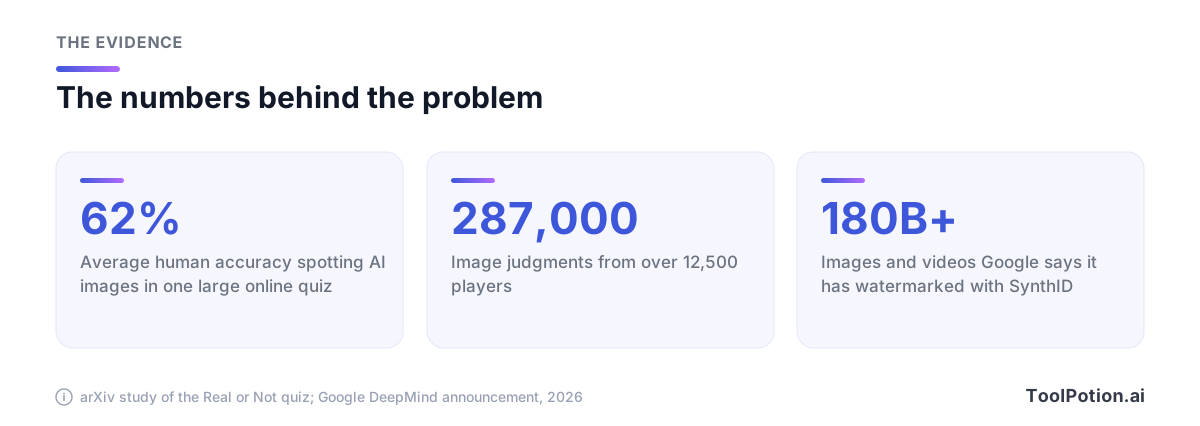
The evidence for that is blunt. In the online "Real or Not" quiz, about 12,500 players made roughly 287,000 judgments and averaged 62% accuracy, which the authors call "a modest ability, slightly above chance" (arXiv). A coin flip scores 50%.
This guide covers what still works: Content Credentials, Google's SynthID watermark, platform labels, reverse image search, and detector tools with their real limits. It ends with a routine you can run on any suspicious viral clip in a few minutes, plus a confidence scorer and a decision tree that picks your next check.
Why the visual tells stopped being reliable
The classic checklist was extra fingers, garbled signs, mismatched earrings and waxy skin. Those were artifacts of older generators, and newer ones keep improving. The field is crowded too, as our ranked board of AI image generators shows.
The quiz authors found people struggled most with images "without obvious artifacts or stylistic cues." Players did best on human portraits and worst on natural and urban landscapes (arXiv). So a scenic street photo with no faces to inspect is the hardest case, and it's also the kind that fakes a news event.
Portraits are easier, but not easy. A separate 2026 study of 1,664 participants, who judged only portraits from two generators, reported 85.2% average accuracy. Even there, accuracy fell with age and was lower on phones than on PCs, and ChatGPT-4o portraits were harder and slower to classify than Imagen 3 ones (arXiv). Phones are where most people meet a fake.
Confidence is a shaky guide. In that portrait study, people who rated themselves more confident and more AI-exposed scored higher, but it was a volunteer web experiment, not a measure of how you'll do on a tricky image tonight. Treat your gut as a prompt to check, not as a result.
None of this means you should stop looking. Text that doesn't fit the place, lighting that disagrees with itself, and a scene that contradicts the caption are all worth a flag. Use them to raise suspicion, not to settle the question either way.
Start with provenance, not pixels
The C2PA standard, branded as Content Credentials, is "an open technical standard for publishers, creators and consumers to establish the origin and edits of digital content" (C2PA). When a camera or AI tool signs a file, the record of its creation and edits travels with it. To read that record, drag the file into the official Content Credentials verify tool, which accepts JPEG, PNG, WebP, HEIC, MP4, MOV and other formats and shows how the content changed over time. Its own warning is worth heeding: Content Credentials are still rolling out, so most files you check won't carry any. Our directory also has a Content Credentials tool page.
Signing can happen at the moment of capture as well as in an editing app or an image generator. That flips the usual question. Instead of you trying to prove a photo is fake, the source can prove it's real. It only helps when the credential survives the trip to your screen, which is where the path below breaks down.
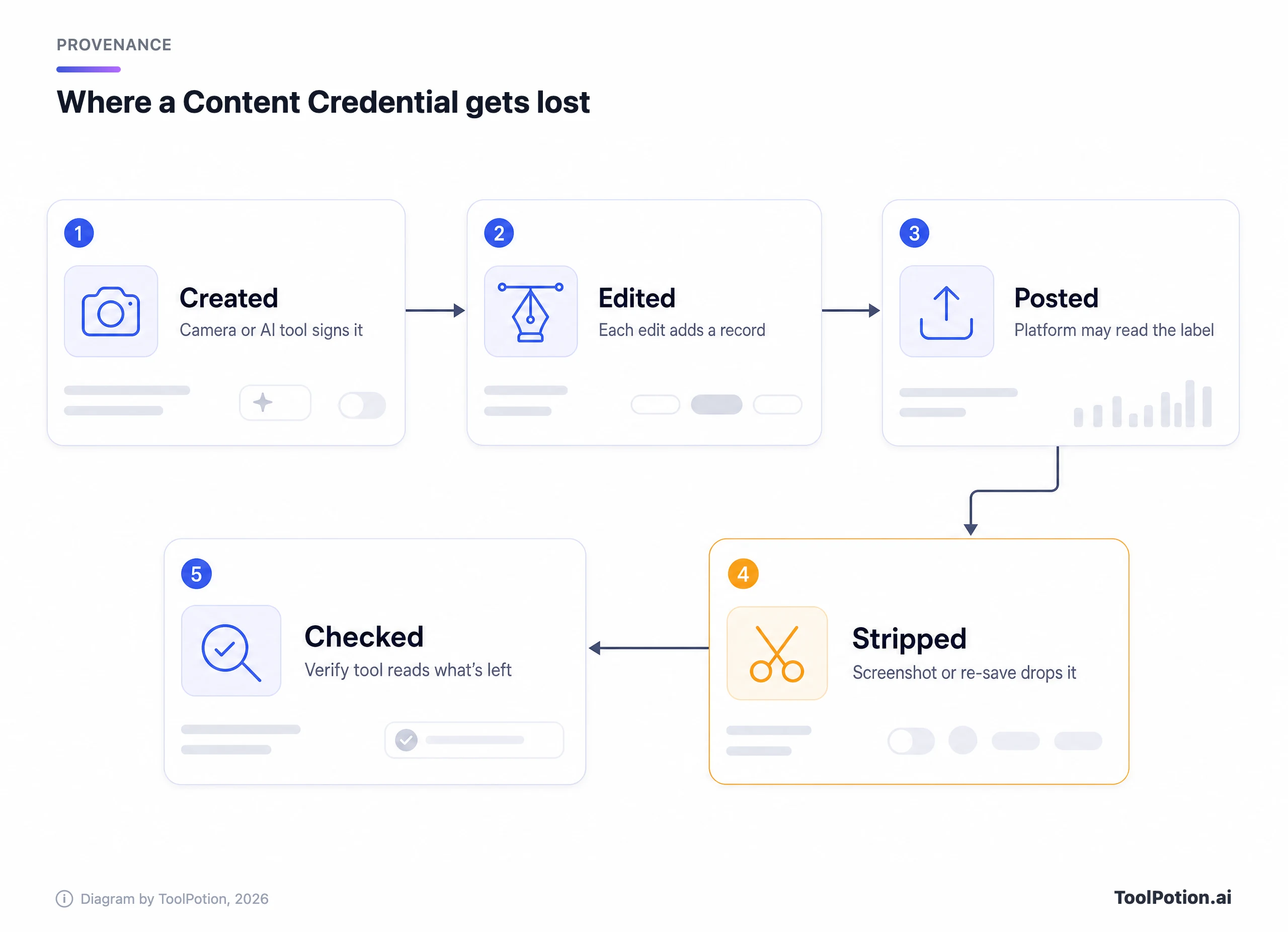
The catch is step four. The standard's own explainer is candid that provenance metadata can be removed, answering "Yes it can" when asked, and it says credentials are optional (C2PA explainer). A screenshot, a re-save or a platform re-encode can drop the record. The spec's answer is durable credentials, which add a watermark or fingerprint lookup so the record can be found again in cloud storage.
Two more cautions from the same document. Nobody should assume an asset is trustworthy "purely based on its usage of Content Credentials." And provenance "cannot tell you whether the digital content is true, accurate or factual." A signed photo of a staged scene is still a signed photo of a staged scene.
The second kind of provenance is a watermark hidden in the pixels. Google DeepMind says SynthID embeds imperceptible watermarks into images, audio, text and video, and that the image and video marks are designed to survive cropping, filters, frame-rate changes and lossy compression (Google DeepMind). Google says it has now watermarked over 180 billion images and videos, plus 240,000 years of audio. The same announcement opened the Google SynthID Detector portal to everyone, in English, for content from Google or partners including OpenAI, NVIDIA and Kakao (Google).
The easiest check is Gemini. Per Google's help page, you upload one file at gemini.google.com (or in the Android app), then ask whether it was created or edited by Google AI. Videos must be under 90 seconds, the quota is about 10 image checks and 10 video checks in any rolling 24 hours, and screenshots should be cropped tightly (Gemini Help). The same tool summarizes Content Credentials when a file has them.
Reading the result is lopsided. A hit means all or part of the file was made or edited by Google's AI. A miss means almost nothing, because Gemini "can currently only recognize content created by Google AI tools" and another system could still have made the image.
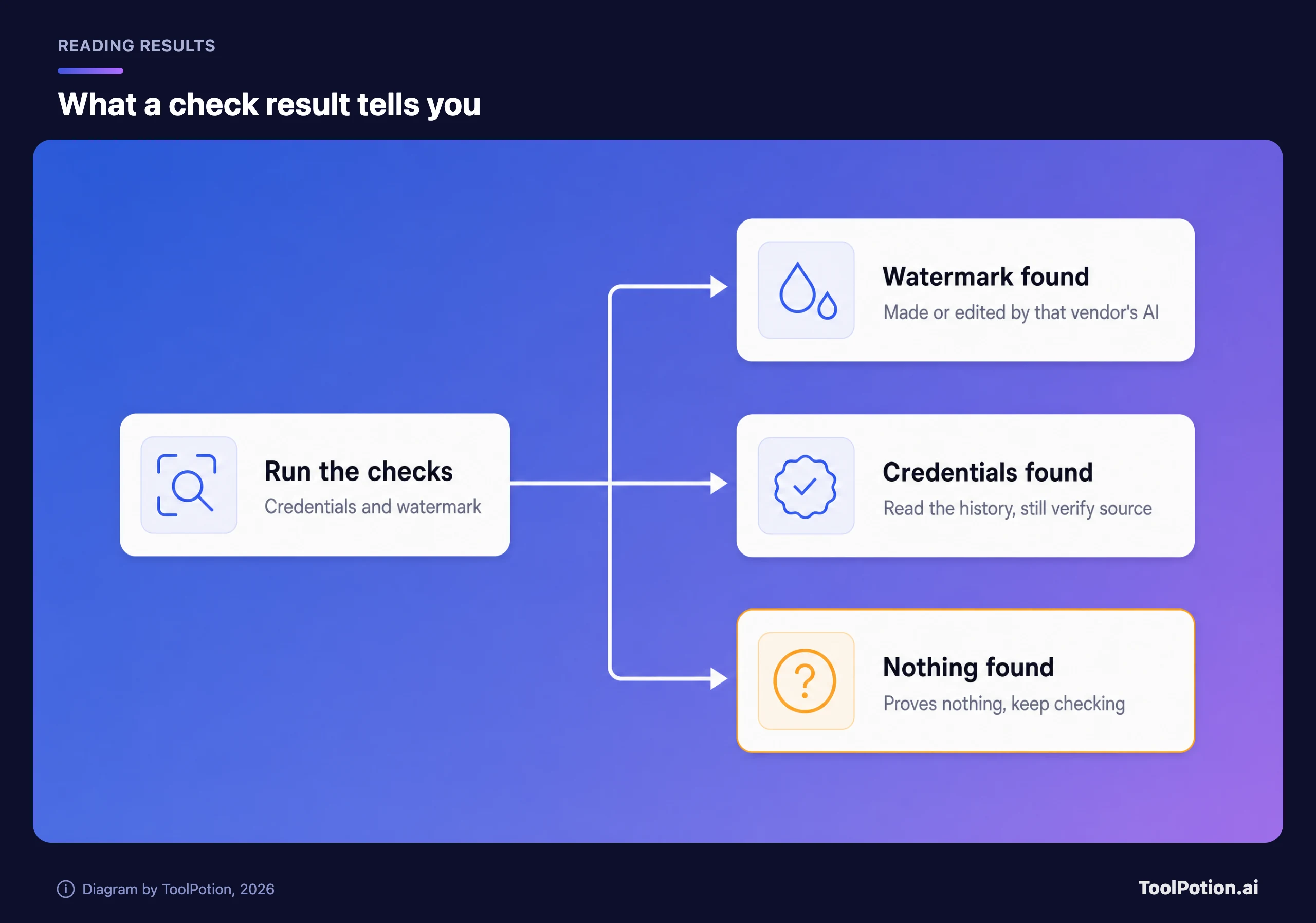
Positive provenance is strong evidence. Absent provenance is a shrug, and most real-world fakes arrive with none. That asymmetry is the most useful habit in this guide.
What platform labels do and don't tell you
Labels are what most viewers actually see, and they are weaker than they look because they depend on creators being honest or on metadata surviving the upload.
- YouTube requires creators to disclose realistic altered or synthetic content through an "AI use" setting in YouTube Studio. It can also apply a label itself for content made with its own AI tools or carrying C2PA metadata, and the label may sit on the player or only in the expanded description (YouTube Help).
- Meta shows an "AI info" label on Facebook, Instagram and Threads when it detects industry standard AI indicators or when someone self-discloses. In its 2024 update, Meta said content only edited with AI would carry the label in the post menu instead, because the original "Made with AI" wording had landed on photos with minor retouching (Meta).
- TikTok requires creators to label realistic AI content, and it auto-labels content made with its AI effects or uploaded with Content Credentials attached. Once an auto label is applied, the creator can't remove it (TikTok Support).
The pattern is clear. All three lean on C2PA metadata or self-disclosure, so an honest creator or a big-lab generator gets labeled, while someone who strips the metadata and says nothing mostly doesn't. YouTube says creators who consistently skip disclosure can face removal of content or suspension from its Partner Program, but that's enforcement after the fact.
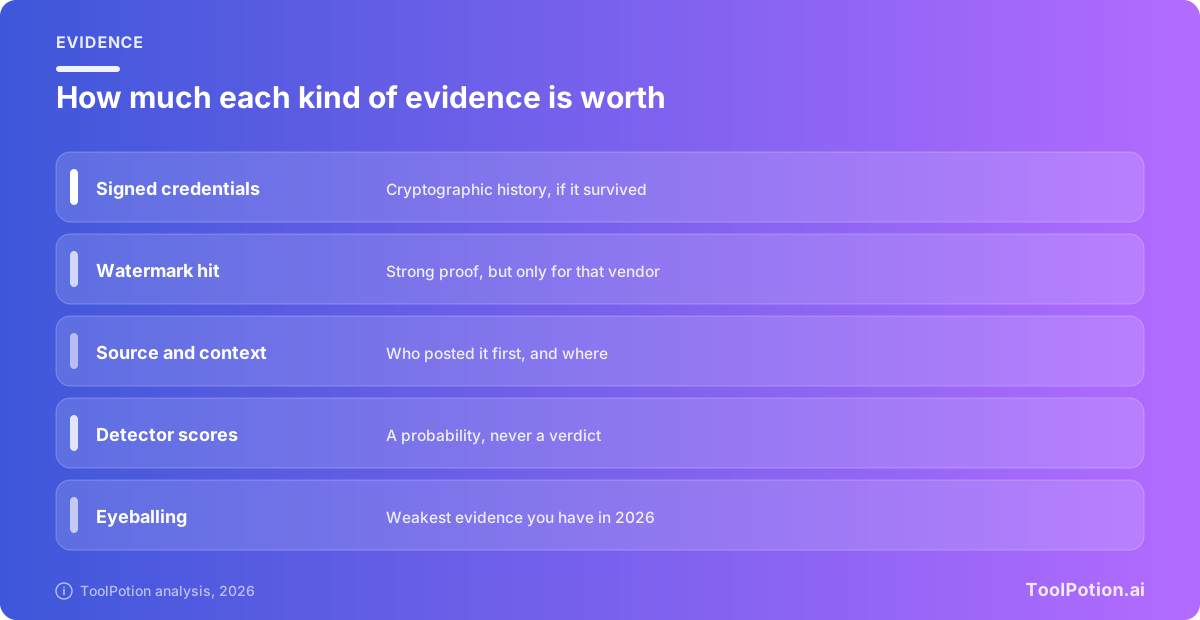
A label is useful when present and silent when absent. The same logic ranks every kind of evidence you'll meet.
Trace the source before you trust the file
Most viral fakes fall apart on context, not forensics. Ask who posted this first, when, and with what caption. A dramatic clip with no original uploader, no location and a thousand reposts is a weak claim, whatever the pixels say.
Reverse image search is the workhorse here. TinEye says it searches over 86 billion images and offers browser extensions for right-click searches. Google Lens takes a photo, an image or a screenshot. Lenso.ai has separate search modes for places, people, duplicates and similar images. Copyseeker offers a free web search and a Chrome extension. Run at least two, since their indexes differ.
What you're after is the earliest copy. If a photo "from yesterday's storm" turns up on a stock site two years ago, you're done. If it appears nowhere before this post, that's a mild flag and not proof, since a genuinely new photo has no history either. For video, grab three or four key frames and search each one.
Then check the claim itself. Does a news outlet or a fact-checking desk report the same event with their own footage? Do the weather, signage, language and landmarks fit the place named? Is the account new, or does it post a lot of dramatic clips? Ten minutes on the poster's history often tells you more than any detector.
What detector tools can and can't do
A detector is a model trained on known generators that returns a probability. It isn't a lab test. Our directory lists plenty, including the free Hive AI Detector Chrome extension for text, images, audio and video, the UncovAI extension, DeepfakeDetection.io and Sealed Rose, which analyzes video frame by frame. The wider field is on our ranked board of AI content detectors, and the hub for that category has the full list.
Vendors publish big numbers. BitMind says on its site that it reaches 95% accuracy on real-world deepfakes (BitMind). Sensity describes a multilayer system that checks visuals, file structure, metadata and audio, and says its reports include confidence scores. Treat any vendor figure as a claim. A single headline number doesn't say how the tool behaves on your compressed screenshot or how often it flags real photos.
Independent work paints a harsher picture. The Deepfake-Eval-2024 benchmark tested detectors on media that actually circulated online and found that open-source state-of-the-art models lost about 50% of their AUC on video, 48% on audio and 45% on images compared with earlier benchmarks. Commercial and fine-tuned models did better but still fell short of human forensic analysts (arXiv). Another 2025 evaluation found fewer than half of the tested detectors scored above 60% AUC, with the worst at chance level, and that basic edits like JPEG compression or enhancement can significantly reduce performance (arXiv).
Errors run both ways. A heavily compressed, upscaled or retouched real photo can look odd to a classifier, just as a fake can look clean. Meta's own labels misfired on real photos with minor AI retouching.
Context also changes the answer. A tool tuned for face swaps may miss a fully synthetic landscape, and one built for identity verification, like a liveness check on a selfie, solves a different problem than one that scans a viral meme. Read each tool's page for what it covers before you trust a result, and expect new generators to beat older detectors until the vendor catches up.
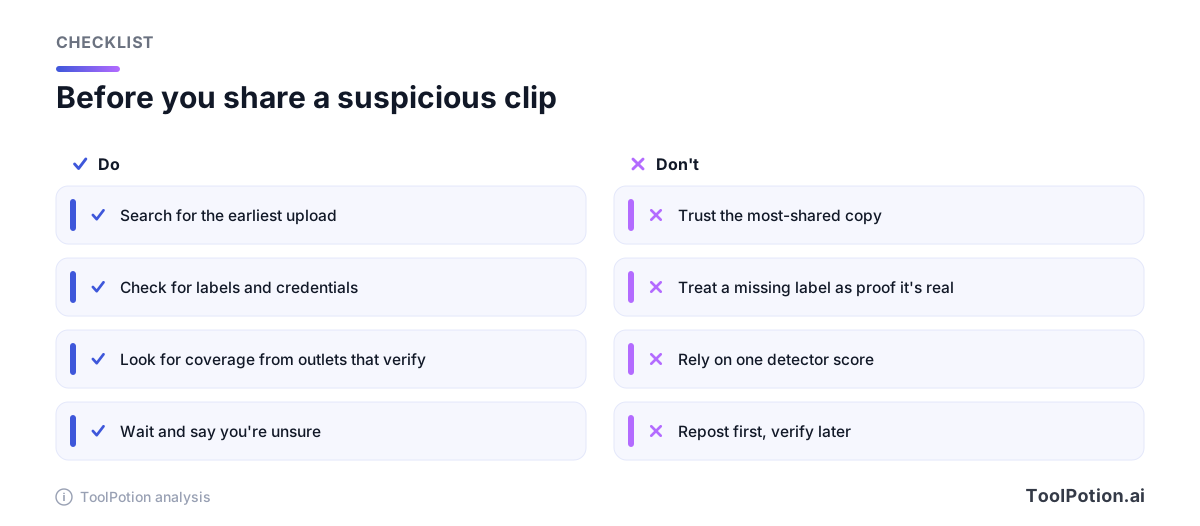
Used well, detectors are tie-breakers. Run two of them. Give a result less weight when your file is a screenshot or a re-encoded clip. Never accuse a person of faking something because a score said 87%, and weigh any detector's output below a credential or a watermark hit.
A routine for a suspicious viral image or video
Pick the path that fits what you're holding, then work the steps in order. Stop as soon as you reach a decisive answer, such as a verified credential or an earlier original.
- Pause before reacting. Fakes are built for fast shares, and urgency is the cue to slow down.
- Get the best copy you can. A screenshot has lost its metadata, so look for the original post or file and note the account, link and time.
- Read the label. Check the player, the description and the post menu for an AI label on YouTube, Meta apps or TikTok.
- Run the file through a Content Credentials verify tool and note the signer and edit history if one exists.
- Run a SynthID check in Gemini for images, or for video under 90 seconds.
- Reverse image search the picture or four key frames, and find the earliest copy.
- Check the claim. Look for a reputable outlet or fact-checker with their own footage of the same event, and test the place, date and weather.
- Run two detectors and treat the answer as a tie-breaker.
- Decide how to describe it: verified, likely fake or unconfirmed. Share it that way, or don't share it.
The scorer below turns that routine into a rough confidence number. Provenance and source tracing carry the most points, and detectors carry the fewest. A high score still isn't a guarantee, since provenance can be faked and one good-looking source can be wrong.
Three situations, worked through
These are illustrative cases, not reports of real incidents, but each one mirrors how fakes show up.
A storm photo in your family chat. It shows a flooded main street at dusk and the caption names your town. You can't verify pixels, so go to context. A reverse search finds the same street in a travel blog from two years ago, with dry pavement and the same signage. That's decisive: the photo is old or the scene is staged, and either way the caption is wrong. Total time is about two minutes, and no detector was needed.
A video of a politician saying something outrageous. The clip is 40 seconds, vertical, with captions burned in, and it's been reposted everywhere. Look for a label, then check whether any outlet carries the same remark from a longer, wider source. Real statements by public figures nearly always have a longer original and multiple witnesses. If the only copies are cropped reposts, call it unconfirmed. If you need a technical check, trim it to the face and run a SynthID check plus two detectors, then note that a negative result still doesn't clear it.
A profile photo from a stranger asking for money. Reverse search the photo first. Stolen photos from real accounts are a common alternative to generated faces, and a match to another name settles it. If the photo is clean, ask for a live video call and an unscripted action, such as holding up a handwritten note. A deepfake detector can be one more input, and the call is stronger than any of them.
What to do once you've decided
If you're confident it's fake and it's spreading, reporting beats quote-posting. TikTok has a report flow in the app and on the web, and its help page notes that unlabeled realistic AI content and AI impersonation fall under its Community Guidelines (TikTok Support). Quote-posting a fake to debunk it often gives it more reach than the correction earns.
If you're not confident, say so plainly. "I can't confirm this is real" is a perfectly good caption, and it keeps you out of the awkward position of correcting yourself later. If you publish AI-made images yourself, label them and keep the credentials on. Whether a given generator attaches them varies, so check its documentation before you rely on it.
Video and audio need extra care
A short clip is the hardest format to check in a hurry. Platforms recompress uploads, creators crop and add captions, and the version that reaches you may be the tenth copy of something. Re-encoding strips metadata and, per the evaluations above, can degrade detector accuracy. Gemini only takes clips under 90 seconds, so for a longer video, trim to the suspicious moment or ask for the full original.
Ask for the longest, highest-quality version you can get. A fake that holds up for six seconds in a vertical crop often has a longer original that tells a different story, and a real event usually has several angles from different people.
Slow the clip down. Watch the mouth against the audio, the blink pattern, the edges where hair or glasses meet the background, and any text that flickers between frames. These checks still catch sloppy fakes and earn a flag, not a verdict, for the same reasons as stills.
Voice cloning is its own problem. Pindrop targets deepfake voice in customer data and fraud settings, and Facia pairs deepfake detection with liveness checks for identity verification. For personal safety the human step matters more than any tool. If a video call or a voice message asks for money, hang up and call back on a number you already trust.
If you want the bigger picture on why this matters, Nina Schick's Deepfakes: The Coming Infocalypse explores the rise of the technology and its social effects. For what the generators can do, see our guides to AI image generators compared and the top AI image generators, and our roundup of content detectors.
Frequently asked questions
Can you reliably tell if an image is AI-generated by looking at it?
No. In the Real or Not quiz, players averaged 62% accuracy across about 287,000 judgments (arXiv). Visual cues can raise suspicion, but confirmation comes from provenance data and source tracing.
Does a missing watermark or Content Credential mean an image is real?
No. Credentials are optional and can be stripped, and Gemini's SynthID check only recognizes Google AI content. A missing marker tells you nothing either way.
Are free AI image detectors accurate?
Sometimes, and you can't tell which times. Vendors cite figures like 95%, while independent testing on real-world media has found sharp drops in accuracy and sensitivity to compression. Use two tools, and treat the output as a tie-breaker.
Does reverse image search show whether a picture is AI-generated?
Not directly. It shows where else the image appears and how early. A photo that surfaces long before the event it claims to show is fake, and one with no history at all is merely unproven.
Can a screenshot of an AI image still be checked?
Barely. A screenshot has no embedded credentials, and detectors lose strength after cropping and re-encoding. SynthID is built to survive many such changes, but Google's help page still says to crop tightly and avoid collages. Your best move is to find the original post and work from there.
What should I do if I still can't tell?
Call it unconfirmed and don't amplify it. Wait for a news outlet or fact-checker with independent footage. Waiting costs you a little speed, and sharing a fake costs someone their reputation.