Your multimodal pipeline won't fail because a model hallucinates. It'll fail because Sora's download URL expired 61 minutes after the render finished, or because your 90-minute podcast hit OpenAI's 25 MB transcription cap while AssemblyAI would have taken the whole 5 GB file in one request.
Every hop between models has a contract: an exact file format, a plan tier that unlocks it, an expiry window, and a fallback for when the vendor kills the model. Most guides skip all four.
This one gives you the contracts, three worked pipelines, and the swap plan you need before OpenAI shuts down the Videos API and both Sora 2 models on September 24, 2026 with no listed replacement. That's 19 days out.
Why multimodal pipelines break at the handoffs, not the models
Every model in your chain works. The transcription is accurate, the image looks right, the voice sounds human, the video renders. What breaks is the moment one model's output has to become the next model's input, and nobody wrote down what that output was supposed to look like.
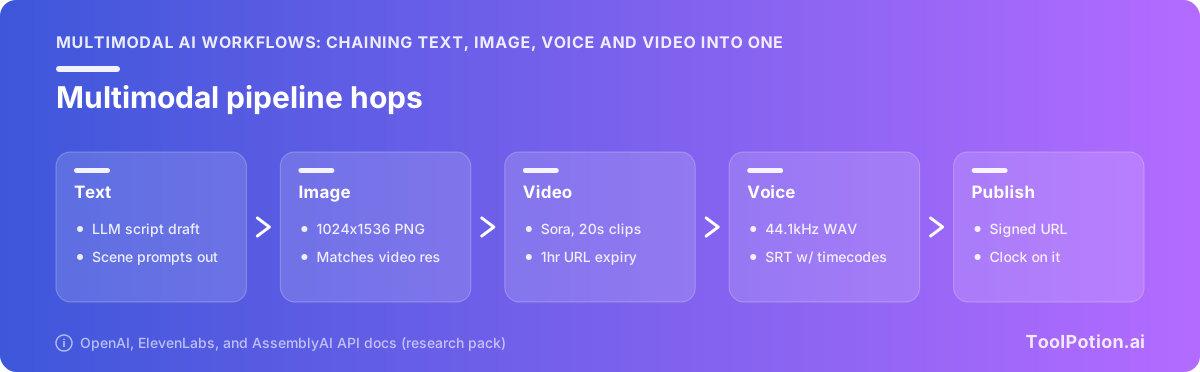
A concrete version of that: Sora's generated-asset download URLs stay valid for a maximum of one hour after generation, and the output arrives as an MP4 plus a WebP thumbnail and a JPG spritesheet (OpenAI). If your pipeline queues the render and gets to the copy step 90 minutes later, the render is gone. The model did its job perfectly.
The handoff contract: format, tier, expiry, fallback
Treat every hop as a contract with four terms you write down before you build anything.
Format is the exact file spec the next hop demands, down to sample rate and pixel dimensions, not an aspect ratio and a hope. Tier is the plan level or the single API parameter that unlocks that format, because plenty of the formats you need are gated behind a paid subscription or a legacy model name. Expiry is how long the artifact stays retrievable from the vendor before you own the loss. Fallback is what you swap in when the vendor sunsets the model, which right now is not hypothetical.
Write those four lines per hop and most of the debugging disappears before you start.
Four failure modes that kill a pipeline mid-run
- The upstream hop emits a format the downstream hop silently downgrades or rejects outright.
- A feature you assumed was in the API turns out to sit behind a higher plan tier or an older model version.
- The artifact expires on the vendor's storage while your job is still queued.
- The model you built on gets a shutdown date, and the vendor lists no recommended replacement.
The three pipelines that follow are all instances of the same contract: podcast to show notes, script to narrated video, and product photo to campaign set. Each one names the format, the tier, the expiry and the fallback at every hop.
This is written for someone shipping a deliverable, not comparing fusion architectures. You can pick the individual tools from the 18,982 active AI tools in our directory. Wiring them together is the part nobody documents.
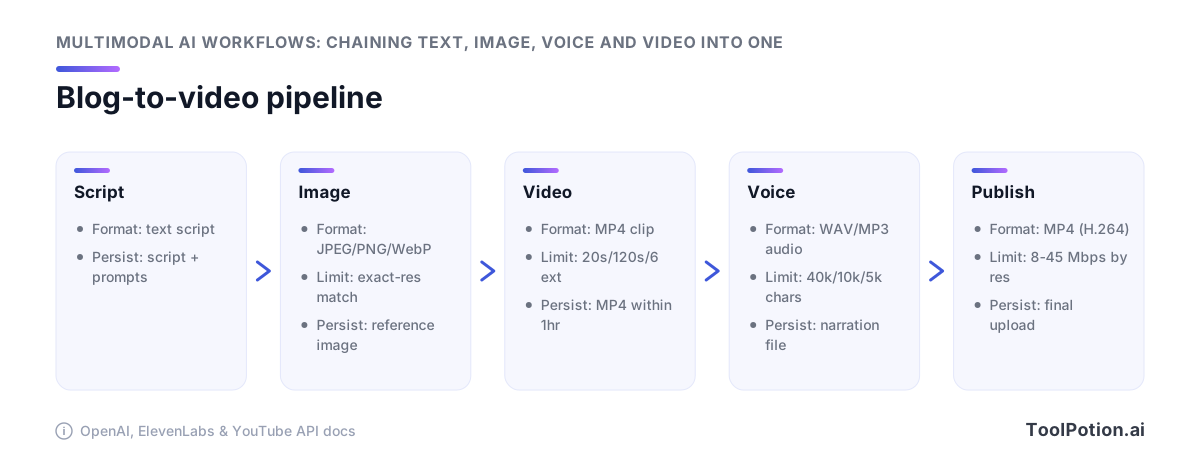
Pipeline 1: blog post to narrated video
Take a 1,200-word article and you want a two-minute narrated video out the other end. Four hops: split the text, generate stills, animate them, speak over them. Every one of those hops has a spec the previous hop has to satisfy, and you set most of those specs before you make a single API call.
Script segmentation before any generation call
Segmentation isn't a formatting step you do at the end. It's the parameter that everything downstream inherits, because the voice model you pick caps what you can send per request. Eleven Flash v2.5 takes 40,000 characters, Multilingual v2 takes 10,000, and v3 stops at 5,000 (ElevenLabs). Pick v3 for expressive narration and your 1,200-word script fits in one call. Pick it for a 9,000-word explainer and you're chunking into two, with a seam you have to hide.
Segment on scene boundaries, not sentence counts. Each segment needs one visual idea, a target duration in seconds, and a target pixel resolution attached to it as metadata. That last field is what the image hop reads.
Image hop: match the video hop's exact pixel dimensions
Sora's image-to-video path requires the reference image to match the target video resolution exactly, in image/jpeg, image/png or image/webp (OpenAI). Exactly means pixels, not "16:9". An image generator told to produce a widescreen still will happily hand you 1792x1024 when the video call wants 1280x720, and the job fails at submission rather than at render time. So the image prompt template carries the width and height as literal integers pulled from the video hop's config, and you validate the returned file's dimensions and MIME type before you queue anything else. Among the 324 AI models tracked in our directory, the ones that let you specify arbitrary pixel dimensions rather than named presets are the ones worth wiring in here.
Video hop: 16- and 20-second clips, chained
Both sora-2 and sora-2-pro generate 16- or 20-second clips. Each extension adds up to 20 seconds, capped at six extensions and 120 seconds total (OpenAI). Your two-minute segment is six chained calls.
Continuity across those six is your problem. The model doesn't remember the narrative arc between extension 3 and extension 4, so the prompt for each call has to restate the setting, the subject and the camera behavior. Budget for retries on the seams.
Voice hop and the mux
Generate narration per segment, not per video, so a bad take costs you one call. Then align: the audio for segment 4 has to fit the 20-second clip you rendered for segment 4, which usually means trimming script copy rather than time-stretching audio. Mux with ffmpeg, one segment at a time, then concat.
Pipeline 2: podcast episode to clips and show notes
One 58-minute WAV goes in. Out come a transcript, timestamped chapters, six vertical clips with burned-in captions, and a show-notes page. The audio never changes format after the first hop, which is what makes this pipeline easier than the video one. What decides whether it works is which transcription vendor you route to and which three parameters you set on the request.
The 25 MB wall and where to route around it
OpenAI's transcription endpoint caps uploads at 25 MB and takes mp3, mp4, mpeg, mpga, m4a, wav and webm (OpenAI). A 58-minute 48kHz WAV is roughly 300 MB. So you either transcode to a low-bitrate MP3 and pray, or you split the file, and splitting audio at arbitrary byte boundaries cuts words in half and shifts every timestamp after the seam.
AssemblyAI takes up to 5 GB per request on /v2/transcript (2.2 GB if you're uploading local files through /v2/upload) and handles anything from 160 ms to 10 hours (AssemblyAI). That's about 200x the ceiling. For long-form audio, send the whole episode there and keep your LLM vendor for the reasoning hops downstream.
Word-level timestamps are the clip-cutting primitive
You cannot auto-cut clips from a transcript that only has paragraph boundaries. You need to know that the word "anyway" starts at 00:41:12.340 so the cut lands before it, not through it.
Two catches on the OpenAI side. SRT and VTT output plus the timestamp_granularities[] parameter only work on whisper-1, not on gpt-transcribe or gpt-4o-transcribe (OpenAI). If your pipeline burns in captions or cuts on timecode, you keep the older model in the chain on purpose and stop treating it as tech debt. ElevenLabs Scribe v2 gives you word-level timestamps, diarization and entity detection across 90+ languages in one response (ElevenLabs), which is the cleaner pick if you're already paying them for the TTS hop.
Diarization only works if you ask for it
Speaker labels need chunking_strategy set to auto for any audio longer than 30 seconds, and gpt-4o-transcribe-diarize does speaker identification only (OpenAI). Omit the parameter and the request succeeds. You get back a clean, fluent, completely unlabeled wall of text, and nothing in the response tells you a two-host interview just collapsed into one voice. Check for speaker fields in your validation step, not by eye.
Transcript to show notes, chapters and social copy
One transcript with word timings fans out to four artifacts without any further audio processing: chapter markers from topic shifts, a summary paragraph plus link list for the show-notes page, ranked clip candidates scored on quote density, and the vertical cuts themselves rendered from those in and out points. Feed the same transcript to each, in parallel, with different prompts. If you're looking for format references before you build, there are 201 AI podcasts in our directory publishing on roughly this stack.
Pipeline 3: product shots to ad variants
One studio photo of a shoe becomes twelve on-brand stills, then four 8-second motion ads for paid social. The hops are image in, image out, video out, and the interesting engineering sits between hops two and three, where a vision model looks at what the image generator produced and decides whether it ships.
Vision-model review as a QA gate
Generated product stills fail in boring ways. Wrong logo placement, six eyelets instead of five, a shadow that contradicts the key light. You don't want a human eyeballing 120 variants, so you send them to a vision model with the source shot and a written brand spec, and ask for a pass/fail plus a reason string.
Claude takes up to 100 images per request on 200k-context models and 600 on other models, with 20 per message on claude.ai, capped at 8000x8000 px and 10 MB per image (Claude Docs). Those aren't the numbers that will bite you.
The 32 MB standard request-size limit is. Twelve 4K PNGs blow through it long before you approach 100 images, which is why Anthropic recommends uploading through the Files API and referencing each image by file_id instead of inlining base64 (Claude Docs). Build the review hop that way from day one. Retrofitting it after your batch sizes grow means rewriting the request builder and the retry logic together.
Frame sampling is a direct cost lever
Claude bills images as 28x28-pixel visual tokens, computed as ⌈width/28⌉ × ⌈height/28⌉. A 3840x2160 frame costs 4,784 visual tokens on the high-resolution tier and 1,560 after downscaling on the standard tier, roughly $23.92 per thousand 4K frames at Claude Opus 5's $5/M input rate (Claude Docs). Downscale before you send, unless the QA check depends on fine detail like stitching or small type.
Same math governs the video-analysis hop. Reviewing four 8-second ads at 24fps is 768 frames if you're naive about it. Sample at 2fps, check 64, and your review bill drops by a factor of twelve without losing a single scene change.
Batching images without hitting the request ceiling
Chunk by payload bytes, not by image count. Sort variants into groups that stay under about 25 MB of references, keep the source photo in every batch as the comparison anchor, and re-send failures individually at full resolution so the reason string is worth reading. Our directory lists 727 image generators and 342 photo editors among the AI image and photo tools in our directory, and almost none of them expose the batch mechanics you need here. That part stays your code.
The handoff spec sheet: what to demand at each hop
Write the contract before you write the code. Each hop in a chain has three things you need pinned down: the exact output format you're asking for, the plan tier or parameter that unlocks it, and how long the artifact lives before it's gone. Get those wrong and the failure shows up two hops later as a quality complaint nobody can trace.
Audio: the tier that gates broadcast-quality output
ElevenLabs puts pcm_44100, pcm_48000, wav_44100 and wav_48000 behind a Pro subscription, and mp3_44100_192 behind Creator (ElevenLabs API reference). So on a free or entry plan, your video editor receives lossy MP3 at 128kbps or below no matter how good the voice model is. That's a quality ceiling set by billing, not by inference.
If your deliverable is a podcast that needs to hit -16 LKFS with true peak at or below -1 dBFS (Apple Podcasts), you want lossless in and one encode at the end. Normalizing a 128kbps MP3 and re-encoding it stacks two lossy generations. Budget the Pro tier as a production cost, not an upgrade.
Video: expiring URLs and sidecar assets
Sora doesn't hand you one file. A completed render gives you an MP4, a WebP thumbnail and a JPG spritesheet, and the download URLs stay valid for a maximum of one hour (OpenAI video guide). Your job at that hop is a copy to your own object store, triggered by the completion event, not by a nightly batch. Miss the window and the render is unrecoverable.
Text and timing: the fields downstream steps require
Downstream steps hard-require specific fields, and the ones that need timing are the ones that break silently. SRT and VTT output plus timestamp_granularities[] only work on whisper-1, not the newer transcribe models (OpenAI speech to text). Anything cutting clips or burning captions needs word-level timestamps in the contract.
| Hop | Demand this output | What unlocks it | Expiry |
|---|---|---|---|
| Text to speech | wav_48000 or pcm_44100 | Pro tier; Creator for mp3_44100_192 | No expiry, store on write |
| Speech to text | Word-level timestamps, speaker labels | whisper-1 for SRT/VTT; chunking_strategy: auto above 30s for diarization | No expiry |
| Image to video | MP4 plus thumbnail and spritesheet | Reference image matching video resolution exactly | 1 hour on download URLs |
| Video to text | Sampled frames at a fixed rate | Standard vs high-res tier changes visual-token cost ~3x | No expiry |
Whatever orchestrator you pick from the 128 AI frameworks in our directory, test it against the binary hops first. Passing JSON between models is the easy part.
Automation platform or manual glue
The rule is simple: let the platform decide what happens and when, and let your own code move the bytes. Anything that touches a large file or races an expiry window belongs in a script with object storage behind it.
Where a platform wins
Triggers, retries on cheap steps, approval gates, and the fan-out at the end. Zapier pitches 9,000+ app integrations wired into Zaps, Tables, Forms and Zapier MCP, and that catalog is the actual reason to use it. Getting finished show notes into your CMS and clip links onto a content calendar is connector work, and writing those connectors yourself buys you nothing.
Human-in-the-loop belongs here too. A Zap that posts four ad variants into Slack, waits for a thumbs-up, then releases the publish step is twenty minutes of setup and the only thing standing between a hallucinated product claim and your paid social budget.
Where binary media defeats it
No-code nodes pass JSON well and files badly. A 58-minute WAV has to be split into chunks of 25 MB or less before OpenAI's transcription endpoint accepts it (OpenAI). A two-minute Sora render is up to six chained extension calls at 20 seconds each (OpenAI), and the download URL is valid for a maximum of one hour after generation (OpenAI). Retry logic across six calls with a countdown running on the artifact is a program, not a canvas.
Two platforms do carry media. n8n keeps files as binary data between nodes instead of forcing base64 round-trips, and its code node sits right next to the agent nodes (n8n). Descript exposes transcription, clips and captions through an API rather than a GUI (Descript).
The middle path: platform for control flow, code for bytes
Every hop writes to your own bucket and returns a key. The platform passes keys and status codes, never the file. Staging the work that way also cuts compute: the OnePiece system reports a 16x GPU consumption decrease for Wan2.1 image-to-video once a monolithic pipeline is decomposed into staged services (arXiv).
If you're picking components, our directory tracks 550 AI agents and orchestration tools alongside 301 open-source AI repos. The repos are where the byte-moving glue usually lives, because no vendor sells that part.
Delivery specs: meeting the platform where it publishes
Your last hop isn't the render. It's the upload, and the upload has a spec sheet too.
Video: bitrate and audio targets for upload
YouTube publishes recommended delivery bitrates by resolution: 8 Mbps for 1080p SDR, 16 Mbps at 1440p, and 35–45 Mbps at 4K, with audio delivered as AAC-LC, Opus or Eclipsa at 48 kHz and 384 kbps stereo (YouTube Help). If your video hop hands you a file well under those numbers, don't upscale the bitrate on export. You'll spend encode time padding compression artifacts. What you should do is make the encode step read the source resolution and pick the matching target, so a 1080p Sora render doesn't get force-fed a 4K ladder because someone hardcoded it in a config six months ago.
The audio target matters more than the video one for narrated content. A 48 kHz 384 kbps AAC track from a 44.1 kHz source means a resample somewhere, and you want that resample happening once, in your own ffmpeg call, where you can see it.
Audio: loudness preconditioning before encoding
Apple Podcasts asks for -16 dB LKFS ±1 dB with true peak at or below -1 dB FS, measured per ITU-R BS.1770-5, and it's explicit that the audio should be preconditioned to that target before encoding (Apple Podcasts for Creators). Order of operations, not a preference. Normalizing a finished MP3 means you're pushing gain through lossy artifacts that were baked in at a different level, and true peak on a decoded MP3 can already exceed what the encoder saw. Put the loudness pass on the WAV, then encode.
This is why the TTS format tier from earlier in the chain keeps mattering. Handing your normalizer a 128 kbps MP3 is a worse starting point than handing it PCM, and no amount of downstream care fixes it.
Provenance and labeling on generated assets
Decide on provenance while you're designing the pipeline, not after a platform asks. Google's SynthID watermarks generated media at creation time, which means it travels with the asset only if your pipeline doesn't strip or re-encode it out. Every ffmpeg pass between generation and upload is a chance to lose that signal, so track which hop introduced the file and keep a record of model, prompt and timestamp in your own metadata store rather than trusting the container to carry it.
Build for the swap: the deprecation cliff under every video hop
If your video hop calls Sora, you have 19 days. OpenAI announced on March 24, 2026 that the Videos API and both sora-2 and sora-2-pro shut down on September 24, 2026, snapshots sora-2-2025-10-06, sora-2-2025-12-08 and sora-2-pro-2025-10-06 included, with no recommended replacement model listed (OpenAI deprecations). An empty replacement column means you pick the successor yourself, and you pick it before the cutoff, not after.
Abstracting the hop so a swap is a config change
The fix is a thin adapter per generative hop. Your pipeline hands the adapter a normalized job: prompt, reference image path, target resolution, duration in seconds, output bucket key. The adapter owns everything vendor-shaped. Sora's rule that the reference image must match the video resolution exactly, its 16- and 20-second clips extended in 20-second steps to a 120-second ceiling, its 1-hour download expiry (OpenAI video generation). None of that leaks into your orchestration code.
Then swapping providers is a config value, not a rewrite. Validate a second adapter against Runway's model docs now, run both on the same ten prompts, and keep the loser warm.
Image and audio families carry their own dates, so treat this as recurring maintenance rather than a one-time scramble. Our directory exists partly to let you track model releases and sunsets across 324 listed models.
A migration checklist for pipelines running today
- Grep every repo and workflow JSON for
sora-2,sora-2-proand the Videos API base path. Include cron jobs and one-off scripts, which is where the forgotten calls live. - Wrap each hit in an adapter with your own job schema before you change providers, so the swap and the refactor aren't the same commit.
- Run the alternate provider on ten real prompts and diff the outputs on resolution, clip length and motion quality.
- Pin a calendar reminder two weeks ahead of every published sunset date, per vendor, per model family.
- Log the model ID and snapshot on every render so you can answer "what generated this asset" after the model is gone.
Frequently Asked Questions
What is a multimodal AI workflow, in practical terms?
It's a chain of API calls where one model's output file becomes the next model's input file, and every hop has a format contract you have to satisfy. A typical chain goes transcript to script to still image to video to voiceover to final render, and each arrow is a place where a wrong resolution or codec breaks the run. Sora's image-to-video hop is a good example of how literal those contracts get: the reference image has to match the target video resolution exactly and be image/jpeg, image/png or image/webp, so the image step upstream needs the video step's pixel dimensions, not just an aspect ratio (OpenAI video generation docs). Think of the pipeline as a set of handoffs rather than a set of tools.
How do I chain AI tools together without losing quality between steps?
Pin the output spec at every hop to whatever the last step in the chain needs, then work backwards. Quality loss usually comes from a pricing tier or a default parameter rather than the model: ElevenLabs puts pcm_44100, pcm_48000, wav_44100 and wav_48000 behind a Pro subscription and mp3_44100_192 behind Creator tier, so an entry-tier account hands your editor a lossy MP3 whether you wanted one or not (ElevenLabs create speech reference). Copy every generated artifact into your own object store immediately, because Sora's download URLs are valid for a maximum of one hour after generation (OpenAI video generation docs). Sampling rate is also a cost lever, not just a quality one: Claude prices a 4K frame at 4,784 visual tokens on the high-resolution tier versus 1,560 on standard, roughly $23.92 per thousand 4K frames at Opus 5's $5/M input rate (Claude vision docs).
What audio format should I hand from a text-to-speech step to a video editor?
Uncompressed 48 kHz WAV or PCM, which on ElevenLabs means wav_48000 or pcm_48000 and a Pro subscription or above (ElevenLabs create speech reference). Handing an editor a 128 kbps MP3 bakes in compression artifacts that survive every later encode. If the destination is YouTube, the final delivery target is AAC-LC, Opus or Eclipsa at 48 kHz and 384 kbps stereo (YouTube upload encoding settings), and if it's a podcast feed, Apple wants loudness preconditioned to -16 dB LKFS ±1 dB with true peak at or below -1 dB FS, measured per ITU-R BS.1770-5, before you encode (Apple Podcasts audio requirements). You can't hit either target reliably from a lossy intermediate.
Why does my podcast transcription fail on full-length episodes?
OpenAI's transcription endpoint caps uploads at 25 MB and accepts mp3, mp4, mpeg, mpga, m4a, wav and webm, so anything longer than about half an hour at decent bitrate has to be split into chunks of 25 MB or less (OpenAI speech-to-text docs). That's why long-form pipelines usually route transcription away from the LLM vendor: AssemblyAI takes up to 5 GB per request on /v2/transcript (2.2 GB for local uploads) and files from 160 ms to 10 hours, roughly 200x OpenAI's ceiling (AssemblyAI pre-recorded audio docs). Two other failure modes look like success: speaker diarization silently returns unlabeled text unless you set chunking_strategy to 'auto' for audio longer than 30 seconds, and SRT/VTT output plus timestamp_granularities[] only work on whisper-1, not on gpt-transcribe or gpt-4o-transcribe (OpenAI speech-to-text docs). If you need word-level timestamps for automated clip cutting, ElevenLabs Scribe v2 gives them across 90+ languages alongside diarization (ElevenLabs models).
Should I build an AI content pipeline in n8n or Zapier, or write the code myself?
Write code for any hop that moves binary media, and use an automation platform for the triggers, approvals and notifications around it. Zapier's strength is breadth, with a vendor-stated 9,000+ app integrations plus Zaps, Tables, Forms and Zapier MCP (Zapier developer platform), which is exactly what you want for "new row in Airtable, kick off the render, post the link to Slack." It's the wrong layer for a 200 MB MP4 with a one-hour expiring URL. n8n sits in between, since its agent nodes and binary passthrough handling let you keep files inside the workflow (n8n Tools Agent docs), and there's a real infrastructure argument for splitting the chain into stages rather than one monolith: the OnePiece paper reports a 16x decrease in GPU consumption from decomposing an AIGC pipeline into staged microservices for Wan2.1 image-to-video (arXiv).
What replaces Sora in a video pipeline after the September 2026 shutdown?
OpenAI announced on March 24, 2026 that the Videos API and the sora-2 and sora-2-pro models (snapshots sora-2-2025-10-06, sora-2-2025-12-08 and sora-2-pro-2025-10-06) shut down on September 24, 2026, and it lists no recommended replacement model (OpenAI deprecations). From September 5, 2026 that's 19 days, so the practical move is to put your video hop behind a thin interface today and point it at another vendor, with Runway's API as the most direct swap to evaluate (Runway models docs). Budget for a rewrite of your chunking logic too, since Sora's limits shaped a lot of pipelines: 16- and 20-second clips, up to 20 seconds added per extension, and a 120-second maximum across up to six extensions, which made a two-minute narrated segment six chained calls (OpenAI video generation docs). If you're shopping alternatives, our directory currently tracks 452 tools under AI Video Generators.