The SBA's 7(a) page puts the lender's test in one line: a borrower must be "creditworthy and demonstrate a reasonable ability to repay the loan" (SBA). Your business plan exists to prove that sentence with numbers. A chatbot can make a plan look finished in ten minutes, and that's the danger.
A polished plan with invented figures is worse than a rough one with real figures. The loan officer can't see which paragraphs came from your bank statements and which came from a model's imagination, so they test the ones they can check, and one wrong number casts doubt on the rest.
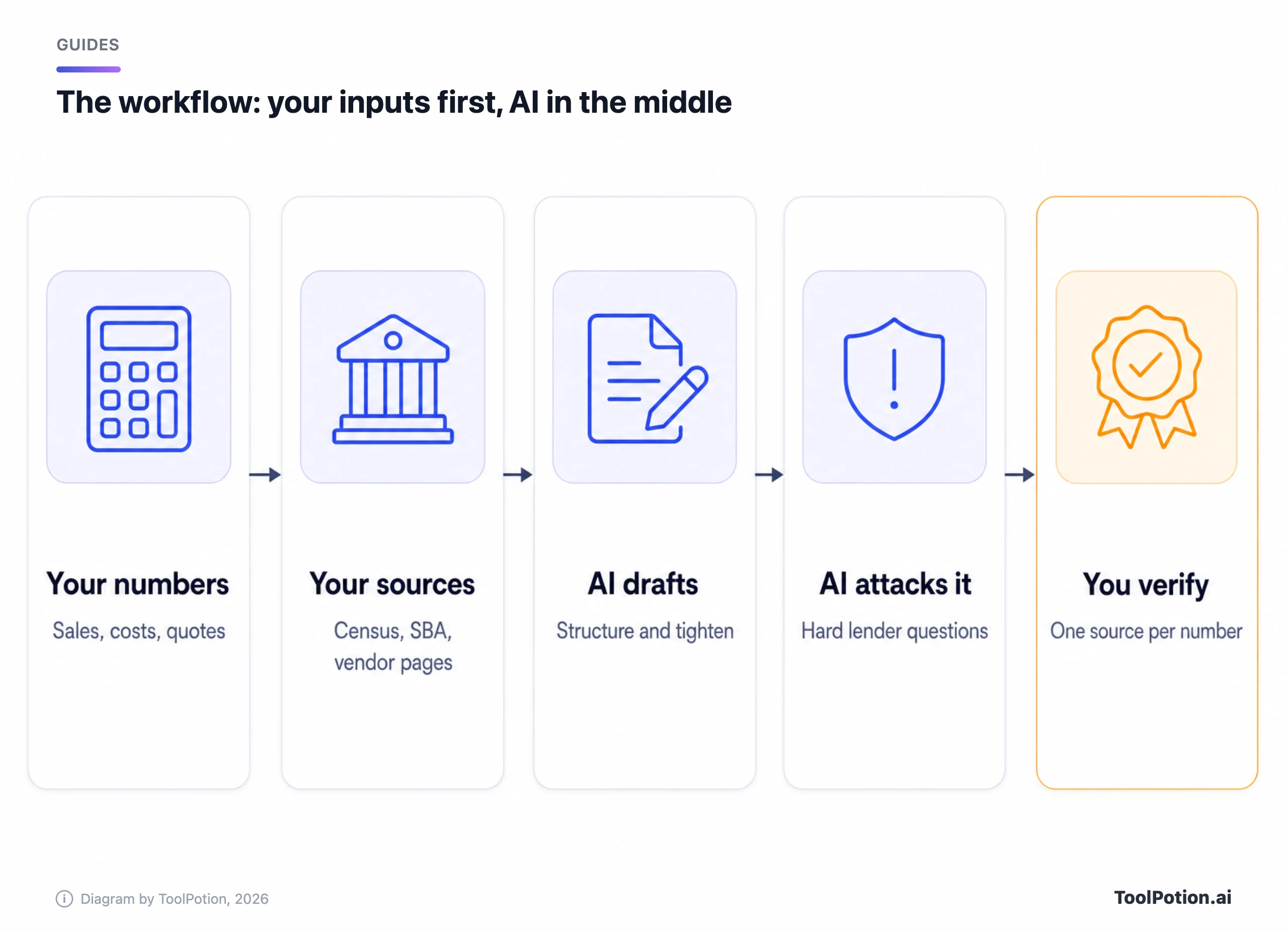
This guide is a workflow for using ChatGPT, Claude, Gemini and a few planning tools on a plan you'll hand to a lender. Your facts go in first. The AI structures, tightens and attacks the draft. You verify every number before it leaves your desk. This is general information, not financial or legal advice, so talk to your lender, accountant or an SBA counselor before you borrow.
What the SBA says a lender-facing plan contains
Start from the official outline, not from a chatbot's idea of one. The SBA says there's "no right or wrong way to write a business plan," but it describes two shapes (SBA). The traditional plan is detailed and, in the agency's words, "Lenders and investors commonly request this plan." The lean startup plan is one page, and the SBA says some lenders and investors may ask for more information.
The common traditional sections are the executive summary, company description, market analysis, organization and management, service or product line, marketing and sales, funding request and financial projections. The SBA tells you to use the sections that make the most sense for your business, not to follow the outline slavishly.
Two of them carry the loan. The funding request must say how much you need over the next five years, whether it's debt or equity, and exactly what the money buys. The financial projections must match it. For the first year the SBA wants quarterly or even monthly figures, and if the business already exists, income statements, balance sheets and cash flow statements for the last three to five years.
The SBA also says that "Poor credit history is one of the main reasons why loan applications for small businesses are often declined" (SBA). No prompt fixes that. If your credit is the weak spot, we'd work on it before polishing a single paragraph.
One more point from the SBA's 7(a) page: applicants work directly with a lender, and "The contents of the loan application vary depending on the size of the loan and the lender’s processing method" (SBA). We'd call the lender before writing anything and ask what they want to see. That one call decides your outline, and it costs nothing.
Gather your own numbers and sources first
The order is the whole trick. If you open a chat window and type "write me a business plan for a bakery," you'll get fluent prose built on figures the model made up. If you paste in your own records first, the model has something true to organize.
Collect these before the first prompt:
- Twelve months of sales or invoices if you're already trading, or signed letters of intent and a price list if you aren't.
- Quotes for your three biggest costs (rent, equipment, a key supplier), each from a named vendor with a date.
- Your startup cost list, split into one-time and monthly items. The SBA suggests counting at least one year of monthly expenses, and five years if you can.
- Market facts from sources you can name. The Census Business Builder is a free federal tool for demographic and economic data on a chosen place and type of business, and the SBA's own market questions (demand, market size, saturation, what customers pay for alternatives) are a ready-made outline (SBA).
- A one-page account of who runs the business and why they can: past jobs, licenses, partners.
- Your personal credit report and your debts. A lender will see them anyway.
None of this needs AI. It needs a weekend and a spreadsheet. If you want help with the spreadsheet itself, our AI spreadsheet board ranks the tools, and our roundup of AI spreadsheet tools covers prices.
The workflow, with prompts that earn their keep
Once the facts exist, the AI has three useful jobs: arrange them, tighten the writing and attack the result. Anything beyond those three, like supplying a market size or a growth rate, is where plans go wrong.
- Paste your facts into a fresh chat and ask for a section-by-section draft that uses only those facts.
- Read the draft against your records. Mark every sentence that contains a number or a claim you didn't supply.
- Delete the marked sentences or replace them with sourced ones.
- Ask for a tightening pass: cut filler, keep every figure unchanged.
- Start a second chat and ask it to play a skeptical loan officer.
- Fix the weak points it finds with real data, then run the numbers through your own spreadsheet one last time.
Here's the first prompt. The last line does more work than the rest, because it gives the model permission to leave gaps. Anthropic's own guidance on reducing hallucinations says to "Allow Claude to say “I don’t know”" and notes this can drastically reduce false information (Anthropic docs). The same trick works in the other chatbots.
You are helping me draft a business plan for a bank loan application.
Use ONLY the facts between the <facts> tags. Do not add statistics,
market sizes, growth rates or competitor details I didn't give you.

<facts>
[paste: sales records, cost quotes, startup costs, owner background]
</facts>

Write these sections: executive summary, company description,
market analysis, organization and management, marketing and sales.
Where a section needs a fact I didn't provide, write
[NEED: what is missing] instead of guessing.
Every [NEED: ...] tag is a to-do for you, and they're the most useful output of the whole exercise. We'd take a plan with six visible gaps over one with none; a model that knows nothing about your town can't have filled them truthfully.
Now act as a loan officer at a community bank who has seen
hundreds of plans for businesses like this. Read the draft below.
List the ten questions you'd ask me in the meeting, ordered from
most damaging to least. For each, say which section failed to
answer it. Do not suggest new facts. Do not rewrite anything.

<draft>
[paste the revised draft]
</draft>
The third prompt audits the draft for claims that need a source. Run it in a fresh chat so the model isn't defending its own work.
List every number, percentage, date and named source in the text
below. Put them in a table with three columns: the claim, where
in my facts it came from, and "not in my facts" if it didn't.
Do not fix anything. Do not add sources.

<draft>
[paste]
</draft>
The "not in my facts" rows are the ones you chase. Open the primary source, copy the figure, and write the source name and year next to it in the plan. If you can't find one, the number goes.
Where AI plans go wrong
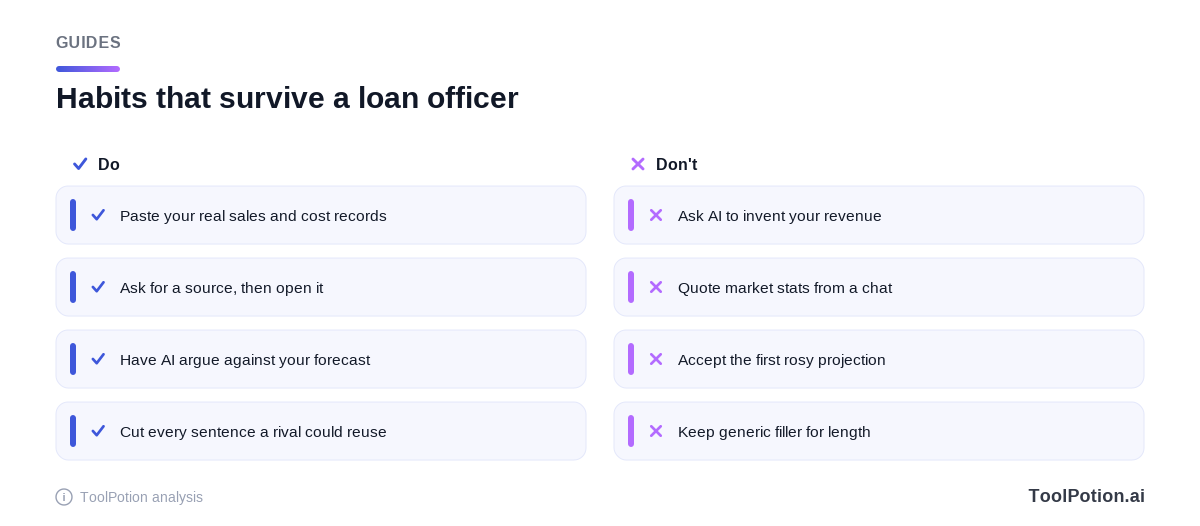
Four failures show up again and again, and a loan officer who reads plans all day will spot most of them.
Invented market statistics come first. Ask any chatbot for the size of your market and you'll get a confident figure, often with a plausible-sounding report name attached. Treat it as a placeholder. We wouldn't trust a number that came from a chat window unless a link to an official source sits next to it and we've opened that link ourselves. Perplexity-style tools that show their citations are better here (see our comparison of AI search tools), but a citation can still point at a page that doesn't say what the answer claims.
Rosy assumptions come next. Models love a smooth curve: revenue up 40 percent every year, no slow opening months, no customers who leave, no supplier raising prices. Real small businesses ramp slowly and bleed cash early. The SBA's break-even guidance calls it "a good idea to throw a little extra, say 10%, into your break-even analysis to cover miscellaneous expenses that you can't predict" (SBA). A forecast with no cushion like that is a wish list.
Then there's generic filler. "Our passionate team is dedicated to delivering exceptional customer experiences" could sit in any plan on earth, which is exactly why it reads as nothing. The SBA wants specifics: the problem you solve, who you serve, why your location or team beats the competition. Ask the tightening prompt to cut any sentence a competitor could paste into their own plan unchanged.
Last, the numbers often don't tie. The funding request says $85,000, the projections assume $110,000 of equipment, and the executive summary mentions a third figure. The SBA says to match projections to the funding request. A model drafting section by section has no reason to keep them consistent, so you check them.
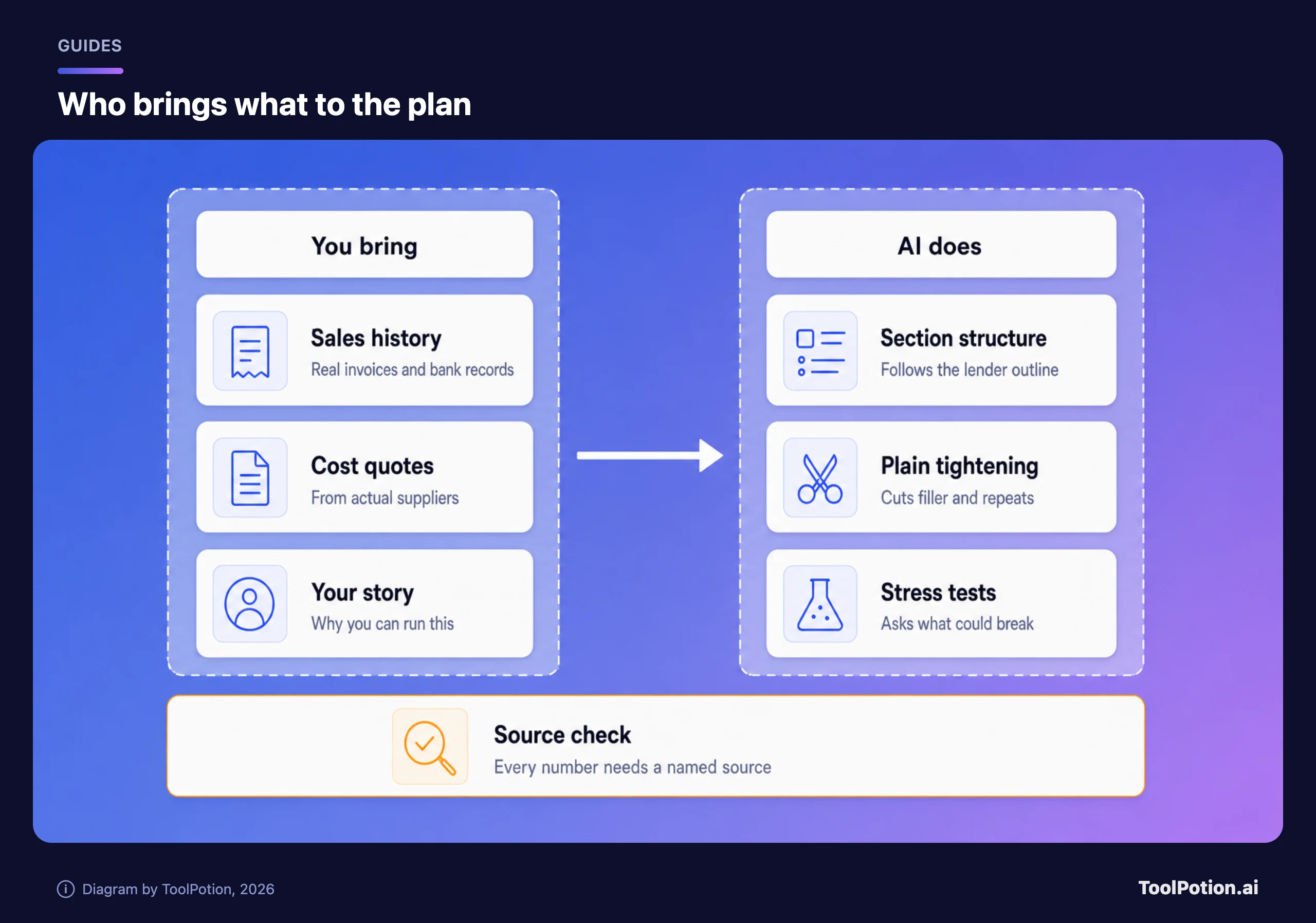
Our rule of thumb follows from those failures. You bring anything that can be wrong in a way that costs you money: sales, costs, prices, dates. The AI brings structure, plain language and hard questions. Whenever a number crosses from the first group into text the AI wrote, it gets a source before it stays.
Try your own break-even before the AI touches it
The SBA's break-even formula is short: fixed costs divided by (price minus variable cost per unit) gives the number of units you must sell to break even (SBA). Worked with placeholder figures, $4,000 of fixed costs and a $40 price with $22 of variable cost leaves $18 per unit, so you need at least 223 units a month before you make a cent.
The calculator below does the monthly version with your own inputs, plus a 10 percent cost cushion. That cushion is our reading of the SBA's "say 10%" tip, applied to both cost lines, not an SBA formula. The defaults are placeholders, not a benchmark for any industry. Compare its output with whatever profit figure an AI draft gives you. If they disagree, the draft is wrong or its assumptions are hidden.
A lender will run this same arithmetic in their head, so put it in your plan with your own quotes behind each input.
Which tool for which job
We run a directory of AI tools and haven't hands-on tested these for loan applications, so read this as a read of the product pages and policies, not a bake-off.
For drafting and critique, any of the big three works. Claude is our first pick for the tightening pass, partly because Anthropic's docs spell out how to ground it in text you supply (that's a vendor's guidance, not a benchmark). ChatGPT is the broadest if you also want help with spreadsheets and charts, and our guide to ChatGPT features most people miss covers the ones that help here. Google's Gemini can do the same jobs, but read its privacy terms (below) before you paste financials into it. If you'd rather work from uploaded documents, our notebook comparison covers the options.
If you already live in Notion AI, it's a reasonable place to keep drafts and meeting notes, but it won't build a forecast. For that you need a spreadsheet or a planning tool.
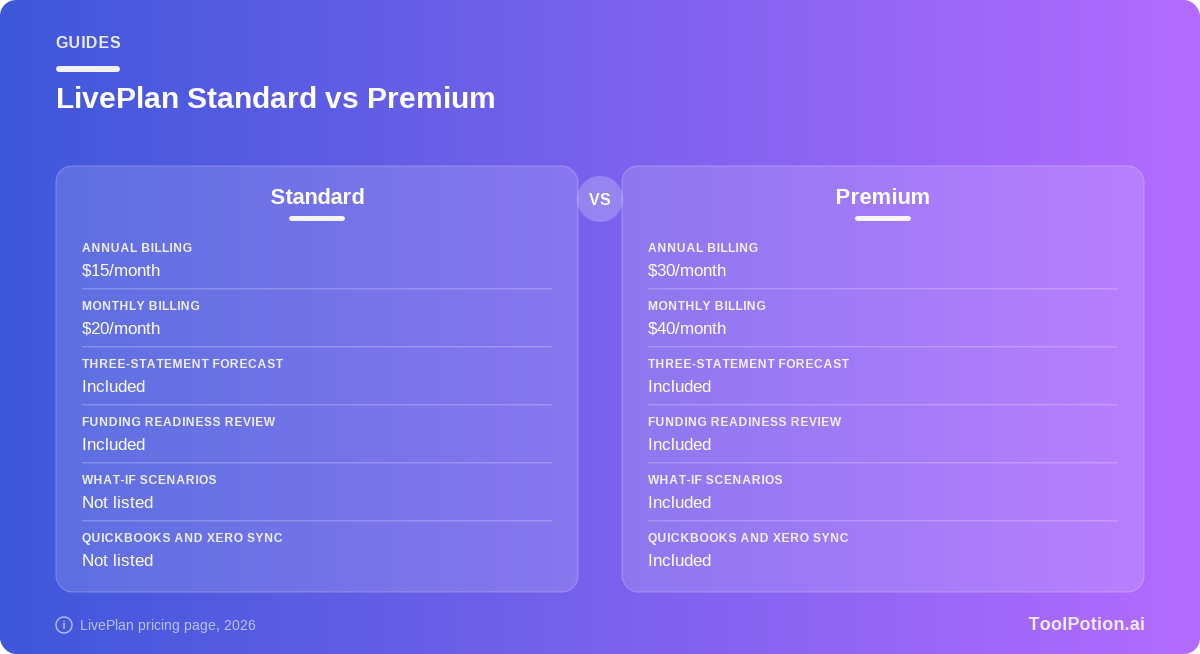
LivePlan is the one dedicated product here worth a look. Its pricing page says Standard costs $15 a month billed annually ($20 month to month) and Premium $30 ($40 monthly), and that Standard includes a profit and loss, cash flow and balance sheet forecast and a funding readiness review (LivePlan). It also says Premium adds what-if scenarios and QuickBooks and Xero sync. For a first loan application, we'd pick Standard and skip Premium until you have a year of books to connect. The trade-off is that you're building inside their templates, so check the Excel export before you commit. Standard also lists AI writing help and a pitch presentation, so you'd get a draft tool in the price. Cheaper generators like TOPY.AI write text from a short form, which is the invented-numbers risk in product form, and we'd treat their output as a first draft at best.
Privacy is the other cost, and it's the one most people skip. A business plan holds your finances and often your personal ones. Google's Gemini privacy hub says a subset of chats are read by human reviewers (disconnected from your account first), that reviewed chats are kept for up to three years, and that with Keep Activity on you shouldn't enter confidential data (Google). Temporary chats aren't used to improve Google's AI with help from human reviewers, and Google keeps them with your account for 72 hours. Three years is a long time for a document that holds your bank statements. We think defaults are policy, so check the equivalent setting in whichever assistant you use before pasting in bank statements, and strip account numbers either way. Our explainer on how assistants handle memory shows where the other controls hide.
The check before you send it
Give the plan to someone who didn't write it, ideally an SBA-affiliated counselor, and read the whole thing aloud once yourself. Reading aloud is the cheapest test for filler. Then tie the numbers out: the funding request equals the use-of-funds total, the first-year projections match your startup cost list, every market statistic has a named source and a year next to it, and nothing in the document contradicts your tax returns.
Last, delete any sentence you can't explain out loud to a skeptical stranger. If a loan officer asks where the 18 percent growth figure came from and your only answer is "the chatbot suggested it," the meeting is over.
Frequently asked questions
Will a bank reject a plan because AI helped write it?
Nothing in the SBA guidance we read asks what drafted the plan; it describes what the plan must contain. Plans get turned down on content: weak credit, numbers that don't hold up, a request that doesn't match the projections. Use AI for structure and editing, and you can describe the process truthfully if asked.
Can AI do my financial projections?
It can build a spreadsheet layout and explain the formulas, and it's good at asking what you forgot. It shouldn't choose your growth rate, pricing or costs. Those come from your records and quotes. A planning tool like LivePlan or your own spreadsheet should produce the final statements, and your accountant should look at them.
Is the traditional plan or the one-page lean plan better for a loan?
The SBA says lenders and investors commonly request the traditional plan and that some may want more than a lean plan gives them. Ask your lender which they prefer. If they don't care, write the traditional version, because its funding request and projections sections are the ones a lender reads closely.
Which AI is best for a business plan?
Any of the large assistants can do the three jobs above. We'd pick Claude for the tightening pass and ChatGPT if you want spreadsheet help in the same chat, but the habits matter more than the brand: your facts first, no invented figures, a source per number.
Where can I get free help with the plan itself?
The SBA says it provides counseling through its resource partner network and links a counselor finder from its plan your business page. A counselor will read your draft against what lenders look for, which no chatbot can do. Book that session before you apply, with your source list in hand.