Most AI presentation makers can produce a decent first draft in under a minute. That's no longer the hard part. The hard part is the next hour: fixing the slide that got the numbers wrong, matching your brand, getting the file into PowerPoint without the fonts exploding, and finding out your free plan ran out of credits on slide nine.
This guide is built around that second hour. The leaderboard below ranks the top 25 on the Top 50 AI Presentation Makers board for 2026, and the sections after it explain what the ranks can't: how editable each deck is, what exports cleanly, what the free plans really give you, and which tool suits a sales deck, a class, an internal update or an investor pitch.
The top 25 right now
- # 1Top PickCanvaAI AppCanva is a free online graphic design tool that allows users to create social media posts, presentations, posters, videos, logos, and more. It offers a variety of templates and features to enhance creativity and productivity.92ToolRankElite
- # 2Runner UpGamma AI Presentation MakerAI AppGamma is an AI-powered design partner for creating presentations, websites, social media content, and documents. It requires no coding or design experience, enabling users to generate polished, shareable content quickly from ideas or existing outlines. Export options and real-time collaboration are key benefits.77ToolRankStrong
- # 3Third PlaceWonderaAI AppWondera is an AI music co-creator that works as a personal producer, helping you create, iterate on, and refine music with AI tools such as generation and stem separation.67ToolRankStrong



- 4Meitu Design StudioAI AppMeitu Design Studio is a free online AI design tool that enables users to create high-quality commercial visual content. It offers AI-generated product images, posters, and PPTs, aiding e-commerce and brand marketing with efficient design solutions.60ToolRankStrong
- 5Beautiful.aiAI AppBeautiful.ai is an AI-powered presentation software designed for teams to create professional, on-brand decks quickly. It offers smart slide layouts, AI content generation, and collaborative features, saving hours on design and ensuring brand consistency across all presentations.59ToolRankSolid
- 6PreziAI AppPrezi is an AI presentation maker that creates studio-quality, interactive presentations from a prompt or uploaded file through a simple conversation, letting you refine slides by chat and present in a dynamic zooming format.57ToolRankSolid
- 7Qwen Assistant (千问)AI AppQwen Assistant is Alibaba's official AI tool designed to enhance productivity in work, study, and daily life. It offers AI search, web summarization, AI PPT creation, image generation, and transcription services to streamline creative and analytical tasks.56ToolRankSolid
- 8PitchAI AppPitch is a collaborative presentation platform designed for teams to create, share, and deliver impactful presentations efficiently. With powerful editing tools and seamless collaboration features, Pitch helps teams produce stunning slides that engage audiences and drive decisions.56ToolRankSolid
- 9Plus AIAI AppPlus AI is an AI assistant for PowerPoint and Google Slides that generates, edits, and reformats presentations directly inside your existing slide apps, so you can create professional decks from a prompt or document.55ToolRankSolid
- 10Quark PPTAI AppQuark PPT allows users to input a theme or upload a document to intelligently generate outlines and match them with beautiful templates. It simplifies the process of creating professional presentations.55ToolRankSolid
- 11VismeAI AppVisme is an AI-powered visual content platform that enables teams to create professional presentations, infographics, and videos. It simplifies the design process, allowing users to manage and scale their branded content efficiently.54ToolRankSolid
- 12Smallppt AI PowerPoint GeneratorAI AppSmallppt is an AI-powered tool that transforms your ideas into professional, brand-ready presentations in minutes. It offers features like AI slide generation, content summarization, and a vast template library, streamlining the creation process for users seeking efficiency and polished results.53ToolRankSolid
- 13PopAiAI AppPopAi is an AI presentation maker that turns a prompt, PDF, Word file, PPTX, or webpage into editable slides. It is aimed at professionals, educators, and students who need decks quickly.53ToolRankSolid
- 14Presentations.AIAI AppPresentations.AI is an AI platform that transforms ideas, documents, and URLs into branded, professional slide decks in minutes. It automates content creation, applies brand consistency, and exports editable PowerPoint files, enabling teams to generate high-quality presentations efficiently and at scale.53ToolRankSolid
- 15MagicSlides AI PPT MakerAI AppMagicSlides AI PPT Maker transforms prompts, topics, or content into professional presentations in seconds. It supports over 136 languages and offers an AI chat assistant for creating, editing, and designing slides. Trusted by millions, it's a free, no-design-skills-needed solution for generating stunning decks.53ToolRankSolid
- 16Gamma.designAI AppGamma.design is an AI-driven presentation maker that allows users to create professional slides quickly. With over 1000 templates and AI-generated content, it simplifies the creation process for students, designers, and business teams.52ToolRankSolid
- 17SlidesGPTAI AppSlidesGPT is an AI-powered tool that transforms text content into professional presentations in seconds. Upload PDFs, blog posts, or articles, and let the AI generate engaging slideshows for PowerPoint or Google Slides. Save hours of work and mental energy with this efficient presentation maker.52ToolRankSolid
- 18VenngageAI AppVenngage is a visual communication platform with a free AI infographic generator that turns text, CSV, or documents into on-brand infographics. Built for non-designers on marketing, HR, and consulting teams.51ToolRankSolid
- 19MiriCanvasAI AppMiriCanvas is an online design tool that helps you create presentations, social media posts, posters, and videos using templates and built-in AI features like an AI presentation generator, image generator, and photo editing tools.51ToolRankSolid
- 20SlideSpeakAI AppSlideSpeak is an AI presentation platform that transforms documents, text, and ideas into polished, native PowerPoint presentations instantly. It requires no design skills and offers AI-powered content generation, editing, and translation, making presentation creation effortless for teams and individuals. Try it for free.51ToolRankSolid
- 21Template.netAI AppTemplate.net is an all-in-one AI editor that turns natural-language prompts into fully editable, brand-compliant documents, presentations, designs, images, videos, forms, charts, and whiteboards, with native exports to formats like PPTX and Word.50ToolRankSolid
- 22Decktopus AIAI AppDecktopus AI is an AI-powered presentation assistant that generates fully designed, branded presentations in seconds. Simply input your presentation title or paste text, and Decktopus handles the research, copywriting, and image generation, allowing you to focus on delivery. It offers a drag-and-drop editor for further customization.50ToolRankSolid
- 23TwistlyAI AppTwistly is an AI presentation maker add-in for Microsoft PowerPoint that generates slides from text, PDFs, DOCX, YouTube links, and more in seconds, with native PowerPoint export and no design skills required.49ToolRankSolid
- 24ChatSlide AIAI AppChatSlide AI transforms documents, links, and ideas into professional presentations, videos, and posters in minutes. Trusted by over 240,000 users, it offers AI-powered slide generation, avatar videos, and design customization for coaches, agencies, and healthcare professionals.49ToolRankSolid
- 25Slidebean AI Pitch Deck CreatorAI AppSlidebean offers an AI-powered pitch deck creator and a design agency service. It simplifies fundraising by helping founders craft compelling pitch decks and financial models. Clients have raised over $500 million in venture capital using their tools and services, making it a valuable resource for startups.49ToolRankSolid


















How ToolRank works
ToolRank is ToolPotion’s proprietary ranking engine.
It continuously evaluates hundreds of signals across the open web — real traffic and popularity, audience and community strength, authority and longevity, adoption and engagement — processing millions of data points to place every tool where it has earned to be.
Every AI type is measured by its own tailored model: what proves traction for a SaaS app is not what proves it for an open-source framework or a creator channel. Missing a platform never counts against a tool — ToolRank judges the evidence that exists.
No paid placement. No self-reported numbers.
Quick picks
- Best overall: Canva, #1 on the 2026 board. It's a full design suite that happens to make decks, so the same brand kit covers your slides, social posts and handouts.
- Best for a fast first draft: Gamma, #2 with a ToolRank score of 77 (strong tier). Paste an outline or a document and it builds the whole deck.
- Best for polished team decks: Beautiful.ai, #4 and a solid-tier 58. Smart Slide layouts keep spacing consistent no matter who edits.
- Best if you live in PowerPoint or Google Slides: Plus AI, #11. It runs as an add-on, so there is no export step to go wrong.
- Best free starting point: Visme and Presentations.AI both keep a permanent free plan, with different catches covered below.
- Best for sales and collaboration: Pitch, #8, built around shared editing and tracked links.
What changed in 2026
The big platforms stopped leaving this category alone. Google now lets Gemini in Slides generate a multi-slide deck from one prompt, grounded in Drive files, with fully editable native slides (Google Workspace Updates). At launch it was limited to US English and to certain Workspace and Google AI plans.
That raises the bar for everyone else. If your existing slide app can draft a deck, a standalone maker has to win on something else: design quality, brand control, collaboration or speed.
The independents have money to try. Gamma raised $68 million at a $2.1 billion valuation on $100 million in annual recurring revenue and a claimed 70 million users (TFN). Beautiful.ai took $45 million from General Catalyst and shipped a context-aware workflow that goes from first prompt to finished deck (PR Newswire).
One caution on all of this. Those figures are what the companies say about themselves, and funding rounds say little about how good your next deck will be. Use them as a sign that these products will still exist next year, nothing more.
Whatever the brand, the work splits the same way. The machine handles the blank-page problem. You still own the details.
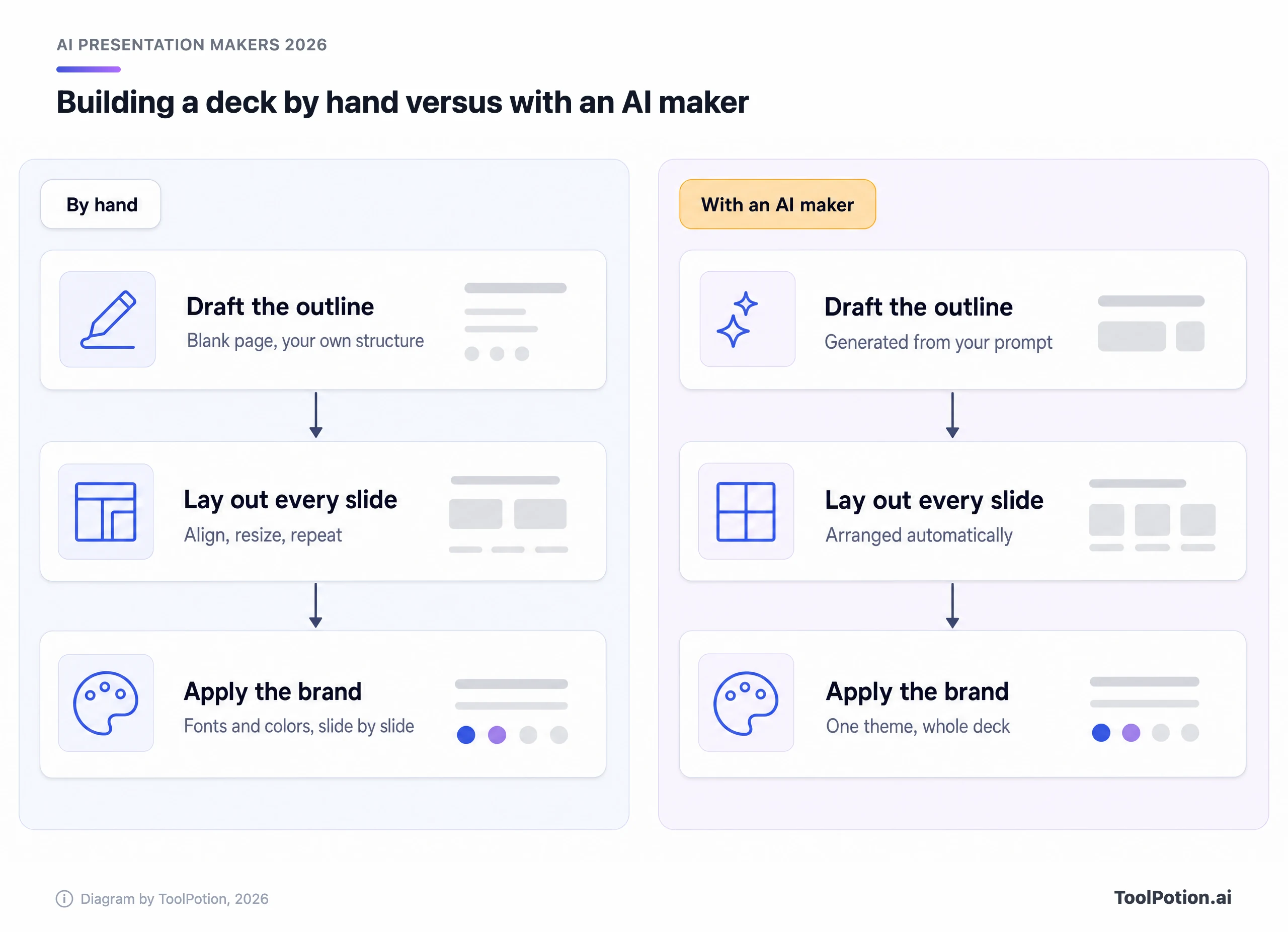
What survives the first draft
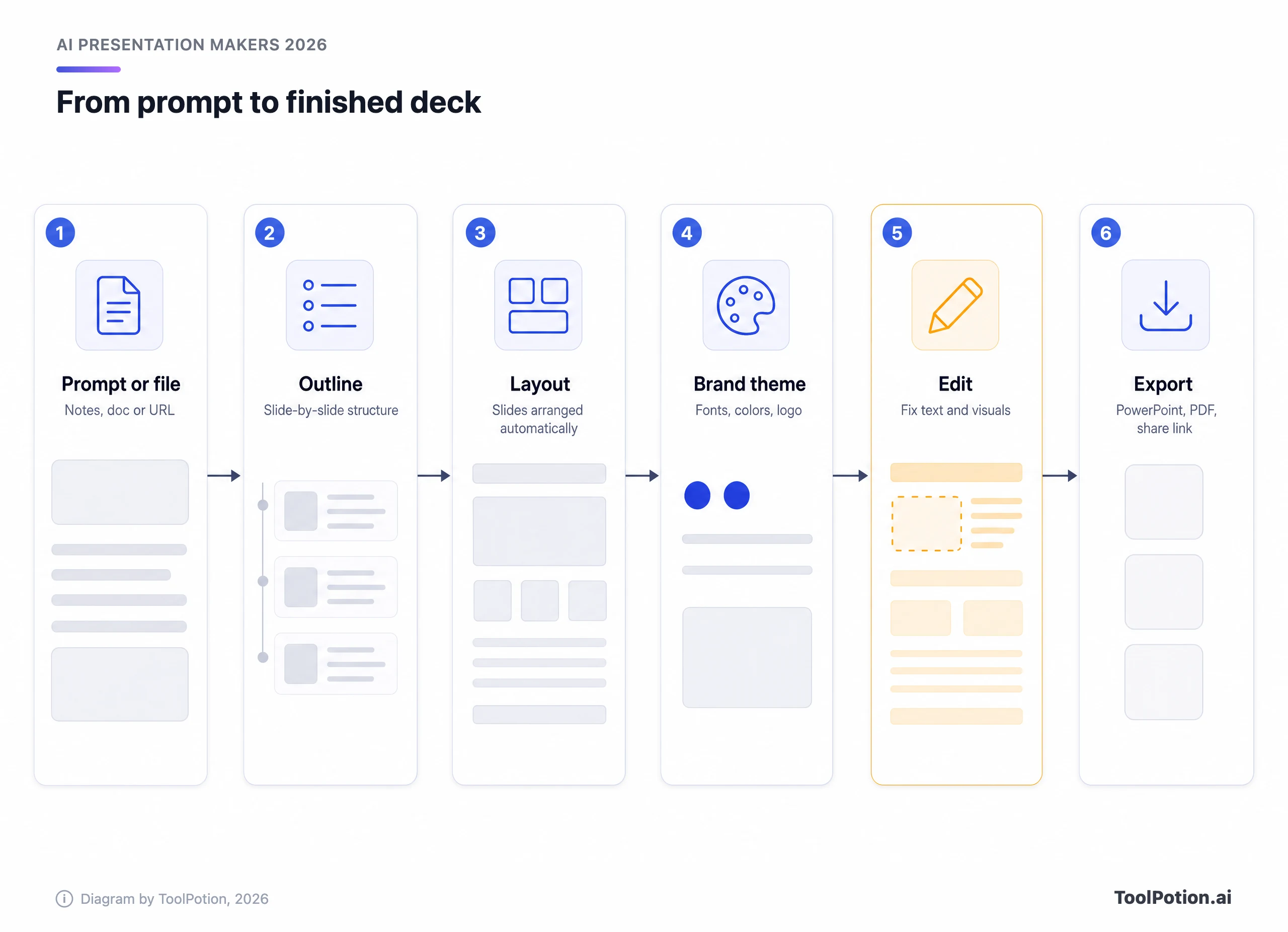
Nearly every tool here follows one pipeline, shown below. The first four steps are where the AI earns its fee. Step five is where you spend your time, and step six is where deals get lost.
Editability is the quiet differentiator. A deck that is generated as a flat design is a dead end the moment a client asks for a different chart. A deck built from real text boxes, native tables and theme fonts survives. Gamma's own help center says tables export as editable by default, and also lists what doesn't translate to PowerPoint: tables lose rounded corners, gradient headings can render as single colors, and italics come through as slanted regular type (Gamma help center). That's an unusually honest list, and it's the kind of thing to check for any tool before you commit a deadline to it.
Collaboration is the other half of editing. Beautiful.ai's Team plan adds real-time editing, a shared slide library and version control. Canva Business adds approval workflows. Pitch's paid tiers add teamspaces and shared rooms, and its free plan allows two external guests. If more than one person will touch the deck, check this before you check the template gallery, because the free plans of nearly every tool here are effectively single-player.
Brand kits come second. Canva's free plan includes one Brand Kit capped at three colors, Pro lifts that to five kits, and Business to 100 (Canva pricing). Presentations.AI puts brand customization in its Pro plan, and a brand setup like that saves more time than any template library.
Then credits. Nearly every free plan is metered, and the meters differ in kind. Some are one-time, some monthly, some yearly. Prezi spells out what a credit buys: one action each, whether that is generating a deck, converting a document, making an image or refining text, and unused credits don't roll over (Prezi). Gamma says the cost of an action varies, and that longer, more complex generations use more (Gamma credits help). So a credit count on a pricing page is a rough guide to how many decks you get, never a promise. Rebuilding one deck three times with a different tone can cost more than the first draft did.
The leaders, reviewed
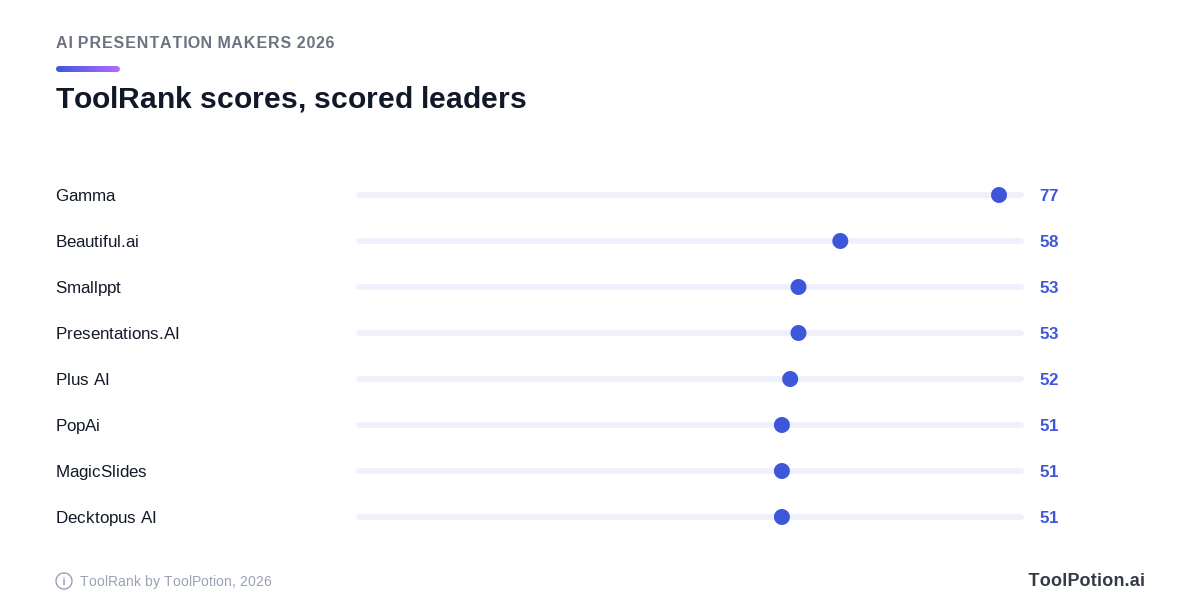
Scored entries on the board cluster tightly. Gamma sits well clear at 77, Beautiful.ai follows at 58, and the next six scored names fall between 51 and 53. A few of the biggest names, including Canva, Prezi, Visme and Pitch, are ranked but not yet scored, so they're left out of the chart.
Canva: best all-round for non-designers
Canva is #1 on the 2026 board, up from #2. Its pitch is breadth. The free plan covers a huge template library, one Brand Kit and up to 20 standard or premium AI uses a month. Pro costs $144 a year and Pro subscribers get roughly ten times the AI of free users, while Business is $250 a year per person and adds real-time collaboration, task assignment and approval workflows (Canva pricing).
The catch is that it's a design tool first. Canva's presentations page says you can export slides as a PowerPoint file (Canva), but if your company runs on .pptx files, open an exported deck once before you build forty slides.
Gamma: fastest from an outline to a deck
Gamma is #2, climbing from #6, with a score of 77 in the strong tier. You paste notes or an outline, and it builds a deck you refine by chat. Its listing says it draws on more than 20 AI models and imports brand colors and fonts, with over 100 themes.
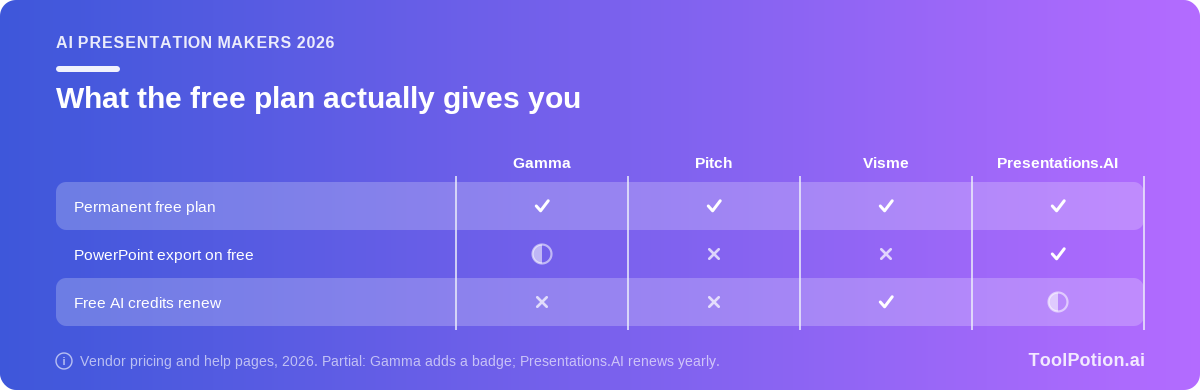
The free plan gives 400 credits once. They don't refresh, and you can earn 200 more per referral. Paid plans refill monthly and roll over up to twice your plan size, and Plus includes 1,000 credits a month (Gamma credits help). Exports from a free workspace to PowerPoint carry a "Made by Gamma" badge until you pay. We couldn't retrieve current plan prices from Gamma's own page, so check it before budgeting for a team.
Beautiful.ai: best for keeping decks on-brand
Beautiful.ai is #4 on the 2026 board, up from #8, at 58 (solid). The product's old idea still holds: slides snap to layouts that stay aligned as you add content, so a manager can edit your deck without wrecking it. It has no free plan, only a 14-day trial. Pro is $14.50 a month billed annually, Team is $40 per user a month billed annually (or $50 monthly) for 2 to 20 users, and both include PowerPoint import and export plus unlimited AI content generation (Beautiful.ai pricing).
It's the pick for a team that cares more about consistency than speed. It is a poor pick if you want something free, and since the Team plan starts at two seats, a solo freelancer ends up on the single-user Pro plan anyway.
Prezi: the zooming canvas, and a rank slide
Prezi slipped from #1 to #5 on the 2026 board, and it's unscored. It builds a designed deck from a prompt or an uploaded PPTX, PDF or DOCX and lets you refine it in conversation, then presents it in its zooming, non-linear format.
Per Prezi's own plan breakdown, Basic is free with 500 AI credits a month and Standard is $7 a month on annual billing. Unlimited AI and PowerPoint export start at Plus ($19), with Premium at $29 (Prezi). The free tier makes presentations public by default, which rules it out for anything confidential.
Visme: strongest when the deck is full of data
Visme is #7 and unscored. It leans on charts, infographics and interactive content, and sells itself to marketing and training teams. The free plan allows 10 AI credits a month and exports only to JPG, PNG and PDF, with no Brand Kit. Starter is $12.25 a month ($147 a year) with 200 credits and PPTX export. Pro, at $24.75 a month, adds a Brand Kit, advanced collaboration and 500 credits. There are also a $48 student plan and a $96 educator plan (Visme pricing).
Pitch: collaboration first
Pitch is #8 and unscored. Its listing says over 4 million teams use it, and the product is built around shared editing, a brand library and sending decks with tracked links. The free plan has 100 one-time AI credits and no PowerPoint export. Plus is €10 a month for 500 monthly credits, unbranded export and custom fonts, and Team (€15) and Business (€20) add guests, teamspaces and analytics (Pitch pricing). It's priced in euros.
Presentations.AI: the most generous export terms
Presentations.AI is #10, up from #14, with a score of 53 (solid). Its free Starter plan includes 100 credits a year, decks up to 20 slides and PowerPoint and PDF export. Pro is $20 a month billed annually with 5,000 credits, and Gold is $50 (Presentations.AI pricing). The credits are yearly, so a free user can drain them in one afternoon. Still, PowerPoint and PDF export come with every plan, free included.
Plus AI: for people who won't leave PowerPoint
Plus AI is #11 at 52 (solid). It works inside PowerPoint and Google Slides, so decks are native files that inherit your templates. Every plan starts with a 7-day trial and 1,000 credits. Basic is $10 a month annually ($15 monthly) for 1,500 credits, Pro is $20 for 3,000, Team is $30 and adds custom branding, and Max is $200 with unlimited credits (Plus AI pricing). There's no permanent free plan.
How to choose
Start with where the deck has to end up. If it must be a clean .pptx or a Google Slides file that other people will edit, Plus AI, Presentations.AI or Beautiful.ai are the safest bets because export or native format is part of the product. If it only needs to be a link or a PDF, you can pick on speed and looks.
Teachers and students have the easiest path. Canva's free plan and Visme's student and educator plans are the obvious places to start, and a class deck rarely needs PowerPoint fidelity. Investor and sales decks are the opposite case. They get forwarded, printed and reopened a year later, so export quality and tracked links outrank a pretty first draft. Internal updates are where Plus AI and the Microsoft and Google options earn their place, because the audience already lives in those apps.
Then check the free plan against your real workload. A one-time pool like Gamma's 400 credits or Pitch's 100 is a trial in disguise. Visme's monthly allowance is small but renews. Entry prices for paid plans cluster between $7 and $20 a month (Slidebean's $7 Starter is on its pricing page, and the tool is covered in the rising names below), so the plan limits matter more than the sticker.
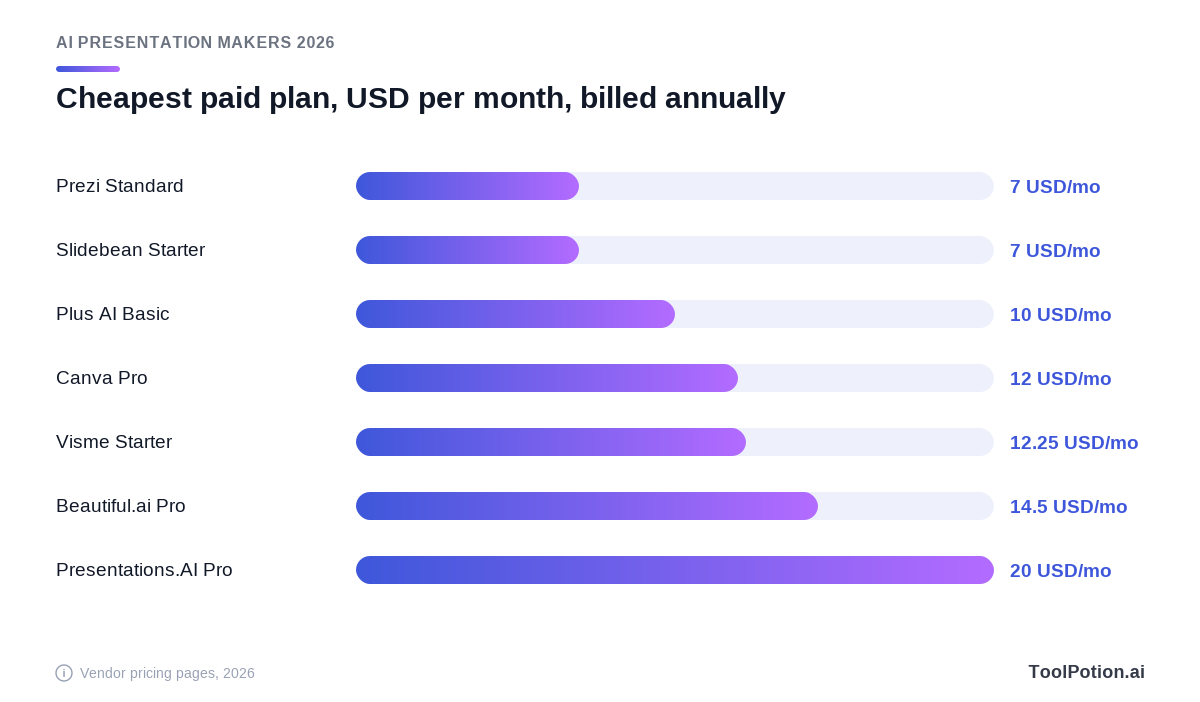
Plans change often, so the table below is a snapshot of what each vendor published in 2026. Sort by any column.
The short version of that table is also a flowchart. Two quick questions below route you to one pick, and every answer matches the reviews above.
If your deck is part of a bigger writing job, our boards for business proposals and consultants cover the surrounding tools, and teachers will find classroom options there. For graphics beyond slides, see the social media graphics board.
About ToolRank
ToolRank is ToolPotion's independent ranking of AI tools. Placement can't be bought, and every board shows a 0-100 score and a tier. Browse the other leaderboards on the ToolRank index, or see every listing in the AI presentation makers directory.
Rising and newer names
Beyond the top ten, Smallppt reached #6 at 53 (solid) with topic-to-slides generation and an AI summarizer, and PopAi sits at #12 with 51, turning PDFs, Word files or web pages into editable slides. Slidebean, a pitch deck specialist, slid from #5 to #16 on the 2026 board, so check the live presentation makers leaderboard before choosing it for fundraising.
Just outside the published top 25, iSlide (#26) is a PowerPoint and WPS plugin, auxi (#27) targets consulting and investment banking teams, and 2Slides (#28) builds decks from plain text.
Frequently asked questions
What is the best free AI presentation maker in 2026?
Presentations.AI is the one free plan among those we compared with PowerPoint export included, but its 100 credits are for the year. Canva's free plan, with 20 AI uses a month, is the better choice if you design often.
Can AI presentation makers export to PowerPoint?
Most can, though terms differ. Canva lists PowerPoint among its export formats, and Gamma exports on every plan but adds a badge on free. Visme and Pitch hold PPTX back for paid plans. Prezi needs Plus. Beautiful.ai and Presentations.AI include it.
Will my fonts and layouts survive the export?
Not always. Gamma lists rounded table corners, gradient headings and true italics as things PowerPoint can't reproduce. Open every exported deck once before the meeting.
Which tool is best for a sales deck?
Pitch is built for shared editing and tracked links, and Beautiful.ai suits a team that needs every deck to look the same. Both cost more than a solo plan.
Is Canva an AI presentation maker?
It is a full design suite with AI built in, and it holds #1 on the 2026 board. Its strength is design range and one brand kit across every format.
Are AI presentation tools safe for confidential decks?
Check privacy defaults first. Prezi's free Basic plan makes presentations public by default. Read each vendor's data terms before uploading client material.