One of the biggest AI browser stories of 2026 was a retreat. OpenAI launched its ChatGPT Atlas browser last year, then said this year it would shut it down and fold the useful parts into the ChatGPT app and a Chrome extension. TechCrunch's read was that OpenAI "appears to have concluded that the browser is a feature, not the destination" (TechCrunch). Microsoft is also retiring Copilot Mode in Edge. AI is moving into the browser you already use, and for most people the way in is still an extension.
Our Browser Plugins leaderboard ranks 480 of them and publishes the top 250. Two names sit well clear: AI Marketer for X at #1 with a ToolRank score of 81 (elite) and Grammarly at #2 with 68 (strong). Everything from #3 to #25 lands between 46 and 53, so below the top two the right pick depends on the job, not on a point or two of score.
This guide sorts the leaders by job, quotes prices only where the vendor's own page shows them, and then deals with the uncomfortable part. Every tool here can read the pages you visit, so there's a section on permissions, the data-theft cases of the last two years and a two-minute audit, plus a short take on when a full AI browser beats an extension.
The top 25 AI browser extensions right now
- # 1Top PickAI Marketer for XAI Marketer for X is a Chrome extension that automates your X (Twitter) marketing efforts. It posts, engages, and sends DMs to grow your audience and drive results. This AI employee manages your account professionally, aiming for viral tweets and lead conversion, all organically executed by AI.82ToolRankElite
- # 2Runner UpGrammarly AI Writing AssistantGrammarly for Chrome is an AI writing assistant that enhances grammar, clarity, and tone across all your online writing. It offers real-time suggestions, plagiarism detection, and generative AI tools to help you write faster and more confidently, from first draft to final edit.69ToolRankStrong
- # 3Third PlaceAI SiderAI Sider integrates ChatGPT, DeepSeek, and Gemini into your browser sidebar. Seamlessly access AI chatbots side-by-side while browsing any website. Features include smart screenshots, page context extraction, YouTube summarization, and context-aware actions for enhanced productivity without tab switching.55ToolRankSolid



- 4GPTZero: AI Detection & Writing ReplayGPTZero brings AI detection, citation checks, live essay feedback, and writing replays directly into Google Docs. Enhance critical thinking and human writing with instant AI detection, customizable feedback, and detailed writing reports, including typing pattern analysis.54ToolRankSolid
- 5Youdao Lingdong Translator (有道灵动翻译)Youdao Lingdong Translator is a Chrome extension by NetEase Youdao that offers immersive web-page translation. It provides bilingual page translation, image text extraction, and real-time video subtitle translation, enhancing global content accessibility.53ToolRankSolid
- 6NaturalReader AI Text to SpeechNaturalReader is a Chrome extension that converts text into natural-sounding audio. It reads aloud webpages, emails, PDFs, Google Docs, and Kindle Books using realistic AI voices. Enjoy customizable listening experiences, advanced compatibility, and the ability to download audio files for offline use. Save time and boost productivity by listening instead of reading.51ToolRankSolid
- 7Read AIRead AI's Chrome extension boosts productivity by integrating connected work AI into your meetings and calendar. It offers automatic meeting detection, smart scheduling, live summaries, and a meeting scheduling link, helping you work smarter and achieve more with AI-powered insights and actions.51ToolRankSolid
- 8HARPA AIHARPA AI is a free AI sidebar for Chrome that integrates ChatGPT, Claude, Gemini, and DeepSeek. It offers over 100 commands to automate web tasks, summarize content, monitor prices, and assist with writing, research, and social media marketing, trusted by over 400,000 users.50ToolRankSolid
- 9BardeenBardeen is an AI-powered browser automation tool that helps users build custom workflows with ChatGPT, Sheets, and other web apps. It enables scraping, exporting, and extracting data to enhance sales and productivity, with users saving an average of 10+ hours weekly.50ToolRankSolid
- 10PopAi - Personal AI AssistantPopAi is a Chrome extension designed to enhance document interaction. It offers AI-powered summarization, chat capabilities for PDFs, and image recognition. Aimed at professionals, educators, and students, it provides an intuitive interface for smarter digital engagement and document analysis.50ToolRankSolid
- 11AIPRMAIPRM is a productivity tool designed for ChatGPT users, providing access to a vast library of over 4,000 expert-crafted prompts. It enhances content creation efficiency, making it easier for individuals and teams to generate high-quality outputs quickly.50ToolRankSolid
- 12Thunderbit AI Web ScraperThunderbit is an AI-powered Chrome extension that scrapes and extracts data from websites into structured formats like Excel. It uses advanced AI models like ChatGPT and Claude to automatically identify and collect information, requiring no coding or complex selectors. The tool offers free data export and specific free extractors for emails, phone numbers, and images.50ToolRankSolid
- 13Suki for CliniciansSuki is an AI-powered clinical documentation app that integrates with your Chrome browser. It uses generative AI and voice technologies to reduce administrative burdens for clinicians, allowing them to save time on notes and focus more on patient care. The app offers ambient documentation and dictation features.50ToolRankSolid
- 14JasperJasper is an AI content platform that provides a browser extension to access its AI writing tools everywhere you work. It helps teams create high-quality content faster by integrating with platforms like Gmail, Google Docs, and WordPress, eliminating the need for constant copy-pasting.50ToolRankSolid
- 15Otter.ai Chrome ExtensionOtter.ai provides live transcription, AI-powered summaries, and chat capabilities for online meetings and web audio directly within your Chrome browser. It integrates with platforms like Zoom, Microsoft Teams, and Google Meet, offering high accuracy and actionable insights without requiring a bot in certain applications.49ToolRankSolid
- 16BeFunky Photo EditorBeFunky is an online photo editing, collage making, and graphic design application. It offers AI-powered tools for background removal, image enhancement, and portrait retouching. The app provides one-tap features, artistic effects, and design templates, making it accessible for users of all skill levels without ads or registration.49ToolRankSolid
- 17Eightify: AI YouTube SummarizerEightify uses AI to summarize YouTube videos, providing instant, high-quality overviews and key insights. Save time on long content, extract main points quickly, and navigate videos efficiently with timestamped summaries. Supports over 40 languages and works across multiple devices.49ToolRankSolid
- 18Liner: ChatGPT AI CopilotLiner's ChatGPT AI Copilot integrates directly into your web browser, offering AI assistance on websites, YouTube, and PDF files. It allows users to ask questions, summarize content, and highlight key information, accelerating research and information digestion for enhanced productivity.48ToolRankSolid
- 19Compose AICompose AI is an AI writing assistant that automates writing tasks, offering sentence autocompletion across various platforms. It learns your writing style to provide personalized suggestions, significantly reducing typing time and increasing efficiency for professionals. The tool aims to help users write faster and save valuable time.48ToolRankSolid
- 20Screenshot to Editable Design - VisilyVisily is an AI-powered Chrome extension that transforms website and app screenshots into editable wireframes. It's designed for non-designers and teams to quickly create and customize UI designs, ideal for kick-starting projects, redesigning legacy apps, and building inspiration libraries.48ToolRankSolid
- 21CrystalCrystal is an AI-powered Chrome extension designed to help sales professionals communicate more effectively by predicting and adapting to any buyer's unique personality, motivations, and communication style. It provides personalized insights for calls, meetings, and demos, enabling adaptive selling and improved communication across various platforms.48ToolRankSolid
- 22MeetGeek AI Meeting NotesMeetGeek offers AI-powered automation for online meetings, providing automatic recordings, transcripts, and summaries. It seamlessly integrates with platforms like Zoom, Google Meet, and Microsoft Teams, eliminating manual note-taking and boosting team productivity with actionable insights.48ToolRankSolid
- 23Phia: Best PricePhia is a Chrome extension that instantly compares fashion prices across the internet. It helps shoppers find cheaper alternatives from retail and secondhand marketplaces, saving time and money. The tool provides real-time price analysis and resale value insights, empowering smarter purchasing decisions and supporting sustainability.48ToolRankSolid
- 24GuiddeGuidde is an AI-powered platform that transforms web workflows into professional video tutorials and step-by-step guides. It enables teams to capture, edit, and share knowledge significantly faster than manual methods, offering features like AI voiceovers and instant localization for efficient knowledge dissemination.48ToolRankSolid
- 25LanguageToolLanguageTool is a Chrome extension that enhances texts by checking grammar, spelling, and style. It offers paraphrasing suggestions, supports over 25 languages, and works across various websites like Gmail and social media, aiming to boost user confidence in their writing.47ToolRankSolid






















How ToolRank works
ToolRank is ToolPotion’s proprietary ranking engine.
It continuously evaluates hundreds of signals across the open web — real traffic and popularity, audience and community strength, authority and longevity, adoption and engagement — processing millions of data points to place every tool where it has earned to be.
Every AI type is measured by its own tailored model: what proves traction for a SaaS app is not what proves it for an open-source framework or a creator channel. Missing a platform never counts against a tool — ToolRank judges the evidence that exists.
No paid placement. No self-reported numbers.
Quick picks
- For most people the first install is Grammarly, #2 on the 2026 board. It works across 500,000+ sites and the free plan includes 100 AI prompts.
- If you want one panel with every major model, take Sider (#4, 52), which puts GPT, Claude, Gemini, DeepSeek and Grok side by side.
- Meetings on a zero budget point to Otter.ai. It records Google Meet without a bot, and the free plan gives 300 minutes a month.
- Teachers and students checking for AI text should start with GPTZero, #3 at 53 and free for up to 10,000 words a month.
- Power users who repeat the same chores will get more from HARPA AI, with 100+ commands and a lifetime plan.
- To pull a table off a web page, Thunderbit is free for 6 pages, then $15 a month.
Scores show how far apart the leaders are, and on this board the gap closes fast.
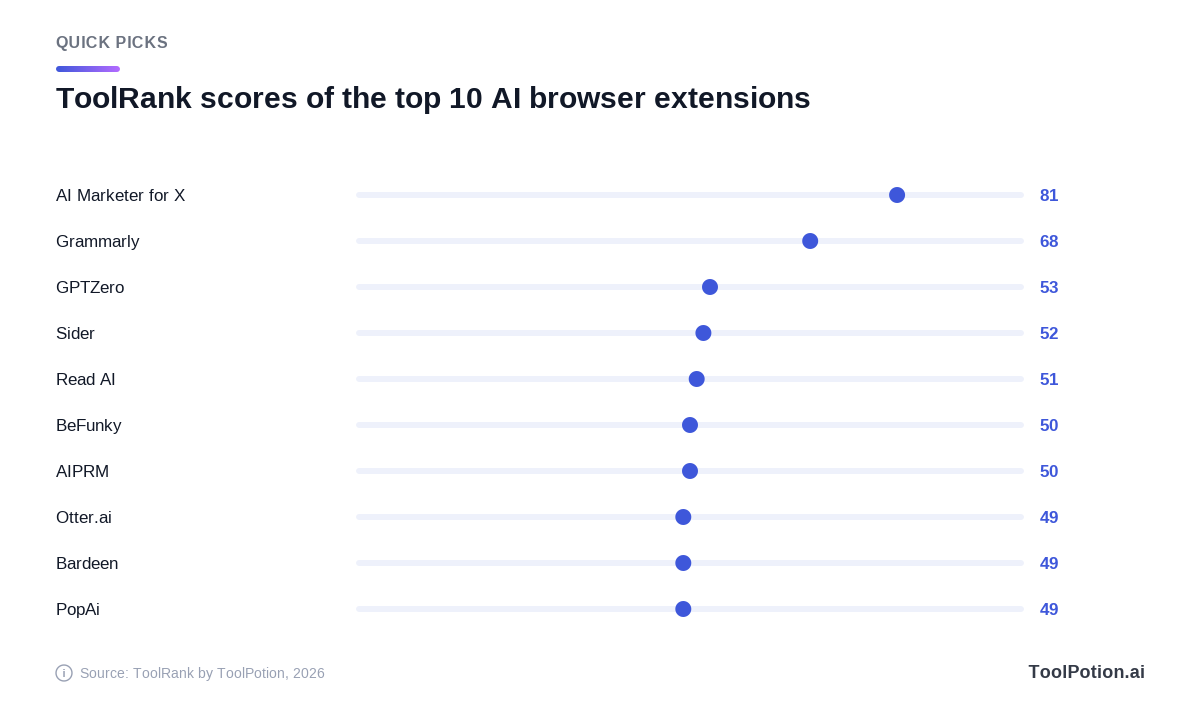
After the top two, ranks 3 to 12 all sit between 49 and 53. Treat that middle as a tie and choose on fit, price and how much of your browsing the tool needs to see.
What changed in 2026
The big platforms stopped pushing separate AI browsers and built the AI into the ones people already have. Edge's Copilot Actions preview became Browse with Copilot, available on desktop only to Microsoft 365 Premium subscribers in the U.S. (Microsoft Edge Blog). Chrome gained auto browse, which lets Gemini scroll, click and type through multi-step chores for AI Pro and AI Ultra subscribers in the U.S., while you still press the purchase button and confirm posts yourself (9to5Google).
The model makers shipped extensions of their own. Anthropic's Claude in Chrome is now generally available on every paid Claude plan, and OpenAI's new ChatGPT extension reads the page you're viewing so you can question it, summarize it or start a longer task. First-party assistants now compete head-on with the sidebars on this board.
Two more shifts matter if you're buying. Grammarly's parent company renamed itself Superhuman last year, though the Grammarly product keeps its name. And fake AI extensions became a malware genre of their own, with this year's campaigns dressed up as ChatGPT and Gemini sidebars (the permissions section has the cases). Firefox went the other way: version 148 added a single Block AI enhancements switch that turns off its built-in AI features.
Writing and editing
Start with the job, because the board mixes very different tools. Six jobs cover most of the top 25, and the map pairs each with the leaders covered here.
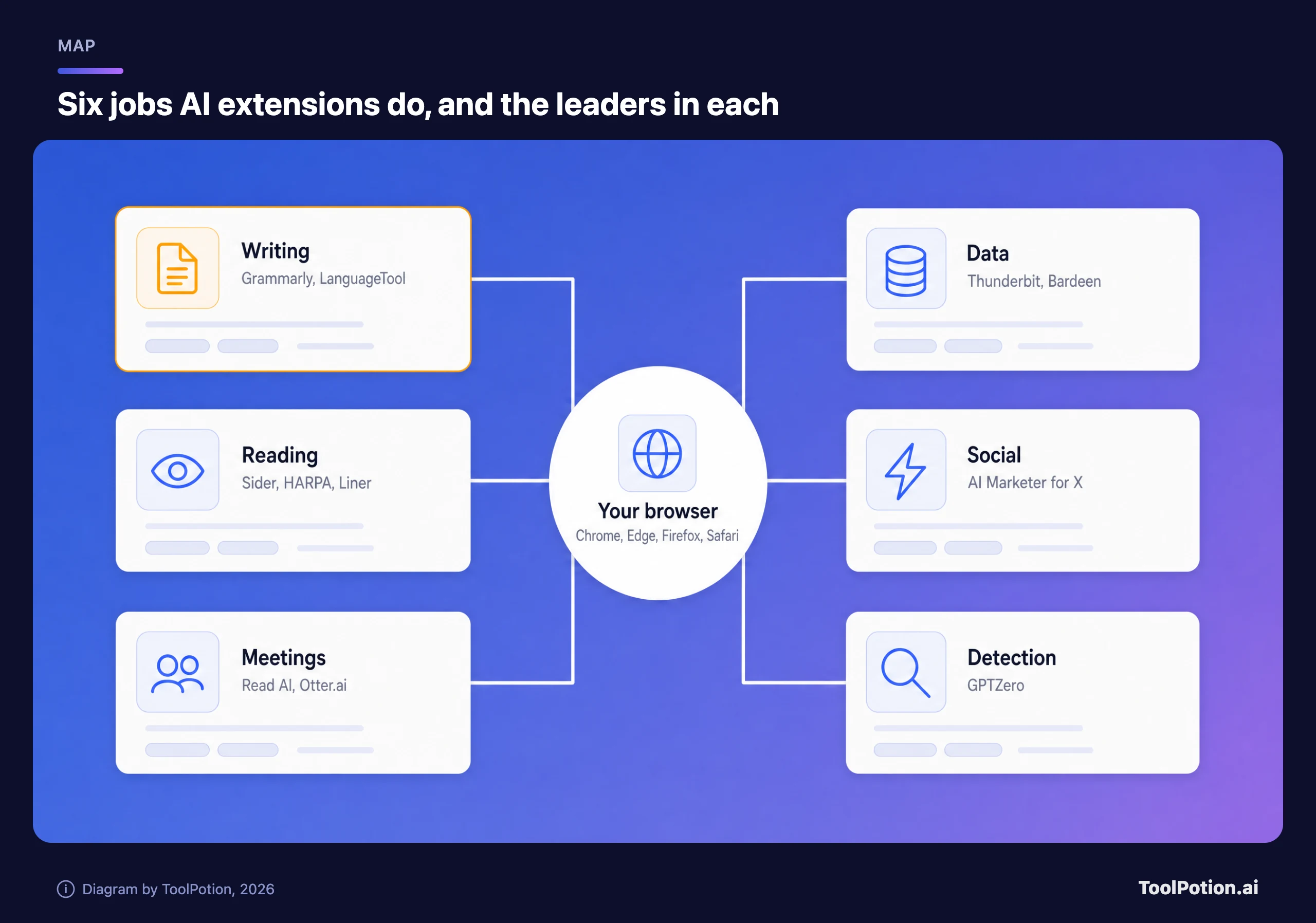
Writing gets the highlight because it has the biggest installed base in this guide. Grammarly's Chrome listing shows 40 million users, eight times the 5 million on Sider's.
Grammarly: the default for everyday writing
Grammarly checks grammar, clarity and tone as you type in Gmail, Google Docs, LinkedIn and, by its own count, 500,000+ other sites, with one-click drafts and rewrites on top. Free covers spelling, grammar and tone plus 100 AI prompts. Pro is listed at $12 a month (the page doesn't say which billing period that assumes) and adds full-sentence rewrites, plagiarism and AI-text detection and 2,000 prompts. Enterprise adds data-loss prevention and bring-your-own-key encryption (Grammarly).
The catch is reach. Its store listing declares that it handles personal communications, location, user activity and website content, which is what a tool that reads everything you type has to touch. If you draft contracts or patient letters in the browser, narrow its site access or pay for the enterprise controls.
LanguageTool: for people who write in several languages
LanguageTool is #23 at 46 (solid). It checks grammar, spelling and style and rewrites sentences, and its site says it supports 30+ languages, so it's the natural pick if you switch languages during the day. The free version stops at 2,000 characters per text field, against 150,000 on Premium. Emails rarely hit that ceiling. Long reports do. Its pricing page didn't display prices when this was written, so check it before subscribing.
Three more writing entries suit narrower buyers. Compose AI (#12, 49) autocompletes as you type: press Tab to accept a suggestion or type "//" to generate text. Jasper (#21, 47) brings a marketing team's writing platform into Gmail, Google Docs and WordPress, at $59 per seat a month billed yearly. Frase (#25, 46) comes from an SEO platform whose Starter plan is $39 a month billed yearly. Neither of the last two is a solo writer's first purchase, and the AI writing assistants board covers the wider field.
Reading, research and AI sidebars
This is the crowded middle of the board: a panel beside every page that summarizes, translates, answers questions and drafts replies. The products overlap, so choose on model access, sources and price.
Sider: one panel, every major model
Sider is #4 at 52 (solid). Its store listing names ChatGPT, Claude, DeepSeek, Gemini and Grok, and a group-chat mode puts one question to several models at once. It also chats with PDFs, summarizes YouTube videos and translates in 50+ languages. Five million Chrome users and a 4.9 rating from 114,500 reviews put it far ahead of HARPA's 400,000.
Two caveats. Sider's own pricing page couldn't be loaded for verification, so check the credit tiers before paying. And a 2025 academic audit flagged how it handled user data (details in the permissions section), which is reason enough to keep it off sensitive sites.
HARPA AI: commands, not just chat
HARPA AI is #13 at 48. It also connects to ChatGPT, Claude, Gemini and DeepSeek, but its pitch is automation: 100+ commands that summarize, extract data, draft emails and watch prices on pages you choose.
Pricing is unusual. The free demo allows 10 messages a day through your own chatbot web sessions and 100 command runs in total. Paid plans start at $12 a month billed annually, and a lifetime plan costs $240 once for a single user, with 30 Megatokens and unlimited web-session connections. That suits people who already pay for a chatbot and want HARPA as the front end. If all you want is a summary button, skip it, because its value lies in commands that take time to set up.
Liner: answers you can cite
Liner is #18 at 47. It's built for people who have to check what the AI says: answers carry citations you can open in one click, and an academic mode finds and compares papers. The extension brings that to web pages, YouTube and PDFs. Free includes unlimited searches with ads and one file upload a day. Pro is $14.99 a month billed annually ($17.99 monthly) with 20 uploads a day, models from OpenAI, Google and Anthropic, and no ads.
Two more readers round out the group. PopAi (#10, 49) leans toward documents, with PDF chat and a presentation maker that turns a file into editable slides. NaturalReader (#14, 48) reads web pages, PDFs, Google Docs and Kindle books aloud, the best fit here for anyone who'd rather listen than read.
Meeting notes
Three notetakers made the top 25, and the difference that matters is how each one gets into the call.
Read AI: notes across every platform
Read AI is #5 at 51 (solid). Its extension spots upcoming Zoom, Teams and Google Meet calls on your calendar, prompts you to add Read, writes live summaries you can skim if you join late, and helps schedule meetings. Free allows 5 transcripts a month. Pro is $15 per user a month billed annually ($19.75 monthly) with unlimited transcripts, and HIPAA compliance plus SAML sign-on arrive at Enterprise+, which needs five or more licenses. Five free meetings is a trial, so budget for Pro if you're in calls daily.
Otter.ai: the most generous free tier
Otter.ai is #8 at 49, and it's the pick if bots joining calls bother you or your clients. In Google Meet the extension records on your device, so no extra participant appears, and it transcribes any tab with audio, from webinars to podcasts. Quiet recording cuts both ways. Say out loud that you're taking notes.
The free Basic plan gives 300 transcription minutes a month with a 30-minute cap per conversation, enough to test on real calls. Pro is $8.33 per user a month billed annually ($16.99 monthly) for 1,200 minutes and 90-minute conversations.
MeetGeek (#16, 48) is the budget option for teams: free covers 3 hours of transcription a month and Pro is $9.99 per user a month billed annually. For bot-based notetakers and desktop apps, see the AI meeting assistants board.
Extensions that act on websites
These don't stop at reading. They scrape, click and post, which makes them the most useful entries for repetitive work and the ones that deserve the most care.
Thunderbit: a table from any page
Thunderbit is #19 at 47. It turns a page into rows and columns without CSS selectors, using AI models to decide what to collect, and exports the result as a spreadsheet. Credits are easy to reason about, at one per output row. Free covers 6 pages, Starter is $15 a month for 500 credits or $108 a year, and Pro starts at $38 a month for 3,000 credits.
Bardeen (#9, 49) has become a sales tool, with scraping, AI web search, contact enrichment and lead qualification for go-to-market teams. Everyone gets 100 free credits, Basic is $10 a month, and enrichment costs 3 credits a row against 1 for scraping. Axiom (#24, 46) builds no-code bots that click and type through sites on a schedule. New accounts get 2 free hours of runtime, and Starter is $15 a month for 5 hours.
AI Marketer for X: the #1 entry, built for one job
AI Marketer for X leads the 2026 board at 81, the only elite score in the top 25. It runs an X account for you. Its store listing says it automates posting, engagement and direct messages around the clock.
It's also the clearest case of a niche leader. The store listing shows 321 users, four ratings and in-app purchases, with no prices given. Read the platform's rules before you hand over an account: X's developer guidelines say non-API automation, including browser automation, "results in permanent suspension" (X). Whether a given tool crosses that line is between you and X, but the account at risk is yours. It suits people who run growth accounts and accept that risk, not the typical reader.
Detection and the specialists
GPTZero: AI checks inside Google Docs
GPTZero is #3 at 53 (solid) and aimed at classrooms. Inside Google Docs it runs live AI detection, checks citations for sources an AI may have invented and drafts feedback from a teacher's rubric. Its best feature points the other way. Writing Replay shows how a document was written, edited and pasted, which gives a student a record of their own work.
The free plan scans up to 10,000 words a month and includes the extension, while paid prices didn't render on its pricing page. GPTZero frames results as the share of text that is likely AI-generated, so use a score to open a conversation, not to settle an accusation. The next detector on the board, Copyleaks, sits just outside the top 25 at #27.
The rest of the top 25 is niche, which is fine if you're the niche.
- BeFunky (#6, 50) is a photo editor and collage maker with AI background removal, sold in Free, Plus and Pro tiers.
- AIPRM (#7, 50) adds a library of more than 4,000 prompts to ChatGPT and Claude, free to start.
- Suki for Clinicians (#11, 49) drafts clinical notes from the patient conversation and connects to Epic, Oracle Health, athenahealth and MEDITECH. The clinician reviews and edits each note, and it doesn't replace clinical judgment.
- Crystal (#15, 48) predicts personality styles on LinkedIn profiles for salespeople, with 10 free profile reads and Premium at $49 a month.
- Phia (#17, 48) compares fashion prices across new and secondhand sellers for free. This year Bloomberg accused it of "cookie stuffing", alleging that it overrode other affiliates' referral codes at checkout to claim credit for sales. Phia says the features behind any misattribution were removed and that it is reviewing transactions and reversing them for brand partners (Yahoo Finance).
- Visily (#20, 47) turns screenshots of apps and sites into editable wireframes.
- Smartcat Agent (#22, 46) comes from an enterprise translation platform covering 280+ languages.
What "read and change all your data" really means
Install almost any AI sidebar and Chrome warns that it can read and change all your data on all websites. That isn't boilerplate. A broad host permission lets an extension inject scripts into pages, read tab addresses and titles, monitor network requests and access cookies. For a tool that summarizes whatever you're looking at, that's how it works. It also means the extension sees your inbox, your bank and your HR portal.
A narrower option exists. Chrome's activeTab permission gives an extension temporary access to the current tab only when you invoke it, with no install warning. Google's documentation explains why that matters: without it an extension needs "full, persistent access to every website", and "if the extension is ever compromised, the attacker gets access to everything the extension had" (Chrome for Developers). The diagram traces what happens when you ask a sidebar about a page.
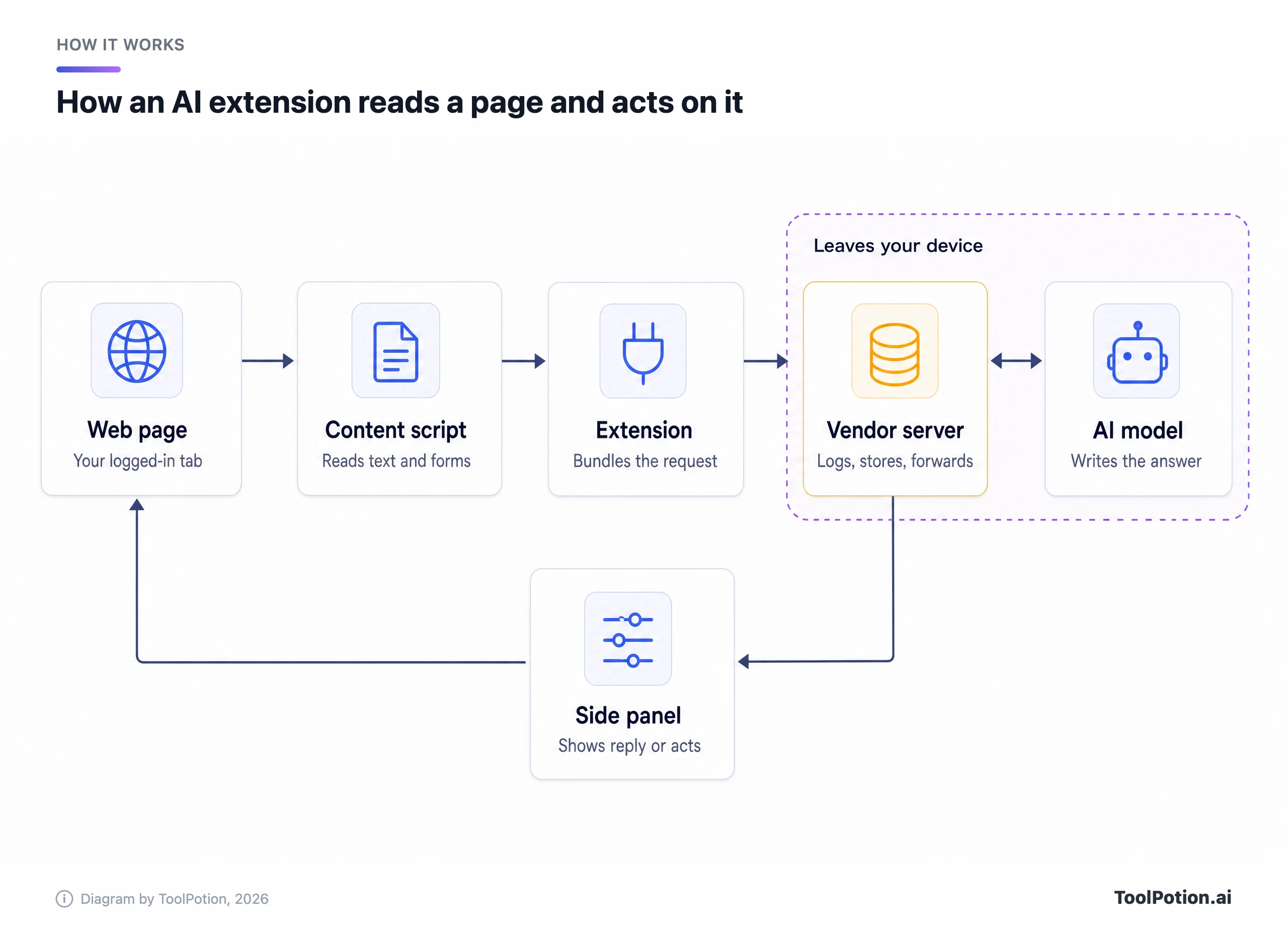
The amber box is the part to remember. In an audit of popular AI browser assistants presented at USENIX Security in 2025, researchers found they "largely depend on server-side APIs" and "collect and share webpage content, often the full HTML DOM and sometimes even the user's form inputs" (arXiv).
The paper names names. Merlin captured form inputs, including a Social Security number typed on the IRS website. Sider and Merlin shared chat and user identifiers with Google Analytics, and Monica and Sider profiled users on attributes including age, gender, income and interests. Perplexity and TinaMind showed no strong evidence of profiling. Those results describe the versions tested for a paper first posted in 2025, and code changes, but they show how much a well-known sidebar can see.
Then there are extensions built or hijacked to steal. In late 2024 attackers phished extension developers, pushed malicious updates to at least 35 extensions and exposed more than 2.6 million users, and several of those extensions were AI-themed, such as "GPT 4 Summary with OpenAI" (The Hacker News). Last year Koi Security found Urban VPN Proxy, which carried Google's Featured badge, capturing conversations from ChatGPT, Claude, Gemini, Copilot, Perplexity and others for more than 7 million Chrome and Edge users. The harvesting code arrived in an automatic update (Malwarebytes).
This year the copies got better. OX Security found two extensions imitating a legitimate AI sidebar that sent users' ChatGPT and DeepSeek chats, plus every open tab's address, to a remote server every 30 minutes. They had 900,000 users between them, and one had carried Google's Featured badge (The Hacker News). LayerX then found more than 30 fake AI assistants with names like "AI Sidebar" that loaded an attacker's site inside the extension and lifted email content and API keys from at least 260,000 users, and Google removed them (The Register). Side by side, the numbers show where the damage was largest.
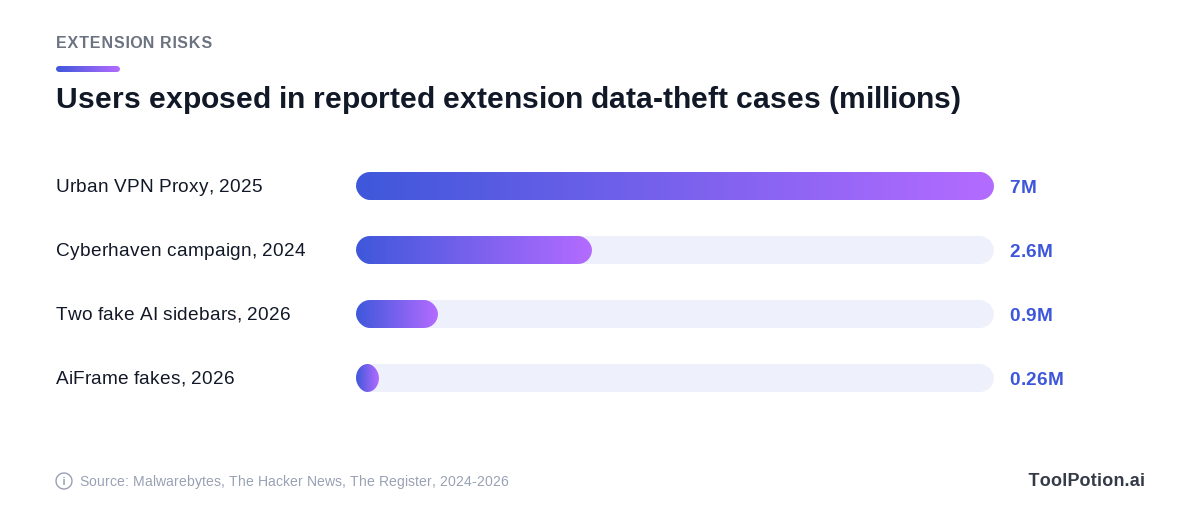
The biggest case wasn't an AI tool at all. It was a VPN that wanted your AI chats, and it got them through an update to software people had already trusted, badge and all. So rank every extension you run by how much it can touch.
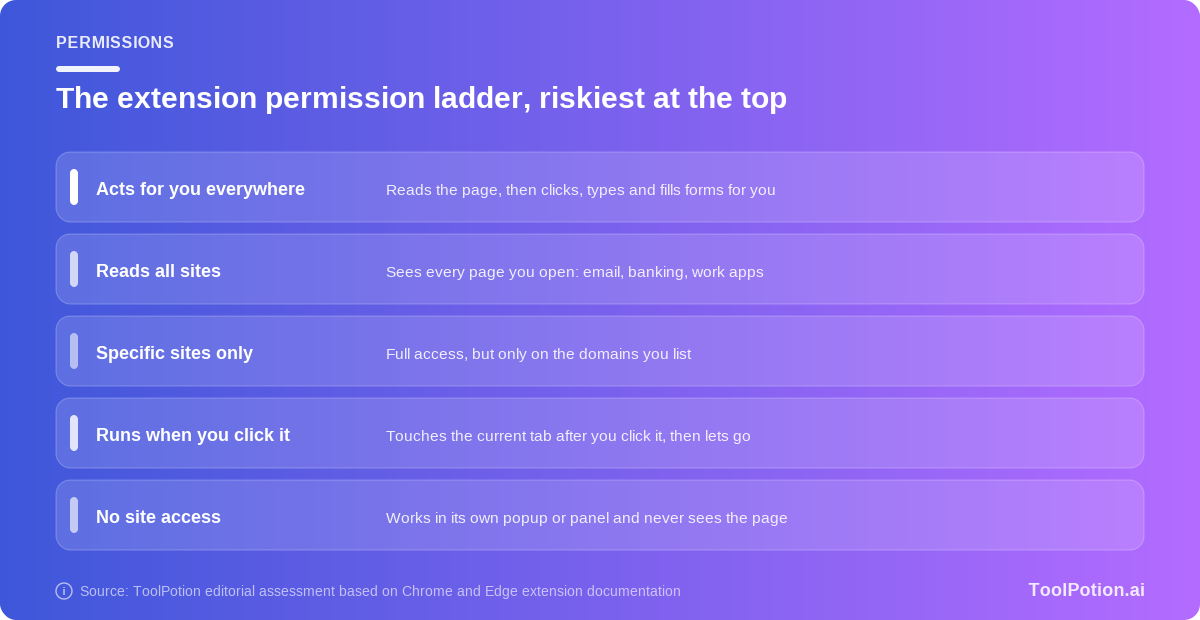
A sidebar that can summarize any page the moment you open it needs the second rung from the top. Moving one down a rung or two costs a click each time you use it, and it shrinks what a bad update could take.
A two-minute audit
- Open chrome://extensions (edge://extensions in Edge) and remove anything you haven't used in weeks.
- For each one left, open Details and change site access from all sites to on click or to specific sites. Edge has equivalent options.
- Check the publisher. A generic name like "AI Sidebar" from a company you can't find is the exact profile of this year's fakes.
- Read the privacy section on the store page and ask whether each data type fits the job.
- Keep sidebars off banking, health and HR sites, or use a separate browser profile for that work.
- Look again whenever an extension asks for new permissions or changes hands.
Safari works the same way in spirit, with a toolbar button that sets how much page access each extension gets. To score one extension against these checks, tick through the list below.
Anything that scores under 6 should go. Between 6 and 8, restrict it rather than trust it, and re-run the check after its next big update.
When an extension is enough
Full AI browsers and built-in agents do something most extensions don't: they work across tabs for you, booking, filling forms and buying. Perplexity's Comet became free for everyone last year. Chrome's auto browse and Edge's Browse with Copilot sit inside paid plans, and Claude in Chrome needs a paid Claude subscription.
The case for caution is security, not quality. Gartner told companies last year to block AI browsers for now, warning that "active web content, browsing history, and open tabs" are often sent to the AI back end (The Register). OpenAI has said prompt injection, where hidden text on a page hijacks the agent, is unlikely ever to be fully solved. Anthropic's own advice for Claude in Chrome is to "skip banking, health records, and anything with credentials you wouldn't share".
For most people the order is clear. Use the AI already built into your browser, or one good extension, for writing and reading. Add an agent only for chores you'd watch anyway, in a separate profile without your saved passwords. Before you trust any of them with a work account, run them through our privacy framework for AI tools.
How to choose
Pick by the job you do most, then by how much of your browsing you're willing to show the vendor. The table puts the verified free tiers and entry prices side by side.
| Extension | Free tier | Entry paid plan |
|---|---|---|
| Grammarly | 100 AI prompts | Pro, $12 a month |
| Read AI | 5 transcripts a month | Pro, $15 a user a month, billed annually |
| Otter.ai | 300 minutes a month | Pro, $8.33 a user a month, billed annually |
| MeetGeek | 3 hours a month | Pro, $9.99 a user a month, billed annually |
| HARPA AI | 10 messages a day | $12 a month billed annually, or $240 once |
| Liner | Unlimited search, with ads | Pro, $14.99 a month, billed annually |
| GPTZero | 10,000 words a month | Not shown on its pricing page |
| Thunderbit | 6 pages | Starter, $15 a month or $108 a year |
| Bardeen | 100 credits | Basic, $10 a month |
| Axiom | 2 hours of runtime, once | Starter, $15 a month |
| Crystal | 10 LinkedIn profile reads | Premium, $49 a month |
| Jasper | 7-day trial | Pro, $59 a seat a month, billed yearly |
Almost every paid tier for one person lands between $8.33 and $15 a month, so price rarely decides it. Jasper and Crystal are the exceptions, priced for business budgets. If you're still unsure, two questions will get you to a first install.
One extension is usually enough to start. Add a second only when the first leaves a job undone, because every new one widens what can see your pages.
About ToolRank
ToolRank is ToolPotion's independent ranking of AI tools, and placement can't be bought. Each entry gets a score from 0 to 100 and a tier, from elite down to nascent. Browse all ToolRank leaderboards, or open the full Browser Plugins board for ranks 26 to 250.
Rising and newer names to watch
Just below the top 25, Magical (#26) expands text snippets and autofills forms, and MaxAI (#30) is another sidebar for questioning the page you're on. Several YouTube summarizers sit in the 30s as well.
The bigger change will come from the platforms. ChatGPT, Claude and Gemini now reach into Chrome through official extensions or the browser itself, so third-party sidebars have to win on model choice, price or a specific job. Expect generic sidebars to thin out while the specialists (notetakers, scrapers, detectors) hold their ground. The full directory of browser plugins lists every entry, ranked or not.
Frequently asked questions
Are AI browser extensions safe to use?
Ones from known vendors are reasonably safe if you limit them. Set site access to on click or specific sites, remove what you don't use and distrust generic "AI Sidebar" names. The largest thefts came through fakes or through updates to extensions people already trusted, so a clean install today isn't a guarantee for next year.
What's the best free AI extension?
Grammarly for writing, Otter.ai for meetings and GPTZero for detection. Liner's free plan is ad-supported but places no cap on searches, which makes it the best free research option.
Do these extensions work in Edge, Firefox and Safari?
Edge installs Chrome Web Store extensions once you choose Allow extensions from other stores. For Firefox and Safari, check each vendor's site, since not every extension on this board has a version for them.
Do I need an AI browser like Comet if I already use extensions?
Not for reading, writing or meetings. An agentic browser earns its place for multi-step chores across several sites, and agent makers, Anthropic among them, advise keeping agents away from banking and health records.
How many AI extensions should I run?
As few as cover your jobs, usually one to three. Every extension with all-sites access is one more company that can see your pages, and one more developer account an attacker could phish.