The best AI translator depends on what you're translating and who has to trust the result. For travel, reading and chat, Google Translate and DeepL are the names most people reach for, and both are free to start. For contracts, product copy and anything with a glossary attached, you're shopping for something different: a workflow platform such as Smartcat that wraps machine output in terms, style rules and a human sign-off.
That split is the spine of this guide. We looked at the leading tools on ToolPotion's Top 150 AI Translators board, read the vendors' own pricing and privacy pages, and sorted what we found by the job you're hiring the tool for. Language count, document handling, the move from classic neural engines to LLMs, and what happens to your text on a free plan all matter, but only in the context of that job.
One sentence before the picks. Machine translation doesn't replace a certified translator for legal or medical documents, and for USCIS filings the rule is explicit: a full English translation that the translator has certified as complete and accurate, with a certification of competence (8 CFR 103.2). The leaderboard below shows where each tool stands in 2026.
The top 25 AI translators right now
- # 1Top PickGoogle TranslateAI AppInstantly translate words, phrases, and web pages between English and over 100 other languages. This free service from Google offers text translation, language detection, and document translation capabilities for seamless cross-lingual communication.90ToolRankElite
- # 2Runner UpDeepLAI AppDeepL's AI-first platform offers advanced translation for text, files, and voice, alongside an API for seamless integration. Trusted by millions, it ensures accurate, secure, and high-quality multilingual communication, helping businesses enhance global reach and efficiency with specialized language tools.76ToolRankStrong
- # 3Third PlaceMicrosoft TranslatorAI AppMicrosoft Translator is a versatile tool that translates words and phrases between English and over 100 languages. It supports real-time conversations, offline translation, and integrates with various platforms for seamless communication.71ToolRankStrong


- 4Immersive TranslateAI AppImmersive Translate is a next-generation AI translation tool that integrates over 20 leading AI translation engines. It offers bilingual website, PDF, video subtitle, and image translation, supporting hundreds of languages across major browsers and devices for seamless cross-language communication and learning.71ToolRankStrong
- 5Azure AI TranslatorPlatformAzure AI Translator is a robust translation service enabling real-time and batch translation across 100+ languages. It integrates seamlessly into applications, offering customizable translations and domain-specific terminology support.67ToolRankStrong
- 6DeepL VoiceAI AppDeepL Voice offers real-time AI-powered voice translation for meetings and conversations, ensuring seamless communication without language barriers. It supports multiple platforms and provides enterprise-grade security, making it ideal for global teams.61ToolRankStrong
- 7NVIDIA Riva Speech AI SDKPlatformNVIDIA Riva is a speech AI SDK that enables developers to build and deploy real-time AI pipelines. It offers customizable models for speech recognition, text-to-speech, and translation across multiple languages, optimized for various deployment environments.59ToolRankSolid
- 8eTranslation ServiceAI AppeTranslation is an AI-based multilingual service provided by the EU. It offers neural machine translation built on the EU’s history of professional translation, facilitating communication across languages for EU institutions, public administrations, and more.58ToolRankSolid
- 9PapagoAI AppPapago is an intelligent AI translation tool that aims to eliminate language barriers, enabling seamless communication across different languages. It supports text, image, document, and voice translations, making it versatile for various user needs.57ToolRankSolid
- 10Phrase: AI Localization PlatformAI AppPhrase is an AI-powered localization and translation platform for enterprises. It automates workflows, connects various tools and engines, and enables scalable delivery of multilingual content. The platform applies brand voice, cultural nuance, and market standards for deeper customer connections and faster business growth.55ToolRankSolid
- 11Smartcat AI Translation PlatformAI AppSmartcat is an AI-driven translation platform offering translation, localization, and content generation services. It supports 280+ languages and integrates with various tools, providing seamless project management and collaboration.55ToolRankSolid
- 12SonioxAI AppSoniox is a multilingual speech AI platform offering real-time speech-to-text, text-to-speech, and translation services in over 60 languages. It provides low-latency streaming and native-speaker accuracy, making it ideal for live voice applications.54ToolRankSolid
- 13SmartlingAI AppSmartling offers end-to-end localization and translation services, enabling brands to connect with global customers. It automates translation workflows and integrates seamlessly with existing tech stacks, ensuring real-time analytics and high-quality translations.54ToolRankSolid
- 14LokaliseAI AppLokalise is a continuous localization and translation management platform that integrates into your development workflow, enabling faster shipping of localized products. It connects your content ecosystem, ensuring brand consistency and customer engagement across markets.54ToolRankSolid
- 15Baidu TranslateAI AppBaidu Translate is an AI-powered translation platform supporting 203 languages. It offers text, document, and image translation with multiple engines, including traditional machine translation and AI models, providing comprehensive solutions for foreign language reading and professional translation.54ToolRankSolid
- 16Youdao Lingdong Translator (有道灵动翻译)Youdao Lingdong Translator is a Chrome extension by NetEase Youdao that offers immersive web-page translation. It provides bilingual page translation, image text extraction, and real-time video subtitle translation, enhancing global content accessibility.53ToolRankSolid
- 17GlobalLink Language Intelligence PlatformAI AppGlobalLink is a comprehensive language intelligence platform that helps manage, translate, and optimize content across markets, channels, and languages. It integrates AI models and human expertise to deliver efficient localization solutions.53ToolRankSolid
- 18Youdao TranslateAI AppYoudao Translate offers free instant translation services for multiple languages including Chinese, English, Japanese, Korean, and more. It supports text, document, and webpage translations, providing a comprehensive solution for language conversion needs.53ToolRankSolid
- 19LILT Enterprise AI Translation PlatformAI AppLILT is an AI-powered enterprise translation platform that helps organizations streamline multilingual content creation. It offers agentic AI workflows, ensuring brand compliance and accelerating global market expansion.53ToolRankSolid
- 20TradosAI AppTrados offers AI-powered translation technology designed for individual translators, agencies, and corporations. It streamlines the translation supply chain, enhancing productivity and collaboration across multilingual content management.52ToolRankSolid
- 21MachineTranslation.comAI AppInstantly translate text and documents using 22 AI models simultaneously. This tool cuts translation risks by comparing outputs from multiple sources, providing one trusted result. Join over 1 million users for free, with no sign-up required, to achieve highly accurate, AI-verified translations.52ToolRankSolid
- 22TransifexAI AppTransifex is a cloud-based localization platform that helps businesses and developers manage the translation of digital content and software across multiple languages. It features robust API integration, collaboration tools, and automated workflows for continuous localization.52ToolRankSolid
- 23AIPal: Web CopilotAI AppAIPal is an AI-powered tool that enhances web browsing by integrating advanced AI models like GPT-3.5 and GPT-4. It facilitates seamless chatting, writing, replying, and translating across webpages, offering personalized interactions and efficient content management.52ToolRankSolid
- 24CrowdinAI AppCrowdin is an all-in-one localization and translation management platform that provides tools and integrations to help teams localize software, websites, apps, and more efficiently. Its AI-powered features streamline workflows and enhance translation quality.52ToolRankSolid
- 25Lara TranslateAI AppLara Translate is a professional AI translation platform from Translated that translates text, documents, images, and audio across 200+ languages. It offers a live AI interpreter, an adaptive API, and optional human review.52ToolRankSolid













How ToolRank works
ToolRank is ToolPotion’s proprietary ranking engine.
It continuously evaluates hundreds of signals across the open web — real traffic and popularity, audience and community strength, authority and longevity, adoption and engagement — processing millions of data points to place every tool where it has earned to be.
Every AI type is measured by its own tailored model: what proves traction for a SaaS app is not what proves it for an open-source framework or a creator channel. Missing a platform never counts against a tool — ToolRank judges the evidence that exists.
No paid placement. No self-reported numbers.
Quick picks
- Best free all-rounder: Google Translate. It's #1 on the 2026 board, lists up to 249 languages (App Store listing), and now runs Gemini models for text and live speech.
- Best for polished business text: DeepL. It's #2 on the board with a ToolRank of 77, and its paid plans promise your text isn't used for training.
- Best for reading the web in two languages at once: Immersive Translate, the #3 tool, which lets you choose the engine behind the page.
- Best for Korean, Japanese and Chinese pairs on a phone: Papago, a free app with 14 languages built around those pairs.
- Best for teams that need people in the loop: Smartcat or Smartling, which pair machine drafts with linguists and quality checks.
- Best for software teams: Lokalise or Phrase, built to plug into code repositories and release schedules.
What changed in 2026
The headline is that the live voice tools grew up. Google rolled Gemini models into Translate for idioms and slang, and launched a live speech-to-speech beta that covers more than 70 languages and keeps the speaker's tone (Google). The beta started on Android in the US, Mexico and India, with iOS and more countries promised for 2026.
The enterprise side moved toward automated quality control. Smartling shipped its largest AI release yet, including an LQA Agent that scores translations against the MQM error framework and, by Smartling's own account, reached 90% agreement with human reviewers (Smartling). That's the vendor's claim, not an independent test, so read it as a direction rather than a benchmark.
Two jobs hiding under one label
Searching for an AI translator sweeps up two groups of buyers who barely overlap. One wants an answer in seconds on a phone or in a browser tab. The other is a localization manager who needs the same product description in nine languages, with the brand's terminology intact, reviewed by someone accountable. The first buyer judges a tool by speed and price. The second judges it by what happens around the translation.
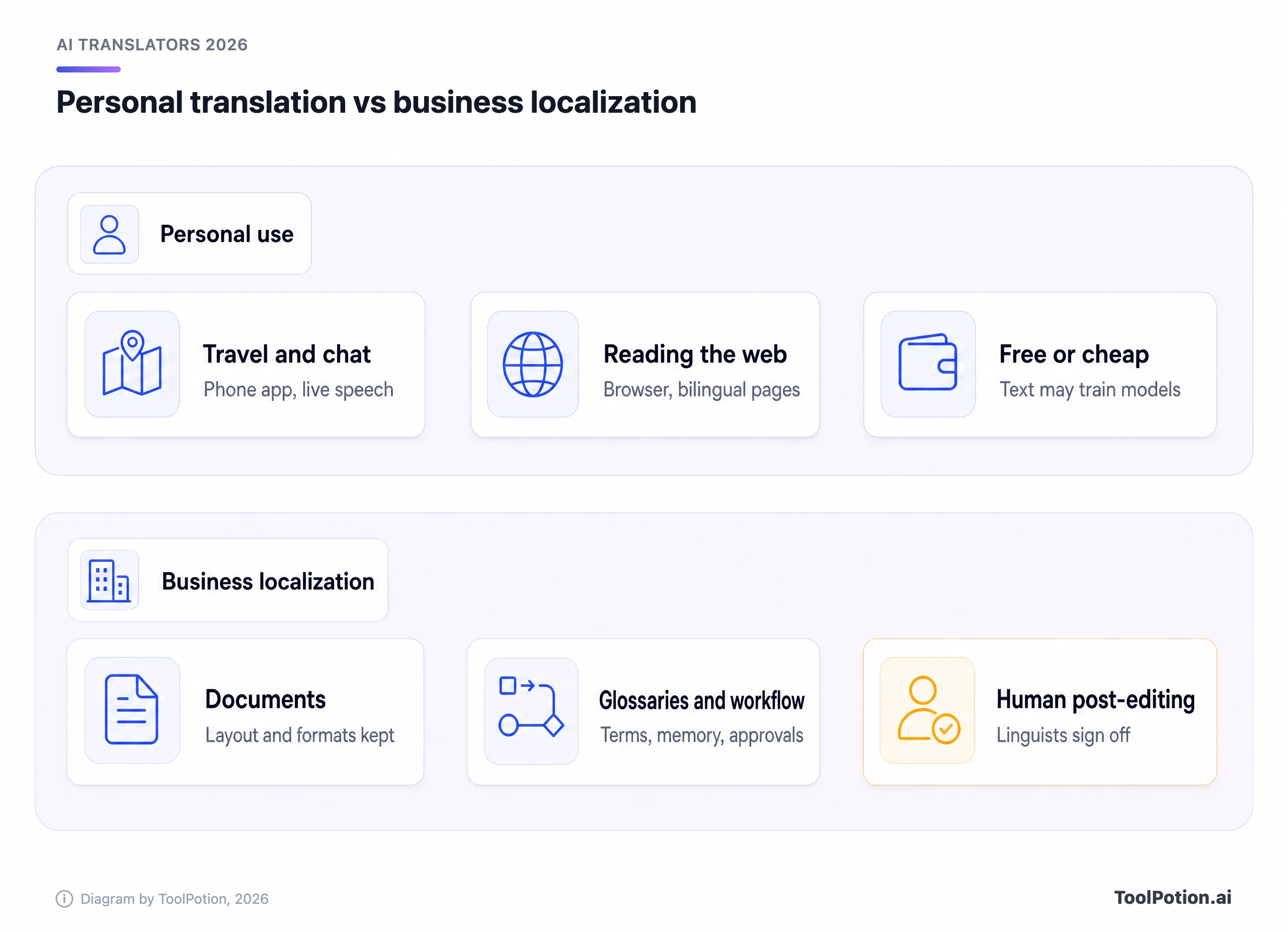
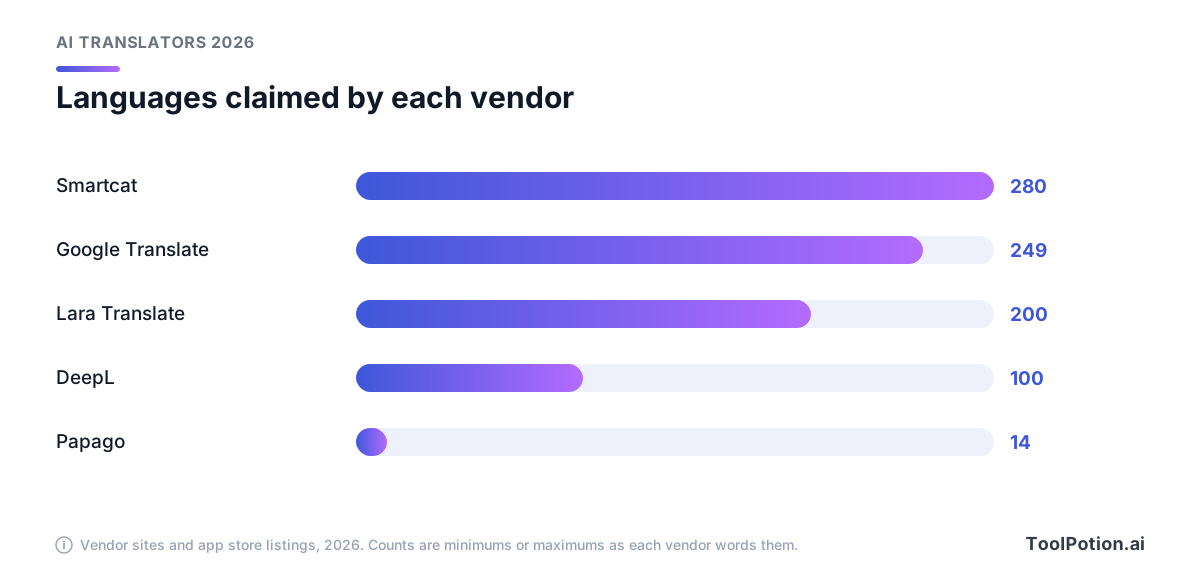
Language coverage sits awkwardly across both lanes. Vendors count differently (some count dialects, some count only pairs they'll stand behind), so treat the numbers as marketing claims rather than quality guarantees. Still, the spread tells you something. Smartcat lists 280+ languages and Google Translate's App Store listing says up to 249. Lara Translate lists 200+, DeepL lists 100+, and Papago offers 14. A narrow list can mean deeper tuning for the pairs that matter to you. A wide one helps when you don't know which languages will come next.
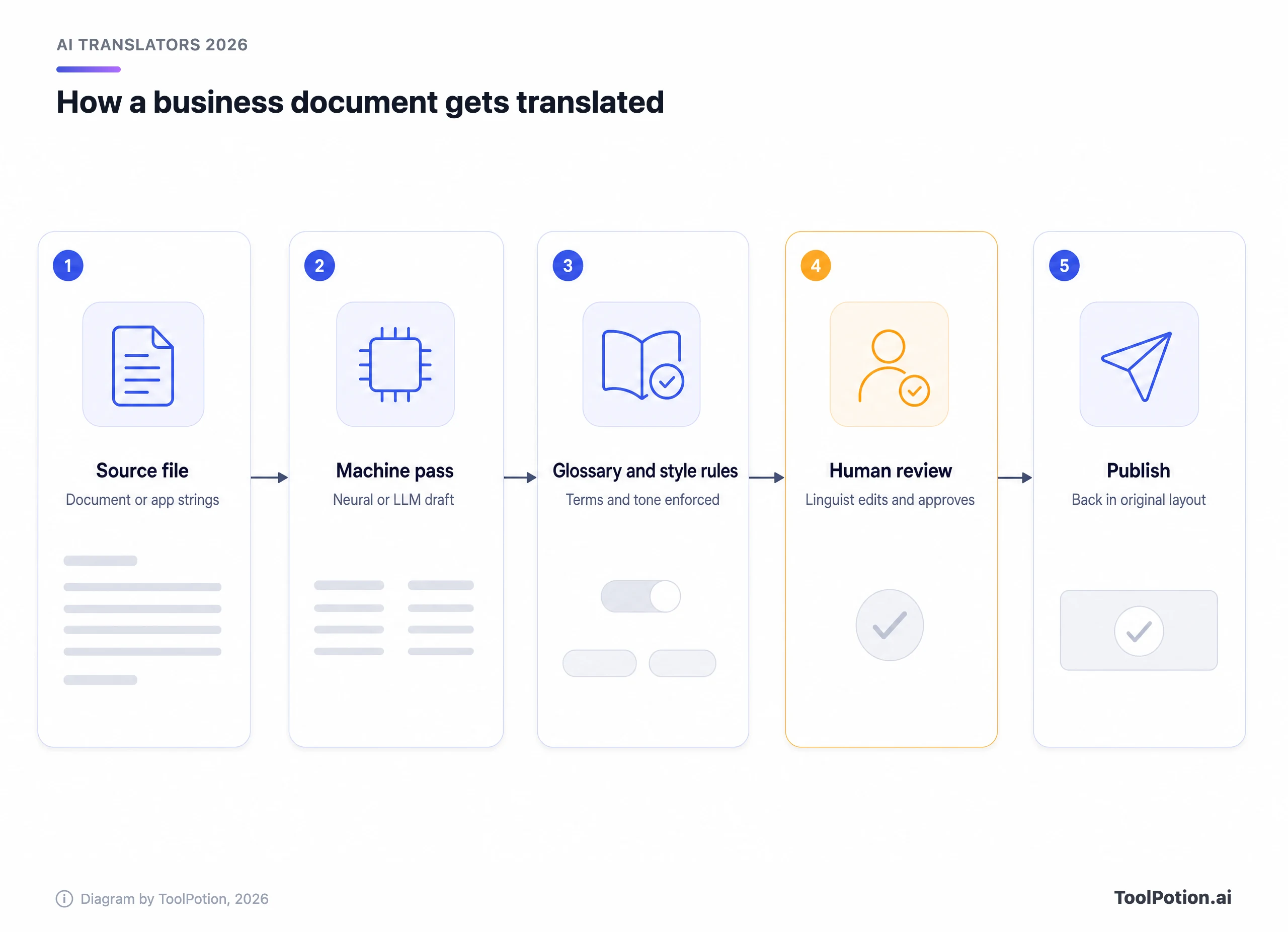
Document handling is the quieter differentiator. Everyone can translate a pasted paragraph. Rebuilding a 40-page slide deck or a PDF with tables is harder, and the limits vary a lot. DeepL's free plan allows one file a month up to 5 MB, Individual allows three files, Team 20 and Business 100 (DeepL pricing). Lara Translate lists 70+ formats, Smartcat lists 50+, and Immersive Translate adds OCR for scanned PDFs. If your work arrives as files rather than text, check the file caps before the character caps.
The other fault line is the engine itself. Classic neural machine translation gave one fixed model per language pair. Now the label covers a single in-house LLM, a router that picks among several models, and plain old NMT dressed up with a chat window. Ask a vendor which of those you're buying.
The leading tools, reviewed
Google Translate: best for everyday use
Free, fast and everywhere. Google Translate lists up to 249 languages, more than twice DeepL's 100+. It sits at #1 on the 2026 board (it isn't scored yet, so there's no ToolRank to quote). It handles text, web pages, documents and live speech, and the Gemini upgrade made it noticeably better with idiomatic phrasing. The catch is privacy, covered further down: the free consumer product is not the place for contracts, patient notes or anything under NDA.
DeepL: best for business-quality text
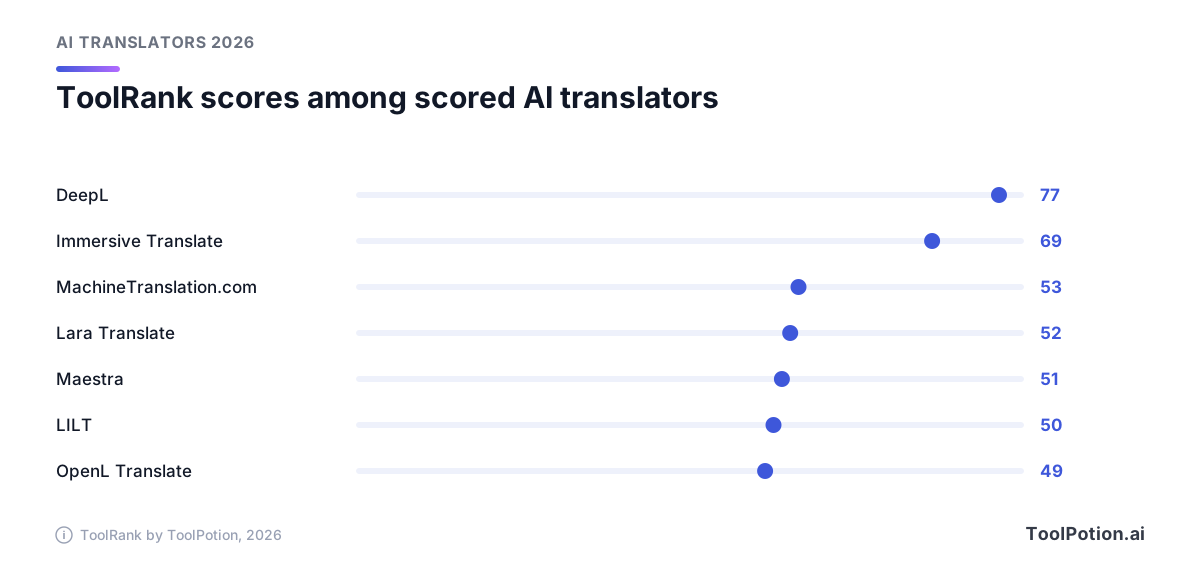
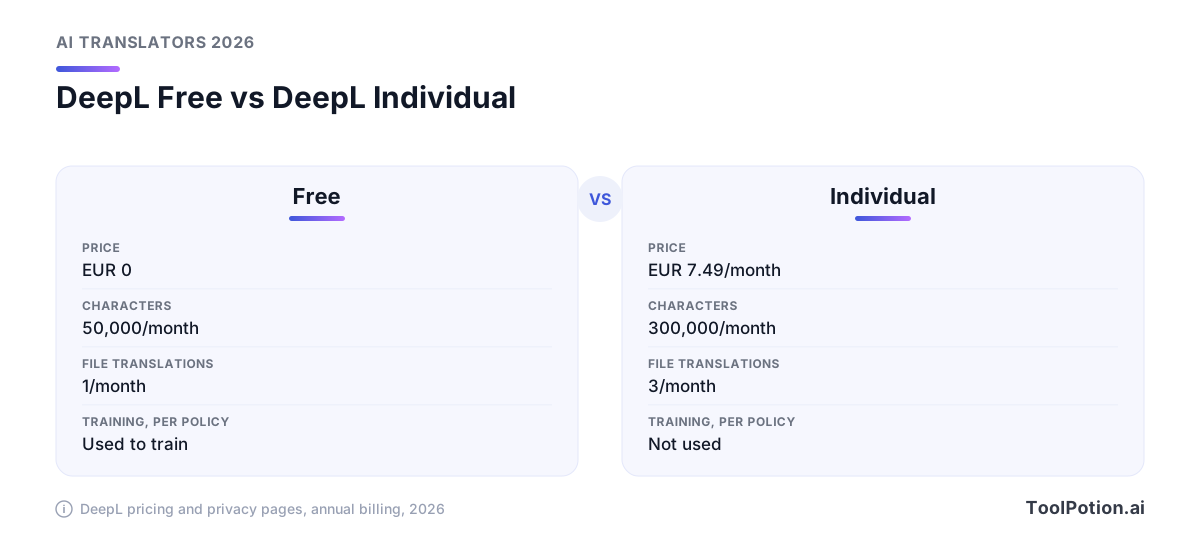
DeepL is #2 on the 2026 board with a ToolRank of 77, tier strong, after slipping from #1. That's still the highest score of any translator we've scored. It translates text and files, keeps layouts, and has real glossaries. The free plan gives you 50,000 characters a month and one file translation. Individual costs EUR 7.49 a month on annual billing, Team is EUR 24.99 per user, and Business is EUR 49.99 per user and lifts the character cap, all per the DeepL pricing page. That page lists euros for a German visitor and no US dollar prices, so check your region's figure at checkout. The glossary limits are the part to read closely: the free plan allows one glossary with five entries per language pair, Individual one glossary, and Team five.
Immersive Translate: best for reading in two languages
Immersive Translate climbed to #3 on the 2026 board with a ToolRank of 69, also in the strong tier. It's a browser extension and app that puts the original and the translation side by side, handles PDFs with OCR for scans, and translates video subtitles on YouTube and Netflix. The unusual trick is engine choice. Its listing says it plugs in more than 20 engines, ChatGPT, DeepL, DeepSeek and Gemini among them. Pro costs $14.99 a month or $119.88 a year, with 20 million tokens a month of advanced-model quota (membership terms).
Papago: best for Korean, Japanese and Chinese
Naver's Papago is #4 on the board and unscored. The App Store listing shows a free app covering 14 languages (Korean, English, Japanese, Chinese in two scripts, and a handful more), with text, image, voice and handwriting input plus offline text translation (App Store). If your languages are on that short list, it's worth a spot on your phone next to Google. If they aren't, skip it.
Smartcat: best for mixed machine and human teams
Smartcat sits at #5 and is unscored. It lists 280+ languages, 50+ file formats and a marketplace of 500,000+ linguists, which tells you the pitch: machine first, humans on demand. The pricing page shows where the line falls. Adapt starts at $1,200 a year, but marketplace access and the Reviewer coworker only arrive with Accelerate at $24,000 a year, and Anticipate at $60,000 adds API access (Smartcat pricing). Translation memory is free on every plan, and there's a 15-day trial. Budget accordingly.
Smartling: best for enterprises scaling content
Smartling is #6 and unscored. It lists 50+ pre-built integrations. The 2026 release added Style Rules for AI, whose default rules cover more than 30 locales, plus Auto Select LLM, which picks the model and builds the prompt, drawing on your translation memory and glossaries. Smartling also reports ISO/IEC 42001 certification for AI management. Pricing isn't published, which usually means a sales call.
Phrase and Lokalise: best for software and product teams
Phrase (#7) bundles a translation management system, a strings tool for apps and games, a workflow builder and a video localization tool, and its pitch is routing: it says it chooses the engine and context for each piece of content. Lokalise (#8) is the lighter option for development teams, with plans from $149 a month for Explorer to $1,049 for Advanced and a 14-day trial (Lokalise pricing). Both are unscored. Pick them if the strings live in a repository and the translators live somewhere else.
Trados: best for professional translators and agencies
Trados is #10. It's the CAT tool that working translators and agencies know, with an AI assistant, terminology extraction and central term bases. It's less a translator than the desk a translator works at. Teams already in that world should also compare memoQ and Crowdin on the same board.
Lara Translate: best for fast, documents-heavy drafts
Lara Translate comes from Translated, the language services company. It slipped from #5 to #15 on the 2026 board, with a ToolRank of 52 (solid). The plans are straightforward: free gives 60,000 characters a month, Pro is $9.99 a month on annual billing for 500,000 characters, and extra usage costs $0.30 per 10,000 characters (Lara pricing). It reads 70+ file formats, and the pricing page lists optional human validation for sensitive content.
MachineTranslation.com: best for a second opinion
MachineTranslation.com (#12, ToolRank 53, solid) runs your text through 22 models at once and shows the one most of them agree on, free and with no sign-up. Agreement is not accuracy, though, since several models can share the same blind spot. It's useful as a cheap sanity check, and the optional human review is the real safety net.
What happens to your text
Privacy is where free and paid plans split. DeepL's privacy policy says that on the free translator it processes your content "for a limited period of time to train and improve our neural networks and algorithms," and that you may not use the free service for texts containing personal data of any kind (DeepL privacy). For Pro subscribers the same policy says texts "will not be permanently stored" and "will not be used to improve the quality of our services," and its pricing page lists "No data training" among the paid plans' features (DeepL pricing). If the text matters, that written promise is a large part of what the subscription buys.
Google splits it by product, and that matters if you're choosing between the two for business use. DeepL's paid plans carry the promise in the subscription. Google's route to a comparable promise is the Cloud Translation API rather than the consumer app. For the Cloud Translation API it states that it "does not use the content you send to train and improve our Google Translation features" (Google Cloud). The consumer app falls under the general Google privacy policy, which says Translate works by "detecting common language patterns in phrases you ask it to translate" (Google privacy policy). Read those two pages side by side before you paste a client's draft into a browser tab.
The practical rule: free consumer tools for text you'd be fine reading aloud on a train, paid or API tiers with a written no-training promise for everything else, and a signed data processing agreement if personal data is involved.
How to choose
Start with the job, then the data, then the budget. The tree below walks through it in three questions and lands on a tool that appears on the leaderboard above.
Two traps are worth naming. The first is buying a platform when you need an app. A team translating a few documents a month does not need an annual platform contract, and DeepL's Team plan or Lara Translate Pro will cover it for a tiny fraction of the price. The second is the reverse. If your website changes weekly in six languages, pasting text into a free tool leaves you with no translation memory, no terminology control and no audit trail. LILT and the other enterprise names on the full AI translators hub exist for that gap.
Those entry prices aren't comparable like for like. One bills by characters, one by seat, one by annual contract. Use the table to set a floor, then work out your own volume. If you need subtitles or dubbing, a separate set of tools such as Maestra does that, and our AI subtitles and dubbing board ranks them.
Related boards cover adjacent needs: the Top 100 AI Tools for Translators is the view for professionals, and the Top 50 AI Tools for Localizing websites and apps is the view for product teams. For one-off jobs the Top 250 AI Tools for Translating content is wider.
About ToolRank
ToolRank is ToolPotion's independent ranking engine. Placement can't be bought, and each board shows a 0 to 100 score and a tier. Every board lives on the leaderboard index, and this one is the AI translators board.
Rising and newer names worth watching
Past the top 25, the next names on the board lean toward the website and document niches. Weglot (#26) translates websites into 110+ languages, Interprefy (#27) handles interpretation for events, O.Translator (#28) converts PDF, Word, Excel and EPUB files, and Localazy (#30) automates software localization with humans in control. On the board itself, Immersive Translate is the mover, up from #4 to #3.
Frequently asked questions
Is Google Translate or DeepL better?
DeepL is the pick for polished business text with glossaries and file layout. Google Translate lists far more languages (up to 249 against DeepL's 100+), adds live speech and costs nothing. Both are good enough for a first draft.
Is it safe to put confidential text into a free translator?
Not by default. DeepL's privacy policy says free-service content is used to train its networks and bars personal data, while its paid plans promise no data training. Google's consumer app falls under its general privacy policy. Use paid or API tiers with a written no-training promise.
Can AI translate documents and keep the formatting?
Several can. DeepL, Immersive Translate, Lara Translate and Smartcat all list document or PDF support, and Smartcat lists 50+ file formats. Check scanned PDFs separately, because OCR quality varies.
What's the difference between LLM and classic neural translation?
Classic neural translation uses a model trained for language pairs. LLM-based tools use general or specialized large language models, which often handle tone and context better and can be steered with instructions. Many products now mix both.
Do I still need a human translator?
For anything with legal, medical or financial consequences, yes. The certified-translation rule in the intro is one example, and a professional should sign off on anything similar.
What does an AI translation platform cost?
From free to six figures. DeepL starts at EUR 7.49 a month, Lara Pro at $9.99, Lokalise at $149 a month, and Smartcat plans begin at $1,200 a year, with marketplace access at $24,000.