Anthropic's engineers once let a lead agent hand out short instructions like "research the semiconductor shortage." The subagents misread it: one explored the 2021 automotive chip crisis while two others duplicated work on 2025 supply chains (Anthropic Engineering). Nothing crashed. Every agent did something sensible with a request vague enough to be read several ways.
Most of us repeat that mistake whenever we hand work to ChatGPT, Claude, Gemini CLI or one of the terminal coding agents. We type a task and call it a brief. Below: six parts a brief needs, three rewrites you can borrow, a template, and a table of the ways briefs fail. Our positions, argued as we go: write the done-when line first, replace "ask me if unsure" with a named list of actions, and cut the walls of capitals. The vendor docs we quote back some of this and don't cover the rest, and we say which is which.
A task is not a brief
A task names an activity. A brief gives the person doing it everything they'd otherwise have to guess. Anthropic's prompting guide puts it as a new employee: "Think of Claude as a brilliant but new employee who lacks context on your norms and workflows." (Anthropic docs) OpenAI draws a similar line between model types. A reasoning model is "like a senior co-worker" who can take a goal and work out the details, while a GPT model is "like a junior coworker" that performs best "with explicit instructions to create a specific output" (OpenAI docs).
OpenAI says reasoning models do well with high-level guidance, and we'd stop short of trusting that once a job runs for dozens of steps with side effects. The senior co-worker still can't know what "done" means to you, and a junior's wrong guess costs one email. An agent acts on its first misreading at every step that follows, as Anthropic's lead agent showed.
Anthropic offers a test we like because it takes two minutes: "Show your prompt to a colleague with minimal context on the task and ask them to follow it. If they’d be confused, Claude will be too." (Anthropic docs) If a contractor couldn't start from your message without sending five questions, the agent will answer those five questions itself, silently, and you'll find out from the result.
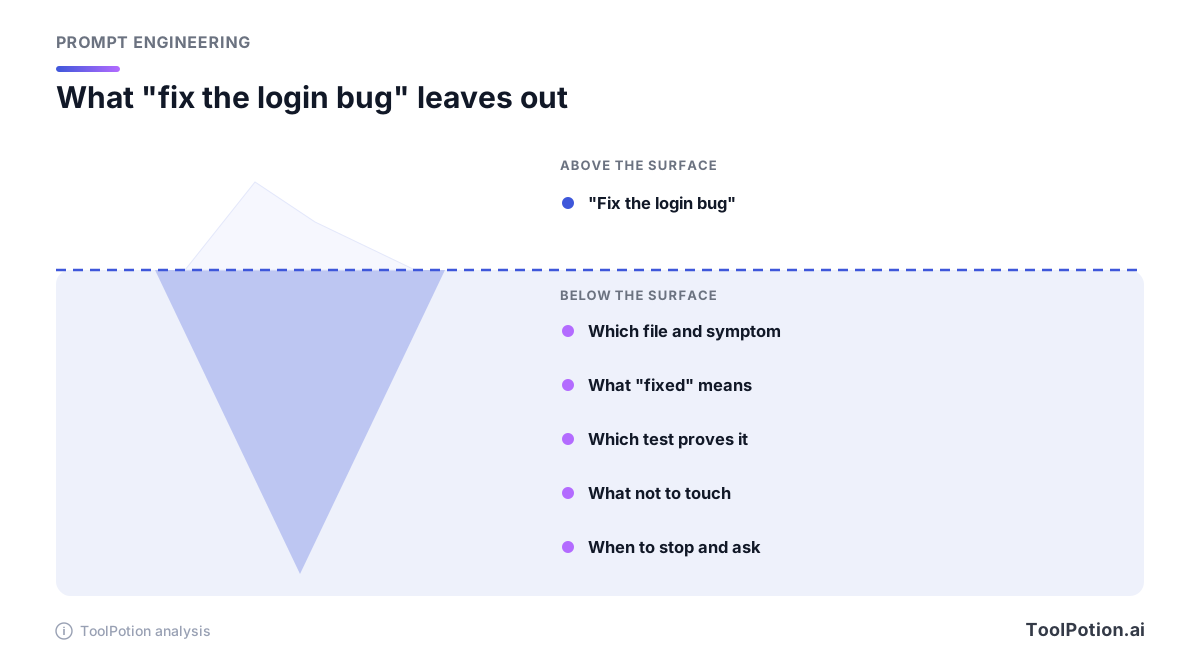
Write the done-when line before anything else
Claude Code's own best-practices page says it flatly: "Claude stops when the work looks done." Without something to run that says whether the work is done, the page continues, "In practice that makes you the test suite, and every mistake sits there until you happen to notice it." (Claude Code docs)
OpenAI's Codex guidance reaches for the same idea from the other side. It suggests four things in a prompt: a goal, context, constraints, and "Done when," which it phrases as a question about what should be true before the task is complete, "such as tests passing, behavior changing, or a bug no longer reproducing" (OpenAI Codex docs). Two vendors, two products, one skeleton. We add two parts of our own (stop-and-ask and report), and we'd write the done-when line first even though it sits fourth in the finished brief, because writing it forces you to find out what you want.
Outside code the same line works with a different check. "A table of twelve vendors, a source link beside every price, and a flag on any price that isn't public" is something an agent can count. "A thorough comparison" is something it can only feel.
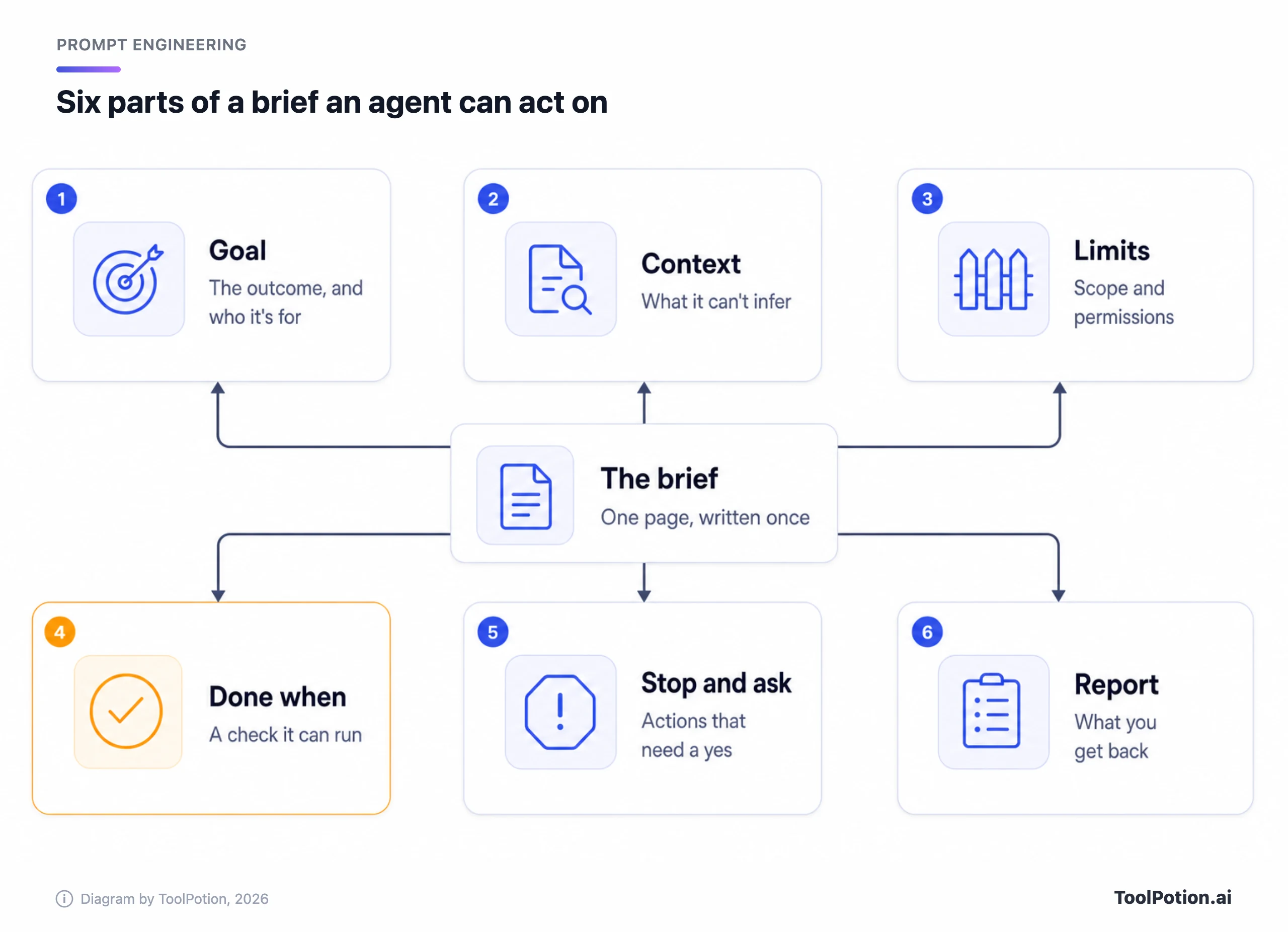
The six parts of a brief, top to bottom
The goal names the result and who uses it
One or two sentences. Say what you want at the end and what it feeds: a recommendation two partners will read in five minutes, a fix that ships on Friday, a shortlist for a purchase. The destination changes what the agent includes and what it cuts. "Look into pricing" produces volume. "Recommend one tool under $15 a seat" produces a decision.
Context is whatever it can't find on its own
Claude Code's docs give a useful filter: "Could it find this by reading the code? Would it actually go and look? If both are yes, leave it out." (Claude Code docs) What stays in is the meeting decision that never reached the repo, the account the agent should use, the tool you already tried and dropped, the reader's level.
Give the reason behind a rule, too. Anthropic's guide says that context or motivation behind an instruction "can give Claude more information about your goals and help it deliver more targeted responses," and its own example of the weaker version is a bare "NEVER use ellipses" (Anthropic docs).
Limits say what is in scope and what is off limits
Agents tend to do more than you asked. Anthropic's guide says Claude Opus 4.5 and 4.6 have a tendency toward "creating extra files, adding unnecessary abstractions, or building in flexibility that wasn’t requested," and offers a sample instruction that includes "Don't add features, refactor code, or make \"improvements\" beyond what was asked." (Anthropic docs) The guide ties that habit to those two models, so check it against whichever one you run. We'd borrow the sentence either way. Then add your own list: folders it may touch, sources it may use, accounts it may not log into.
Google's Gemini guide lists risk assessment among the settings an agent prompt controls, and says it can explicitly distinguish between low-risk exploratory actions (reads) and high-risk state changes (writes) (Google AI docs). That split is the useful part. Reading and running tests need no permission slip; deleting, sending and paying do.
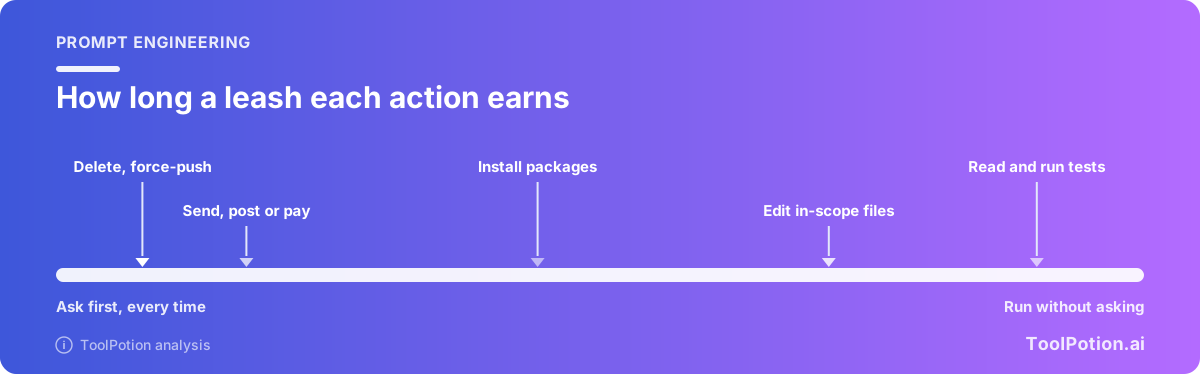
A caveat before you lean on any of this. Words in a brief are requests. A sandbox, a read-only token or a permission rule is enforcement, and the two are not substitutes. Our guide to containing AI agents covers the enforcement side; this piece sticks to what you write.
Done when is a check it can run
Name the command, the count or the file. "Tests pass" is a start. "pnpm test passes and a new test proves the 101st request in a minute gets a 429" is a check. For research, say how many items, which fields, and what to write when a field can't be found. If the check can fail, tell the agent what to do next, and cap it. Google's guide notes that "High persistence increases success rates but risks higher token costs or loops," so "retry a failing test twice, then stop and report" is a better line than silence (Google AI docs).
Stop-and-ask is a list of actions, not a mood
"Ask me if you're unsure" gives the agent a judgment to make, and an eager agent is rarely unsure. List the actions instead. Anthropic's guide has a sample prompt for exactly this, written for Claude Opus 4.6: for actions "that are hard to reverse, affect shared systems, or could be destructive, ask the user before proceeding," with deleting files or branches, git push --force and sending messages among the examples (Anthropic docs). The list is the part we'd copy, whatever model you use.
Anthropic's agent-design essay describes the pattern: agents "can then pause for human feedback at checkpoints or when encountering blockers" (Anthropic Engineering). Make the first checkpoint a plan. Ask for the steps before any change, read them, then say go. It costs one round trip, and we think it's the cheapest checkpoint there is.
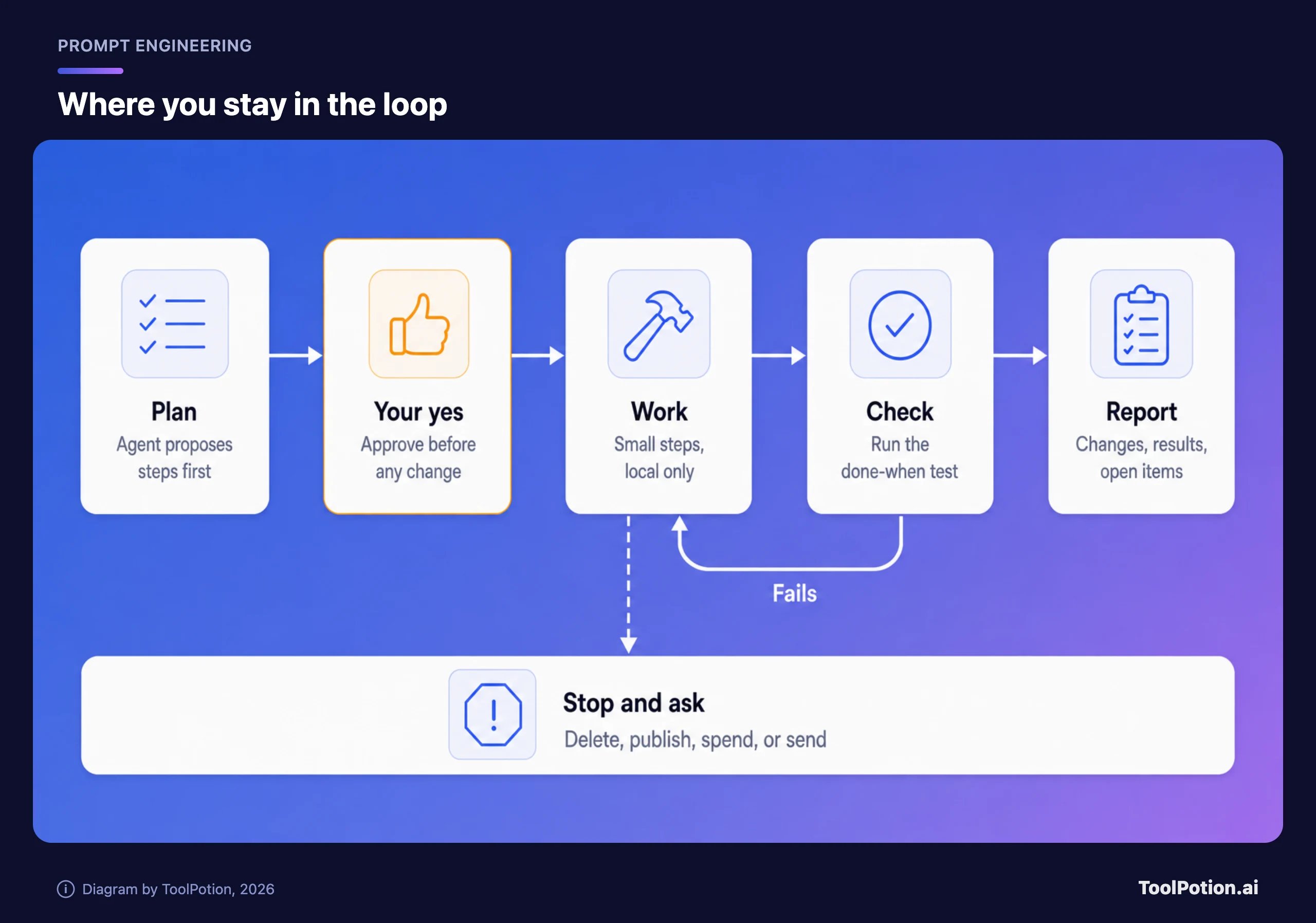
The report is where you say what comes back
Ask for the changes made, the checks run with their results, anything it assumed, and anything it chose not to do. That last item is the one people forget. It's where the agent tells you it skipped the migration because you said not to touch the schema.
Three briefs, before and after
Each rewrite below runs about 120 to 150 words. That's longer than the average prompt and shorter than people fear. All three briefs are our own invented examples: the tasks, tools and numbers are made up for illustration, and none comes from a vendor or a real project.
A research agent (invented example)
Before:
Find the best project management tool for a ten-person design agency.After:
Goal: Recommend one project-management tool for a ten-person design agency that bills by the hour. Two partners will read the result in five minutes.
Context: We use Google Workspace and Slack. Our shared spreadsheet fails at time tracking and client approvals. The ceiling is $15 per seat per month, billed monthly.
Limits: Use vendor pricing pages and documentation only. Skip review sites and "best tools" lists. Don't sign up for anything or enter our email anywhere.
Done when: A table of at most six tools with price per seat, billing basis, a link to the pricing page, and whether time tracking and client approvals are built in. Write "not public" for any price you can't find. End with one recommendation and the one reason it could be wrong.
Stop and ask: If fewer than three tools fit the budget, tell me before widening it.
Report: The table, your recommendation, and a list of what you assumed.A coding agent (invented example)
Claude Code's docs contain their own before-and-after: "add a calendar widget" becomes a request to follow the pattern in an existing widget file, with "no new libraries" (Claude Code docs). Here is the same move on a bigger job, written for Claude Code or Codex.
Before:
Add rate limiting to the public API.After:
Goal: Add per-API-key rate limiting (100 requests a minute) to the public REST endpoints so one noisy client can't slow the rest.
Context: Endpoints live in src/api/public/. Follow the middleware pattern in src/api/middleware/auth.ts. Limits belong in config/limits.yaml. Redis is available through src/lib/redis.ts.
Limits: Touch only src/api/ and config/. No new dependencies. Don't change the auth middleware or any existing test. Work on a new branch.
Done when: pnpm test passes, pnpm typecheck is clean, and a new test shows the 101st request in a minute returns 429 with a Retry-After header. If a test fails twice, stop and report.
Stop and ask: Before adding a dependency, changing a database schema, or pushing anything.
Report: Files changed, commands run with results, and any decision I should review.An inbox agent (invented example)
This one is for any assistant you let near your mail, the kind of job agent products such as Manus and Claude Cowork are sold for. Mail is where "clean up" can quietly turn into "deleted".
Before:
Clean up my inbox.After:
Goal: Reduce my inbox to messages that need a reply. Newsletters and receipts should end up under labels.
Context: Receipts come from stripe.com, paypal.com and amazon.com. Newsletters always carry an unsubscribe link. Anything from my accountant or the school stays where it is.
Limits: Create labels and move messages into them. Never delete, send, unsubscribe or reply.
Done when: The inbox holds only unread messages from people and anything from the last seven days.
Stop and ask: Show me the list of senders you plan to label before you move anything, and wait for my yes.
Report: Counts per label, and every sender you couldn't classify.The Goal line barely changes between before and after. The weight is in the last four lines: a check, a stop, a report, and a limit that says what the agent may never do.
A template to paste
Delete any line that doesn't apply, but delete it on purpose.
Goal: <the result, and who or what uses it>

Context: <files, links, accounts, decisions and past attempts it can't see>

Limits: <in scope> / <off limits> / <sources or tools allowed>

Done when: <a command, a count or a file that proves it>. If the check fails twice, stop and report.

Stop and ask before: <delete / publish / send / spend / install / change shared systems>

Report: <changes made, checks run and results, assumptions, things you chose not to do>
Score your own draft against it. Eight yes-or-no questions, thirty seconds.
How briefs fail, and what we'd change
| Failure | What you see | Change |
|---|---|---|
| The goal is an activity | Pages of output, no decision | State what the output feeds |
| No done-when | It stops at "looks done" or never stops | Add a check it can run and a retry cap |
| Scope left unstated | Extra files, refactors, unrequested improvements | List what's off limits |
| Warnings without reasons | A wall of NEVER lines, ignored or over-applied | Add the reason in one clause |
| Approval only implied | It deletes, pushes or sends on its own judgment | Name the actions and ask for a plan first |
| Corrections piling up | Instructions contradict each other | Rewrite the brief and start fresh |
Two of these deserve a longer word. The first is the pile of capitals. We doubt that more emphasis ever fixed a missing reason, and Anthropic's guide points the same way: a bare "NEVER use ellipses" is its weaker example. Claude Code's docs add that "Phrases like think step by step or be thorough are ordinary prompt text rather than keywords" (Claude Code docs). We'd cut "be thorough" boilerplate for that reason. Anthropic's guide does recommend giving Claude a role, even one sentence, so we wouldn't ban it; we'd skip the "world-class expert" persona, because the six parts already tell the agent more than a title does.
The second is the opposite problem. The sample agent prompt in OpenAI's guide (shown for its gpt-6-astra model, as a sample and not as a rule) tells the model to "keep going until the user's query is completely resolved" and says "Do not stop after completing only part of the request" (OpenAI docs). That's reasonable for a job with a clear finish line, and a trap for one without. A persistent agent with a vague goal can keep spending tokens in a loop; Google's guide says as much about high persistence. Anthropic's essay says it's common to include "stopping conditions (such as a maximum number of iterations)" to maintain control (Anthropic Engineering).
One more habit we'd drop: pasting the brief into a thread that already holds ten corrections. The agent now has eleven sets of instructions and no way to rank them.
Watch the first minute, then rewrite
Claude Code's docs advise: "Watch the first minute, press Esc the moment Claude drifts, and after two failed corrections run /clear and write a better prompt instead of a third" (Claude Code docs). We'd apply that to any agent: the first plan and the first few actions show whether your brief was read the way you meant it.
When you can't write the brief yet, let the agent interview you. Claude Code's docs suggest a prompt along the lines of "Interview me until you could write the spec, then write it to SPEC.md," and Codex's guidance says to ask it to question you first and "challenge your assumptions" (Claude Code docs, and OpenAI Codex docs). Then start a new session from the written spec.
Briefs that work twice deserve a home. Standing rules (how to run the tests, what never to touch) go in an AGENTS.md or CLAUDE.md file; OpenAI says "A short, accurate AGENTS.md is more useful than a long file full of vague rules" (OpenAI Codex docs). A procedure you repeat can become a skill, which we cover in From Prompts to Skills. What to load into the session in the first place is the subject of our context engineering piece, and the habits that keep prompts working across model releases are in Prompt Patterns That Survive Model Updates. For tools built around this kind of delegation, see our boards for AI agents, agent-building tasks and prompt engineering tools.
Frequently asked questions
How long should a brief be?
Long enough to hold the six parts, which for most jobs is 100 to 200 words. Standing preferences belong in a rules file so each brief covers only this task. If the brief grows past a page, the job probably wants splitting in two.
Do ChatGPT, Claude and Gemini need different briefs?
The skeleton is the same. The four parts in OpenAI's Codex guidance, Anthropic's advice to supply context and ask before risky actions, and Google's agent dimensions (ambiguity handling, risk assessment, persistence) describe one set of needs in different words. Formatting differs a little: Google's guide recommends XML-style tags or Markdown headings and says to "Choose one format and use it consistently" (Google AI docs). Which assistant suits which job is a separate question we take up in ChatGPT vs Claude vs Gemini in 2026.
What should I tell the agent to do when it's unsure?
Give it a rule it can apply. "Assume anything reversible and list it in the report; ask before anything that isn't" works better than "ask if unsure." Google's guide frames the same choice as when the model may make assumptions and when it must pause for clarification or permission.
Is a good brief enough to make an agent safe?
No. A brief reduces mistakes and prevents none of them. Anthropic recommends "extensive testing in sandboxed environments, along with the appropriate guardrails" (Anthropic Engineering), and our containment guide covers permissions and audit trails.
The agent still got it wrong. What now?
Find the first step where it went off course and ask what the brief said about that step. Add the one line that would have prevented it, then rerun from a fresh session.