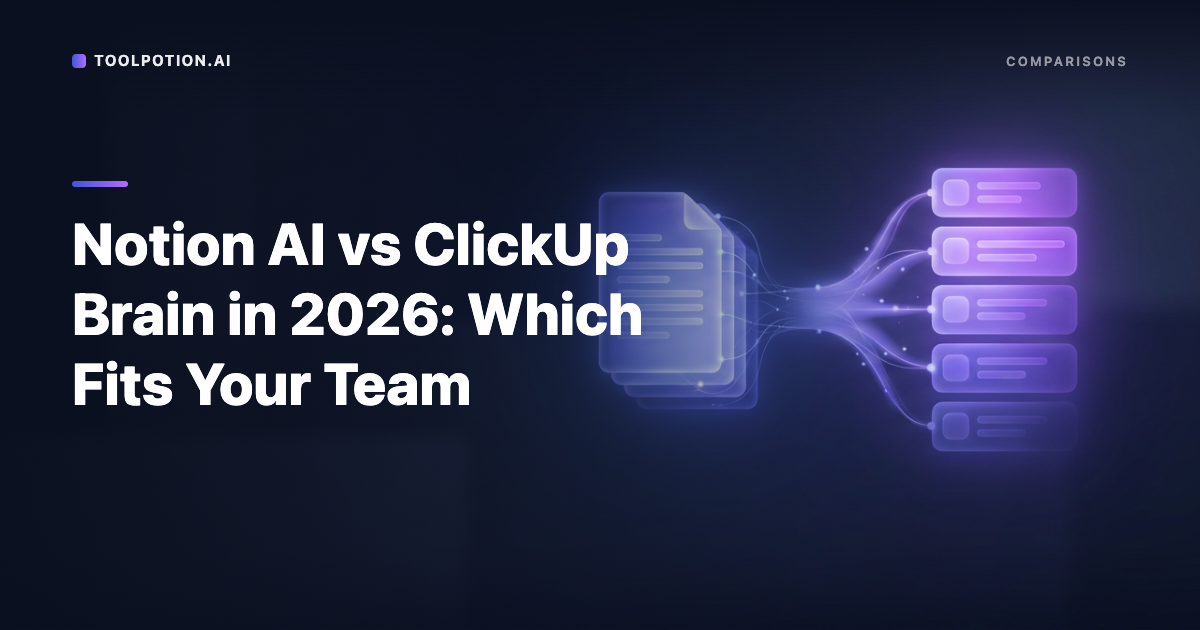
Researchers went through more than 15 million biomedical abstracts on PubMed and looked for words that jumped in frequency after ChatGPT arrived. One verb, the root of the paper's own title, turned up in 2024 abstracts at 28 times the rate the earlier trend predicted. Two others ran at 13.8 and 10.7 times. From that vocabulary shift alone, Dmitry Kobak and his co-authors estimated that at least 13.5% of 2024 abstracts had been processed with an LLM, and up to 40% in some corners of the literature (Science Advances, open copy on PubMed Central).
The words say nothing about whether those scientists had something to say. They only show that a machine touched the sentence and nobody went back over it.
This guide is about getting a draft to sound like you, and, more to the point, to say what you mean. It is not about beating AI detectors. If you're in a school, a journal or a job where AI help is prohibited or must be disclosed, follow that rule. We won't help anyone pass off machine work where it isn't allowed, and nothing below is a way around a policy. For everything else (emails, posts, reports, proposals), here's the workflow we'd use, built from the Wikipedia editors' catalogue of AI writing, the vocabulary research and each vendor's help pages.
Why every default draft sounds like the same person
Wikipedia's volunteer editors clean up chatbot text for a living, and their field guide explains the mechanism well. Language models, they write, "regress to the mean": the output tends toward whatever is statistically most likely across the widest range of cases. A second training round tunes it toward "the most broadly palatable prose."
The consequence is specific. Facts that are rare get swapped for descriptions that are common. The editors give an example: the highly specific "inventor of the first train-coupling device" turns into "a revolutionary titan of industry." The subject, in their image, fades from a sharp photograph into a blurry sketch while the praise gets louder.
Your voice lives in exactly the stuff the average erases. The odd number, the proper noun, the opinion you're slightly embarrassed to hold, the short sentence after the long one.
There's a second reason not to build your fix around a word list: the words move. The same Wikipedia page says the same verb was famously overused by ChatGPT in 2023 and 2024 and dropped off sharply in 2025, and it lists a different set of favorites for each model generation. On the em dash, which everyone blamed, the page says the sign is most useful combined with others, and that some newer chatbots are built to suppress it. Hunt the shape, not the vocabulary.
Humans are poor at spotting it. The page cites a 2025 study in which people did no better than chance, and another on German theses where readers got 57% of the AI texts and 64% of the human ones right. It also cites a 2025 preprint in which a group of expert annotators picked out 90% of the AI text.
Start with five things you wrote
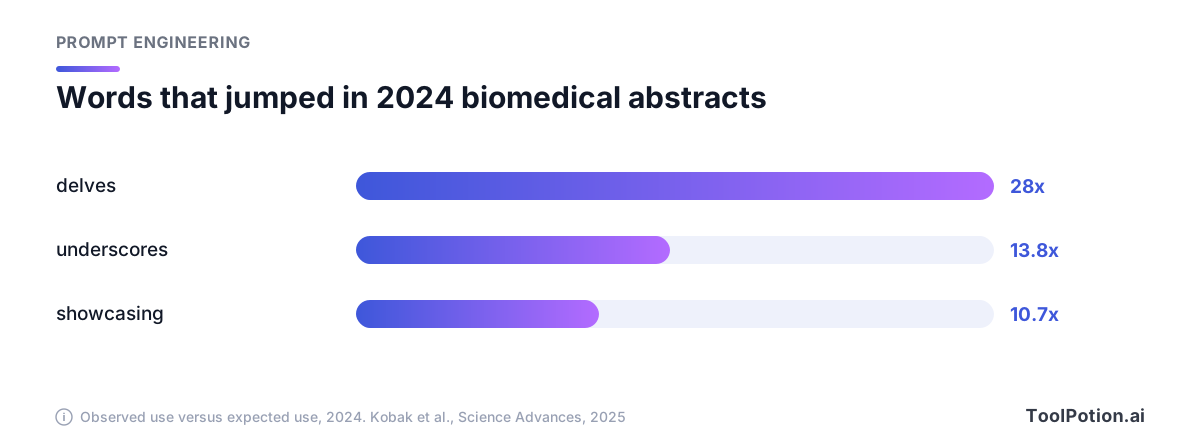
Pull three to five pieces you wrote yourself, for a real reader, without a model in the loop. Emails to a colleague, a post you were pleased with, the Slack message where you explained something to a new hire, at 300 to 600 words each. None of the help pages we read say how many samples are enough. Our rule of thumb: enough that a quirk shows up twice.
Choose the fast, unpolished ones. A note dashed off to a friendly colleague beats the paragraph you labored over for a client. Leave out anything that began as an AI draft you tidied, because that teaches the model its own habits back.
Strip names and anything confidential before you paste, then read the pile once as a stranger would. Look for what you do that a default draft never does.
A style sheet records habits, not adjectives
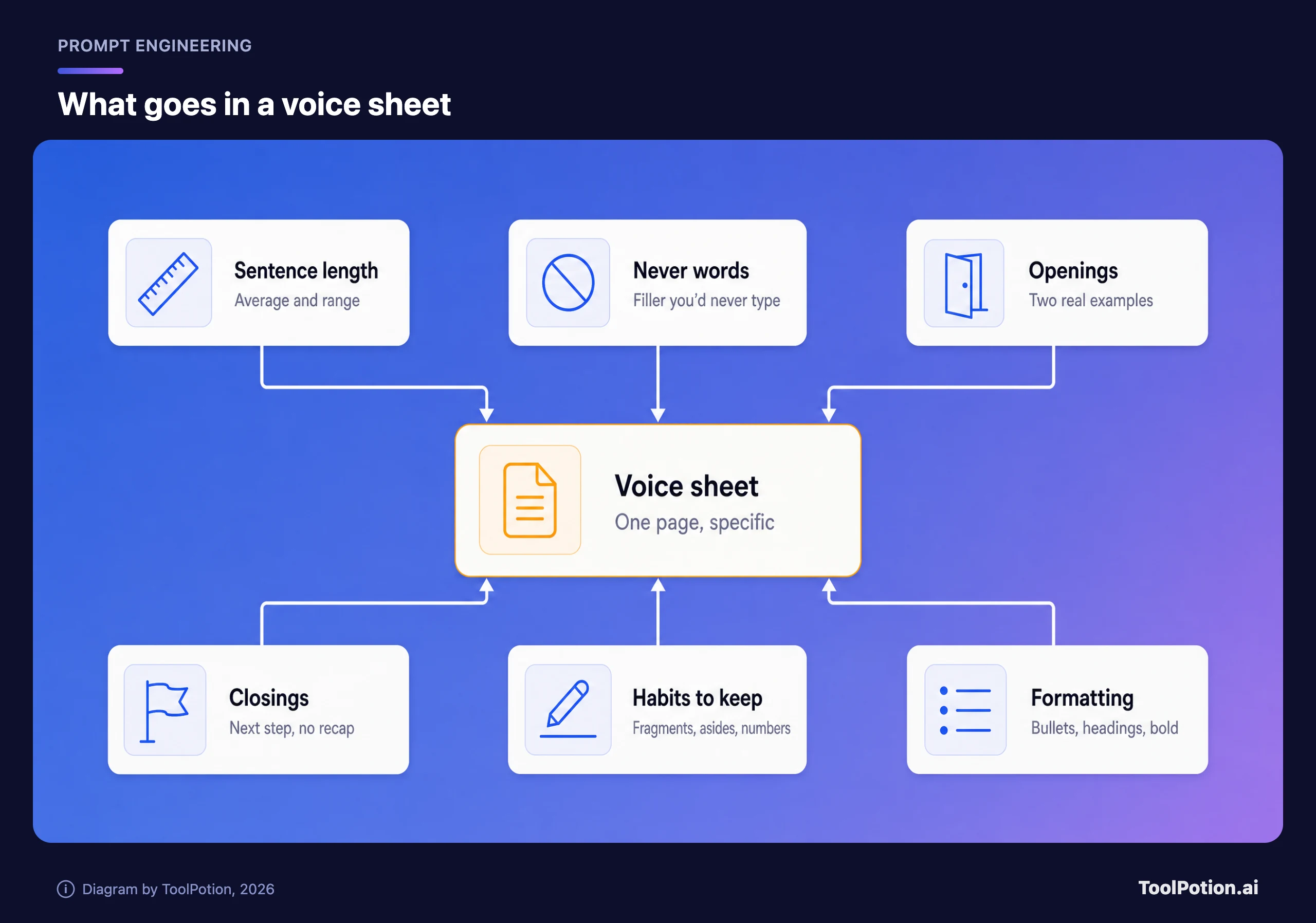
A style sheet is a page of observations about your writing, specific enough that someone could imitate you from it. Adjectives don't count. "Warm but professional" describes a million people. Measurements and habits describe you. Six things are worth writing down:
- Sentence length. Count a few paragraphs. If you average about 14 words and run from 3 to 35, say so, and say that short sentences follow long ones.
- Words and phrases you never use. Skim your samples for the corporate filler you'd never type, then add what you spot in drafts you reject.
- How you open. Do you start with the answer, a number, a question or an apology? Quote two real openings.
- How you close. Many people simply stop, or end on the next step and a name. Say what yours looks like, and say no recap.
- Habits a model would smooth out. Fragments, parentheses, starting a sentence with And, first person, a dry aside, a habit of naming the exact figure.
- Formatting. Whether you use bullets at all, how long your paragraphs run, how you write headings, whether you use contractions (most people do).
Add two or three of your real sentences as examples. Models imitate examples better than descriptions.
Here's a compressed sheet we wrote for an imaginary operations manager named Dana. It shows the format. Don't copy it, because yours should differ.
VOICE SHEET: Dana
Sentences: average 14 words, range 3 to 35. A short one after every long one.
Openings: the answer first, or the number. Never a greeting line, never "I wanted to".
Closings: the next step and who does it. No recap, no offer to help further.
Contractions always. First person plural for the team, "I" for opinions.
Parentheses for asides, maybe one per email. Fragments are fine.
Never writes: "touch base", "circle back", "moving forward", "going forward", "leverage", "stakeholders", "ensure".
Numbers as digits, with units. Dates as "Thursday the 12th".
No bullets in emails under 200 words. No bold. No headings.
Examples of my sentences:
- "The vendor took nine days, not two."
- "We can cut invoices from this release. Nothing else can slip safely."
- "Not great, but fixable."
You can ask a model to draft the sheet from your samples, but check each line against a real sentence of yours. Models describe a writer in the average. If no sentence of yours obeys a rule, delete the rule.
Where the sheet goes in each tool
Every major assistant has a place for standing instructions. They differ in how much text fits, and a full sheet with examples runs longer than some allow.
| Tool | Where your voice goes | What the vendor's page says | Catch |
|---|---|---|---|
| ChatGPT | Settings, then Personalization, then Custom Instructions | Applied immediately to all chats. Limit is 1,500 characters on Free and Go, 5,000 on Plus, Pro, Business, Enterprise and Education | Fit the short sheet there and paste the examples at the top of a chat |
| Claude | Settings, then Your Claude, then Instructions; or a project's instructions | Account-wide instructions, project-scoped instructions, and skills for "communication patterns based on your own writing" | Anthropic's personalization page lists instructions, project instructions and skills, with no separate styles feature |
| Google Gemini | A Gem: a name, instructions and optional knowledge files | Gemini can rewrite your Gem instructions for you | Google says Gems on personal accounts will soon transition to skills |
| Grammarly Humanizer | Paste a writing sample to create a custom voice | Four preset styles, plus a custom voice learned from your sample, for future rewrites | It rewrites text you already have. It can't supply the facts you left out |
Sources: OpenAI, Anthropic, Google and Grammarly.
Our pick is boring: keep the master copy in a plain text file you control and paste it wherever it's needed. Vendors rename and retire these features (Google says Gems on personal accounts will transition to skills), and a sheet you can paste anywhere survives that. For turning a prompt into something reusable, see reusable AI instructions, and for why context beats clever phrasing, context engineering.
Grammarly's sample-based custom voice is the right idea, and it is sold as an "AI humanizer." Grammarly's own FAQ says the tool "is not intended to bypass AI detectors" and encourages acknowledging AI assistance in academic or professional work. We'd use it the same way, as a copy editor that learns your habits. Other products in the AI humanizers category may make different promises, so read each one's terms. Our writing assistants roundup and the Grammarly versus QuillBot comparison cover the broader tools.
Give it your facts, then ask for a draft
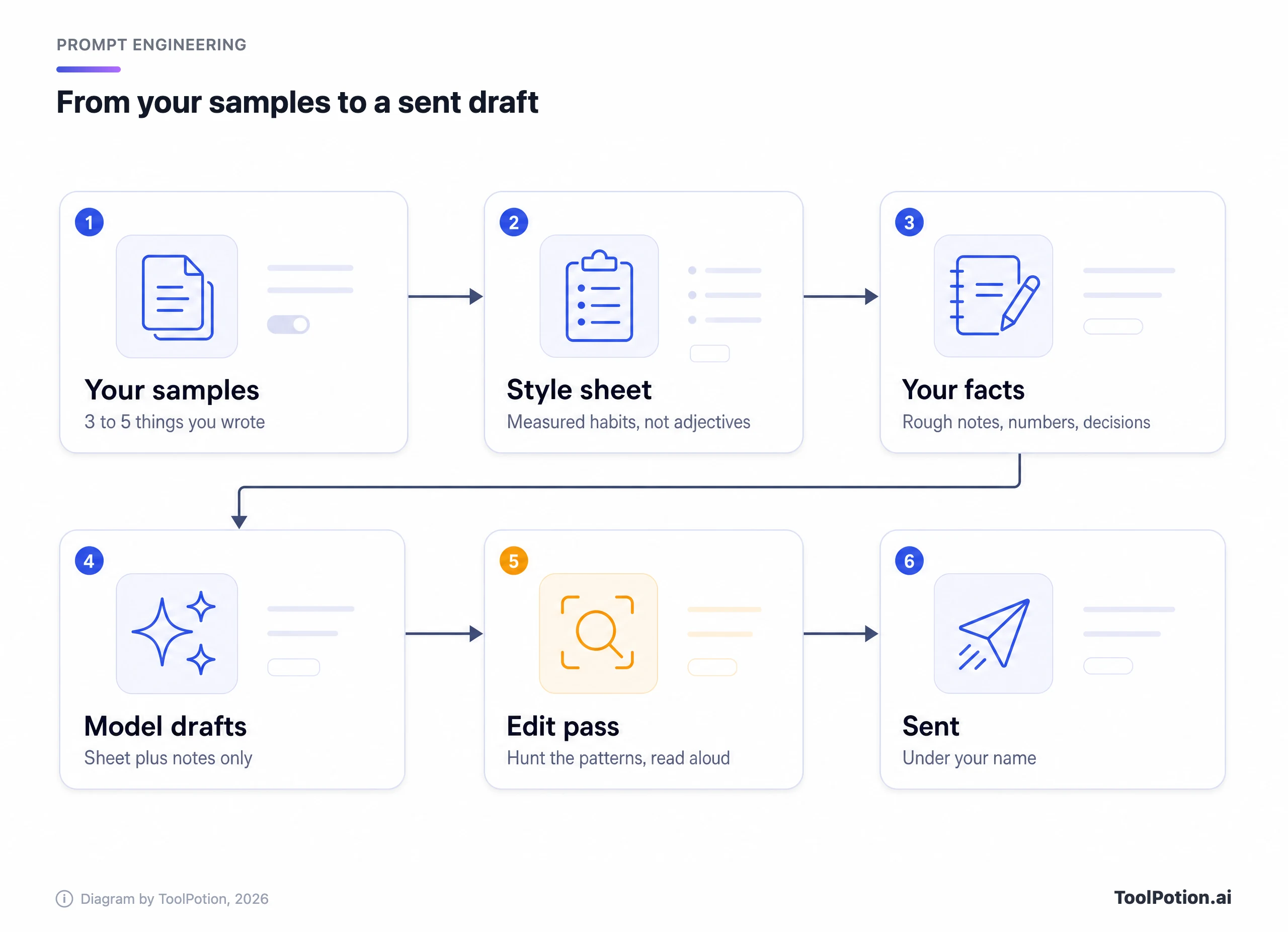
The sheet fixes the surface. The content has to come from you. Before you ask for a draft, write out the raw material in your own mess: what happened, the numbers, the decision, what you want the reader to do. Ten rough lines will do. Then tell the model to use only that material, to ask you when a fact is missing instead of filling the gap, and to follow the sheet.
The ask-me instruction matters most. A model allowed to guess will guess, and its guesses are the generic, flattering, plausible kind. Our prompt engineering guide covers the mechanics of giving instructions like this, and the email guide applies them to email.
One update, before and after
We wrote both versions below ourselves to illustrate the difference. The first is what a typical default draft looks like when you ask a chatbot to "write a project update to a client about a delay." The second is what Dana would send after giving the model her ten lines and her sheet, and then editing.
| Typical AI draft (our illustration) | Edited draft with the style sheet (also our invented example) |
|---|---|
| Subject: Project Update. I hope this message finds you well. I wanted to take a moment to provide an update on the project timeline. Our team has been working diligently to ensure we deliver a high-quality product, and we remain committed to transparency. Unfortunately, we have encountered some unforeseen challenges that have impacted our schedule. Moving forward, we will continue to prioritize clear communication and collaboration. Please don't hesitate to reach out if you have any questions. | Subject: We're a week late. The payment provider took nine days to approve our test account, not the two they quoted, so we couldn't test checkout until Monday. It works now. New date is Thursday the 12th. If that breaks your press embargo, call me and we'll cut invoices from this release, which is the only piece that can slip without breaking anything else. Dana |
Count what changed. The second version is shorter, but that isn't the point: it has a nine, a two, a Monday, a Thursday and a decision the client can act on. None of those came from the model, and none could have. Most of the improvement is facts, with the voice work on top. Nothing in the first draft is false. It could have been sent by anyone about anything.
Eight things to hunt in the edit pass
Print this part out. These patterns come from the Wikipedia catalogue, which is built on real examples from articles, drafts and talk pages. The middle column describes each pattern, with a couple of phrases the page itself shows.
| The tell | What it looks like | What to do |
|---|---|---|
| Puffed-up significance | Ordinary facts described as a turning point, a legacy, a role in broader trends ("marking a pivotal moment", "reflects broader") | Delete the sentence, or replace it with the plain fact it was inflating |
| Participle tails | A sentence ending in "-ing" commentary that tells the reader what the fact means | Split it. State the claim as its own sentence, or cut it if you can't back it |
| Negative parallelism | "It's not just X, it's Y" and its cousins "not X, but Y" | Say Y |
| Vague attribution | Unnamed experts, reports or observers cited for a claim nobody can trace | Name who said it and link it, or remove it |
| Rule of three | Three adjectives or three parallel clauses by reflex | Keep the one or two that are true |
| Formatting dressed as thought | Bold labels at the start of every bullet, title-case headings, emoji as bullets | Write plain sentences. Use a list only when the items are separate |
| A tidy outlook paragraph | A closing section on "challenges and future prospects" that restates the piece | End on the last concrete point or the next step |
| Assistant leftovers | Pleasantries at the top, offers to revise at the bottom, bracketed placeholders left in the text | Delete them all, then search for brackets |
Two notes on using the list. First, it exists to help Wikipedia's editors spot undisclosed AI text, and they warn against treating the signs as the problem. In their words: "Please do not merely treat these signs as the problems to be fixed; that could just make detection harder." We use the list as an editing aid, to find sentences with nothing in them. Puffery usually means there was nothing to say, so the fix is a fact, not a better word.
Second, the page keeps a list of "ineffective indicators": perfect grammar, a mix of formal and casual registers, and unsourced content all show up in human writing too. Fix what your sheet says you do differently, and leave your quirks in.
Read the draft aloud once and mark every stumble. Then go through the table. Then ask what fact, name or number each remaining sentence carries. If none, cut it.
Three things the model doesn't get
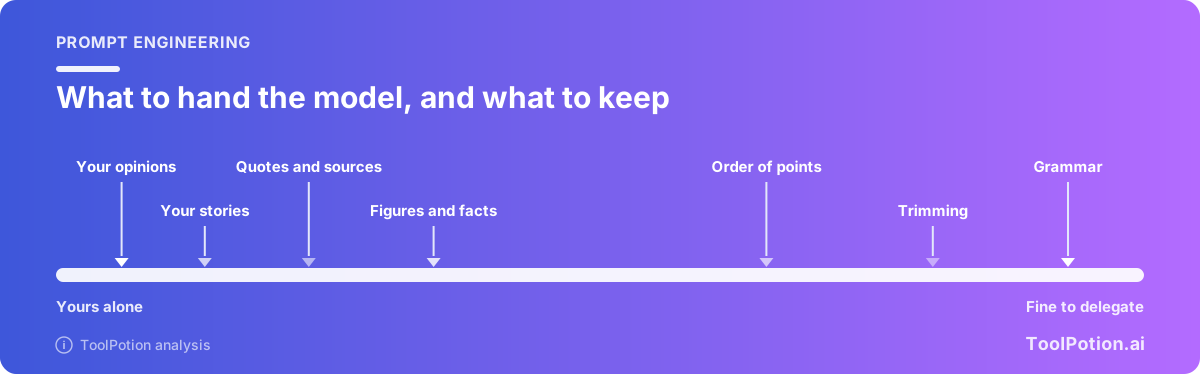
A style sheet covers phrasing, and it's tempting to let the model wander into territory where it knows nothing. We'd draw a hard line at three things.
Opinions you don't hold. A model asked for a strong take will write a confident one in your voice, which is worse than a bland one. If you haven't made up your mind, say "I'm still undecided."
Anecdotes that didn't happen. "A client told me recently" is a claim about the world. If it's invented, you've lied in the first person, and models write that kind of line very easily.
Quotes nobody said, and sources that don't exist. The Wikipedia page documents reference lists that sound right and lead nowhere, including one edit where "the reference added for this sentence did not exist." Every number, quote and link in a draft is yours to verify, whoever typed it.
The model is good for the rest: questioning your notes, finding the order, trimming, and offering ways to open a paragraph so you can steal the one you'd have written.
Frequently asked questions
Will this get my writing past AI detectors?
It isn't built for that and we won't promise it. Wikipedia's editors say detectors such as GPTZero and Pangram "perform better than random chance" but have "non-trivial error rates", and that a high score alone isn't proof. A clean score isn't proof of anything either. If a school or employer prohibits AI help, the answer is to follow the rule.
Should I tell people I used AI?
Follow the rules of wherever the writing is going. Many workplaces don't mind an AI-assisted email, while journals, courses and some clients do. When in doubt, ask.
Will the sheet still work when the model changes?
The shape-level rules usually survive, and the word-level ones age quickly. The Wikipedia page lists a different set of favorite words for each model generation, so reread your "never writes" line every few months and compare it to a fresh default draft.
Is it okay to paste client work into a style tool?
Check the vendor's data terms first. OpenAI's page says, for example, that information from your use of custom instructions can be used to improve model performance unless you opt out. Strip names and confidential details from your samples either way.