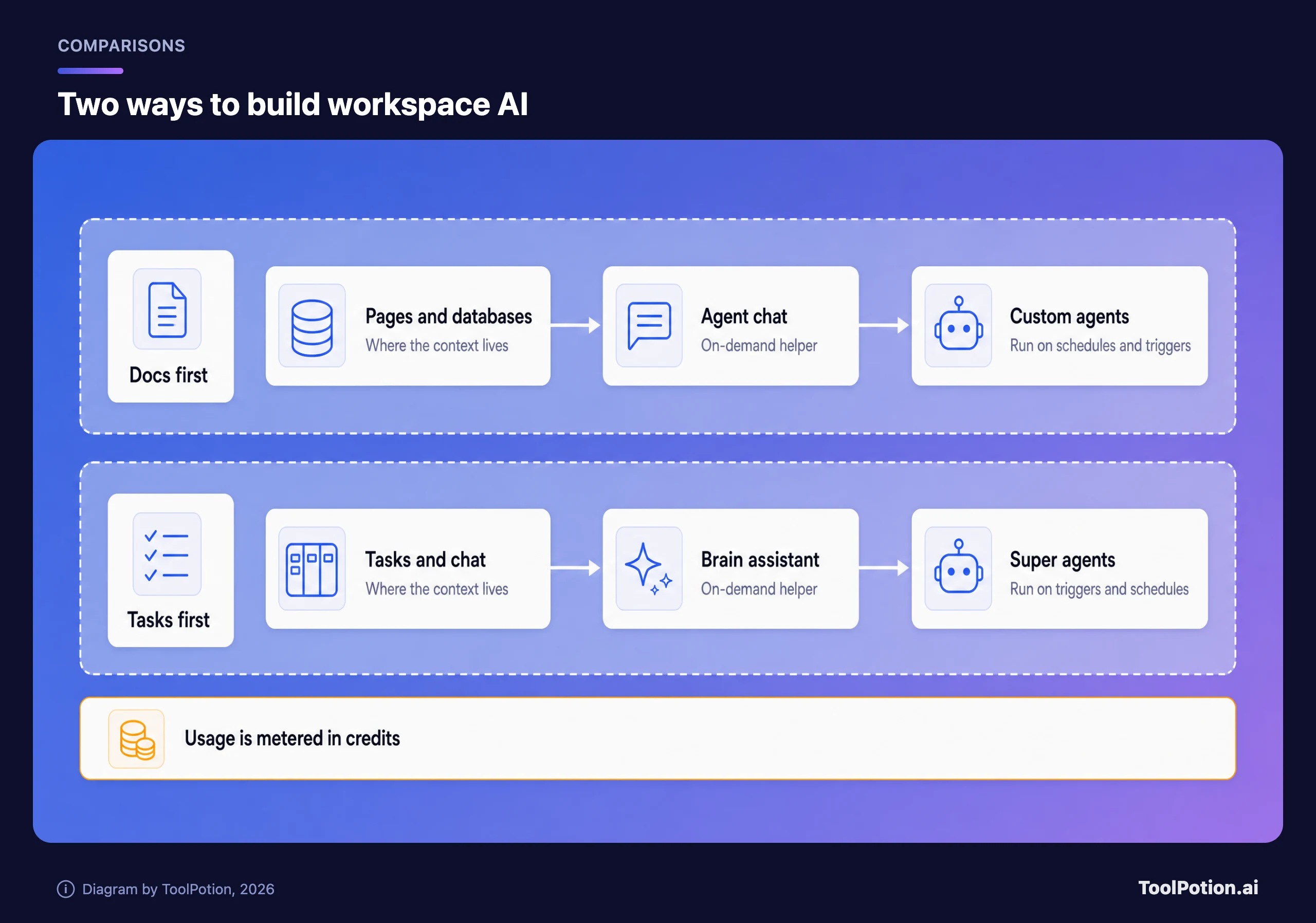
If your team lives in documents and wikis, Notion AI is the better fit. If it lives in tickets, sprints and status, ClickUp with its Brain assistant is. The two overlap more every year, which is why packaging and data rules end up mattering more than feature lists.
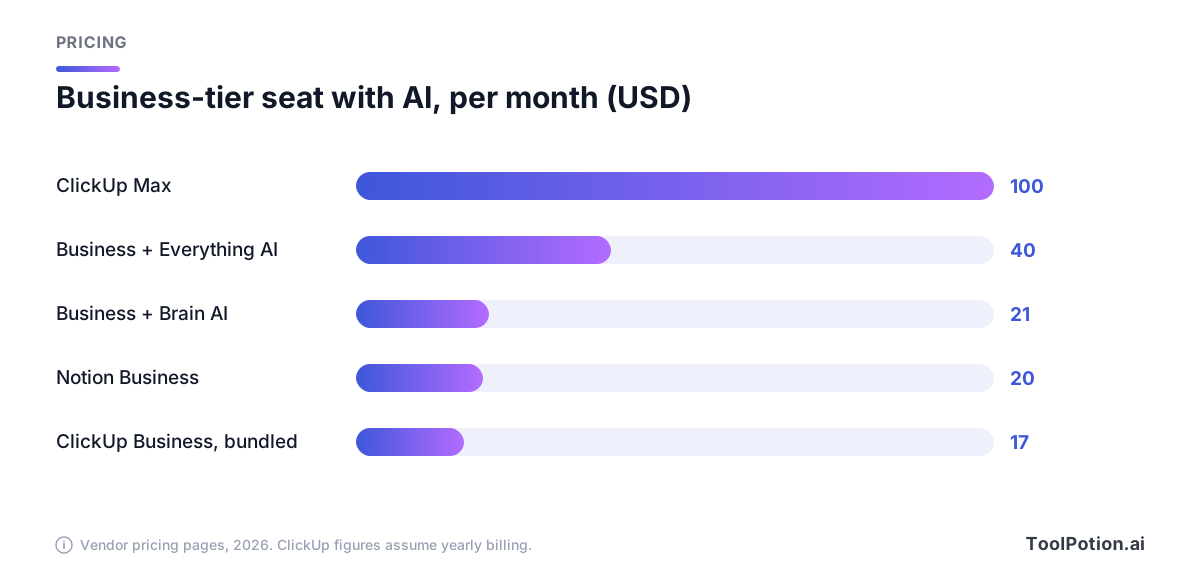
Both vendors now meter their heavy AI features in credits, so a seat price tells you less than it used to. A $20 Notion seat and a $17 ClickUp seat are not the same purchase, and ClickUp is currently showing its AI pricing in two different ways. This guide covers what each plan includes, what the AI does, which model providers each vendor documents and where your data goes.
Everything below comes from the vendors' own pricing, help and security pages as they stood in 2026. Those pages change often and ClickUp's is running two layouts at once, so check the live numbers before you buy.
How each AI is packaged and priced
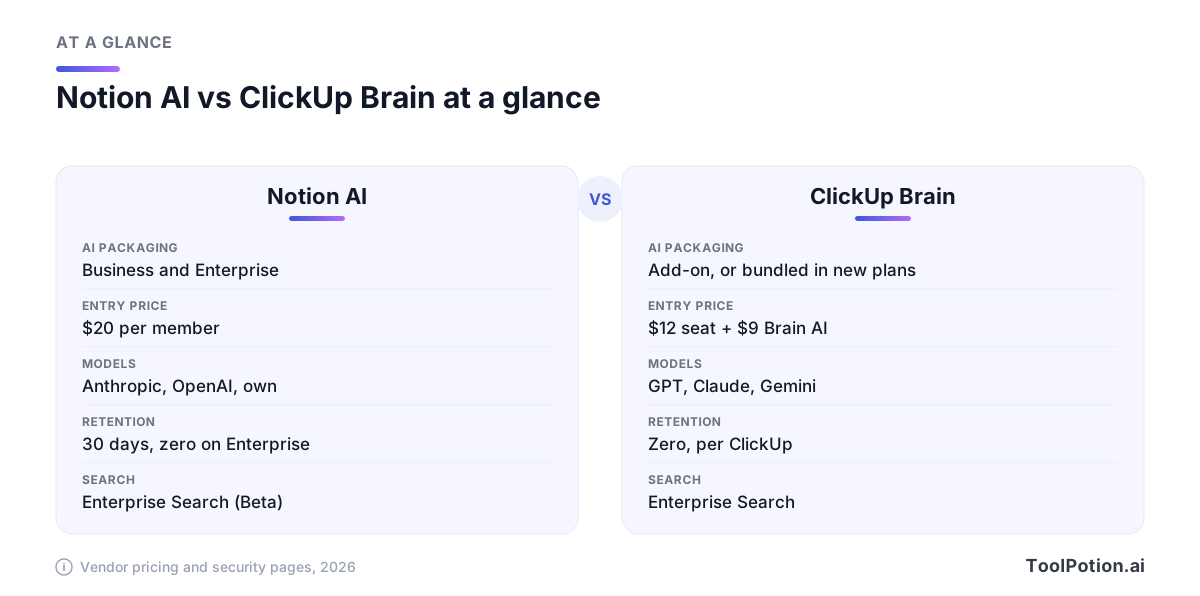
Notion keeps its AI behind the top two paid plans. The pricing page lists Free at $0, Plus at $10 and Business at $20 per member per month (it advertises up to 20% off for yearly billing), with Enterprise on custom pricing. Free and Plus only get a trial of Notion AI. Business adds Notion Agent, AI Meeting Notes and Enterprise Search (still labeled Beta), and Enterprise adds zero data retention at the model providers. Notion's help center says the same thing in one line: Notion AI is available on Business and Enterprise plans, with a usage allowance on top.
Custom Agents are the part that costs extra. Notion says they're free to try, then $10 per 1,000 Notion credits, and its help page says they require a Business or Enterprise plan (Notion help).
ClickUp is harder to pin down, because its pricing page serves two layouts. The classic one sells seats and AI separately. Seats are Free, Unlimited at $7 and Business at $12 per user per month billed yearly, with Enterprise on custom pricing. On top sit two AI plans. Brain AI is $9 per user and covers the assistant, the @Brain agent, AI chat and 1,500 extra AI credits. Everything AI is $28 and adds an unlimited AI Notetaker, AI Fields and AI automations, with 5,000 credits. A Business seat with Brain AI therefore runs $21, and with Everything AI $40.
The newer layout bundles it. Core is $9 (regularly $12), Business $17 (regularly $25), Max $100 (regularly $120), and Enterprise is custom, all per user per month billed yearly. Every plan ships with Brain and a pooled monthly credit allowance: 1,000 credits per user on Core, 1,500 on Business, 3,000 on Enterprise and 10,000 on Max, plus 500 per workspace on Free. ClickUp's help center says the new plans are available to a limited number of workspaces and that existing customers keep their current plan and price. Both layouts price extra credits at $10 per 10,000.
The practical difference is simple. With Notion you pay for AI by moving up to Business, then pay again as agents burn credits. With ClickUp you either add a $9 or $28 AI plan to a seat or, if your workspace has the newer plans, get some AI on every tier. Then you pay for volume.
What Notion AI does
The center of it is Notion Agent. Notion's help center describes it as something you chat with that can create and edit pages and databases using context from your workspace, your connected apps and the web (Notion help). It can draft, translate, autofill database properties and answer questions across everything you've stored.
Search reaches outside Notion too. Enterprise Search covers connected tools like Slack, Microsoft Teams and GitHub, and the pricing page marks Jira, Box, OneDrive, Salesforce and Asana as Beta connectors. AI Meeting Notes transcribe and summarize calls without a bot joining, and Enterprise admins can auto-delete the transcripts on a schedule.
Then there are Custom Agents, which are the real shift. They run in the background on a schedule, or when something happens: a comment lands, a database row changes, a meeting note finishes, a Slack message arrives. They only see the pages and apps you grant them. Anyone with the right sharing level can run one, but only people with full access can edit it, which is a sensible split for a team (Notion help).
For a docs-heavy team that's a coherent story. The agent reads your specs, your meeting notes and your project database, and writes back into the same place. Notion's directory listing sits at Notion, and our case study on Notion and Claude agent orchestration describes how it runs 30+ concurrent agent tasks from a single task board.
What ClickUp Brain does
ClickUp's pitch is that the AI sits on top of the work itself. Its Brain page describes a context engine that indexes tasks, docs, chat and connected apps, an assistant you can chat with, and shared AI chats and channels so a team can work with the same context. The plan cards add AI Fields, an AI Notetaker, image generation and what ClickUp calls Super Agents.
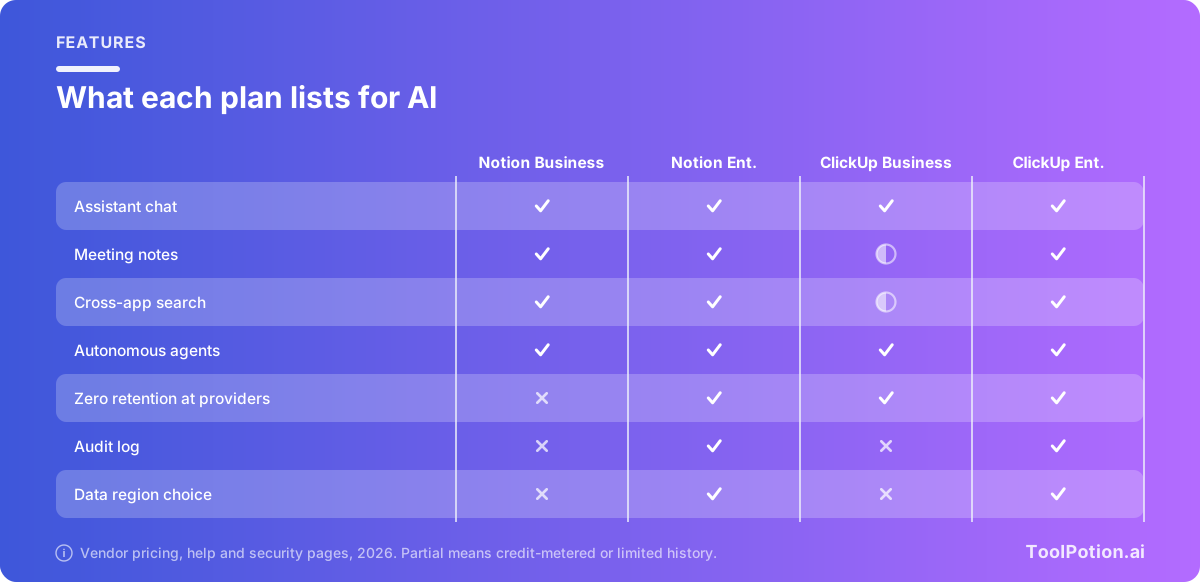
Where a feature sits on the ladder depends on the layout. In the classic one, the unlimited AI Notetaker comes with Everything AI at $28, not Brain AI at $9. In the bundled one, the Notetaker runs on credits from the lower tiers and is unlimited on Enterprise and Max. Search follows the same pattern. Connected Search across Google Drive, OneDrive, Gmail, Microsoft Teams and Slack is an Enterprise headline, though ClickUp's comparison table also lists private connections on Business with 90 days of history. If meeting capture and search are why you're buying, price those limits first, because Notion puts both on Business.
The top of the ladder is where ClickUp gets ambitious. Max, at $100 per user, adds custom skills, MCP connections, auto-memory and unlimited Autopilot agents. It's priced like a different product from the rest of the page. Most teams will sit on Business and treat Max as a power-user tier for a few people.
Our ClickUp AI Agents page covers the agent side in more detail, and the ToolRank board for AI project management shows where ClickUp sits against its rivals.
Models, data and admin controls
Notion is specific about its providers. Its security page says its models are hosted by Notion and by organizations such as Anthropic and OpenAI, that embeddings come from OpenAI's API and that vectors are stored in Turbopuffer (Notion security). On Enterprise the model providers use zero data retention. On other workspaces they keep customer data for up to 30 days. By default neither Notion nor its AI subprocessors train on customer data.
Limits are worth knowing before rollout. Notion's help center says Business and Enterprise plans include a usage allowance for certain AI features, and a workspace can hit a rolling six-hour or monthly cap and see a temporary pause. Owners on those plans can then let the team spend credits to keep going. ClickUp's terms are looser in wording. Use is subject to fair usage that ClickUp decides, and if you exceed it you may have to buy more or see AI performance degraded. Neither is unusual, but a heavy user can stall on either platform.
Notion's admin controls are practical. Owners on any plan can turn web search off under Settings, then Notion AI. Premium models stay off until an owner or admin enables them, and admins can cap how many credits each person spends. Notion also says it charges model usage at each provider's published rates with no markup.
ClickUp is vaguer on providers and firmer on promises. Its Brain page says it routes work to the best model and names GPT, Claude and Gemini, and its AI terms say ClickUp may add, remove or limit the third-party providers at any time. The security page says ClickUp forbids third-party providers from training on your data and from storing any of it, and that Brain respects your permissions, so the assistant can't reveal anything the asking user couldn't open. That's a vendor claim, so ask for the contract language.
On residency, the two are level, and both reserve it for Enterprise. ClickUp says Enterprise customers can host core workspace data in US, European or Asia Pacific data centers at no extra cost. Notion's data residency help page offers the same on its Enterprise plan, free of charge, with US, European and Asian regions. Notion's workspaces stay in the United States until they are migrated, so it isn't automatic.
What it costs for a real team
Take the classic ClickUp layout first. A Business seat plus Brain AI is $21, a dollar more than Notion Business at $20, so 25 seats cost $525 against $500 a month before any credit spend. Add Everything AI and ClickUp reaches $40 a seat, or $1,000. In the bundled layout ClickUp Business is $17 ($425 for 25 seats), but that figure is struck against a regular $25, which would be $625.
Credits are the wildcard on both sides and they aren't comparable. Notion sells 1,000 credits for $10 and ClickUp sells 10,000 for $10, but each vendor decides how many credits a task burns, and neither publishes a flat rate per action. Treat the first month as a measurement and set the admin caps early.
Which team shape fits which tool
Notion suits teams whose output is writing: product specs, research, handbooks, client briefs, meeting notes. The AI can answer a question about a decision made months ago because the decision is sitting on a page. Our guide to AI knowledge management tools goes deeper on that pattern, and the knowledge management board lists the alternatives.
ClickUp suits teams whose output is tracked delivery: sprints, support queues, agency client work, ops. The question there is who owns what and what's late, and Brain works on tasks, comments and time data. You can see how agent tools compare in general on the AI agents board.
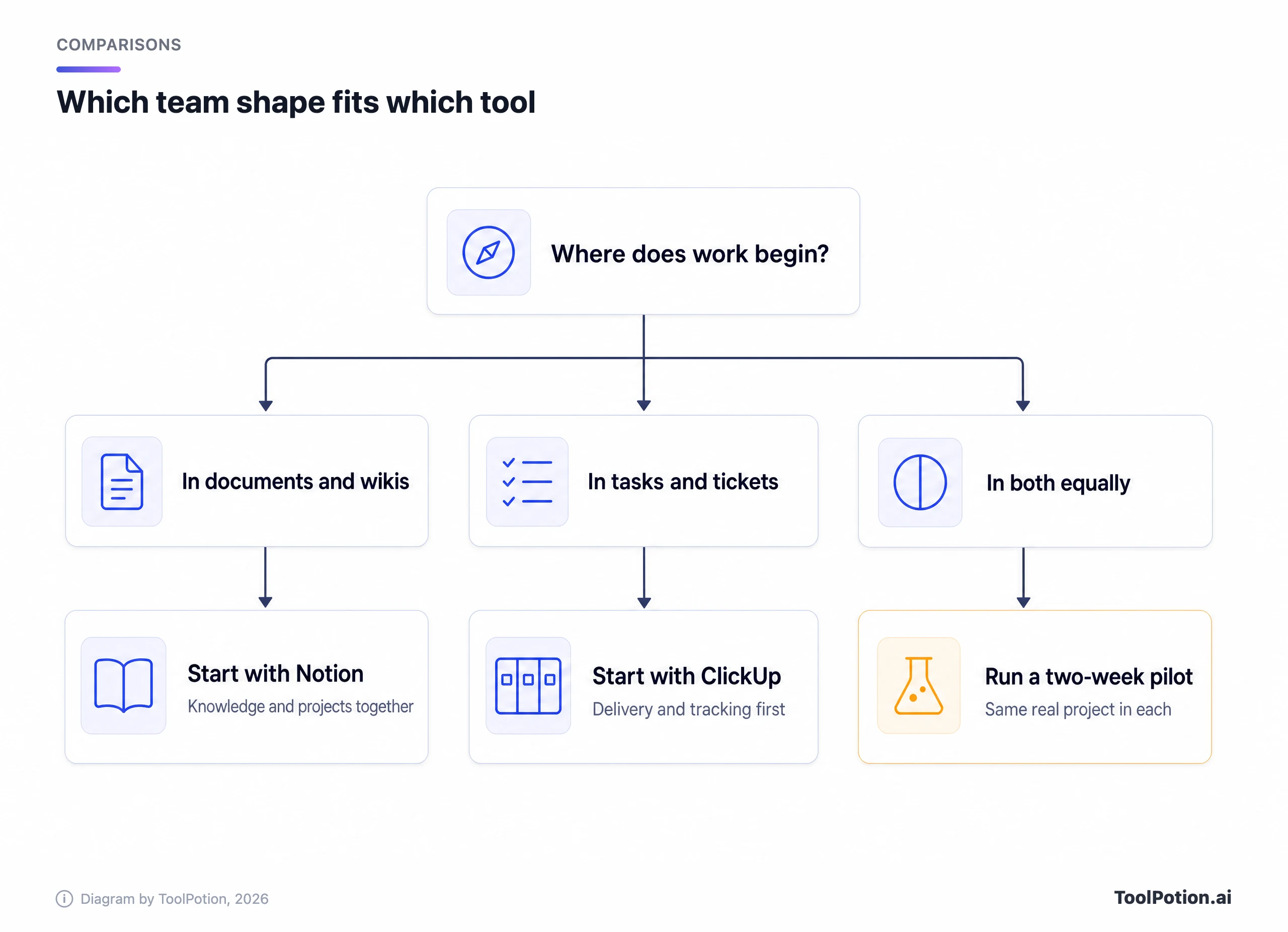
A rough rule helps here. Count where your last ten important decisions were recorded. If most are in a doc, a thread or a meeting summary, you're docs-first. If most are in a task comment, a status change or a ticket, you're task-first. The AI is only as good as the record it can read, so it makes sense to buy the tool that already holds yours.
Some teams don't fit either shape. Small studios and startups often run docs and tasks in the same week, and either tool will work if you commit to it. In that case the tie-breakers are admin controls and who has to pay for the heavy features. Notion's agents cost Business seats plus credits, and ClickUp's fullest feature set costs Everything AI or Max.
Here's a quick self-check that scores which way your team leans.
A two-week pilot that settles it
Pick one real project and run it in both tools with the same people. Keep the scope small enough to finish, and write down the results as you go.
- Connect the same apps in each tool and check which connectors your plan actually includes.
- Ask each AI five questions you already know the answers to, such as who owns the launch checklist or what was decided about pricing.
- Turn on one agent that does a boring recurring job, like a weekly status digest, and watch its credit use.
- Have an admin set the credit caps and the web search policy before everyone else starts.
- Ask each vendor for the data processing terms covering AI, and compare them with what the security pages promise.
Score the pilot on answers that were right, work the AI finished without edits, and how many credits that took. A tool that sounds smart but needs rewriting every time loses, whatever the pricing page says. The same logic applies to the broader question of agents versus plain automation, which is worth a read before you hand either tool anything that changes records.
Frequently asked questions
Is Notion AI included in the free plan?
Only as a trial. Notion's pricing page lists a trial of Notion AI on Free and Plus, and the full Notion Agent, AI Meeting Notes and Enterprise Search on Business and above.
Does ClickUp Brain cost extra?
Sometimes. On ClickUp's classic layout, yes: Brain AI is $9 per user per month and Everything AI is $28. On the newer bundled plans, Brain and a credit allowance come with every tier. ClickUp says those plans reach only some workspaces and that existing customers keep what they have, so check what your own upgrade page offers.
Which one is better for meeting notes?
Notion lists AI Meeting Notes on Business. ClickUp's unlimited AI Notetaker comes with Everything AI, Enterprise and Max, and runs on credits on lower bundled tiers. Notion is the simpler way in on the pricing pages. For a dedicated option, see our meeting notes board.
Do either of them train on my data?
Both vendors say no. Notion says neither it nor its AI subprocessors train on customer data by default, and ClickUp says it forbids third-party providers from training on yours. Get the wording in writing if you're in a regulated field.
Can I use my own choice of model?
Partly. Notion lets admins decide which premium models the team can use, and they stay off until switched on. ClickUp says it picks the best model per task, and its terms say the provider list can change. Neither documents a way to bring your own model on the pages we read.