The best AI knowledge management tool in 2026 depends on where your company's knowledge already lives. If it lives in a wiki you write yourself, Notion and Confluence now build the AI in. If it's scattered across a dozen apps, Glean and Atlassian's Rovo search all of them at once. If it can't leave your own hardware, AnythingLLM runs on your machine for free.
The leaderboard below ranks 25 tools. This guide does what a ranked list can't: it says what each one costs where the vendor publishes a price, names the catch, and gives you a way to choose. One thing matters more than any feature on a spec sheet: whether the AI respects who's allowed to see what. A search tool that answers from a document you were never meant to read isn't a productivity gain. It's an incident.
Prices below come from vendor pages in 2026, and some vendors publish none at all. Where that's the case, we say so instead of guessing.
The top 25 right now
- # 1Top PickNotionAI AppNotion is an AI workspace that combines docs, wikis, projects, and databases with custom AI agents, cross-app search, and automation. It is built for individuals and teams who want to run their work from one place.89ToolRankElite
- # 2Runner UpConfluenceAI AppConfluence is a collaborative workspace designed for teams to create, share, and manage knowledge efficiently. With AI capabilities, it helps draft, summarize, and find information quickly, enhancing productivity and project acceleration.72ToolRankStrong
- # 3Third PlaceGlean – Work AIPlatformGlean is an enterprise Work AI platform that connects knowledge, systems, and context. It enables users to find, create, and automate tasks across various business applications, offering secure, permission-aware access and reducing token waste for more efficient AI deployment.66ToolRankStrong

- 4RovoAI AppRovo is Atlassian's GenAI product that empowers teams to leverage organizational knowledge through Rovo Search, Rovo Chat, and specialized Rovo Agents, enhancing decision-making and workflow efficiency.59ToolRankSolid
- 5AnythingLLMGitHub RepoAnythingLLM empowers users to own their intelligence rather than rent it. This tool provides everything necessary for a robust local-first agent experience, enhancing productivity and autonomy in various tasks.58ToolRankSolid
- 6Mintlify - Intelligent Knowledge PlatformAI AppMintlify is an AI-native knowledge platform designed to help teams create and maintain world-class documentation. It integrates AI throughout the documentation lifecycle, from writing and editing to user understanding, ensuring content is accessible to both humans and LLMs. The platform aims to reduce documentation debt and enhance user experience.55ToolRankSolid
- 7AnythingLLMAI AppAnythingLLM is a free, private AI assistant that runs entirely on your own device. It lets you chat with documents, transcribe meetings, and build AI agents locally with no accounts, API keys, or token limits.55ToolRankSolid
- 8IBM Watson DiscoveryPlatformIBM Watson Discovery is an AI-powered platform that enhances productivity by automating information discovery using advanced NLP and intelligent document processing.54ToolRankSolid
- 9Snowflake CoWork | Enterprise Intelligence AgentAI AgentSnowflake CoWork is an enterprise intelligence agent designed for knowledge workers, offering governed analysis, automation, and action in one place. It empowers businesses with secure and scalable data infrastructure.54ToolRankSolid
- 10GitMind AIAI AppGitMind is an AI-powered workspace that transforms text, audio, video, and images into summaries, mind maps, and visual insights. It simplifies learning, thinking, planning, and creativity by converting scattered information into clear, structured knowledge. Available across desktop and mobile platforms.54ToolRankSolid
- 11ServiceNowPlatformServiceNow offers an AI platform designed to streamline enterprise workflows, enhancing productivity for both customers and employees. It provides a unified solution for digital business transformation across various sectors.52ToolRankSolid
- 12GuruAI AppGuru is an AI-powered knowledge management platform that structures and governs enterprise knowledge. It ensures that every AI-generated answer is trusted, providing a single source of truth for organizations to enhance their workflows and decision-making processes.52ToolRankSolid
- 13Dropbox DashAI AppDropbox Dash is a secure cloud storage solution designed to streamline file sharing and collaboration. It integrates with AI tools to enhance productivity, allowing users to organize and access content efficiently from any device.52ToolRankSolid
- 14SysAid CopilotAI AppSysAid Copilot is an AI-driven IT support solution that enhances efficiency by providing instant context and tools for quick issue resolution, allowing IT teams to focus on high-value tasks rather than repetitive ticket management.51ToolRankSolid
- 15SliteAI AppSlite is a self-maintaining AI knowledge base that keeps team documentation accurate by syncing with your tools, verifying content with your team, and answering questions with cited, trust-ranked results for people and AI agents.51ToolRankSolid
- 16Stack InternalAI AppStack Internal is a knowledge engine designed to organize and validate your team's expertise. It captures and curates enterprise knowledge, ensuring that crucial information is easily accessible and reduces time wasted in chat threads and wikis.51ToolRankSolid
- 17Contentstack Agentic Experience PlatformAI AppContentstack's Agentic Experience Platform (AXP) unifies a composable Content Cloud, real-time Data Cloud, and autonomous Agent OS. It empowers enterprise teams to automate digital workflows and deliver hyper-personalized, adaptive digital experiences, eliminating operational debt.51ToolRankSolid
- 18DocsGPTGitHub RepoDocsGPT is a private AI platform designed for agents, assistants, and enterprise search. It features a built-in Agent Builder, deep research capabilities, document analysis, multi-model support, and API connectivity, making it a versatile tool for various AI applications.50ToolRankSolid
- 19KMS Lighthouse - Enterprise Knowledge Management SystemAI AppKMS Lighthouse is an AI-powered knowledge management system designed to optimize enterprise knowledge. It provides teams with an AI knowledge base, enabling customers to receive fast, efficient service. The platform integrates with popular tools to enhance operational efficiency.50ToolRankSolid
- 20OpenTagAI AppOpenTag is an AI coworker for Slack that integrates with your company's knowledge and connected tools. It answers questions, completes tasks, and automates recurring workflows by routing requests to the most suitable AI model from over 40 options. This ensures efficient and cost-effective task completion within your team's existing communication channels.49ToolRankSolid
- 21Shelf.ioAI AppShelf.io is a next-generation AI knowledge management platform designed to eliminate bad data and ensure accurate GenAI answers. It provides a scalable and secure solution for organizations looking to enhance their operational efficiency and data governance.49ToolRankSolid
- 22Document360AI AppDocument360 is an AI-powered documentation platform that enables teams to create, manage, and publish knowledge bases, user manuals, and SOPs. It features AI search, writing tools, and integrations, making documentation efficient and accessible for businesses worldwide.49ToolRankSolid
- 23ReflectAI AppReflect is a minimalist note-taking app with backlinks and a native AI assistant that mirrors the way you think, helping you connect ideas, capture highlights, and never miss a note or connection.49ToolRankSolid
- 24Onyx AIAI AppOnyx AI is an open-source enterprise search platform that empowers teams to find information across all company data. It integrates with various applications, providing reliable responses and customizable configurations for enhanced productivity.49ToolRankSolid
- 25CapacitiesAI AppCapacities is a note-taking and knowledge management app that transforms your ideas into connected objects rather than files in folders. It helps you link anything to anything, making your knowledge network accessible when you need it. Available on multiple platforms.49ToolRankSolid



















How ToolRank works
ToolRank is ToolPotion’s proprietary ranking engine.
It continuously evaluates hundreds of signals across the open web — real traffic and popularity, audience and community strength, authority and longevity, adoption and engagement — processing millions of data points to place every tool where it has earned to be.
Every AI type is measured by its own tailored model: what proves traction for a SaaS app is not what proves it for an open-source framework or a creator channel. Missing a platform never counts against a tool — ToolRank judges the evidence that exists.
No paid placement. No self-reported numbers.
Quick picks
- Best overall: Notion, #1 on the 2026 board, with full AI and cross-app search on a $20-a-seat Business plan billed yearly.
- Best if you already run Jira: Confluence (#2), because Rovo ships inside paid plans with no extra line item.
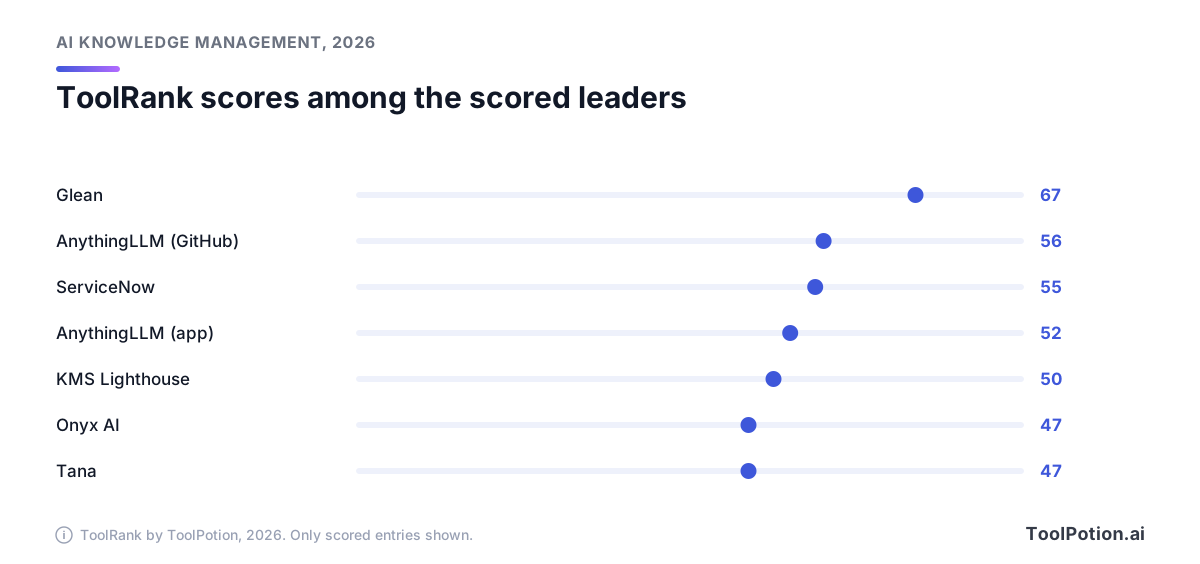
- Best for searching everything a company owns: Glean (#3), the highest ToolRank score of any scored entry at 67.
- Best free option: AnythingLLM (#5), an MIT-licensed app that needs no account.
- Best self-hosted for a whole team: Onyx AI (#23), open source with permission syncing.
- Best for documentation customers read: Mintlify (#6).
What changed in 2026
AI stopped being the upsell. Two years ago you bought the wiki and then paid extra for the assistant. In 2026 the assistant comes in the box and the meter moved to usage. Atlassian says Rovo is included at no extra cost on Standard, Premium and Enterprise plans, with a monthly pool of credits per user. Notion charges $10 per 1,000 credits for Custom Agents once the free allowance runs out. Mintlify bills its assistant at 25 credits per answer. Read the plan page for the unit, not just the seat price.
The other shift is that retrieval is now the product. The pricing pages above sell search, chat and agents over your own content, and the sales pitch has moved from "write better pages" to "find the right page." Both halves matter. A bolted-on chatbot over messy pages gives confident wrong answers faster, so the tools that rank well in 2026 also help you keep the knowledge itself accurate. Slite, for one, lists a doc verification workflow on its pricing page even on the cheapest plan.
Protocols matter too. Mintlify supports llms.txt and MCP, and Stack Internal ships an MCP server, so your documentation can feed other AI tools rather than only its own chat box. If you already use an assistant like Claude or ChatGPT at work, that connection is worth a line on your checklist.
Why permissions decide the shortlist
Every enterprise search tool follows roughly the same path, and the weak spot is the middle. Connectors pull content from your apps. An index stores it along with the access rules attached to each item. When someone asks a question, the tool filters by what that person may open before it retrieves anything, then writes an answer with links back to the originals. Glean's documentation describes it plainly: its connectors mirror access controls from each source, so search results only show a user what they could already see in the source app.
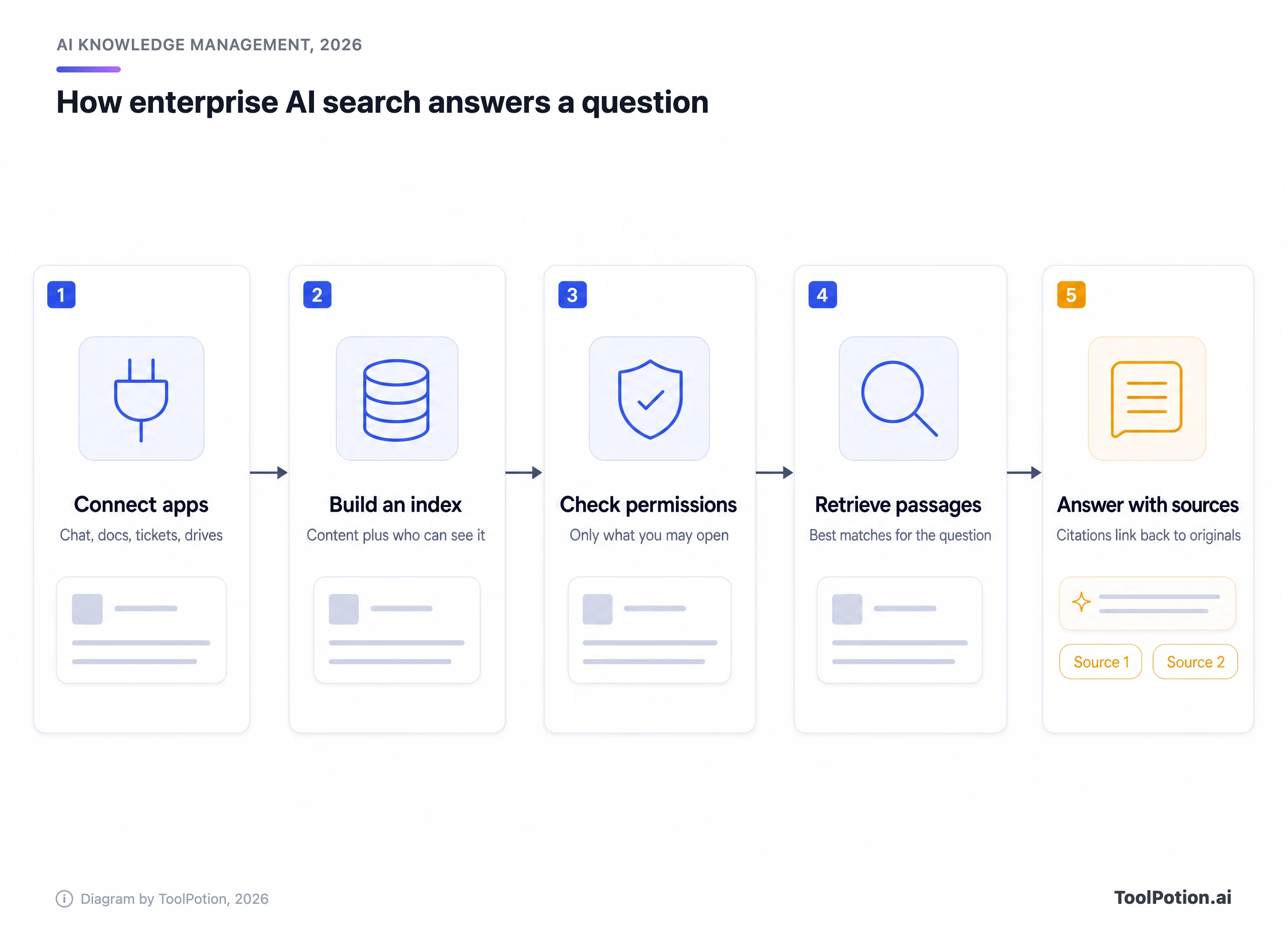
Press any vendor on three points in the demo. A permission change in the source app should reach the AI right away. Every answer should cite the document it came from. Admins should be able to see what was asked. A vendor who stumbles on the first one hasn't solved the hard part, and the second is how your team learns to trust (or catch) the answers. Fuzzy citations are the usual way a wrong answer survives.
The leaders, one by one
The scored entries are a small group, and the gaps are real. The chart shows who they are. Every other entry on the board is ranked but not yet scored, so we don't compare those on score.
Notion: best all-round workspace with AI
Notion is the board's #1 after climbing from #2 on the 2026 board. It is a wiki, a database tool and a project tracker in one, and the AI sits on top of all three. The pricing page puts full Notion AI, agents, meeting notes and Enterprise Search (still labelled beta) on the Business plan at $20 a seat billed yearly, or $24 monthly. Free and Plus get only a trial of the AI features.
The catch is the jump. A team on Plus ($10 a seat yearly) who wants real AI pays double per seat, then pays by credit for Custom Agents on top. Enterprise Search is still labelled beta on the pricing page, so don't plan a company-wide rollout around it without a pilot. Notion also isn't a company-wide search layer for everything. Its search reaches connected tools like Slack and GitHub, but it's strongest on what's written in Notion.
Confluence: best if Atlassian already runs your team
Confluence holds #2. It is the default wiki for teams that live in Jira, and its AI drafts, summarizes and answers questions over your pages. Atlassian's page lists a free plan for up to 10 users, Standard at $5.42 and Premium at $10.44 per user per month. Those are the monthly-billing rates shown for a 300-user team, and yearly billing is cheaper. Rovo comes with Standard and above, not the free plan.
It doesn't have a score yet, so there's no number to quote. What you can say is that, at the published rates, the cheapest route to an AI wiki in this guide is a Confluence Standard seat, provided your content is already there. If it isn't, migration is the real bill.
Glean: best for searching across every app
Glean is #3 after rising from #5, with a ToolRank score of 67 in the strong tier. It's the pure enterprise search play: connect Slack, Drive, Jira, SharePoint and Salesforce, and ask one question. Permission mirroring is the selling point, as covered above. The catch is cost and process. Its pricing page has only a demo button, so expect a sales cycle and a quote. It's built for companies where finding things across forty tools is a measurable drag. A ten-person startup with everything in Notion and Slack doesn't have that problem yet, and Glean's strength would sit mostly unused. The directory description adds that it can also run agents and automate work, but search is the reason to buy it.
Rovo: best AI layer for Atlassian shops
Rovo is Atlassian's search, chat and agents product, and it sits at #4 after slipping from #1 to #4 on the 2026 board. It searches Jira and Confluence deeply and reaches Google Drive, Slack and GitHub through connectors.
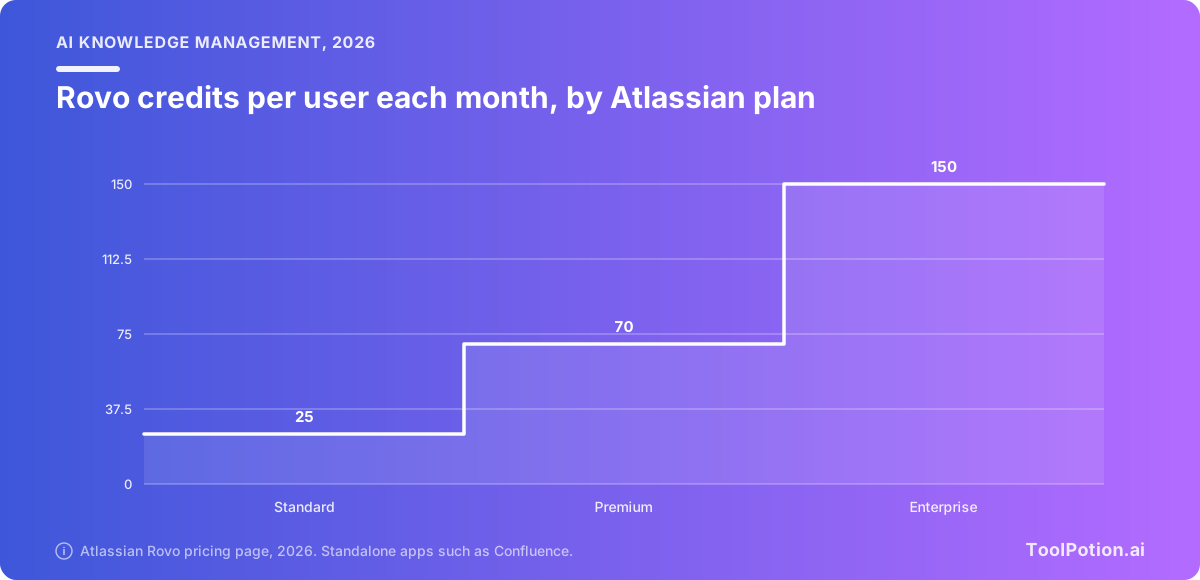
Credits are pooled across the organization and reset monthly. Once they run out, Atlassian charges $0.01 a credit. For a heavy-use team that's the number to model, because Standard's 25 credits per user go quickly if people lean on agents.
AnythingLLM: best private, local option
AnythingLLM is #5 with a ToolRank score of 56, and the app listing (the desktop listing) sits at #11 with 52. Both are solid tier. The project is MIT licensed with 66.6k GitHub stars, runs as a desktop app or a Docker server, and the Docker version supports multiple users with permission controls. You point it at your own documents and your choice of model, local or hosted.
The catch is that you become the IT department. There are no managed connectors to your SaaS apps, no vendor to call, and you choose the model quality your answers will have. For an individual, a legal team or anyone with data that can't leave the building, that's the point.
Mintlify: best for public docs and AI readers
Mintlify (#6) isn't an internal wiki. It's documentation software for products, built so customers and AI agents can read your docs, with llms.txt and MCP support. Its free Starter plan has five editor seats, and Pro adds the assistant with 10,000 credits a month. Buy it if your knowledge problem faces outward.
ServiceNow: best for IT and employee workflows
ServiceNow (#7, score 55, solid) is a workflow platform first and a knowledge tool second. Its fit is a large organization that already routes IT and HR requests through it and wants AI answers inside those flows. A small team would be buying a lot of platform for a wiki. Its listing mentions an AI Control Tower for governing AI use, which matters more to a compliance office than to a team lead who just wants answers.
Dropbox Dash: best for file-heavy teams
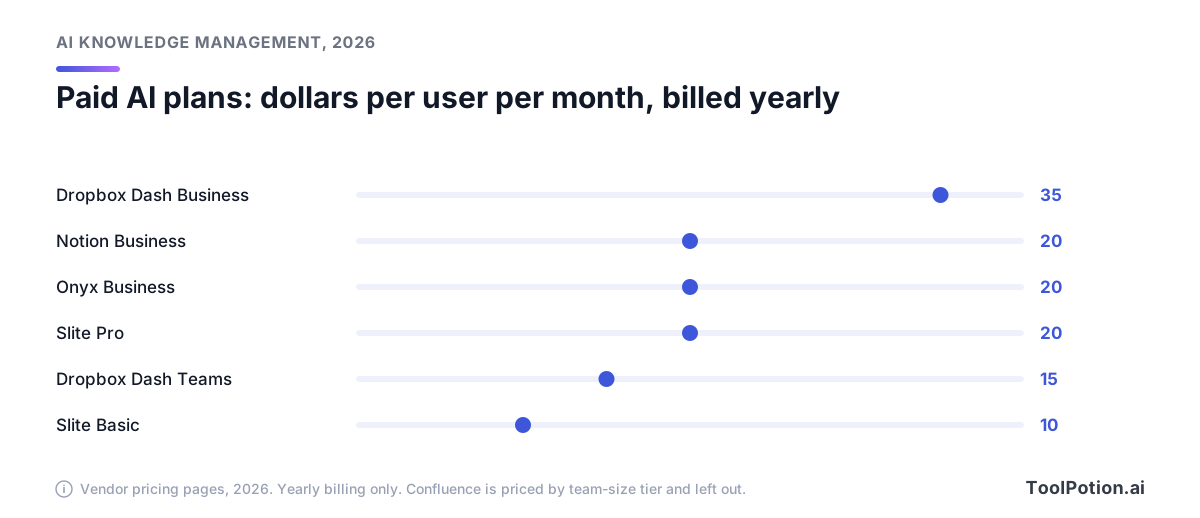
Dropbox Dash (#8) searches across connected apps and returns answers and verified results. Pricing is public: Teams is $15 per user billed yearly ($19 monthly) for up to 100 users, and Business is $35 yearly. The page also warns that future plans may cap how many items each member can use, with 30 days' notice. That's a price risk worth reading before you roll it out widely.
Guru and Stack Internal: best for trusted answers
Guru (#10) pitches itself as the governed knowledge layer, with permission-aware answers, audit trails and over 100 integrations. We couldn't verify a current price from the vendor, so we're leaving it out. Stack Internal (#12) is the rebrand of Stack Overflow for Teams and marks answers with authorship and recency cues and has an MCP server. Both are bets that verified knowledge beats more knowledge. That bet is easy to defend. If half your wiki is out of date, a faster search over it only reaches the wrong page sooner. Guru and Stack Internal make a person own each answer, which is slower to set up and cheaper to trust.
Slite: best lightweight team wiki
Slite is #14 after sliding from #6. Its Basic plan is $10 and Pro is $20 per user, billed yearly. Basic caps AI search at 30 questions a month, and search across connected tools like Slack and Jira starts at Pro. It's a good fit for a small team that wants a tidy wiki and doesn't want to administer anything.
Onyx AI: best open-source search for a team
Onyx AI is #23 with a score of 47 in the solid tier. It's the middle path between Glean and AnythingLLM: MIT licensed, self-hostable, with connectors that sync permissions. A hosted Business plan costs $20 per user billed yearly and includes 40+ connectors. You'd pick it to get enterprise-style search without sending data to a vendor.
How to choose
Start with the shape of your problem, not the feature list. The tools in this guide sit on a spectrum from one person's notes to a company-wide search layer, and the mistake we'd expect most often is buying from the wrong end of it.
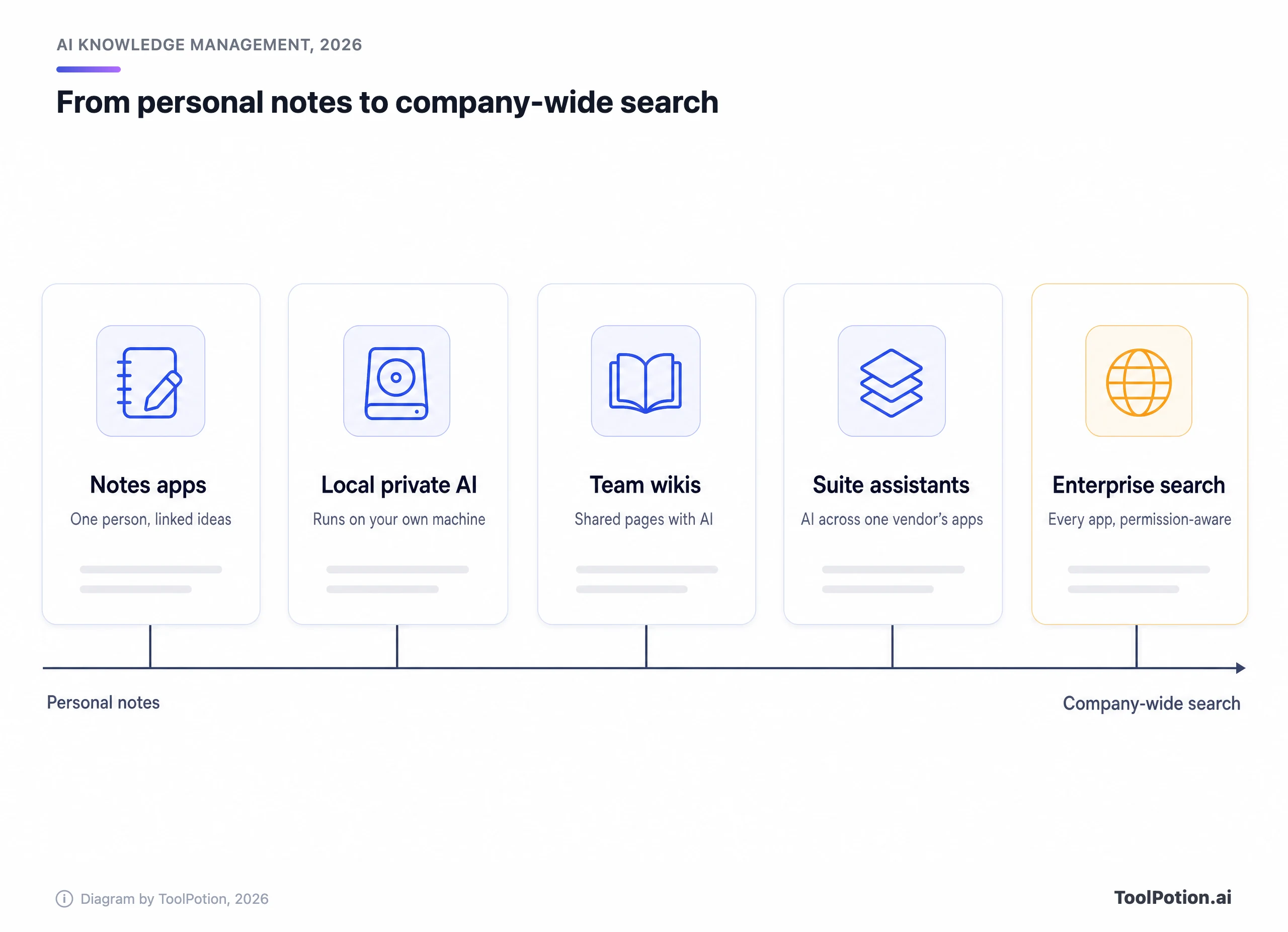
Solo users and small groups are served by Reflect and Capacities, which sit near the notes end, or by the local AnythingLLM app. A team of 20 that needs one source of truth wants a wiki: Notion, Confluence or Slite. A company of 500 with knowledge in thirty places needs search, which means Glean, Rovo, Dropbox Dash or a self-hosted Onyx. Customer-facing help centers are a different job again, and Mintlify is the pick for that.
Then run the money. The table lists every plan where a vendor publishes a per-user price. Sort it by price, and note how many rows say Trial instead of Free.
Seat price is the smaller half. The larger one is how many people need the AI at all, and what the meter costs. Notion's Custom Agents ($10 per 1,000 credits), Atlassian's Rovo overage ($0.01 a credit) and Mintlify's overage ($0.01 a credit) all work out to the same $10 per 1,000. What differs is what a credit buys. Mintlify charges 25 credits per assistant answer, so the 10,000 monthly credits on Pro cover about 400 answers. Rovo pools credits across the whole organization, so a quiet team can cover a busy one. Glean won't name a number until you've sat through a demo. Ask every vendor for the full quote with the usage assumptions written down.
If you'd rather be pointed somewhere, the tree below takes three clicks.
Whatever you pick, pilot it on one team with real questions before a company rollout. Check the answers against documents that person shouldn't see. That single test tells you more than any demo.
About ToolRank
ToolRank is ToolPotion's independent ranking of AI tools, and placement can't be bought. Every board shows a rank, a 0-100 score where one exists, and a tier. You can browse all of them on the ToolRank index, see the full Top 100 AI Knowledge Management board, or explore every tool in the category.
Rising and newer names worth watching
Not every mover is a leader. Slite fell from #6 to #14 on the 2026 board and Capacities from #4 to #17, while Reflect slid from #10 to #19, which suggests the personal-notes end of the spectrum is getting squeezed by wikis with AI built in. Meanwhile Glean climbed from #5 to #3 and Notion from #2 to #1.
Past the top 25, the board has Bloomfire at #27, Heptabase at #28 and PrivateGPT at #34. The last is a self-hosted pick that overlaps with the private options above. For adjacent needs, see our boards for writing technical documentation and summarizing documents.
Frequently asked questions
What is AI knowledge management?
It's software that stores your organization's documents and answers, and uses AI to find, summarize and draft from them. Some tools are wikis with AI added. Others are search layers over the apps you already use.
What does permission-aware search mean?
The AI only answers from content the asking person is allowed to open in the source app. Glean's documentation describes mirroring each source's access controls, and you should ask any vendor how quickly permission changes reach the index.
Is there a free AI knowledge base?
Yes. Notion and Atlassian publish free plans, though Notion's free AI is only a trial and Confluence's free plan leaves out Rovo. AnythingLLM's desktop app is free and MIT licensed, and Onyx's code is open source if you host it yourself.
How much do these tools cost per user?
Published prices in this guide run from $5.42 for a Confluence Standard seat (monthly billing) to $35 for Dropbox Dash Business (billed yearly). Glean publishes no price. Usage credits can add to the bill.
Can I self-host an AI knowledge base?
Yes. AnythingLLM runs on your desktop or in Docker, and Onyx supports air-gapped, self-hosted deployments according to its repository. You then own the setup, the updates and the model choice.
Do these tools replace a wiki?
Search tools like Glean sit on top of your wikis and don't replace them. Notion, Confluence and Slite are the wikis. If your pages are stale, a search layer will find stale answers faster.