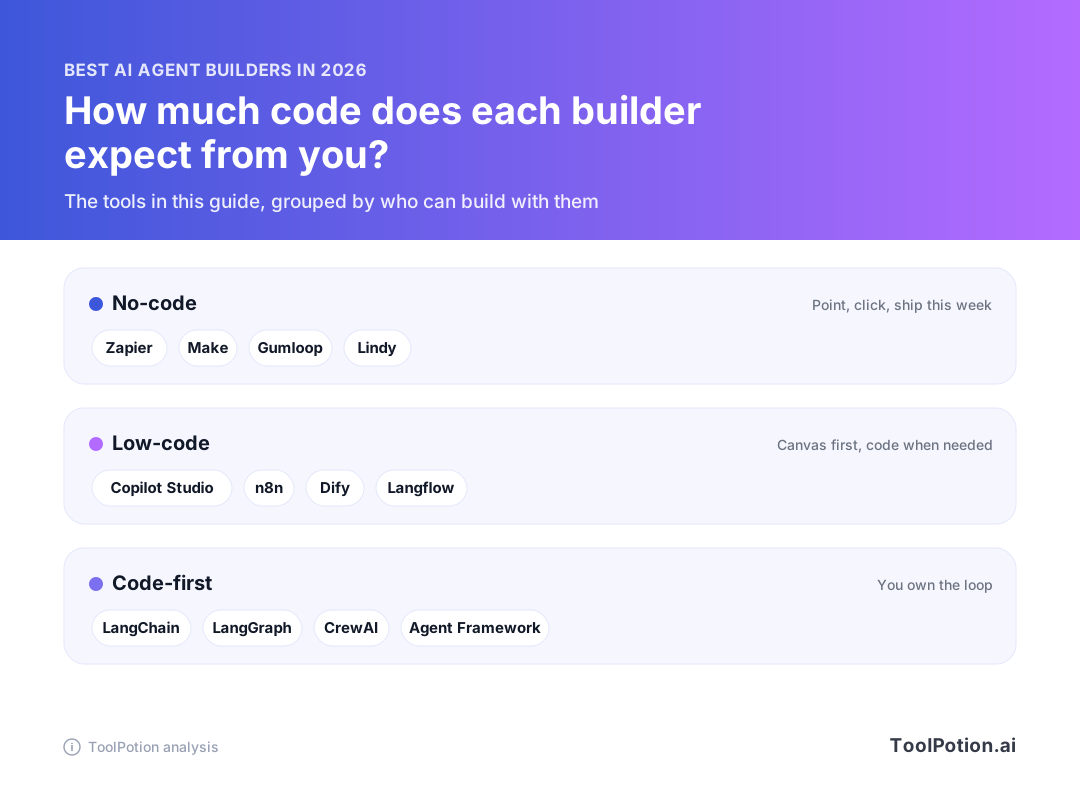
The best AI agent builders in 2026 come in three kinds, and the kind you pick matters more than the product. No-code platforms like Zapier and Make let an ops team ship an agent this week. Low-code canvases like n8n and Dify trade some polish for control. Code-first frameworks like LangChain and LangGraph hand developers the whole loop, and every bug that comes with it.
This guide is for people building agents. Ready-made agents you simply use have their own leaderboard. The ranking below mixes both, which is why the top of it looks odd: autonomous agents, automation platforms and developer libraries share one list without sharing a job. So we sorted the field by how you build, ranked within each group, and said plainly where a tool is the wrong call.
Our one-line advice: pick the lowest-code option that can do the job. Code you don't write is code you don't debug. The full ranking lives on the AI Agent Builders board, and what follows is the judgment that a list can't give you.
The top 25 AI agent builders right now
- # 1Top PickManus: Hands On AIAI AgentManus is an AI action engine that automates workflows, executes tasks, and extends your capabilities. It integrates seamlessly with your browser to enhance productivity and streamline complex processes without constant supervision.77ToolRankStrong
- # 2Runner UpZapier AI AutomationAI AppZapier enables teams to build and scale AI workflows and agents across over 9,000 apps. It provides a centralized platform for setting guardrails, managing model access, and monitoring AI usage, ensuring confident and secure AI adoption without IT bottlenecks. Start automating with AI today.76ToolRankStrong
- # 3Third PlaceMake AI AutomationAI AppMake is a visual AI automation platform that connects apps, data, and AI models. Build and manage AI agents and workflows using a no-code interface, drag-and-drop, or prompts. Scale automations across your business with over 3,000 integrations, from idea to deployment, with a free plan available.75ToolRankStrong



- 4AutoGPT: Autonomous AI AgentsGitHub RepoAutoGPT is a platform for creating, deploying, and managing autonomous AI agents. It allows users to automate complex workflows by building custom agents or using pre-configured ones. The platform offers an intuitive interface for agent design, workflow management, and performance monitoring, enabling users to focus on their ideas.75ToolRankStrong
- 5Microsoft Copilot StudioAI AppMicrosoft Copilot Studio is a platform for creating and managing AI agents. Build custom agents that connect to your business data, respond to natural language prompts, and automate tasks. Deploy agents across various channels, including Microsoft 365 apps and websites, to enhance workflows and customer interactions.74ToolRankStrong
- 6Devin | The AI Software EngineerAI AgentDevin is an AI coding agent designed to assist developers in building better software more efficiently. It utilizes parallel cloud agents to enhance productivity for serious engineering teams.73ToolRankStrong
- 7LM Studio BionicAI AppLM Studio Bionic is a local AI agent from Element Labs that runs on your own computer. It edits and saves documents, writes code, automates tasks, and takes voice commands transcribed on-device. It runs open models like GLM 5.2, Kimi K3 and DeepSeek V4 Pro through LM Studio's llama.cpp and MLX runtime, built for developers and privacy-focused users.73ToolRankStrong
- 8LangChainFrameworkLangChain is an AI agent engineering platform that enables developers to build, test, and deploy reliable AI agents. It offers tools for observation, evaluation, and deployment, supporting the entire agent development lifecycle for teams of all sizes.72ToolRankStrong
- 9Sierra AI AgentsAI AgentSierra empowers businesses to build advanced AI agents for enhanced customer experiences. It enables personalized interactions across multiple channels, automates workflows, and provides deep insights into agent performance, all while offering outcome-based pricing for measurable value delivery.71ToolRankStrong
- 10Gemini Enterprise Agent PlatformPlatformGemini Enterprise Agent Platform is a comprehensive Google Cloud platform for developers to build, scale, govern, and optimize AI agents. It offers tools for creating generative AI applications and transforming enterprise workflows into powerful agentic systems.70ToolRankStrong
- 11LangflowFrameworkLangflow is a low-code AI builder designed for creating and deploying AI agents and Retrieval-Augmented Generation (RAG) applications. It offers a visual interface with drag-and-drop functionality, allowing users to build complex workflows without extensive coding. Langflow supports major LLMs, vector databases, and AI tools, enabling rapid iteration and deployment.70ToolRankStrong
- 12LangGraph: Agent Orchestration FrameworkFrameworkLangGraph is an agent orchestration framework designed for building reliable AI agents. It provides a low-level agent runtime, enabling developers to design and control agent workflows. Key benefits include the ability to handle complex tasks, persist memory, and integrate human-in-the-loop controls, all within a flexible and customizable framework.70ToolRankStrong
- 13Taskade AI Business App BuilderAI AppTaskade Genesis transforms a single prompt into live business applications, including CRMs, dashboards, and client portals. It leverages AI agents and automations to put your business on autopilot, requiring no coding or developer expertise. Build, run, and share custom apps effortlessly.69ToolRankStrong
- 14GumloopAI AgentA multiplayer AI agent builder that lets anyone at a company build agents with any AI model and integration to automate work, while IT keeps control over access and usage.69ToolRankStrong
- 15Dialogflow Customer Experience Agent StudioPlatformDialogflow's Customer Experience Agent Studio enables rapid development of personalized conversational agents. Powered by Gemini, it supports multimodal interactions and integrates seamlessly across channels, enhancing customer engagement and reducing operational costs.68ToolRankStrong
- 16SoundHound AIAI AppSoundHound AI offers conversational AI agents designed to automate operations, service, and commerce for businesses. Their OASYS platform enables the creation of AI agents that learn and improve with each interaction, driving real-world impact by reducing costs, boosting revenue, and enhancing customer loyalty across various industries.68ToolRankStrong
- 17DifyPlatformDify is a platform for building, deploying, and managing agentic workflows and RAG pipelines. It empowers teams to create AI applications at any scale, from initial idea validation to production. Dify offers integrations, observability, and a community for AI innovators.67ToolRankStrong
- 18CrewAIFrameworkCrewAI is a multi-agent platform designed for enterprises, enabling teams to build and manage AI agents efficiently. It streamlines automation processes while ensuring governance and compliance, making it suitable for both business and technical teams.67ToolRankStrong
- 19Jules - An Autonomous Coding AgentAI AgentJules is an Autonomous coding agent that allows developers to focus on their coding tasks while it handles the mundane tasks. It streamlines the coding process, making it easier to manage projects and collaborate effectively.66ToolRankStrong
- 20Zaia - Vibe AgentAI AppZaia's Vibe Agent is an Agentic OS that allows businesses to create truly autonomous AI agents and entire departments. Build powerful agents and teams simply by describing your needs in text, with advanced options for detailed control. Integrates with over 60 tools for seamless automation.64ToolRankStrong
- 21Kore.aiPlatformKore.ai provides an enterprise AI platform that accelerates outcomes in customer service and employee productivity through agentic AI applications. It offers pre-built applications and tailored solutions across various industries, enhancing operational efficiency and user experience.64ToolRankStrong
- 22rabbit OS3AI Apprabbit OS3 is an agentic operating system that integrates AI models and connected computers to help users complete tasks. It supports multiple communication channels and allows users to bring their own API keys for model access.59ToolRankSolid
- 23LindyAI AgentLindy is an AI teammate that connects to a company's tools and does real work across departments: marketing, sales, support, operations, finance, product and engineering. It manages inboxes, sits in meetings, runs scheduled routines like daily briefs, and learns repeatable skills that the whole team can reuse, working from Slack, Gmail or iMessage.59ToolRankSolid
- 24n8n Workflow AutomationAI Appn8n is a powerful workflow automation platform designed for technical teams. It uniquely blends AI capabilities with business process automation, offering the flexibility of code alongside the speed of no-code. This allows users to build complex automations, integrate AI models, and streamline operations efficiently.59ToolRankSolid
- 25JetBrains AirAI AppJetBrains Air is a comprehensive system for building software with AI agents. It integrates with existing agents and ACP-compatible ones, offering flexible AI access and team collaboration in cloud environments.58ToolRankSolid

















How ToolRank works
ToolRank is ToolPotion’s proprietary ranking engine.
It continuously evaluates hundreds of signals across the open web — real traffic and popularity, audience and community strength, authority and longevity, adoption and engagement — processing millions of data points to place every tool where it has earned to be.
Every AI type is measured by its own tailored model: what proves traction for a SaaS app is not what proves it for an open-source framework or a creator channel. Missing a platform never counts against a tool — ToolRank judges the evidence that exists.
No paid placement. No self-reported numbers.
Quick picks
- Best for most ops teams: Zapier, because of the app catalog and a free plan to start on.
- Best visual canvas on a budget: Make.
- Best if you need to self-host: n8n, with a free Community Edition you run yourself.
- Best for Microsoft-heavy companies: Microsoft Copilot Studio.
- Best for developers: LangChain to get going, then LangGraph once the agent needs state and a human sign-off.
- Best for teams of cooperating agents: CrewAI.
What changed in 2026
Two years ago, building an agent meant gluing a prompt to a loop and hoping the wrapper library survived the month. The plumbing has settled since. The Model Context Protocol, the open standard for plugging tools into models, moved to a neutral Linux Foundation fund in 2025 (Anthropic), and most of the builders below now speak it.
The frameworks grew up too. LangChain and LangGraph reached 1.0 in 2025 with a promise of no breaking changes until 2.0 (LangChain). In 2026 Microsoft shipped Agent Framework 1.0 for .NET and Python, merging Semantic Kernel and AutoGen into one SDK (Microsoft). For developers, that means you can choose a framework without wondering whether it will be rewritten under you next year.
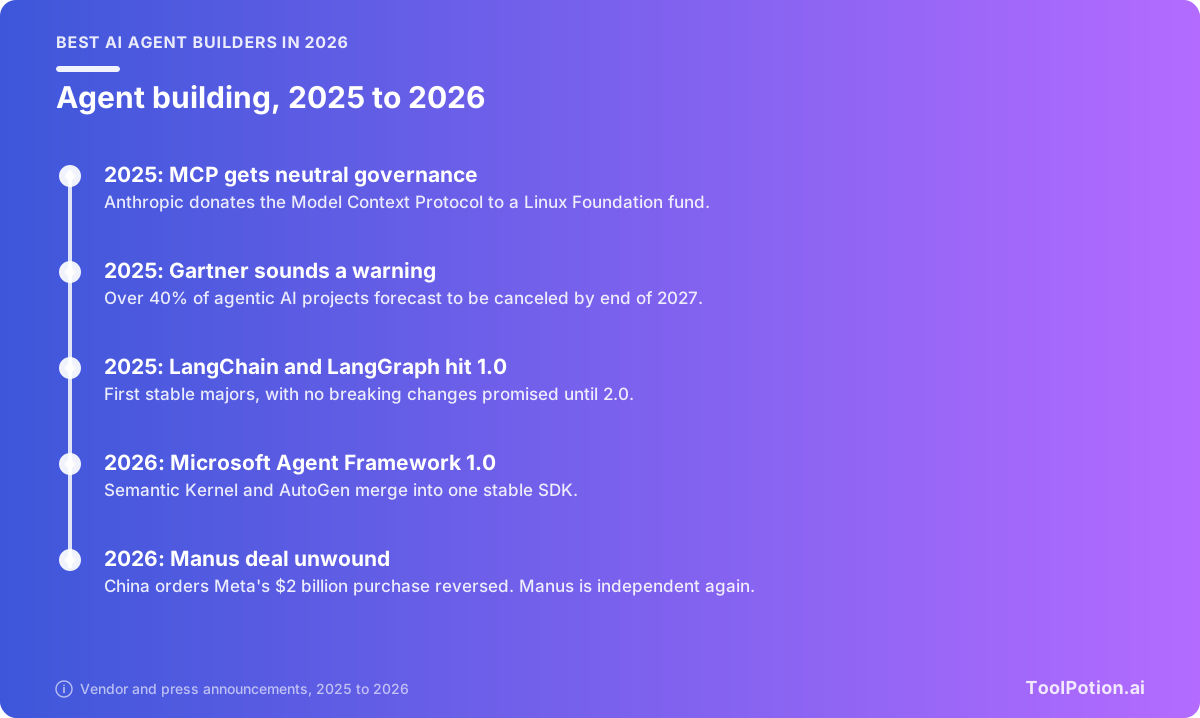
The mood among analysts is less cheerful. Gartner expects more than 40% of agentic AI projects to be canceled by the end of 2027, blaming rising costs, unclear business value and weak risk controls. It also says only about 130 of the thousands of agentic AI vendors are real, the rest being "agent washing" of chatbots and old automation (Gartner). Treat that as a buying filter. If a vendor can't show you the loop, the tools and the approval step, you're looking at a chatbot with a new name.
China's regulators ordered Meta to unwind its $2 billion purchase of Manus in 2026, and Manus has since announced it is independent again (Silicon Republic). Whatever you build on, know who owns it, and what happens to your data if that changes.
What an agent is made of
Strip away the branding and every agent on this board has the same parts. Something triggers it. A model plans a step, calls a tool, reads the result and plans again. Memory carries context between steps, guardrails limit what it may touch, and for anything risky a person approves the output before it goes out. Builders differ mainly in how many of these they wire up for you.
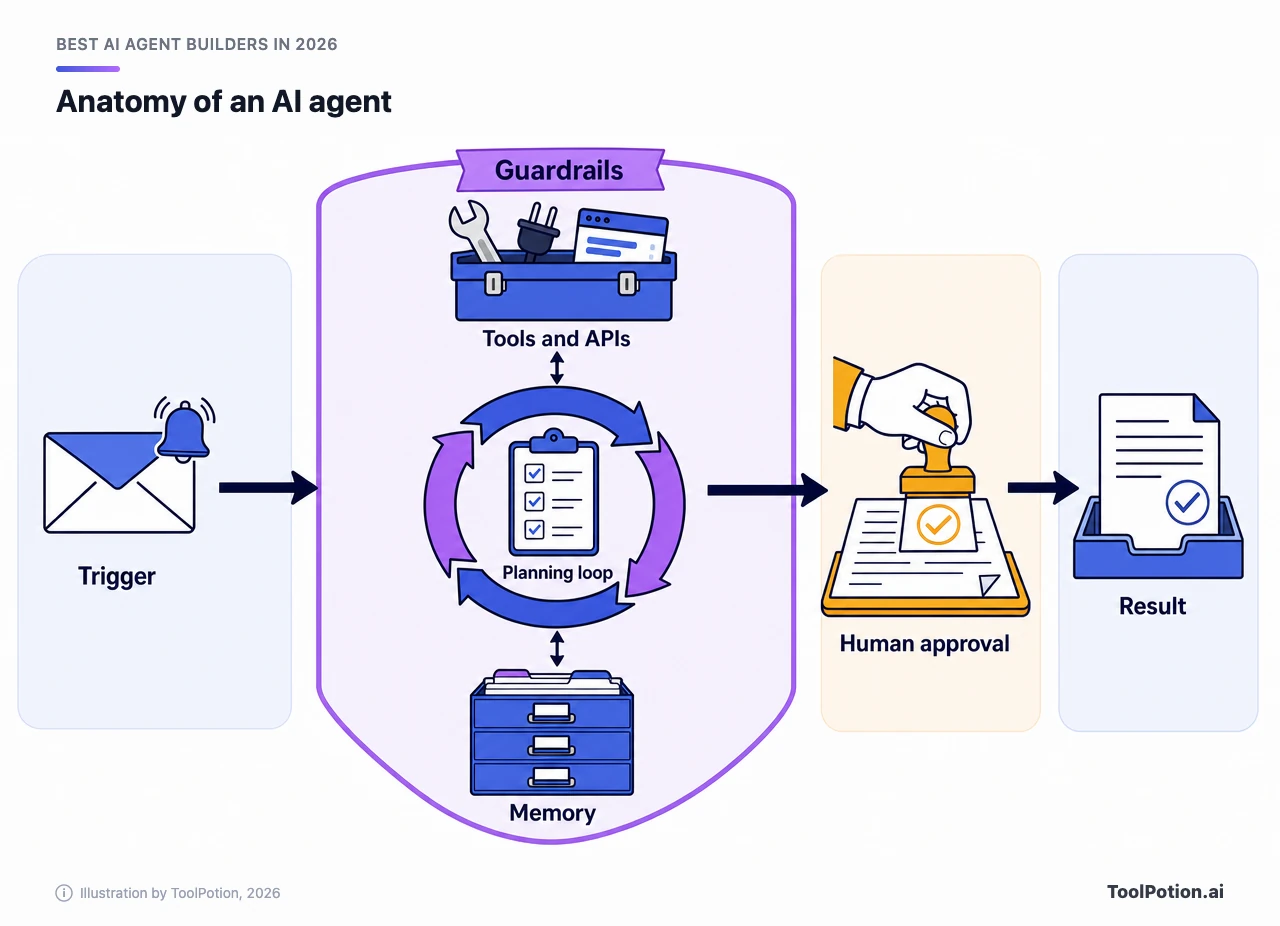
The loop is what separates an agent from an automation. Anthropic draws the line cleanly: workflows are "systems where LLMs and tools are orchestrated through predefined code paths," while agents are systems where the model directs its own process and tool use (Anthropic). Most useful business automation is the first kind, and that's fine.
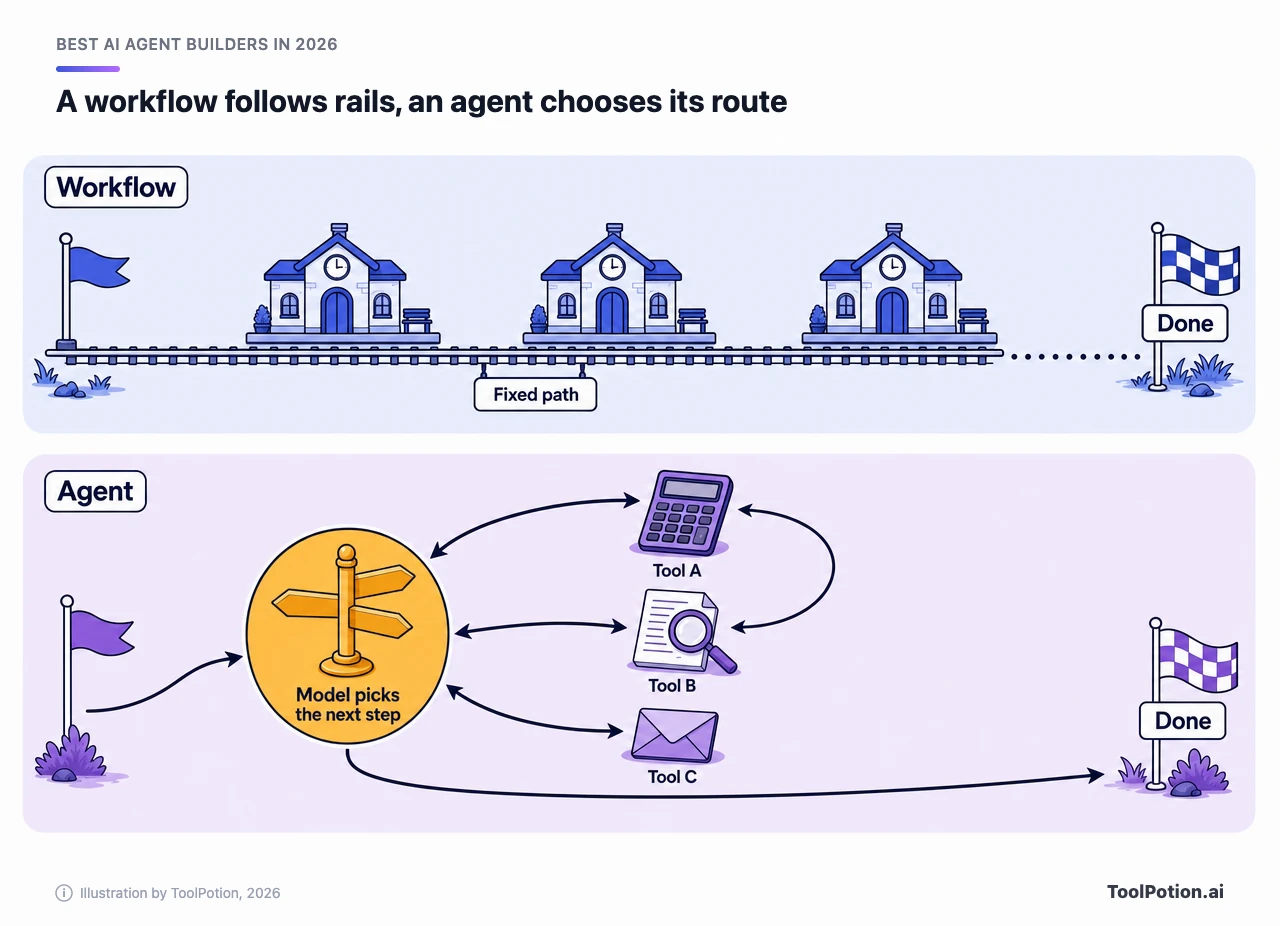
The two camps are converging. Zapier and Make began as workflow tools and added agents. LangGraph began as a way to control agents and now mixes fixed logic with model-driven steps. Anthropic's advice for anyone starting out is to begin with simple prompts and add multi-step agentic systems only when simpler solutions fall short, and to be wary of frameworks that hide the prompts and responses. We agree, and it's why the next section starts with the least code.
Sorted by how you build
This is where the leading builders sit, from no-code to code-first. The grouping is our editorial read of each product, not a score. Everything below follows this order, and each tool carries its place on the 2026 board.
No-code builders for ops teams
Zapier: the safe default
Zapier is #2 on the 2026 board and the login most ops teams already have. Its listing counts more than 9,000 connected apps, agents sit next to the classic Zaps rather than replacing them, and it can expose its actions to Claude and ChatGPT over MCP. The free plan gives you 100 tasks a month, and Zapier Agents carry their own allowance of 400 activities free and 1,500 on Pro. Pro starts at $19.99 a month billed annually (Zapier pricing). The catch is bookkeeping: tasks and agent activities are counted separately, so estimate both before you commit.
Make: more canvas for the money
Make sits at #3, up from #8 in the previous ranking. You build agents on the same drag-and-drop canvas as its automations, with more than 3,000 integrations behind it. Core costs $9 a month, the free plan stops at 1,000 credits and two active scenarios, and agents come with every plan (Make pricing). Each module action spends a credit, so a chatty agent adds up fast. Run Make and Zapier against one real workflow before you believe anyone's price comparison, including ours.
Gumloop: agents for every team, with IT holding the keys
Gumloop is #14 with a ToolRank score of 68, strong tier, up from #47. It calls itself a multiplayer agent builder: anyone at a company can build, and IT governs access with SSO, audit logs and usage monitoring. It plugs into apps through MCP servers. That governance angle is the reason to shortlist it for a company where dozens of non-developers will build. We couldn't verify its pricing from its own page, so we're leaving numbers out.
Lindy: a teammate instead of a canvas
Lindy skips the node graph. You describe a teammate that handles inboxes, meetings and recurring routines across sales, support and operations, and it connects to your tools. It's #20 with a score of 59, solid tier, up from #57. Pricing is per user, so it suits a handful of heavy users better than a wide rollout.
Low-code canvases with an escape hatch
Microsoft Copilot Studio: the Microsoft-shop default
Microsoft Copilot Studio is #8 with a score of 71, strong tier, up from #19. It's a graphical studio for agents and workflows that publish to Teams, Microsoft 365 Copilot and websites. Billing is consumption-based: prepaid packs cost $200 a month for 25,000 Copilot Credits, pay-as-you-go is the alternative, and both need an Azure subscription (Microsoft). If your data already lives in Microsoft 365, the connectors are the whole argument. If it doesn't, the argument gets thin. Forecasting credit spend is the hard part, so pilot a metered workload first.
n8n: for technical teams that want the source
n8n is #21 on the 2026 board (ranked but not yet scored). It mixes a visual canvas with code nodes, lists more than 1,500 integrations and runs anywhere you can run Docker. The Community Edition is free to self-host. Hosted plans start at EUR 20 a month billed annually for 2,500 executions, and n8n prices by workflow execution, however many steps one contains (n8n pricing). One licensing note: it's source-available under the Sustainable Use License, which covers internal business use but not paid redistribution, so check it before you resell what you build.
Dify: open-source LLM apps with a hosted option
Dify is #15, score 67, strong tier, up from #32. It bundles a visual workflow builder, a retrieval pipeline for your documents, agent features and observability, and you can self-host the Community Edition with Docker Compose or use its cloud. Read the license before building a product on it, because it's a modified Apache 2.0 license that requires a commercial license for multi-tenant services and keeps its branding in place. Dify is the better fit when the thing you're making is a knowledge assistant, since retrieval is built in rather than bolted on.
Langflow: visual, with the Python in plain sight
Langflow jumped from #62 to #9 and scores 70, strong tier. It's MIT licensed, has a visual builder over real Python source, ships a desktop app, and can deploy a flow as an MCP server so other agents call it as a tool. It's a builder's tool rather than a business user's, so hand it to someone comfortable reading a stack trace.
Entry prices across these vendors use five different meters: tasks, credits, executions, runs and traces. The table lines up what each one publishes, and every column sorts.
Code-first frameworks for developers
LangChain: the default starting point
LangChain is #5 with a score of 73, strong tier, a climb from #22. Version 1.0 centered the library on one helper, create_agent, with middleware hooks for human approval, summarizing long conversations and redacting personal data (LangChain). The observability side, LangSmith, is its own listing at #23. It has a free Developer seat with 5,000 traces a month and a $39 per seat Plus plan (LangSmith pricing). The cost of a framework is abstraction: you'll still end up reading the prompts it sends on your behalf.
LangGraph: when the agent needs memory and a human in the loop
LangGraph is #11 with a score of 70 and moved up from #21. It's the lower-level runtime that LangChain's own agents run on. Its pitch is long-running, stateful work: execution that resumes after a failure, a person who can inspect and edit the agent's state mid-run, and both short and long-term memory. More code, more control. If your agent can spend money or message customers, this is where we'd start.
CrewAI: role-playing teams
CrewAI is #13, score 69, up from #33. It's MIT licensed and independent of LangChain, and it splits the job in two: Crews let agents delegate to each other, while Flows give you event-driven, predictable control. Start with Flows if you need predictability, because a crew of agents multiplies model calls and makes the bill harder to forecast. The hosted Basic plan is free for 50 workflow executions a month.
Microsoft Agent Framework: the .NET answer
Microsoft Agent Framework closes out the top 25 at #25 with a score of 55, solid tier, the lowest in the group. Its youth likely explains that. It supports sequential, concurrent, handoff and group-chat patterns, MCP and agent-to-agent protocols, and it's MIT licensed. If you're on Azure and .NET, it's the obvious pick. Elsewhere, LangGraph has the longer track record.
Autonomous agents are on the board, but they're a different job
The figure below shows how tight the top is: these eight builders span only nine points, from 77 down to 68. Notice who leads. Manus, at #1 with a score of 77, is an agent you use rather than assemble. It browses and executes tasks on your behalf, which is exactly why it belongs on the ready-made agents board as much as this one.
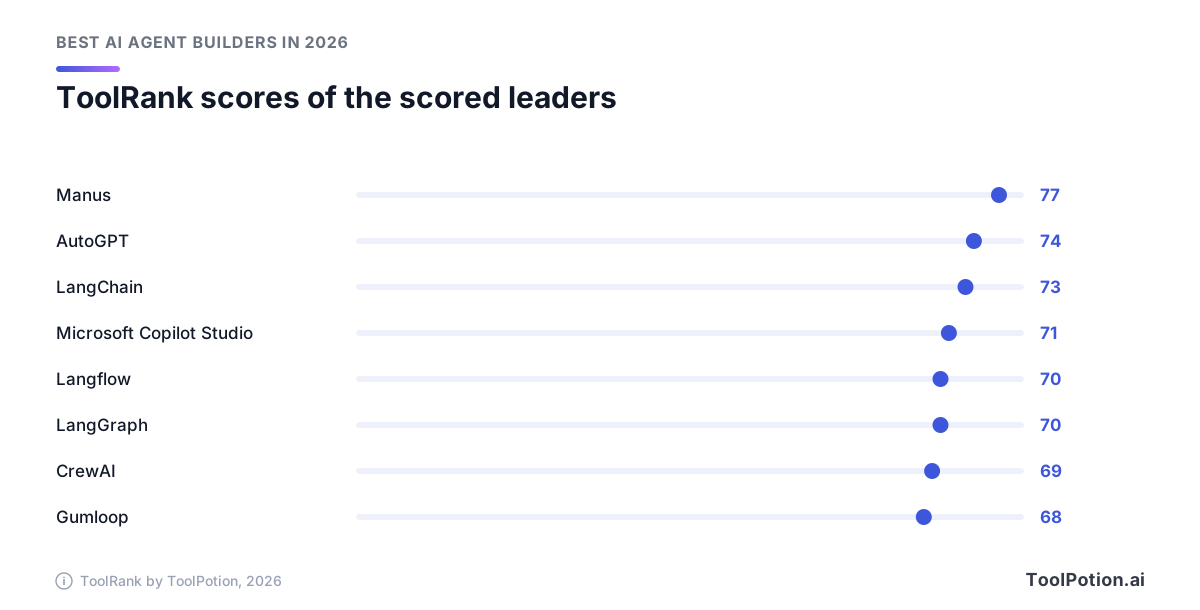
AutoGPT is the exception that proves the sort. At #4 with a score of 74, it's both: a visual builder, a library of pre-built agents and a platform you can self-host with Docker and your own model keys. Its platform code uses the Polyform Shield license, free for internal business use but not for selling as a competing hosted service, while the older classic agent is MIT. LM Studio Bionic (#7, 73) runs a local agent on open models on your own machine. Sierra (#10, 70) sells customer-service agents to enterprises, so you configure it rather than code it.
Then there are the coding agents. Devin (#6, 73) and Jules (#17, 65) landed here through their listing category, and they're better judged on the software developers board.
How to choose
Start from who will maintain the thing, not from the feature list. An agent that only its author understands is a liability the day they change jobs. The picker below asks three questions and lands on one tool from this guide.
A few situations the picker can't capture. If the job is moving data between apps and a model only classifies or drafts along the way, you want an automation tool, and our note on agents versus automation tools covers the trade-off. If the agent will talk to customers, budget for the approval step before you build anything else.
Whatever you shortlist, put four checks to every vendor:
- Know what happens when the model is wrong and where a person steps in.
- Find the meter (tasks, credits, runs) and price a looping agent at your volume.
- Check whether you can export the flow, or run the code yourself, if terms change.
- Make sure every step of a run can be traced afterward.
For narrower jobs, the building AI agents board ranks tools by task.
About ToolRank
ToolRank is ToolPotion's independent ranking for AI tools, and placement can't be bought. Scores run from 0 to 100 and each entry sits in a tier. Not every entry is scored yet, which is why entries like Zapier, Make and n8n show a rank without a number. Every board is listed on the ToolRank leaderboards page.
Rising names worth watching
Several tools moved a long way up the 2026 board. Jules climbed from #87 to #17. Taskade went from #60 to #12 on the strength of its prompt-to-app approach, which turns one sentence into a CRM, dashboard or client portal. Lindy rose from #57 to #20. Voiceflow, the conversational platform for chat and voice agents, went from #56 to #22. Relevance AI, an enterprise workforce builder, went from #45 to #24.
Just outside the top 25, Botpress (#27), MindStudio (#28) and Open Interpreter (#30) are the ones to check next. The rest of the field is in the full AI agent builders directory.
Frequently asked questions
What is the best AI agent builder in 2026?
There isn't one winner, because the tools solve different problems. Zapier is the easiest start for ops teams, n8n suits technical teams that want to self-host, LangGraph is the strongest option for developers who need control, and Copilot Studio fits Microsoft shops. The live leaderboard shows how all 25 stack up.
Do I need to code to build an AI agent?
No. Zapier, Make, Gumloop and Lindy are built for people who don't write code, and Copilot Studio is low-code. You'll want a developer for anything that touches payments, customer messages or sensitive records.
What's the difference between an AI agent and an automation workflow?
A workflow follows a path you defined. An agent decides its own next step using a model. Most real setups mix the two, with fixed steps around one or two model-driven decisions.
Which AI agent builders can I use for free?
Zapier and Make have free plans, n8n, Dify and Langflow can be self-hosted at no license cost, and the Python frameworks are open source. Model calls still cost money wherever you run them.
Are AI agent builders safe to use with business data?
They can be, if you control what the agent can reach. Use a platform with access controls and audit logs, keep a human approval step on anything irreversible, and start with read-only tools. None of these products replaces your own security review.
How is this different from the AI agents leaderboard?
This board ranks tools you build agents with. The AI agents board ranks finished agents you use as they are.