The best AI UI and UX design tool in 2026 depends on what you're trying to finish. If you design products with a team, Figma is the safe default and sits at #1 on our board. If the design has to become a published site, Framer is right behind it. Stitch is the quickest way to see several interface ideas from a single description, Spline handles interactive 3D, and Relume turns a brief into a sitemap and wireframes.
This guide covers 11 of the 20 tools in the Top AI UI & UX Design Tools leaderboard below. Prices come from vendor pricing pages, and the market context comes from surveys and press coverage published in 2026. It's written for product designers and UX teams, though founders and product managers who need screens without a designer on call will find a few picks here too.
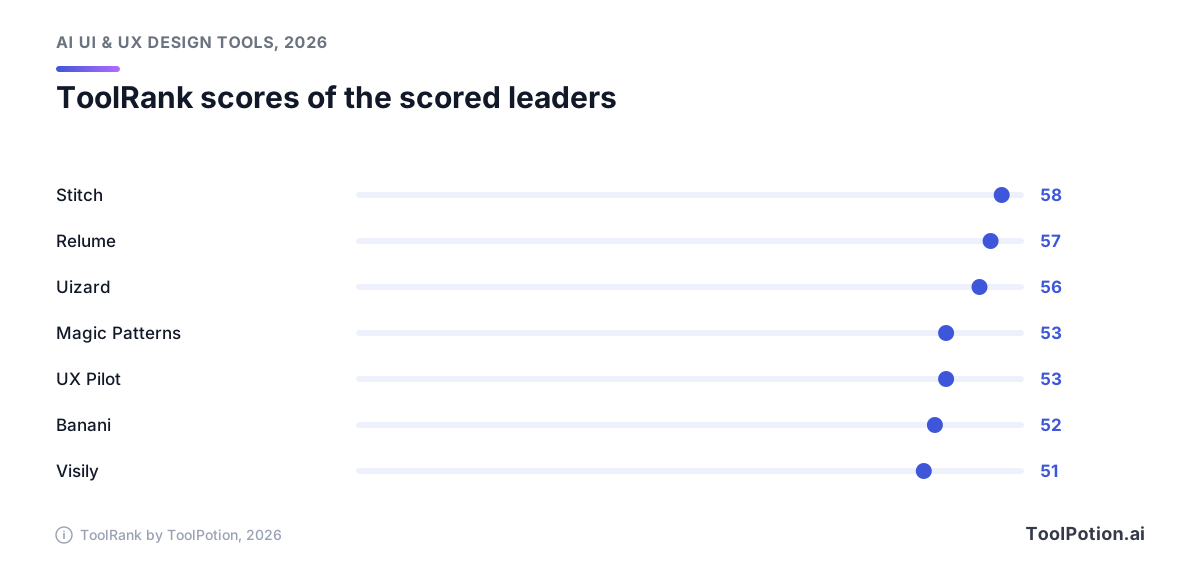
One thing before the picks. Seven of the leaders carry a ToolRank score, and they sit within seven points of each other. The order is a good place to start, and it won't choose for you.
The top 20 AI UI & UX design tools right now
- # 1Top PickFigmaAI AppFigma is a collaborative design platform that integrates design, code, and AI. It enables teams to work together seamlessly from concept to production, enhancing creativity and efficiency in product development.89ToolRankElite
- # 2Runner UpFramerAI AppFramer is a no-code website builder empowering designers to create professional, custom websites with full design freedom. It offers AI-driven site generation, responsive design tools, a built-in CMS, real-time collaboration, and integrated SEO and analytics for high-performing sites.72ToolRankStrong
- # 3Third PlaceStitchAI AppStitch is a Google AI tool that generates user interfaces for mobile and web applications, making design ideation fast and easy.59ToolRankSolid


- 4RelumeAI AppAn AI-powered web builder that generates sitemaps and wireframes for marketing websites from text prompts, backed by a 1,000+ component design system for Figma, Webflow, and React.56ToolRankSolid
- 5SplineAI AppSpline is a free 3D design software that enables real-time collaboration to create interactive web experiences directly in the browser. It offers easy 3D modeling, animation, and textures, making it accessible for both individuals and teams.55ToolRankSolid
- 6UizardAI AppUizard is an AI-powered UI/UX design tool that turns text prompts, screenshots, and hand-drawn sketches into editable mockups and multi-screen prototypes, built to be as easy to use as slide software.55ToolRankSolid
- 7UserTesting Human Insight PlatformAI AppUserTesting provides a platform for gathering real human insights to enhance digital, product, and customer experiences. It enables teams to validate ideas and optimize experiences quickly, leading to more confident decision-making.54ToolRankSolid
- 8UX PilotAI AppUX Pilot is an AI-powered UX/UI design platform that turns ideas, sketches, or PRDs into wireframes, high-fidelity screens, complete user flows, and production-ready code, with Figma and GitHub integration.54ToolRankSolid
- 9AnimaAI AppA design-aware AI agent that turns Figma files, URLs, screenshots, and prompts into production-ready apps, available directly for product teams and as an API for coding agents.53ToolRankSolid
- 10Magic PatternsAI AppMagic Patterns is an AI design tool that transforms prompts into production-ready UI. It enables product teams to generate prototypes quickly, ensuring consistency with existing design systems while facilitating collaboration and rapid iteration.53ToolRankSolid
- 11DesignsAIAI AppDesignsAI is an AI-powered platform for creating communication assets faster. It generates images, videos, copy, audio, and slides using advanced AI models. The platform ensures brand consistency and offers multi-LLM access for up-to-date capabilities, making it ideal for scaling business content creation efficiently.53ToolRankSolid
- 12BananiAI AppBanani is an AI UI design tool that generates editable, multi-screen UI prototypes from text prompts, images, or Figma links, and exports designs to Figma, HTML/CSS, or images.52ToolRankSolid
- 13Builder.ioAI AppBuilder.io is a collaborative platform that enables teams to build software with AI agents, streamlining the development process. It allows engineers, designers, PMs, and marketers to work from a single source of truth, ensuring brand consistency and efficient workflows.52ToolRankSolid
- 14Modao AIAI AppModao AI is a versatile tool for generating text, images, and prototypes. It supports multiple formats and allows seamless integration with HTML/CSS for web development. Ideal for designers and developers seeking efficient prototyping and design solutions.51ToolRankSolid
- 15WhimsicalAI AppWhimsical is a collaborative whiteboard app designed for technical teams and agents. It facilitates idea capture and sharing at the speed of thought, enabling the creation of diagrams, mind maps, and wireframes. The platform offers real-time multiplayer editing and expert templates to enhance team productivity and idea visualization.51ToolRankSolid
- 16Maze | User Research and Testing PlatformAI AppMaze is a user research and testing platform that empowers teams to conduct research efficiently. It connects various research methods and participants, enabling organizations to gather insights that drive informed decisions and shape change effectively.51ToolRankSolid
- 17UXPin | UX/UI and Prototyping ToolAI AppUXPin is a design tool that enables the creation of interactive prototypes with real code components, logic, and states. It supports high-fidelity product design and helps bridge the gap between design and development, making it ideal for professional product teams.51ToolRankSolid
- 18VisilyAI AppVisily is an AI-powered UI design software that enables non-designers to create high-fidelity wireframes and prototypes quickly and easily, with no learning curve involved. Ideal for conveying product ideas effectively.51ToolRankSolid
- 19Balsamiq Wireframing ToolAI AppBalsamiq is a fast, AI-powered wireframing and prototyping tool designed for product, tech, and business teams. It helps users sketch, test, and refine UI ideas quickly, enabling efficient collaboration and decision-making before development begins.50ToolRankSolid
- 20ProtoPie: AI-driven Prototyping PlatformAI AppProtoPie is an AI-driven prototyping platform that allows designers to create dynamic interactions and high-fidelity prototypes. It supports multiple devices and platforms, enabling seamless collaboration and efficient design handoff.50ToolRankSolid
















How ToolRank works
ToolRank is ToolPotion’s proprietary ranking engine.
It continuously evaluates hundreds of signals across the open web — real traffic and popularity, audience and community strength, authority and longevity, adoption and engagement — processing millions of data points to place every tool where it has earned to be.
Every AI type is measured by its own tailored model: what proves traction for a SaaS app is not what proves it for an open-source framework or a creator channel. Missing a platform never counts against a tool — ToolRank judges the evidence that exists.
No paid placement. No self-reported numbers.
Quick picks
Five situations come up again and again, so here's the short version.
- Figma is the best all-rounder for teams that already work from a shared design system.
- Framer is the pick when a design needs to become a live, hosted site by the end of the week.
- Stitch is the one to open when you want a handful of UI directions from a written description and don't mind a young product.
- Uizard is the budget route to editable mockups from prompts, screenshots or sketches.
- Spline is the choice for interactive 3D that lives on a web page.
What changed in 2026
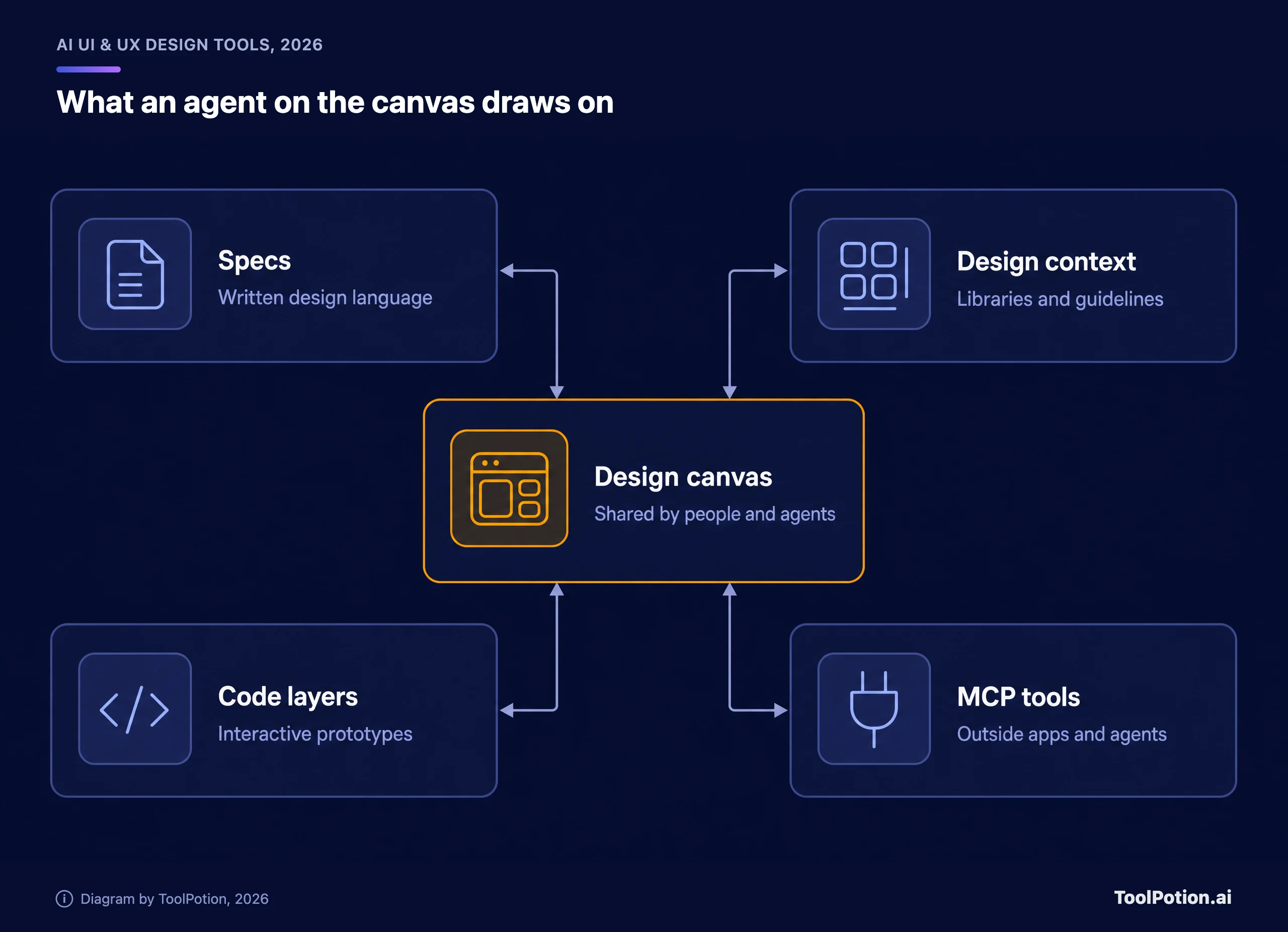
Agents moved onto the canvas. At its first Config event in India, Figma launched Specs, a Markdown container on the canvas where teams write down decisions and design language for people, Figma's agent and outside coding agents to read. Figma calls it an open beta on paid plans. TechCrunch reported that design libraries, code libraries and guidelines can feed the same system, that code layers, which add code to a design for more interactive prototypes, moved from private to public beta, and that Figma's MCP now supports more than 20 new tools. Chief Design Officer Loredana Crisan told the outlet that far more code is being produced than before, 17 times as many lines by her count, against only 1.3 times as many releases.
Google went at the blank page instead. Stitch's relaunch earlier this year introduced what Google Labs calls vibe design: you describe the business goal or the feeling you want rather than drawing wireframes. Google's launch post lists an infinite canvas that takes images, text and code as context, a design agent, an agent manager for parallel ideas, voice control, and DESIGN.md, an agent-friendly markdown file for moving design rules between tools. A Stitch MCP server and SDK are there for coding tools, and designs can be exported to AI Studio and Antigravity.
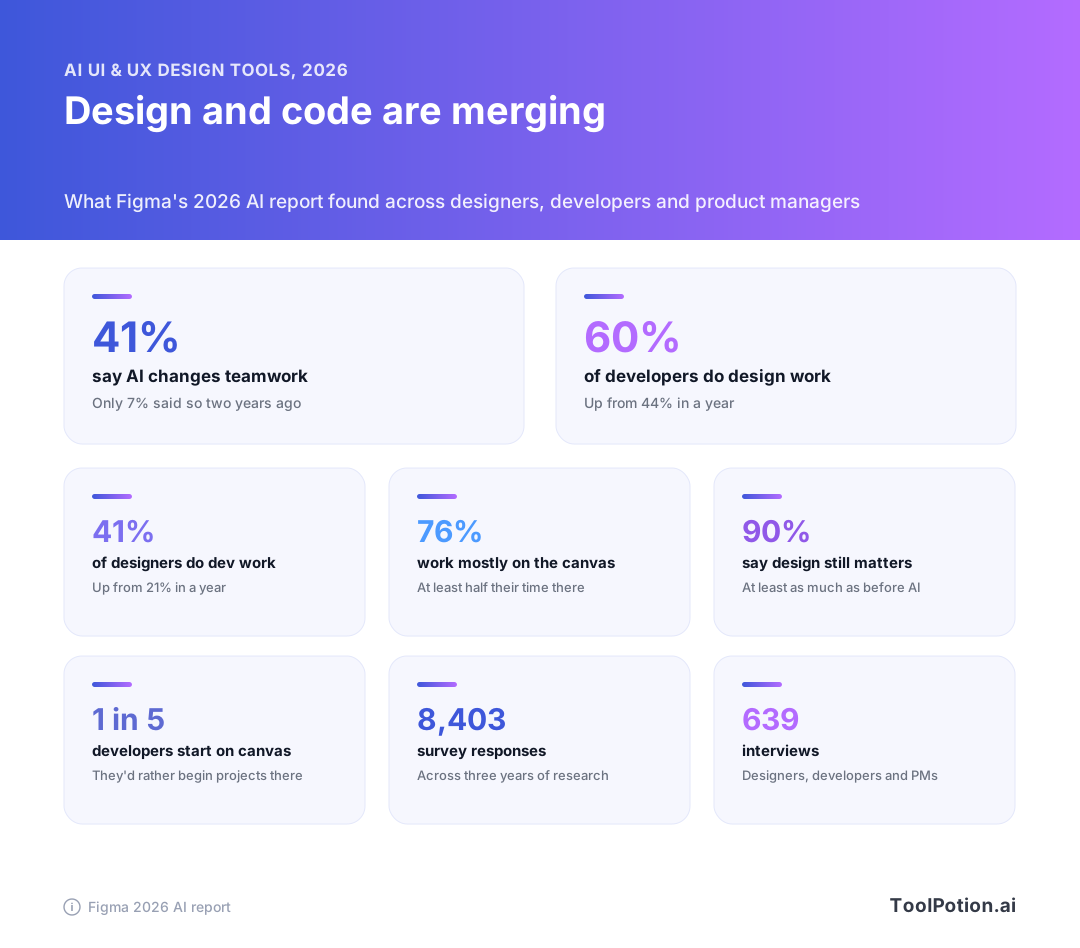
Figma's own 2026 AI report shows why the two camps are converging. Across 8,403 survey responses and 639 interviews gathered over three years, 41% of respondents now say AI meaningfully changes how teams work together. Two years ago it was 7%. The share of developers doing design work rose from 44% to 60%, and designers doing development work went from 21% to 41%. It's a vendor's research, so read it as one view, but the direction matches what the tools are building.
Independent data points the same way. A survey of 1,478 designers and builders by UX Tools found Figma was the most-used tool each week. Claude came second, used weekly by 50.8% of designers, and five of the top ten weekly tools were AI products. About 44% said they spend more than half of their building time on AI-generated code. Trust is thinner: just 32.8% would use AI output in production, and only after review.
The same survey asked what gets in the way. Price wasn't near the top.
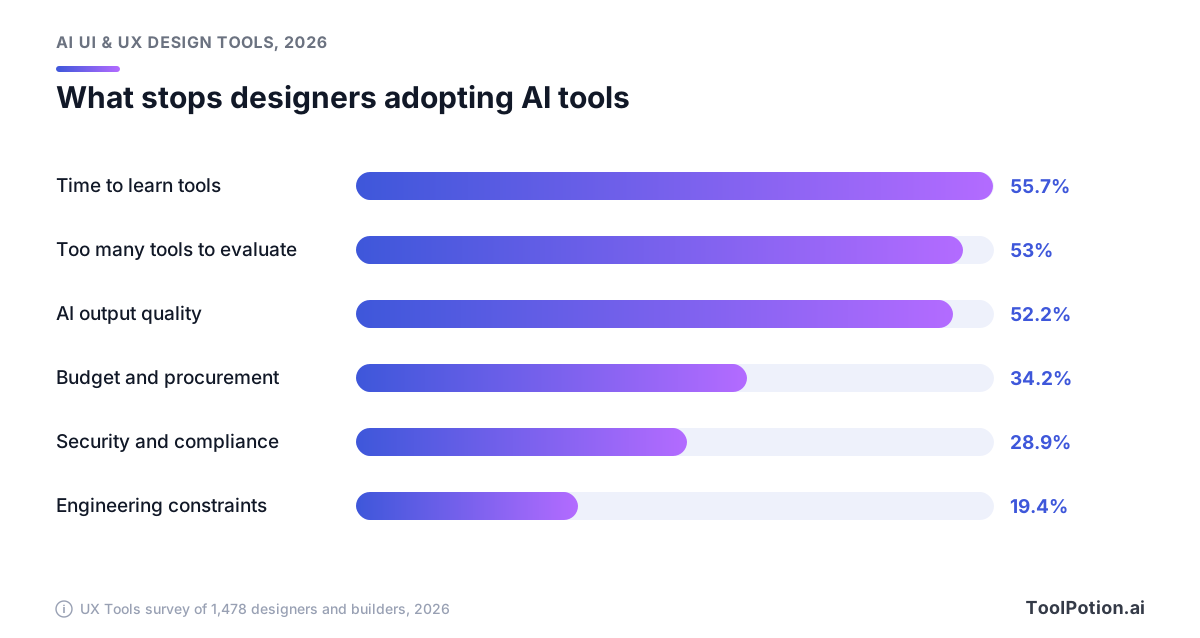
Learning time, too many tools to evaluate and output quality all landed above 50%. Budget and procurement came in at 34.2%. That's the case for a short list. Nobody has time to trial 20 tools, so the sections below try to tell you which three or four deserve it.
There's also a quieter shift in who is buying. Several of the tools in this guide, including Visily, Banani and Uizard, are priced and described for people who don't think of themselves as designers. Product managers, founders and marketers are generating screens directly, and designers are being asked to review output rather than draw it from scratch. That changes what a good tool looks like. Editable output, clean export to Figma and a way to keep the brand consistent now matter more than a clever first draft.
The 11 tools worth a closer look
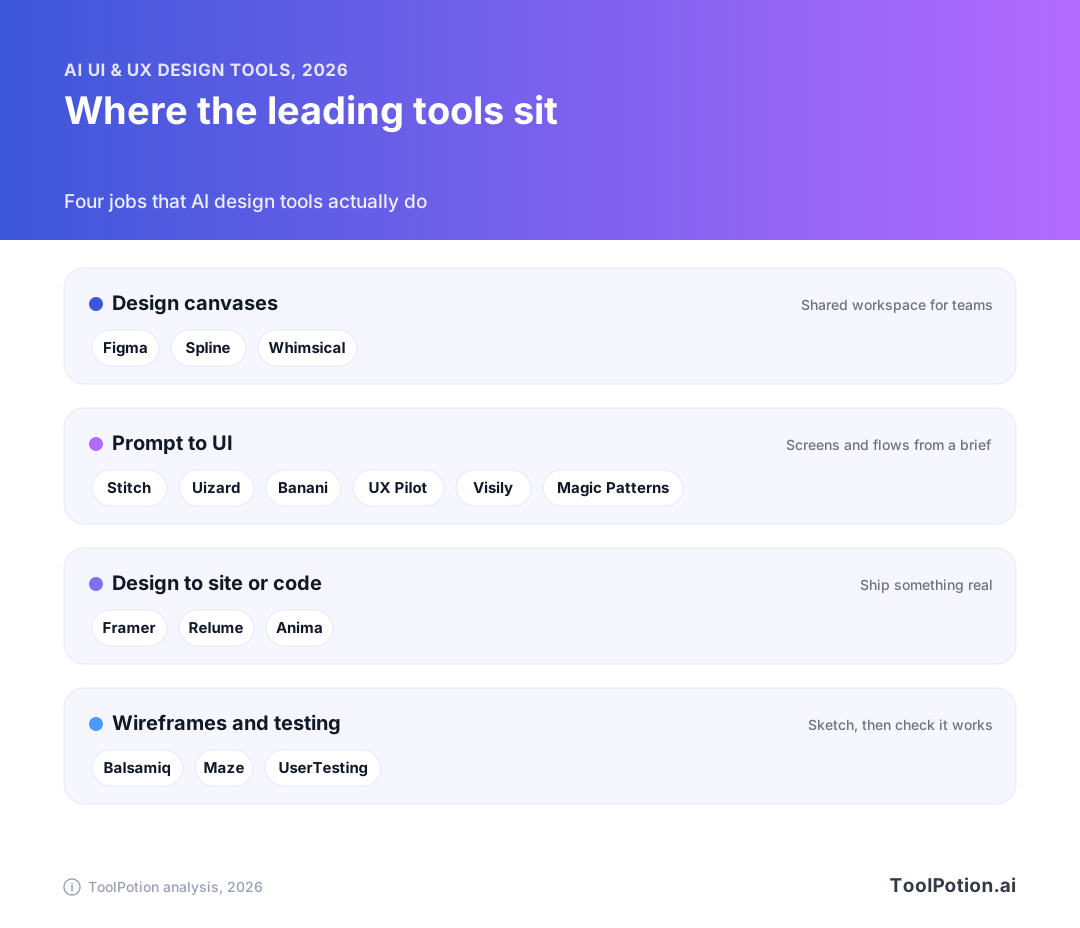
Before the individual reviews, it helps to see how the field divides. Most AI design tools do one of four jobs, and picking the job first removes about half the options.
Figma: best for teams with a design system
Figma is #1 on the 2026 board. It's ranked but not yet scored by ToolRank, so there's no number to quote, only the position. What puts it there is simple: it's where design systems, libraries and developers' hand-off already live, and now agents work in the same file with shared context. Figma also acquired the open-source headless CMS Payload last year and is wiring it into Figma Make, its prompt-to-code product, so a generated prototype can come with real content management.
The catch is the seat model. On the Professional plan a full seat is $16 a month billed annually ($20 month to month) with 3,000 AI credits, a dev seat is $12 ($15 monthly) and a collab seat is $3 ($5 monthly). The Organization plan lists a full seat at $55, also billed annually. The free Starter plan includes up to 500 AI credits a month, which is enough to try the agent and not much more. A team with a mix of designers, developers and reviewers should count seat types before it counts anything else.
Framer: best for designers who publish
Framer sits at #2 and, like Figma, is unscored. The pitch on its own site is a design agent that's native to the canvas, alongside a CMS agent and a code agent, with hooks that let tools such as Claude Code, Cursor or Codex push changes in. Because hosting, SEO settings and a CMS are built in, the design you finish is the site people visit.
Pricing on its pricing page starts at a free plan with 500 AI credits and a Framer subdomain. Basic is $10 a month and Pro is $30 a month on yearly billing, and Pro adds a staging environment and branching with previews. The catch is scope. Framer is for websites, so a product team designing an app's screens will want something else for that job and Framer for the marketing site beside it.
Stitch: best for exploring directions
Stitch is #3 on the 2026 board with a ToolRank score of 58 and a solid tier. It slipped from #1 to #3 on the 2026 board, though 58 is still the highest score among the seven scored tools. It's Google's AI-native design canvas, and you edit by describing changes, typing or speaking them.
That makes it a very good first hour on a new idea: several looks to react to, then a handoff to a coding tool through MCP or an export. Our directory entry adds that it's a public beta and exports to Figma, and Google's launch post mentions neither, so confirm both in the product. Neither the post nor the pages we checked gave a price, which is reason enough not to build a team process on it yet.
Spline: best for interactive 3D
Spline is #4, unscored, and the odd one out on a UI board. It's a free, browser-based 3D design tool with real-time collaboration for building interactive web experiences, with modeling, animation, layered materials and AI-assisted design in one place. If your product page needs a rotating object that reacts to the cursor, nothing else in the top 20 does this.
The pricing page lists a free plan, then Hobby at $12 per seat a month billed yearly ($15 billed monthly), Pro at $25 ($30 monthly) and Max at $60 ($70 monthly). The catch is obvious but worth saying. It isn't a tool for laying out app screens, so treat it as the specialist you add to a stack.
It also shows how wide the category has grown. A few years ago nobody would have put a 3D tool on a UI board. In 2026 interface design includes motion, depth and real-time rendering, and the tools that handle them are being pulled into the same conversation as the screen layout tools.
Relume: best for sitemaps and marketing sites
Relume is #5 with a ToolRank score of 57, tier solid. You give it a brief and it builds the sitemap, wireframes and a marketing site. Its homepage pitches a component system said to sit behind 2 million websites, with export to Figma, Webflow or React. Building from a fixed component library is a sensible trade. You get fewer surprises and more consistency.
Relume's pricing page splits into two tabs. On the export side there's a free plan, then Starter at $18 per user a month and Pro at $40, both billed yearly. Team is listed at $36 per user, which looks cheaper than Pro until you see the minimum of three people ($1,296 a year). Hosting is priced apart, from $12 per site a month. The catch is sameness. A site built from a shared component library will look like a well-made site, not necessarily like yours.
Uizard: best for mockups from screenshots and sketches
Uizard is #6 with a score of 56, solid tier, down from #2 on the 2026 board. Its Autodesigner generates multi-screen prototypes from text, a Screenshot Scanner turns screenshots into editable mockups, and a Wireframe Scanner digitizes hand-drawn sketches. Positioned to feel as approachable as slides, it's a good fit for people who've never opened a design tool.
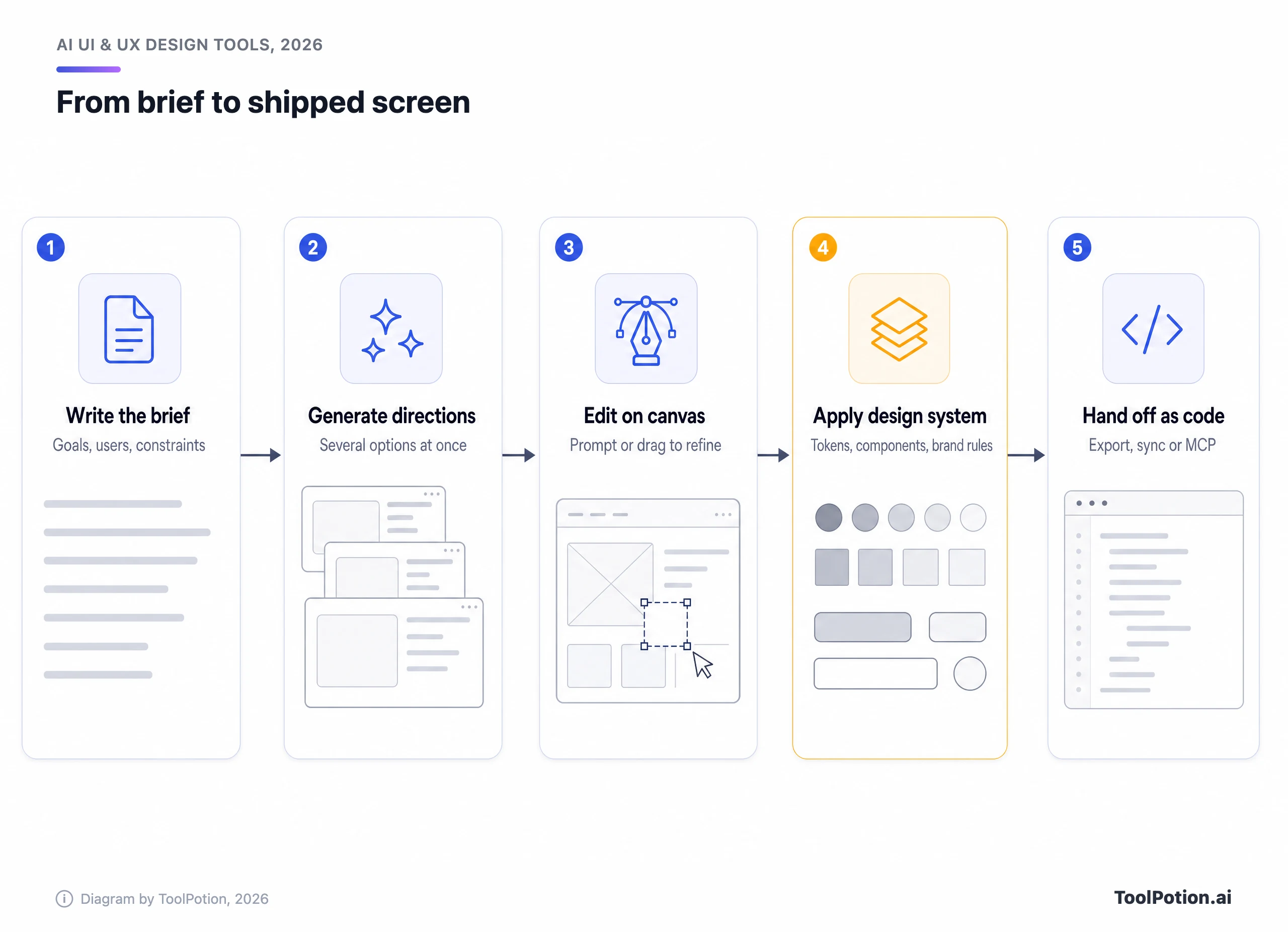
Per its pricing page, the Free plan covers 2 projects and 3 AI generations a month. Pro is $12 a month billed annually with 500 generations and developer hand-off to React and CSS. Business is $39 a month with 5,000. Three free generations will run out in one sitting, so assume you'll pay if the tool sticks.
Anima: best for turning designs into code
Anima is #7 and unscored. Its homepage describes turning a Figma design, screenshot or prompt into editable HTML or React. It also says Anima's engine already runs inside Bolt.new and Replit, so you may be using it without knowing. Teams can call it directly or through its API to give other coding agents design context.
It earns its place when design-to-code hand-off is the bottleneck. If nobody on your team writes front-end code, it matters less than the tools above.
The odd part is that you may never open it. If the engine already sits inside the coding tools your developers use, hand-off becomes a call another agent makes for you, which is a different job from the screenshot-and-redline routine many teams still run.
Magic Patterns: best for matching your existing product
Magic Patterns holds #8 with a score of 53, tier solid. Its site says it generates UI that matches your existing product, and you can bring in your components and design rules so every concept comes out in your style. Teams can compare directions side by side and edit together live.
Its pricing page lists a free tier, then Starter at $17 per seat a month and Business at $85, both billed annually ($20 and $100 month to month). That Business jump is steep, and the catch is that the real value shows up only after you've fed it a proper design system. Without one, it's just another prompt box.
UX Pilot: best for full user flows
UX Pilot is #11 with a score of 53, tier solid. It fell from #3 to #11 on the 2026 board, an eight-place fall, the same as Banani's. Its homepage describes wireframes and high-fidelity screens from a prompt, a sketch or a product requirements document, with an Autoflow feature for end-to-end flows. It can import Figma components to keep designs consistent, pulls designs back into Figma and hands off code.
The homepage headline promises a tenfold speedup from design to working prototype, with nothing behind the number, so file that under marketing. We couldn't confirm pricing, so we're leaving it out. Check the live page before you commit.
Banani: best for quick clickable prototypes
Banani is #12 with a score of 52, tier solid, down from #4. It generates ready-to-edit, multi-screen UIs from prompts, images, screenshots, Figma links or PRDs, then lets you tweak by clicking or chatting. The fix is fast, which suits early client conversations.
On its pricing page the Free plan has 12 monthly credits plus 3 daily top-ups. Plus is $12 a month on yearly billing ($20 monthly) with unlimited Figma export and HTML or CSS export. Pro is $30 ($50 monthly) with unlimited credits. A single generation typically costs more than one credit, so the free plan goes quickly.
Visily: best for non-designers
Visily is #17 with a score of 51, tier solid. Its pitch is for product managers and founders who need to show an idea to clients or executives and don't live in design software. You can start from a screenshot, a text prompt or a diagram, edit with drag and drop or chat, and collaborate with comments and shared libraries.
The pricing page lists a free Starter plan with 300 AI credits a month, Pro at $14 per editor a month with 3,000 credits, Figma export and import, code export and an MCP server, and Business at $29 per editor billed annually with 10,000 credits. Pro is where Figma export and import start.
How to choose
Start from the output, not the tool. The questions below take about a minute, and they're based on the same documented features covered above. If your list has more than four tools after that, you're probably comparing things that don't compete. The full top 50 board has the rest.
Some situations don't fit a quiz. If your team already ships from Figma, add one AI tool on top of it rather than switching. Stitch or Banani for exploration and Anima for hand-off all work with it. If you're a solo founder, a free plan at Uizard, Banani or Visily is enough to learn what you actually need. And if you build marketing sites for clients, Framer and Relume solve different halves of the job.
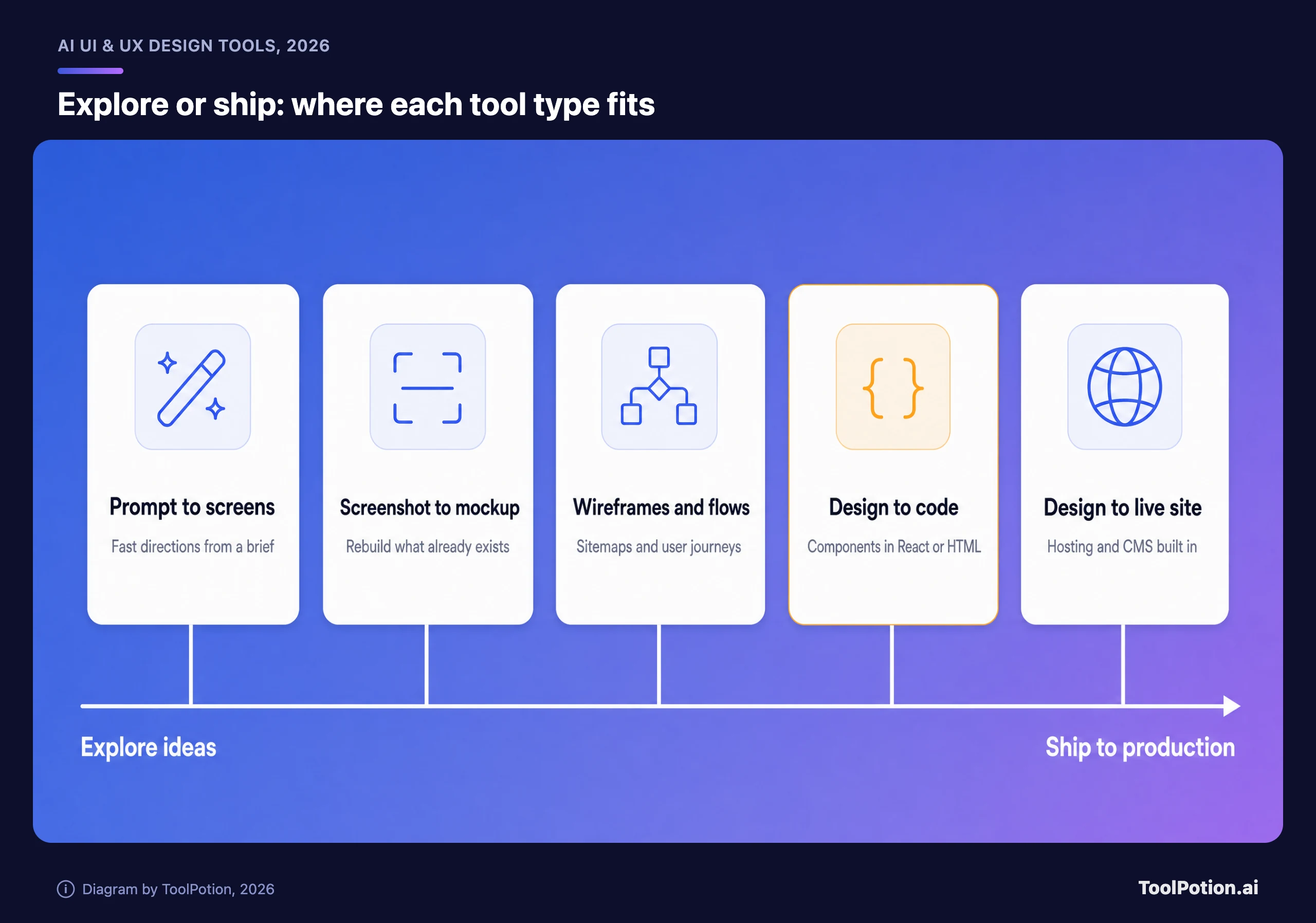
Cost shouldn't decide it, though it does separate the tools. Entry prices cluster between $10 and $20 a month, which means the real expense is people's time, and the survey data above says learning time is the top blocker. Sort the table by price if you like, but read the unit column first. A seat, a site and an editor aren't the same thing.
Before you pay for anything, run the same small job through two tools. Pick a real screen from your backlog, write the brief once, and see how much cleanup each result needs. Check what happens when you bring in your own colors and components, whether the export opens cleanly in the tool your developers use, and what the free plan's limits do to a real afternoon of work. Credits are the usual trap. Figma, Framer, Banani, Uizard and Visily all meter AI use, and a single generation can cost several credits.
When you want to look beyond this list, the AI UI & UX design category has every tool in the directory. Related boards are useful too, especially the 100 AI tools for UX designers, the 250 for product managers, the 150 for building landing pages and the 150 AI graphic design tools.
A word on the ranking
ToolRank is ToolPotion's independent ranking for AI tools, and placement can't be bought. Scores run from 0 to 100 with a tier, and some entries here, including Figma, Framer, Spline and Anima, are ranked but not yet scored. Every board lives on the leaderboards index.
Newer names worth watching
Several tools just outside the top 20 are worth a look. pen.dev, from the team formerly known as Pencil, is a design canvas built around AI agents. Flowstep generates production-ready UI from prompts on an infinite canvas and can copy to Figma. Subframe is an AI-native tool that ties design to real components. Paper connects teams, code and data on one canvas, and Onlook is a visual code editor for designers and PMs. Codia rebuilds screenshots and files into editable designs.
Most of them are betting on the same thing Figma has just announced: agents that read your design rules before they touch the canvas.
Frequently asked questions
What's the best AI UI design tool in 2026?
For teams, Figma. For publishing sites, Framer. For fast exploration, Stitch. There isn't one winner, and the quiz above maps the common cases.
Is there a free AI UI design tool?
Yes, several. Figma's Starter, Framer, Spline, Relume, Uizard, Banani and Visily all list a free plan. The limits are tight: Uizard's is 3 AI generations a month and Banani's is 12 credits.
Can AI replace a UX designer?
The survey data says no, at least not yet. Only 32.8% of designers trust AI output for production, and even then after review. Figma's report found 90% of respondents think design is at least as important as before AI.
Which tools export to Figma?
Our directory entry says Stitch exports to Figma, and UX Pilot describes a two-way connection with it. Banani's paid plans have Figma export, Visily's Pro plan has Figma export and import, and Relume exports to Figma, Webflow or React.
Which tool is best if I want code?
Anima is built for it, turning a Figma design, screenshot or prompt into editable HTML or React. Visily and Banani list code export on paid plans, and Figma's code layers are in public beta.
How should I check AI-generated designs?
Treat the first output as a draft. Compare it against your design system, test it with real users, and have a developer check anything that's headed to code.