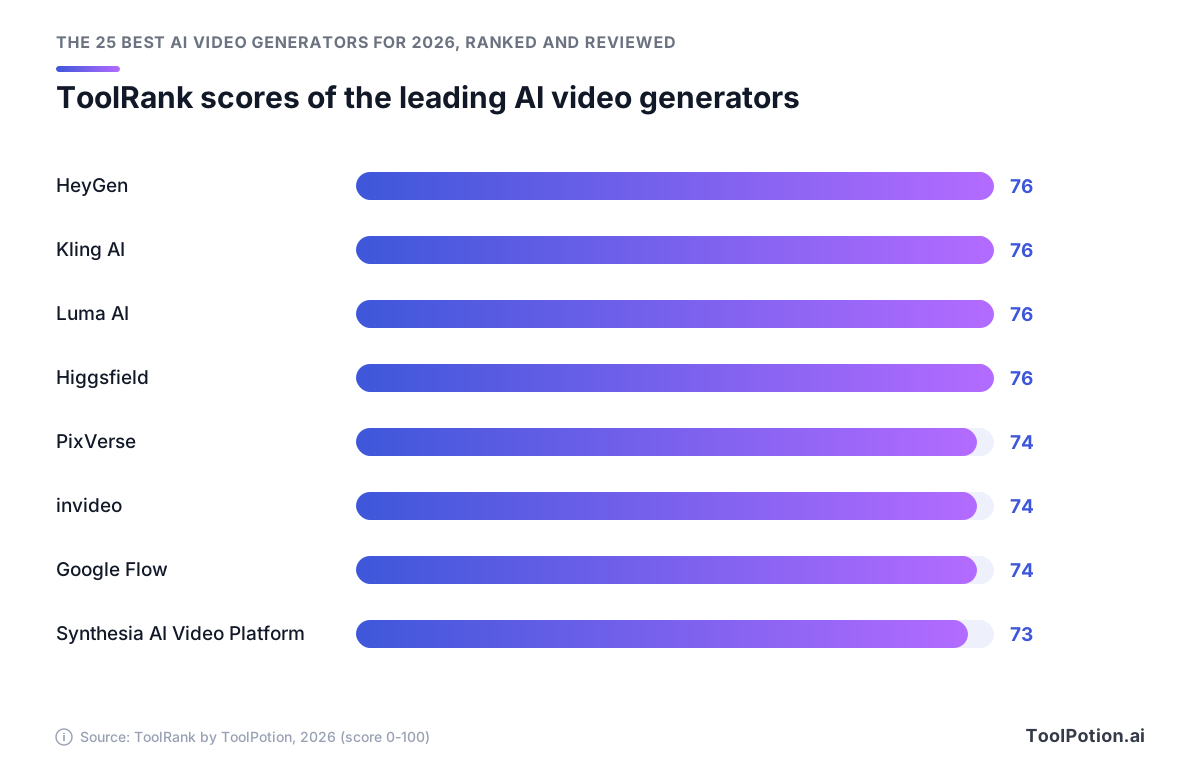
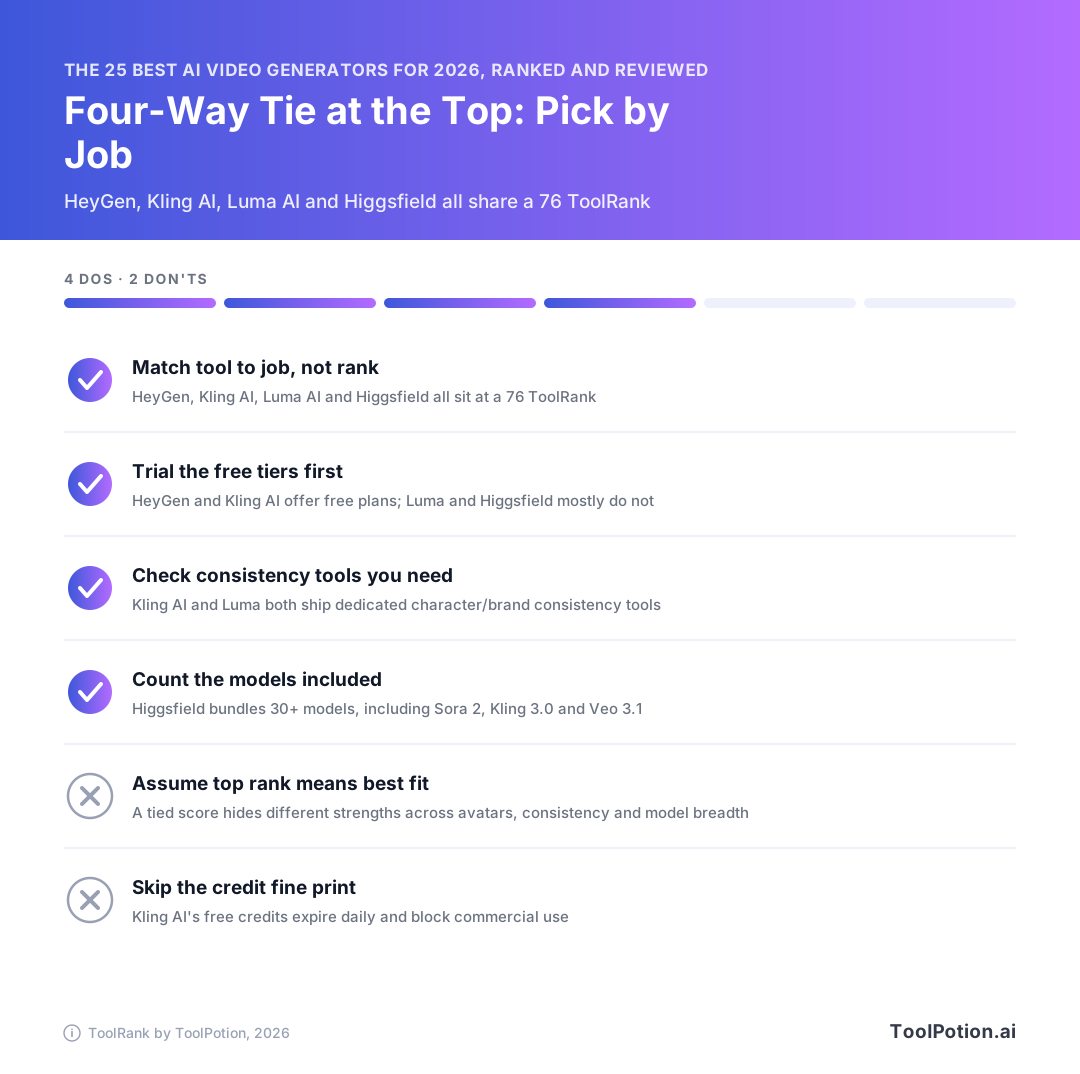
If you're comparing the best AI video generators 2026 has to offer, start with a four-way tie. HeyGen, Kling AI, Luma AI and Higgsfield share the top ToolRank score of 76 on the 2026 board, so the right pick depends on the job you need done.
Our AI video generators leaderboard ranks 335 tools. This guide covers the top 25 with quick picks, short reviews that name each tool's catch, sourced pricing and a decision guide. Prices have moved a lot this year, and several free plans have shrunk or disappeared.
If you already know what you're making, start with the leaderboard below.
The top 25 AI video generators in 2026
- # 1Top PickHeyGenAI AppHeyGen allows users to create realistic AI videos in minutes by inputting text, images, or audio. It offers various features for video generation, including narration, captions, and animations, making it ideal for creators and businesses alike.77ToolRankStrong
- # 2Runner UpKling AIAI AppKling AI is an advanced AI video and image generator that transforms text and images into high-quality multimedia content. It offers features like native audio, cinematic resolution, and character consistency, making it ideal for creative professionals and marketers.76ToolRankStrong
- # 3Third PlaceLumaAI AppLuma AI is a creative platform designed for video generation and image creation, utilizing advanced AI models. It streamlines creative workflows, enabling users to generate, edit, and refine multimedia content efficiently. Ideal for agencies and brands looking to enhance their creative processes.76ToolRankStrong



- 4HiggsfieldAI AppHiggsfield is an AI-native creative suite for generating images, videos, and voice content from text prompts or references. It is built for creators, marketing agencies, and filmmakers of any skill level.76ToolRankStrong
- 5PixVerseAI AppPixVerse is an AI video platform powered by proprietary video foundation models, offering text-to-video, image-to-video, and image generation for creators, teams, developers, and enterprises.75ToolRankStrong
- 6Google FlowAI AppGoogle Flow is an AI creative studio that empowers users to transform their ideas into cinematic videos and images using advanced generative models. It offers tools for creating, refining, and sharing creative projects seamlessly.74ToolRankStrong
- 7Adobe FireflyAI AppAdobe Firefly is an all-in-one AI creative studio that enables users to generate high-quality content, including images, video, and audio, using over 30 AI models. It offers speed, control, and creative freedom for various creative projects.73ToolRankStrong
- 8Synthesia AI Video PlatformAI AppSynthesia is the leading AI video platform for businesses, enabling users to create professional videos from text using advanced AI avatars and voiceovers in over 160 languages. It simplifies video production for training, marketing, and internal communications, making it accessible without technical expertise.73ToolRankStrong
- 9PikaAI AppPika is an AI creative platform for video, image and audio generation. It combines its own models like Pika 2.5 and Pika Soundtrack with third-party models such as Seedance, Nano Banana and ElevenLabs in one set of apps for video creation, image editing, character design and sound effects, aimed at ad creatives, editors, marketers and filmmakers.73ToolRankStrong
- 10invideoAI Appinvideo is an AI video creation and editing platform built around Agent Two, letting users generate and edit videos with multiple AI models and 5,000+ templates. It serves creators, marketers, and enterprises.72ToolRankStrong
- 11Viggle AIAI AppViggle AI is a spatial AI platform for 3D character animation and motion capture. Its Meme Maker swaps characters into any video or photo, PINOC turns a phone clip into game-ready motion capture without a mocap studio, and its API and games let developers and studios build character and motion features into their own products.71ToolRankStrong
- 12Luma AI (luma.ai)AI AppLuma Layers is an AI-powered platform that creates videos from text or images. It offers multiple models and templates for editing, ensuring privacy and transparency in credit costs before creation.69ToolRankStrong
- 13Hailuo AIAI AppHailuo AI is an AI video generator and prompt tool that turns a short piece of text into a polished AI video. It is aimed at creators who want to produce engaging visuals quickly.67ToolRankStrong
- 14RunwayMobile AppRunwayML's iOS app offers AI-powered image and video generation for iPhone users. Create visuals in any style with consistent characters and locations. Features a Chat Mode for simplified prompting and seamless asset transfer with desktop accounts. Regularly updated with new AI models and features.63ToolRankStrong
- 15Fliki - AI Video GeneratorAI AppFliki is an AI video generator that transforms text, scripts, and blog posts into videos using over 2,000 AI voices in 80 languages. It requires no camera or editing skills, making video creation accessible for everyone.60ToolRankStrong
- 16Pictory.aiAI AppPictory.ai is a video creation tool that transforms text into professional-looking videos. It uses AI to automatically select relevant stock footage, add voiceovers, and create engaging video content from articles, scripts, or existing content. Ideal for marketers, content creators, and businesses seeking efficient video production.57ToolRankSolid
- 17D-IDAI AppD-ID offers a self-service platform for AI-generated video creation, enabling users to create videos with animated avatars. Its Creative Reality Studio combines deep-learning technology with text generation for businesses and content creators seeking innovative video solutions.57ToolRankSolid
- 18Hedra — Inference and Infrastructure for Visual IntelligenceAI AppHedra is an AI research and infrastructure company that builds models for visual intelligence and the platform to run them in production. It enables creative productivity through its advanced tools and collaborative features.57ToolRankSolid
- 19Lumen5AI AppLumen5 is an AI-powered video creation platform that transforms text-based content like blogs and articles into engaging videos within minutes. It simplifies video production for users without prior experience, offering a drag-and-drop interface and automated features for marketing, communications, and education.55ToolRankSolid
- 20Steve AI Video CreationAI AppSteve AI is a patented AI video creation platform that transforms text, audio, or prompts into professional videos in minutes. Trusted by over 7 million users, it offers generative AI, live action, and animated video options, making video production accessible for creators and businesses alike. Start creating for free.54ToolRankSolid
- 21Biteable - AI Video MakerAI AppBiteable is an AI-powered online video maker that enables users to create professional videos quickly. With features like AI avatars, text-to-speech, and customizable templates, it simplifies video creation for marketing, training, and more.54ToolRankSolid
- 22freebeat.aiAI Appfreebeat.ai is an AI music video generator that turns a song, upload, or streaming link into a finished video. It analyzes a track's rhythm and structure, then generates beat-synced visuals, dance or performance scenes, and karaoke-style lyric videos in one workflow. It is built for musicians, dancers, content creators, and producers who want a finished video without editing skills.54ToolRankSolid
- 23MagicLightAI AppMagicLight is an AI long-form video generator that turns ideas, scripts, or stories into finished videos up to 50 minutes long, with consistent characters, scene transitions, voiceovers, and subtitles.54ToolRankSolid
- 24AI STUDIOSAI AppAI STUDIOS by DeepBrain AI is an all-in-one AI video platform for avatar videos, text-to-video, dubbing, and generative video. It offers 2,000+ realistic avatars and voices, dubbing in 150+ languages, and 4K exports for marketing, training, and creators.53ToolRankSolid
- 25KaiberAI AppKaiber is an AI-powered video generation platform designed for musicians and creators. It offers tools like Canvas for starting from prompts or references, Beat Sync for automatic music-synced video creation, and an Editor for polishing final outputs. The platform supports multiple leading AI models, simplifying content creation for social media and other platforms.53ToolRankSolid




















How ToolRank works
ToolRank is ToolPotion’s proprietary ranking engine.
It continuously evaluates hundreds of signals across the open web — real traffic and popularity, audience and community strength, authority and longevity, adoption and engagement — processing millions of data points to place every tool where it has earned to be.
Every AI type is measured by its own tailored model: what proves traction for a SaaS app is not what proves it for an open-source framework or a creator channel. Missing a platform never counts against a tool — ToolRank judges the evidence that exists.
No paid placement. No self-reported numbers. Rankings refresh monthly as ToolRank re-measures the market.
Best AI video generators 2026: quick picks by job
Short on time? Match the tool to what you're making, then check the plan terms in the reviews further down.
- For avatar-led marketing and presenter videos, go with HeyGen, #1 on the 2026 board.
- Cinematic clips with native audio point to Kling AI, which is built around native audio output and cinematic 4K resolution.
- Agencies that need brand consistency across a campaign should start with Luma AI, because its Master Reference Assets are designed to keep outputs on-brand.
- If you want one hub for trying many models, Higgsfield lets you run a prompt through several of them from one login.
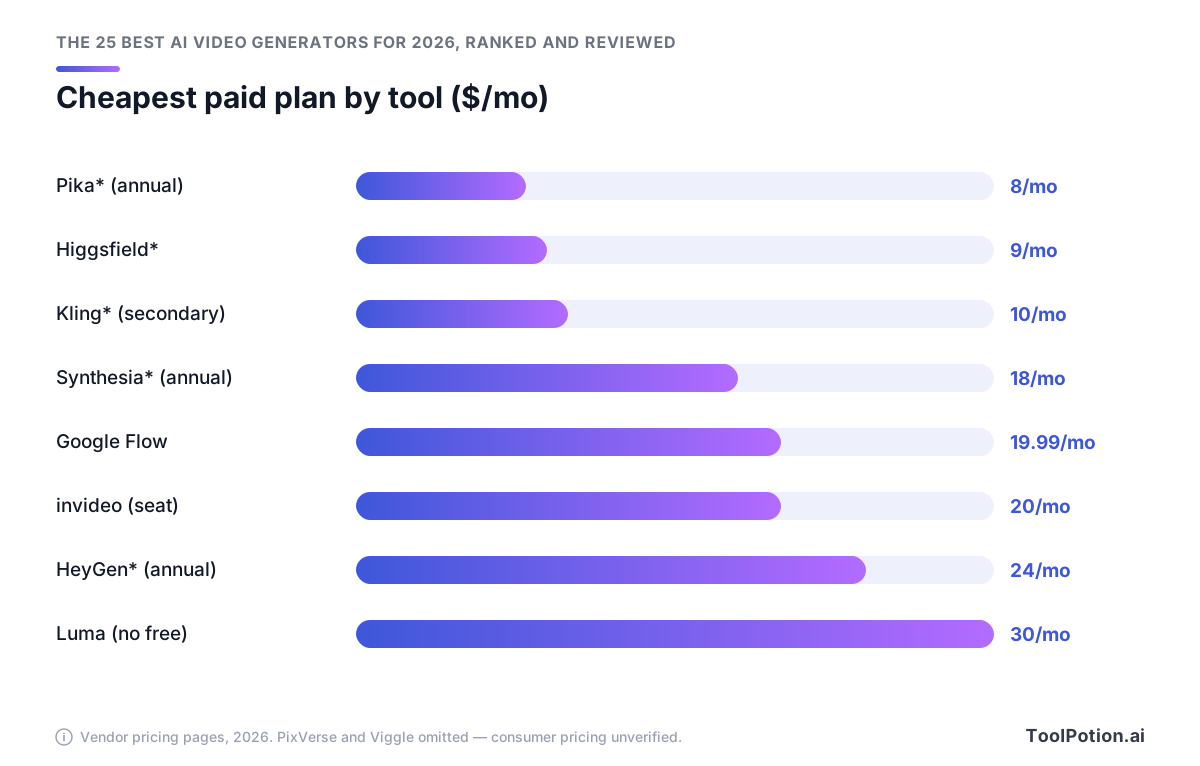
- The best budget entry is Pika, whose Standard plan costs $8/mo billed annually for 700 credits with no watermark (Pika pricing).
- For enterprise training in many languages, Synthesia is the pick, and its free Basic plan gives you up to 10 minutes of video a month with no card required (Synthesia pricing).
Stuck between the top four? Let the output decide. If your video is a scripted talking head, pick HeyGen. For prompt-driven footage, choose Kling AI if you want one model or Higgsfield if you'd rather compare several.
What changed for AI video generators in 2026
A roundup from 2025 gets two things wrong for 2026: who has the money to last, and what you'll pay to start.
The money got serious
Synthesia raised a $200M Series E at a $4B valuation on Jan 26, 2026, led by Google Ventures (Synthesia). Seven months later, Higgsfield closed a $400M Series B at $5.4B and reported $700M in annualized revenue and 30M+ users (TechCrunch).
Our read is that products this well funded will keep changing. The tool you standardize on this year may look different by the time your annual plan renews, so keep your source files and exports somewhere you control, and don't build a team workflow around one vendor's quirks.
Sharper output: vertical, 4K and editable layers
Google's Veo 3.1 "Ingredients to Video" update on Jan 13, 2026 added native 9:16 generation plus 1080p and 4K upscaling, and every output carries a SynthID watermark (Google). If you publish Shorts or Reels, you can stop cropping 16:9 renders. The upscaling only works in Google Flow, the Gemini API and Vertex AI, so check where you're generating before you promise a client 4K.
Luma launched Layers on July 29, 2026. It splits an image into independently editable layers, so you can pull a product or character out as a transparent asset (Luma).
The bigger structural shift is the multi-model hub. Higgsfield bundles Kling 3.0 and Veo 3.1 among its 30+ models, and invideo puts Seedance 2.5, Veo 3.1 and Kling 3.0 behind one subscription. That's handy when you want to test one prompt across models without juggling logins. For a model-by-model breakdown, see how Sora, Veo, Runway and Kling compare.
Free tiers got thinner
invideo's pricing page lists no free plan at all now, though reports from earlier in 2026 described one with 10 AI minutes a week (invideo). Luma's Agents pricing has no free tier either (Luma pricing).
The free plans that are left come with strings attached. Kling AI gives you 66 daily login credits and bans commercial use (Kling AI). Pika caps free users at 80 credits a month of watermarked 480p video, also with no commercial use (Pika).
The four leaders tied at the top
HeyGen, Kling AI, Luma AI and Higgsfield all score 76 and sit in the strong tier on the 2026 board. Don't treat the #1-to-#4 order in the leaderboard above as a quality ladder. With identical scores, the right pick comes down to what you're making.
HeyGen: best for avatar-led marketing and training videos
HeyGen turns a script, an image or an audio file into a video with a presenter. It fits marketing explainers and onboarding modules, where a talking head is the format. Its March 2026 release added Avatar V, which generates studio-quality video from a 15-second recording (HeyGen).
Free users get 3 videos a month, each capped at 1 minute and watermarked. That's enough to judge avatar quality and too little to ship anything. Creator costs $29/mo, or $24/mo billed annually. It removes the watermark and allows videos up to 30 minutes. Pro starts at $49/mo, and its credit ladder climbs to $4,300/mo for 100,000 credits (HeyGen pricing). Most solo marketers will be fine on annual Creator, and if avatars are all you need, check the top AI avatar generators before you commit.
Kling AI: best for cinematic clips with native audio
Kling AI is the pick when you want prompt-driven footage with sound already attached. Native audio, 4K output, multi-shot control and character consistency are all built in, which suits short ads and storyboards. Kling also has three more listings lower on the board, which we sort out in the ranks 11 to 25 section.
Credits expire monthly, so size your plan to what you'll render in a month. Paid plans run Standard at $10/mo, Pro at $37/mo, Premier at $92/mo for 8,000 credits and Ultra at $180/mo for 26,000 credits (Kling AI). Treat those figures as approximate and confirm them on Kling's membership page before you pay.
Luma AI: best for agencies that need brand consistency
Luma AI makes you pay from day one, since its Agents plans have no free tier. Plus is $30/mo for 10,000 credits, Pro is $90/mo for 40,000 and Ultra is $300/mo for 150,000. An older set of Dream Machine plans ($9.99, $29.99 and $94.99) still exists separately, so it's easy to budget against the wrong prices (Luma Labs).
What you get for that money is a platform built for teams running campaigns. Its agents can handle several creative tasks at once, and Master Reference Assets keep products and characters on brand from one asset to the next. Layers, covered earlier, works inside the same workspace.
For an agency with steady client work, Pro makes sense. Solo creators who are still testing ideas should try a tool with a free plan first.
Higgsfield: best hub for many models in one place
Higgsfield puts 30+ models behind one login, so it suits you if you want to run one prompt through several models and keep the best result. Cinema Studio adds 1,296 camera lenses and color grading. Soul ID keeps a character's look the same from shot to shot.
Budget more credits than you think. The free tier covers only a small set of models, and Basic is $9/mo for 120 credits, which runs out fast when every comparison means another render. Plus is $49/mo for 1,000 credits and Ultra is $129/mo for 3,000 (Higgsfield). These prices come from Higgsfield's own 2026 comparison with Runway. If comparing models is why you're signing up, skip Basic and start on Plus.
Ranks 5 to 10: specialists and all-rounders
Scores barely drop after the top four. Ranks 5 through 9 score 74 or 73, and Viggle AI rounds out the top 10 at 70. All six are in the strong tier, so choose by the job you need done.
PixVerse: best for batch video ads
PixVerse runs its own video foundation models for text-to-video and image-to-video. Growth Studio turns one brief into a batch of ads ready for each channel. Canvas is a node graph where you plan a production and rerun single steps when a client changes the brief. The models have a track record: V5 debuted at #2 on Artificial Analysis's image-to-video leaderboard in 2025, and the line has since moved through V5.5 and V5.6 to V6 in 2026 (PR Newswire).
Canvas takes some learning. If you've never wired up a node graph, expect a while before batch runs beat prompting by hand.
Developers pay separately. The PixVerse API has no free tier, and its Essential plan costs $100/mo for 15,000 credits (PixVerse docs). That's the developer API only, and this guide doesn't cover PixVerse's consumer plan prices, so check those on its site.
invideo: best template-led editor with multi-model access
invideo is an editor first. Its Agent Two builds and edits the video using 200+ image, video, audio and music models, and you can start from any of 5,000+ templates. If your marketing team wants to generate and cut in one tab, this is the tool we'd pick.
Everything is priced per seat. Starter is $20 per seat per month for 400 credits, and you need Plus at $60 per seat to unlock Seedance 2.5 (invideo). A five-person team on Plus pays $300 a month. For lighter options, see our list of the best AI short video makers.
Google Flow: best for vertical and 4K Veo output
You'll need a Google AI Plus ($19.99/mo) or Ultra subscription before Google Flow will generate any video. Once you're in, it's Google's studio for Veo 3.1, and since a 2025 update its main video modes generate native audio, including dialogue and lip-synced music (Google). In 2026, Google folded Whisk and ImageFX into Flow, so you make images and video in the same workspace (Google).
Add the vertical and 4K output covered earlier, and it's our pick here for high-resolution Shorts and Reels.
Synthesia: best for enterprise training at scale
Synthesia's AI video platform is built for corporate video. Its avatars speak 160+ languages, and more than 90% of the Fortune 100 use it (Synthesia). It also has one-click video translation, which is worth a look if your L&D team ships the same compliance course to a dozen countries.
Your plan decides how many avatars you get. The free Basic plan is watermarked and has 9, while Enterprise gets 240+. Starter costs $29/mo ($18/mo billed annually), and Creator costs $89/mo ($64/mo annually) and adds API access (Synthesia pricing).
Pika: best low-cost entry point
Pika's Standard plan has the lowest annual-billed price we could verify among these tools, with 700 watermark-free credits. Pro is $28/mo annually for 2,300 credits. Monthly billing costs about 20% more on either plan, so the listed prices assume you commit for a year (Pika). Pikascenes, its editing tool, is aimed at trend clips and photo animation.
The free plan, covered earlier, is a sample and nothing more.
Viggle AI: best for memes and photo-to-motion clips
Viggle AI is a niche tool for memes and remixes. Give it a photo and a reference video, and it makes the person in the photo dance or lip-sync using motion taken from that video. It can also export the animation as an FBX or GLB file, so a 3D artist can reuse the motion in other software.
For a polished product ad, PixVerse or HeyGen will serve you better. Get consent before you animate a real person's photo, and check your local law on using someone's likeness. For more motion-first tools, browse our board of AI tools for creating animations.
How to choose the right AI video generator
Decide what you're making first. Then read the plan terms before you pay, because that's where the surprises are.
If you make talking-head, training or localized videos
For marketing explainers and personalized sales outreach, pick HeyGen. If your audience is employees in a dozen countries, pick Synthesia instead, since it's built for localized training. If you plan to plug video into an LMS or internal tooling, Synthesia's Creator plan (priced in its review above) is the tier that includes API access.
If you make cinematic or social clips
If you want one model with native audio and consistent characters, start with Kling AI. If you already have the Google AI subscription Flow requires, you get its vertical and 4K output without paying for another tool. If you'd rather run one prompt through several models before you commit, Higgsfield is the better fit.
If you're on a tight budget or need commercial rights
For the cheapest watermark-free output we could verify, pick Pika Standard. Be careful with free plans, though: Kling's and Pika's both bar commercial use (see above), so neither works for client projects.
If you run a team, agency or ad pipeline
Agencies that juggle several brands should look at Luma AI for the brand controls covered in its review. If you ship ads in volume, PixVerse's Growth Studio is built for batch runs. Template-led teams will get along with invideo, though its prices are per seat.
Run this check before you enter a card number:
- Confirm the plan allows commercial use.
- Export a test clip and look for a watermark.
- Find out when credits expire, and don't buy more than you'll use before they do.
- Multiply any per-seat price by your real headcount before you compare it with a flat plan.
If you mostly edit footage you already have, the top AI tools for video editors board and our guide to the best AI video editing tools are a better place to start.
Beyond the top 10
Ranks 11 to 25 worth a look
From #11 to #25, scores fall from 69 to 56, and the tier changes from strong to solid at #18. We'd shortlist these six, each for a specific job.
- Hailuo AI (#12, 69) has first- and last-frame control, so you decide where a clip starts and where it lands.
- Vidu (#13, 69) keeps subjects consistent across multiple references and handles anime.
- Adobe Firefly (#14, 67) puts 30+ models inside one Adobe studio.
- Runway's iOS app (#18, 59, solid) is the one to pick if you want consistent characters and locations from your phone.
- Dreamina (#23, 57) runs the Seedance and Seedream models and can make short dramas for ads and social posts.
- D-ID (#22, 57) gives you a self-service studio for animated avatar videos, useful for quick talking-head clips.
Some brands appear more than once. Kling has four listings: Kling AI at #2, the Kling 3.0 AI Video Generator at #15 (67), the Kling AI mobile app at #17 (63) and the Kling 3.0 model page at #19 (58). Luma has #3 plus Luma Layers at #11 (69). The board lists distinct products, models and apps separately, so a web platform and its mobile app each get their own spot. For Kling, the #2 entry is the one to bookmark.
CapCut AI Video Editor (#16) and Wondershare AI (#20) are ranked but don't have a score yet.
Just outside the top 25
A few tools below #25 cover narrow jobs. MagicLight turns scripts or stories into long-form videos up to 50 minutes. Tavus builds real-time AI humans that talk with people face to face. Seedance is a standalone generator for the Seedance 2.0 and 2.5 models. For everything else, see ranks 26 to 250 on the full board.
About ToolRank
ToolRank is ToolPotion's independent ranking of AI tools, and no one can pay for a spot. We keep every board current as tools launch and fade, and you can find all ToolRank leaderboards in one place. To look past the rankings, browse every AI video generator in our directory.
Frequently asked questions
What is the best AI video generator in 2026?
HeyGen is #1 on the 2026 board. Pick it if your videos need a presenter or an avatar. For cinematic text-to-video, go with Kling AI (#2), and see the four-leaders section above for how Luma AI (#3) and Higgsfield (#4) compare.
Is there a free AI video generator without a watermark?
None of the free plans we could verify. HeyGen (HeyGen pricing), Synthesia (Synthesia pricing) and Pika (Pika pricing) all watermark free exports. Pika's Standard plan is the cheapest watermark-free option we could verify, and HeyGen's Creator plan also removes the watermark.
Can I use videos from a free AI video generator commercially?
Not on the free plans we could check. Kling AI's free tier doesn't allow commercial use (Kling AI), and Pika's free plan rules it out as well (Pika). Plan to pay for a tier, and read its license terms before you put a clip in a paid campaign.
Is HeyGen or Synthesia better for training and avatar videos?
For internal training, pick Synthesia. Its free Basic plan gives you up to 10 minutes of video a month, and Starter costs $18/mo billed annually (Synthesia pricing). HeyGen's free plan stops at 3 one-minute videos, and Creator costs $24/mo billed annually (HeyGen pricing). HeyGen ranks higher on the 2026 board (#1 with a ToolRank score of 76, against Synthesia's #8 and 73), and its Avatar V model generates studio-quality video from a 15-second recording (HeyGen), so it's the better choice for marketing and personalized outreach.
Do AI video generator credits expire?
Kling AI's do. Its credits expire monthly, so anything you don't use is gone when the month ends (Kling AI). For the other tools here, we couldn't confirm the expiry rules. Luma Plus gives you 10,000 credits for $30/mo (Luma), and HeyGen Creator includes 600 credits (HeyGen pricing), but neither pricing source says whether unused credits roll over. Check the terms before you buy a bigger tier.
Which AI video generator lets me use Veo 3.1 and Kling 3.0 in one place?
Higgsfield and invideo both give you Veo 3.1 and Kling 3.0 in one workspace. Higgsfield is #4 on the 2026 board with a ToolRank score of 76. It has a limited free tier, and Basic starts at $9/mo for 120 credits (Higgsfield). invideo is #6 with a ToolRank score of 74, has no free plan and starts at $20/seat/mo for 400 credits (invideo). We'd start with Higgsfield: it ranks higher and costs less to try.