ChatGPT, Gemini and Perplexity train on your personal chats until you switch it off. Meta AI says it uses your interactions too, and we found no off switch on its help pages. Claude trains on your chats only if you allow it, and it asked in a 2025 pop-up whose toggle The Verge reported was pre-set to On. Only Microsoft Copilot, in its updated app, says it doesn't train on your conversations at all.
What follows is each assistant's settings path as the vendor's own help page gives it, then what still leaks after you've flipped every switch, and which defaults we'd call worst. Memory mechanics live in our memory explainer, and the question of which tools deserve your data at all is in our privacy framework. This piece covers personal plans first. Business plans get their own section.
ChatGPT: one switch, plus a feedback exception
OpenAI's page doesn't hedge: "On personal workspaces with ChatGPT Free, Plus, or Pro, data sharing is enabled by default." (OpenAI). Here is the whole job.
- Open your account menu, then Settings, then Data controls. On mobile, open the sidebar and tap your profile icon.
- Turn off Improve the model for everyone and select Done.
- For a chat that shouldn't land in your history, start a new chat, select Temporary, and choose Unpersonalized before your first message.
- For memory, go to Settings, then Personalization.
- For shared links, go to Settings, Data controls, and select Manage next to Shared links.
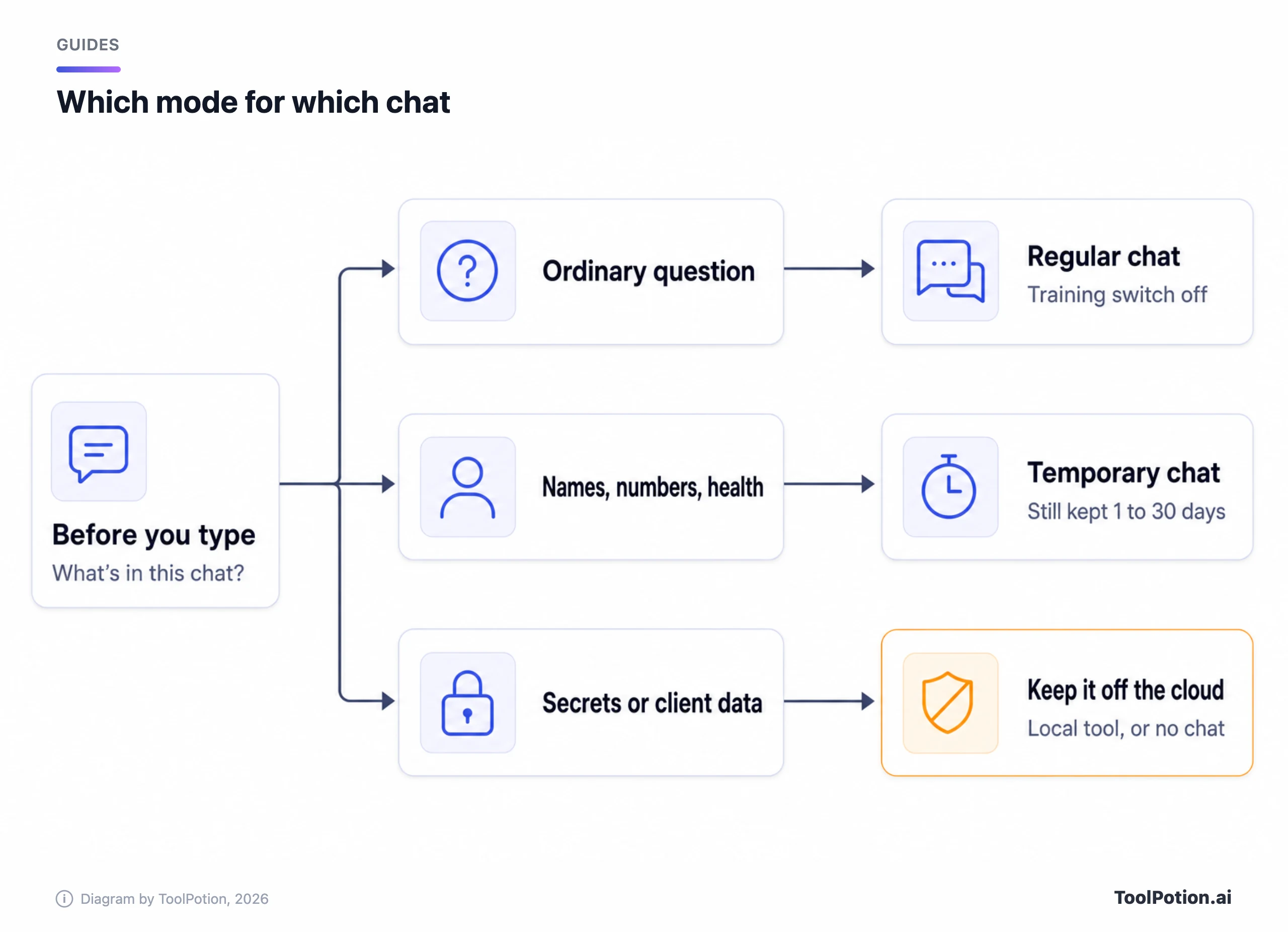
The opt-out doesn't delete or hide anything; your saved chats stay. A temporary chat isn't used for training, but OpenAI says it may keep a copy for up to 30 days for safety. Deleting a normal chat removes it from your view at once and schedules permanent deletion within 30 days. And there's a hole in the opt-out: if you thumbs-up or thumbs-down a reply, the entire conversation attached to that feedback may be used for training even though you opted out. Voice mode has its own sharing control, and so does Codex, so the one switch above doesn't cover them.
One oddity from the same page: during sessions in a program it calls Trusted Access (Daybreak is the named example), OpenAI may use content to improve its models even with the main setting off. It's limited to those sessions, and we'd still want to know before entering one.
Claude: check the pop-up you clicked through
Anthropic's consumer page says it uses your chats and coding sessions to improve Claude if you allow it, and also if a conversation is flagged for safety review, whatever the setting says (Anthropic). The toggle sits under Settings, then Privacy, and Anthropic's own steps call it Help Improve our AI models. The Verge's 2025 walkthrough called it Help improve Claude, so look for either. Anthropic's own pages say you choose; the pre-set On is The Verge's report of the 2025 pop-up, and we couldn't confirm what new sign-ups see today.
Incognito is the ghost icon at the top right of a new chat outside a project. Those chats aren't used for training and don't touch memory, but they're retained for 30 days and can't be turned into regular chats afterwards. Memory is on by default for Free, Pro, Max and Ultra. Switch it off under Settings, Your Claude (older layout: Settings, Memory) by turning off Generate memory from chats. You'll be offered Pause or Reset, and only Reset deletes what's stored. To skip memory for one chat but keep the chat, use the plus menu before your first message.
Retention is where Claude's numbers get large. Delete a conversation and it's gone from your history at once and from back-end storage within 30 days. Leave training on, though, and Anthropic may keep de-identified data for up to five years, and thumbs feedback is kept for five years too. Chats flagged for policy violations are kept up to two years. Five years is the longest figure on any page we read for this guide; we'd turn the toggle off. Shared chats are public to anyone with the link, files you attached aren't included, and you can revoke each link under Settings, Privacy, Shared chats.
Gemini: one switch covers history, training and review
Google's setting is called Keep Activity, and Google says it's on by default if you're 18 or over. It holds your history, feeds model training and lets human reviewers read samples. Open gemini.google.com, choose Settings & help, then Activity, and select Turn off (or Turn off and delete activity). You can also change auto-delete there from the default of 18 months to 3 or 36 months, or never.
Turning it off isn't clean. Google's privacy hub says "Even if your Keep Activity setting is off or you use temporary chats, Google still uses your chats to respond to you and help protect Google, our users, and the public, including with help from human reviewers." Those chats are saved for 72 hours. Chats already reviewed are disconnected from your account, so deleting your activity doesn't touch them. They're retained for up to three years.
Temporary chats are also held for 72 hours but, Google says, aren't used to train its models. Some Connected Apps stop working with Keep Activity off, and the hub says turning it back on restores them. Public links are a separate object: Google's activity page says deleting a shared chat doesn't delete its public link, so remove the link itself.
Microsoft Copilot: two apps, two sets of rules
Microsoft's help pages describe two different products and each page tells you to read the other if you're on the wrong one. For the updated app that arrived in 2026, the privacy controls page puts everything under Settings, then Personalization: a Saved memories toggle with Manage and Delete all memories, a Web search toggle, and an Allow ads personalization toggle (free Copilot can show ads). Delete a single chat from the Chats list with More, then Delete. Wiping the whole history goes through the Microsoft privacy dashboard. The activity page says prompts, responses and file contents "aren't used to train foundation models."
The older app is another story. Its FAQ says Microsoft uses conversation activity for training except for opted-out and some excluded users, keeps conversations 18 months by default, and has personalization on by default. The FAQ says you can opt out of training in the older app's settings, and an opt-out covers only future conversations. Microsoft also says older-app content needs a sign-in to the updated app before 2026 ends or it's deleted. We couldn't find a retention period or a temporary-chat mode for the updated app, which is a gap we'd want filled before calling it the best default.
Meta AI: deleting is easy, opting out isn't obvious
Meta's privacy center lists the sources of AI training data, and one is "your interactions with features that are part of AI at Meta" (Meta). It also says Meta doesn't train on private messages with friends and family unless someone in the chat shares them with its AIs. We found no toggle to turn the training off on either Privacy Center page or Meta's help article. Meta shares some of what you send its AIs, along with your region and interests, with search partners, and depending on region the interactions can personalize content and ads.
What you can control is deletion. In the Meta AI app go to Menu, Settings, Data & privacy, Manage your information, where Meta's help article lets you remove all public vibes or select Delete all chats and media (your public vibes stay unless you remove them too). Inside Messenger, Instagram or WhatsApp, typing /reset-ai in a chat deletes that AI's copy of your messages, and /reset-all-ais does it for every AI on that app. On WhatsApp, deleting the chat in the app only deletes your WhatsApp copy.
Perplexity: the toggle is called AI data retention
On Free, Pro and Max, AI data retention is on by default, and if the toggle is enabled your data is being collected for training. Go to Account, then Preferences, and turn it off. Then read the footnote: "Opt-outs only apply to data collected after the opt-out date." Data already collected can't be removed. The label sounds like a retention policy you'd want on, which we think is a poor name for a training switch.
Memory and search history are always off inside incognito sessions. Memory itself is under Settings, Memory, with separate toggles for Use search history and Notes, plus Manage memories to delete entries. Perplexity also says it may use memory content to improve its models unless AI data retention is off, so the one toggle covers that too. We couldn't confirm a retention period for ordinary sessions or the default sharing setting from the pages we read.
Which defaults we'd call worst
Our reading of the help pages, not a test, puts Gemini first. Google folds history, training and human review into one switch, keeps reviewed samples for three years after you delete, and costs you some connected apps when you turn it off. We'd pick Meta AI second because we couldn't find a way to say no at all. Claude is third: asking was better than not asking, but a toggle reported as pre-set to On and a five-year clock for those who leave it on is a lot to leave to a pop-up. Perplexity's mislabeled toggle and no-backfill opt-out come fourth.
ChatGPT's page is the easiest to follow and the opt-out is one switch, though the feedback exception undercuts it. Copilot's updated app looks best on training, and we'll change our mind on retention when Microsoft publishes a number.
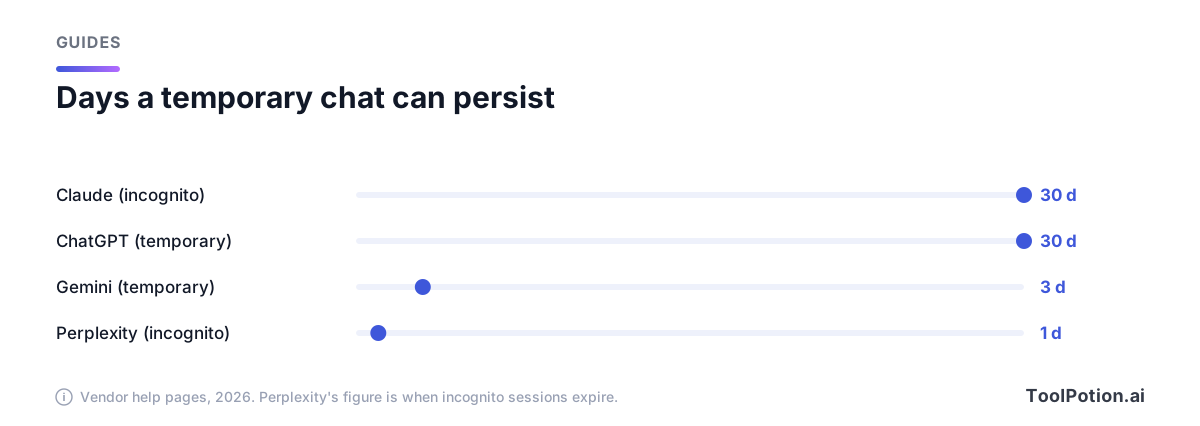
Note how short the temporary-chat window is at Gemini and Perplexity, and how long at ChatGPT and Claude. A 30-day safety copy is still a copy.
Business plans change the default and add a second reader
Paid work plans flip the training default. ChatGPT Business, Enterprise and Edu don't train on your content by default, Claude's Team and Enterprise plans don't, and Perplexity Enterprise says it never does. Microsoft's older-app FAQ excludes organizational accounts from training as well.
Those plans add a reader. Claude's incognito chats on Team and Enterprise are included in owner exports, and Enterprise's Compliance API includes them. OpenAI says eligible Enterprise customers can reach temporary chats through its Compliance API for 30 days. Google's activity page says a Workspace administrator controls Gemini settings for work and school accounts, and you may not be able to change retention or even see how long chats are kept. So on a work account, assume your admin can read the chat. Temporary modes hide a chat from your sidebar, not from them.
Sharing differs too. ChatGPT Business links open only for workspace members, though Business has no admin switch to turn sharing off (Enterprise and Edu do). Perplexity says custom retention periods need 50 Enterprise Pro seats or one Enterprise Max seat. We found no business tier for Meta AI.
What still leaks after you've changed everything
Four things survive the settings. Feedback is the first: ChatGPT may use the whole conversation, Claude keeps it five years, and Gemini keeps reviewed feedback up to three years even with Keep Activity off. Safety flags are second; Anthropic says flagged chats may still be used to improve its safety models. Memory is third. OpenAI's memory FAQ says deleting a chat alone doesn't necessarily delete a saved memory made from it, so delete both. Shared links are fourth.
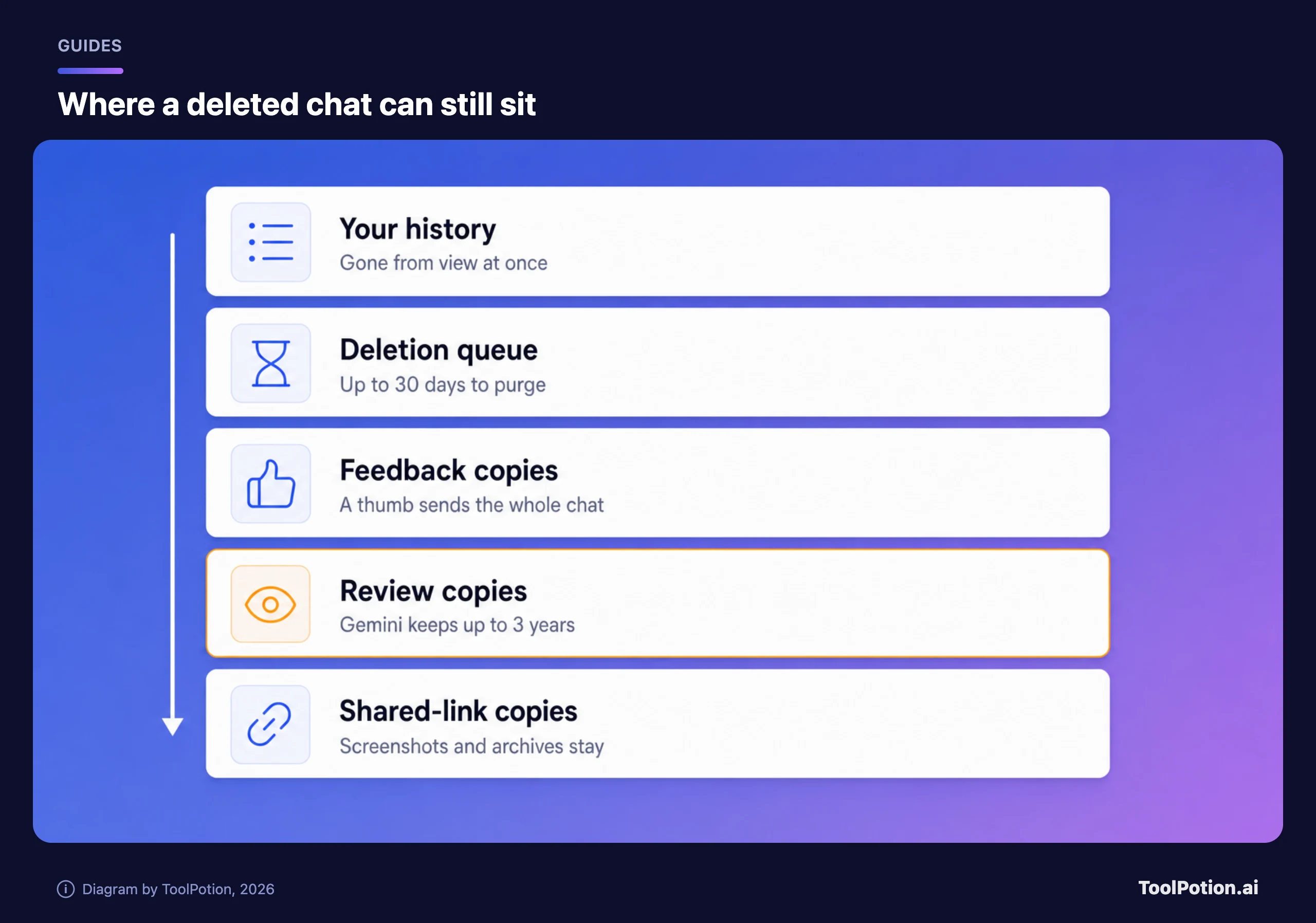
A shared link is the one leak you create yourself. Anthropic notes that its shared pages carry a noindex instruction but that screenshots and archive services keep their own copies, and turning a link off can't recall them. Google's activity page says deleting a shared chat doesn't delete the public link, so the link needs its own deletion. The ChatGPT and Gemini pages we read don't mention search engines.
So deletion is a sequence. Delete the chat, then the memory it planted, then any link to it, then any connected-app data it pulled in, in that order, and expect the vendor's own queue (30 days at ChatGPT and Claude) to finish the job.
A routine that takes one sitting
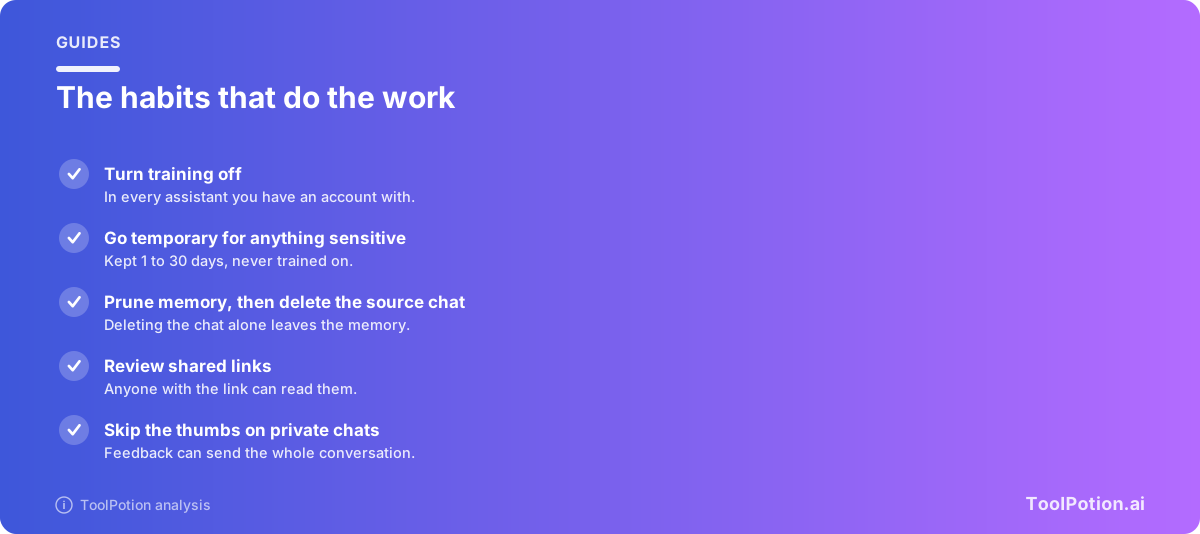
- Turn training off in every assistant you have an account with, including the ones you've stopped using.
- Make temporary mode the habit for anything with a name, number or diagnosis in it, knowing it's still held 1 to 30 days.
- Open memory and delete what you wouldn't say to a stranger, then delete the chat that put it there.
- Review shared links every few months and delete the ones you've forgotten.
- Skip the thumbs on private chats.
If a chat can't survive a stranger reading it, keep it off cloud assistants entirely. Our AI privacy board and security and privacy board list tools that run on-device, and Privacy AI App describes itself that way; we haven't checked that claim. For comparisons of the big three beyond privacy, see ChatGPT vs Claude vs Gemini and Microsoft 365 Copilot vs Gemini for Workspace.
Frequently asked questions
Does turning off training delete my chats?
No. OpenAI's page says turning off Improve the model for everyone doesn't delete or hide saved chats. Anthropic says a turned-off setting stops use in future training runs, but data already used stays in models that have been trained. Deleting is a separate step.
Are temporary and incognito chats really private?
They keep chats out of your history, out of memory, and out of training. They don't mean nothing is stored: ChatGPT and Claude hold a copy for 30 days, Gemini for 72 hours, and Perplexity's sessions expire within a day. On a work plan your admin may still see them.
If I delete a chat, is it gone?
It's gone from your view at once. ChatGPT and Claude schedule back-end deletion within 30 days. Gemini removes it from your Activity, but chats already reviewed by human reviewers are kept up to three years. The Perplexity pages we read don't give a back-end timeline.
Can a shared chat show up in Google?
Claude says shared pages carry a noindex instruction. OpenAI says anyone with a personal-account link can open the chat, and neither OpenAI's nor Google's page we read mentions search engines. Whichever assistant it is, treat a link as public.
Which assistant has the best default?
On training, Microsoft Copilot's updated app, per Microsoft's own page. On retention, nobody wins until Microsoft states a number. For anything sensitive we'd use the work account your company pays for, aware that your admin can read it.