Pick Gemini if your company already lives in Gmail and Docs, and pick Microsoft Copilot if it lives in Word, Excel and Outlook. That sounds obvious, but the price tag is where the two part ways. Google builds its AI into the Workspace plan you already pay for. Microsoft sells Microsoft 365 Copilot as a paid layer on top of the suite, and for a Standard-tier team that layer adds about $9.50 per seat per month.
Both vendors changed their prices and packaging in the last 18 months, and a lot of comparison posts still quote the old numbers. Google folded Gemini into every business plan in early 2025. Microsoft launched a cheaper small-business Copilot late last year and reshuffled its suites again in mid-2026. Microsoft is also renaming the product: its Learn docs say Microsoft 365 Copilot is now Microsoft Copilot, while its pricing pages still use the old name. This guide says Copilot for both.
This guide uses the vendors' own pricing and docs as read in 2026, in US dollars on annual commitments. It covers what you pay, what the AI does in each app, how the agent tools differ, what happens to your data, and how much work a rollout is. It also says plainly when moving suites just for AI is a bad idea.
What changed in the last 18 months
The cleanest way to see the gap is as a timeline. Google moved first and made AI part of the plan. Microsoft kept AI as an add-on and then spent a year making that add-on easier to buy.
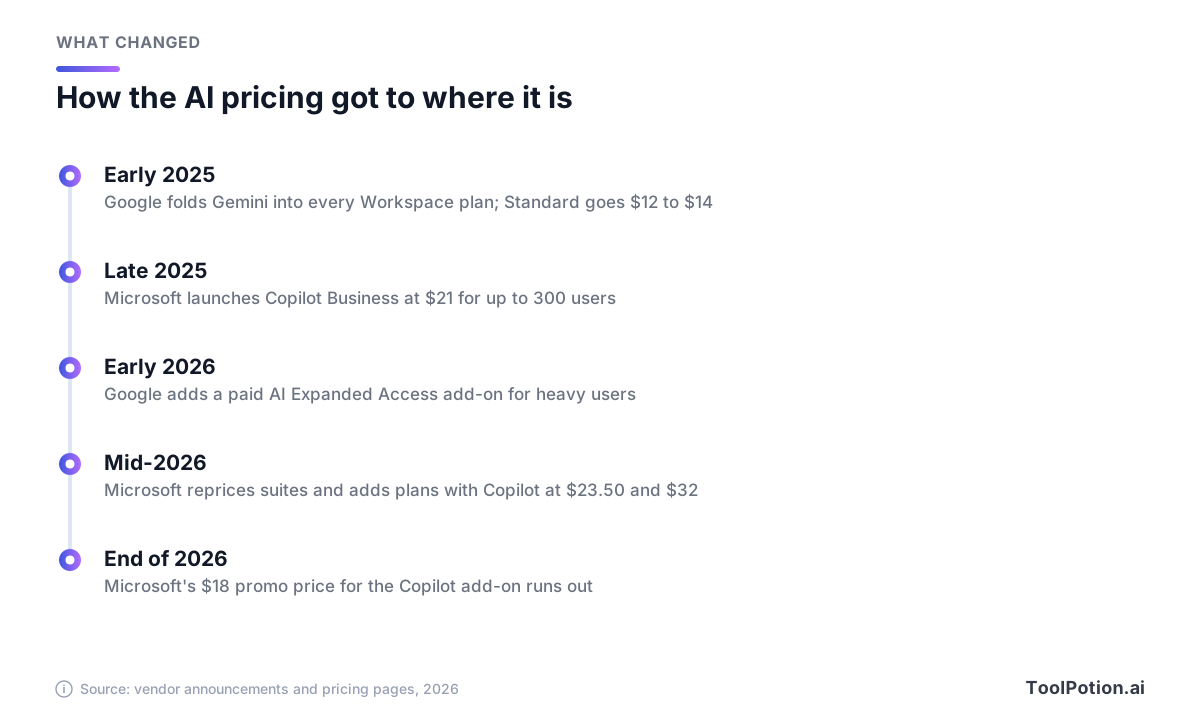
Google's move was the blunt one. It added Gemini to every Workspace business plan and raised prices to cover it. TechRepublic reported that Business Starter went from $6 to $7, Standard from $12 to $14 and Plus from $18 to $22, while the standalone Gemini add-on, which had cost $20 or $30 per user, went away (TechRepublic).
Microsoft went the other way. Copilot Business launched at $21 per user per month for organizations with up to 300 users, against $30 for the enterprise version (Office Watch). Then, in a mid-2026 repricing, Business Basic rose from $6 to $7 and Standard from $12.50 to $14, while Premium stayed at $22 (LazyAdmin). Microsoft's own pages list the new prices for Standard and Premium, and the same update added plans that bundle Copilot.
One more detail matters for 2026 budgets. Microsoft's pricing page says the $18 promotional price for the Copilot Business add-on runs only through the end of this year, applies to the first year, and is limited to existing customers with an eligible Business plan (Microsoft).
Prices side by side
Here are the business plans that matter, all per user per month on an annual commitment. Microsoft's own page lists higher prices for monthly commitments. Google's page shows $16.80 instead of $14 for Business Standard if you pay month to month (Google Workspace).
| Plan | Price per user per month | AI included |
|---|---|---|
| Microsoft 365 Business Basic | $7 | Copilot Chat (web-grounded chat) |
| Microsoft 365 Business Standard | $14 | Copilot Chat only |
| Microsoft 365 Business Standard with Copilot | $23.50 | Copilot in Word, Excel, PowerPoint, Outlook and Teams |
| Microsoft 365 Business Premium with Copilot | $32 | Same, plus security and device management |
| Copilot Business add-on | $21 list, $18 promo through 2026 | Needs an eligible Business plan |
| Microsoft 365 Copilot (enterprise) | $30 | Needs a qualifying Microsoft 365 plan |
| Google Workspace Business Starter | $7 | Gemini in Gmail, Gemini chat |
| Google Workspace Business Standard | $14 | Gemini in Gmail, Docs, Meet and more |
| Google Workspace Business Plus | $22 | Standard's AI, plus Vault and eDiscovery |
| Google Workspace Enterprise | Sales quote | Adds agent management through Gemini Enterprise |
Sources: Microsoft plans and pricing, Microsoft 365 Copilot and Google Workspace pricing. Microsoft's base plans and bundles cap at 300 users, and so do Google's Business plans.
Line up the Standard tiers and the story is short. Microsoft's Standard plan costs $14 and Google's costs $14. Add Copilot through Microsoft's new bundle and you pay $23.50. So the whole price gap for a Standard-tier team is the AI itself, about $114 per seat per year.
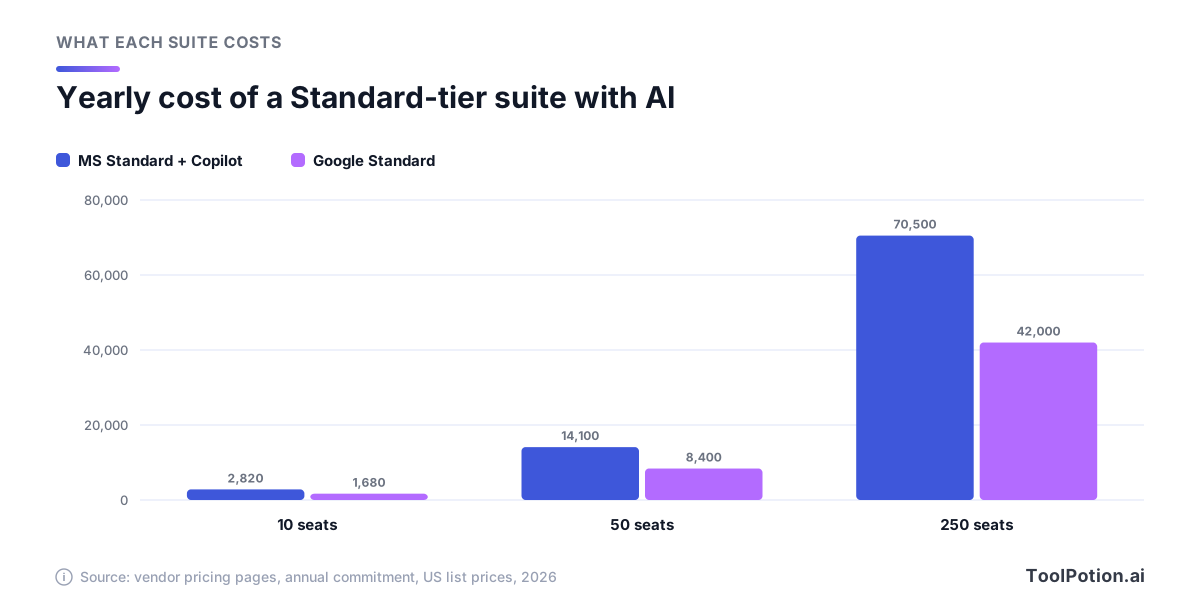
At 10 seats that's roughly $1,100 a year. At 50 it's $5,700, and at 250 it's $28,500. Those numbers assume every seat gets Copilot, which is the part you control.
The odd bit is how Microsoft prices the same capability two ways. The bundle adds $9.50 to Standard and includes Copilot Business. The add-on for people who already own a plan lists at $21. Microsoft's FAQ says new customers can choose a plan with Copilot, and existing customers can add Copilot as an add-on (Microsoft). If you're an existing customer paying for the add-on, ask your reseller whether you can move seats to the bundle. We couldn't find a published answer, so treat that as a question to put to them, not a promise.
Google has an upsell too. AI Expanded Access is an add-on for Business Standard and Plus, and for Enterprise Standard and Plus. It raises usage limits for image and video generation, deep reasoning in the Gemini app, Gemini Notebook outputs, Workspace Studio automations and meeting speech translation. Google's announcement doesn't give a price, and its promotional higher limits ended earlier this year (Google Workspace Updates). Budget for it only if heavy image, video or automation use shows up in your pilot.
Use the calculator to run your own seat count. The default is 50 seats, all on Copilot, which reproduces the $14,100 versus $8,400 figures above.
Dial the Copilot share down to 30 percent and Microsoft's yearly bill drops to about $10,100, roughly 28 percent less, because the other 70 percent of staff stay on the plain $14 plan. That's the cheapest honest way to run Copilot: buy it for the people who live in documents, and leave the rest on Copilot Chat.
What the AI does in each app
Start with what's in the box, because the lower tiers differ most. Every Microsoft business plan now includes Copilot Chat. Microsoft describes it as limited chat with enterprise data protection that uses public web data. It doesn't connect to your files, emails or chats, and it doesn't work inside the apps (Microsoft). Google's cheapest plan, Business Starter, lists Gemini in Gmail and chat with Gemini, and Standard adds Docs, Meet and Gemini Notebook with expanded access (Google Workspace).
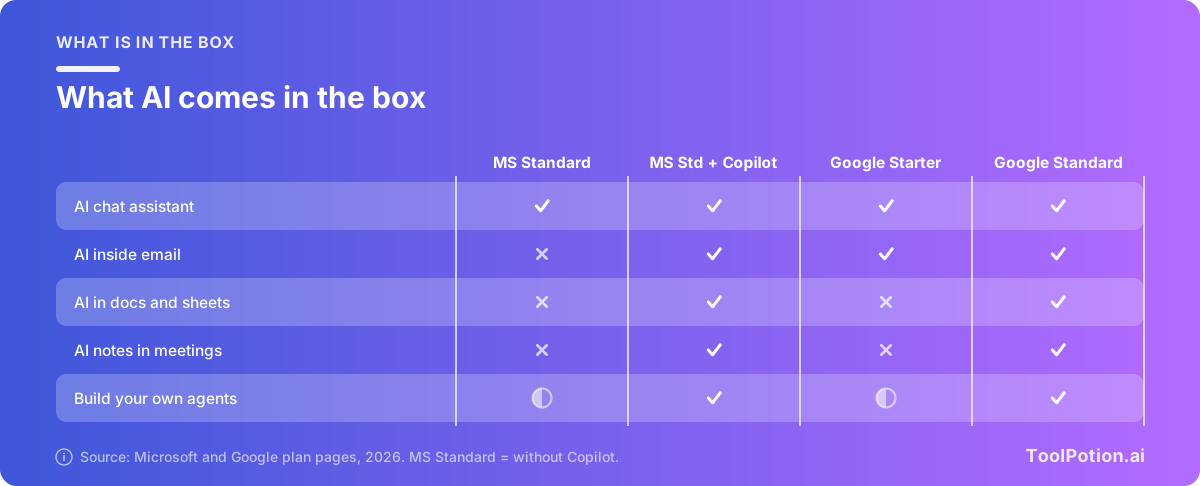
Google's Starter plan has no listed AI in Docs or Meet, so a very small team that wants it needs Standard. Two caveats: Microsoft's Teams features need a Teams license, and the matrix is ToolPotion's reading of each vendor's plan pages, not a hands-on feature test.
Inside the apps, the two do broadly similar jobs with different habits. This table keeps to what each vendor says.
| Job | Microsoft Copilot | Gemini in Workspace |
|---|---|---|
| Writing | Drafts and edits in Word, plus a Word agent | Fully formatted first drafts in Docs that match your tone |
| Spreadsheets | Excel built-in Copilot, plus an Analyst agent | Build whole sheets, fill tables, solve optimization problems by prompt in Sheets |
| Chat with Copilot in Outlook | Summarize threads, find key details and draft replies in Gmail | |
| Meetings | Catch up on meetings in Teams (Teams license needed) | AI notes, translated captions, noise cancellation and recordings in Meet |
| Slides | Create a new presentation with Copilot in PowerPoint | Add editable slides to existing decks in Slides |
| Search across files | Chat grounded in work data; 100+ connectors on the enterprise license | Drive turned into a searchable knowledge base |
| Research | Researcher agent | Gemini Notebook: audio overviews, mind maps, video overviews |
Sources: Microsoft Copilot support, Microsoft 365 Copilot and Google Workspace AI. Google's notebook tool was called NotebookLM in its announcement earlier this year and appears as Gemini Notebook on its current plan pages.
The practical difference is where the AI sits. Copilot lives inside the desktop apps most finance, legal and operations teams already use, and that depth is Microsoft's real edge for anyone who builds big Excel models or long Word documents. Gemini's strength is that it comes with the plan, so every user gets it from day one and nobody has to argue about who deserves a seat. If you want a standalone assistant on top of either suite, Google Gemini and Microsoft Copilot are also available on their own, and our AI chatbots board shows how the wider field compares.
For specialist work inside the suite, a dedicated tool can still beat either one. Our boards for AI spreadsheet tools, AI writing assistants, AI presentation makers and AI data analysis are worth a look before you pay for seats.
Agents: Copilot Studio against Workspace Studio
Both vendors now sell the idea of agents that do work for you, and both split it into a simple tier and a heavier one.
Microsoft Copilot Studio is the builder. Business plans with Copilot include Agent Builder and Copilot Studio in the Copilot Chat or Standard harness, and prebuilt agents such as Researcher, Analyst and Facilitator (Microsoft). Agents published to Copilot are covered by a Copilot license, but heavier use is metered. Pre-purchased capacity is $200 a month for a 25,000-credit pack, or you pay as you go, and either way you need an Azure subscription (Microsoft Copilot Studio).
Google's version is Workspace Studio, which builds flows across Workspace apps, such as meeting prep or sorting email, and ships with the plans (Google Workspace). For agents at company scale, Google points Enterprise customers to Gemini Enterprise, described as a platform to discover, create, share and run agents, with connections to Microsoft 365, Slack, Salesforce and more (Google Cloud). We couldn't find a published list price for Gemini Enterprise, and Google says some of its features are still in early access, so don't plan around it without a quote.
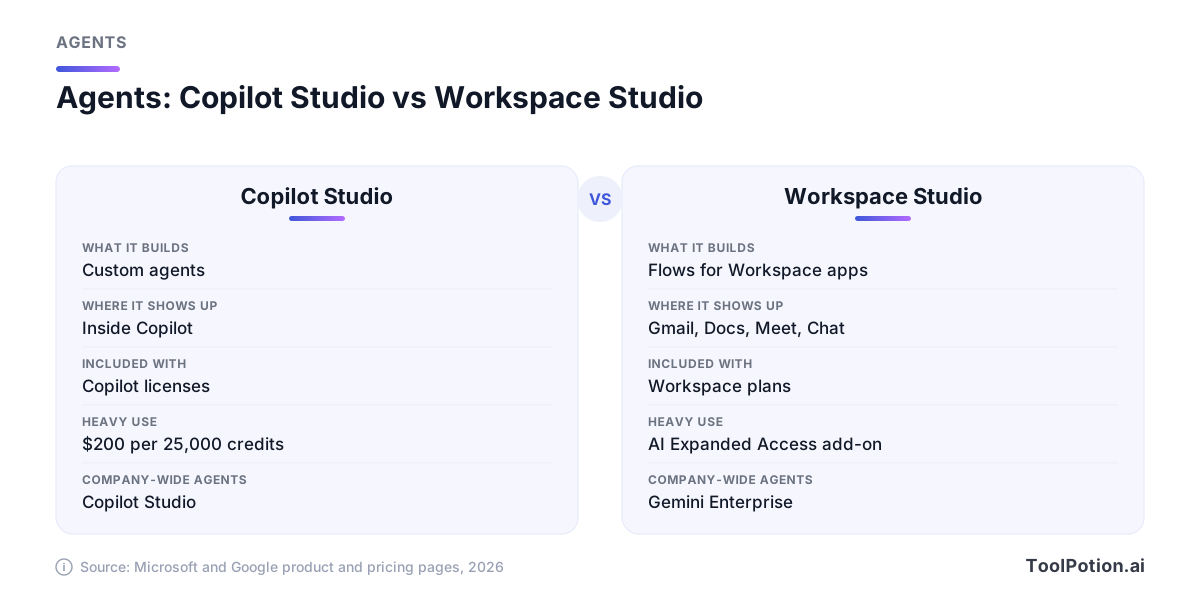
For a business owner, the agent question usually shrinks to this. If you want agents for a handful of repeat jobs, like routing support emails or drafting weekly reports, both suites can do that on the included tools. If a developer will build something custom, Copilot Studio is the more established builder, and it comes with an Azure bill you should model first. If agents are your main goal rather than a side benefit, our piece on AI agents versus automation tools will save you buying the wrong thing, and the AI agents board lists alternatives outside both suites.
Data protection and admin controls
On the headline promise the two are aligned. Microsoft says prompts, responses and data accessed through Microsoft Graph aren't used to train its foundation models, and that Copilot only surfaces data a user already has at least view permission to see (Microsoft Learn). Google says your content isn't human reviewed or used for generative AI model training outside your domain without permission, and that Gemini only retrieves what the user can already access (Google).
The differences are in the controls.
- Microsoft honors Purview sensitivity labels and usage rights, lets admins search and retain Copilot interaction history, and lets admins decide which agents and which third-party models are allowed, including Anthropic and OpenAI models. It notes that Anthropic models are currently excluded from the EU Data Boundary.
- Google lets admins switch Gemini on or off for users or organizational units, set retention for conversations, choose which sources Gemini can ground on (Gmail, Drive, Calendar, Chat), and have existing data loss prevention rules apply to generated output.
- On certifications, both cite ISO 42001. Microsoft also lists GDPR, ISO 27001 and HIPAA for Copilot. Google lists SOC 1, 2 and 3, ISO 27001 and FedRAMP High for Gemini in Workspace, and supports HIPAA.
Microsoft also offers a copyright commitment: it says it will defend commercial customers sued over output from its Copilots, provided they used the built-in guardrails and content filters (Microsoft Learn). We didn't find an equivalent line on the Google pages we read, so check your contract.
Neither vendor makes the shared-drive problem go away, and that matters more than any certification. Both assistants respect the permissions you already have. If half your company can open the salary spreadsheet today, the AI will happily answer questions from it. Microsoft's own Copilot page points to SharePoint Advanced Management to prevent oversharing (Microsoft). Google's equivalent is cleaning up Drive sharing before you turn Gemini on for everyone.
What a rollout asks of you
Neither product is hard to switch on. The work is everything around it. Microsoft's switch is a license you manage in the admin center. Google's is a toggle, and on a Standard plan Gemini is already available. What takes time is deciding who gets it and finding out whether it earns its keep.
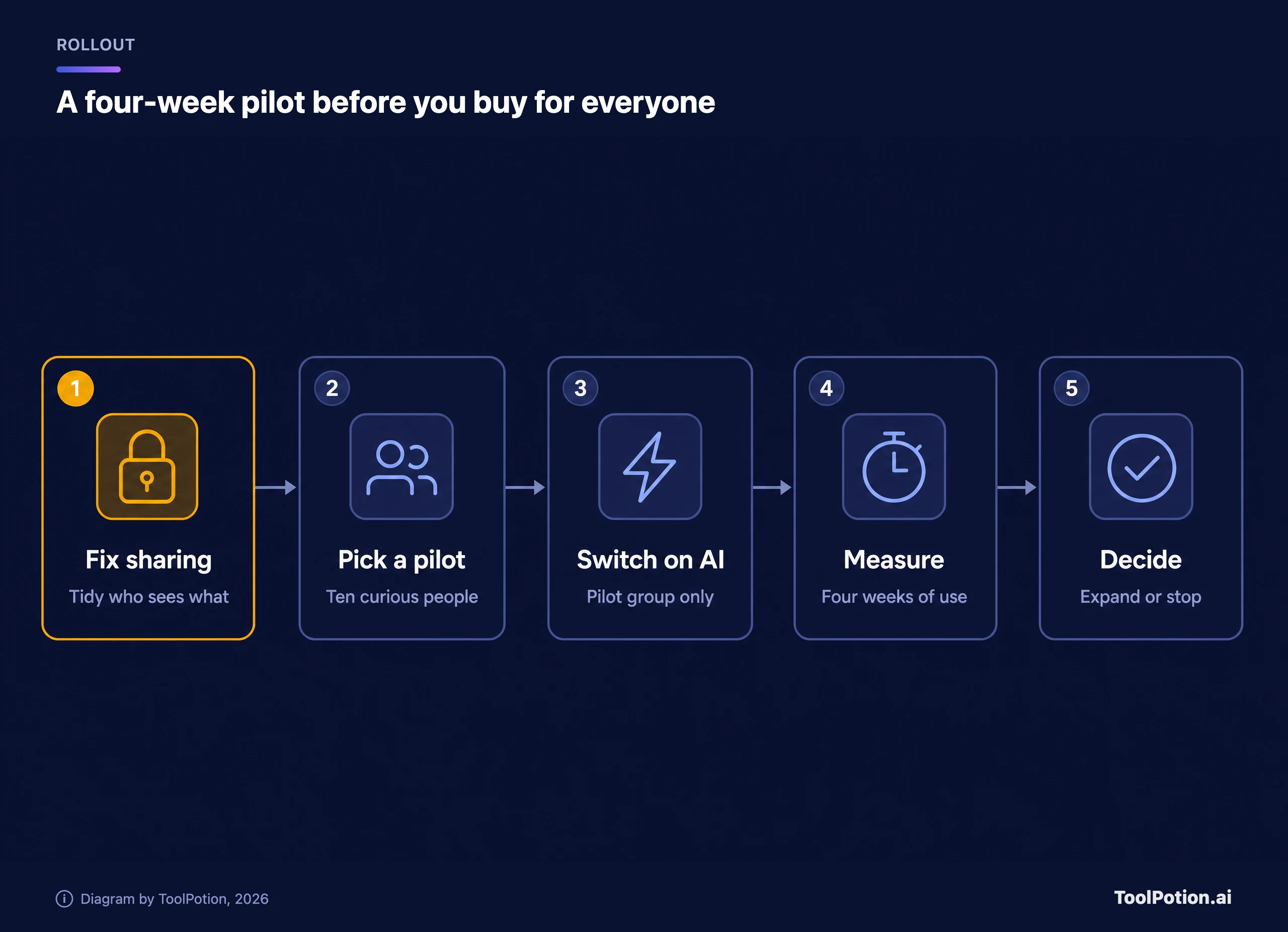
A sensible order looks the same on both suites. Fix oversharing first, because that is the one step you can't do in a hurry later. Then pick a pilot of about ten people with real document-heavy work. Give them the AI and nobody else. Measure for four weeks, then decide. Microsoft ships a Copilot Dashboard for usage and adoption reports (Microsoft), so you can see who is actually using it. Google's admin console offers the retention and access controls above, but we didn't find an equivalent usage-and-ROI dashboard on the pages we read.
Plan for a few things that don't show up on price sheets. Staff need a short training session, because most people use an AI assistant like a search box until someone shows them otherwise. Microsoft says Copilot is easy to adopt because it works inside the apps people already know, which is a fair argument for Office-heavy teams.
Which suite should carry your AI
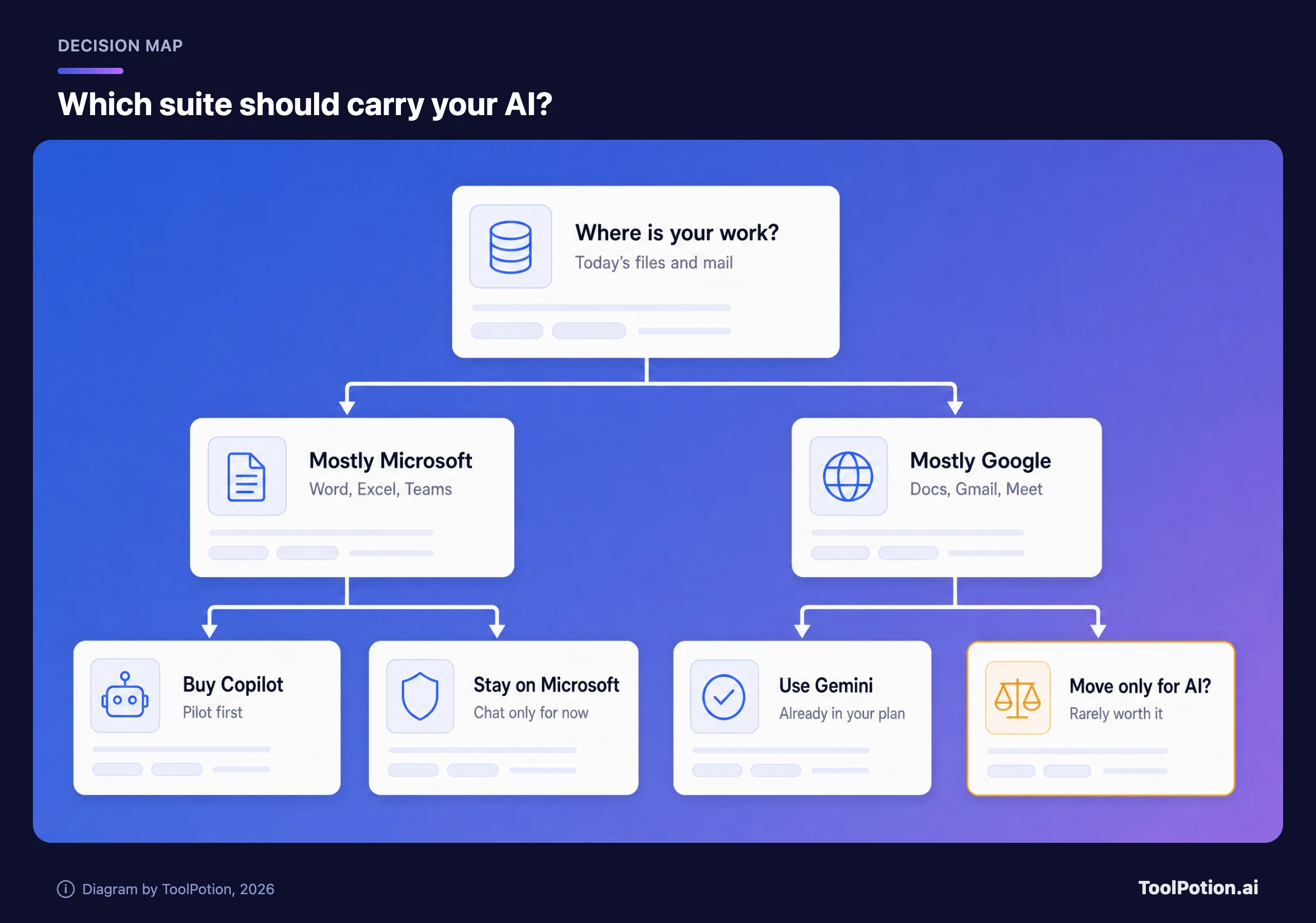
Here is the rule that holds up in most cases: follow your documents, not the AI. The suite your team already works in will give you better results than the suite with the cleverer demo, because the assistant is only as useful as the files, mail and meetings it can see.
If you run on Microsoft
Buy Copilot for the people who live in Word, Excel and Outlook, and leave everyone else on Copilot Chat. For a new customer, the plan with Copilot at $23.50 or $32 is the cheaper door. Check the $18 add-on promo before it ends this year if you're already a customer. Skip it entirely for teams that mostly use email and chat, where the free Copilot Chat covers the basics.
If you run on Google
Use what you already pay for. Gemini is in your plan, so the question isn't whether to buy it but whether to turn it on for everyone. Move small teams from Starter to Standard if they want AI in Docs and Meet, and test the AI Expanded Access add-on only if the pilot hits limits.
When switching suites for AI is not worth it
It rarely is. Changing suites means moving mailboxes, shared drives, calendars and years of habit, plus retraining and a messy overlap while both run. The AI price gap on a Standard-tier team is about $9.50 per seat per month. That isn't enough to justify a migration on its own, and AI features at both vendors are changing fast enough that the better one can flip within a year.
Switching can make sense for other reasons, such as security tooling, existing Microsoft licensing or heavy Excel dependence. In those cases the AI is a bonus, not the reason. The one case where AI alone might justify a move is a small, document-heavy team that has no migration baggage yet. Starting fresh is the only time the choice is nearly free.
If neither suite fits, a standalone assistant like ChatGPT or Claude can sit beside whichever suite you have, and our ChatGPT alternatives guide and top AI chatbots roundup compare them. For meetings specifically, a third-party note taker such as Otter can fill gaps in Teams or Google Meet, and the AI meeting assistants board has more. Our meeting assistants guide goes deeper.
Frequently asked questions
Is Gemini free in Google Workspace?
It's included in the price of Business and Enterprise plans, so there's no separate Gemini charge. Google raised plan prices in early 2025 to cover it. Higher usage limits for some features need the paid AI Expanded Access add-on.
Do I need Microsoft 365 to buy Copilot?
Yes. Copilot isn't sold without a qualifying Microsoft 365 plan. New customers can buy a plan with Copilot, and existing customers add it as an add-on.
What is the difference between Copilot Chat and Microsoft Copilot?
Copilot Chat is the included, web-grounded chat with enterprise data protection. It doesn't connect to your files, mail or chats. The paid Copilot connects to your work data and works inside Word, Excel, PowerPoint, Outlook and Teams. Microsoft has also renamed Microsoft 365 Copilot to Microsoft Copilot, though some pages still use the old name.
Is Copilot Business the same as the $30 Copilot?
Reporting says it has the same core capabilities at a lower price, but it's limited to organizations with up to 300 users. Above that you buy the $30 version.
Which is better for data privacy?
Neither wins outright. Both say they don't train foundation models on your content and both respect existing permissions. Your real exposure is oversharing inside your own files, so audit permissions before a rollout.
Can I use both?
Technically yes, since Google's Gemini Enterprise connects to Microsoft 365 data. But paying for two AI layers makes sense only for a team with a clear reason, such as a Microsoft-based finance group inside a Google-based company.