If your team already lives on GitHub, GitHub Copilot is the safest first buy of the three. If you want the most agent-heavy editor and can live with some ownership risk, Cursor is the pick. Windsurf is the harder call, because the app you'd download today is called Devin Desktop.
All three changed this year. SpaceX bought Cursor in a $60 billion stock deal. Cognition renamed Windsurf. And every one of them moved to usage-based plans, which makes the sticker price a poor guide to what you'll pay once agents start running for an hour at a time.
This guide sticks to what the vendors publish: plans, included usage, data rules, and what each tool is built to do well. Prices are US list prices. Terminal agents such as Claude Code are a different category and are not compared here.
Three products, three new situations
Cursor is made by Anysphere, which SpaceX agreed to buy for $60 billion in stock (TechCrunch). Cursor says the deal has closed and that SpaceX's GPU fleet will let it "provide customers with more capable models at lower cost" (Cursor). In practice that already shows in the plans: Cursor's own Composer models and the Grok models sit in one usage pool, and third-party models from Anthropic, Google and OpenAI draw from a second pool at API prices (Cursor docs).
GitHub Copilot is the odd one out because it isn't an editor of its own. It runs inside VS Code, Visual Studio, JetBrains IDEs, Eclipse and Xcode, in the terminal, and on github.com (GitHub). Its model menu is the longest of the three, with Claude, GPT, Gemini, Grok and Kimi models plus Microsoft's own MAI-Code-1.1-Flash.
Windsurf has had the busiest stretch. Cognition, the company behind Devin, agreed to acquire it in 2025 (Cognition). Earlier this year Cognition renamed the product Devin Desktop, and windsurf.com now redirects to devin.ai. Cognition says plans and pricing carried over unchanged (Cognition). The new pitch is an "agent command center": a board that tracks your local and cloud agents, with support for Codex, Claude Agent and OpenCode through the open Agent Client Protocol. The old Cascade agent has been replaced by Devin Local, rewritten in Rust, which Cognition says is up to 30% more token efficient. We'll keep writing "Windsurf" below, since that's still what most people search for.
| Cursor | GitHub Copilot | Windsurf (Devin Desktop) | |
|---|---|---|---|
| Owner | Anysphere, now part of SpaceX | GitHub | Cognition |
| Where it runs | Its own editor, CLI and cloud agents | VS Code, Visual Studio, JetBrains, Eclipse, Xcode, CLI, github.com | Its own desktop IDE, plus Devin CLI and Devin Cloud |
| Models | Claude, GPT, Gemini, plus Grok and Composer | Claude, GPT, Gemini, Grok, Kimi, Microsoft MAI | OpenAI, Claude, Gemini and SpaceXAI models, plus open-source ones |
What each one costs in 2026
Individual plans line up more neatly than you'd expect. Each vendor has a free tier, a $10 to $20 entry plan, and a $100 to $200 plan for people who run agents all day. Cursor and Copilot add a middle step; Windsurf doesn't.
| Tier | Cursor | GitHub Copilot | Windsurf |
|---|---|---|---|
| Free | Hobby: limited agent requests | Free: 2,000 completions a month, limited chat and agent use | Free: light quota, unlimited Tab completions |
| Entry | Pro, $20 | Pro, $10 | Pro, $20 |
| Middle | Pro+, $60 | Pro+, $39 | None |
| Top | Ultra, $200 | Max, $100 | Max, $200 |
| Teams | Teams, $40 per seat (Premium, $120) | Business, $19 per seat (Enterprise, $39) | Teams, $80 flat plus $40 per seat |
Sources for every figure above are the vendors' own pricing pages: Cursor, GitHub and Devin. The team row is where the three drift apart, so here it is as a chart.
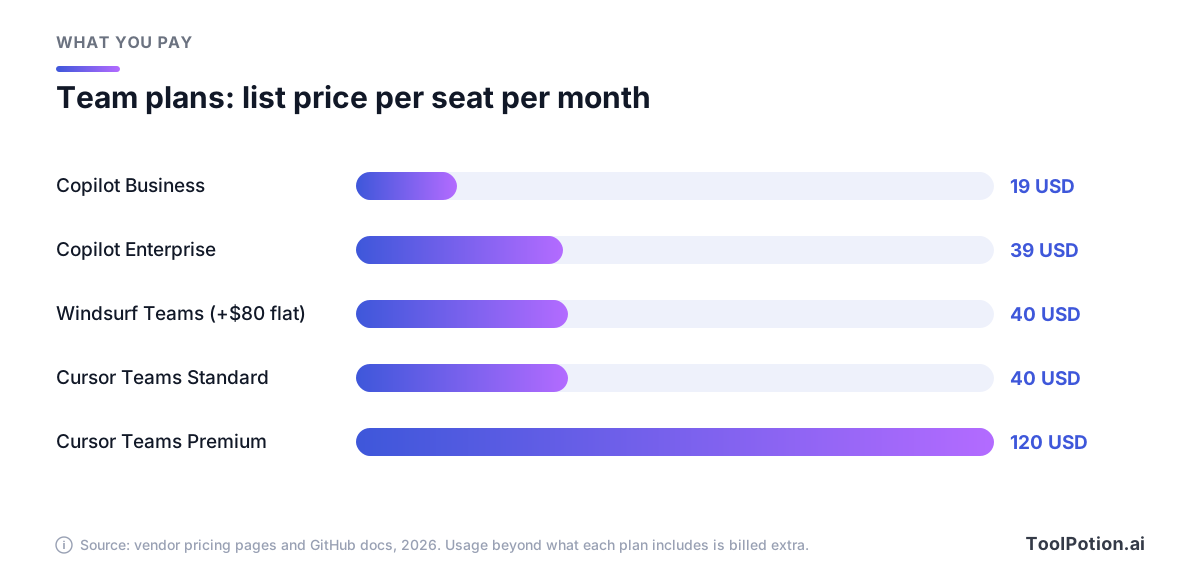
Copilot Business is the cheapest seat by a wide margin, and a Cursor Premium seat costs more than six times as much. Cursor says Premium adds five times the Standard agent limits, so the extra money buys headroom, not new features. Windsurf's $40 hides a flat $80 team fee: five developers pay $280 a month, not $200.
Included usage is the part to read twice
None of these plans sell unlimited agents anymore. Each sells a flat fee that comes with a pool of usage, then charges API-style rates once the pool is gone. How the pool is measured differs, and that's what you need to compare.
GitHub's version is the easiest to follow. Usage is measured in AI credits, and one credit equals one cent (GitHub docs). A $10 Pro plan includes 1,000 base credits plus a 500-credit flex allotment, so you get $15 of usage. Pro+ gives $70 for $39, and Max gives $200 for $100. The flex part is variable, though. GitHub says it is designed to adapt as model prices change, and unused credits expire at the end of each month.
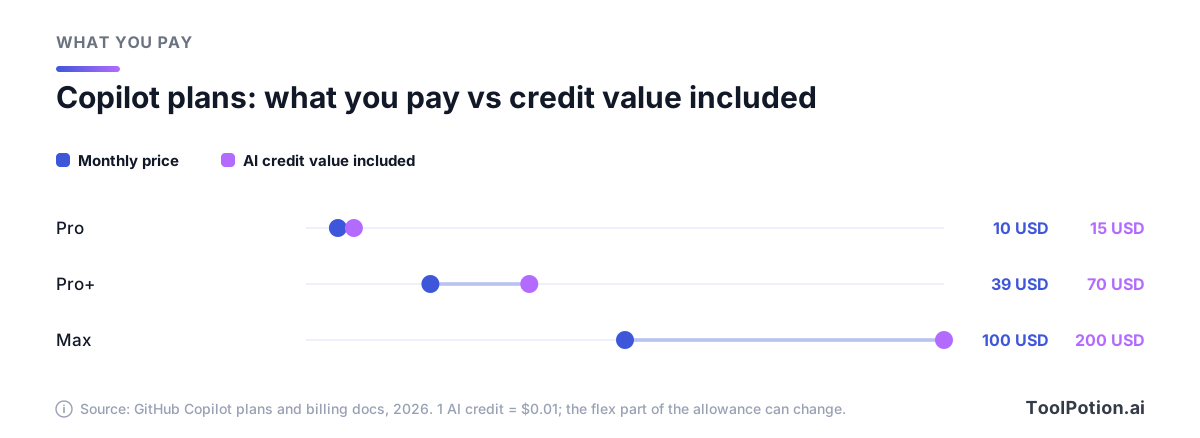
Read the chart as a discount that GitHub is free to adjust. Today the bigger plans give you the biggest bonus, and the $10 plan gives the smallest. Inline suggestions and next edit suggestions don't consume credits on any paid plan, so autocomplete is effectively flat-rate.
Business seats work as a shared pool. A company with 100 Business seats gets 190,000 credits to spend across everyone, and overage is allowed by default at a cent per credit unless an admin switches it off or sets budgets. There is no automatic fallback to a cheaper model when a budget runs out, so a capped developer simply stops.
Cursor splits usage into two pools. The "Cursor Models" pool covers Grok and Composer. The "Other Models" pool is charged at each model's API price, so Claude Sonnet 5 costs $2 per million input tokens and $10 per million output tokens (Cursor docs). When you run out, you can keep going on-demand at the same rates, and Cursor says requests are never slowed or downgraded. The docs also give a useful range: daily agent users typically burn $60 to $100 a month in total usage, and power users $200 or more. That's why Cursor's own pricing FAQ points daily agent users to Pro+ instead of the $20 plan.
Windsurf's Pro and Max plans come with an allowance that refreshes daily and weekly, and extra usage is billed at API pricing. The Max plan at $200 exists, in Cognition's words, for power users who need significantly higher quotas.
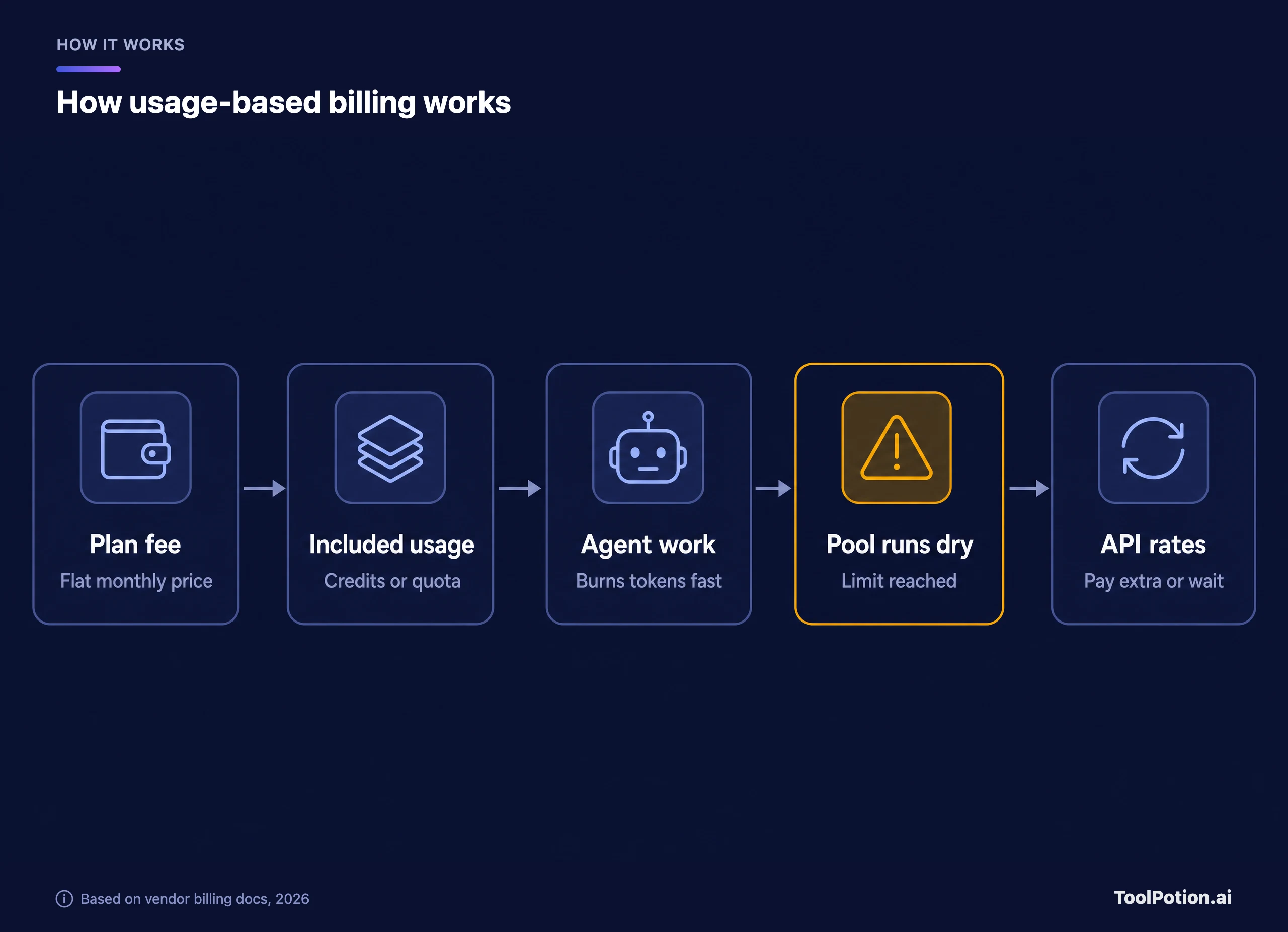
The diagram is the whole story in one line. A plan fee is a deposit. If your developers mostly use autocomplete and the occasional chat, you never reach the amber card. If they hand agents hour-long tasks, you reach it in the first week.
Where each one is strongest
Pricing pages can't tell you which tool writes the best code, and we haven't seen a benchmark of these three that we'd trust. What they can tell you is what each product is built around. The scorecard below is an editorial read of published features, not a test result.
Autocomplete and small edits
This is the least differentiated area. Cursor says its paid plans include unlimited Tab completions, GitHub says completions and next edit suggestions are unlimited on every paid Copilot plan, and Devin's pricing page lists unlimited Tab completions even on the free Windsurf plan. Copilot's free tier is the stingy one, capped at 2,000 completions a month. If autocomplete is all you want, the decision is about which editor you like, and Copilot at $10 or Windsurf's free plan are the cheapest ways to find out.
Multi-file edits and agent work
Here the products pull apart. Cursor treats the agent as the main interface. It runs cloud agents, and its docs let you choose where those agents run. Large engineering teams use it too: Stripe is one of the customers Cursor names on its customer page, and we have a Stripe case study in the directory.
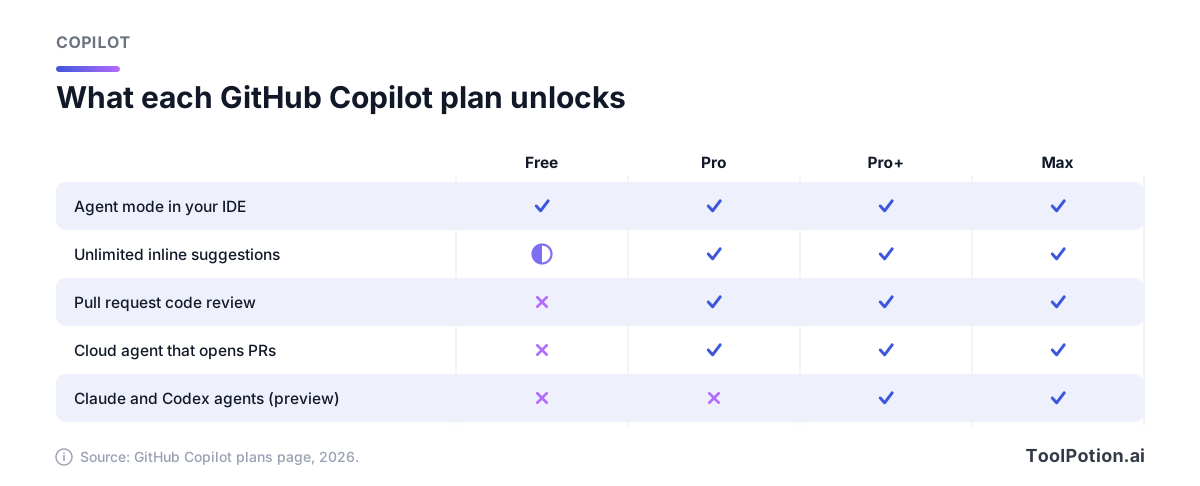
Copilot's agent mode works in your existing IDE on every plan, including Free. From Pro up, you can assign an issue to a cloud agent and get a pull request back, which suits teams whose work already starts in GitHub issues. Pro+ and Max can also hand tasks to Claude or Codex agents, though GitHub still labels that a preview.
Windsurf's bet is orchestration. Devin Desktop shows every session on a board, shares context between agents through Spaces, and runs third-party agents next to Devin's own. If you expect each developer to supervise several agents at once, that's the most deliberate design of the three. If you expect one agent per person, it's more interface than you need.
Code review
Cursor sells review as a product called Bugbot. It's included on Teams and billed by usage on individual plans, and Cursor says more than 70% of the issues it flags get fixed before merge. That number is the vendor's own. Copilot reviews pull requests and editor diffs from the Pro plan up, paid for in credits. Cognition lists Devin Review as a separate surface in its lineup, and its pricing page doesn't spell out what it costs. If review is your main reason to buy, run two weeks of real pull requests through each before you commit.
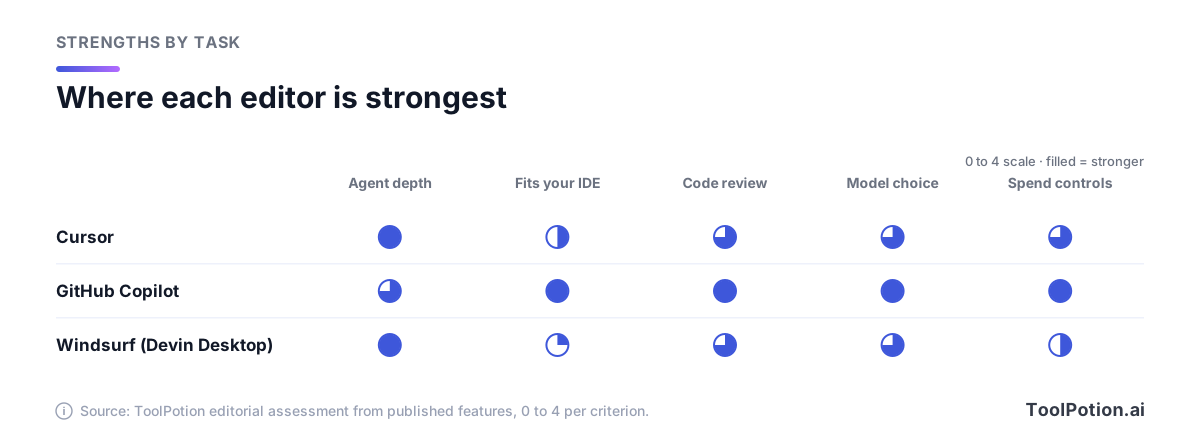
Copilot scores well mainly because it fits your existing setup and has the strongest spend controls: per-user budgets, pooled credits, and the biggest model list. Cursor and Windsurf win on agent depth. Windsurf scores lowest on IDE fit because it's a standalone desktop app, though Cognition says it stays compatible with VS Code settings and extensions.
One more view of Copilot, because its plans are the most layered. Code review and cloud agents start at Pro, and the third-party agents wait for Pro+.
Privacy, training and admin controls
This is where individual plans and company plans split sharply, and where the defaults surprise people.
| Cursor | GitHub Copilot | Windsurf | |
|---|---|---|---|
| Individual plans | Privacy Mode is a setting you turn on. With it on, Cursor says your data isn't used for training; with it off, it may be | Free, Pro and Pro+ interaction data is used for training unless you opt out | May train on your data by default; paid users can opt out |
| Team plans | Team-wide Privacy Mode enforced by admins, plus SSO. Cursor holds SOC 2 Type II, ISO 27001 and ISO 42001 | Business and Enterprise are excluded from training | Teams: only an admin can opt out. Enterprise: no training without written consent |
The sources are Cursor's data use page, GitHub's announcement of the training change and Cognition's security page. A few details matter. GitHub says its training program doesn't use private repository content "at rest", but Copilot does process private code while you're using it. Cursor routes requests through its own backend even when you bring your own API key. And when a Windsurf user on a paid plan opts out, Cognition says zero data retention is switched on with its model providers.
For a solo developer on client code, the first job in any of the three is to open the privacy setting. For a company, the cleanest answer is a business tier: Copilot Business, Cursor Teams with Privacy Mode enforced, or Windsurf under an enterprise agreement.
Risks worth pricing in
Cursor's ownership is the big one. SpaceX now controls an editor that's also the main channel for its own Grok models, and the pool with the most included usage is the one that holds those models. Nobody has said Claude or Gemini access will shrink. But OpenAI has said it plans to end Cursor's access to its models later this year, citing doubts that SpaceX will follow its terms (CNBC). Cursor's CEO said OpenAI models make up about 5% of traffic and that talks were under way. Cursor's docs still list GPT models today. If your team standardized on GPT in Cursor, plan a fallback.
Windsurf's risk is churn. In a year it changed owner, name and local agent, and its old agent was retired. Cognition says settings and extensions carried over, which is reassuring. It's still a reason to pay monthly rather than annually until the product settles.
Copilot's risk is the flex allotment, which GitHub can change, and the training default on individual plans. Both are manageable. Neither is a reason to avoid it.
How to pick: four rules and a two-week trial
Start with the situation, then check cost.
- If your developers use several editors, such as JetBrains for backend and Xcode for mobile, take Copilot Business at $19 per seat. It's the only one of the three that follows them everywhere.
- If most of your developers want an agent to do the first draft of every task and don't mind a VS Code-style editor, take Cursor Teams and start on Standard. Watch the usage dashboard for a month before you consider Premium.
- If you want Codex, Claude Agent and Devin running side by side from one board, try Windsurf (Devin Desktop). It's the only one built around that idea.
- If your security team insists on no training on any code, buy a business tier of whichever you choose and enforce it centrally.
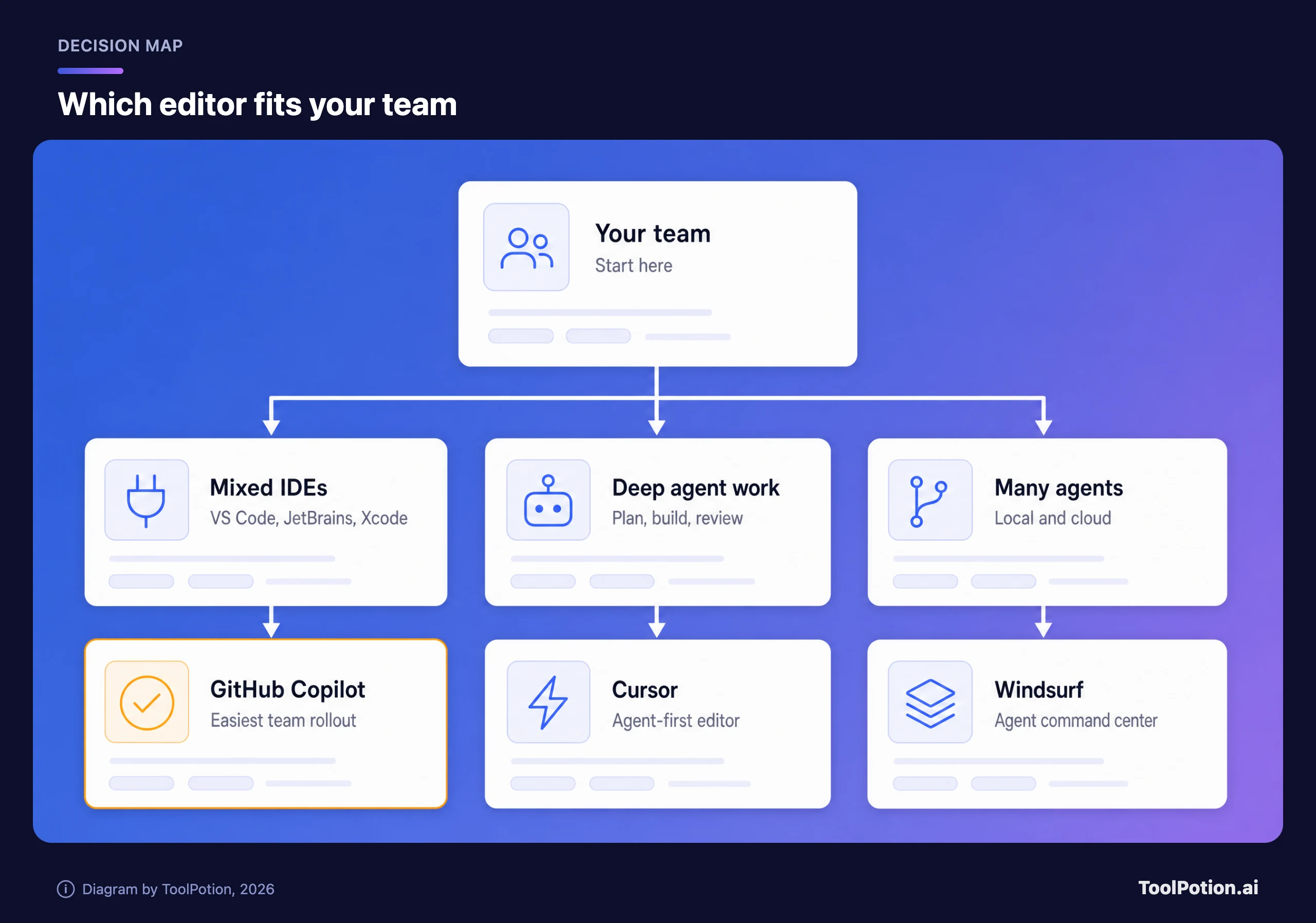
The map is a starting bias, not a verdict. Copilot gets the amber card because it asks the least of a team that's already on GitHub, and nothing in its plans locks you out of trying the others later.
Then run a trial. Pick five developers with different habits. Give each one a plan for two weeks. Have them note the tasks they handed to agents, and compare merged pull requests and the usage dashboards at the end. Dashboards are where the surprises appear: a developer who looks light on Tab but spends $90 on agent runs changes which plan you buy.
The calculator below turns your team size and expected usage into a monthly figure. Copilot's number is straight list math, with the caveat in the note. Cursor and Windsurf show the seat fee as a floor, because neither publishes the dollar value of its included usage.
Alternatives worth a look
Zed is a fast editor with a free Personal plan, a $10 Pro plan that includes $5 of tokens, and a $30 per seat Business plan, per its pricing page (Zed). On the free plan you can use your own API keys or external agents such as Claude Agent and Codex CLI. It's the pick for people who want AI optional.
Google Antigravity is Google's agent-first development platform. It has a free individual plan with weekly rate limits, paid tiers through Google AI Pro and Ultra, and business plans via Google Cloud. Cline is an open-source agent (Apache 2.0) that uses your own model keys and runs in VS Code, JetBrains in early access, and even inside Cursor and Windsurf. It's the cheapest way to keep model choice in your own hands. JetBrains Air is JetBrains' agent hub, which runs Claude Agent, Codex, Junie and Copilot, though cloud runs are only available to some customers so far.
For a wider scan of the category, see the AI coding assistants leaderboard, our guide to the best AI coding tools, and the top 15 AI coding assistants.
Frequently asked questions
Is Windsurf still around?
Yes, under a new name. Cognition renamed it Devin Desktop earlier this year and says existing users got the change as an automatic update with their plan and pricing intact. The windsurf.com address now redirects to devin.ai.
Should I worry about Cursor after the SpaceX deal?
Nothing has changed in the plans you can buy today, and Cursor says it plans to keep the product familiar. The things to watch are model access (OpenAI's planned cutoff) and how heavily Grok models get favored in pricing. Month-to-month billing keeps your options open.
Which is cheapest for one developer?
Windsurf's free plan has unlimited Tab completions and a light agent quota. Copilot Pro at $10 is the cheapest paid plan. Cursor Pro at $20 costs twice as much (Windsurf Pro is $20 too), and Cursor says daily agent users usually need Pro+ at $60.
Does Copilot train on my code?
On Free, Pro and Pro+, GitHub uses interaction data for training unless you opt out in the Privacy settings. Business and Enterprise are not included. GitHub says its program doesn't use private repository content at rest.
Can I use two of them together?
Yes. Copilot installs in VS Code and JetBrains next to other tools, and Cline runs inside both Cursor and Windsurf. Just remember each has its own bill and its own privacy setting.
What is an AI credit?
It's GitHub's billing unit for Copilot: one credit is $0.01. A task's token use is priced by model and converted to credits, so a short chat with a small model costs a fraction of a credit and a long agent run with a frontier model costs many.