If you spend your day on video calls and want a bot-free notepad, pick Granola. If you want the broadest set of integrations and language support, pick Fireflies.ai. If you want the cheapest paid seat from a name people know, pick Otter.ai. That's the whole decision for most people, and the rest of this piece is the evidence behind it.
The three tools look alike in a demo. All of them listen to a meeting, write a summary and pull out action items. The differences show up in four places: whether a bot joins your call, what the free plan stops you from doing, which apps get the notes afterward, and what happens when someone on the call didn't agree to be recorded.
Prices and limits below come from each vendor's own pricing page in 2026, confirmed against US list prices. Fathom shows up as a fourth option because its free plan changes the math for some buyers. For a wider market view, see the ToolRank board for AI meeting assistants and our roundup of top AI meeting assistants.
Bot or no bot is the real dividing line
Most notetakers join your call as a participant. A named bot shows up in the roster, records, and leaves. Otter's pricing page says its plans join Zoom, Microsoft Teams and Google Meet to write and share notes automatically. Fathom's integrations page says it joins Zoom, Google Meet and Microsoft Teams to create transcripts, summaries and action items.
Granola works the other way. Its security page says it "does not add a bot to your video call," and that it transcribes in real time on macOS and Windows, or after the meeting from temporarily cached audio on mobile. It also says it doesn't store the audio. The pricing page lists "Bot-free, device-audio capture" on every plan, including the free one.
Fireflies sits in the middle. Its free plan card lists a Chrome extension, and its comparison table has a row for recording "using Chrome extension without Fireflies bot." Fathom now offers a choice too: its pricing page lists bot-free capture as a beta feature for Mac, alongside the usual bot.
There's no free lunch here. A bot is visible, which is a kind of consent. A bot-free app is invisible by default, so you carry the job of telling people. More on that in the legal section.
What the free plans actually give you
Free plans are where these tools differ most, because each vendor chose a different thing to ration. Granola rations history. Otter rations minutes and meeting length. Fireflies rations summaries and storage. Fathom rations almost nothing.
| Plan | What the free tier limits | What it includes |
|---|---|---|
| Granola Basic | 30 days of meeting history; AI chat model choice is automatic only | AI notes, AI chat, shared folders, custom templates, multi-language, Slack |
| Otter Basic | 300 transcription minutes a month, 30 minutes per meeting, 25 most recent conversations | Live transcription, speaker ID, 3 lifetime file imports, 20 AI chat queries a month |
| Fireflies Free | "Limited" AI summaries, 400 minutes of storage per team, 20 AI credits | Unlimited transcription, 100+ languages, live notes, Chrome extension, mobile apps |
| Fathom Free | Advanced summaries and action items are paid | Unlimited recordings and transcription, instant summaries, bot-free option in beta on Mac |
Otter's limits bite first on long meetings. A 30-minute cap per conversation means a one-hour client call gets cut off, and the cap only rises on paid plans.
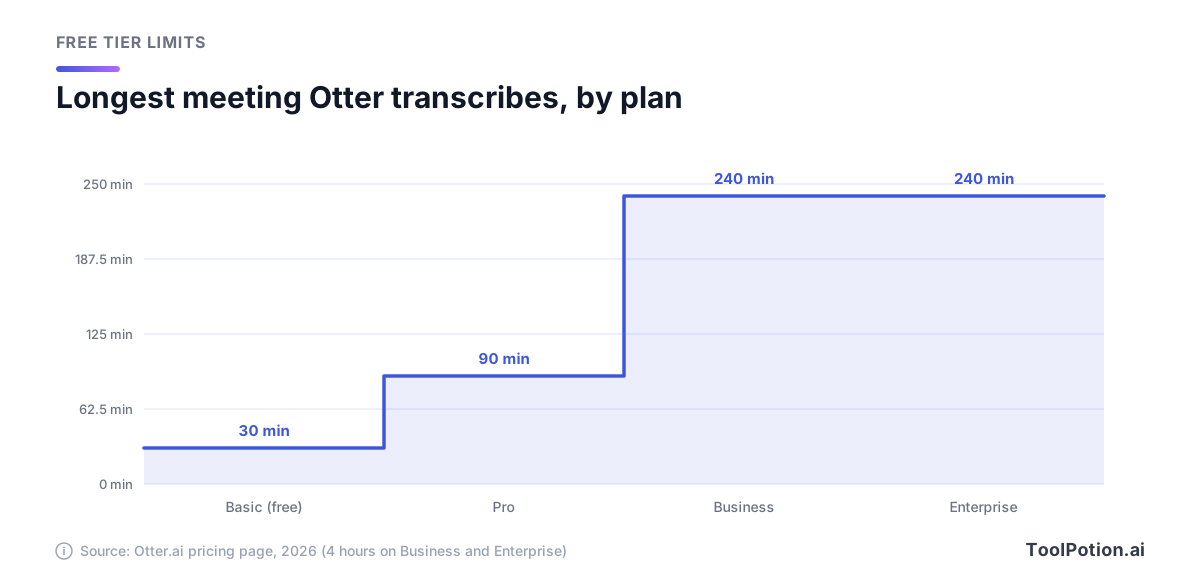
The jump from the free plan to Pro triples the cap, and Business pushes it to four hours. If your calls run long, the free plan isn't a trial of Otter. It's a trial of a smaller product.
For a pure free-tier winner, Fathom has the most generous deal on paper, since unlimited recording and transcription are listed with no minute cap. Granola's free plan is the better fit if you can live with a 30-day window, because your notes are the product and old ones fall out of reach.
What you pay when you outgrow free
The cheapest paid seat is Otter Pro at $8.33 per user per month billed annually, or $16.99 billed monthly. Fireflies Pro is $10 annually and $18 monthly. Granola's Business plan is $14 per user per month, and its page shows one price. Fathom's individual Premium plan is $16 annually or $20 monthly (Fathom pricing).
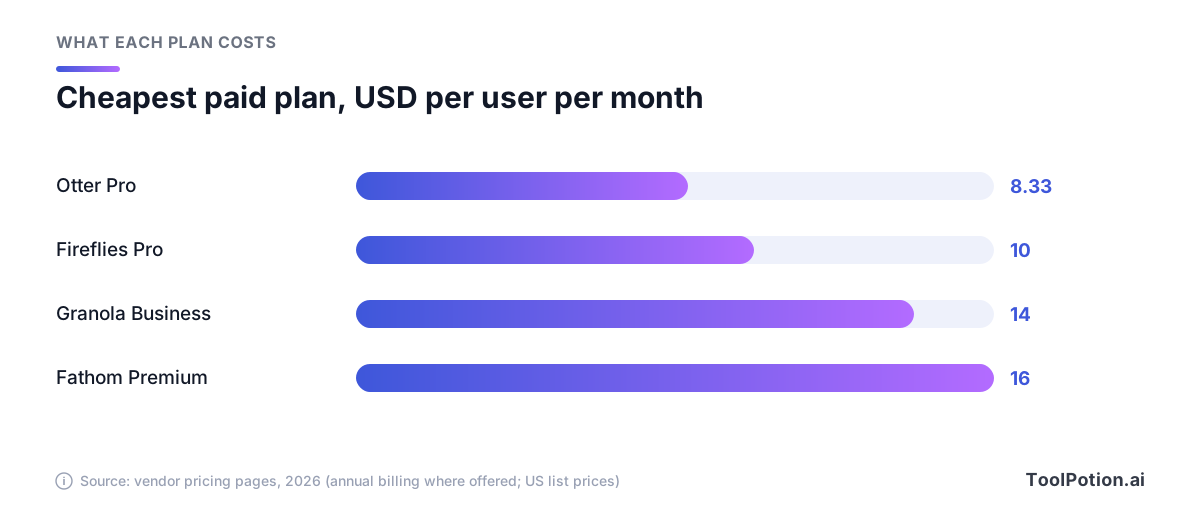
Price per seat isn't the full picture, because the plans buy different things. Otter Pro gives 1,200 monthly minutes and 90 minutes per meeting. Fireflies Pro adds unlimited summaries and 8,000 minutes of storage per seat. Granola Business removes the history limit and unlocks the integrations with Attio, Notion, HubSpot, Affinity and Zapier, plus API access. The step up to team plans is steeper: Otter Business is $19.99 annually, Fireflies Business is $19, and Fathom's Team plan is $15 annually with a two-user minimum.
Security and admin controls are a separate price tier on all three. Granola lists SOC 2 Type II on every plan but keeps SSO, SCIM and HIPAA-compliant workspaces for Enterprise. Fireflies puts SSO, SCIM, audit logs and HIPAA compliance on its Enterprise plan at $39 per seat, billed annually only. Otter lists SSO, SCIM and HIPAA (as an add-on) under Enterprise too. If you handle health or legal material, budget for the top tier or pick something else.
Use the calculator to see what your headcount does to the bill.
At five seats for a year, the gap between Otter Pro and Granola Business is about $340. Whether that's worth paying depends on whether you'd use the bot-free capture and the history. For a solo consultant, probably. For a ten-person sales team that wants CRM sync, probably not.
Languages and platforms
Language support is lopsided. Otter's pricing page lists AI transcription in English, Spanish, French, German, Japanese and Chinese. Fireflies lists transcription in 100+ languages, with a Multi-language Mode on Business and above. Granola says it supports 31 languages on desktop and 17 on mobile, and on desktop you can switch languages in the middle of a meeting.
Mobile is a quirk worth knowing. Granola's docs say that on iOS and Android it picks a single language for the whole transcript, so mixed-language calls work better from the desktop app. Granola runs on macOS, Windows, iPhone, Android and Apple Watch. Otter has iOS and Android apps, a desktop app and a Chrome extension. Fireflies lists desktop, mobile and Chrome extension options as well.
If your team works across several languages, Fireflies is the safest default. If you only need English and a couple of European languages, any of the three will do.
Where the notes go: CRM, Slack and Notion
A summary nobody opens is a wasted summary. The useful question is where the notes land. All three push to Slack and Notion, and all three reach a CRM such as HubSpot, though the depth differs.
Fireflies has the longest list. Its integrations page names HubSpot, Salesforce, monday CRM, GoHighLevel, ActiveCampaign and Redtail on the CRM side, plus Slack, Notion, Discord, WhatsApp and Telegram. Otter names HubSpot, Salesforce, Microsoft Dynamics and Zoho, along with Slack and Notion, and its pricing page notes that Salesforce and HubSpot sync is subject to user limits. Granola's Business plan names Attio, Notion, HubSpot, Affinity and Zapier, and keeps Salesforce for Enterprise at $35 per user per month.
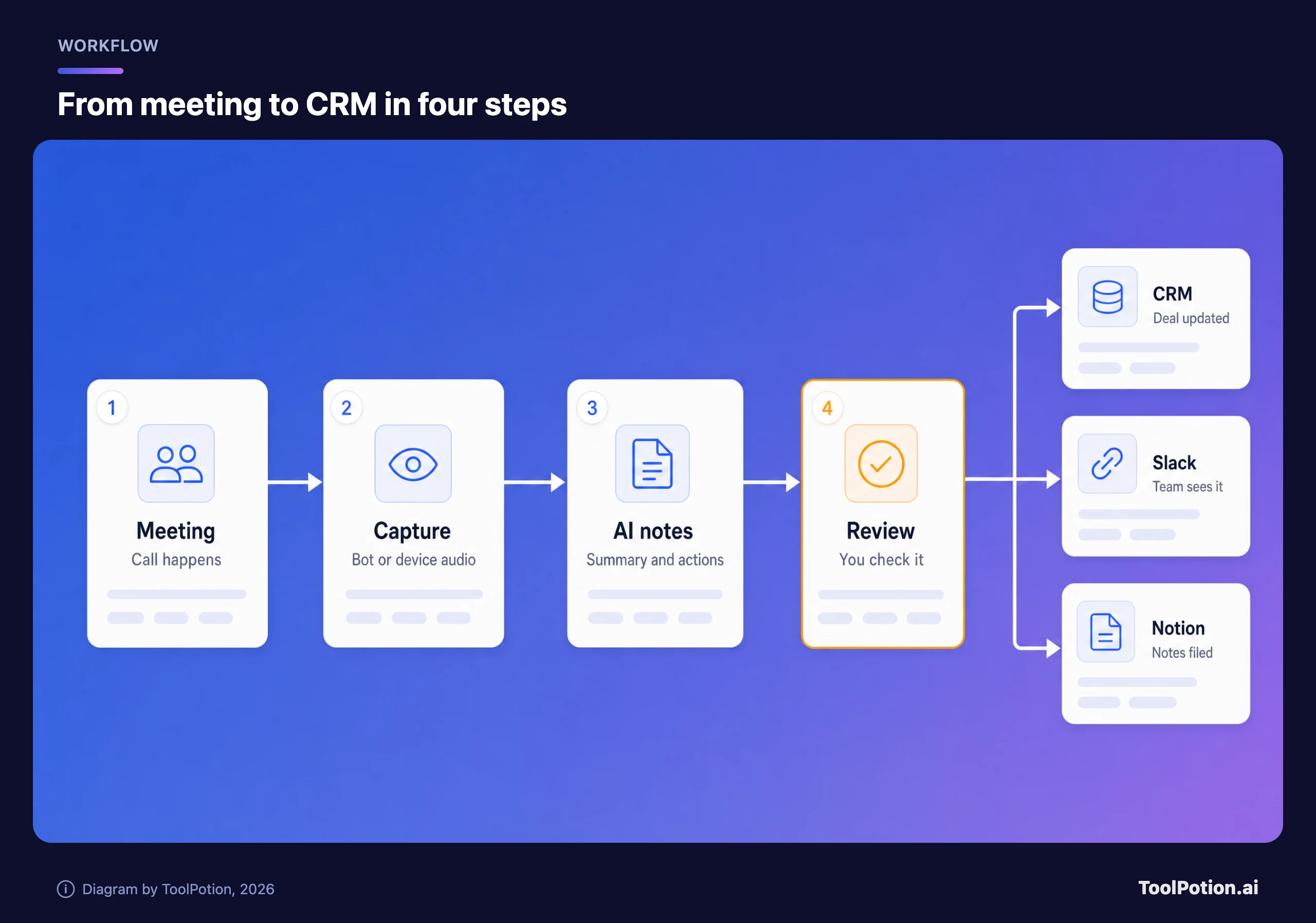
The amber step matters most. Every tool can post a summary to a CRM automatically, but an AI summary can get a deal stage or a name wrong. Read the notes before they sync, or limit automatic sync to Slack. If you'd rather build your own flow, Zapier is supported by Granola, Otter and Fathom, and Fathom also lists Make.
Fathom's Business plan is the one to look at if CRM field sync is the goal. Its pricing page lists CRM field sync, deal view and coaching scorecards on that tier at $25 per user per month billed annually.
Recording laws and the consent problem
This is the part vendors skip. Whether you can record a meeting depends on where the people on it are. Justia's 50-state survey says most states require only one-party consent, so a participant can record without telling anyone else. A smaller group of states requires every party to consent. The federal wiretap law, 18 U.S. Code Section 2511, is a one-party statute. Justia adds that on a call that crosses state lines, you may want to follow the most restrictive law.
In practice, that means a notetaker is safe in one state and risky in another, and you often won't know where everyone is sitting. The sensible default is to tell people every time. This is general information from a public survey, not legal advice, so check the rules where your participants are.
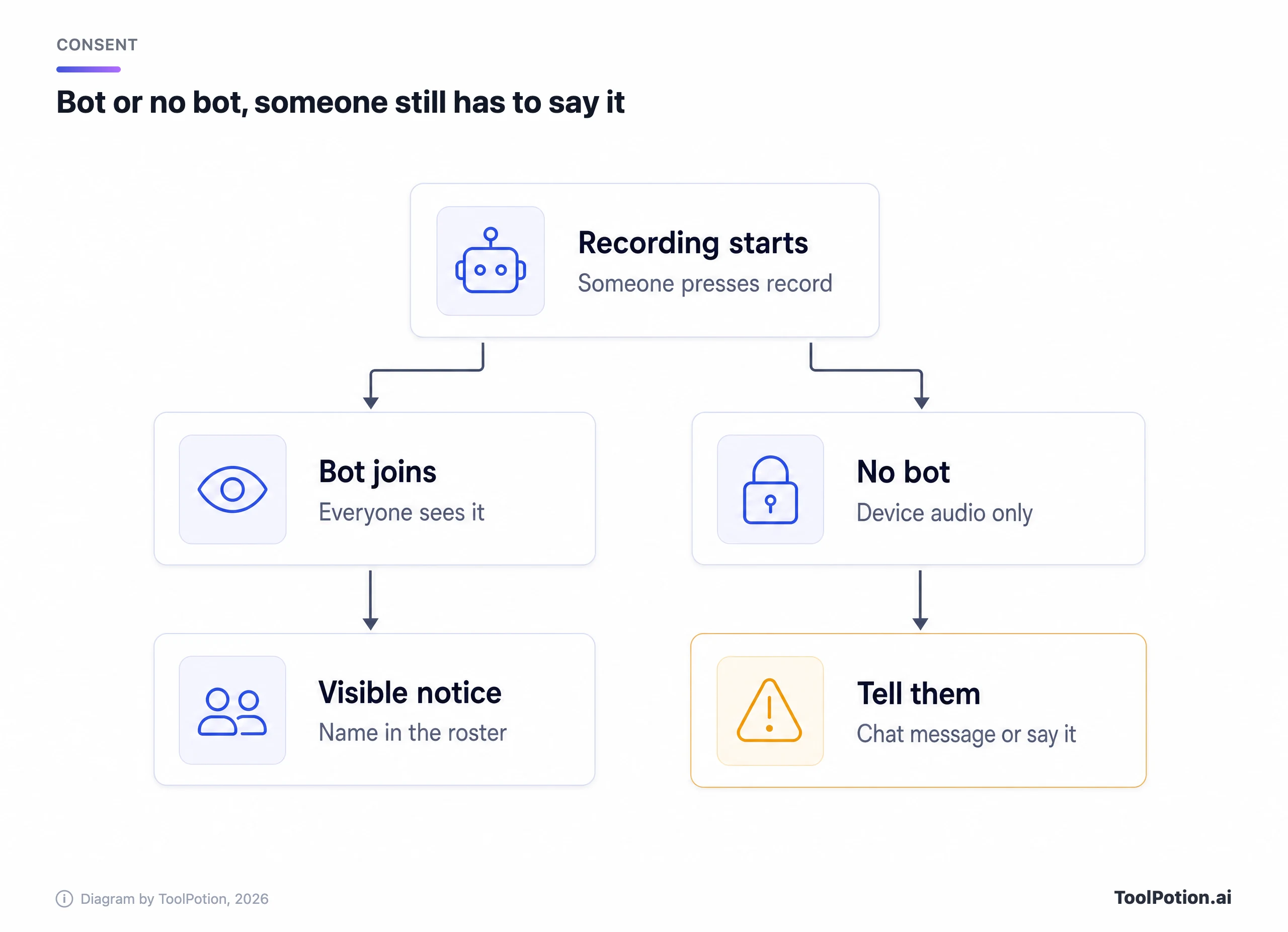
Granola's own consent docs say it's best practice to make sure participants know when you use an AI notetaker. The app can add a watermark on your camera and send an automated message in the meeting chat. Its pricing table shows that letting people know is a per-user setting on Basic and Business, and an admin-enforceable one on Enterprise.
Bots haven't solved the problem either. Last year, a plaintiff in California filed a proposed class action against Otter (NPR member station report). The suit alleges that Otter recorded private conversations without permission and used them to train its AI, and that its software can join meetings from a connected calendar without every participant consenting. Otter's privacy policy says users grant permission, and Otter says it de-identifies audio before using it for training. The suit's claims are allegations, not findings.
Fireflies faces a related claim. A proposed class action filed in Illinois federal court late last year (law-firm summary) alleges that its meeting assistant recorded and analyzed the voiceprint of an Illinois resident who never signed up for Fireflies, without the written notice and consent that Illinois's Biometric Information Privacy Act requires. That is also an allegation, and we found no ruling.
The takeaway isn't that one tool is safe. It's that your consent practice matters more than the brand on the bot. Say it at the start of the call, and don't let a notetaker auto-join meetings with outside guests.
Which one to pick
The scorecard below is an editorial judgment from the vendors' published pages, so treat it as a guide and not a measurement.
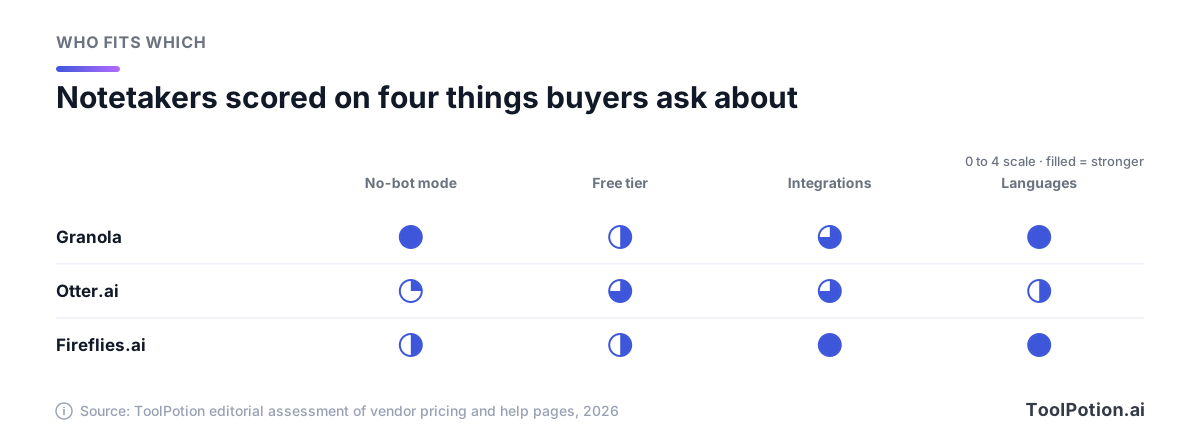
Pick Granola if you meet with clients, investors or candidates and a bot in the roster would change the mood. It's also the right call if you take your own notes and want the AI to fill the gaps. Skip it if you need a recording to replay, since it doesn't keep audio, or if you need Salesforce without paying for Enterprise.
Pick Fireflies if you run a team with a mixed stack of CRMs and chat apps, or if you work in many languages. It's the most flexible option, and its bot is the visible kind unless you use the Chrome extension.
Pick Otter if you want a low-cost paid seat and mostly work in English, with a meeting length under 90 minutes. Don't pick Otter's free plan for long calls. If you're evaluating it for a team, read the lawsuit allegations above and decide how you'll handle consent.
Pick Fathom if you want the most generous free plan and don't mind a bot, or if you want Mac bot-free capture in beta.
Try two for a week each on real meetings. Use free tiers where you can, and check the summaries against what was actually said. For more options, see the ToolRank board for taking meeting notes, our AI transcription tools ranking, and the guide on setting up AI meeting notes properly.
Frequently asked questions
Can Granola record without anyone knowing?
Technically yes, because it doesn't join as a participant. That's exactly why its docs tell you to make sure people know, and why it offers a chat message and camera watermark. Treat disclosure as your job, and check local recording law first.
Does Otter or Fireflies work with Zoom, Teams and Google Meet?
Yes. Otter lists Zoom, MS Teams and Google Meet. Fireflies lists Zoom, Google Meet and Teams, plus other web-conferencing apps. Both can be invited to a meeting or set to join from your calendar.
Is there a free notetaker with no meeting cap?
Fathom's free plan lists unlimited recordings and transcription. Fireflies' free plan has unlimited transcription but limits summaries and storage. Otter caps meeting length at 30 minutes on free.
What about tl;dv, Read AI and the built-in tools in Zoom and Teams?
They exist, and for some teams a built-in option is enough. We only compared tools whose pricing and help pages we could read for this piece, so check Zoom or your Teams admin settings before paying for a separate seat.
Do these tools train AI on my meetings?
It varies. Granola says third parties can't train on your data and that you can opt out of its own anonymized training, which is off by default for enterprise customers. Otter's privacy policy and the lawsuit above are in dispute on this point. Read each vendor's privacy page before you upload sensitive calls.