If you use Claude Code or any other AI coding agent, spend ten minutes on your repositories first. Search for agent settings files that got committed, rotate every credential they hold, and switch on GitHub's secret scanning. Stolen keys get resold fast (Unit 42 describes one case that took minutes), so the checks come before the story.
Run these checks on your repos first
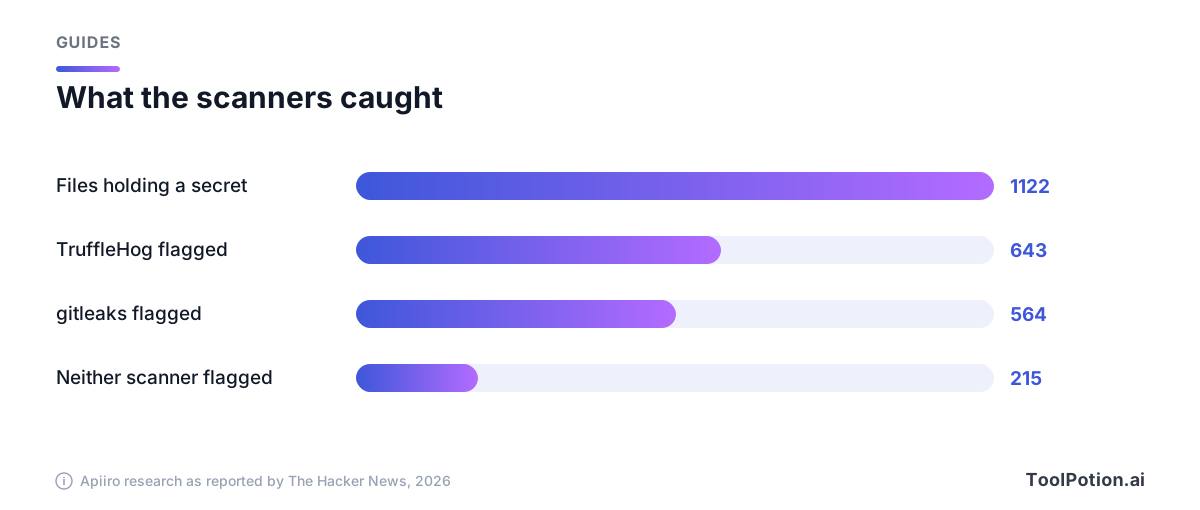
Start with the file at the center of the Claude Code story: .claude/settings.local.json. Security firm Apiiro found 104,185 copies of it in 103,617 public repositories, and 1,122 of those copies held at least one secret (The Hacker News). Here's how to look for yours.
- Search your GitHub organization for the file by name (swap in your own org name; needs the GitHub CLI).
- Check whether the file was ever committed in each repo you work on, including old branches. History keeps what the latest commit deleted.
- Read the saved approvals for anything resembling a password, token or connection string.
- Scan the full history, and add a rule for passwords typed inside commands, which stock rule sets tend to miss.
# 1. Find the files across an organization
gh search code --owner YOUR-ORG --filename settings.local.json

# The same search in the GitHub web search box
#   org:YOUR-ORG path:.claude/settings.local.json

# 2. Was it ever committed, on any branch?
git log --all --oneline -- .claude/settings.local.json .claude/settings.json

# 3. List what you have approved with "don't ask again"
jq -r '.permissions.allow[]' .claude/settings.local.json

# 4. Grep the folder and its history for the usual suspects
grep -rEn 'PGPASSWORD=|sshpass -p|mysql -p|AKIA[0-9A-Z]{16}|ghp_[A-Za-z0-9]{20,}' .claude/
git log --all -p -- .claude | grep -E 'PGPASSWORD=|sshpass -p|mysql -p|AKIA[0-9A-Z]{16}'
These are standard git, jq and grep calls, but treat their output as a lead, not a verdict. GitHub's code search only sees what's on a branch today, which is why step 2 exists.
For the scanner pass, Gitleaks and TruffleHog are the two Apiiro used. Run them on history, then add a custom rule, because the stock rules catch a key but not a password sitting after a flag.
gitleaks git --redact -v .
trufflehog git file://.# .gitleaks.toml
[extend]
useDefault = true
[[rules]]
id = "password-inside-command"
description = "Password passed on a command line"
regex = '''(PGPASSWORD=|sshpass -p |mysql -p)\S+'''That custom rule earns its place. Apiiro ran both tools across every file it found: gitleaks flagged 564 of the 1,122 files holding secrets, TruffleHog flagged 643, and neither caught 215, mostly passwords typed after PGPASSWORD=, sshpass -p or mysql -p (The Hacker News).
Apiiro also tells security teams to treat .claude/, .cursor/, .gemini/, .specstory/ and agent memory files as secret-bearing, like .env. We'd run the same search for every agent your team has installed: a transcript saved by Cursor, GitHub Copilot or Codex can hold a pasted key too.
How one approval click puts a password in your repo
Claude Code asks before it runs most shell commands. Choose "Yes, and don't ask again" and it writes an allow rule into .claude/settings.local.json. Anthropic's docs say a Bash approval made this way lasts "permanently per repository and command" (Claude Code docs). The catch is the shape of the rule. It can be a pattern like npm test *, or it can be the exact command, and when the exact command contains a password, the password is now saved in plain text.
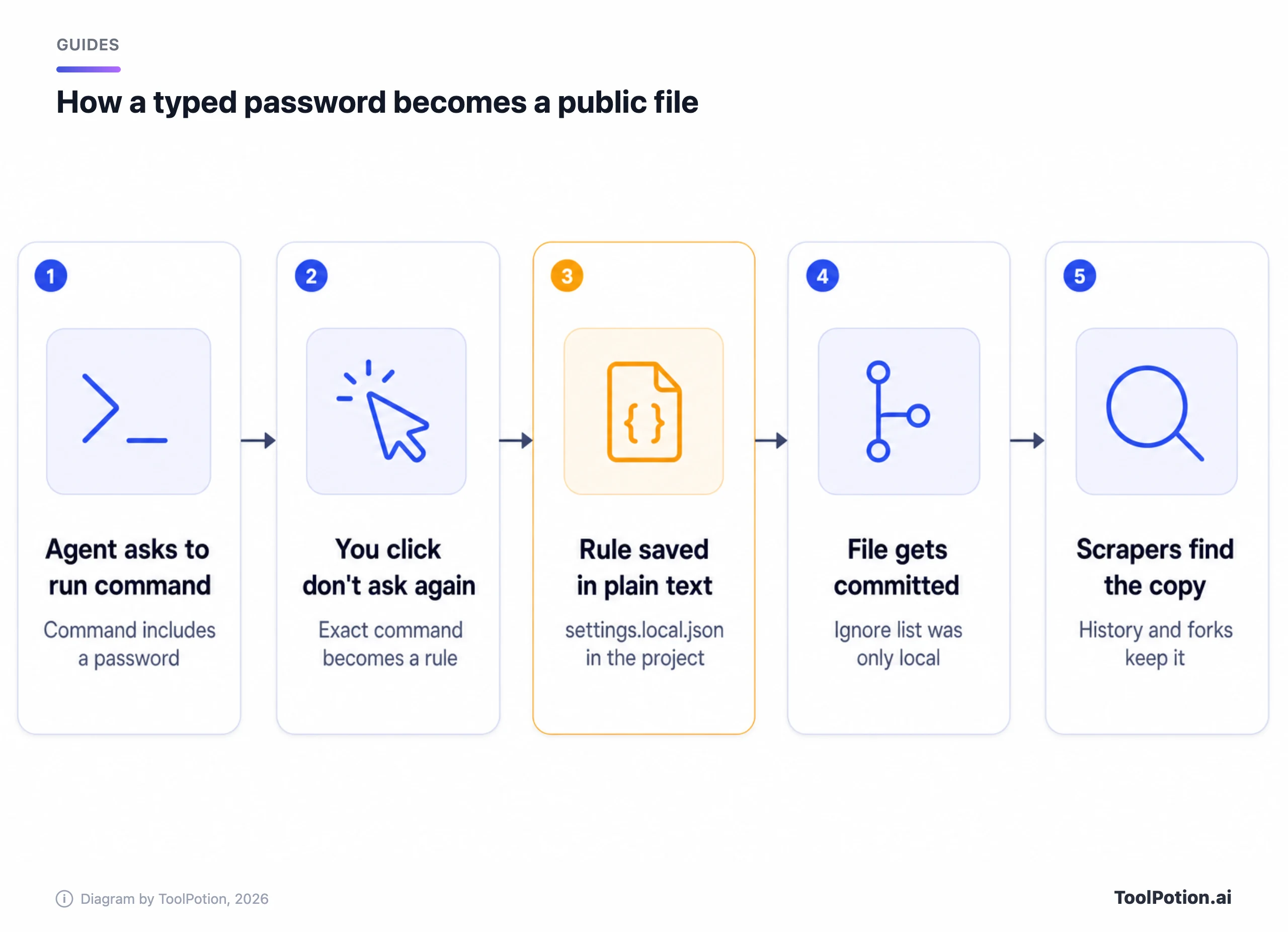
The file is supposed to stay local. Per Anthropic's settings documentation, the first time Claude Code writes it in a repo that doesn't already ignore it, Claude Code adds **/.claude/settings.local.json to your global git excludes, and a file you create by hand needs your own .gitignore line (Claude Code docs). That protects one computer, not a fresh clone, a hand-made file, or one committed before the ignore rule existed.
More than a third of the secrets Apiiro found open a database directly, including 379 database passwords. The rest include 43 SSH logins for public servers, 42 tokens for GitHub, GitLab and npm, and 23 AWS keys. Sixty-three organizations owned affected files, and in half the repos with a secret the file had sat there at least 217 days. Apiiro didn't test whether any of it still works, though one company it notified confirmed its key had been live.
Anthropic's answer so far is one Hacker News comment
A bug report filed in 2025 was closed by an automated bot as "not planned" after 60 days without activity, and Apiiro's researchers say none of the related reports they cite got a reply from Anthropic (The Hacker News). The public answer came on Hacker News, from a commenter who introduced himself as "Boris from the Claude Code team." He wrote that "Historically Claude Code has not done secret scrubbing," that the team is "looking into what we can do to prevent this," and that in this case "the files were manually created and checked in." He added that "Permission rules are old hat. Everyone should be using auto mode instead."
Apiiro's data sits badly with the hand-made explanation. In 539 of the 1,105 repositories it traced, a commit listing Claude as co-author changed the file. A co-author line doesn't prove who ran git, but it's hard to square with files someone made by hand. We find the commit data harder to dismiss than the comment, and we'd treat the file as something Claude Code can commit until Anthropic says otherwise.
Grok Build leaked twice, in different ways
Two Grok Build stories are getting blurred together, and they need different fixes. (Coverage calls the company SpaceXSI or SpaceXAI.)
The first came earlier in 2026. A researcher publishing as cereblab analyzed Grok Build 0.2.93 and reported that it uploaded entire tracked Git repositories, with commit history, committed secrets and API keys, to cloud storage (The Next Web). The upload was roughly 27,800 times larger than the task needed, per that analysis, and the privacy toggle reportedly did nothing. xAI had marketed the tool with the claim "nothing from your codebase transmitted to xAI servers during a session." Elon Musk acknowledged the transfers and said prior user data would be deleted. TNW adds that no independent audit has confirmed the deletion.
The second is the one now in the news, and it has nothing to do with repositories. Security firm Claroc found that Grok Build's share links can be found by people who were never sent them (Claroc). Engadget reports each link used a four-word random phrase with up to 38 bits of entropy, placed "to the left of the domain" (Engadget). That puts it in the hostname, and Claroc explains that passive DNS services collect those lookups. Shared ChatGPT and Gemini chats keep their secret in the URL path, which DNS never sees. "Nobody would guess one," Claroc writes, "and nobody needs to, because the dataset lists them."
The exposed apps held real material. Claroc lists a sales territory map of 594 strategic accounts, eight X advertising proposals, four live advertiser account boards, a hospital group's staff app with a roster of more than 3,500 employees, and a fire department's live shift board with each firefighter's name and badge number. Of the addresses it tested, 94.7% opened with no sign-in. Claroc estimates roughly 2% of apps held material serious enough to rate high or critical.
Claroc says SpaceXSI took down the 24 apps its staff had built, "but not the apps of other Grok users and organizations." Engadget adds that the company reportedly didn't respond until Claroc tagged Musk and another company official on X. Claroc's post says SpaceXSI answered a reporter's questions, saying Grok apps are private until their creator chooses to share one, but hadn't replied to the report itself. We found no statement saying the other apps will come down.
The fix for users is blunt. Treat anything built or shared through Grok Build as public, take down links you don't need, and rotate any credential that touched an app you shared. No .gitignore line helps here.
Stolen keys get resold within minutes
Palo Alto Networks' Unit 42 describes "token jacking," where stolen AI API keys are resold through gray-market "transfer stations" that sell discounted access to frontier models (Unit 42). Its listed sources of keys include exposed code repositories, infostealers and poisoned npm packages. In one case attackers integrated exposed credentials into a transfer station within minutes, and "nearly a million dollars in charges" followed before discovery. Unit 42 says victims have "very little recourse to recover funds." Its defenses are the boring ones: spending limits with alerts, short-term tokens in place of long-term keys, and a review of every privileged account that can adjust limits.
Fix the leak: ignore, untrack, then rotate
Rotate first, clean up second. A revoked key is useless in every fork and cached copy, while a key you merely deleted from the latest commit is still live in history. GitHub says to rotate an exposed credential immediately, and calls scrubbing history "time-intensive and often unnecessary if you've already revoked the credential" (GitHub docs).
# Rotate the exposed credentials first (table below), then:

# Stop tracking the local file (keeps your copy on disk)
git rm --cached .claude/settings.local.json

# Add to the repo's OWN .gitignore, not just your global excludes
printf '%s\n' '.claude/settings.local.json' '.specstory/' >> .gitignore

git add .gitignore
git commit -m "Stop tracking agent local settings"

# Drop any allow rule that looks like it holds a secret, even if never committed
jq '.permissions.allow |= map(select(test("PGPASSWORD|password|token|secret|key"; "i") | not))' \
  .claude/settings.local.json > .claude/settings.local.json.new \
  && mv .claude/settings.local.json.new .claude/settings.local.json
Think before ignoring .cursor/ or .gemini/ wholesale, because some teams commit shared rules there on purpose.
Rotating keys at the major providers
Every provider has a console button for this, and the safe order is create the replacement, deploy it, then kill the old key. Deleting first can take production down.
| Provider | How to rotate | Notes |
|---|---|---|
| AWS | Create a second IAM access key, update your apps, check last-used, deactivate the old key, then delete it | aws iam create-access-key, get-access-key-last-used, update-access-key --status Inactive, delete-access-key (AWS docs) |
| GitHub | Delete the token and create a new one with an expiry date | GitHub automatically revokes tokens pushed to a public repository or gist; for a leak anywhere else you can submit a revocation request through the REST API (GitHub docs) |
| Stripe | Roll the key in the Dashboard, and use restricted keys going forward | Rotate even if you're unsure anyone saw it; Stripe may deactivate a key it detects (Stripe docs) |
| OpenAI | Create a replacement, update your apps, revoke the old key once it works | Set an expiry on project keys and use a project service account for apps (OpenAI docs) |
For any provider not in the table, including Anthropic and xAI, we haven't verified the rotation steps, so follow its own docs. For database passwords and SSH logins, the bulk of what Apiiro found, change the password, end open sessions, then check access logs from the day the file was first committed.
Turn on GitHub's scanners and learn their limits
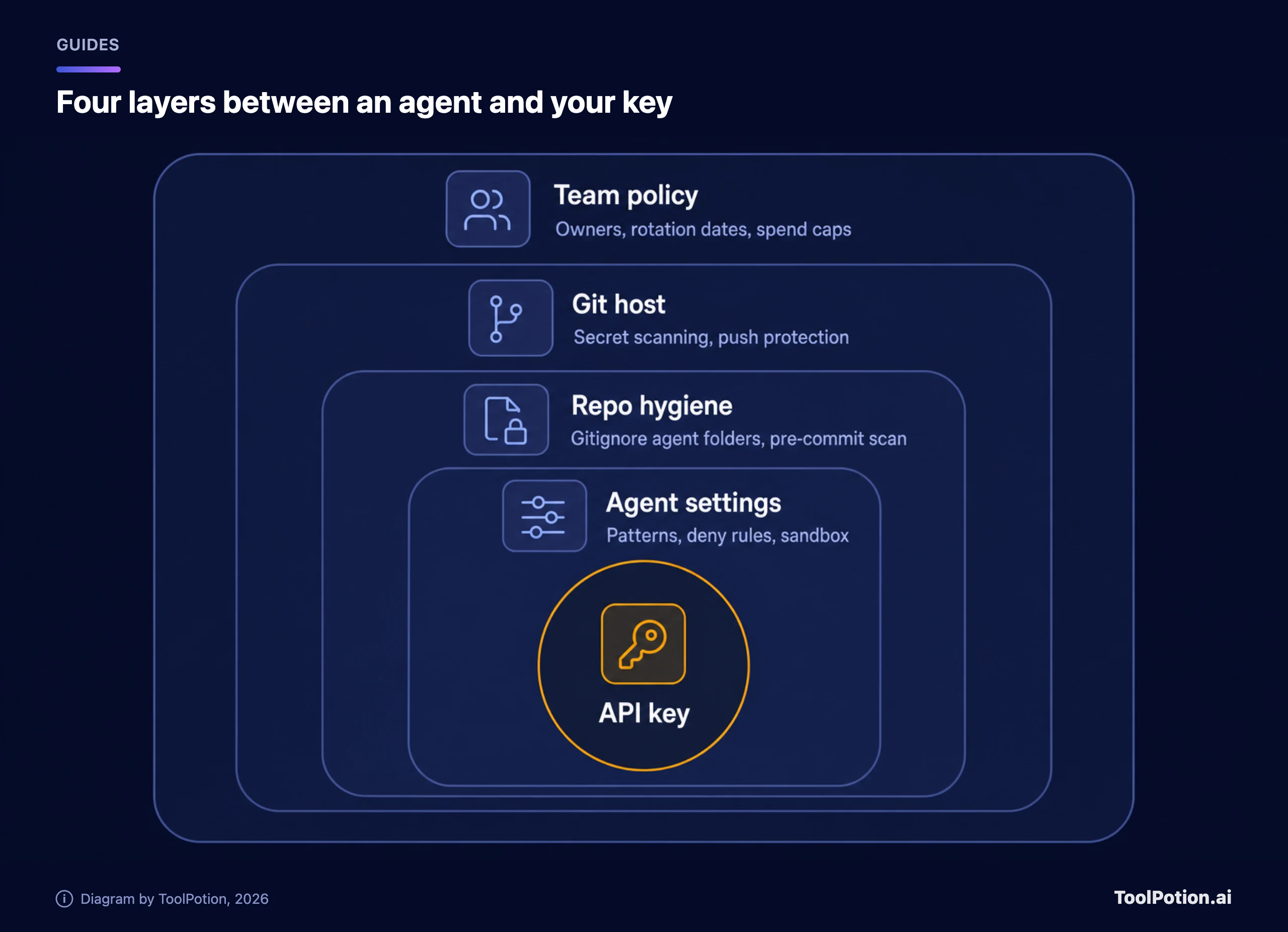
Secret scanning checks the full history of every branch, plus issues, pull requests, discussions and wikis. It's free and automatic on public repositories; for private and internal repos in an organization it needs GitHub Secret Protection (GitHub docs). When a partner's key format is detected, GitHub notifies that provider, which may revoke the key without any alert in your repository.
Push protection is the layer that would have stopped many of these files before they went public. It blocks a push containing a detected secret. Per GitHub's documentation, the user-level setting is on by default for pushes to public repositories on GitHub.com, while the repository-level setting is off by default and needs a repo admin, org owner or security manager to turn it on (GitHub docs). It scans provider patterns, generic ones like private keys and connection strings, your custom patterns, and an AI-detected category for unstructured secrets such as passwords, in public preview. That last category looks aimed at the gap Apiiro found. REST API pushes don't get it; command-line pushes, web UI commits and file uploads do.
Know the escape hatch too. By default anyone with write access can bypass a block by picking a reason, including "I'll fix it later," which opens an alert and emails the owners. If your agents commit on your behalf, set up delegated bypass so only named people can wave a secret through.
Agent permission settings to change today
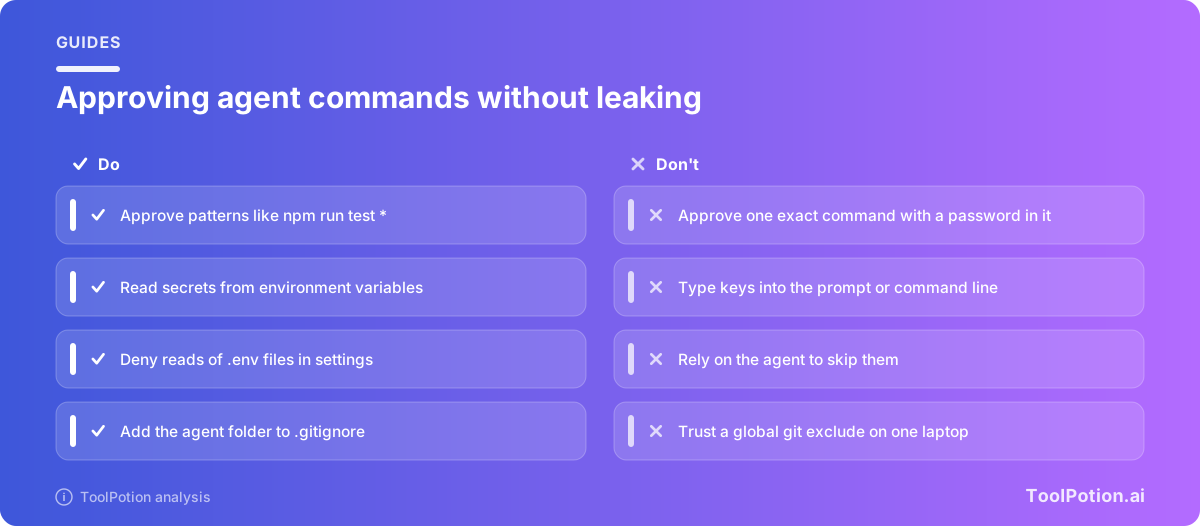
Three habits would have kept the password out of the file. Approve patterns, never literal commands with credentials. Put secrets in environment variables so the command carries a name, not a value. And deny the agent access to the files that hold secrets in the first place. Anthropic's settings documentation shows the shape:
{
  "permissions": {
    "allow": [
      "Bash(npm run lint)",
      "Bash(npm run test *)"
    ],
    "deny": [
      "Read(./.env)",
      "Read(./.env.*)"
    ]
  }
}
The command your agent should run looks like psql "$DATABASE_URL", so the approval rule stores a variable name and nothing else. Load the variable from a secrets manager or your shell profile, not from a file the agent can read.
Two details from the docs matter for teams: allow rules in the committed .claude/settings.json wait until each teammate trusts the folder, while deny and ask rules apply immediately, and the auto and bypassPermissions modes don't take effect from project or local settings. Organizations can lock allow rules down with allowManagedPermissionRulesOnly. The Claude Code team member quoted above says auto mode makes permission rules unnecessary. We'd still keep the .env deny rules: two lines, applied the moment the file is committed.
For other tools the setting names differ, but the question is the same: where does the tool store approvals, history or transcripts, and is that place inside a repo? Going by documentation, Apiiro found Claude Code to be the only one of 16 coding agents it compared that is confirmed to save the full approved command in a project file by default. The other fifteen can still leak through transcripts, pasted keys and memory files. Our terminal coding agents comparison and the Cursor vs Copilot vs Windsurf piece cover what each one stores.
The strongest control doesn't depend on a prompt. Run agents in a container or sandbox with only the credentials that task needs, limited scopes and short lifetimes. We wrote up the mechanics in How to Contain an AI Agent.
Users own the rotation, vendors own the default
Typing a password into a command is a user error, and the user owns the rotation. But a tool that stores the full command in a project file, then relies on an exclude in your home directory to keep it private, has a safety that only works on one laptop.
Defaults are policy, and here the default decided the outcome. A Claude Code that scrubbed secrets before saving a rule, or wrote the ignore line into the repo's own .gitignore, would have closed the hole at the source. Anthropic says it is looking at that (we'd want a date). A bug report closed by an inactivity bot isn't reassuring, and the commit data doesn't match "manually created."
Grok Build is the worse case in the share-link story, because the user did nothing wrong. A link that anyone can find through passive DNS isn't private, whatever the sharing menu implied. And the earlier upload contradicted a marketing line that said the opposite. We wouldn't put a client list, a sales territory map or a production credential into Grok Build until the share-link problem is fixed and an outside audit confirms the deletion. If that changes, our view will too.
Treat agent folders like .env files and budget one afternoon for the setup above. You can compare the tools themselves on our AI coding assistants board, and the security side of the ecosystem on the AI cybersecurity tools board.
A checklist for the whole team
Tick what's true today and the score tells you where to start. The two-point items are the ones we'd do before lunch.
Frequently asked questions
Is .claude/settings.local.json safe to commit?
No. It holds your personal approvals and can hold credentials. Anthropic's docs say Claude Code keeps it out of git when it creates the file, through a global exclude, and that a hand-made copy needs your own ignore line. Add it to each repo's .gitignore and untrack it with git rm --cached if it was ever committed.
Do I need to rotate keys if my repo is private?
Yes, if the file ever held a credential. Private repos get cloned to laptops and CI runners, forked into other accounts and sometimes flipped to public. GitHub's secret scanning for private organization repos needs a paid plan, so yours may have had no automated check.
Will deleting the file from my repo remove the secret?
It removes it from the latest commit and nothing else. History, forks and caches keep the old version, and Apiiro found 734 secrets that appear only in older versions of the file. Rotate the credential first, and rewrite history only if you want a tidy repo.
Do GitHub Copilot, Cursor and Codex have the same problem?
Apiiro confirmed this behavior, saving the full approved command in a project file by default, only for Claude Code among the 16 agents it compared. That doesn't clear the others. Any agent that writes transcripts or memory into your working directory needs the same ignore rules.