Project Screen Test starts with a few personality words ("anxious, shy, awkward") and a voice, then lets you talk to the character until it has a backstory, fears and movement quirks (The Verge). It was the strangest demo at Adobe's Max conference this year, and it is one you can't open. Adobe's own pages say it's "coming soon".
That sets the terms for this teardown. Adobe Labs lists ten sneaks for 2026. Two can be tried today, and the other eight carry a "Get notified if this Sneak becomes available as an experiment" button. We go through them with one filter, the one we use on every launch: an experiment is a claim until people can use it.
Ten sneaks, two open doors
Adobe's labs site sorts its work into stages, and the stages are the story. Every sneak starts as a demo video. Some move to a notify list, a smaller group reaches the Playground, where anyone can open a live prototype, and the last step is a feature in a paid app. Eight sit on the notify list, two (Deep Brush and Hands On) are in the Playground, and we found none listed as shipped. (The Playground also hosts a third experiment, Project Custom Filters, that isn't one of the ten sneaks.)
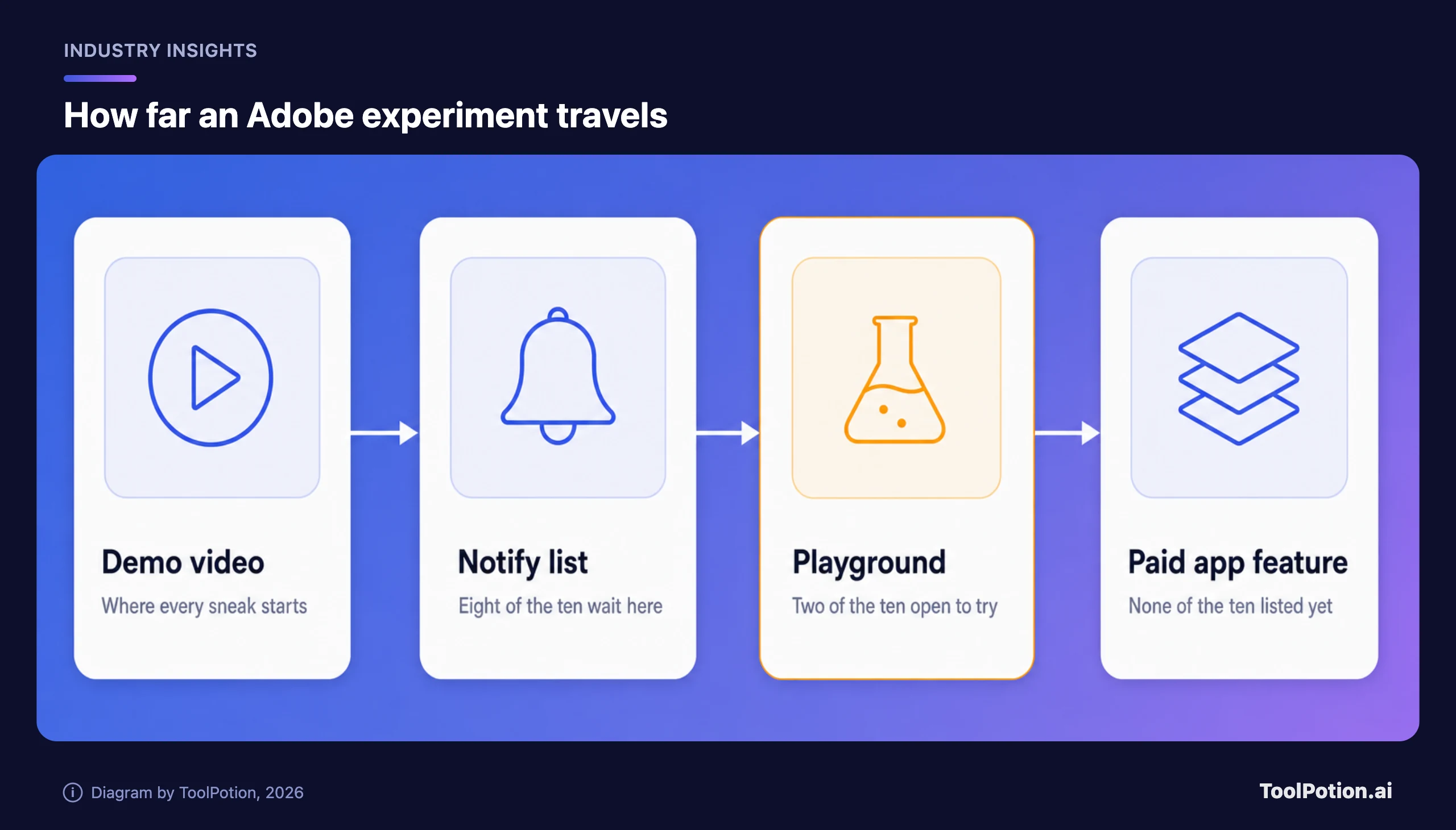
The Verge's own caveat is blunt: sneaks are tech previews, and there is "no guarantee that they'll graduate into being available features" (The Verge). The same piece expects at least some to launch, given how central AI is to Adobe's growth plans. Both halves are plausible; neither is a plan.
Screen Test lets you audition a character before it exists
Adobe says Screen Test grew from a former filmmaker's frustration that directors can't have the long, character-motivation conversations with AI video that they have with actors. Its page describes the mechanism: "the conversation builds a personality profile, and that profile guides video generation" (Adobe Labs). Adobe also pitches it for game design, role-play practice and keeping a character's mannerisms consistent across dubbed languages.
The Verge found the result more identifiable and consistent than many AI characters it had seen, and also noted it is a standalone exercise with no stated route into Adobe's existing video tools (The Verge).
Is the personality profile reusable, editable, exportable? Adobe doesn't say. That's the whole value; a profile you can't carry into a project is a party trick. We'd wait.
Sight Span turns one photo into a room you can walk around
Adobe describes Sight Span as a way to turn a single image into a navigable world, with a quick 3D preview the team aims to build in roughly 10 to 20 seconds, followed by a separate image-generation step that renders the final shot from your chosen view (Adobe Labs). The Verge saw a pixelated, ill-defined preview that sharpened once an angle was picked, and said the results work on photos, paintings and illustrations alike (The Verge).
Adobe's suggested uses are storyboarding, set design and product repositioning: one studio photo, several camera angles, no reshoot. The first two are previsualization, where an invented angle is fine because nobody thinks it's real. Product shots are different, since every new angle is the model's guess about an object it saw from one side. We'd use it for concept art and pitch decks, and keep it away from a store listing.
Sound Bender and Rinse Repeat respect the file you already have
Sound Bender takes a video clip and a text prompt (the Verge's example was "bubbling sci-fi cauldron noises"), generates synced effects, and puts four sounds in the corners of a square canvas you drag around in real time (The Verge). Adobe adds that you can pull a single sound out of a mix by describing it (Adobe Labs). Its Playground page files it under coming soon.
Rinse Repeat is the plainest idea of the ten: copy a Photoshop edit and paste it onto other subjects, so a shadow added to one product reaches the rest. Adobe says the system uses native Photoshop tools, layers and masks, so results stay non-destructive and editable, and that creators told the team they want AI to help them work better, not to do the work for them (Adobe Labs). It's on the notify list.
Of the ten, this is the one we'd bet reaches Adobe Photoshop first. It removes repetitive work without creating a flattened file nobody can fix, which is our test for whether AI saved anything. That is a forecast, not a promise from Adobe.
The two you can open today
Deep Brush splits a photo into physically decomposed layers so paint follows shadows, geometry and lighting; Adobe's examples are graffiti on a wall, a logo on a curved bottle, lipstick or hair color (Adobe Labs). Hands On analyzes an image and puts controls on the canvas, such as control points on a mug's handle, so you drag instead of rewriting a prompt (Adobe Labs). Hands On also has a shipped relative: Adobe says it grew from a project that now lives in the Edit object tool in Adobe Firefly.
Both are good news for anyone who has fought a prompt box over a handle's curve. Neither page we read says whether Playground output is cleared for client work, so check before you bill for one.
Adobe's training-data promise covers Firefly, and the sneaks don't say
Adobe's page on its Firefly approach is specific: "We only train Adobe Firefly on content where we have permission to do so," it says, and it adds that it has never trained Firefly on customer content and built the models to be commercially safe (Adobe). Those are Adobe's claims about its own model family.
The same page says Adobe may offer partner models inside its apps and leaves it to the creator to judge whether a partner model suits a project. Screen Test's page lists Firefly Video among related tools, and Adobe describes that tool as running models such as Firefly Video 2 and Veo. None of the sneak pages we read says which model powers a given sneak. So "commercially safe" can't be assumed for an experiment; ask Adobe before pitching one to a client who needs indemnity.
Bloomberg's headline for the same week reads "How Adobe Is Helping Disney with Custom AI Tools" (Bloomberg), and that's all we'll attribute to it. A studio training on its own library is where a permission-based pitch is easiest to keep. The details would have to come first.
Canva and Runway sell the boring version
Canva's AI page offers text to image, text to graphic and text to video inside the editor, with its usual editing tools on top (Canva). We found no walk-inside-a-photo equivalent on the pages we read. For quick social graphics that's fine, and our Canva versus Adobe Express comparison covers where each fits.
Runway is the closer rival for the ambitious ones. Its product page lists plugins that generate, edit and extend footage inside Premiere Pro and After Effects, and says it is "used by 60M+ users globally" (Runway's own marketing number, not an audited one) (Runway). Its GWM Worlds 2 research preview generates interactive worlds live, 720p at 24 frames per second, steered by text actions (Runway). That is a different bet from Sight Span: live video generation instead of a 3D scene plus a render. Our video model comparison has the shipping side.
Adobe's edge is Photoshop's layers and a labs site that is honest about stages. The rivals' edge is that you can buy what's on their pages today.
What to do with ten demos
Adobe's own research gives the argument for these experiments. In eight studies with 82 creative professionals, it found that "Chat is the most common interface for generative AI, but it is insufficient for precise visual work" (Adobe Labs). Senior research scientist Gautham Mysore told The Verge: "Making these interactions more intuitive is also about giving experienced creatives more precise control" (The Verge). Hands On, Sound Bender, Sight Span and Rinse Repeat are all that thesis in software. We buy the thesis. We doubt most of it ships this year.
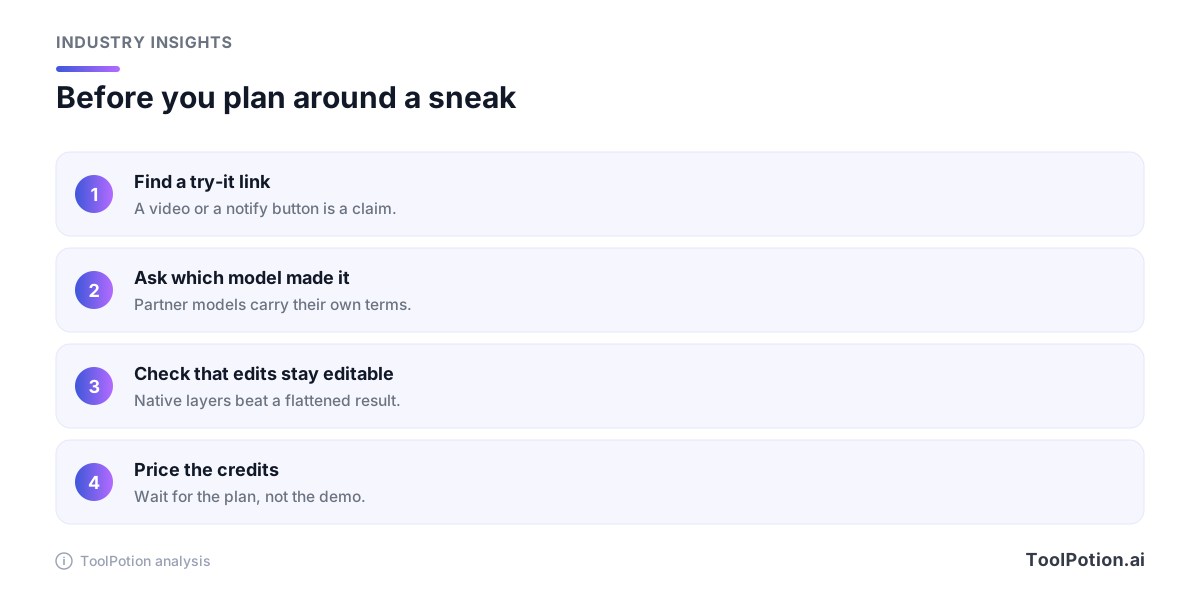
Our advice is short. Spend an afternoon in the Playground with a throwaway image: Deep Brush for mockups, Hands On for shape fixes. Put your name on the notify list for Rinse Repeat only if you live in Photoshop. And for work that has to ship, stay with what's already out: Adobe's Firefly image generator extension, its free image upscaler, the Adobe Express background remover or Canva's photo editor.
If Adobe turns a sneak into a Firefly or Photoshop feature with a plan, a credit price and a model named on the page, we'll look again.