Anthropic's product manager Nicholas Lin called knowledge workers "the gap we're hoping to close" when he briefed reporters on the company's new office tools (The Verge). Claude Code, he said, "changed how engineers work a year ago." Now Anthropic wants the same pull from people who spend their days in meetings, spreadsheets and slide decks.
So there are four new things to evaluate: Claude Meetings, Claude Whiteboards, Claude Sheets and Claude Data. We read the launch posts, the help-center pages, the admin guide and the pricing tables, and our view is plain. Three of the four are usable today, and they sit on top of whatever suite you already pay for. It isn't a replacement for Word, Excel or Docs, and Anthropic's own help pages say so. For a particular kind of team, that's still worth a trial.
This is a buyer's notebook, so we'll go criterion by criterion: what each piece does, who gets it and at what price, how it compares with Microsoft 365 Copilot and Gemini for Google Workspace, what is missing, and what to try first. We haven't run hands-on tests; everything below comes from the vendors' pages and the reporters who covered the launch.
Four products and one status mismatch
Start with what each does, in the vendor's own terms.
- Claude Whiteboards is a shared board where you talk, type or sketch a messy plan and Claude lays it out as diagrams, flows and groups. Everyone on the board edits live, and Claude can turn the finished board into a doc or a deck (Claude help center).
- Claude Sheets is a spreadsheet you and Claude edit in the same cells, with tabs, formulas, dropdowns and charts. Each change Claude makes is outlined as it lands, and version history can roll it back (help center).
- Claude Data is the renamed Claude Dashboards. It connects to a warehouse or CRM such as BigQuery, Redshift or ClickHouse and builds dashboards, written data stories or narrated videos. Data teams can certify the queries everyone should use (Anthropic).
- Claude Meetings puts Claude into a video call as a visible participant. It follows the conversation, drafts the plan being discussed, builds a whiteboard while people talk, and can pull figures from connected apps (TechCrunch).
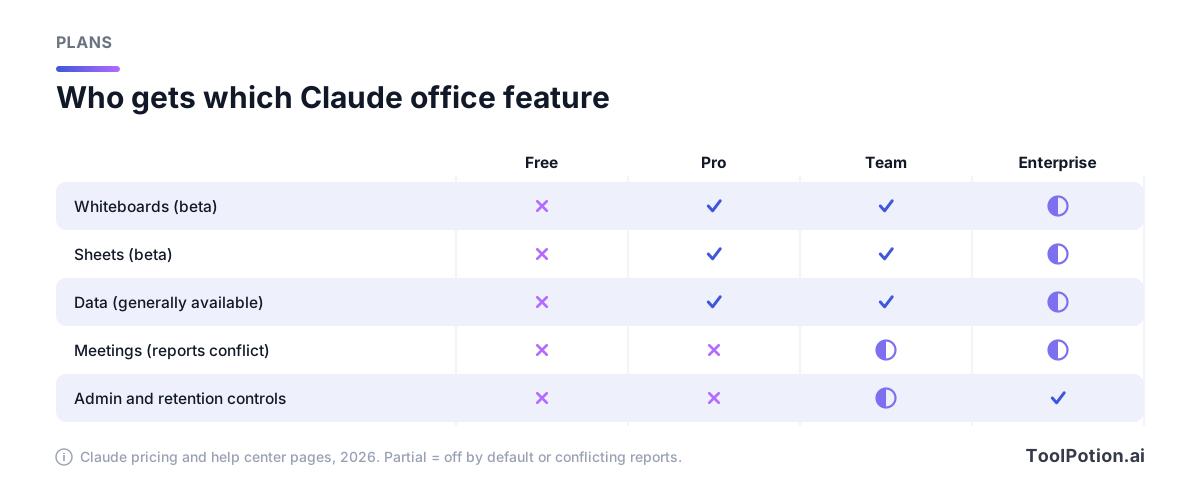
Now the mismatch. Anthropic's own announcement says Whiteboards and Sheets launch in beta, Data is generally available, and "Claude Meetings is coming soon" (Anthropic). The Verge reports Meetings as "available in beta" on Team and Enterprise, and TechCrunch says it's launching in beta on those plans, working with Google Meet at launch. We looked again after both stories ran. Anthropic's help center, pricing tables, release notes and product pages say nothing about Meetings, and the help-center search for "meetings" returns no Meetings article. The company's own pages outrank two secondhand accounts, so we'd plan on "coming soon" until a help article exists. A staged rollout to some accounts is possible, and we can't rule it out.
That gap is why we treat Meetings differently from the other three. Shipping beats demos, and a feature with no help article is still a demo.
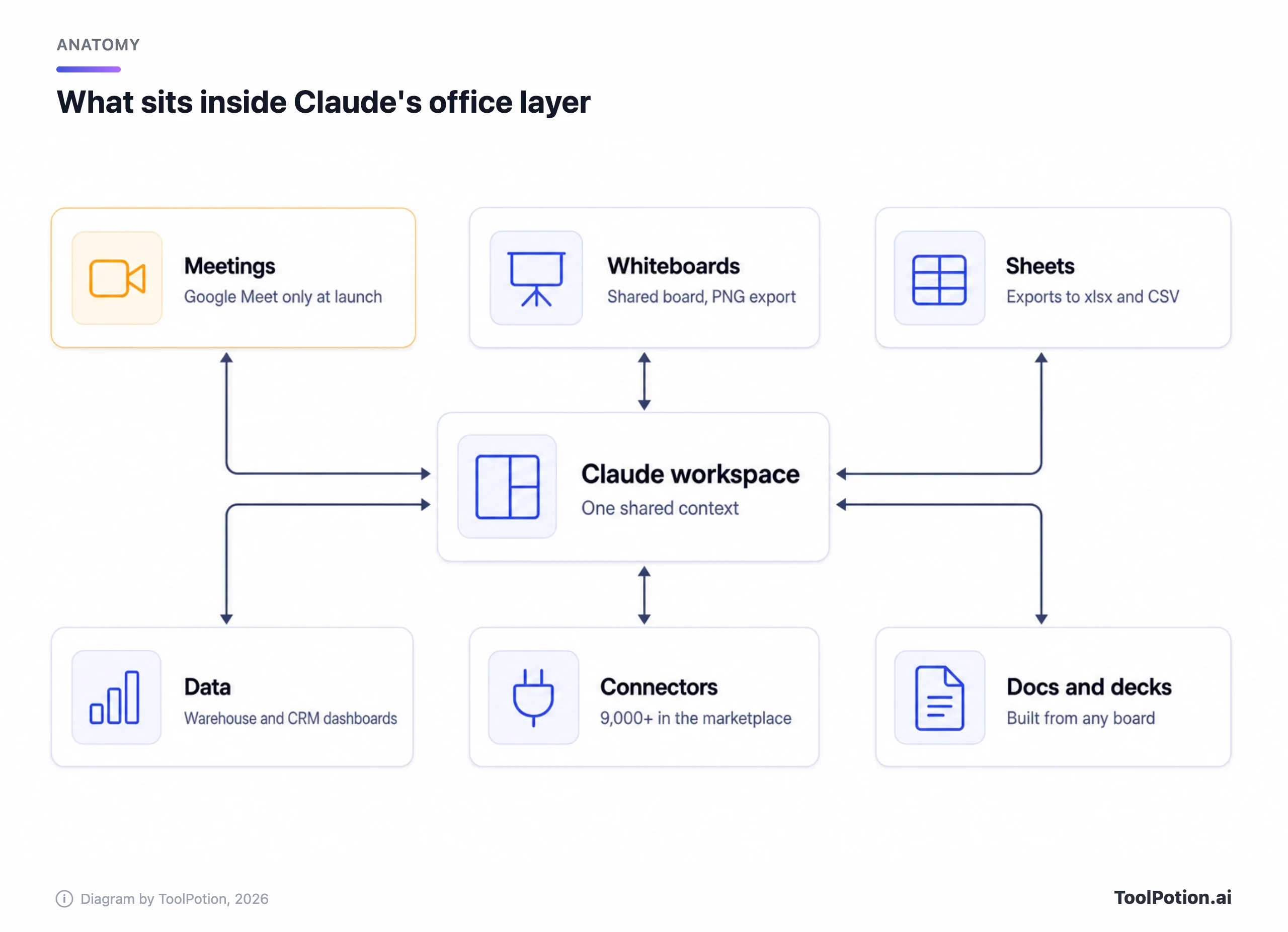
Around the four sits a fifth announcement that the coverage underplayed: interactive connectors. Partners can now open full apps beside the conversation, among them Adobe, Atlassian, Box, HubSpot and Notion, and Claude can edit the page or file you have open. Anthropic says this is rolling out on web and desktop on all plans as part of the new Claude experience that merges chat and Cowork (Anthropic). The rollout covers web and desktop, and Anthropic says you'll see it once your account is updated or your organization turns it on. If you already use Claude Cowork, that's the product being merged with chat.
What you pay, and what you can't buy
Whiteboards, Sheets and Data are on every paid plan, and Meetings is limited to Team and Enterprise (per the press accounts above). The Free plan gets none of them; the pricing table lists Sheets, Whiteboards and Data as "No" for Free (Claude pricing). The Enterprise column of the matrix below is what surprised us: admins have to switch Whiteboards and Sheets on, while Team plans get them by default.
Prices are simple until you add them up. Pro is $17 a month billed annually or $20 monthly. A Team standard seat is $20 annually or $25 monthly, and a premium seat with five times the usage is $100 or $125 (Claude Team pricing). Team plans cover two to 150 people. Enterprise is $20 per seat per month on an annual contract, plus usage billed at API rates, with a 20-seat minimum (Enterprise pricing).
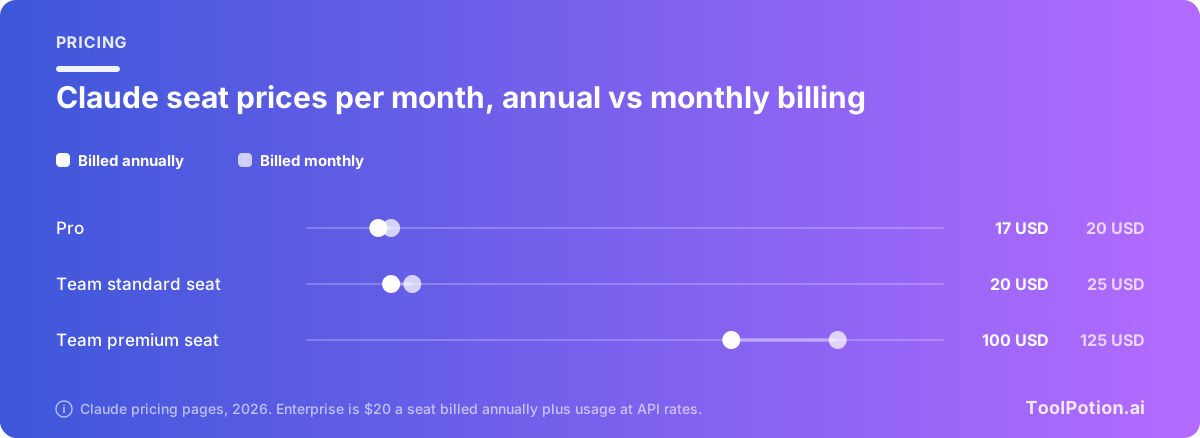
Two things in that last paragraph deserve a flag. First, "plus usage at API rates" means the Enterprise seat price is a floor, not a bill. We can't tell you what a Sheets-heavy team will spend because Anthropic doesn't publish a per-feature cost. Second, both help articles say Sheets and Whiteboards count toward your plan's usage limits, so a team that builds a lot of boards eats the same pool as people using Claude to write code. Price is part of the product, and here part of the price is a meter you can't see in advance.
Our view on seats: we'd start every office pilot on Pro or Team standard seats and skip the $100 premium tier. Nothing on the pricing or help pages ties these features to premium seats, so the extra usage only pays off for people who already hit limits.
Meetings is the one we'd wait on
The idea is the most ambitious of the four, and the safeguards read well. According to TechCrunch, Claude identifies itself as a participant and posts a notice in the meeting chat. It won't join calls with external guests unless an admin authorizes it, and it leaves on its own if an external guest joins. After the call, the notes, action items and anything Claude built are in claude.ai.
That's a sensible design for a first release, and it explains why the launch is Team and Enterprise only: an admin has to exist. It's also narrow. At launch it works with Google Meet, so a company on Teams or Zoom is out for now, and Anthropic hasn't said when Zoom or Teams will follow. (TechCrunch writes only that "support for additional plans" is expected, which we read as a typo for platforms.)
What we couldn't find is the bigger gap. Neither launch post nor any help-center page we read says where a Meetings transcript is stored, how long it is kept, whether an admin can delete it, or whether the call audio is retained. Those are the first questions a security review asks of a note-taker. If you want one you can audit today, see our comparison of Granola, Otter and Fireflies or the AI meeting assistants board, where Fellow and others are ranked.
Our call: pilot Meetings on internal calls with a single team once your admin has the setting and a retention answer in writing. Until Anthropic documents the data handling, we wouldn't put a customer or HR conversation near it.
Sheets and Whiteboards are light on purpose
Anthropic doesn't oversell Sheets. Its own post says "For now, sheets have simple spreadsheet functionality," and the help center lists what's absent at launch (help center). There are no pivot tables, protected ranges, find and replace, multi-column sort or filter views. Excel macros, VBA, Power Query and DAX aren't supported. A sheet tops out at 100,000 cells, mobile access is read-only, and Sheets can't pull live data from connected apps.
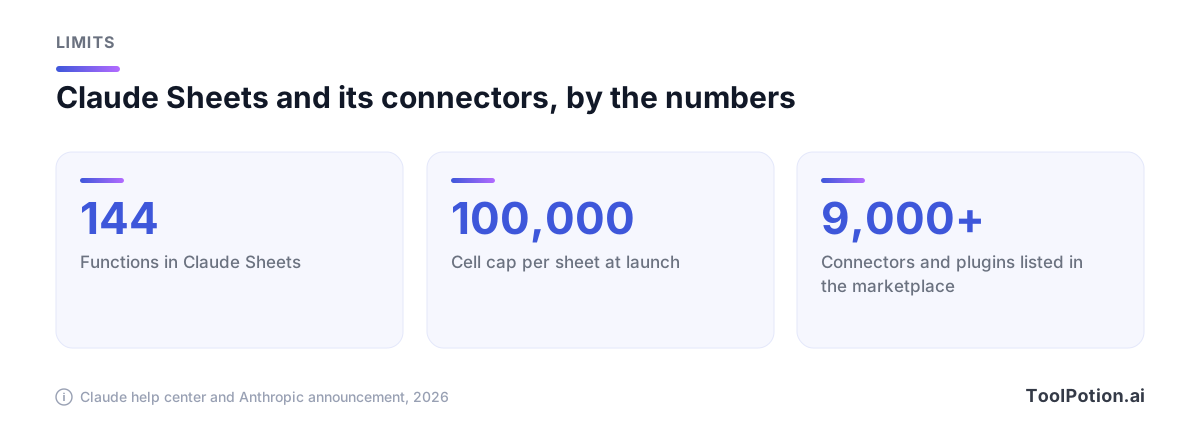
What it does well is the blank-page job. Ask for a campaign tracker or a hiring budget and you get tabs, formulas that stay visible in the cells, dropdowns and checkboxes, with 144 functions behind it. For export, Sheets writes .xlsx and CSV and imports CSV, Excel and Google Sheets. Lock-in is a cost, and a clean .xlsx export counts in Sheets' favor. Claude Sheets also sits beside a Claude for Excel add-in and a Google Workspace sidebar, and Anthropic points to those when your file already lives in Excel or Google Sheets.
Whiteboards has the weaker exit. A board can be saved as a PNG, sent to Lucid, Miro or Zoho Vani, or turned into a doc or deck. You can't import a board from a file, and Claude works only from what's on the board, with no context from your connected apps (help center). If your team already lives in Miro, Lucid or FigJam, this is a brainstorming front end, not a replacement. For a team with no whiteboard tool, it's the easiest way to get one: dictate a plan in any of 25 languages and edit the result.
We think Sheets will disappoint anyone who judges it against Excel. Judge it against a shared Notion table or an Airtable base, and the comparison is closer. Our AI spreadsheet tools board and the roundup of AI spreadsheet tools show how crowded that lane already is.
Data is the one that's ready
Of the four, only Claude Data is out of beta, and it moved there quickly: dashboards launched in beta earlier this year, and the renamed product adds caching, per-dashboard refresh schedules, tracked changes with rollback, and design-system support (Anthropic). The partners named are Amplitude, Mixpanel, Omni, PostHog and Sigma.
The feature we'd look at first is certified queries. A data team marks a query as the official definition of a metric, and charts built on it carry a "certified" badge. Live sharing lets colleagues see current numbers without access to the underlying connector; viewers get the approved queries' results and "can’t run others with your access." Both are still in beta. Together they answer the oldest complaint about self-serve dashboards, which is two people showing two different revenue numbers in the same meeting.
Data needs a connector to something real, a warehouse or CRM, so it's a tool for teams with a data stack and a person who owns it. That person's first job is deciding what counts as certified. We'd budget a week of their time before anyone else touches it.
Against Copilot and Gemini, this is a different shape of product
Microsoft and Google sell AI inside the apps where your files live. Anthropic is selling a new place to make files. That's the biggest difference, and it changes how you buy. We covered the two incumbents' pricing in detail in our Copilot versus Gemini comparison; the short version is below.
| Question | Claude (Team plan) | Microsoft 365 Copilot | Gemini in Workspace |
|---|---|---|---|
| Where files live | Claude's own artifacts, plus connectors | Word, Excel, PowerPoint, Outlook | Docs, Sheets, Slides, Gmail |
| AI price on a $14 base plan | $20 a seat annual, as an extra line | $23.50 total with the Copilot bundle (+$9.50) | Included in the $14 plan |
| Meetings | Claude Meetings, Google Meet at launch | Copilot in Teams | Gemini in Meet on Standard |
| Spreadsheet depth | 144 functions, no pivots | Full Excel | Full Sheets |
| Admin audit and retention | Enterprise plan only | Purview Audit logging | Vault retention on Business Plus ($22) |
Sources: Claude Team pricing, Microsoft 365 plans and pricing, and Google's business editions page. Prices are per user per month on annual billing. Claude seats cover the whole assistant, so this isn't a like-for-like cost.
The table understates one thing in Claude's favor: you don't have to pick. Claude for Microsoft 365 and Claude for Google Workspace add a sidebar to the apps your team already uses, and the pricing page lists Claude for Microsoft 365 as included from Pro up. A company can keep Copilot or Gemini for the daily writing and email work and use Claude for the jobs where its models do better or where a shared board helps. Our three-way assistant comparison covers that model question.
The slider below runs the simple arithmetic on the AI line item alone. It exposes how different the pricing models are: Gemini adds nothing to a Workspace bill, Copilot adds $114 per seat per year to a Standard plan, and a Claude Team standard seat adds $240. Copilot also sells as a standalone add-on, listed on Microsoft's page at $18 a seat monthly (down from $21); the slider uses the cheaper bundle step-up. The first Claude question is whether the people who'd use it are enough of your staff.
We're not convinced a Claude seat is the better buy for a whole company that lives in Microsoft or Google, because you're stacking a third subscription on top of a suite you can't drop. For a 15-person team that doesn't care about Office, it's a different story: Team seats cover chat, Cowork, Claude Code, Sheets and Whiteboards for $20, and there's no suite to replace.
Admin controls and data handling: what's written down
Anthropic's launch post for enterprises says admins on Enterprise plans decide who can use which products and connectors, set spend limits at a granular level, and can limit what each connector does, so Claude might read Slack but not send messages (Anthropic). Enterprise data is encrypted in transit and at rest, and security teams get audit logs plus a Compliance API. Those are real controls, and they're all on the Enterprise tier. Team has SSO, but the pricing table lists audit logs, SCIM, role-based access and custom retention as Enterprise only (Team pricing).
Defaults are policy, so here are the ones that count.
- On Team plans, Whiteboards, Sheets and Data are on by default. On Enterprise, Whiteboards and Sheets are off until an owner turns them on, and Data switches on by default on a date set soon after launch, which the admin guide lists. We think the Enterprise default is right and the Team one deserves a deliberate decision, because Team plans also start with email invitations to people outside your organization turned on, and link sharing follows if external sharing is enabled.
- The plan table lists model training as "Opt-out" on Free, Pro, Max and Ultra, and says Team has no model training on your content by default (Claude pricing). If your staff use personal Pro accounts for these features, that's the default they get.
- Sheets is a beta product, so HIPAA, CMEK and zero data retention aren't supported. Whiteboards isn't available to organizations with HIPAA-ready configurations, and it isn't covered by zero data retention where that's turned on for Claude Code (Sheets, Whiteboards).
- Data from Meetings: we found nothing on retention, deletion or recording, as above.
None of this is hidden; it is on the help pages. It means a regulated team, health or finance, shouldn't put real records in Sheets or Whiteboards yet. For everyone else the limits are workable, as long as someone reads them first.
What to try first
If we were piloting this at a team of 20 people, we'd do it in this order.
- Pick the owner. One admin reads the artifacts admin guide and decides which templates to turn on and whether external sharing stays off.
- Run Whiteboards on one real planning session or retro. Dictate the plan, let Claude group it, and turn the board into a doc. It's the lowest-risk feature and works on any paid plan.
- Build one tracker in Sheets that nobody has built yet, such as a launch checklist or hiring plan. Export it to .xlsx at the end to see how clean the file is.
- Point Claude Data at one warehouse table, and have the data owner certify two queries. Look at whether two people now see the same number.
- Add Meetings last, on one internal call with a retention answer in hand.
After a few weeks, count what changed: documents that didn't need retyping, meetings that ended with an owner and a date. If a feature created review work for someone else, it hasn't saved anything.
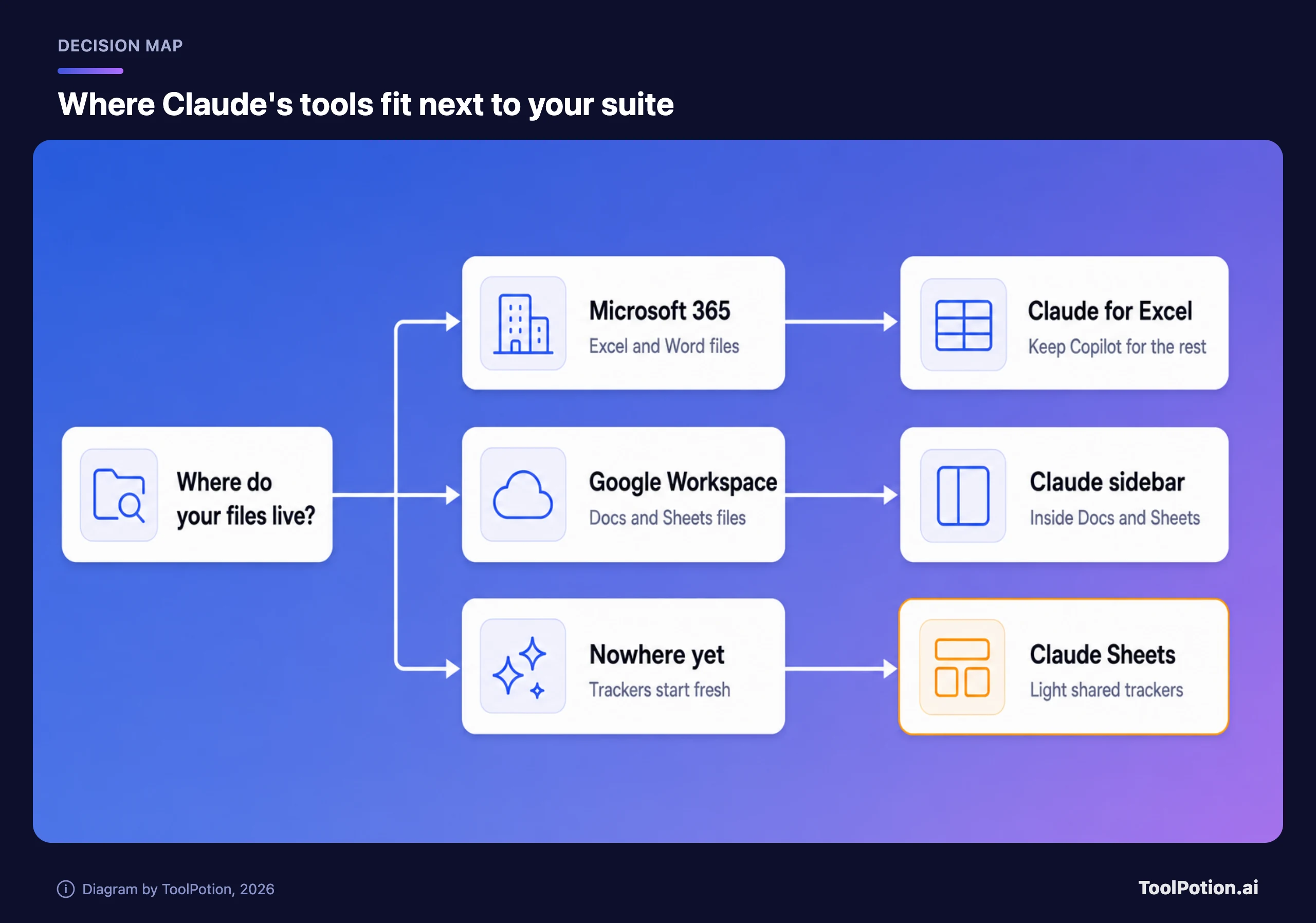
The map above is for the other fork: if your files already live in Excel or Google, Sheets is usually the wrong first step, and the add-ins fit better. The tree below picks a starting point by the problem your team has.
An Office rival, or a set of features?
Features, with one real exception. Microsoft's moat is the file formats, the installed base and the Outlook and Teams plumbing, and Claude's own tools replace none of it (its add-ins work inside Office, not instead of it). A finance team with 40 linked Excel models has nothing to move. A legal team on Word with tracked changes has nothing to move either.
The exception is the team with no suite commitment, or with a suite they use lightly. For them Claude's pitch is coherent: one assistant that carries context from a whiteboard to a sheet to a dashboard, with export to open formats when the work has to go elsewhere. That's closer to what Notion and similar workspaces do than to Office.
Anthropic's own framing is cautious. It says it wants to "bring that magic to every team," and its help pages direct people to Excel when they need full functionality. We read that as honest. The Verge also noted that Anthropic is under pressure to show product engagement ahead of its IPO, which is a reason to expect fast iteration and a reason to wait for the documentation. Nothing here is investment advice, and we don't take a position on the company's finances.
Our picks, for a team deciding today: start with Whiteboards for planning, Data if you have a warehouse, Sheets for light trackers, and Meetings only after the retention answer. What would change our mind: a published Meetings data page, pivot tables and live data in Sheets, and an Enterprise-grade export for boards.
Frequently asked questions
Is Claude's office suite free?
No. The pricing table lists Sheets, Whiteboards and Data as unavailable on Free. They start on Pro at $17 a month billed annually ($20 monthly), and Meetings is described as Team and Enterprise only (Claude pricing).
Does Claude Meetings work with Zoom or Microsoft Teams?
Not at launch. TechCrunch reports it works with Google Meet, and Anthropic hasn't said when Zoom or Teams will follow. Anthropic's own post says Meetings is coming soon, so check your account before planning around it.
Can Claude Sheets replace Excel?
No, and Anthropic doesn't claim it can. Sheets has no pivot tables, macros or Power Query, and caps a sheet at 100,000 cells. It exports to .xlsx and CSV, and Anthropic points to Claude for Excel when you need the full application.
Who can turn these features on?
Owners and Primary Owners of Team and Enterprise plans, under Organization settings and then Artifacts. Team plans have Whiteboards, Sheets and Data on by default, while Enterprise plans start with Whiteboards and Sheets off (admin guide).
Is my data used to train Claude?
It depends on the plan. Claude's pricing table lists model training as opt-out on individual plans and says Team has no training on your content by default, and its Enterprise page says prompts and results aren't used to train models by default. Read the data-controls notes on each feature page before using regulated data.
How does it compare with Copilot or Gemini for the price?
Gemini is included in a $14 Workspace plan, and Copilot's bundle adds about $9.50 a seat monthly, per Microsoft's and Google's pricing pages and our earlier comparison. A Claude Team standard seat is $20 a month billed annually, and it sits on top of your existing suite.