We can't find a published claim procedure for ChatGPT business profiles, so any step-by-step you see right now is guesswork. OpenAI announced Businesses in ChatGPT (OpenAI) and summarized it as a way to "Manage your business information, get insights about how your business shows up, and turn interest into action in ChatGPT." That line says what the feature is for. It doesn't say how you get in.
So this guide does two jobs. It lays out the route as far as it has been described, marks every gap, and then covers what a small business can do before the details arrive. Most of that work helps whether or not you ever touch the feature.
The route, as far as anyone has described it
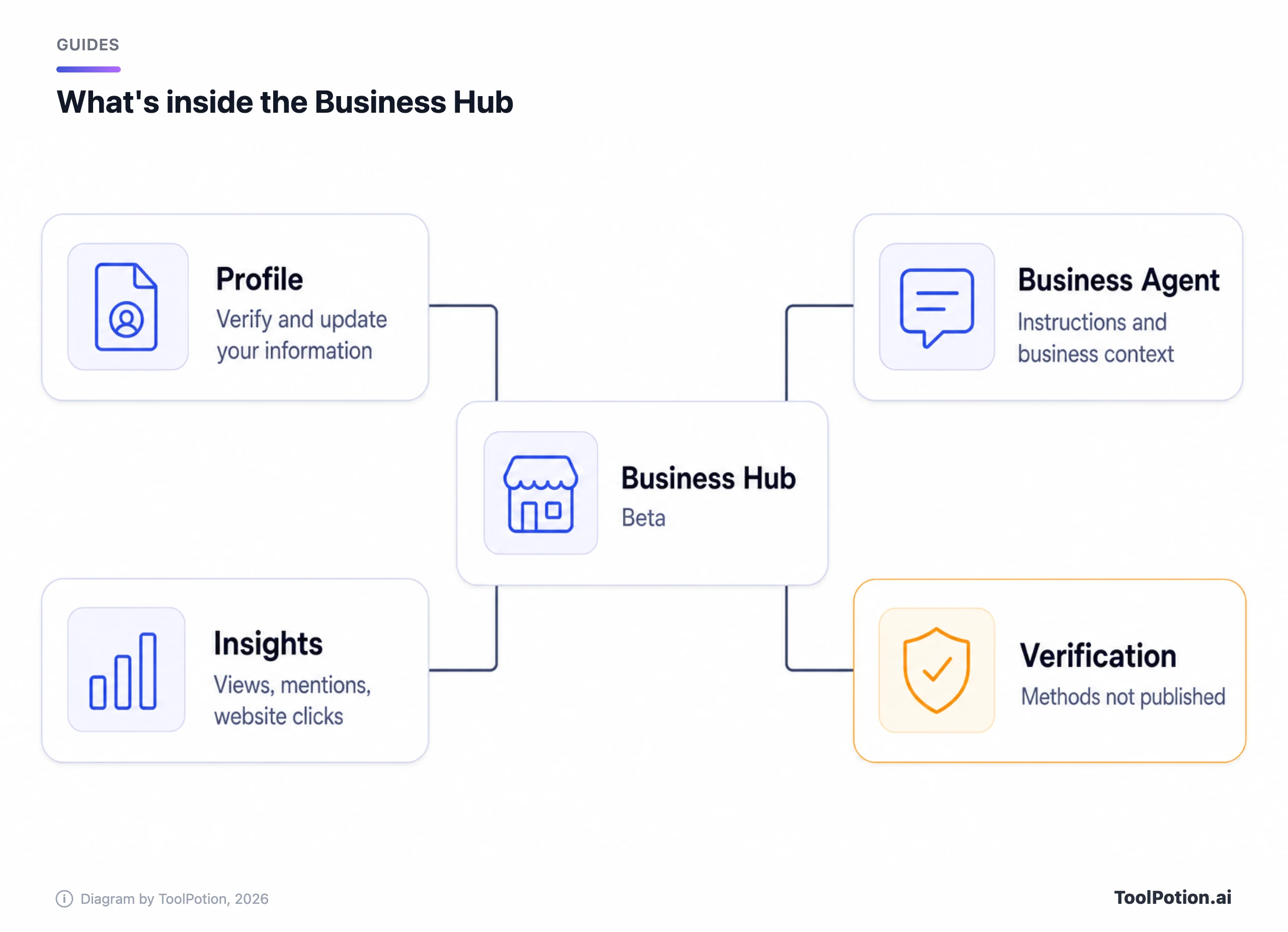
Two reporters covered the launch. The profile lives in a new tool called Business Hub, which TechCrunch's Lucas Ropek says is in beta. Neither outlet laid out steps, so the order below is our reading of what they describe, and it goes thin fast.
- Open Business Hub and create a profile. TechCrunch says it lets companies "verify and update information about their products and services," much like the profiles Google already offers. Neither outlet gave an address or screenshots for the Hub.
- Go through verification. TechCrunch says there is a formal process, but not what it involves.
- If you qualify, create a Business Agent (more on that below) and supply its instructions and business context, per The Verge.
- Read the insights: profile views, business mentions and website clicks, per TechCrunch, which calls the analytics limited.
The Hub and the profile are described. The verification and eligibility behind them are not, and those are the two things you'd need before applying.
What OpenAI hasn't said
Benji Shomair, OpenAI's VP of Monetization, told journalists there are "multiple verification methods that we use for different types of business in different markets" (TechCrunch). That sentence is the entire published answer to how verification works. It doesn't say whether a domain check, a document upload, a store connection or a phone call is involved for a bakery with one location.
Three gaps stand out, and none of the coverage we read answers them.
- Verification methods. No list, no document requirements, no timeline, no mention of what happens when a claim fails.
- Eligibility. The Verge says Business Agents are for "eligible" e-commerce and online service businesses in the US. Nobody has said what makes a business eligible, or whether a plain profile has the same limits as an agent.
- Availability outside the US. The reporting says nothing about it, so a business in Manchester or Jakarta can't tell whether to wait or ignore it.
We'd add a fourth that nobody asked: what you can edit. TechCrunch says "information about their products and services." It doesn't say whether that covers opening hours, prices, delivery areas or return rules, or what a customer sees when a profile and a web page disagree.
We haven't found an OpenAI help article or how-to for any of this. This guide rests on OpenAI's one-line summary of the announcement plus the TechCrunch and Verge reports, and a published OpenAI procedure would override what we've written.
How it compares with Google Business Profile
Google's system is old enough to have manuals. Its help page on adding or claiming a profile says that if the business already appears in Google Maps, you find it there and select "Claim this business" and then "Manage now." If no profile exists, you start at business.google.com/add instead. Either way you choose a verification option and follow the on-screen steps. If someone else already verified the listing, you can't claim it directly; you request ownership from them. Google says only businesses eligible for a Business Profile can add or claim a location, and adding or claiming is free.
The part we'd copy is the accountability. Google's page on editing business information names the fields (address, hours, category, attributes such as parking or Wi-Fi) and warns that "If your business info isn't accurate, your Business Profile might not show up for relevant searches in your area." You're told what to fix and why. OpenAI hasn't shown anything comparable.
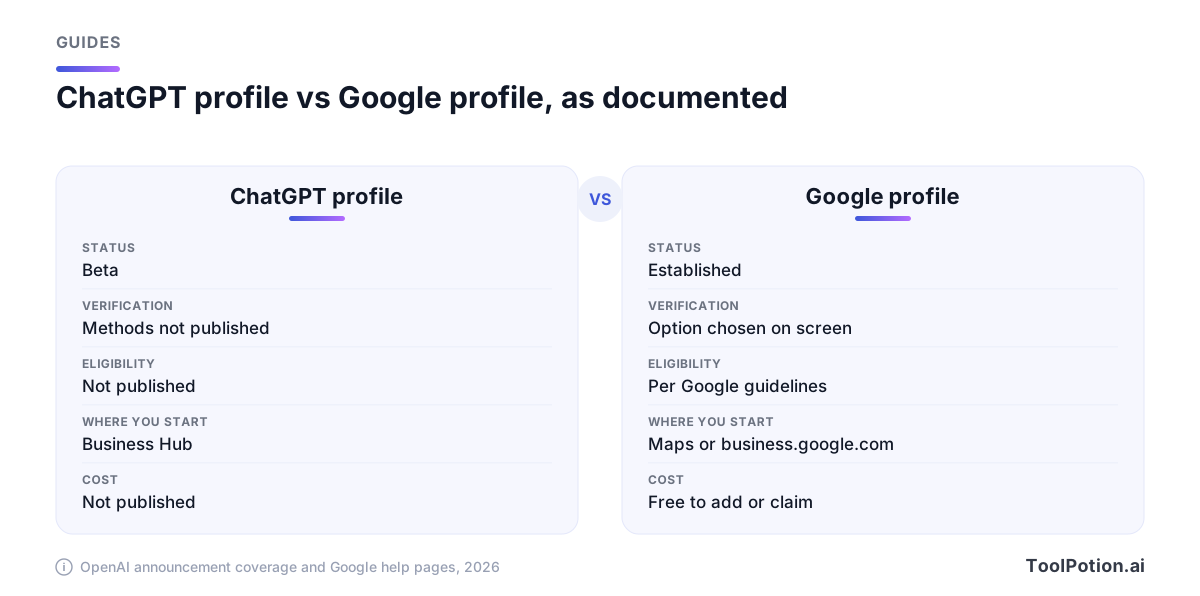
Where ChatGPT differs is the agent, which talks back. That is also where the risk concentrates, so we'll spend the next section on it.
What a verified Business Agent does, and who controls it
Per The Verge, a user can start talking with a Business Agent when a business that has created one appears in a ChatGPT answer. The user can then ask about the business's offerings and put follow-up questions, such as how two products differ. The Verge describes these agents as verified and as representing a brand.
From the owner's side, that's the catch: you supply the agent's brief, so you answer for what it tells someone about to spend money. Nothing we've read says whether you can review the conversations, correct a wrong answer after the fact, or see where the agent went beyond what you gave it. Until that's answered, we'd treat the agent as a junior employee nobody supervises. If you already run a chat assistant on your store, such as Shopify Inbox, you've met this problem; our rankings of customer support tools and AI chatbots show how many options there are, and our customer support chatbot roundup covers the instructions-and-guardrails side.
If you do get access, keep the first set of instructions boring. These are our suggestions, editorial judgment and not OpenAI guidance:
- State what the agent may answer: products, sizes, stock policy, shipping zones, opening hours.
- State what it must refuse and hand to a person: refunds, medical or legal claims, delivery promises, price matches.
- Paste the current policies in as written, with a date, so there's one version to audit.
- Say what the agent should do when it doesn't know, and make that "point to the contact page," never "make your best guess."
- Re-read the instructions whenever your prices or policies change, because nothing will remind you.
Impersonation and wrong answers
The Verge calls Business Agents verified, and verification is what should tell a shopper they're talking to the real business. That's the right goal. Whether it holds depends on methods OpenAI hasn't described, and we'd be wary of any claim that it's airtight before they're public. Search engines have lived with fake listings and hijacked profiles for years; there's no reason a younger system gets that right on day one.
Three failures are likely enough to plan for.
- A lookalike claims your name, or a reseller claims your product line, before you do. Claiming early is the only defense we can see.
- The profile is right and ChatGPT's answer is still wrong, because the answer drew on an old page somewhere else. OpenAI hasn't said how a verified profile is weighted against everything else ChatGPT reads, so assume it isn't a trump card.
- The agent is right when you configure it and wrong a month later, after you changed your returns window and forgot it.
Keep a dated screenshot log of what ChatGPT says about your business. If a wrong answer costs you a sale, or a customer a refund, you'll want the record.
Get your facts straight first
Everything above is waiting on OpenAI. This part isn't, and it's the part we'd start on. Whatever ChatGPT reads about your business, from a profile or from the open web, is only as consistent as the sources you control.
Pick one version of each fact and make every place agree: your own site, your Google profile, your store pages, your social bios. Shopify merchants have the easiest version of this, since the catalog on Shopify is already the source for product names and variants; the job is to make your about page and policies match it. Teams with many locations sometimes use a manager such as Localith to keep Google profiles in step, though a spreadsheet and a monthly check does the same job for one shop.
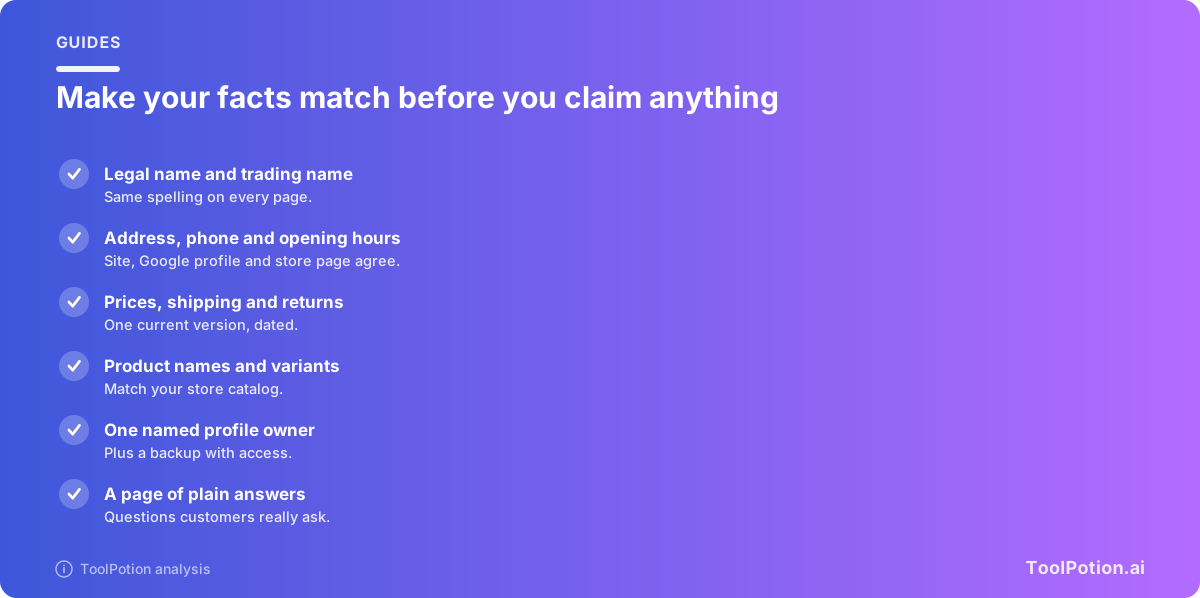
Then name an owner. Profiles that belong to "the marketing team" belong to nobody, and verification usually follows one person's email or one domain. Give one named person the claim, give a second person admin access, and write down which inbox receives the verification messages.
Last, ask ChatGPT about your own business, in a few phrasings, and note what comes back. If it gets your hours or prices wrong today, a profile won't be the cause and may not be the fix; the page it's reading is. Our playbook on getting found when AI answers covers that side in more depth, and our comparison of ChatGPT search, Perplexity and Google AI Mode shows where customers might be asking, including Perplexity.
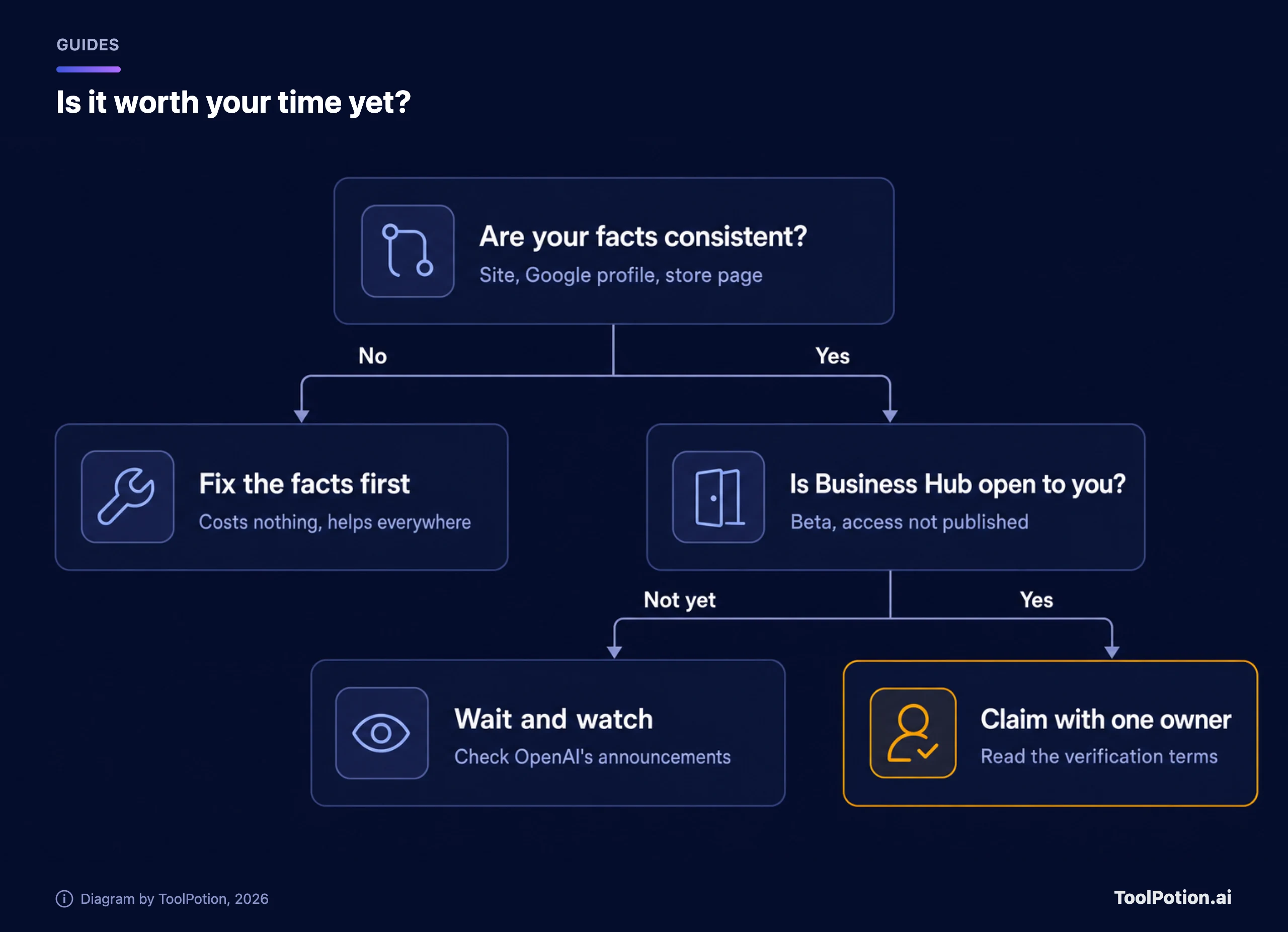
Is a beta with secret verification worth your time?
Not yet, for most small businesses. We'd put an hour into the facts and zero into hunting for the claim button.
Our reasons are plain. The feature is a beta. The verification rules are undisclosed. Business Agents are limited to eligible US e-commerce and online service firms. And OpenAI's earlier e-commerce push, with its checkout cart, was retired earlier this year, as TechCrunch notes. A company that dropped one commerce bet that fast hasn't earned a bakery's bet on the next. (How agents behave once they act for you is a separate topic; see personal AI agents and how to start safely.)
Two things would change our mind: a published verification page that a business owner can read before applying, and a way to review and correct what an agent has said. If both land, claiming early becomes sensible, mainly to keep a lookalike out. If you sell online in the US and you're invited in, go ahead, with a boring set of instructions and a calendar reminder to re-read them.
The insights are a small point in the feature's favor. Views, mentions and website clicks are useful for a business ChatGPT already recommends, though TechCrunch calls the analytics limited. We'd still want to know how OpenAI counts a "mention" before putting it on a slide.
There's a bigger-picture argument that ChatGPT is now a discovery engine and businesses need a seat at the table. We'd agree about the discovery part. A seat with undisclosed rules isn't a reason to hurry, though, and consistent facts help you on ChatGPT, Google and every other assistant at once. For where ChatGPT is headed with money, see our look at ChatGPT ads for marketers.
Frequently asked questions
How do I claim my business in ChatGPT?
No procedure is public that we can find. Reports say companies create a profile in a tool called Business Hub, which is in beta, and then verify it, but there's no published list of steps or requirements.
What does verification involve?
OpenAI hasn't said, as far as the coverage shows. Its VP of Monetization told journalists there are multiple methods for different types of business in different markets, and gave no detail.
Can any small business get a profile?
Unknown. Reports say eligible companies can create a Business Agent, and that agents start with eligible US e-commerce and online service businesses. Nobody has defined "eligible" or said whether plain profiles are open to everyone.
Is it available outside the US?
Unknown. The only geography in the coverage is the US launch of Business Agents.
Is this the same as ChatGPT Business, the team plan?
No. ChatGPT Business is OpenAI's paid workspace plan for teams. Business profiles are a separate feature for companies that want to appear in ChatGPT answers. The names are close enough to cause mistakes, and a search for one will turn up the other.
Does a profile guarantee ChatGPT gets my details right?
We have no evidence of that. Nothing we've read says how a verified profile is weighed against other sources, so keep your site, store pages and Google profile accurate.
What should I do first?
Make your name, address, hours, prices and policies identical everywhere you publish them, pick one person to own your profiles, and check what ChatGPT says about you now. Then watch OpenAI's announcements for Business Hub access.