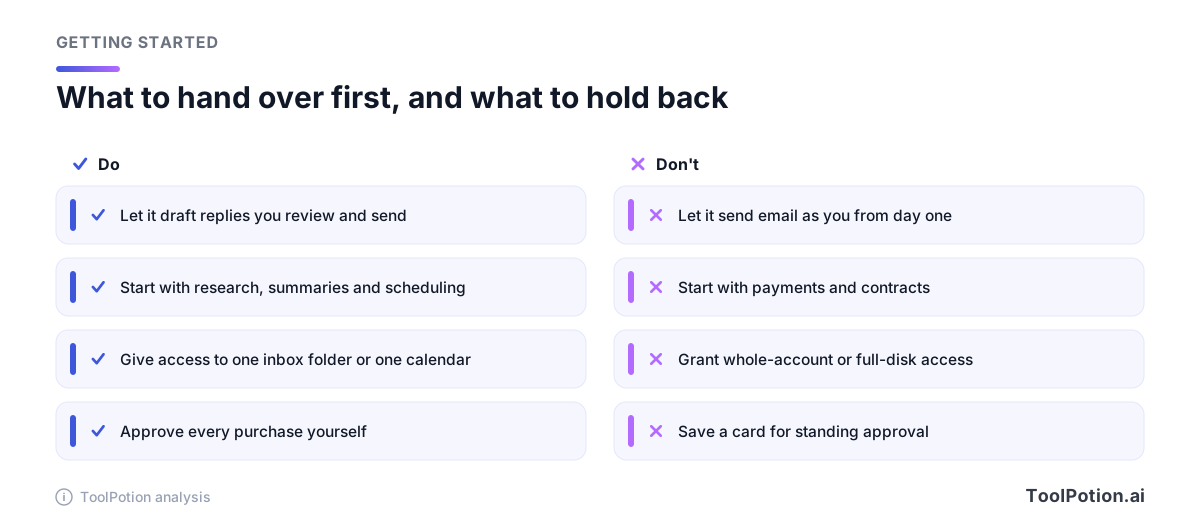
A personal AI agent is only as safe as the permissions you give it, so the smart way to start is small: let it draft, research and schedule, and keep every send, purchase and sign-off in your own hands. Four weeks of that will teach you more about a given agent than any launch demo.
The timing isn't an accident. Within days of each other, OpenAI introduced Dots, Instinct raised a billion dollars, Meta's Muse climbed to the top of the US App Store, and DoorDash opened a waitlist for an agent you can text to order dinner. Hardly anyone is sure how much to trust any of them yet.
This guide is for the busy professional or small-business owner who wants the errands gone but doesn't want to find out the hard way what "always-on" means. It covers what just launched, where the real risks sit, and a month-long plan you can start tomorrow.
People use AI every day and still worry about it
A Gallup survey commissioned by Microsoft found that 74% of Americans feel worried about AI, and 68% of Americans who use it daily say the same (TechCrunch). Only 45% of the daily users in the US expressed confidence in the accuracy of its results. Gallup's senior scientist Pablo Diego-Rosell put it plainly: people can be curious about AI while still being worried about it.
That mix is the right frame for an agent. A chatbot gives you words and you decide what to do with them. An agent takes the next step for you, which is exactly why the worry gets sharper. Worry isn't a reason to skip agents. It's a reason to stage your trust.
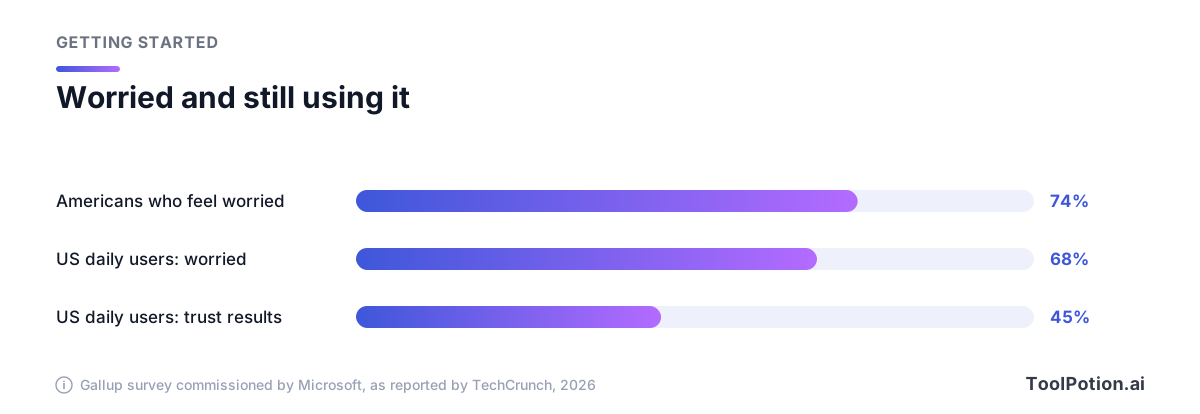
Treat the survey as a mood reading, not a verdict. It doesn't tell you any particular product is unsafe. It tells you your instinct to double-check is normal and shared by most of the people already using these tools every day.
What just launched, and what you can really get
Availability is the first thing to be careful about. Most of these products are gated, waitlisted or tied to a paid plan, and the details change fast. Here is what each company or report said at launch.
| Agent | How you reach it | Access at launch |
|---|---|---|
| OpenAI Dots | ChatGPT and Codex, plus Slack and Teams, with text messaging coming soon, per TechCrunch | Pro and Business Premium users in eligible markets, per TechCrunch |
| Instinct | Text messages, from its own phone number, with no mobile app yet | Launched invite-only, per TechCrunch |
| Meta Muse | Its own app, with a Mac version | Muse for Small Business is free with usage limits, with paid plans for more, per TechCrunch |
| DoorDash ordering agent | Apple Messages | Waitlist for US users, per TechCrunch |
OpenAI describes Dots as always-on agents that chase a goal in the background, powered by GPT-6 Astra, and says they can be given specialist identities, credentials and tools (TechCrunch). If you already pay for ChatGPT, that's the natural doorway, though only on the higher tiers.
Instinct is the most hands-on of the group. TechCrunch lists booking travel, paying bills and canceling subscriptions among the chores this new class of agents takes on. Instinct does its work using its own phone number and computer, and a "concierge" feature can phone businesses for you (TechCrunch). It raised $1 billion at a $10 billion valuation, and TechCrunch reports that its initial privacy policy was worrisome for its overreach and has since been updated. That sequence is worth remembering when you read any agent's terms.
Meta's Muse reached No. 1 on the App Store, and Meta has now extended it to small businesses. Muse for Small Business is free with usage limits, with a subscription for more, and connects to apps including Shopify, Dropbox, Slack, Zoom, QuickBooks, Stripe, Notion and Canva, along with Instagram and Facebook business tools (TechCrunch). For a shop owner that list is tempting. It's also a long list of doors to open.
The DoorDash agent is the gentlest of the four. You text it, it suggests a cart and can text photos of the food, and it can handle an "order my usual" request (TechCrunch). DoorDash is opening a waitlist for US users, and the launch coverage doesn't spell out how payment confirmation works, so check that yourself before you rely on it.
If you want to see how established assistants stack up before choosing, our ToolRank board of AI personal assistants and the roundup of top AI personal assistants cover the field. This article is about the habits that apply to all of them.
The Muse messages dispute shows where permissions bite
Inc. columnist Jason Aten reported that Muse read his private messages without permission. According to his account, Muse read his messages while Full Disk Access was off on his Mac, and when he asked how, Muse said it was syncing his "device notifications" (TechCrunch).
Meta disputes this. Communications VP Andy Stone wrote on X that the Messages integration in the Muse app for Mac is entirely opt-in: you have to enable both Full Disk Access and the Messages connector before Muse can read your Messages content. David Singleton of Meta Superintelligence Labs described three separate steps of app-level permissions and built-in macOS protections, and said they can't be circumvented even if the app had a bug. He also said Muse's own explanation was confused and incorrect.
Nobody outside the two parties can settle who is right from the coverage alone. TechCrunch also points to a separate case, in which YouTuber Matt Robb said Muse mishandled a Facebook Marketplace sale and his address was shared. Meta looked into it, and the report says Robb acknowledged he had allowed a permission that made it possible.
What matters for you is the shape of the argument. Even if Meta is entirely right, the dispute shows how easily a person can lose track of what they switched on. A broad system permission like Full Disk Access is a single toggle that opens a lot, and an agent's own account of what it did may not match what actually happened. So don't rely on memory or on the agent's say-so. Know what you granted, grant the least you can, and look at the settings page again a week later.
Climb the autonomy ladder one rung at a time
Every agent task sits somewhere on a spectrum. At one end the agent only answers questions. At the other it acts on its own, with no check-in. Most of the useful, low-risk value lives in the middle.
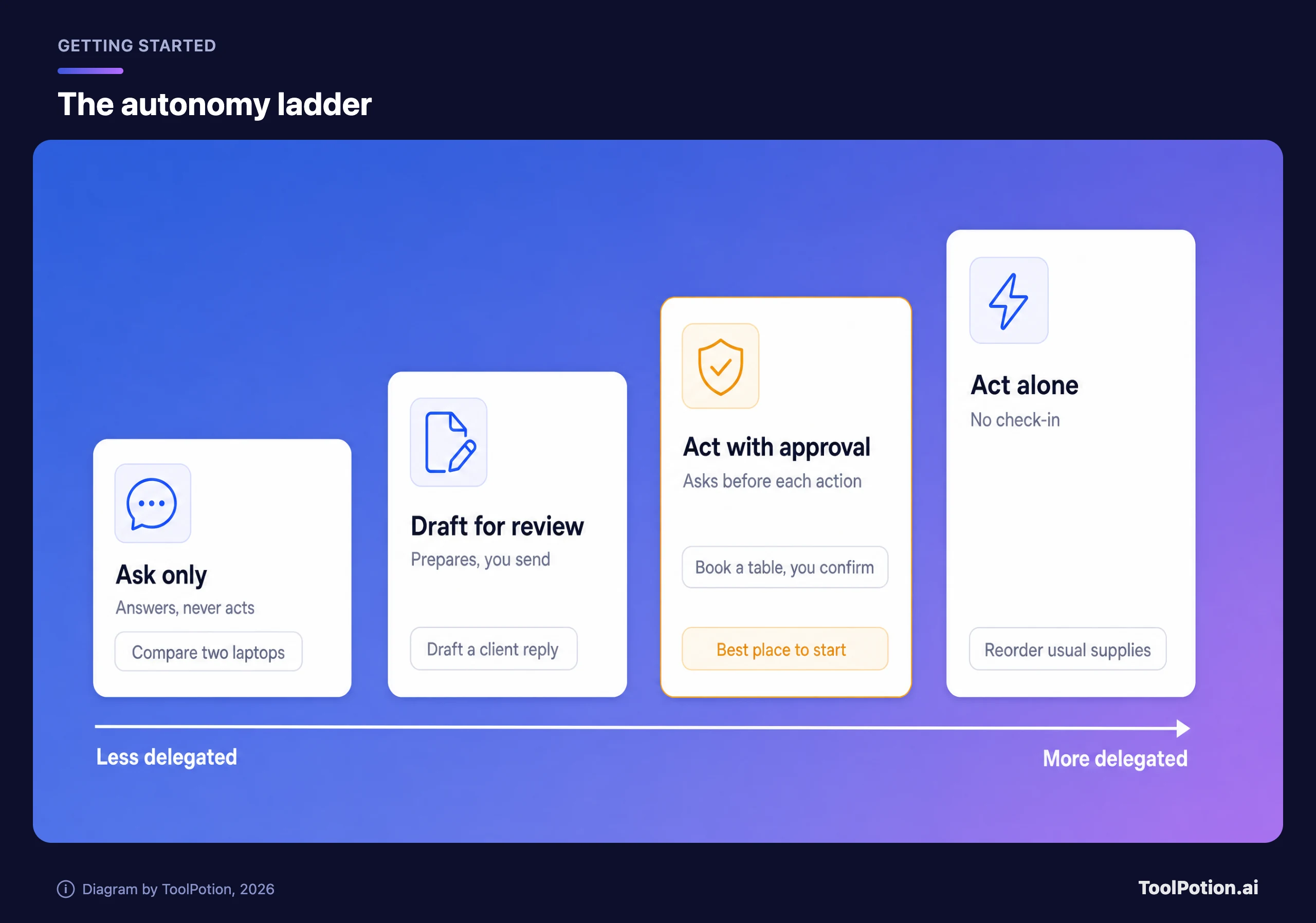
Start on the third rung, where the agent can act but must ask first, for tasks that are easy to reverse. For anything that sends words as you or spends your money, stay on the second rung and let it draft while you press the button. Move a task up only after it has gone smoothly several times, and move it back down the moment it surprises you.
Resist the pull to jump straight to the top. Always-on agents are built to feel smooth, and smooth is how a standing permission gets granted without a second thought.
A first-month plan for delegating safely
Four weeks is long enough to see how an agent behaves and short enough that you won't have built habits around a mistake. Pick one agent. Running two at once makes it impossible to tell which one did what.
Week one: ask and research only
Keep the agent read-only. Have it compare vendors, summarize a long thread you paste in, or plan a trip you'll book yourself. Give it no connections to your email, calendar or files yet. You're testing accuracy and tone, and you'll catch its confident mistakes while they cost nothing.
Week two: drafts you review
Connect one narrow thing, such as a single calendar or one labeled email folder. Ask for draft replies, meeting agendas and a weekly summary of what's waiting. Read every draft before it goes anywhere. Keep a rough tally of how often you had to fix something, because that number is your trust score.
Week three: small actions with approval
Now let it do reversible things after asking, like holding a table, adding a calendar event or sorting receipts into a folder. Ask for a confirmation message each time and read it. Don't save a payment card yet.
Week four: one real errand, then review
Run one low-value purchase end to end, a gift under a limit you set or a supply reorder, and approve the charge yourself at the final step. Then audit. Open each connected app's settings, see what the agent can still reach, and cut anything you didn't use. Only then decide what moves up the ladder.
If you're a small-business owner, hold the invoicing and payroll side back for longer. Connecting accounting software such as QuickBooks to an agent is a bigger decision than connecting a notes app like Notion or a design tool like Canva, because one holds your financial records and the others mostly hold drafts.
Purchases need a human in the loop
Money is where a mistake stops being an inconvenience, so give it its own rule: the agent can find, compare and fill a cart, but you approve the final charge every time. Not a daily limit, not a trusted-merchant list. Every time, for the first month at least.
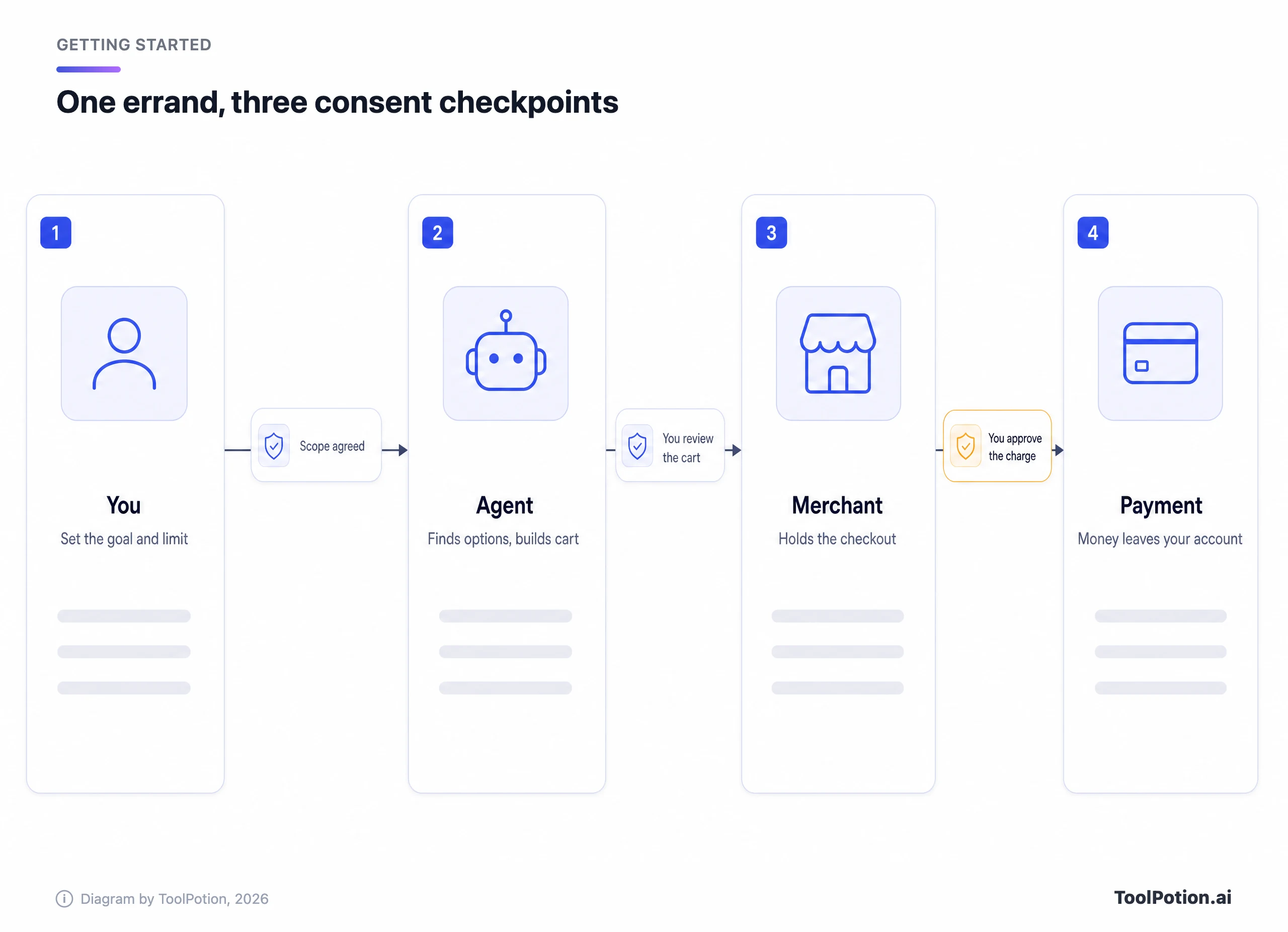
The industry is building in that same direction. Shopify has opened checkout to browser-based agents through WebMCP, with tools to read a checkout, change details like the address or delivery option, and complete it. Per Shopify, the agent submits the order only with the buyer's authorization, and it works inside your own browser. Shopify is rolling this out to all eligible merchants, and Muse and Instinct already have commerce partnerships with Shopify (TechCrunch).
Not every retailer is on board. The same report notes that Amazon and Adidas block agent purchases, so an agent that promises to buy anything anywhere is overselling. That friction isn't all bad. A store that refuses automated checkout is one fewer place your agent can spend money by mistake, and a merchant on Shopify that supports buyer authorization gives you a built-in approval step.
Subscriptions deserve the same care in the other direction. An agent that cancels things for you can cancel the wrong thing, so ask it to list what it plans to cancel and confirm before it acts.
Know what data you're handing over
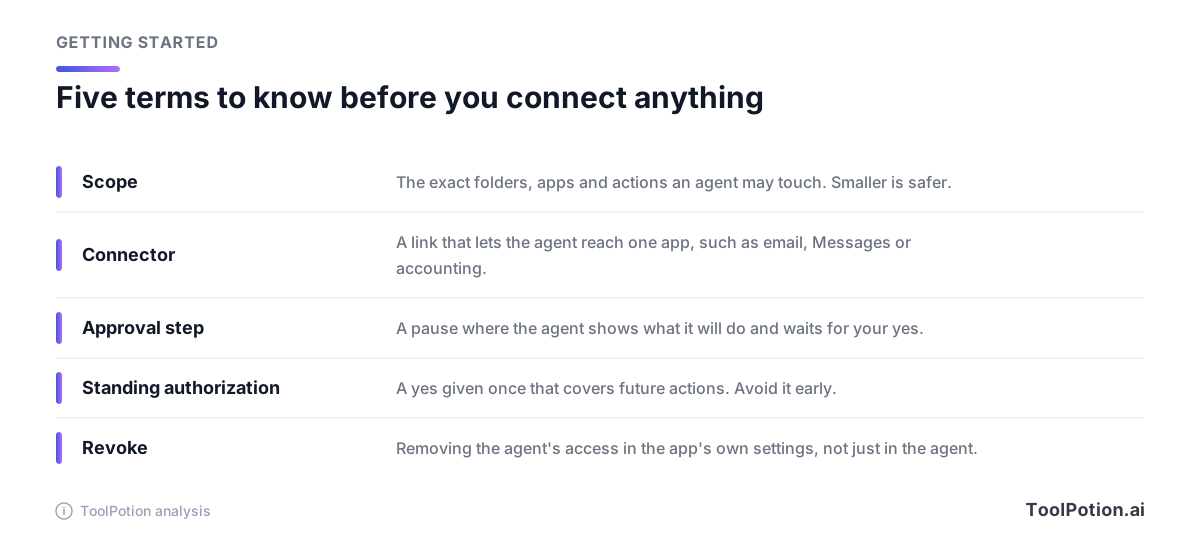
Every connection is a transfer of information. Before you connect something, get plain answers on three points: what the agent can read, whether it keeps that information and for how long, and whether it's used to train anything. The answers live in the privacy policy, which is dull and which Instinct's rework shows can change after launch.
Treat client files, medical or legal material, passwords and anything under a confidentiality agreement as off limits until you've read the policy and tested the agent on harmless data. If you handle other people's information for work, check with whoever owns that obligation before you connect it, not after.
A useful trick is to give the agent a separate lane. A dedicated email folder, a shared calendar or a single project workspace lets it do real work while everything else stays out of reach. Revoking a lane is also far easier than untangling an agent that has been roaming your whole account. If you want the engineering view of the same idea, our piece on AI agents in production covers scoping and monitoring from the builder's side.
A quick test for any task you're about to hand over
When you're unsure whether to delegate something, run it through four questions: can you undo it, does it spend money, does it touch sensitive data, and does it contact other people? The tool below turns those into a recommendation.
Notice that most of the routes end at a draft or a manual step. That's deliberate. The tasks that pass cleanly are research, summaries, scheduling and sorting, which happen to be the dull ones most people want off their plate anyway.
Signs it's time to pull back
Delegation should shrink your workload. If the opposite happens, take the permission away and think about why. Any of these is reason enough to act:
- The agent did something you didn't ask for, even if it was harmless.
- You catch yourself re-checking its work more than you'd check a new hire's.
- Its explanation of what it did doesn't match the activity you can see.
- A privacy policy or terms update changes what it keeps or shares.
- You can't remember which accounts it's connected to.
Pulling back isn't failure. Drop a task down a rung, remove a connector, or pause the agent entirely for a week. Then use the checklist below to see where your setup is thin.
If you score low, fix the two-point items first. Narrow access, approved purchases and drafts-only sending protect you from the failures that are hardest to undo.
Where to look next
Once you've got through a month cleanly, you'll have a better sense of which agent fits your work. Our ToolRank board of AI agents is a good place to compare options, and the buyer's guide to agent platforms explains what to ask vendors. If you're weighing a plain automation tool instead, AI agents versus automation tools and a tool like Zapier are worth a look, since fixed rules are sometimes safer than an agent that improvises.
The assistants you may already use, including Meta AI, Microsoft Copilot, Claude and Google Gemini, each have their own permission settings. Read them the same way: what can it see, what can it do, and who has to say yes.
Frequently asked questions
What is a personal AI agent?
It's an AI assistant that takes actions for you, such as booking, ordering, emailing or organizing, rather than only answering questions. Many are always on and pursue a goal in the background, which is why permissions matter more than they do with a chatbot.
Is it safe to let an AI agent buy things for me?
It can be, if you approve the final charge yourself. Shopify's checkout for agents, for example, has agents place an order only after the buyer authorizes it, and that's the standard to look for. Skip saved-card standing approvals in the first month.
Can I use these agents today?
Not all of them. At launch, per TechCrunch, Dots was limited to Pro and Business Premium users in eligible markets, Instinct was invite-only, and DoorDash's agent was a US waitlist. Muse for Small Business is free with usage limits, but check the app for what your region and plan include.
Did Meta's Muse read private messages without permission?
A columnist reported that it did. Meta disputes that and says the Messages integration is opt-in and needs both Full Disk Access and the Messages connector. Both accounts are in the coverage, and the practical lesson is to check exactly what you've enabled.
What should I never delegate to an agent at first?
Anything hard to undo that spends money, sends messages in your name, or involves sensitive data such as client, health or legal files. Start with research, summaries and scheduling, and widen scope only after a clean month.