Ask any assistant for a five-day itinerary and you'll have one in under a minute. Then comes the part nobody mentions in the demo: the museum that closes on Mondays, the restaurant that moved two years ago, the fare that was true when the model last looked. Used well, AI cuts the dullest hours out of trip planning. Used carelessly, it sends you across a city to a locked door.
We've read the vendors' own pages and the recent reporting, and the working method is simple. Let the assistant draft and compare. Pin everything on a map. Check the facts that can hurt you at the source. Book on the airline's or hotel's own site. The rest of this guide is that method in order, followed by what goes wrong and which tools we'd start with.
What AI does well for a trip
Drafting is the obvious win. A model can turn "four days in Lisbon, we like food and hate queues" into a day-by-day outline that you edit, which beats a blank page. It's also good at the comparisons that normally eat an evening: which neighborhood to stay in for a first visit, how two cities differ for a family with a toddler, whether a rail pass pays off. Ask it to argue both sides and then choose; you'll get a sharper answer than from a list of top ten posts.
Packing lists are a smaller win that people underrate. Give it the climate, the length of stay and the activities, and it produces a list you can trim in two minutes. Translation is the other quiet strength: menus, signs, a note to a host, a message to a driver. For a trip where you won't speak the language, our DeepL vs Google Translate vs ChatGPT comparison picks tools by job, and Google Translate remains the free default most people already have.
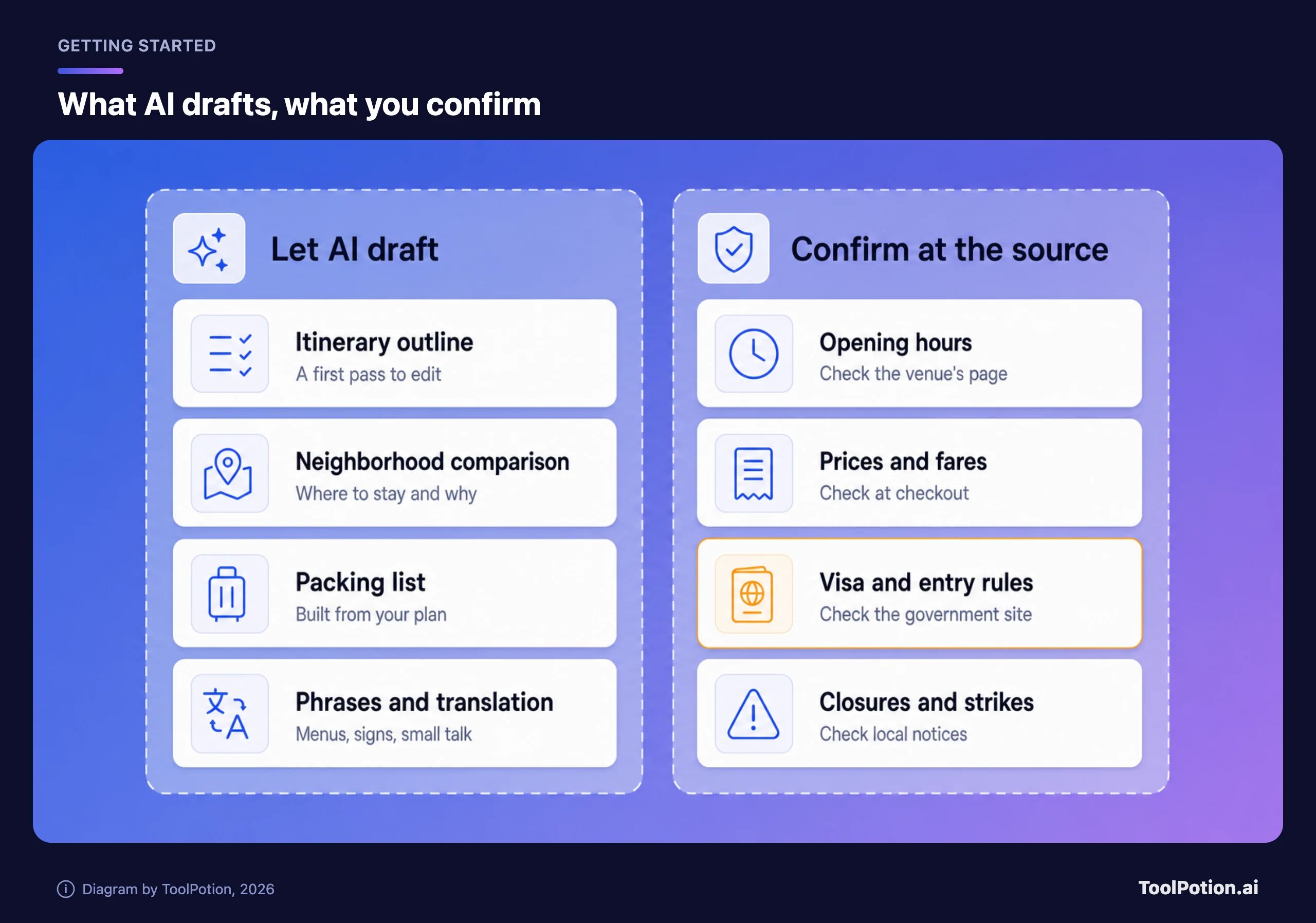
Routing and maps are where the assistants that sit inside a map product pull ahead. Google says Gemini gets locations, reviews and prices from Google Maps, Flights and Hotels, can group things to do by neighborhood and can build routes (Google). That's a vendor description, so treat it as what the product is meant to do, not a guarantee about any one answer.
Notice what's missing from that list: anything with a deadline or a price on it. The draft is the cheap part. The facts that decide whether the trip works are the expensive part, and they're exactly where models slip.
Crowds are another gap. A model will happily describe a quiet corner of a famous city without knowing whether a festival or a transit strike has filled it. Ask the question outright: what local events or closures could affect these dates? Then confirm the answer on the city's tourism site.
Where it fails, and why the failures look fine
OpenAI's own help page says ChatGPT can produce incorrect or misleading output, sometimes confidently, including incorrect facts and references to sources that don't exist, and it tells people to verify important information (OpenAI). Google's help page for connecting Gemini to Workspace says Gemini Apps can hallucinate or give outdated information, and tells you to review the listed sources (Google). Both vendors are telling you to check. Take them at their word.
In trip terms, five failures turn up again and again.
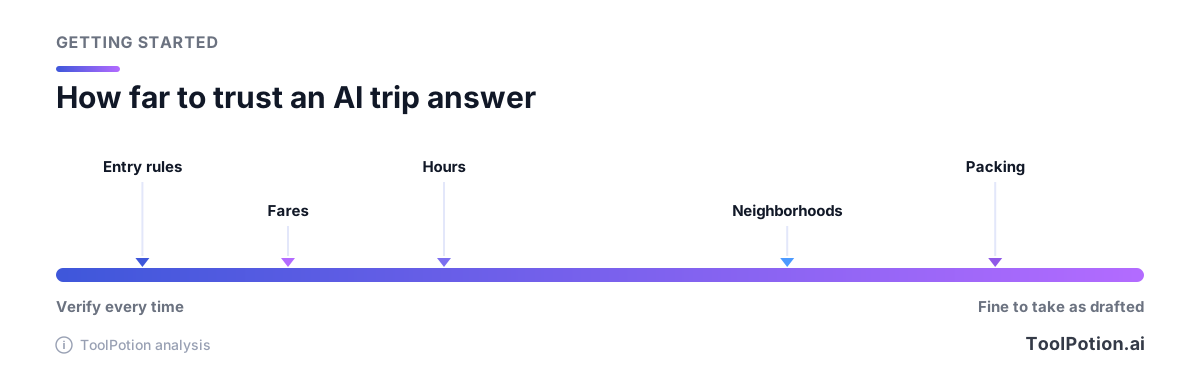
- Opening hours and closures. A draft may place a market on a day it's shut, or send you to an attraction under renovation.
- Prices. A figure that looks like a quote is usually a remembered range, and fares and room rates move by the hour.
- Visa and entry rules. These change by passport, by length of stay and by purpose, and a wrong answer can mean a refused boarding.
- Invented or stale places. A restaurant that closed, or a name that sounds right and isn't on any map.
- Walking and transit times. A day that "flows" on paper can hide two hours of transfers.
We'd put entry rules at the top of the worry list, because the cost of a mistake is a missed flight, not a bad lunch. Look up your passport country's government advice for the destination. The UK's foreign travel advice pages cover entry requirements, safety, health risks and legal differences for 226 countries and territories, and other governments run equivalents. Use the one for your passport.
Our workflow, in the order we'd do it
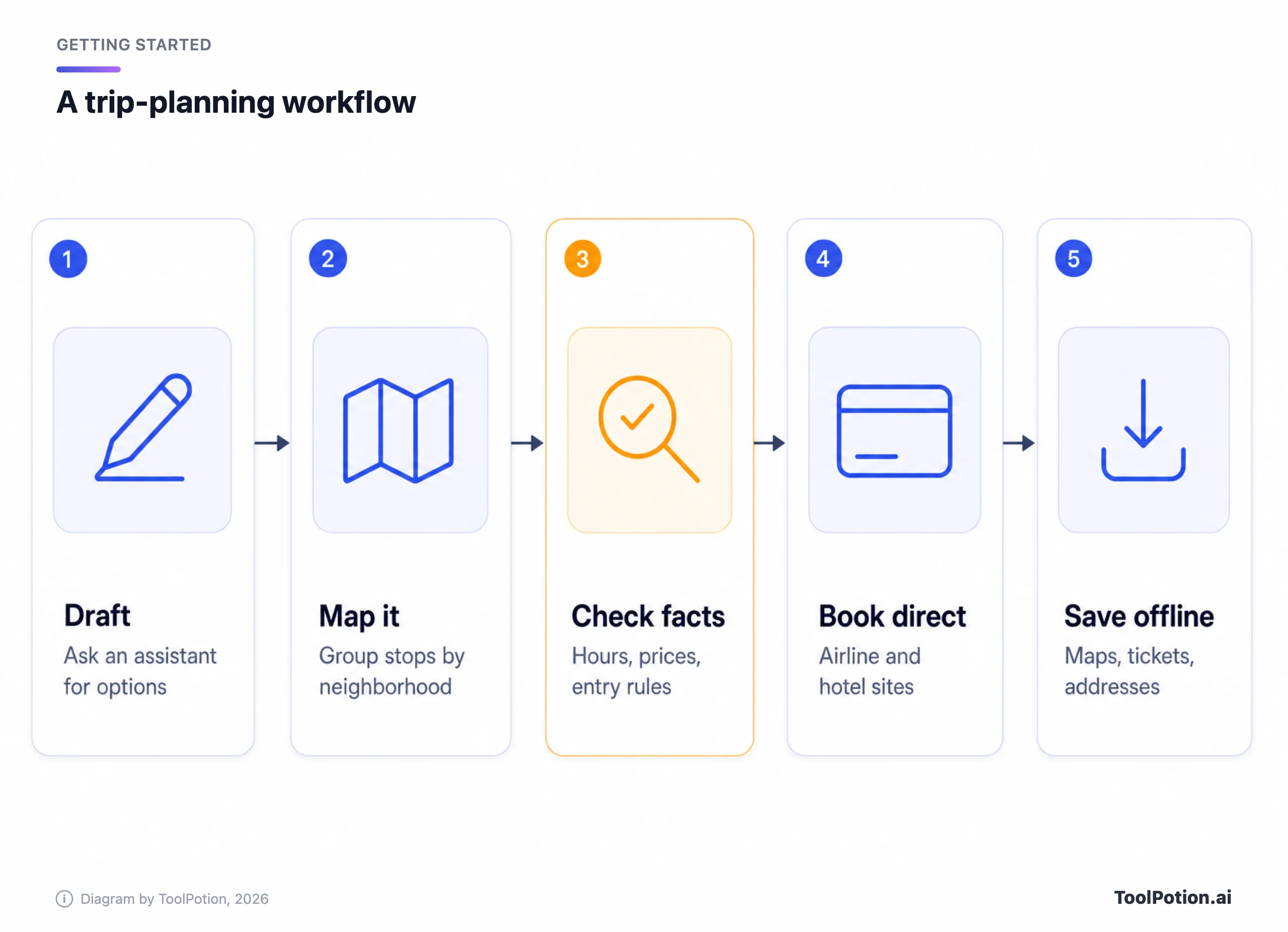
Five steps. None of them is exotic, and the order is the point.
- Brief the assistant like a travel agent. Give dates, who's going, budget, pace, walking tolerance, food limits and anything you refuse to do. Ask for two different versions of the trip, not one.
- Make it commit to places. Ask for exact names and neighborhoods for every stop, with the reason each one made the cut. Vague suggestions can't be checked.
- Put every stop on a map. Paste the names into Google Maps or a planner and watch which ones fail to pin. A place that won't pin is the first suspect.
- Check the facts that can fail. Hours on the venue's own page, entry rules on a government site, fares at the booking page.
- Book directly, then save what you need offline. Google's help page explains how to download an area in Google Maps for offline use, though it warns that some countries can't be downloaded (Google Maps Help).
Here's the kind of brief that works. "Five days in Osaka, two adults, mid-range budget, no more than 15,000 steps a day, one vegetarian. Give me two itineraries with exact place names, the neighborhood for each stop, and a one-line reason for every pick. Mark anything you're unsure is open on the days I'd go." That last sentence costs nothing and tells you where to look first. It won't catch everything, but it turns a smooth wall of text into a list of questions.
A second pass helps. Once you've verified, paste the corrected facts back into the chat and ask it to rebuild the days around them. Models are better at rearranging real constraints than at remembering them.
Group trips need one extra step. Share the draft with everyone before anyone books, because an AI plan that suits the person who wrote the prompt can ignore the person who didn't. Planners with shared itineraries are better at this than a chat window, which is one reason we'd move a final plan out of the chat and into a planner or a shared document.
Memory settings cut both ways here. An assistant that remembers your tastes saves retyping, but it also keeps trip details you may not want kept; our explainer on what AI assistants remember covers the controls. We'd turn it on for preferences and off for passport numbers, which belong in neither a chat nor a planner.
Our picks, by the trip you're taking
Our pick for most people planning one city is the assistant already tied to their map. Gemini is the natural choice if you live in Google Maps, since Google says it draws on Maps, Flights and Hotels and can reference bookings in Gmail when you switch on Personal Intelligence (Google). The trade-off is that you're handing more of your inbox and history to one company to get the personalization. If that bothers you, give it only the trip details and skip the toggle.
ChatGPT is the best generalist drafter and the one we'd use for the arguing-both-sides step. OpenAI's help page says its search tool lets ChatGPT look up current information and give cited answers (OpenAI), which helps for hours and events, but a cited answer still needs a click to confirm. Travel is clearly on OpenAI's mind: a spokesperson told TechCrunch that 1.2 billion people turn to ChatGPT each week for help with everyday tasks, trip planning among them, and that the company sees "a real opportunity to make these experiences even more useful" (TechCrunch). It has hired the founder of the travel startup Odessia, which has already shut down, but TechCrunch reports no travel product has been announced. So for now ChatGPT is a drafter, not a travel agent.
For research-heavy trips across several countries, Perplexity suits the reading phase: transit passes, border crossings, which region to pick. Its help center says each answer carries numbered citations linking to the original sources (Perplexity), and for transit rules and border crossings that's the feature you need. In 2025 it also launched in-app hotel booking through Selfbook, with Tripadvisor reviews (PhocusWire); we found no newer reporting on whether that is still offered, so don't plan around it. We'd use Perplexity to find what to read, then read it. Our Perplexity vs ChatGPT Search vs Google AI Mode comparison goes deeper, and Gemini Deep Research is the one to try for a long report on a big itinerary.
Then there are the dedicated planners. Mindtrip describes an assistant that learns your style and can help you decide on flights, stays and restaurants, with booking either on Mindtrip or handled by the assistant (Mindtrip). Layla takes a different bet: it says AI plans the trip, a real travel advisor checks and books it, and planning is free with nothing added on top when the advisors book (Layla). If you want someone accountable on the other end, that's the more honest model.
Wanderlog is the one we'd pick for logistics once the plan exists. Its site describes the itinerary and the map in one view, and says you can forward booking emails to have them added to a trip (Wanderlog). The catch is on its pricing page: a free tier, then a single paid plan, Pro Annual, starting at $39.99 a year, with offline access and unlimited AI assistance on the paid side and no monthly option listed. Offline access is the feature you'd want on a trip, so price it before you commit.
One small tool earns a mention. Google Maps Route Optimizer reorders multi-stop days by time, which fixes the most common itinerary flaw (stops in a bad order) without asking a model anything.
Book it yourself
A booking is the one step we'd keep human for now, and airlines are starting to say so. United said it is restricting personal third-party AI agents and assistants, saying that sharing account credentials with them "can expose sensitive information" (CBS News). Agents can still show United flights; they can't complete the purchase, and The Verge, citing the Wall Street Journal, quotes CEO Scott Kirby at an event: "To be honest, I don't want to create another middleman" (The Verge).
Other carriers are going the other way. Southwest, per CBS, now lets ChatGPT users see its flights, and United fares stay bookable through Kayak, Hopper and Google Flights. Whatever happens next, one rule survives: you don't need an AI to hold your card. Use it to pick the flight, then open the airline's page and pay there.
Verifying without losing the time you saved
Full verification can eat the hours the draft saved, so spend it where it counts. Check anything with a date, a price or a rule. Skim the rest. A few sensible habits:
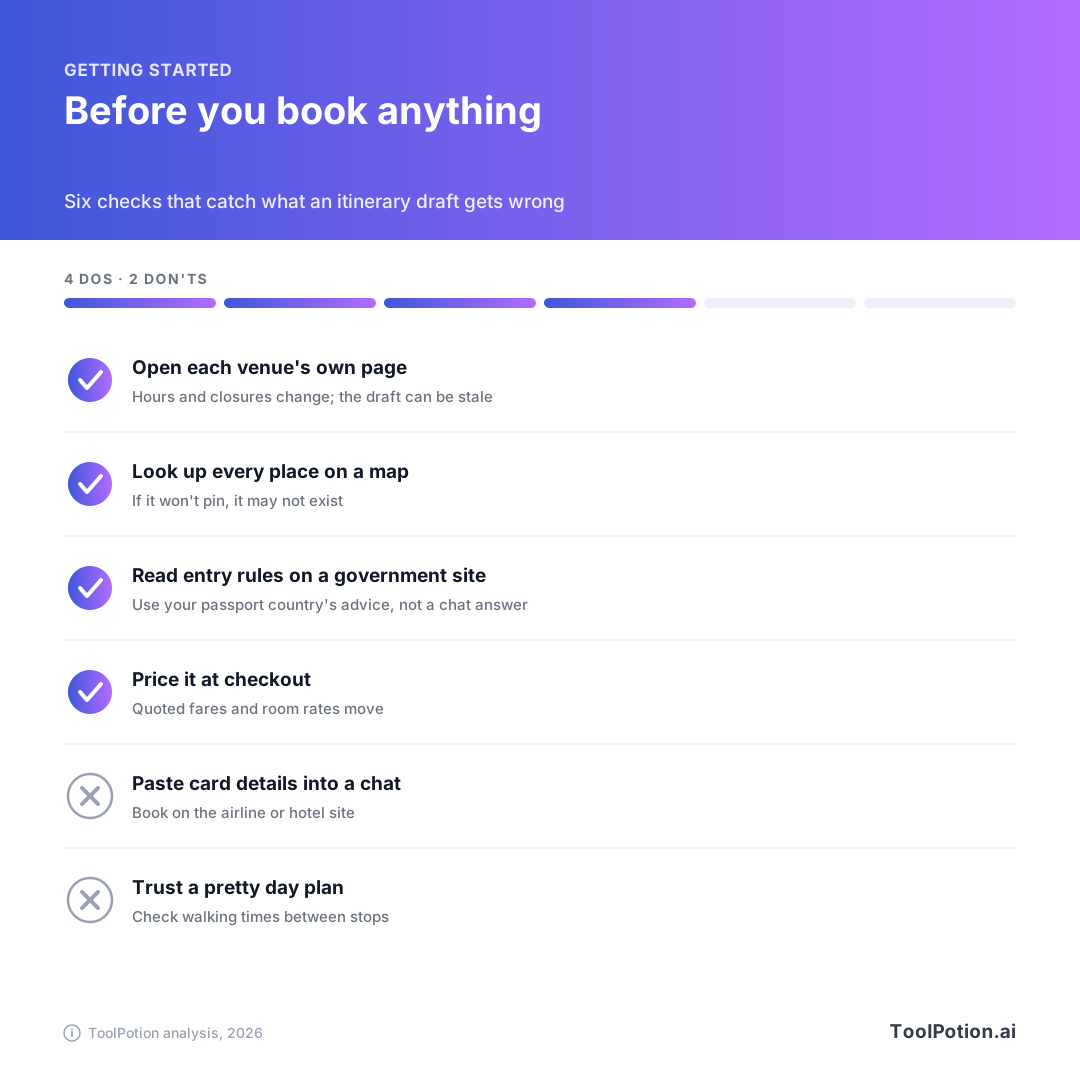
If a place won't pin on a map, ask the assistant for the address and the official website; if it can't give either, drop it. Ask it to flag which claims it's least sure of. It won't always know, but the answer shows where it's guessing. And keep the chat open on the trip, so you can paste in a closed door and ask for a replacement nearby.
The cheapest check of all is a second source. Ask a different assistant the same question and compare. When two models disagree about an opening time, you've found the line to verify.
Frequently asked questions
Can AI book my whole trip?
Not reliably, and not everywhere. United says it's blocking unauthorized third-party AI agents from its booking systems, though others are experimenting. Dedicated planners such as Mindtrip and Layla offer booking inside their own apps. We'd still pay on the supplier's own site.
Is a free assistant enough for planning?
For a draft, yes. The drafting, comparing and packing jobs don't need a paid plan. Pay only if you hit a limit you can name.
How do I stop AI from inventing places?
Ask for exact names and neighborhoods, then pin each one on a map. Anything that won't pin gets cut. It takes ten minutes for a week-long trip.
Can I trust AI for visa and entry rules?
No. Use it to explain a government page in plain language if you like, but the page is the source. Rules differ by passport, and the cost of an error is a refused boarding.
Which is best for a first trip abroad?
We'd start with Gemini or ChatGPT for the draft, Google Maps for the pins, and Layla if you'd rather have a person do the booking. Keep your passport details out of every chat.