MCP, short for Model Context Protocol, is an open standard that lets an AI assistant work inside your other apps: search your Notion pages, file a ticket in Linear, check your calendar or update a customer record. When Claude offers “connectors”, ChatGPT lists “plugins” or a Microsoft Copilot agent calls an outside tool, an MCP server is usually doing the work underneath.
It matters more in 2026 than it did a year ago. Anthropic created MCP, but it now belongs to a Linux Foundation group co-founded with OpenAI and Block. Its maintainers report close to half a billion downloads a month of the software development kits (SDKs) developers build with (MCP blog), and this year's spec release reworked the protocol for large companies.
The catch is that an AI with access to your apps can be tricked or over-trusted, and real incidents are already on record. Below you'll find what MCP is, what people use it for, where it goes wrong, and a safe way to connect your first server, with a checklist to run before you click Connect.
MCP is a shared menu format, not a product
Before MCP, every pairing of AI app and business tool needed its own custom integration. Anthropic described the problem plainly when it released the standard in 2024: “Every new data source requires its own custom implementation, making truly connected systems difficult to scale” (Anthropic). Its launch kit included ready-made servers for Google Drive, Slack, GitHub and Postgres, and the spec was published openly so any company could build on it.
The project's own site describes MCP as “a USB-C port for AI applications” (modelcontextprotocol.io). That's fair about the plug, but it skips the part you care about, which is what gets said through it. A restaurant is a better picture. Each app you connect runs a kitchen, and its MCP server hands over a menu: a list of what it can do (“search pages”, “create task”), each item described in plain language. MCP is the agreed menu format. Your AI app is the waiter. It can read any kitchen's menu, work out what fits your request, and check with you before ordering anything that changes your data.
Keep that picture in mind for the risks section. Menus are written by the kitchen, and the waiter reads every word, including fine print you never see.
A shared format is what changes the math. Picture five AI apps and 20 services. With custom integrations, that's up to 100 separate builds, each one maintained by somebody. With MCP, each AI app learns the format once and each service publishes one server, so the count drops to 25.
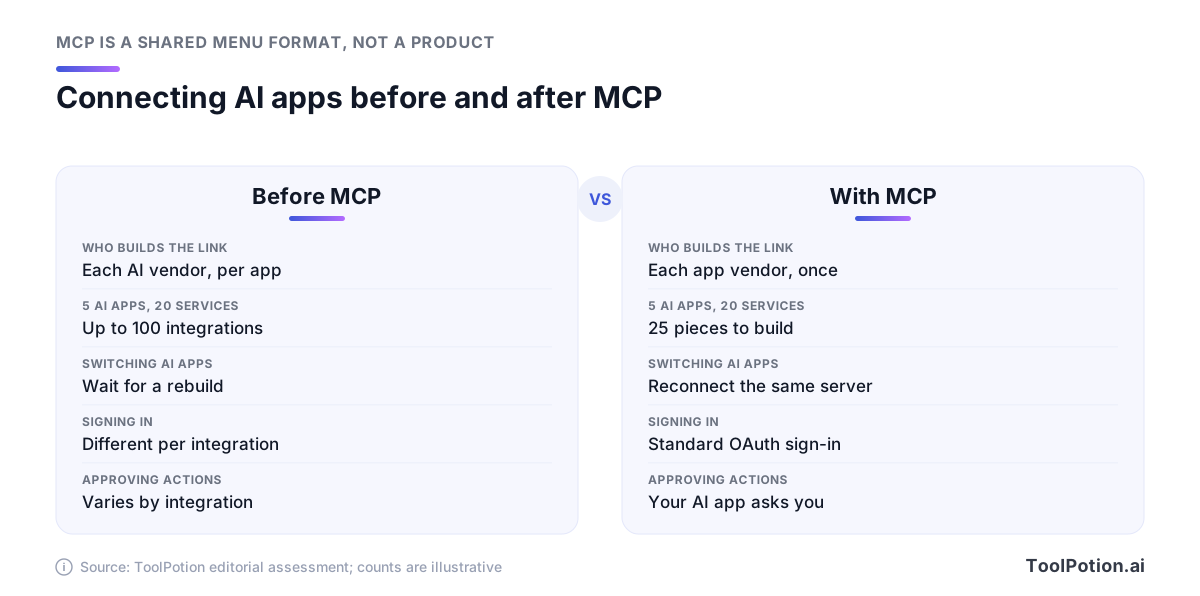
For you, the upshot is portability. Notion's hosted server, for example, documents setup for Claude Code, OpenAI's Codex and Cursor from the same address. If your team switches AI apps next year, its connections can come along.
How it works: hosts, clients and servers
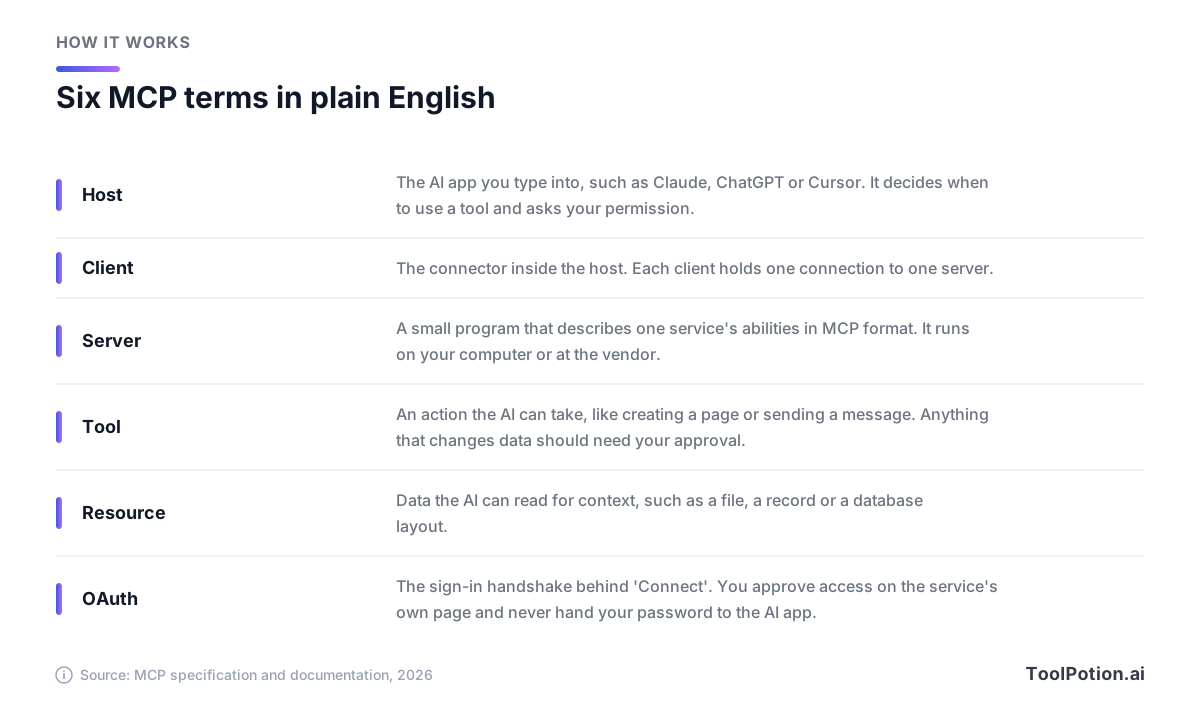
Three roles do all the work, and the MCP documentation names them precisely. The host is the AI app you type into. The server is a small program that describes one service's abilities in MCP format. The client lives inside the host and holds a connection, and the host creates one client for each server it connects to.
So when Claude is connected to your notes, your calendar and your CRM, it's running three clients, each talking to one server. You never see them. You see a list of connectors with a toggle next to each.
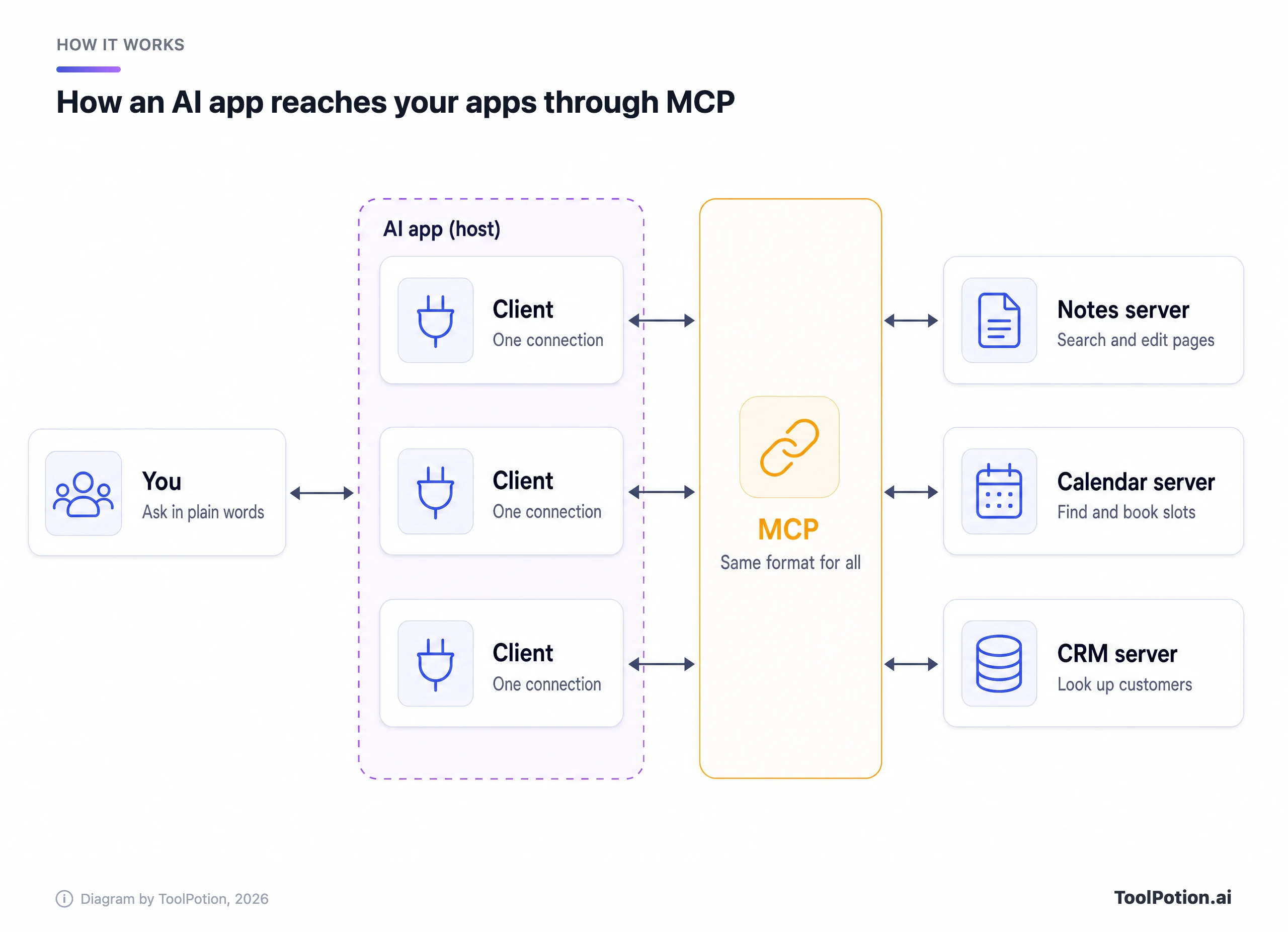
Read the diagram left to right. You ask in plain words, the host decides whether a connected server can help, and the request travels through the matching client to that server. The amber strip is the point of the whole design: every connection speaks the same format, so the host doesn't care which company built the server.
Servers come in two kinds. A local server runs on your own computer, which is common in coding tools and means installing something. A remote server runs on the vendor's infrastructure and you reach it over the internet. Remote servers are the ones most non-developers will use, and you connect them through OAuth, the same “Sign in with” handshake you've clicked through for years. You approve access on the service's own page, and the AI app never sees your password.
Each server can offer three kinds of things. Tools are actions, like creating a page or sending a message. Resources are data the AI can read for context, such as a file or a database record. Prompts are ready-made templates for common tasks. Most of what you'll notice in practice is tools, and most of the risk lives there too.
One rule in the specification shapes everything that follows. Hosts “must obtain explicit user consent before invoking any tool”, and tool descriptions should be treated as untrusted unless they come from a trusted server. The spec also admits that MCP “cannot enforce these security principles at the protocol level.” Whether you get a sensible approval prompt depends entirely on the app you use.
What people do with MCP in 2026
The big assistants all build it in now, each under its own name. What differs is where servers show up, whether you can add unlisted ones, and what happens before the AI acts.
In Claude, MCP servers appear as connectors in one directory under Customize > Connectors, shared across the web app, desktop, mobile, Claude Code and Cowork. Anthropic's own examples include creating issues in Linear, sending Slack messages and searching Google Drive, and some connectors are interactive, drawing dashboards or task boards straight into the chat. Each listing carries a label. Verified means Anthropic has tested the tools, while Community means it screened the listing but hasn't reviewed it in depth (Claude docs).
OpenAI's developer docs now call ChatGPT's integrations plugins: packages that can bundle an MCP server with reusable instructions called skills, listed in one directory shared by ChatGPT and Codex. For servers outside that directory, ChatGPT has a developer mode on Plus, Pro, Business, Enterprise and Education accounts on the web. OpenAI's description is blunt: it's “powerful but dangerous” and meant for people who understand the risks (OpenAI). Write actions need your confirmation by default, and this year ChatGPT added a choice of when connected apps ask permission: always, before making changes, or only before important ones.
Microsoft supports MCP in Microsoft Copilot Studio, its tool for building custom agents, which can use a server's tools and resources. Read its fine print, though. When you connect an outside MCP server, Microsoft says you're responsible for the tools and resources you access. Microsoft 365 Copilot also runs MCP-based agents, and Microsoft has pointed to Monday.com, Canva and Sitecore as early builders.
Coding tools got there first. Cursor installs servers from its marketplace with one click and asks before running an MCP tool by default. Visual Studio Code and Claude Code support MCP too, and connectors you add in claude.ai carry over to Claude Code when you sign in with the same account.
Automation platforms use MCP in both directions. Zapier exposes more than 9,000 apps and 66,000 triggers and actions to any MCP-capable assistant, and each tool call uses two tasks from your plan's quota (Zapier). n8n can act as a server, turning your workflows into tools an assistant can call, or as a client that lets n8n's own agents call outside servers. If you're unsure which side of that line you need, our explainer on AI agents vs automation tools sorts it out.
| App | Where MCP shows up | Servers not in the directory | Default guardrail |
|---|---|---|---|
| Claude | Connectors directory | Custom connector by URL (one on Free) | Allow once or Always allow prompt |
| ChatGPT | Plugin directory | Developer mode, paid plans, web only | Confirms write actions |
| Copilot Studio | Agent tools | MCP onboarding wizard | You're responsible for the tools |
| Cursor | Marketplace | Edit the mcp.json file | Asks before running a tool |
| Zapier MCP | A server any assistant can use | Not applicable | You choose the allowed actions |
Who runs MCP now
A standard owned by one AI lab is a hard sell to its rivals, and MCP got past that fast. In 2025 OpenAI added it to its Agents SDK, with Sam Altman posting that “People love MCP”. A few weeks later Google DeepMind's Demis Hassabis said Google Gemini models would support it, calling it “rapidly becoming an open standard for the AI agentic era”. TechCrunch reported both.
Then Anthropic gave it away. Last year it donated MCP to the Agentic AI Foundation (AAIF), a fund run under the Linux Foundation, co-founded with Block and OpenAI and backed by Google, Microsoft, AWS, Cloudflare and Bloomberg (Anthropic). Block contributed its goose agent and OpenAI its AGENTS.md format as sibling projects.
Day-to-day control didn't move. The maintainers wrote that the people making decisions about the protocol are still the ones who had been stewarding it, and that the foundation won't dictate technical direction. What the foundation adds is neutral ownership, and companies have joined quickly: its latest announcement puts membership at 247 organizations, with Visa and Wells Fargo among the newest Gold members. It also runs the AGNTCon + MCPCon conferences.
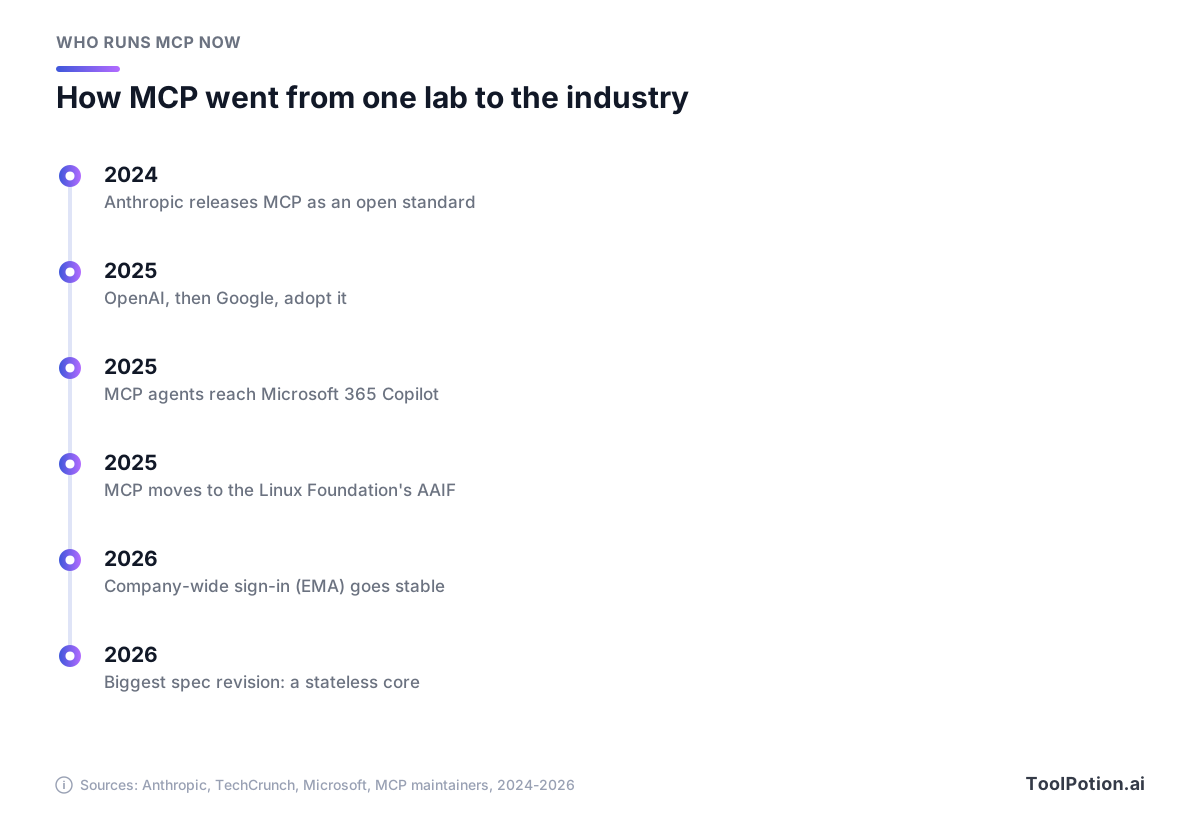
Going from one lab's project to a foundation-run standard in about a year is fast for any protocol. One piece still lags. The official MCP Registry, a public catalog of servers backed by Anthropic, GitHub, PulseMCP and Microsoft, is labelled a preview. It checks that a publisher owns the name it publishes under, but it leaves security scanning to package hosts and to the marketplaces built on top (MCP Registry). A listing tells you who published a server. It doesn't tell you the server is safe.
What changed this year
Scale first. When Anthropic handed MCP over last year, it counted more than 10,000 active public servers and 97 million monthly downloads of the Python and TypeScript SDKs. With this year's spec release, the maintainers put downloads across their main SDKs at “close to half-a-billion” a month, with the TypeScript and Python kits each past a billion downloads in total. The two figures count slightly different sets of kits, so read the jump as direction rather than precision.
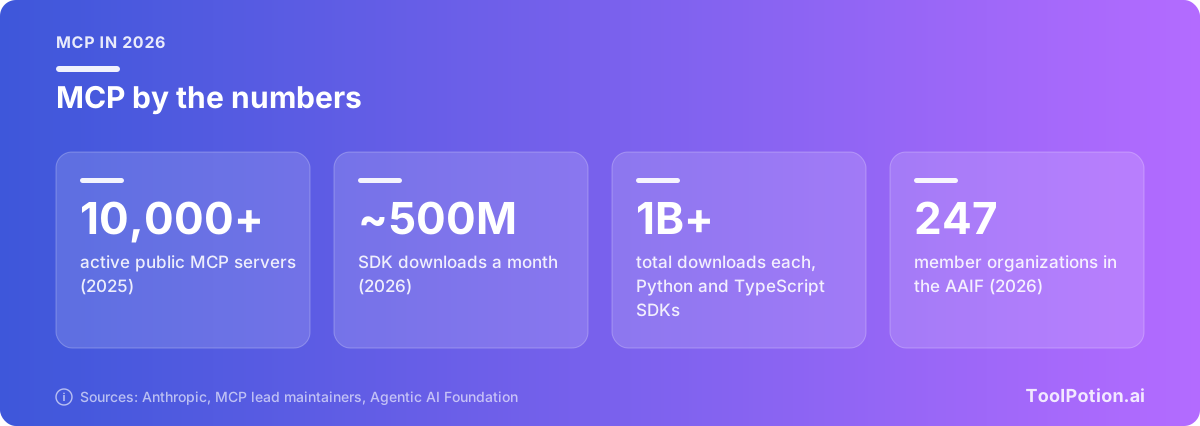
Downloads measure developer activity, not how many people use connectors. Independent directories post server totals for this year, but they count in ways that don't match, so we've left them out.
The spec itself changed a lot. The maintainers called this year's version “the largest revision of the protocol since launch”, and it includes breaking changes for developers (MCP blog). Most of it is invisible to you. Servers no longer have to hold a running session with each app, which makes them easier to run at scale. The release also formalized extensions, optional add-ons that include two you may notice: MCP Apps, which lets a server draw interactive screens such as forms and charts inside the chat, and Enterprise-Managed Authorization.
That second one fixes the most tedious part of using MCP at work, which is signing in to every server separately. A company approves servers through its identity provider, and employees find them connected when they log in. It reached stable status this year with Okta on the identity side, Claude and VS Code as clients, and servers from Asana, Atlassian, Canva, Figma, Granola, Linear and Supabase, with Slack adding support (MCP blog). Linear's head of engineering called logging in once and having every connector set up “pretty magical”.
Where MCP connections go wrong
Back to the restaurant. The waiter now holds keys to the pantry, takes orders from menus written by strangers, and reads every note pinned to them. Most of the risks in this map have already happened outside a lab.
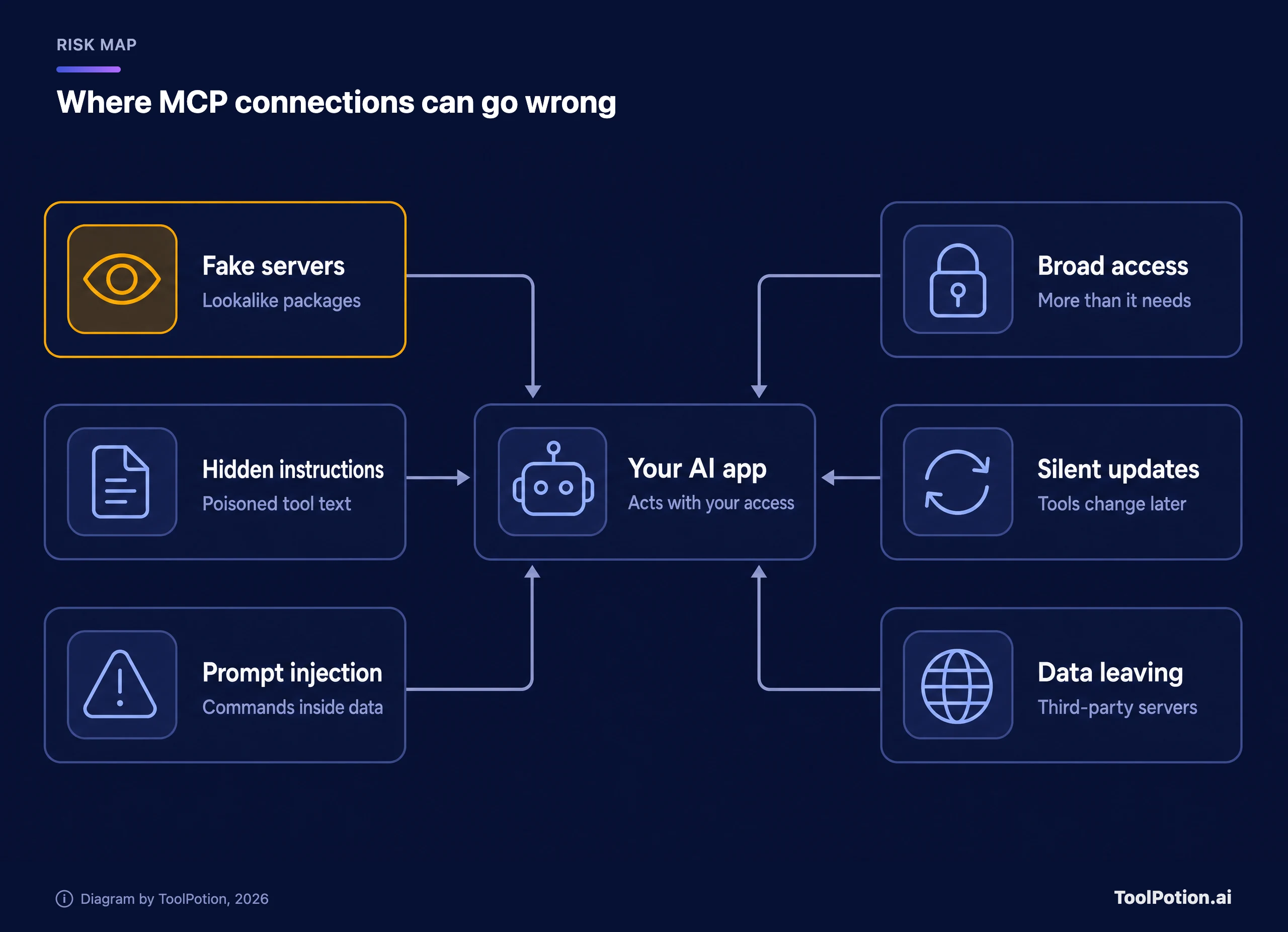
The highlighted one, fake servers, is the risk with a documented victim count. In 2025 the security firm Koi found an npm package called postmark-mcp posing as a server for the Postmark email service. From version 1.0.16 it copied every email it sent to an outside address, and it had been downloaded 1,643 times when it was caught (The Hacker News). Postmark didn't make it.
Hidden instructions are subtler. Researchers at Invariant Labs showed that a tool's description, which the AI reads in full and you usually don't, can carry orders such as reading private files and slipping their contents into a request (Invariant Labs). They named it tool poisoning. The same research describes a quieter variant: a server can change its tool descriptions after you've approved it.
Prompt injection doesn't need a malicious server at all. Invariant also showed an agent connected to GitHub's legitimate server reading a booby-trapped issue in a public repository, then leaking data from the user's private repositories into a public pull request. Any server that reads text written by outsiders, like email, web pages or support tickets, can smuggle instructions in that text.
Broad access turns small mistakes into big ones. Notion's documentation says that once you authorize its server, the client “can read and update content that you can access” in that workspace. That's normal, and it's why approvals matter. Careless setups make it worse: in 2025 Trend Micro found 492 MCP servers reachable on the open internet with no authentication or encryption, and more than 90% of the 1,402 tools they exposed gave direct read access to the data source behind them.
Companies tend to underrate data leaving their systems. A remote server is someone else's software, and Anthropic's guidance says it “doesn't run a third-party connector's servers and doesn't control how it handles your data” (Claude docs). Vendors' own servers fail too. In 2025 Asana took its MCP server offline for almost two weeks after a bug that could have exposed some customers' information to other organizations' users, then reset every connection (The Register).
The sensible response is supervision, and avoidance is overkill for most teams. Treat a connector like a new hire who has your login: useful from day one, checked until trusted. The US National Security Agency made a similar point in guidance on MCP it published this year, warning that “misaligned assumptions or subtle inconsistencies at any stage can propagate and compound into exploitable conditions.”
Connect your first MCP server safely
Claude documents the whole flow step by step, so we'll use it as the worked example (Claude docs). ChatGPT's version follows after the list.
- Pick a service you already use and trust, ideally one that runs its own hosted MCP server, such as Notion or Linear.
- Open Customize > Connectors in claude.ai or the desktop app, select Discover and search for the service.
- Check the label. Prefer a Verified listing, and for a Community one make sure the developer is the service itself.
- Select Connect to Claude. You land on the service's own sign-in page, so read the access it asks for before you approve.
- Back on the Connectors page, open the connector and set its Tool permissions. Reads can be Always allow, anything that writes should be Needs approval, and delete tools can be Blocked.
- In a chat, open the + menu, choose Connectors and switch it on for that conversation.
- Ask for something read-only first, such as a summary of the open issues assigned to you, and approve with Allow once until you've seen how it behaves.
- If you change your mind, Disconnect signs Claude out of the service and Remove takes the connector off your account, both from the same page.
Every request runs through the same five steps, and step three is the one you control.
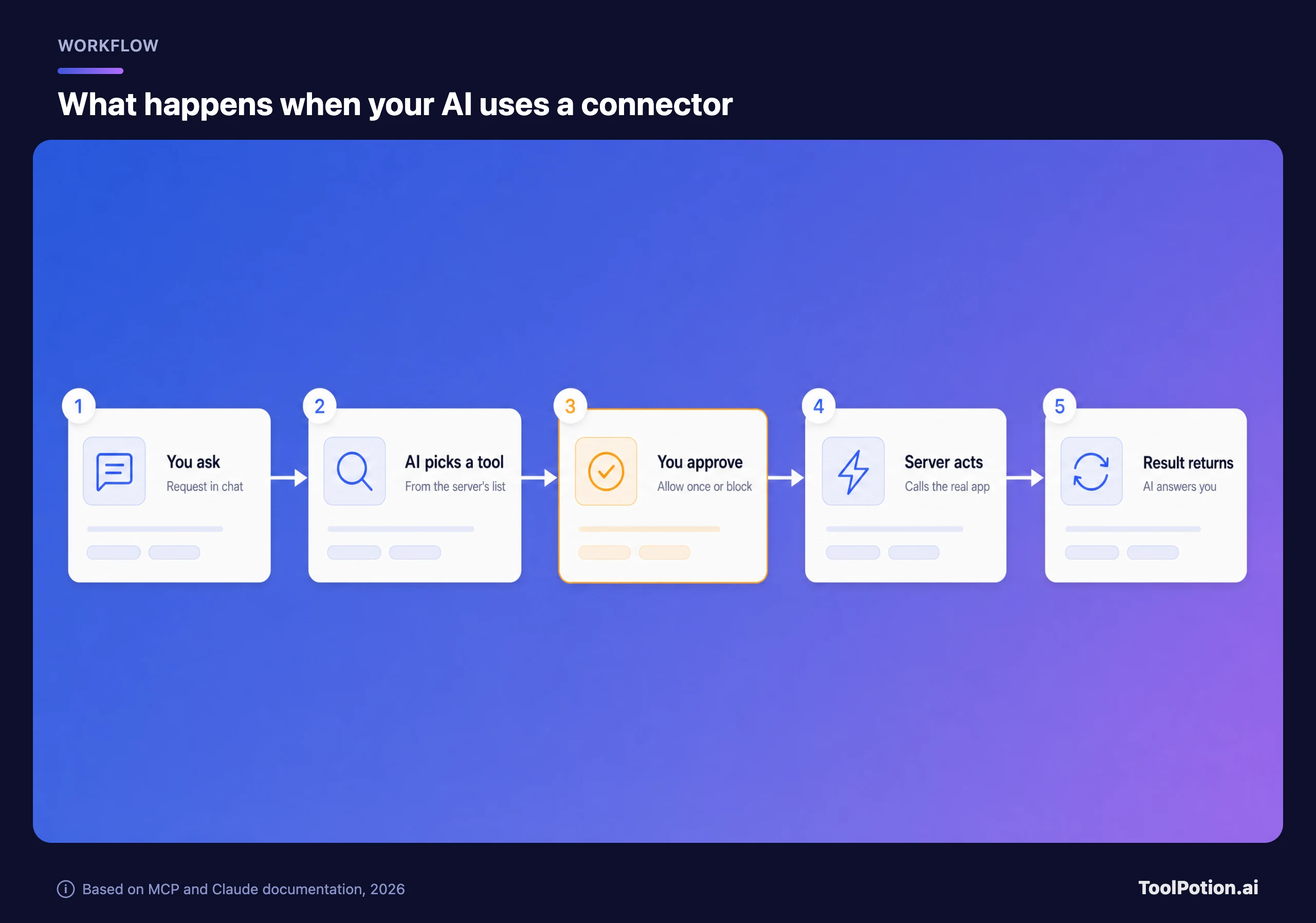
Always allow is a reasonable time-saver for search and read tools. For anything that sends, edits or deletes, keep the prompt. The approval is your only chance to catch a wrong action before it lands in the real app.
Two limits are worth knowing before you try a custom connector, Claude's term for any server you add by its web address. Free accounts get one. And the server must be reachable from Anthropic's cloud over the public internet, so a server inside your company network or behind a VPN won't connect. In ChatGPT the equivalent lives behind developer mode (Settings, then Security and login), and you create the app under Plugins. OpenAI treats any tool that isn't marked read-only as a write action that needs confirmation, which is the safer default.
Not sure which route fits the app you have in mind? The tree below asks up to three questions.
The work-account branch is the one people skip. If your company manages your AI subscription, adding your own servers can send company data somewhere nobody approved. Claude's Team plan already has a Request button on directory connectors for exactly this case.
Vet a server before you connect it
Directory labels help, but Anthropic states that verification “isn't a security audit”, and the developer can change a connector's tools after review. So run your own quick check. The ten items below draw on the MCP project's security guidance and the advice Anthropic and OpenAI give their users. Tick what's true for the server you're considering.
The weighting is deliberate. Who built the server is worth three points because it removes the fake-server risk outright, and postmark-mcp would have failed that check at once. Hosted servers with a sign-in page beat ones that ask you to paste an API key (a long-lived password for software) into a settings file, because OAuth access can be limited and revoked at the source. The item about not mixing servers matters more than it looks. Invariant's GitHub demonstration worked because one connection read outside content while the same agent could reach private data.
Local servers, the kind you install, deserve extra care. The MCP security guidance tells apps to show “the exact command that will be executed, without truncation” before running it. If an install flow hides the command, or the package comes from an account you can't tie to the vendor, don't install it. Developers can browse popular open-source servers such as MCP for Blender on our Top 200 AI GitHub Repos board, but popularity isn't proof of safety either.
Rolling MCP out to a team
Team leads get better controls than individuals, and it pays to switch them on before people start connecting things on their own. In Claude Team and Enterprise, an Owner adds each connector for the organization and members then sign in with their own accounts. Owners can set read and write actions to Always allow, Needs approval or Blocked for everyone. On the ChatGPT side, Business and Enterprise admins set workspace and per-app defaults for when connected apps ask permission.
If your company runs Okta, ask whether the servers you want support Enterprise-Managed Authorization. IT approves a server once, and employees get one sign-in instead of a consent screen per tool. InfoQ's coverage adds a fair caveat: the identity provider decides who can connect, not what an agent does once connected, so per-action approvals still matter.
For automation, a middle layer gives you one place to audit. Zapier keeps app credentials in its own connection layer, lets you choose which apps and actions an assistant can use, and logs every MCP action in its History. If you're comparing platforms, start with the workflow automation board. Our piece on AI agents in production covers what breaks once real users arrive.
A sensible order for most small teams: start with read-only tools, turn on write actions one service at a time with approvals kept on, and keep a short written list of approved servers. Teams that handle health, financial or legal records should hold off on third-party servers until they know where data goes and how long it's kept. Our privacy framework for AI tools lists the questions to ask a vendor.
Frequently asked questions
Is MCP only for Claude?
No. Anthropic created it, but ChatGPT, Microsoft Copilot, Gemini, Cursor and Visual Studio Code all support it, and the protocol now sits with the Agentic AI Foundation rather than with Anthropic.
Do I need to know how to code to use MCP?
Not for directory connectors, which take a few clicks and a sign-in, and adding a hosted server by its address is code-free too. Building your own server or installing a local one is developer work.
Is MCP free?
The protocol and its SDKs are open source. The costs sit in the apps around it: Claude's free plan allows one custom connector, ChatGPT's developer mode needs a paid plan, and Zapier counts two tasks per MCP tool call.
How is MCP different from an API?
An API is one service's own interface, and every AI app would have to learn each one separately. An MCP server usually wraps that API in a standard format with plain-language descriptions, so any MCP-capable assistant can discover what the service does and call it without custom code.
Can an MCP server see my whole conversation?
By design, no. A server receives the requests the AI sends to its tools, and the spec says hosts must get your consent before exposing your data to a server. Anything the AI puts into those requests does reach the server's operator, though, so only connect servers you'd trust with that data.