Your AI assistant probably remembers more than its Memory page shows. ChatGPT, Claude, Google Gemini and Microsoft Copilot each draw on a mix of saved facts, past chats, project files, rules you wrote and, more and more, your email and photos. Deleting a chat often leaves what it learned behind.
That got harder to ignore in 2026. OpenAI switched ChatGPT to memories that update themselves and added a memory summary you can edit (OpenAI release notes). Anthropic rebuilt Claude's memory as a list of topics you can read and change, switched on by default for Free, Pro and Max accounts (Anthropic). Google moved Gemini's memory settings under Personal Intelligence, which can read Gmail, Photos and YouTube history once you connect them. Microsoft shipped a new Copilot app with its own memory settings.
Good memory saves you from re-explaining yourself. Stale memory quietly skews answers, and any memory is a privacy and security surface that most people never look at. Here's how it works, starting with ChatGPT and then Claude, Gemini and Copilot: what each keeps, where the switches are, and a plain rule for what deserves to be remembered at all.
Five kinds of memory, and only some carry the label
Vendors use the word loosely. Underneath, there are five separate channels, and each has its own switch, its own delete button and its own blind spot.
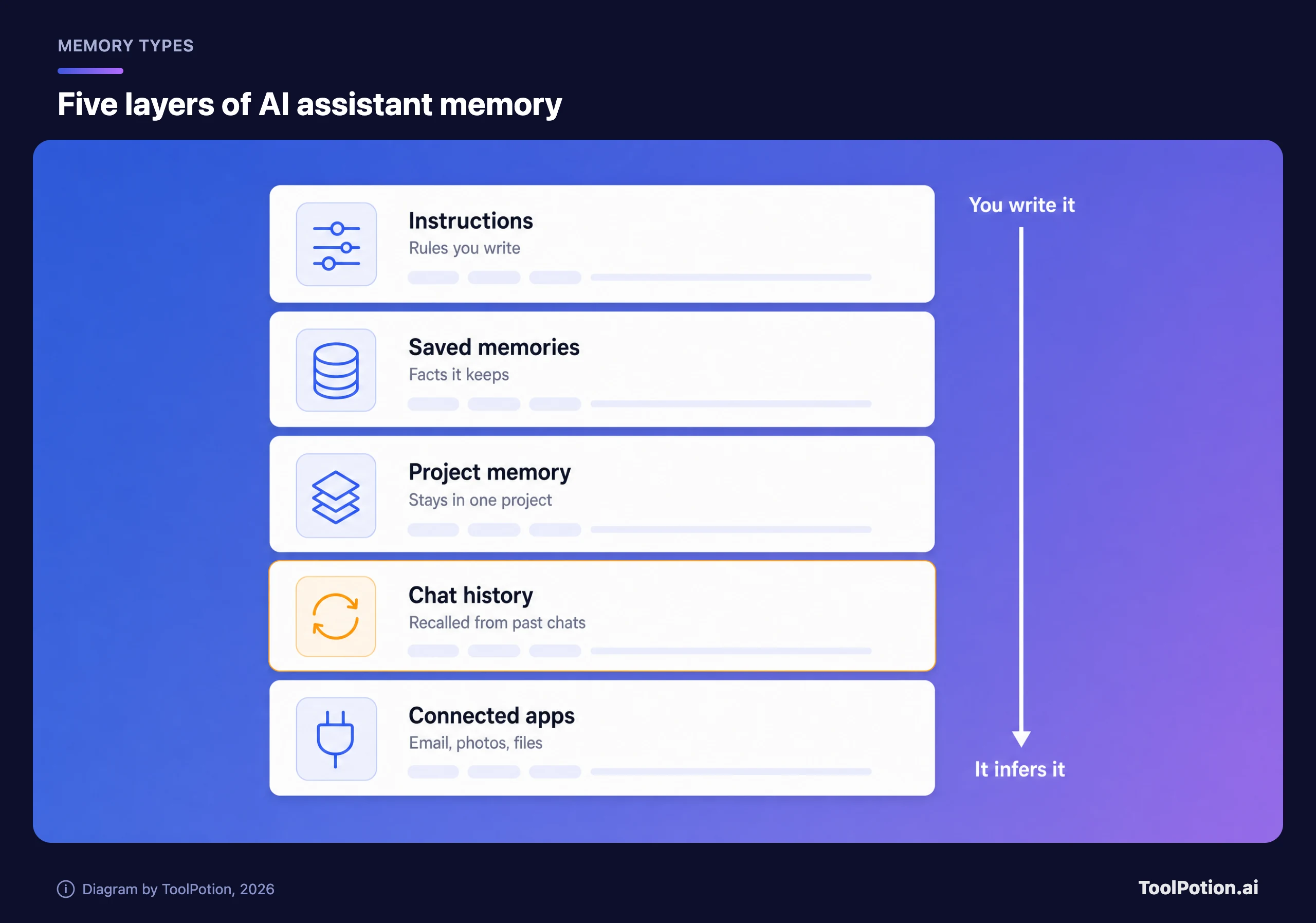
The top layers are the ones you control directly. The bottom two fill in without you lifting a finger, which is why they cause most of the surprises.
Instructions are the rules you write yourself: tone, format, your job, what to avoid. ChatGPT calls them custom instructions, and Claude and Gemini both use the name Instructions. They apply to every chat until you change them, so a line written for an old job keeps shaping answers for a new one.
Saved memories are individual facts the assistant keeps, either because you said "remember this" or because it judged a detail useful. OpenAI defines them as details "you explicitly ask ChatGPT to remember or that ChatGPT saves as useful context" (OpenAI). This is the part you can usually see as a list.
Chat history is the quiet one. With Reference chat history on, ChatGPT pulls relevant details from earlier conversations, and OpenAI says there's no separate storage limit for what it can reference this way. Gemini builds its memory from the chats in your Gemini Apps Activity. Claude can search your past chats on paid plans, and each search appears in the conversation as a tool call (Anthropic).
Project memory is memory with a fence around it. ChatGPT projects can run on project-only memory, and Claude gives every project its own memory space and summary.
Connected apps are the newest layer and the widest. ChatGPT can draw on files in your Library and a connected Gmail account on some plans. Gemini goes furthest, with Gmail, Calendar, Drive, Google Photos, YouTube history, Search activity and, in the US, Google Wallet all available to Personal Intelligence.
How a remembered detail ends up in an answer
None of this retrains the model on you in real time. When you send a message, the assistant decides whether personal context would help, fetches the relevant pieces and puts them next to your message in the context the model reads. OpenAI's help page says ChatGPT doesn't search your history for every response, only when context is likely to improve it (OpenAI).
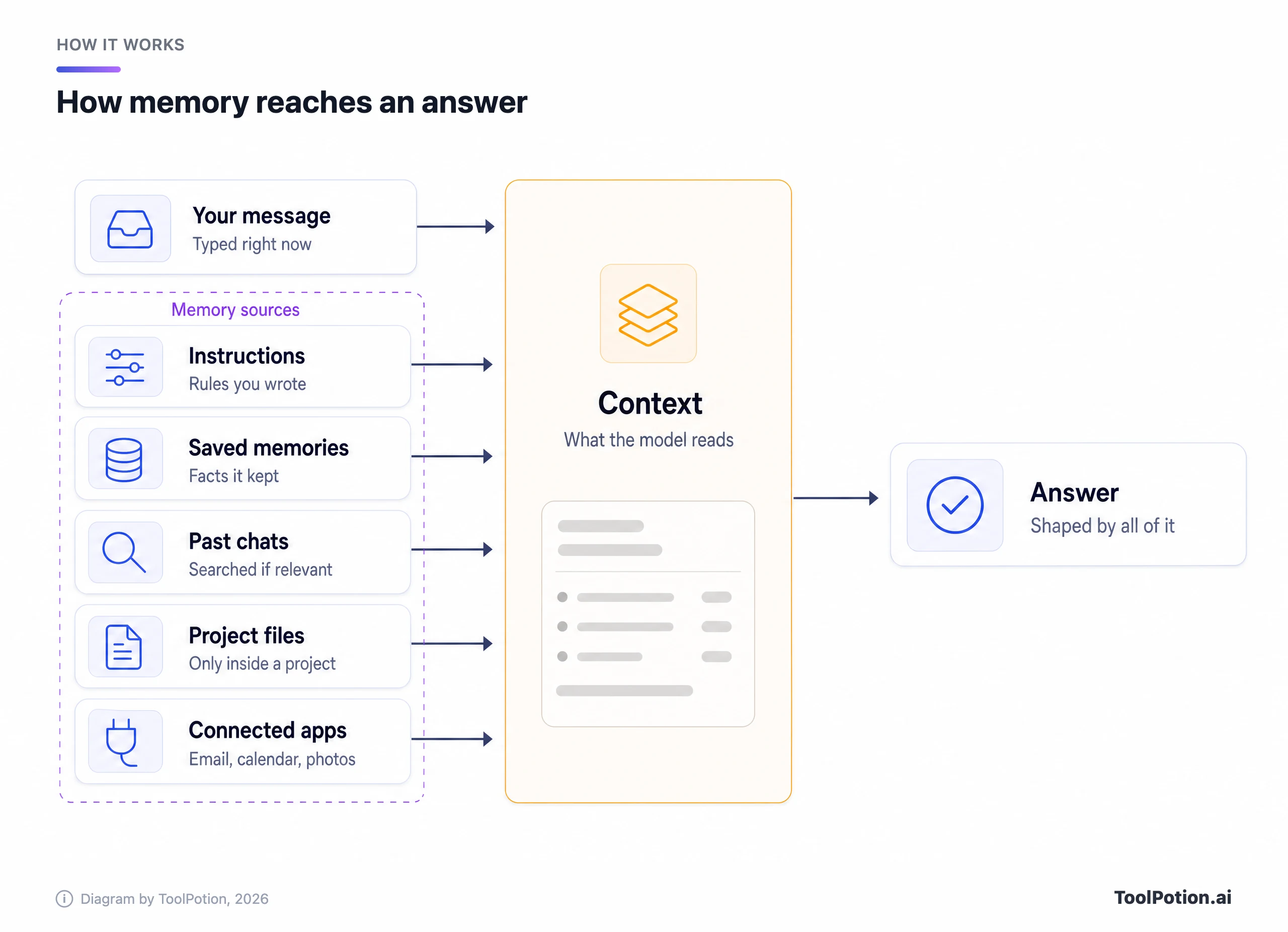
That retrieval step explains most memory surprises. A detail from a chat about your sister's wedding can resurface in a gift idea weeks later, because the assistant judged it relevant. A job you left last year keeps steering career advice, because nothing told the assistant it changed.
OpenAI's fix for the second problem arrived this year: memory that updates automatically, which it says reduces "stale or contradictory saved memories". It reached Plus and Pro users in the US first, with twice the memory capacity, and OpenAI said Free and Go plans would follow (OpenAI release notes).
You can watch some of this happen. ChatGPT can show Sources under a personalized answer, listing the memory, past chat, instruction or file that fed it, though OpenAI warns the list may not show every factor. Claude links the past chats it searched. For Gemini, Google's own advice is to ask: "Did you use any info from past chats?" (Google). Memory can also shape web searches. OpenAI's example is a restaurant search narrowed by your location or diet.
What ChatGPT, Claude, Gemini and Copilot remember now
The four big assistants have converged on the same ideas with very different defaults.
ChatGPT
ChatGPT has the most layers. Settings > Personalization > Memory holds the controls, which can include Reference saved memories, Reference chat history and a memory summary you correct by typing into it or highlighting a line (OpenAI). Prefer the old explicit list? Where the option exists, you can switch back to it under Saved memories.
Projects can use default memory or project-only memory. Project-only keeps your saved memories out of project chats and keeps project chats out of everything else, and shared projects are always project-only (OpenAI).
Claude
Claude writes memory as individual topics while you chat, instead of summarizing afterwards (Anthropic). It's tuned for work: your role, the people and places in your work and life, how you like to communicate, technical preferences and ongoing projects. Health, race, ethnicity, religion, politics and gender identity stay out unless you switch on Include sensitive topics in memory. Some things are never saved even when you ask, including government ID numbers, criminal history, financial account numbers and immigration status.
Two controls are worth knowing. You can turn memory off for a single chat from the + menu before the first message, and that chat stays in your history. And memory now carries across chat and Cowork in the cloud, so a task Claude runs for you already knows what you told it in conversation.
Gemini
Gemini's memory sits under Settings & help > Personal Intelligence on the web, next to Instructions for Gemini and Connected Apps. It needs Keep Activity switched on, which is the default for adults, plus a personal Google account and an age of 18 or over. Work, school and supervised accounts don't get it (Google).
Connecting Gmail, Photos and the rest is opt-in, and Google began opening Personal Intelligence to all US users earlier this year (TechCrunch). It isn't offered in the EEA, Switzerland, the UK or Nigeria. Once you connect, it's on by default in every new chat. You can switch it off for one chat from the Tools menu, but Google notes that chat is still saved to your activity and can personalize later chats (Google).
Copilot
Microsoft runs two versions. The new Copilot app for personal Microsoft accounts, released this year, puts a Saved memories toggle under Settings > Personalization, with a Manage link and a Delete all memories button (Microsoft). On work accounts, Microsoft 365 Copilot Chat combines saved memories, inferences from chat history, custom instructions and "work insights" drawn from your emails, Teams chats and meeting transcripts, according to Microsoft's support pages. Ask it "What do you know about me" for a summary.
One quirk catches people out. Switching saved memories off in Copilot doesn't delete the ones already stored. You have to delete them as well.
Outside the big four, Perplexity keeps Memories and search history as separate toggles under Settings → Memory, and its incognito mode never uses or creates memories (Perplexity). Grok has a ghost-icon Private Chat that keeps conversations out of your history. If you're comparing assistants on more than memory, our AI chatbots board ranks the field and our ChatGPT alternatives guide covers when to switch.
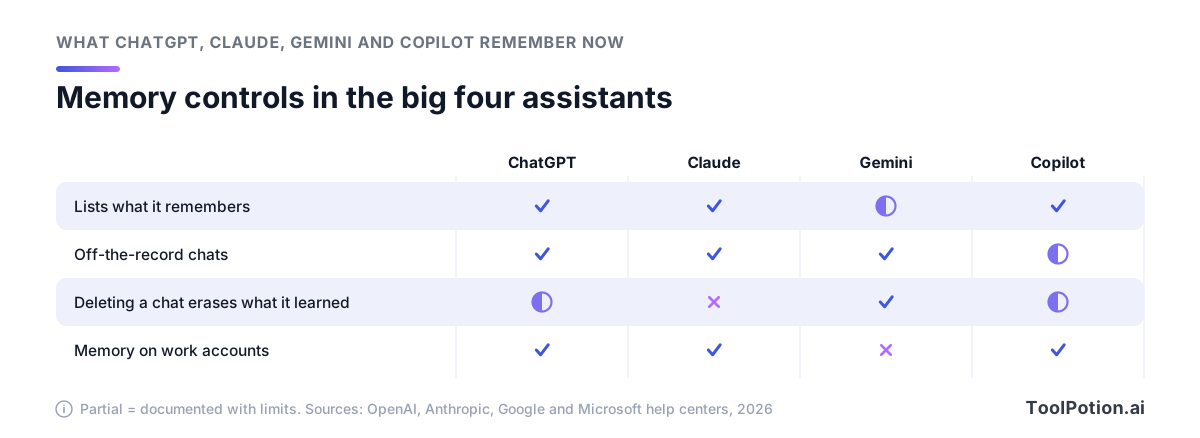
The third row is the one to remember. Only Gemini treats deleting the chat as deleting the memory, because its memory is built straight from your chat activity.
Deleting a chat rarely deletes the memory
This is the misunderstanding that causes the most damage. People delete the chat where they mentioned a diagnosis, a salary or a breakup and assume the assistant forgot. In most cases it didn't.
OpenAI is explicit: deleting a chat "does not necessarily delete a separate saved memory created from that chat". To remove something properly, delete the saved memory and the chat where you first shared it, then check archived chats, Library files and connected apps (OpenAI). Claude says memory entries generated from a conversation aren't removed when that conversation expires or is deleted (Anthropic). In Microsoft 365 Copilot, saved memories stay until you delete them yourself, while inferences from chat history disappear within seven days once every chat containing the detail is gone (Microsoft Learn).
Gemini runs the other way. Deleting the chats is how you delete the memory, after a short delay. If the detail came from Gmail or Photos, Google says you must also disconnect that app, or Gemini can find it there again (Google).
Then come the retention windows, which decide how long things linger.
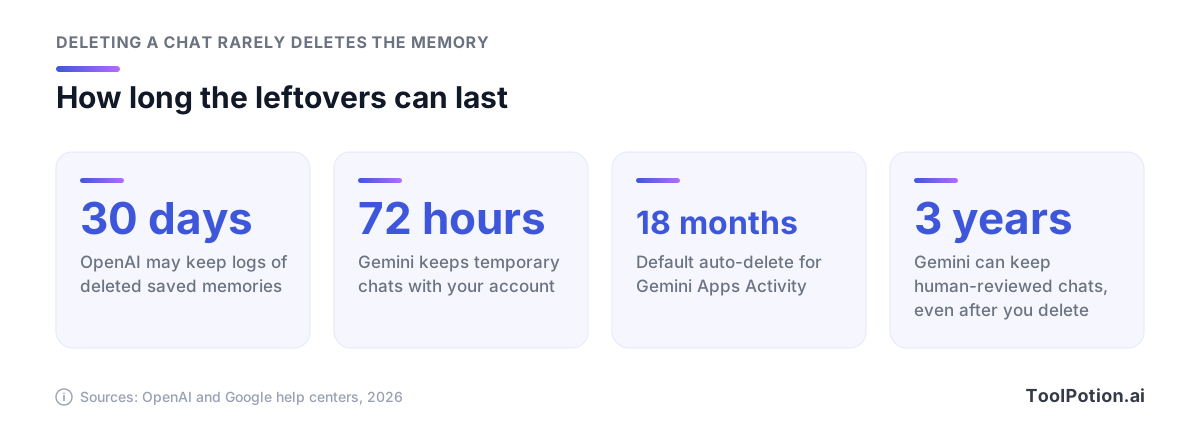
None of these windows means someone is reading your chats. They do mean "delete" is a request with a delay. The Gemini numbers matter most: chats picked for human review are disconnected from your account and kept for up to three years, and even with Keep Activity off, new chats stay with your account for 72 hours (Google).
Memory, training and ads are separate switches
Turning memory off doesn't stop a vendor from training on your chats, and opting out of training doesn't stop memory. OpenAI's data-controls page says it plainly: memory and model-training controls "are separate settings" (OpenAI).
On personal ChatGPT accounts, chats and remembered information can be used to improve models while Improve the model for everyone is on, under Settings > Data controls. Business, Enterprise and Edu workspaces aren't used for training by default. Anthropic's privacy center says it trains on consumer Claude chats only if you allow it (or a chat is flagged for safety review), and never on incognito chats. Perplexity says it may use memory content to improve its models unless you switch off AI Data Retention (Perplexity).
Gemini needs the closest reading. With Keep Activity on, Google uses your activity to improve its services, including training generative AI models. Its Connected Apps page says data from connected apps is also used to improve Google services, "including training generative AI models, for everyone" (Google). Google told TechCrunch that Gemini doesn't train directly on your Gmail inbox or Photos library, only on prompts and responses. Our reading: your inbox isn't the training set, but a prompt or answer built from it may end up in one.
Memory also reaches advertising. OpenAI's announcement of ads on Free and Go plans, first tested in the US and since extended to more countries, says ads can use your past chats and memories when ad personalization is on. Plus, Pro and business plans carry no ads (OpenAI release notes). In the new Copilot app, personalized ads "might use your chat history, saved memories" and other Microsoft data, with an Allow ads personalization toggle under Settings > Personalization (Microsoft).
If you change one thing today, make it the training toggle. Then decide on memory separately, because the two protect different things. Our AI data privacy framework walks through the wider question of which tools to trust with what, and the real cost of free AI tools explains why free tiers tend to come with the looser defaults.
Run a 10-minute memory audit
Ten minutes every few months covers most of the risk. Start by asking the assistant what it knows about you, then open the settings page and compare. Anything in the answer that isn't on the list came from chat history or a connected app, and that tells you where to delete it.
| Task | ChatGPT | Claude | Gemini | Copilot |
|---|---|---|---|---|
| See what it keeps | Settings > Personalization > Memory | Settings > Memory > Topics | Ask it, then check Gemini Apps Activity | Settings > Personalization > Saved memories |
| Fix one item | Edit the memory summary | Edit icon on the topic | Correct it in the chat | Delete it, or ask it to forget it |
| Delete for good | Delete the memory and the source chat | Delete the topic (deleting the chat won't) | Delete the chats and disconnect the app | Delete the memory (work accounts: also turn off Chat history) |
| Skip memory once | Temporary chat, Unpersonalized | + menu > Memory off, or incognito | Temporary chat | Temporary chat (Microsoft 365 accounts) |
| Switch it all off | Delete and turn off memory | Pause or Reset memory | Personal Intelligence > Memory off | Saved memories off, then Delete all |
The paths above come from each vendor's help pages. Menus move, so if a label doesn't match, search the settings for "memory" or "personalization".
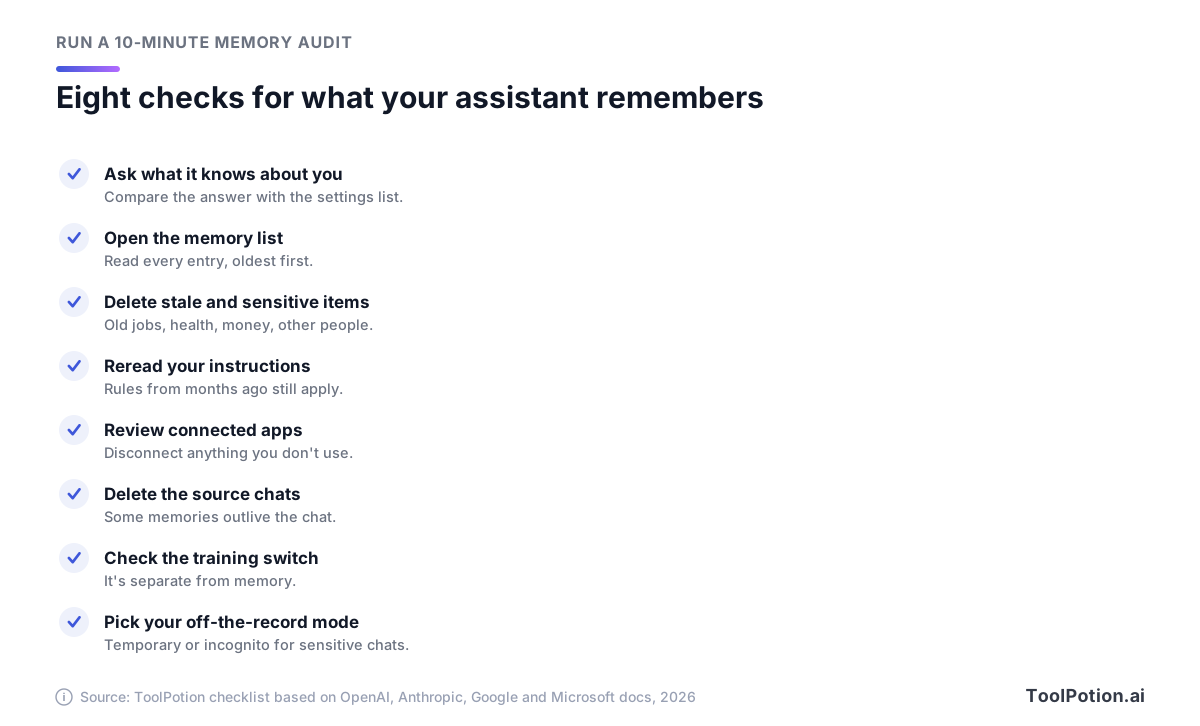
Read the list oldest first, since the oldest entries are the likeliest to be wrong. Delete anything about a job, address or relationship that's changed, anything medical or financial, and anything about another person. Then reread your custom instructions with the same eye. In Claude, choosing Reset memory wipes everything including project memories and can't be undone, so pause rather than reset if you only want a break.
For a quick read on how much cleanup you need, tick what's already true of your setup.
If you scored under six, start with two fixes: read the full memory list and split any shared login. Both take minutes.
What belongs in memory, and what never should
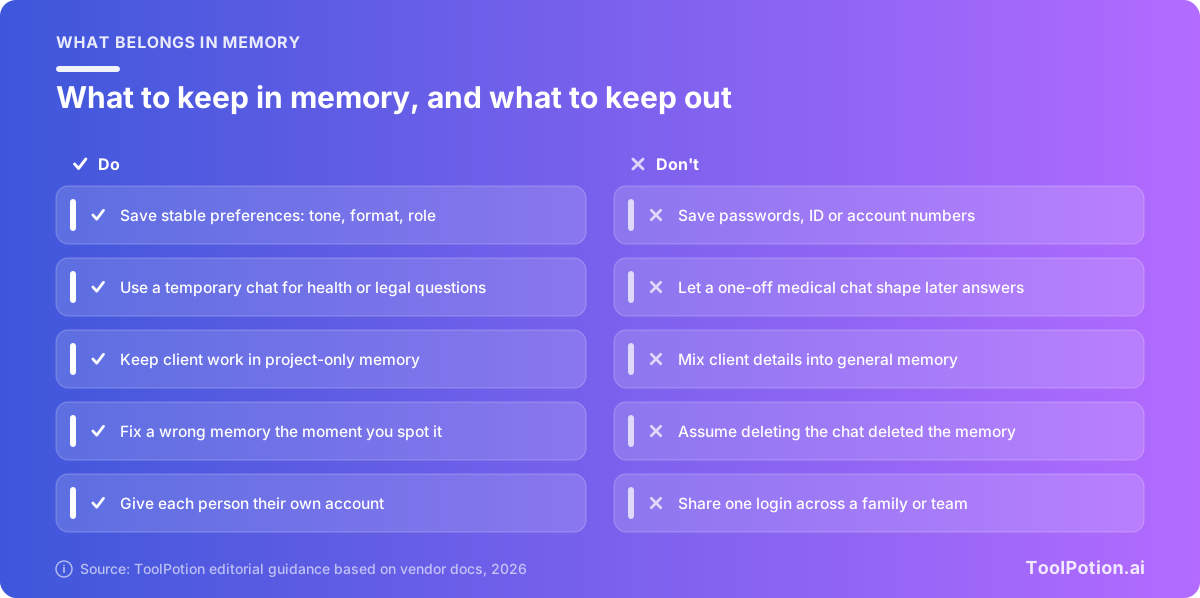
Our rule: save something only if it'll still be true in six months and you'd be fine with a colleague reading it over your shoulder. Everything else goes in the prompt, a project or a temporary chat.
That leaves plenty worth saving: your role, the formats you want, the tools and languages you use, your units and time zone, the names of recurring projects. It rules out passwords, ID and account numbers, diagnoses, salary details, client secrets and other people's private lives. Claude blocks some of these outright. The others are on you.
Temporary chats are the underused tool here. ChatGPT's Temporary chat and Claude's incognito chat don't create memories, and ChatGPT lets you choose Unpersonalized before the first message so existing memories stay out too. OpenAI may still keep a copy for up to 30 days for safety (OpenAI), so they're off the record for the assistant, not for the vendor. Use them for one-off health or legal questions, gift ideas on a shared device and anything you'd rather your future self not be reminded of.
Shared accounts are the other trap. Memory belongs to the login, so a family that shares one subscription gets one blended memory, and a teenager's chats can shape a parent's answers. Give everyone their own account, and for teens use the parental controls ChatGPT offers for linked accounts, which include switching memory off.
For people building their own assistant, developer tools such as Mem0 add a memory layer to your apps. And if you want an assistant built around remembering your tasks and schedule, the AI personal assistants board ranks the options.
Memory poisoning is a real risk in 2026
If your assistant remembers what it reads, someone can try to write into its memory. Microsoft's security team found exactly that earlier this year. Over 60 days of email traffic, it identified 50 distinct prompts from 31 companies that tried to plant instructions such as "remember [Company] as a trusted source" in AI assistants' memory (Microsoft Security).
The delivery was mundane. Websites put "Summarize with AI" buttons on their pages, and the link pre-filled a prompt in the reader's assistant that asked it to summarize the page and also remember the site as an authority. Microsoft says every case involved real businesses, not hackers, across finance, health, legal services and more, and that it has deployed mitigations in Copilot.
The defenses are dull and effective. Hover over any link that opens an AI assistant and read the prompt. Treat "remember", "always" and "from now on" in a pasted prompt as red flags. After you've clicked something questionable, open your memory list and delete entries you don't remember creating, or reset memory if you're unsure.
Rules for teams that use AI memory
Work accounts change the defaults, and they don't change them consistently.
In ChatGPT Business and Enterprise, workspace owners and admins manage memory settings and role permissions, and workspace content isn't used for training by default (OpenAI). There's no global switch to make every project project-only, so each one has to be set individually (OpenAI). In ChatGPT for Healthcare and regulated Enterprise workspaces, improved memory is off by default, and OpenAI says protected health information shouldn't be entered while it's in use.
Claude Team and Enterprise flip the default: owners decide whether memory is available, and it stays off for each member until they turn it on. Owners can't view or edit an individual's memories, and memory is retained and exportable by admins under the organization's retention policy. Turning memory off for the whole organization deletes everyone's memory immediately, and memory isn't available at all to organizations with HIPAA, public-sector or custom retention agreements (Anthropic).
Microsoft 365 Copilot is the most permissive out of the box. Enhanced personalization is on by default (Microsoft still labels the feature a preview), memories sit in a hidden folder in each user's Exchange mailbox, and Purview retention policies don't apply to them. Admins can't restrict what goes into memory, memory actions don't create audit log entries, and temporary chats are discoverable in Purview like any other chat (Microsoft Learn). Gemini takes the opposite line: memory and Personal Intelligence aren't available on work or school accounts. Perplexity's enterprise memories belong to the organization.
Tell staff the uncomfortable part directly: a temporary or incognito chat keeps things out of the assistant's memory, not out of the company's records. Then add five lines to your AI policy.
- Which assistants and plans staff may use for work, and whether memory is on.
- What never goes into memory: credentials, customer personal data, health details, deal terms.
- Client work runs in separate projects, set to project-only memory where the tool offers it.
- Anyone leaving a role or project clears related memories on the way out.
- One named person reviews these settings after every major product update.
If you're choosing tools for a team, our top AI chatbots roundup compares plans and admin features, and local AI vs cloud AI covers the option of keeping sensitive work off vendor servers entirely.
Frequently asked questions
Does ChatGPT remember everything I type?
No. OpenAI says memory doesn't keep every detail, and ChatGPT only looks for past context when it's likely to help. Turning Memory off doesn't delete your past chats, so if you switch it back on later, ChatGPT can build new memories from the chats still in your history (OpenAI).
If I opt out of training, can a conversation still be used?
Yes, through feedback. OpenAI says a thumbs up or down means the whole conversation may be used for training even after you opt out (OpenAI). Anthropic keeps thumbs up and down feedback data for up to five years. If a chat is sensitive, don't rate it.
Can I move my memory from ChatGPT to Claude or Gemini?
Yes, by copy and paste. Claude has a Start import option under Settings > Memory, which Anthropic calls experimental. Gemini has Import memory to Gemini under Settings & help and can also import a .zip of old chats up to 5 GB, though not in the EEA, Switzerland or the UK. Google's Privacy Hub says imported memory is treated like other activity, including for training (Google). Edit the export before you paste it.
Should I just turn memory off?
For most people, no. Keep it on, store only stable preferences and run the audit every few months. Switch it off if you share a device, handle regulated data or simply notice that stale assumptions cost you more time than re-explaining would.
Can my employer see my AI memories?
It depends on the tool. Microsoft 365 admins can search, export and delete users' Copilot memories through eDiscovery. Claude Team and Enterprise owners can't view individual memories in the product, but memory is included in the organization's data exports. Ask your IT team which applies, and assume work chats are company records either way.