Free AI tools limitations go well past the volume caps you compared on the pricing page, and the one that matters most is a data-rights default your upgrade won't touch. GitHub flipped Copilot's default on April 24, 2026 so that Free, Pro, Pro+ and Max users are all opted in to having their code and surrounding context train GitHub's models, while the docs confirm "GitHub does not use Copilot Business or Copilot Enterprise customer data to train AI models" (GitHub Docs). The opt-out is a business-tier feature.
So the $10/month you pay to clear Copilot Free's 2,000 completions and 50 chat requests a month (GitHub) fixes the cheapest problem you had.
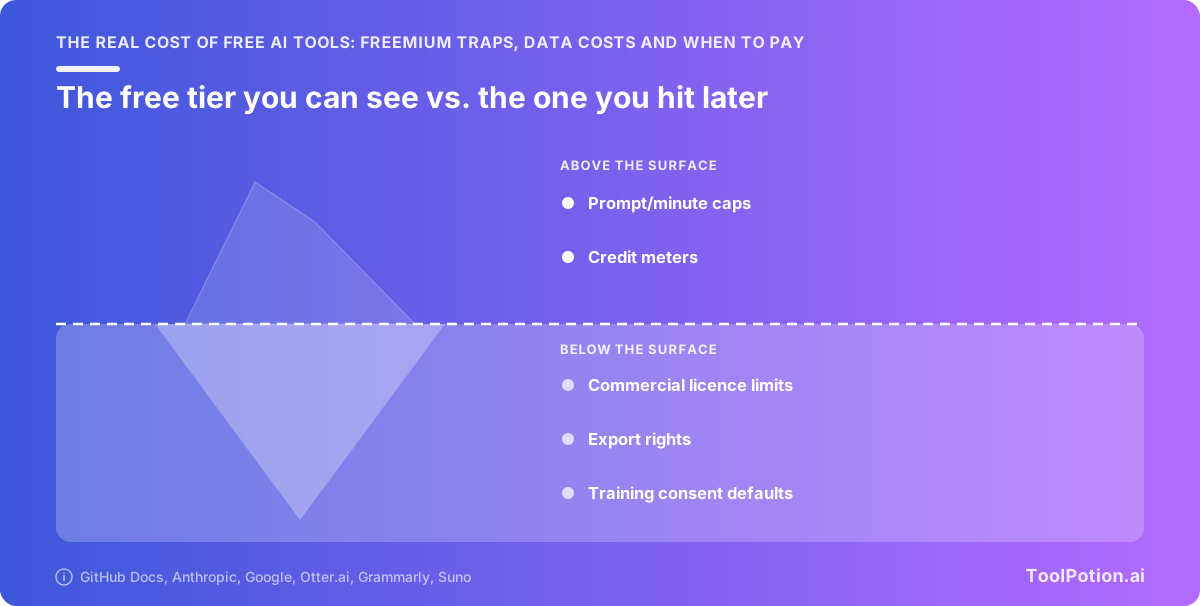
What follows is the plan-by-plan training defaults, five free tiers measured against their paid versions, the licence trap that makes free output unusable at work, and three signals that say pay now.
Free AI tools limitations come in five shapes
Only one of the five shows up on the pricing page you're comparing. Volume caps are the cheap wall. Capability caps, licence terms, export restrictions and data rights are the ones that cost real money, and three of those four are invisible until you've already built something on top of the tool.
Here's the taxonomy the rest of this article uses.
| Wall | What it limits | Example |
|---|---|---|
| Volume | How much you can do per day or month | Grammarly Free: 100 AI prompts a month, about 3.3 a day |
| Capability | How good the tool is allowed to be | Gemini free: 32,000-token context vs. 1 million on AI Pro |
| Licence | Whether you can sell the output | Suno free: no commercial use |
| Export | Whether you can get the output out cleanly | Otter free: 3 lifetime audio/video file imports |
| Data | Whether your inputs train the vendor's model | Copilot Free/Pro: opted in by default since April 24, 2026 |
Metered ceilings, and the ones that stack
A single cap is easy to plan around. Otter.ai stacks three at once on its free plan: 300 monthly transcription minutes, a 30-minute cap per conversation, and 3 lifetime file imports. The 30-minute cap is the one that hurts. Your standard one-hour meeting gets cut in half while you still have 270 minutes sitting unused in the monthly bucket, so the number you shopped on never binds and the number you skipped does.
Watch for caps that reset on different clocks, too. Suno's free 50 credits renew daily and don't roll over, which quietly punishes anyone who works in weekend bursts.
Licence, export and watermark locks
These are contract terms wearing a feature's clothes. Suno's free plan puts you in a shared creation queue and forbids commercial use of what you make there, and free accounts can't buy add-on credits to escape it. Upgrading later doesn't retroactively license what you already generated, so every asset gets remade.
The wall nobody sees: your inputs as training data
GitHub's docs say it cleanly: "GitHub does not use Copilot Business or Copilot Enterprise customer data to train AI models." Free, Pro, Pro+ and Max all sit on the other side of that line, opted in by default. Paying $10 a month raises your throughput and leaves that setting exactly where it was.
Across the 13,000+ AI apps we track, that split between consumer plans and business plans is the most consistent pattern in the whole pricing table.
Paying buys capacity, not privacy: the training default by plan
Your $10 or $20 a month raises the ceiling. It doesn't change what the vendor does with what you type. On every major consumer tool, the training opt-out sits behind a business or commercial agreement, and the paid consumer tiers sit on the same side of that line as the free ones.
GitHub Copilot: free through Max are opted in, Business isn't
GitHub flipped the default on 24 April 2026. Copilot Free, Pro, Pro+ and Max users are now opted in to having their prompts, outputs, code snippets and surrounding file context used to train GitHub's models, and turning it off means going into Copilot settings and setting "Allow GitHub to use my data for AI model training" to Disabled (GitHub Docs). The same page says GitHub does not use Copilot Business or Copilot Enterprise customer data to train AI models. That toggle doesn't appear for Business and Enterprise seats, because there's nothing to switch off.
So Max at $100/month buys you $200 in monthly credits and the same training default as the free plan (GitHub). A Business seat, which costs less, buys you the exclusion.
Claude: five-year retention if you allow training
Anthropic's consumer terms update of 28 August 2025 covers Claude Free, Pro and Max together. Allow training and your conversations are retained for five years; decline and the window is 30 days. The terms say plainly that this does not apply to Claude for Work, Claude for Government, Claude for Education, or API use (Anthropic). Pro and Max are consumer plans. Paying more moves you up the usage ladder and leaves you on the consumer side of the retention split.
Two details in Anthropic's privacy docs are easy to miss. Rating a response with thumbs up or down stores the entire related conversation in Anthropic's back end for up to five years, whatever your other settings say, and Incognito chats aren't used to improve Claude even when Model Improvement is enabled (Claude Privacy Center). If you thumbs-down a bad answer that contains a client's contract, you just extended its retention by roughly five years.
Gemini: human review applies whether or not you pay
Keep Activity is on by default. With it on, Google uses your activity to provide, develop and improve its services, including training generative AI models, activity auto-deletes after 18 months, and a subset of chats are reviewed by human reviewers. Those reviewed chats are kept for up to three years, and deleting them from your account doesn't pull them back (Google Help). None of that keys off your plan.
The practical rule when you compare model providers: read the terms that name your plan, not the marketing page. If the document says "consumer" and your plan is Pro, the upgrade bought throughput.
What the caps actually are: five free tiers, measured
Here are the published numbers, in one place, so you can stop clicking through pricing pages that all use different units.
| Tool | Free tier allowance | First paid tier | What paying changes |
|---|---|---|---|
| GitHub Copilot | 2,000 completions and 50 chat requests a month (GitHub) | Pro, $10/mo | Completion cap disappears entirely, plus $15 in monthly credits (GitHub) |
| Otter.ai | 300 transcription minutes a month, 30 minutes per conversation, 3 lifetime file imports (Otter) | Pro, $8.33/user/mo annual ($16.99 monthly) | Lifts all three ceilings at once (Otter) |
| Grammarly | 100 AI prompts a month (Grammarly) | Pro, $12/mo | 2,000 prompts per member per month, a 20x jump (Grammarly) |
| Google Gemini | 32,000-token context, compute-based prompt allowance (Google) | AI Plus | 128k context on Plus, 1M on Pro/Ultra (Google) |
| Suno | 50 credits daily, about 10 songs, no commercial use (Suno) | Pro, $8/mo | 2,500 credits a month and a commercial licence (Suno) |
Stacked ceilings: Otter's three limits at once
Otter's free plan looks generous if you read only the first number. 300 minutes a month is five hours of meetings. But there's also a 30-minute cap on any single conversation, which means a normal one-hour meeting gets cut in half while you still have 270 minutes sitting unused in your monthly bucket (Otter). The third ceiling bites recorded-elsewhere workflows: 3 audio or video file imports for the entire lifetime of the account.
Read every free tier for the second and third number. The headline allowance is almost never the one that stops you.
Capability caps beat volume caps: Gemini's 31x context gap
Gemini free gives you a 32,000-token context window, roughly 50 pages. AI Pro and Ultra give you 1,000,000 tokens, about 1,500 pages (Google). That's a 31x gap, and no amount of rationing your prompts closes it. If your work involves feeding the model a contract, a codebase, or a quarter of support tickets, the free tier truncates the input before the model ever sees all of it.
Grammarly's 100 prompts a month works out to 3.3 a day, and every compose and every rewrite burns one (Grammarly). That's a volume cap you can feel yourself approaching. Context ceilings give you no such warning: you paste the document, the tool truncates, and the answer comes back confident and partial.
When the meter stops being publishable
Google no longer publishes prompt counts for Gemini. The docs now say your limit "refreshes every 5 hours until you reach your weekly limit," with AI Plus at 2x standard, AI Pro at 4x, and Ultra higher again (Google). Multiples of an unpublished base give you nothing to plan against. The same page warns that without a paid plan, features like Deep Research "may be unavailable during periods of high demand" (Google).
Treat an unquantified free tier as a tier that can shrink without an announcement. Copilot Free's 2,000 completions is a promise you can hold a vendor to. "Limits vary based on demand" gives you nothing to hold. This shows up hardest in consumer-facing categories, where per-tool caps drift constantly across the AI mobile apps in our directory and rarely get restated on the pricing page.
The retroactive licence trap and other fake free tiers
Generating 200 songs on Suno's free plan and then upgrading doesn't make those 200 songs commercially usable. The licence attached to output is set when you generate it, not when you pay. That's the most expensive mistake available on a free tier, because the real bill lands on every hour of work you have to redo, on top of the subscription you eventually buy.
Output you can't sell, even after you upgrade
Suno's free plan spells this out on the pricing page itself: 50 credits renew daily (about 10 songs), you sit in a shared creation queue, and there's no commercial use (Suno). Credits don't roll over, and free accounts can't buy add-on credits to get past the wall. Pro is $8/month for 2,500 credits, Premier $24/month for 10,000 (Suno).
So if a track is going into a client video, a podcast intro, or anything with a invoice attached to it, pay before you generate. Eight dollars spent up front is cheaper than regenerating a library and hoping the new version sounds close enough.
The same pattern shows up across music and image tools. Check the licence line before your first prompt, not after your fiftieth.
One-time credit pools dressed as ongoing plans
A free tier that gives you a number is not necessarily giving you that number every month. Gamma's free plan hands you 400 credits once, as a lifetime pool, and stamps a watermark on free exports (Gamma on slidegmm.ai). Spend them and the plan is over. It still says "free" on the page.
The test is one word on the pricing page: does the number say "per month," "daily," or nothing at all? Nothing at all means one-time. Vendors rarely write "lifetime" in bold.
Watermarks and export locks that make the work unusable
A watermark is a licence term wearing a costume. It leaves your volume alone and restricts what you can do with the output, which is the same wall as a non-commercial licence in a different shape. Export restrictions work the same way: you can build the thing, you just can't get it out in a format anyone else can open.
Before you commit real work to any free plan, especially in a crowded category like AI image generators where a dozen tools look interchangeable, read three lines: the commercial-use clause, whether credits renew, and what the export produces.
How common are free tiers? Directory data by category
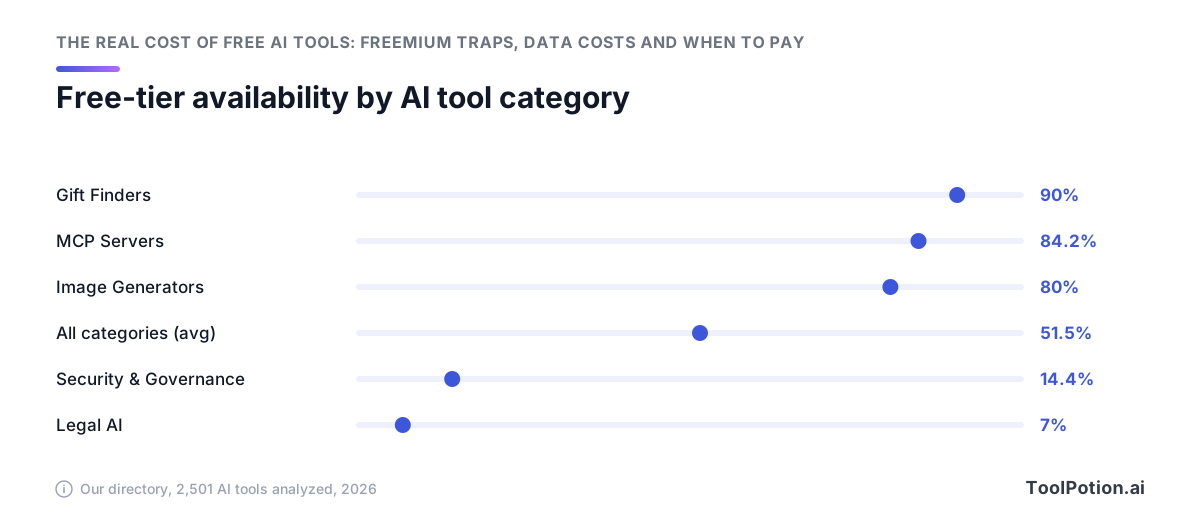
About half of the tools we track have a free tier you can keep using indefinitely, and which half depends almost entirely on who the vendor is selling to. Consumer creative categories run 80% and up. Legal and security run under 15%. You can predict the answer before you open a single pricing page.
Free-tier availability is a proxy for who the buyer is
When a tool sells to one person with a credit card, a free tier is the acquisition channel. That person has to try the thing before they'll pay $10, and nobody's going to sit through a demo call for a $10 subscription. So the vendor gives away a metered slice and hopes you hit the wall.
When a tool sells into a procurement process, free does nothing. The buyer is a security review, a legal review and a purchase order. A free tier in that world creates a compliance problem: unvetted data walking into an unvetted vendor. That's why the categories with the tightest data-handling requirements have the fewest free options.
A second directory of 2,457 active AI tools found the split slightly harsher than ours: 58.5% paid outright, 29.9% freemium and only 5% entirely free, with 65.1% requiring payment in some form. Same shape, different denominator. Both datasets agree on the same picture: most of the market charges, and free clusters in specific categories.
Where free is the norm and where it doesn't exist at all
The high end is where you'd expect. Image generators sit around 80%, and consumer novelty tools like gift finders hit roughly 90%. Our 535 AI writing assistants behave the same way, because a writing tool that won't let you type one paragraph for free can't compete with the twelve that will.
Coding is the interesting middle. Across the 260 AI coding assistants in our directory, free tiers are common, but they're recruitment for a team-seat sale later. Copilot Free is the template: real limits, real usefulness, and a clear upgrade path once you're embedded in someone's workflow.
The floor is Legal AI at about 7% and Security & Governance at 14.4%. If you're shopping in either, budget for a paid plan from the start and skip the search for a free option. It mostly isn't there, and the handful of free things you do find in those categories are usually lead magnets attached to a sales call rather than working tools.
Why the ceiling is where it is
Nobody sets a free tier by what the compute costs. The cap goes where the upgrade decision happens.
Free tiers are engineered around ~97 of 100 users never paying
A freemium product that converts 3 to 5 percent of its free users is considered healthy. So the cap lands at the point where a small slice of users feels enough friction to reach for a card, well short of the point where serving you gets expensive, while the other 95-odd stay put and keep the top-of-funnel numbers looking good. Grammarly's free ceiling of 100 AI prompts a month works out to 3.3 a day, which is generous for occasional email polishing and useless the moment writing becomes your job. That's the sort: a filter tuned to catch the people whose usage looks like work.
This is also why caps tighten instead of loosening. Google used to publish exact free-tier numbers: 5 Gemini 2.5 Pro prompts per day, 100 images, 5 Deep Research reports a month. Now the docs describe a compute allowance that refreshes every 5 hours until you reach your weekly limit, with paid tiers described only as multiples of a number nobody publishes. A cap you can't measure is a cap you can't plan around, which is the point.
The shadow-AI problem this creates at work
When the free tier is the sorting mechanism, the sorting happens inside your company whether procurement likes it or not. Of employees using unsanctioned AI tools, 58% rely on the free version, and 34% use free versions of tools their employer has already approved and paid for. That second number is the odd one. The paid seat exists and people use the consumer account anyway, usually because signing in with a work SSO is one more step than opening a tab.
The data follows them there. Cyberhaven found that 39.7% of data movements into AI tools involve sensitive data, and that most usage of some tools runs through personal accounts: 60.9% for Perplexity, 58.2% for Claude, 32.3% for ChatGPT. Personal accounts are consumer-terms accounts, and consumer terms are exactly the ones that train by default.
When the free tier is genuinely enough
Most people who pay for AI tools are buying headroom they never touch. If your usage sits inside the caps and your work isn't client-facing, the free tier is the correct answer and the $12 or $20 is waste.
The usage profiles free actually covers
Grammarly's free plan gives you 100 AI prompts a month, which works out to 3.3 a day. That's thin for a content team and fine for someone who rewrites a few emails a week and wants the underlying grammar checking, which isn't metered at all.
Otter's free 300 monthly transcription minutes cover roughly ten half-hour calls, and the 30-minute per-conversation ceiling is the part that decides it for you. If your meetings are standups and one-on-ones, free holds. If they're hour-long client calls, free cuts you off at the midpoint every single time and $8.33 a month solves it.
Copilot Free's 2,000 completions and 50 chat requests a month are enough for weekend projects and learning. A working developer blows through 2,000 completions in days, which is exactly what the cap is designed to reveal.
Suno's 50 daily credits, about 10 songs, are plenty if you're making music for yourself. The moment anything goes into a video you'll publish, free turns into a liability, since that output carries no commercial licence.
Two settings to change before you use anything free
- Turn off training. In Copilot, set "Allow GitHub to use my data for AI model training" to Disabled, since free, Pro, Pro+ and Max seats are opted in by default. In Gemini, switch off Keep Activity, which otherwise sends your chats to training and puts a subset in front of human reviewers.
- Stop rating responses on Claude unless you mean it. A thumbs up or down makes Anthropic store the entire conversation for up to five years, regardless of your other settings. Incognito chats stay out of training either way, so use those for anything you wouldn't paste into a shared doc.
Three signals it's time to pay
Each of these is testable in about a minute, and each has a different fix. Two of the three survive an upgrade to the next consumer tier.
You hit the cap more than once a week
One cap collision a month is noise. Two a week means you're rationing, and rationing costs more than the subscription does. Grammarly's free plan gives you 100 AI prompts a month, which works out to 3.3 a day, and every rewrite burns one. If you're batching your edits to stay under that, Pro at $12/month takes you to 2,000 prompts per member per month. Same math on Copilot: 2,000 completions and 50 chat requests free versus unlimited completions at $10/month, which is the cheapest cap removal in this whole article.
Pay the $10. You'll make it back the first time you don't stop mid-task.
The output is client-facing or revenue-touching
Volume has nothing to do with this one, and upgrading later won't fix what you already made. Suno's free plan says no commercial use right on the pricing page, and that licence is stamped on the file at generation time. Pro is $8/month. If you're producing anything a client pays for, buy the licence before you generate, not after. The same logic applies to orchestration tools you'd put in front of a customer: the AI agents worth budgeting for are the ones whose output someone else depends on.
The input would be a disclosure incident
Cyberhaven found 39.7% of data movements into AI tools involve sensitive data, and that 58.2% of Claude usage and 60.9% of Perplexity usage happens through personal accounts. Personal account means consumer terms. Consumer terms means training defaults: Copilot Free, Pro, Pro+ and Max are all opted in by default as of April 24, 2026, while Business and Enterprise seats don't even show the toggle.
So the fix for this signal is Copilot Business, Claude for Work, or a Gemini plan under commercial terms. A consumer Pro seat raises your ceiling and leaves the pipe to the training set wide open, and if you're pasting a contract or unreleased code into it, the $10 you spent bought you nothing that matters here.
Frequently Asked Questions
Do paid AI plans stop your data being used for training?
Usually not. The opt-out is a business-tier feature rather than a paid-tier one: GitHub opted Copilot Free, Pro, Pro+ and Max users IN by default as of April 24, 2026, and its docs say only that "GitHub does not use Copilot Business or Copilot Enterprise customer data to train AI models" (GitHub Docs). Anthropic's August 28, 2025 consumer terms apply to Claude Free, Pro and Max alike, with five-year retention if you allow training versus 30 days if you decline, and they explicitly exclude Claude for Work and API use. Google's default Keep Activity setting uses your chats to train generative AI models whether or not you pay (Gemini Apps Activity). Your $20 a month buys capacity. Privacy sits behind the commercial contract.
Can you use free-tier AI output commercially if you upgrade later?
No, and this is the most expensive free-tier mistake available. Suno's free plan carries a flat "No commercial use" restriction on the output itself (Suno), and upgrading to Pro at $8/month doesn't retroactively license the songs you already made. You have to regenerate every asset under the paid plan, which means the work you did while evaluating the tool is throwaway. If anything you're producing will touch a client deliverable or a revenue-generating channel, pay before you generate, not after.
Which AI tools have the most usable free tiers in 2026?
GitHub Copilot Free is the strongest of the group: 2,000 completions and 50 chat requests per month covers real hobby coding, and Pro at $10/month is the cheapest sensible upgrade in the category (GitHub). Otter.ai's 300 monthly transcription minutes sound generous until you hit the 30-minute per-conversation cap, which cuts a standard hour-long meeting in half, plus a hard limit of 3 lifetime file imports (Otter). Grammarly's free plan gives you 100 AI prompts a month, about 3.3 a day, against 2,000 on Pro at $12/month (Grammarly). Free tiers are also far more common in some categories than others: across 2,457 tools, free-tier availability ranged from 84.2% of MCP servers down to 14.4% of security and governance tools (Tool Directory).
How do I opt out of GitHub Copilot training on my code?
Open your Copilot settings and set "Allow GitHub to use my data for AI model training" to Disabled. Since April 24, 2026 that switch defaults to enabled for Copilot Free, Pro, Pro+ and Max, and it covers your inputs, outputs, code snippets and surrounding context (GitHub Docs). If you're on a Copilot Business or Enterprise seat, the toggle won't appear at all, because those plans are excluded from training by contract.
Why do free AI tools keep reducing their limits?
The caps are the sorting mechanism that decides who converts to paying, so they get tuned as costs and demand shift. Google is the clearest case: it used to publish exact free numbers, 5 Gemini 2.5 Pro prompts a day and 5 Deep Research reports a month (Search Engine Journal), and now describes an opaque compute allowance where "Your limit refreshes every 5 hours until you reach your weekly limit" (Gemini usage limits). The same docs warn that free users may lose access to Deep Research entirely during periods of high demand. A limit you can't measure is a limit that can shrink without an announcement.
Is it safe to use free AI tools for work documents?
For anything confidential, no. Cyberhaven Labs found 39.7% of data movements into AI tools involve sensitive data, and most of that traffic runs through personal accounts: 60.9% for Perplexity and 58.2% for Claude (2026 AI Adoption & Risk Report). Google's own documentation says a subset of Gemini chats are reviewed by human reviewers and retained for up to three years even after you delete them (Gemini Apps Activity). The test worth applying: if pasting the document into a chat box would count as a disclosure incident, you need a business or enterprise agreement, not a free login.