The fastest reliable way to summarize a YouTube video with AI is to feed the transcript to a tool that can point back to it, then check the claims you plan to use. The same rule covers podcasts and long PDFs. A summary you can't trace to a timestamp or a page number is a guess with good grammar.
That matters more in 2026 because every major assistant now takes a link or a file and answers in seconds. The speed is real. So is the failure mode, which is a confident paragraph that quotes something nobody said. Below are the setups the vendors document, what breaks, and a quick way to audit the output.
Pick your path first
Start with what you're holding, because the source type decides the tool. Answer two questions below and you'll get a starting point. The sections after it explain each route.
Summarize a YouTube video
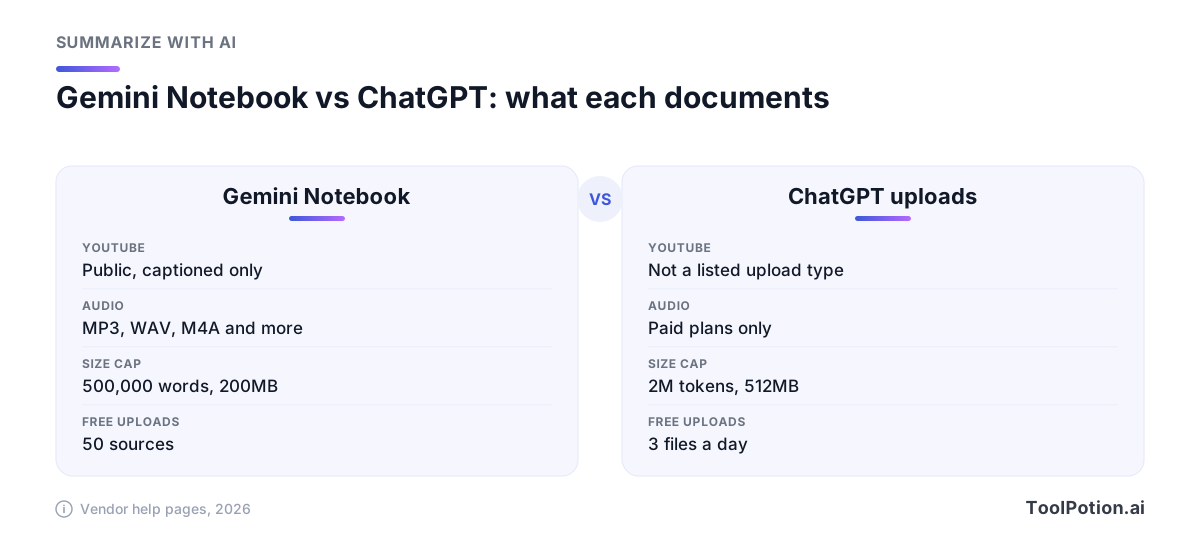
Gemini Notebook is the cleanest route for most people. It's the tool Google renamed from NotebookLM (Google), and its help center now uses only the new name. The help page says it accepts public YouTube videos that have captions, whether the creator uploaded them or YouTube generated them, and that only the transcript is imported (Gemini Notebook Help). That last detail is the key to everything else in this article. The tool never watches the video. It reads the words.
- Open a notebook, select Add sources and paste the YouTube video URL.
- Wait for the import. Google says videos uploaded in the previous 72 hours may not be available yet.
- Ask for a summary and require a timestamp on every point.
- Click the citations back to the transcript and watch the video at those moments.
The Gemini app needs no import step. Sign in at gemini.google.com or in the mobile app, keep Activity turned on, then ask Gemini to find a video and summarize it. Google's own example prompt reads "Find videos of how to quickly get grape juice out of a wool rug. Summarize the first video." Gemini draws on public YouTube information, and the feature doesn't work in Live chats or in Gemini in Google Messages (Gemini Apps Help). Add "with a timestamp for each point" to your prompt, then open the video at those moments.
Browser extensions are the shortcut. Eightify, VidSumm and YouTube Summary with ChatGPT & Claude add a summary panel beside the player. They're convenient for triage, like deciding whether a 90-minute talk deserves your evening. For anything you'll quote, move to a tool that shows its sources. The full board of YouTube summarizers ranks the rest.
Summarize a podcast episode
A podcast is audio, so the first job is a transcript. If the show publishes one, paste it into any assistant and skip the transcription errors entirely. If it doesn't, upload the audio.
Gemini Notebook transcribes audio files when you import them (MP3, WAV, M4A, AAC, OGG and OPUS among others) and saves the text as a new source. It won't take audio with no speech, and low-quality recordings may fail to import (Gemini Notebook Help). ChatGPT can also summarize a recording, but audio uploads need a paid plan, files top out at 512 MB, and OpenAI warns that speaker identification may be unreliable and that you should review important details against the original (OpenAI Help). Free Gemini app users can upload up to 10 minutes of audio in total, and Google AI Pro or Ultra raises that to 3 hours (Gemini Apps Help).
If you publish a podcast rather than consume one, a purpose-built tool like Podcast Show Notes Generator turns an episode into a transcript and show notes in one pass. More options sit on the AI podcast tools board.
Summarize a long PDF
Here the file limits decide. Claude takes up to 20 files per chat at up to 500 MB each, and PDFs up to 1,000 pages. There's a catch worth knowing. PDFs of 100 pages or fewer get text plus charts and images analyzed, while 101 to 1,000 pages are processed as text only (Claude Help Center). A 300-page report full of figures will therefore be summarized without seeing its figures.
ChatGPT caps text and document files at 2 million tokens each, and free users get 3 file uploads a day (OpenAI Help). Gemini Notebook allows up to 500,000 words per source and 200 MB per uploaded file, with up to 50 sources for free users (Gemini Notebook Help). Its chat and generation use is also capped by compute-based limits that refresh every five hours (Gemini Notebook Help). That makes it the better home for a stack of papers you'll question over several days.
Don't ask for one summary of the whole thing. Ask for one per chapter, then a short synthesis of those. Detail survives that way. For dedicated tools, PDF.ai and PDF Summarizer are built for exactly this, and the chat-with-PDF board lists the alternatives. Our guide to summarizing documents with AI goes deeper on prompts.
What fails, and why
No captions
Gemini Notebook needs them. It also skips videos without speech. YouTube says its automatic captions may misrepresent speech because of accents, background noise or mispronunciations, and may not generate at all for videos with poor sound or long silences (YouTube Help). A summary built on a bad transcript inherits every error, and proper nouns go first.
Private or brand-new videos
Gemini uses public YouTube information only. Gemini Notebook can lag on fresh uploads.
Sheer length
Caps vary, so check them before a 6-hour lecture or a 900-page filing. A tool that quietly truncates will still hand you a tidy summary of the first part.
Paywalls and scans
If the text isn't in the file, it isn't in the summary. A scanned PDF with no text layer, or a paywalled article where you saved only the login page, will produce filler.
Invented quotes
This is the one that embarrasses people. Models are good at paraphrase and bad at exact wording, so a quoted line is the most likely thing in the summary to be wrong. Treat every quotation mark as unverified until you've found the line.
Check a summary against the source
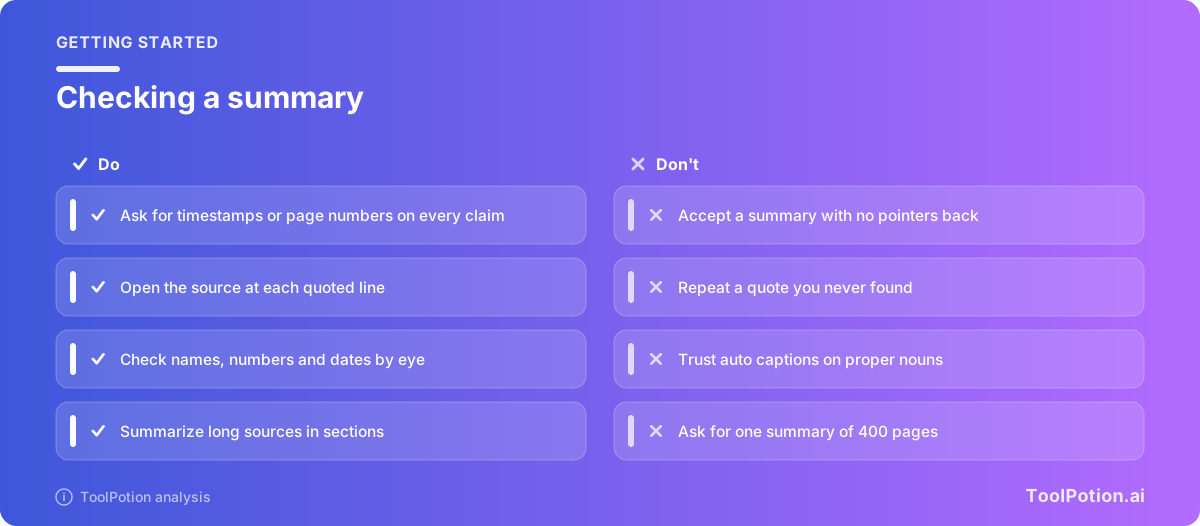
Make verification part of the prompt, not an afterthought. Ask for a locator on each claim: a timestamp for video and audio, a page number for documents. Then spot-check the risky lines. Those are numbers, dates, names and anything in quotation marks.
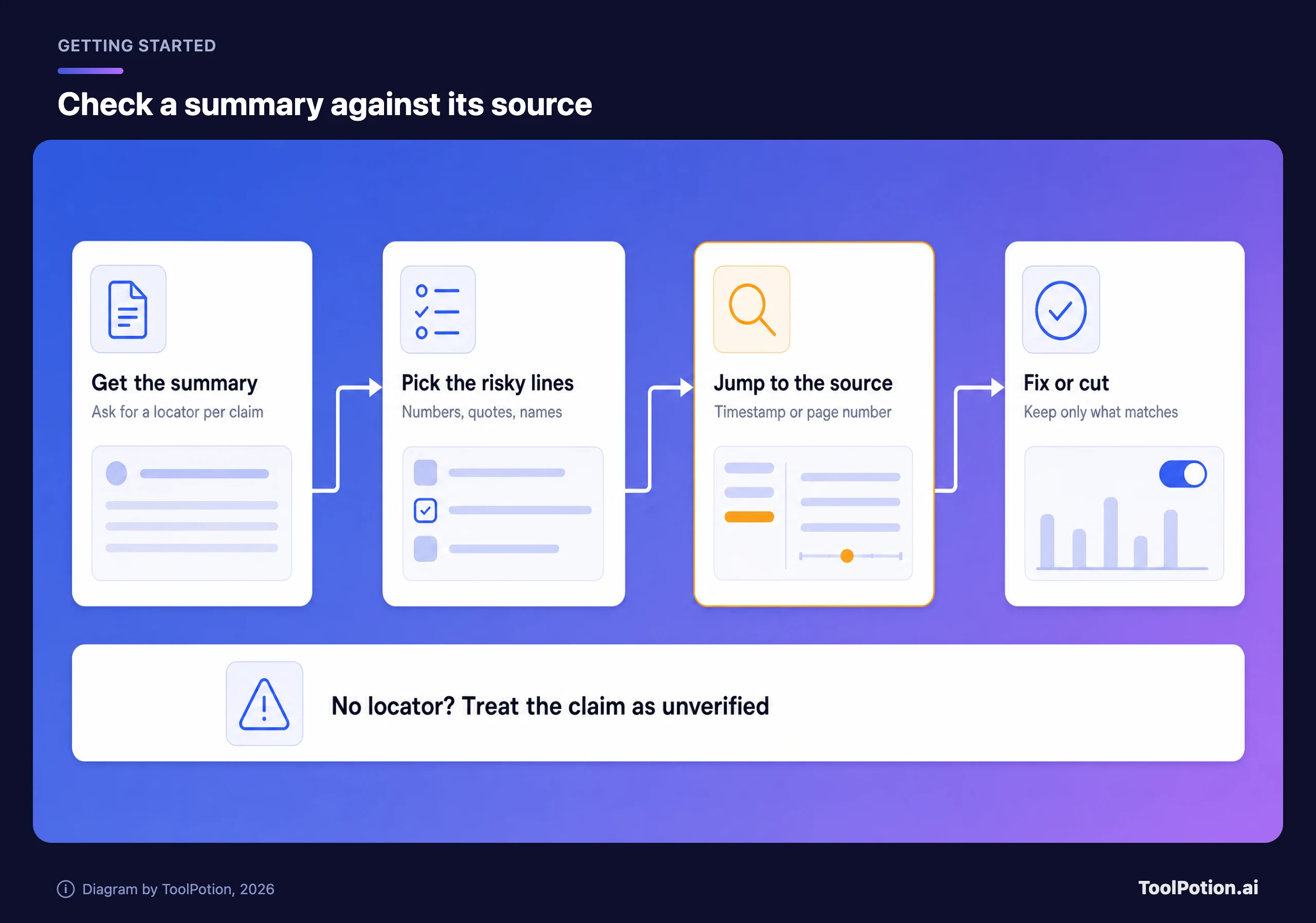
Anthropic's Citations feature shows what good looks like. It's an API feature: developers who enable it get back the exact passages supporting each claim, and for PDFs the page ranges are 1-indexed with an exclusive end page (Anthropic docs). In the chat apps you have to ask for the same thing yourself, so put it in the prompt.
Summarize this in 8 bullets. After each bullet, add the timestamp
(MM:SS) or page number where the claim appears. Quote only text
that appears verbatim in the source. If you can't find support
for a point, leave it out and say so at the end.
Two habits make the audit fast. Read the summary first, then open the source and jump to every locator for the three claims you'd repeat to someone else. If one fails, assume the others need a look too. And when a summary contradicts your own sense of the source, trust the source.
Frequently asked questions
Can AI summarize a YouTube video that has no captions?
Not directly in Gemini Notebook, which requires captions and skips videos without speech. Transcribe the audio first with a tool that handles uploads, then summarize the transcript and proofread names and numbers.
Are free tools enough for a one-off summary?
Usually. Gemini Notebook's free plan allows 50 sources, and free ChatGPT allows 3 file uploads a day. Heavy daily use is where the caps start to bite.
Do AI summaries hallucinate quotes?
They can. Vendors themselves warn that outputs need review, as OpenAI does for transcripts. Ask for timestamps or page numbers and search the source for any quoted line before you reuse it.
Which is best for a very long PDF?
For a stack of long documents you'll revisit, Gemini Notebook's 500,000-word source limit is the roomiest of the three covered here. For a PDF under 100 pages with charts, Claude reads the visuals too.