The best free AI tool for most people is a general chatbot: ChatGPT, Gemini or Claude. Pick the one that matches the account you already use, then add a specialist only for the job the chatbot can't do. That covers writing, questions, summaries, brainstorming and a fair amount of image work without spending a cent.
The catch is that "free" means four different things in 2026. Sometimes it's a permanent plan with a daily cap. Sometimes it's a sample with a watermark. Sometimes it's a one-time credit pack, and sometimes the free tier comes with a licence that bars commercial use. This guide goes through the best free AI tools by job, with the limits each vendor publishes on its own pricing or help page, and flags the spots where free is a trap.
A note on numbers: vendors change caps often, and some publish only words like "limited". Where a vendor gives a figure, you'll see it. Where it doesn't, the article says so instead of guessing.
What free really means (and the four limits to look for)
Not every free plan is the same deal. A genuinely free plan has no end date. A freemium plan is built to show you the product and push you to pay for the part you need. A trial is the full product for a short window. Mixing these up is how people end up with a watermarked video the night before a deadline.
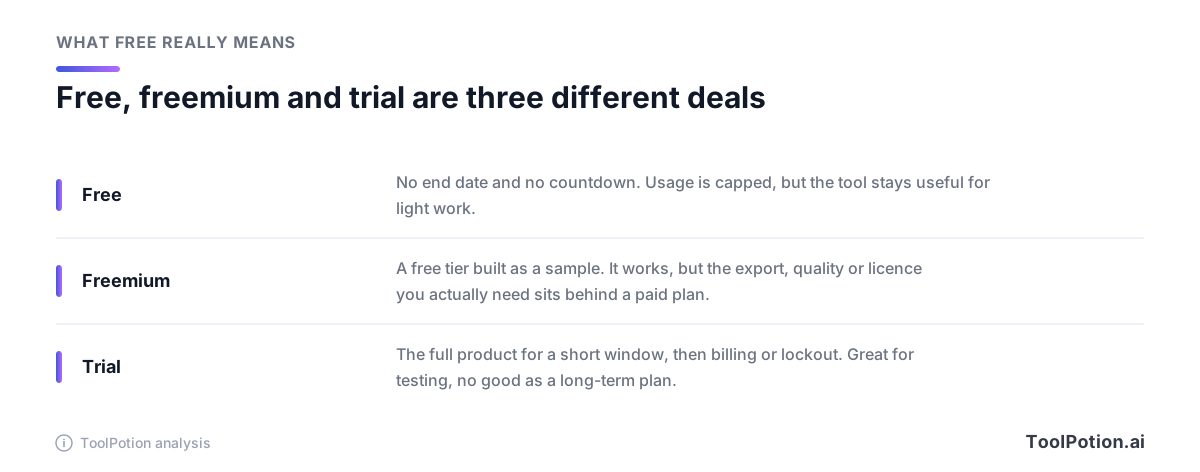
Whatever the label, four limits decide whether a free plan works for you, and they're worth checking before you build a habit around a tool.
- Usage caps come first. Most free plans limit how much you can do, and the reset matters. Leonardo gives free users 150 tokens a day that reset daily, while Descript lists 100 AI credits as a one-time grant. One is a habit, the other is a sampler.
- Watermarks decide whether the result is usable at all. Descript's free plan exports at 720p with a watermark, according to its pricing page.
- Licence terms decide whether you can sell or publish the output. Suno lists no commercial rights on its free plan, and ElevenLabs puts its commercial licence on the paid Starter plan.
- Data terms decide what happens to what you type in. Google's Gemini API pricing page says free-tier content may be used to improve its products, and paid-tier content is not.
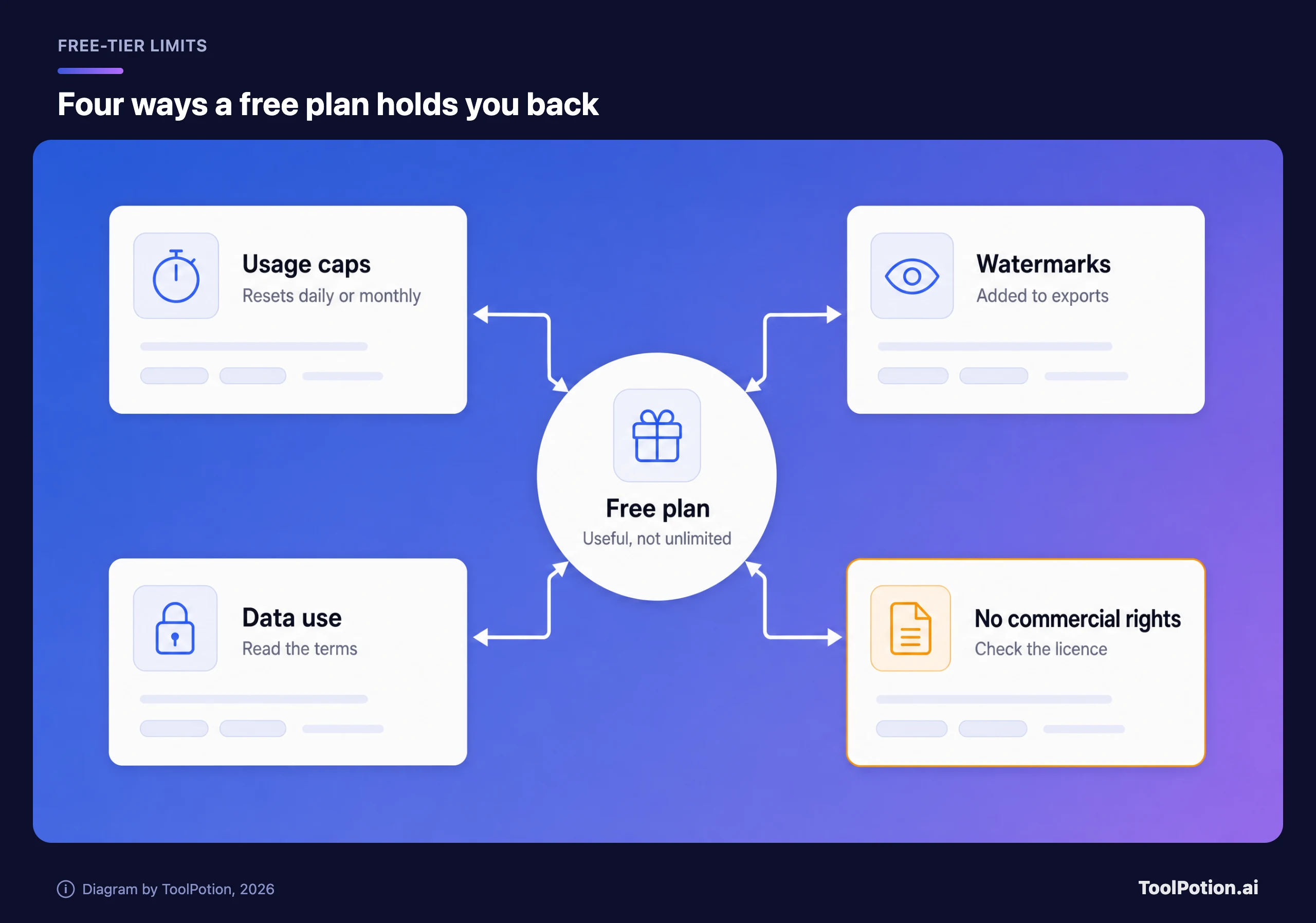
Keep those four in mind and most of the rest of this guide is just filling in the specifics tool by tool.
The best free AI tool for each job
If you want the answer without the detail, the map below is it. Chat and writing go to one of the big assistants. Research and studying go to NotebookLM or Perplexity. Pictures go to Canva or Leonardo. Video, voice and music have the most traps, so they get their own section further down.
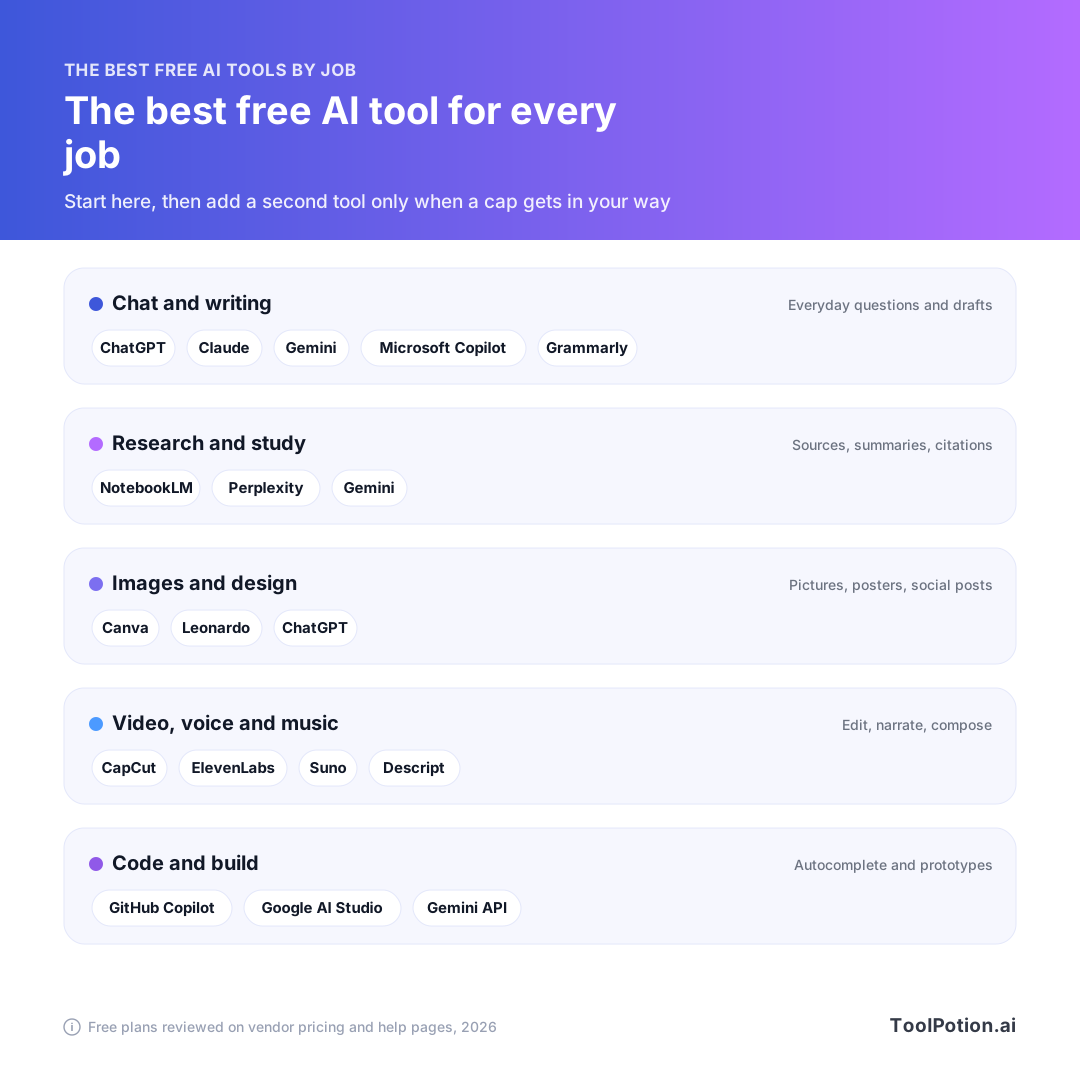
Most people don't need more than two of these. A general assistant plus one specialist for the work you do every week covers the huge majority of free use, and the guides to top AI chatbots and AI image generators are the next stop if you outgrow that.
The table gives the free-plan limits vendors publish, side by side. The catch column is the one to read.
| Tool | Free plan, per the vendor | The catch |
|---|---|---|
| ChatGPT | Unlimited text chats (subject to abuse guardrails); limited uploads, images, voice and deep research | Most extras are "limited" with no number published |
| Gemini | Access to 3.6 Flash, varying access to 3.1 Pro, image generation, Deep Research, Gemini Live, 15 GB storage | Pro-model access varies |
| Claude | Chat, web search, Artifacts, Sonnet and Haiku models, Projects up to 5 | No Opus, no Research; usage limits apply |
| Microsoft Copilot | Free with a signed-in Microsoft account | Some features subject to usage limits |
| NotebookLM (Gemini Notebook) | 100 notebooks, 50 sources per notebook, 50 chats a day | 3 Audio Overviews a day |
| Canva | Up to 20 Standard or Premium AI uses a month, 5 GB storage | No background remover or Magic Resize |
| Leonardo | 150 tokens a day | Free-tier rights terms; public images |
| ElevenLabs | 10k credits a month | No commercial use on Free |
| Suno | 50 credits a day, free model | No commercial rights |
| Descript | 60 media minutes a month, 100 one-time AI credits | 720p export with watermark |
| GitHub Copilot | 2,000 inline suggestions a month, limited chat and agent use | Chat and agent use is metered |
| Grammarly | 100 AI prompts a month | Rewriting and tone tools are paid |
Which free AI tool is enough for most people
One general assistant, plus NotebookLM if you read a lot. That's the answer for students, office workers and anyone who mostly writes, researches and asks questions. The three big assistants overlap so much on the free plans that the deciding factor is the account you already have.
Use Gemini if your life is in Google Workspace, since the free plan comes with 15 GB of storage and sits next to Gmail and Drive. Use Copilot if you're in Microsoft's apps. Use ChatGPT or Claude if you want a standalone app and don't care about ecosystem. Claude is the one to try first for long writing, while ChatGPT has the widest set of extras, even if most are capped.
Specialists are only worth adding when your work needs them. A person who makes a weekly newsletter wants Canva. A person who edits a podcast wants Descript's free minutes for a trial run. A person who writes code wants GitHub Copilot's free plan. If none of those describes you, you can stop at one tool.
Free chatbots for chat and writing
This is where free is most generous, and where the choice matters least. All four big assistants will draft an email, explain a concept or fix a paragraph at no cost. What differs is the ecosystem around them and what each one holds back.
ChatGPT, Gemini and Claude
ChatGPT's free plan lists unlimited text chats, with a footnote that unlimited is "subject to abuse guardrails". Uploads, image creation, voice, deep research and memory are all marked limited, with no numbers attached. The paid Go plan sits just above it, and its listing notes it may include ads (ChatGPT pricing).
Gemini's free plan is the most feature-packed on paper. Google's page lists access to 3.6 Flash, varying access to 3.1 Pro, image generation and editing, Deep Research, Gemini Live, Canvas, Gems and 15 GB of storage (Google). If you already live in Gmail and Drive, it's the natural default. The "varying access" wording for the Pro model is a polite way of saying it'll run out.
Claude is the one to try when writing quality matters more than extras. Anthropic's free plan covers chat on web, desktop and mobile, web search, file creation, memory, Artifacts and the Sonnet and Haiku models. It leaves out Opus, the Research feature and Claude Code, and Projects are capped at five (Anthropic). Usage limits apply, and Anthropic doesn't publish a message count for the free plan.
If you're deciding between them, don't overthink it. Use the one tied to your existing account for a week, and switch if you keep hitting the cap. The ChatGPT alternatives guide goes deeper on when each one wins.
Microsoft Copilot and Grammarly
Microsoft Copilot says it is free with a signed-in Microsoft account, with some capabilities subject to usage limits and more available through paid plans. Microsoft doesn't quantify those limits on the page. The step up is Microsoft 365 Personal at $9.99 a month, which Microsoft says includes advanced Copilot chat with higher usage than free. It's the sensible free pick if you work in Word and Outlook all day.
Grammarly is narrower: a writing checker with an AI layer. Its free plan lists spelling and grammar help, basic tone visibility and 100 AI prompts a month (Grammarly). A general chatbot can rewrite a paragraph just as well, so Grammarly earns its place mainly if you want corrections inside every text box you type in.
Free tools for research and studying
Research is the second-best use of free AI, because the tools that do it well rely on sources rather than raw model power.
NotebookLM is the standout. Google's help page lists 100 notebooks per user, 50 sources per notebook and 50 chats a day on the free plan, plus 3 Audio Overviews and 3 Video Overviews a day (Google). Upload your own PDFs, notes or links and it answers from them, which is the safest way to use AI for study or work reading because it stays tied to what you gave it. One naming wrinkle: Google's help center and plans page now call the product Gemini Notebook, so you may see either name. Google's page also says the usage limits changed earlier this autumn, so check it for the current numbers.
Perplexity is the pick when you want a cited answer to a question rather than a conversation. Basic searches are effectively unlimited on the free plan. Its deeper Pro Search is limited to a small number of searches a day, and the figure has shifted over time, so check the in-app counter rather than trusting any article, this one included.
Free image and design tools
Free image generation splits into two camps: tools that make pictures, and tools that make finished designs. The licence is where they differ most.
Canva is the design pick. Its free plan lists a drag-and-drop editor, a large template library, 5 GB of storage and up to 20 Standard or Premium AI uses a month, but not the background remover or Magic Resize (Canva). Twenty AI uses is enough to make a few posts, not to run a content calendar. For flyers, social posts and slides, it's still the best free place to start.
Leonardo is the pick for AI art. Free users get 150 tokens a day that reset daily (Leonardo), and a single token doesn't map to a fixed image count because cost varies with the task. The licence deserves a careful read. Leonardo's help text says free-tier users grant Leonardo broad rights to their creations, with the user receiving a non-exclusive, royalty-free licence for commercial use, and notes that other users can see publicly available assets. If you're making client work, read that paragraph first.
You don't have to open another app for casual images. The Gemini and ChatGPT free plans both include image generation, though ChatGPT labels it limited. For a quick header image, that's enough. For a full AI image generator comparison, the board lists the full field.
Free video, voice and music: where free turns into a trap
This is the category where free plans are most likely to waste your time, because the output looks finished until you try to use it. Three of the four tools below have a catch that only shows up at export.
CapCut lists the free plan as free templates and basic editing tools, and little else (CapCut). A third-party breakdown says free exports top out at 1080p and that the watermark attaches to templates and effects tagged Pro, so one Pro-tagged asset in an otherwise clean edit puts the mark on the whole export (Vidpros). That's a trap you can avoid by building with standard assets only.
Descript is a clearer example of freemium. The free plan gives 60 media minutes a month and 100 AI credits as a one-time grant, and exports at 720p with a watermark (Descript). Good for trying the text-based editing idea. Not good for anything you plan to post.
ElevenLabs gives the free plan 10k credits a month, which covers text to speech, sound effects, voice design and three projects in Studio, but the commercial licence starts on the paid Starter plan (ElevenLabs). Fine for a personal project. If the voiceover goes on a monetized video, you need to pay.
Suno's free plan gives 50 credits a day, on the free model, with no commercial rights and a shared queue (Suno). It's the clearest example of a tool that is a good toy and a bad foundation.
One habit saves most of the pain here: export a ten-second test before you commit to a workflow. A short test clip, a single voice line or a 30-second song shows you the resolution, the watermark and the file format in a couple of minutes. It's far cheaper to find out on a test than on the finished project, and it tells you whether the free tier is a tool or a demo.
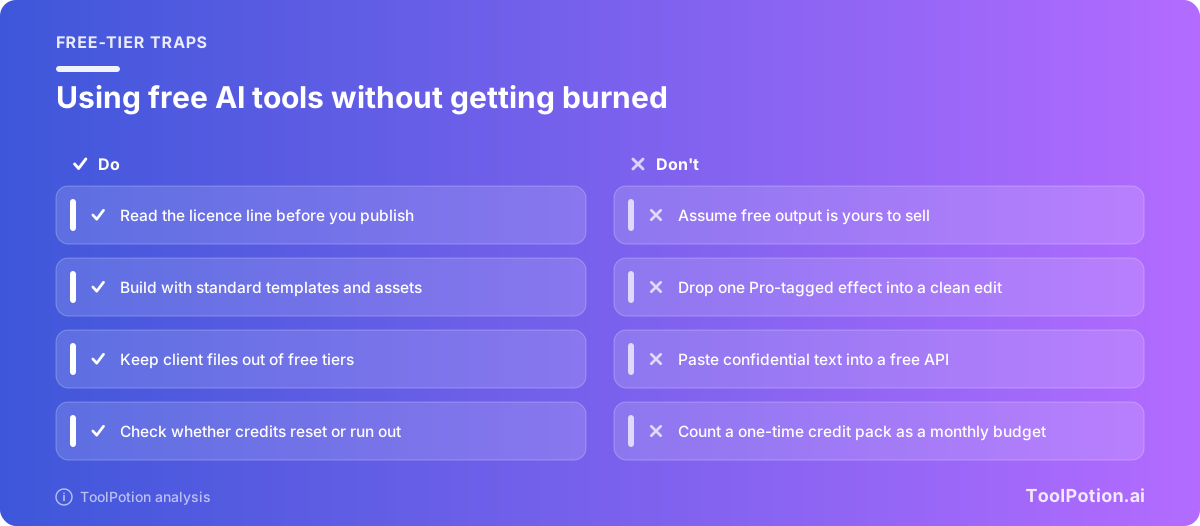
The pattern across all four is the same. Free is fine for learning and for personal projects, and the cost appears the moment you publish. If a result is going on a client's site or a monetized channel, price in one paid month for the tool you actually need, and keep the rest free. The video generators guide and the text to speech board cover the paid options worth considering.
Free AI for coding
GitHub Copilot has the clearest free-plan numbers of any tool here: GitHub's free plan includes 2,000 inline suggestions a month and limited chat and agent usage, while Copilot Pro is $10 a month with unlimited inline suggestions (GitHub). Chat and agent work is metered in AI credits, and the plans page doesn't put a free-plan number on it. Treat the free plan as a way to try Copilot on hobby projects rather than a full-time workflow.
Developers who want more room can use the free tier of Gemini through Google AI Studio and the Gemini API. Google's pricing page lists free-tier access for several models, including Gemini 2.5 Pro, Gemini 3.8 Flash and the open Gemma 4 model, though not the newer 3.1 Pro (Google). The same page says free-tier content may be used to improve Google's products. That's fine for toy projects and wrong for proprietary code, so keep client work on a paid tier. Our best AI coding tools guide covers what to buy when you outgrow it.
How to build your free AI stack
The goal is a short stack, not a long one. Every extra tool is another login, another cap and another licence to read. The workflow below keeps it to what you'll actually use.
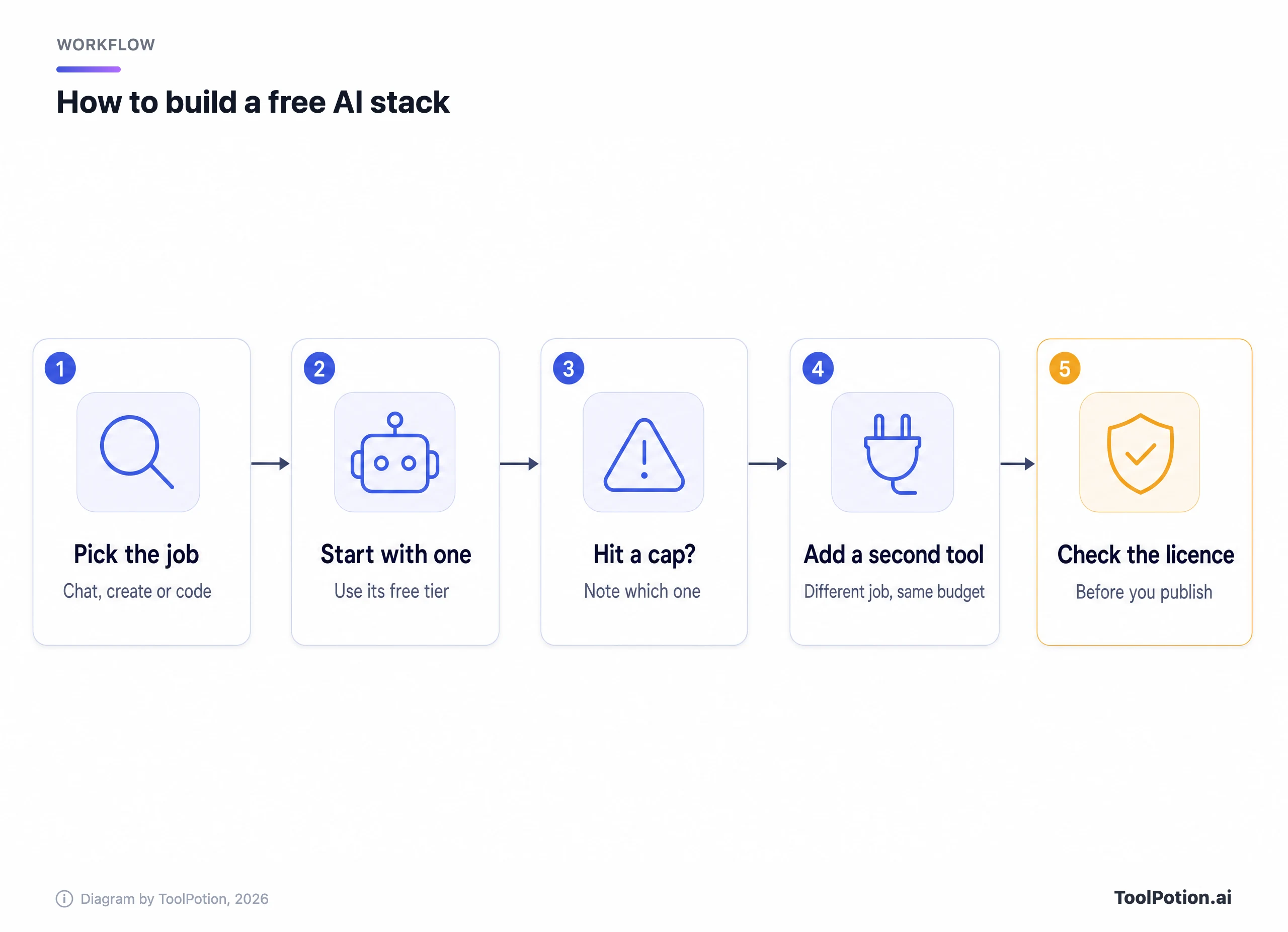
The steps are simple, and the order matters.
- Write down the two or three jobs you do every week. "Everything" isn't a job.
- Pick one general assistant that matches an account you already have, and use it for a week before you add anything.
- When you hit a cap, note which one it was. A daily cap suggests spreading work across tools. A one-time credit pack means the tool was a sampler.
- Add a specialist only for a job the assistant can't do, such as video, voice or design.
- Before anything goes public, read the licence line on every tool that touched it.
What the caps look like per working day
Monthly numbers hide how small some caps are. Divide them across a five-day week and the picture changes.
| Tool | Published free cap | Roughly per working day |
|---|---|---|
| Descript | 60 media minutes a month | About 3 minutes |
| Canva | 20 AI uses a month | About 1 AI use |
| Grammarly | 100 AI prompts a month | About 5 prompts |
| Leonardo | 150 tokens a day | 150 tokens, reset daily |
| Suno | 50 credits a day | 50 credits, reset daily |
The monthly caps (Descript, Canva, Grammarly) are written as a number per month, and they're calculated here over about 21 working days. The daily caps (Leonardo, Suno) refill on their own. That's why a daily-reset tool tolerates heavy bursts better than a monthly one. If your work arrives in bursts, you'll feel the monthly caps first, and that's the usual moment people decide to pay.
If you'd rather click than read, the picker below turns the research above into a recommendation in two or three taps.
The picker only recommends tools whose free limits are quoted above, so you can check each recommendation against its source.
When free stops being enough
Free stops being enough when a cap interrupts your actual work, when a licence blocks a use you need, or when you're pasting in files you shouldn't share. Those are three different problems with three different fixes, and only some of them need money.
The good news is that the first paid step is usually cheap. Google AI Plus is $4.99 a month, Microsoft 365 Personal is $9.99, GitHub Copilot Pro is $10, Google AI Pro is $19.99 and Claude Pro is $20 billed monthly ($17 a month with annual billing).
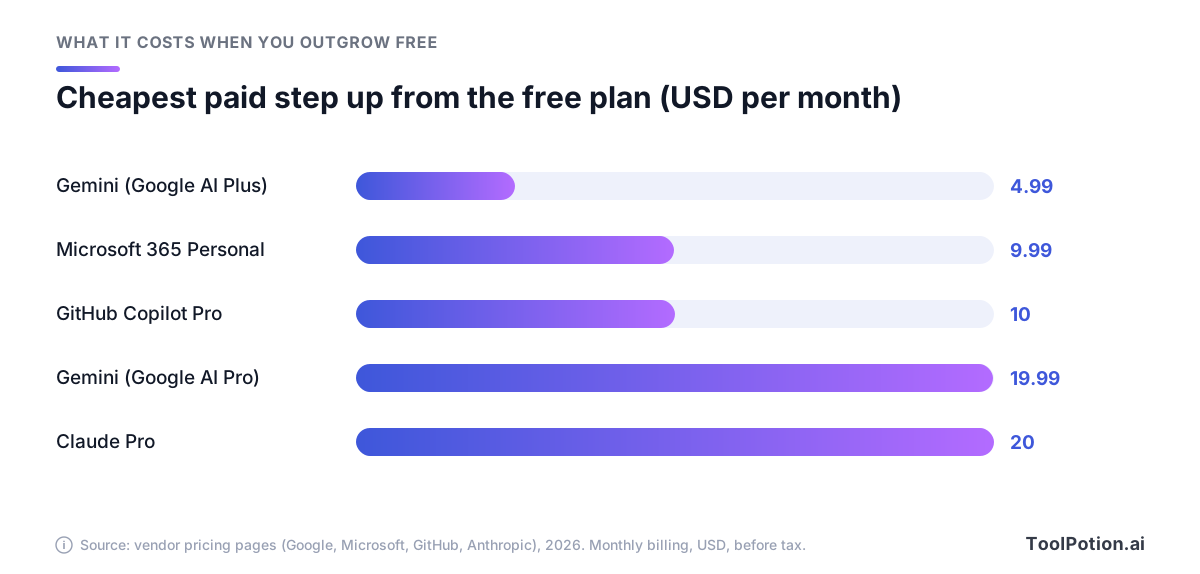
None of those is a big expense next to the cost of a missed deadline, but there's no reason to pay for all of them. Pay for the one tool you hit a cap on every week, and leave the others on their free plans. Our guide to the real cost of free AI tools covers the data and time costs that don't show up on a pricing page.
How to read a free plan in a minute
Vendors bury the important lines. Start on the pricing page and read the footnotes under the Free column, because that's where "unlimited" gets its asterisk. ChatGPT's page, for example, qualifies unlimited text chats with a line about abuse guardrails. Then open the terms or help centre and search for "commercial" and for "improve", which finds licence and data-use language fast. Finally, check the reset: daily, monthly or one-time.
That takes about a minute per tool and catches almost every trap in this guide. It's also the only reliable method, because caps shift without announcements and any article, including this one, is a snapshot.
Who shouldn't rely on free
Free plans are the wrong foundation for anyone producing client work every day, anyone pasting confidential material into a tool whose terms allow product improvement, and anyone who can't tolerate a cap hitting mid-task. If that's you, spend the money on one tool and keep the rest free.
Not sure which camp you're in? This short quiz scores it.
Frequently asked questions
What is the best free AI tool overall?
For most people it's a general assistant: ChatGPT, Gemini or Claude. Choose the one tied to your existing Google, Microsoft or OpenAI login, since they overlap heavily on the basics. Add NotebookLM if you read a lot of documents.
Are free AI tools really free?
The plan is free, but the output often isn't unrestricted. Suno and ElevenLabs withhold commercial rights on free plans, Descript watermarks free exports, and Google says free API content may be used to improve its products. Free is usually fine for learning and personal projects.
Can I use free AI output commercially?
It depends on the tool, and the answer is on the vendor's terms page. Suno lists no commercial rights on its free plan and ElevenLabs starts commercial licensing on its paid tier. Leonardo grants a commercial licence to free users but keeps broad rights over what they create. Read the terms before you publish.
Which free AI tool has no watermark?
Chatbots like ChatGPT, Gemini and Claude don't watermark text. For video, watermarks depend on the editor: Descript's free exports carry one, and a third-party breakdown says CapCut's appears only if you use Pro-tagged assets. Always export a test file before committing to a workflow.
Is free AI safe for work documents?
Check the data terms first. Google says free-tier API content may be used to improve its products, and paid-tier content is not. Treat any free tier as public until the vendor's terms say otherwise, and keep confidential files on a paid or enterprise plan.
How often do free limits change?
Often. Many limits are described as limited with no number, and vendors adjust them without notice. Check the pricing page of any tool before you rely on it, and expect this guide's numbers to age.