Pick Descript if your video is mostly people talking and you'd rather cut it by editing a transcript. Pick CapCut if you make short, effects-heavy social video and want a timeline with templates, because that's what it's built around.
The two get compared constantly in 2026 because both now sell the same promise: AI that does the boring parts of editing. Underneath, they're different tools with different billing, different limits and different terms. This guide walks through the editing model, the AI features each vendor documents, what the plans cost and cap, and the legal fine print worth a read before you upload your back catalog.
A note on sources. Every price and limit below comes from the vendors' own pages as they stood in 2026, and plans change often, so check the live page before you pay. You'll find Descript and CapCut (two listings, the video editor app and the AI video editor) in the directory if you want to see how they stack up on ToolRank.
The editing model decides most of it
Descript opens your recording as a transcript. You delete a sentence and the matching video or audio disappears. You paste a paragraph somewhere else and the clip moves with it. Descript's own pitch is that if you know how the backspace key works, you already know how to edit in it (Descript).
It isn't only text, though. The same page lists a timeline editor with visual navigation and precision controls for color and timing. Text is the front door, and the timeline is there when a cut needs finesse.
CapCut runs the other way. You stack clips, audio and text on tracks, trim edges, and layer effects and templates on top. It's the model most video editors already know, and it suits footage where the picture matters as much as the words: b-roll and trending effects on multi-layer vertical video.
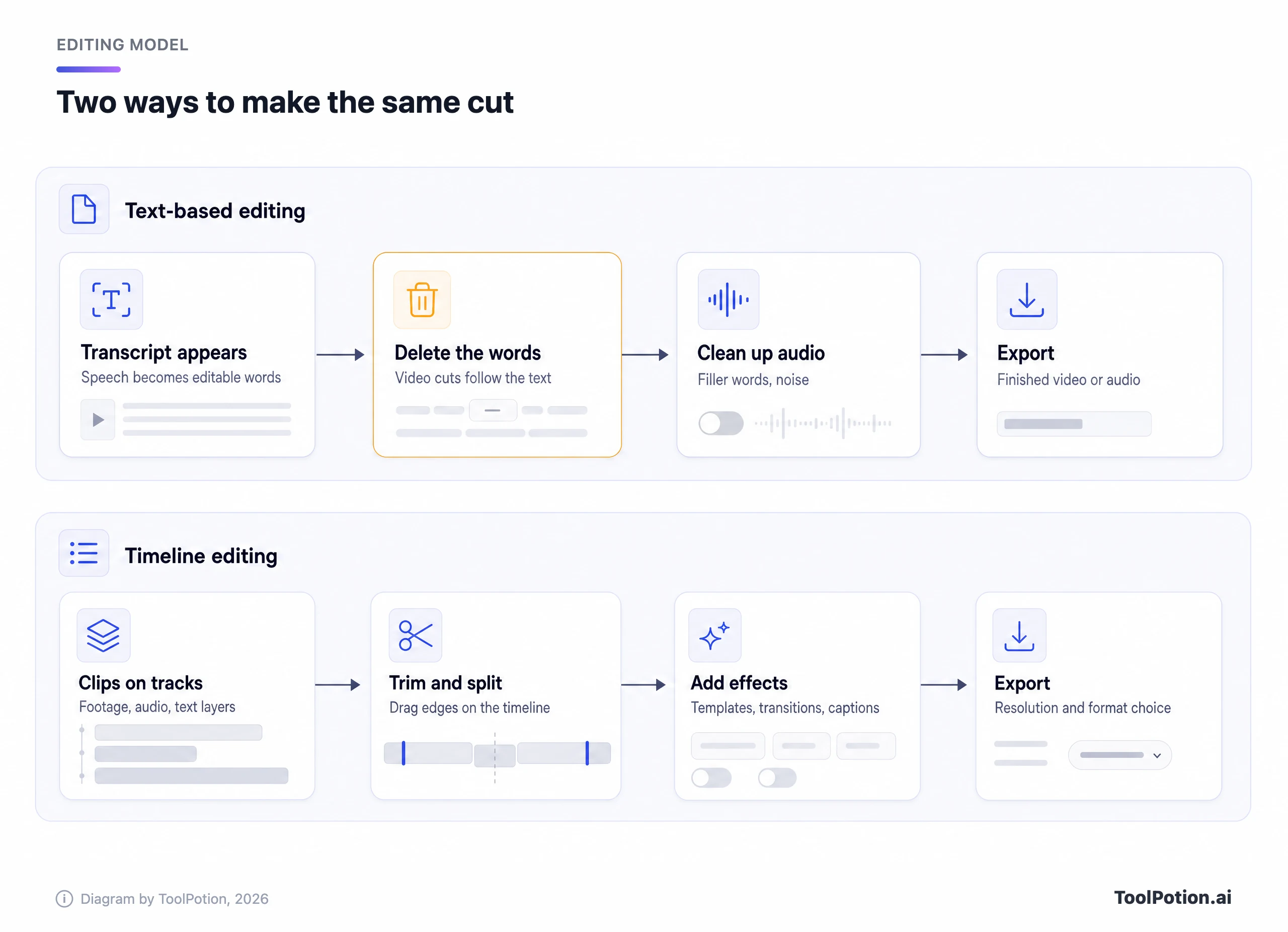
Which one is faster depends on how much of your material is speech. A 90-minute interview with a dozen stumbles is a text problem. A 30-second clip with beat-synced cuts is a timeline problem. If you're a podcaster who also posts video, you probably have both.
AI features each vendor documents
Start with what Descript lists. Its Hobbyist plan and up include Studio Sound and Remove Filler Words, along with Create Clips and its AI co-editor Underlord (Descript pricing). Studio Sound is a one-click background-noise and voice cleanup. Descript also sells Eye Contact, which adjusts your gaze so you appear to look at the camera while reading a script, and says it leaves your original footage untouched so you can toggle it per section (Descript). Dynamic captions are unlimited on every plan, including free.
Translation and dubbing sit higher up. Descript's pricing page says the Business plan can translate and dub video in 30+ languages with proofreading. Other Descript pages give different language counts, so read the number as the pricing page's claim. The free plan marks the AI tools as limited. Descript's podcasting page also mentions Descript Rooms, a recorder with 4K video captured locally so a shaky connection can't hurt the file (Descript).
CapCut's pages document a different set. Its Voice Enhancer page says one click can remove background noise, improve vocal clarity, with a 0 to 100 percent enhancement slider in the editor, and the FAQ lists filler word removal among the things it does (CapCut). Its AI Clip Maker cuts long video into short clips using highlight detection and smart cropping, and CapCut says the output carries no watermark (CapCut). Auto captions and motion tracking are listed among its Pro AI tools (CapCut).
Translation is where the wording matters. CapCut's video translator page describes subtitle translation in more than 27 languages and says that replacing the spoken voice needs a separate dubbing workflow it doesn't describe (CapCut). Eye contact correction isn't listed on the CapCut feature pages we read, so treat it as undocumented rather than absent. Check the app before you rule it out.
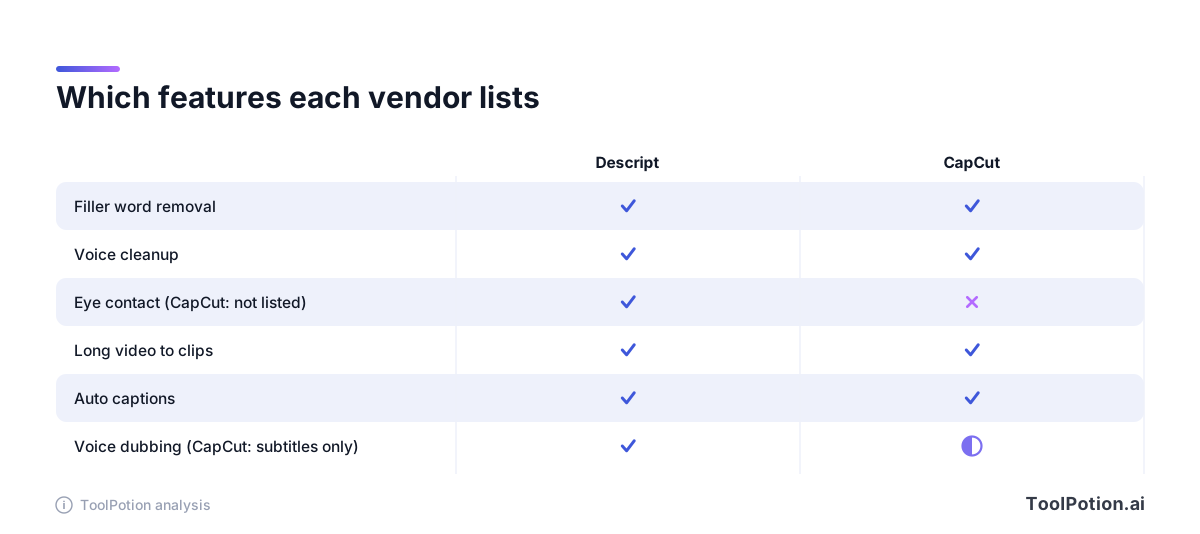
The matrix shows what each vendor lists on its public pages, not what the apps can or can't do, and not a quality test. Both vendors claim clean audio and automatic clips, and those are claims until you hear the result on your own files. Run your own worst recording through each free tier before you decide.
YouTubers sit in the middle. A talking-head channel with a weekly 20-minute upload leans toward Descript, since the cuts are mostly spoken. A channel built on fast cuts, overlays and Shorts leans toward CapCut. Plenty of creators will end up using each for what it does best, and that's a perfectly sane answer. The cost of keeping both is small next to the cost of fighting the wrong editor every week.
One practical test settles most arguments. Take your messiest recording, the one with a barking dog and a dozen false starts, and time how long each tool needs to get it to publishable. Count the clicks, and count how many AI credits it burned.
Pricing, billing basis and the limits that bite
Descript prices per person per month and splits plans by two meters: media hours and AI credits. Billed annually, Hobbyist is $16, Creator is $24 and Business is $50. Billed monthly, those become $24, $35 and $65, and the page advertises savings of up to 35 percent for paying annually (Descript pricing).
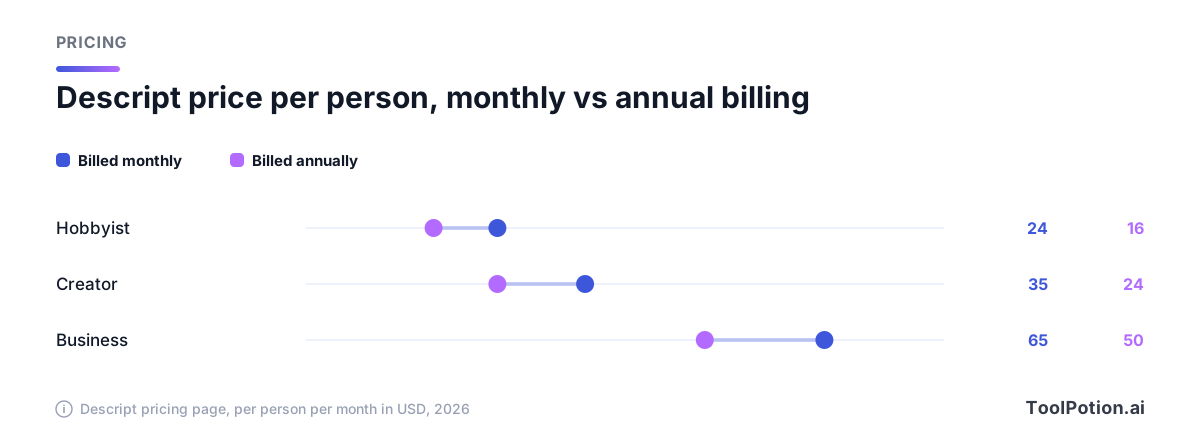
The meters are the part to read carefully. Descript says media hours count uploaded or recorded media whether or not you transcribe it, and AI credits are spent by AI features such as Underlord and Studio Sound. The page doesn't say whether unused hours or credits roll over.
| Descript plan | Media hours | AI credits | Export |
|---|---|---|---|
| Free | 1 hour a month | 100, one time | 720p, watermarked |
| Hobbyist | 10 hours a month | 400 a month | 1080p, no watermark |
| Creator | 30 hours a month | 800 a month | 4K, no watermark |
| Business | 40 hours a month | 1,500 a month | 4K, no watermark |
Descript's free plan also caps cloud storage at 5 GB and uploads at 1 GB per file. Creator and Business can buy top-ups for more media hours and credits.
CapCut is harder to pin down. Its pricing page shows prices in local currency and says the figures are for reference only. Even from a US-set browser it showed prices in Malaysian ringgit, with Pro at MYR 48.9 a month with 1,550 monthly AI credits and 1 TB of storage (CapCut pricing). CapCut's own comparison article lists Pro at $19.99 a month or $179.99 a year for individuals, with a note that prices vary by region and promotions (CapCut). Treat $19.99 as a dollar reference point, not a quote, and confirm the real price in the app.
The more useful difference is the meter. Descript caps media hours and credits. CapCut's pricing page lists AI credits for generation, and its pricing page names no media-hour allowance for editing. If you edit long podcasts every week, that gap decides the monthly math.
Exports, watermarks and where each one runs
Descript's free plan exports at 720p with a watermark, and watermark-free export starts on Hobbyist. Creator adds 4K. The desktop app needs macOS 14 (Sonoma) or Windows 11 and newer (Descript).
CapCut's help page says Pro unlocks 4K at 60 fps, no watermarks and premium templates, and it doesn't spell out what the free tier exports (CapCut). Its site lists desktop and mobile editors plus a browser version, so you can start a rough cut on a phone. That's a real edge for social video that Descript's desktop-first setup doesn't match.
Terms worth reading before you upload
Both companies say you keep your content. Both also take a broad license to it, and the details differ.
Descript's terms, last updated in early 2025, state that Descript claims no ownership of your content and that you own AI inputs and outputs where the law allows. You grant a perpetual, irrevocable, sublicensable license, and Descript may use inputs and outputs to train and improve its models unless you opt out. The terms say its third-party providers are barred from training on them (Descript terms). The terms don't explain how to opt out, so ask support if that matters to you. The Enterprise tier lists opt-out of training as a plan feature.
CapCut's terms, updated in 2026, say "We don't own your User Content," then grant the company and its affiliates a non-exclusive, royalty-free, transferable, sub-licensable, perpetual and worldwide license to operate, develop and provide the services, subject to your platform settings (CapCut terms). The same document says US users are governed by a separate CapCut US Terms of Service instead, and that CapCut may build different versions of the platform for different regions.
The privacy policy says the service is provided by Bytedance Pte. Ltd. in Singapore, stores data on servers in Malaysia, Singapore and the United States, and may use data to train and improve machine learning models (CapCut privacy policy). On availability, TikTok's announcement for its US joint venture says the venture's safeguards also cover CapCut and Lemon8 (TikTok newsroom). CapCut's pages don't set out availability rules for other countries, so check your app store and local rules.
If you handle client footage, interviews or anything under NDA, read both documents and prefer a business plan with written data controls. For your own channel, either license is a normal trade for a free tool.
Pick this if
Choose Descript if you record conversations or tutorials. Editing by transcript beats scrubbing waveforms, the audio cleanup is in the same app, and 4K watermark-free export arrives on Creator. Budget for the media-hour cap, and for Business if you need dubbing.
Choose CapCut if you live in short vertical video, want templates and effects, edit on a phone as often as a laptop, or want to start without paying. Its clip maker, captions and voice cleanup cover the basics of talking-head content too.
Pick neither as a default if you need frame-accurate color or broadcast delivery. Both are made for fast, online-first video, and neither is pitched at finishing a feature film or a broadcast show. For a wider field, see the top AI video editors board, the video editor job board and our roundup of AI video editors.
A hybrid workflow for podcasters who post clips
Nothing says you must choose one. A common split is to record and clean the long episode in Descript, then finish short vertical cuts in a timeline editor with template and effect support. That's an editorial suggestion, not a vendor feature, and it works because both tools export standard files.
Pull the highlights first, since both tools can generate clips. Dedicated clip tools like Choppity, reap and FireCut are in the directory too, and Captions is worth a look for caption-first video. More options for audio-first creators sit on the podcaster board.
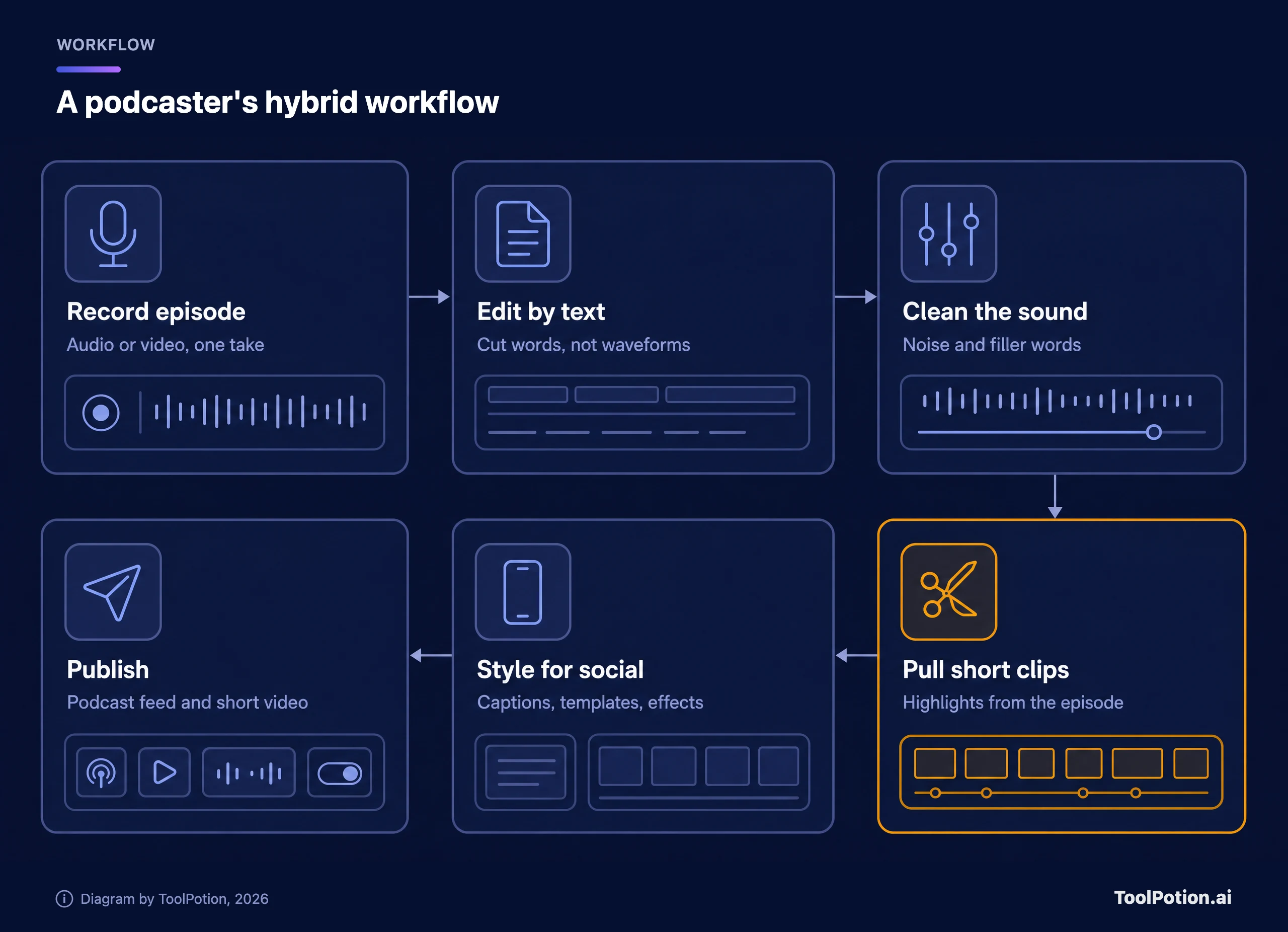
The handoff costs little because you export a finished file from one app and import it into the other. You lose nothing you'd have kept anyway, since the clip is a new project with its own captions and framing. What you gain is two sets of limits instead of one, which matters if Descript's media hours run short during a heavy month.
Keep one rule for the handoff: finish the audio before you clip. Fixing noise once on the full episode is cheaper than fixing it on twelve clips, and it keeps your Descript AI credits for the work that needs them.
Frequently asked questions
Is Descript better than CapCut for podcasts?
For speech-led work, usually yes. Transcript editing and filler word removal are built for it, and Descript Rooms records locally. CapCut can clean audio and make clips, but its editing model isn't text-first.
Does CapCut have a free plan with a watermark?
CapCut has a free tier, and its help page lists no watermarks among what Pro unlocks. The page doesn't describe free-tier exports in detail, so run a test export before you commit to a project.
Does Descript's free plan add a watermark?
Yes. Descript says free exports are 720p with a watermark, and watermark-free export starts on Hobbyist at $16 a month billed annually.
Can either tool dub my video into other languages?
Descript's pricing page says Business translates and dubs in 30+ languages with proofreading. CapCut documents subtitle translation in more than 27 languages and describes dubbing as a separate workflow.
Can I use CapCut in the United States in 2026?
TikTok's joint venture announcement says its safeguards cover CapCut in the US. CapCut's terms say US users fall under a separate CapCut US Terms of Service. Rules in other countries vary, so check your local app store.