If your decks live in a company PowerPoint file, Copilot inside PowerPoint is the safest pick, because nothing gets converted. If you start from a blank page and want a good-looking draft fast, Gamma is the cheapest way in. Beautiful.ai sits between them and suits people who care that every slide stays aligned without nudging boxes.
That's the short version. The longer one depends on three things: what you pay and on what billing basis, how much of the output survives export to PowerPoint, and how much control you get when the AI's first layout is wrong. The pricing pages and the comparison pages the vendors publish about each other don't always agree, so this guide leans on the pricing pages.
This guide compares Gamma, Beautiful.ai and Copilot in PowerPoint for someone who builds decks for work. Prices come from each vendor's pricing page, with the billing basis stated. Claims one vendor makes about another are labeled as claims. If you want the wider field after this, our top 10 AI presentation makers guide is the place to start, the ToolRank presentation makers board ranks 114 tools, and the presentation makers hub lists them all.
What each tool is trying to be
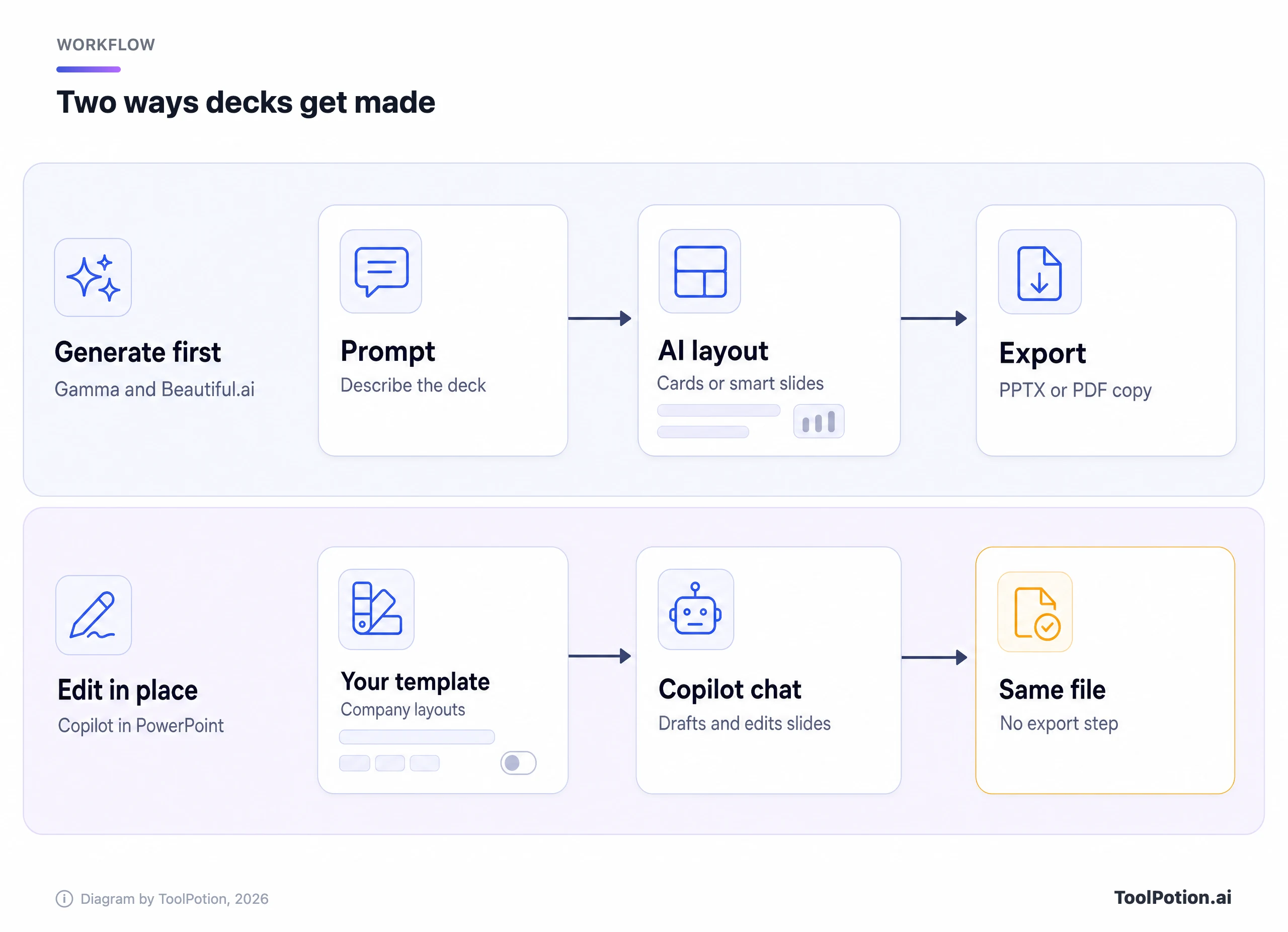
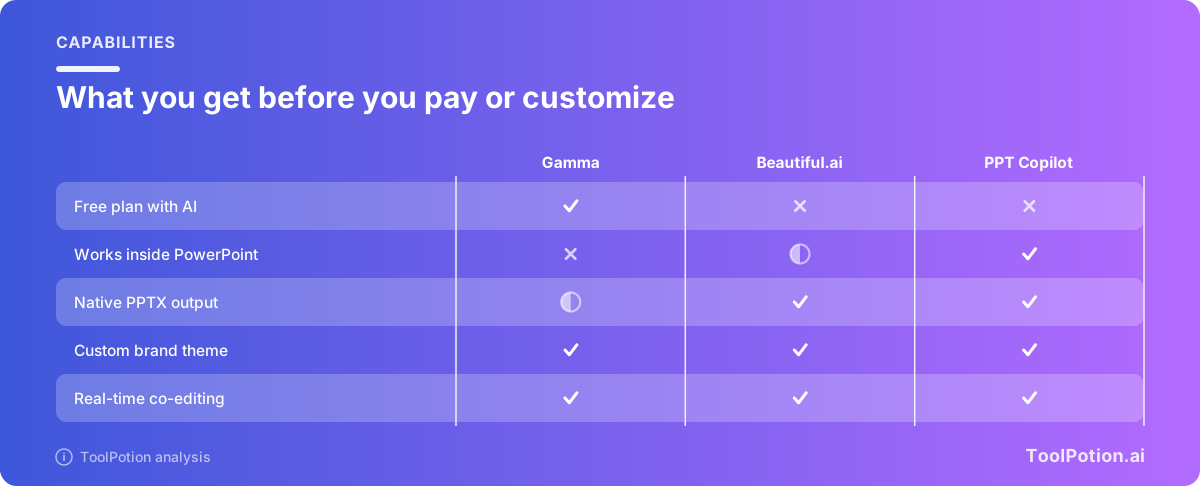
Gamma is a generate-first tool. You describe a topic or paste notes, and it builds a deck from card-based blocks that it also uses for documents and web pages. It has a free plan, a credit meter, and exports to PDF, PPTX, PNG and Google Slides, according to its pricing page.
Beautiful.ai is built around what it calls Smart Slides: layouts that, per the company, "realign, resize, and animate your content automatically" as you edit (Beautiful.ai). It lists over 300 of them. The trade-off is that you work inside the layout's rules rather than dragging things anywhere.
Copilot in PowerPoint is not a separate product. It's an assistant inside the app you may already use, and it drafts, rewrites, reorganizes and adds slides in your own file (Microsoft). That makes it the odd one out in this comparison. The other two are places you build a deck. This one is a helper in the place you already build it. If you're also weighing the standalone assistant, the directory has a page for Microsoft Copilot, and Pitch is another collaboration-first option.
What they cost, and on what basis
Billing basis changes the picture more than the plan names do. Gamma's pricing page defaults to annual billing, where Plus shows $9 per seat per month ($108 a year) and Pro shows $18 ($216 a year). Flip to monthly and they become $12 and $25. Ultra, the 20,000-credit tier, is $90 annual or $100 monthly (Gamma).
Beautiful.ai has the widest gap. Pro is $14.50 a month billed annually, but the one-off monthly option for a single project is $45 (Beautiful.ai pricing). Teams is the murky one. The plan card shows $40 a month for up to three users (or $50 billed monthly), while the summary line and FAQ on the same page say Teams of 2 to 20 pay $40 per user per month billed annually or $50 billed monthly. The page doesn't reconcile the two, so confirm at checkout before you budget.
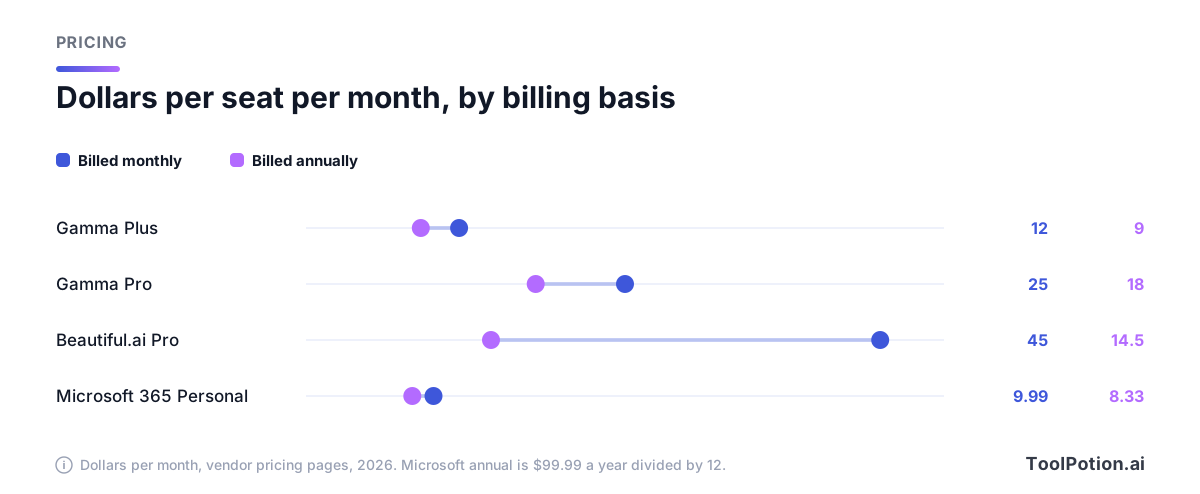
Copilot is where it gets tangled, because you can't buy it alone. On the consumer side, Microsoft 365 Personal is $99.99 a year (or $9.99 monthly), Family is $129.99 a year (or $12.99 monthly, with AI for the subscription owner only), and Premium is $199.99 a year. Personal and up include the desktop apps with Copilot (Microsoft). The free PowerPoint web app lists no AI.
For a business, Microsoft's Copilot pricing page shows Business Standard with Copilot at $23.50 per user per month paid yearly, and Business Premium with Copilot at $32. If you already have an eligible Business plan, the Copilot Business add-on is listed at $18 per user per month paid yearly. Microsoft says that's a discount from $21, available through the end of 2026, annual commitment required, first year only.
| Plan | Annual basis | Monthly basis |
|---|---|---|
| Gamma Plus | $9 per seat | $12 per seat |
| Gamma Pro | $18 per seat | $25 per seat |
| Beautiful.ai Pro | $14.50 | $45 (single project) |
| Microsoft 365 Personal | $99.99 a year | $9.99 |
| Copilot Business add-on | $18 per user, first year | Not listed |
So the cheapest paid road to AI in a deck is Microsoft 365 Personal, if you're a solo user and fine with the Copilot that comes with it. The cheapest road for a team is not obvious, because Gamma bills per seat and Beautiful.ai may bundle three.
Export to PPTX and PDF, and how editable it stays
Gamma exports to PDF, PNG and PPTX, and Google Slides works by uploading the PPTX. Its help center is candid about the limits. Tables export as real, editable tables and speaker notes carry over. Slide masters show up blank in PowerPoint, gradient headings can flatten to a single color, frosted backgrounds use fallback styles, and AI images come through as PNGs that inflate file size. PPTX files embed only the theme's heading and body fonts, so italics can look different.
Free-plan exports also carry a "Made by Gamma" badge, which matters if the deck goes to a client. Paid plans remove it from future exports only.
Beautiful.ai lists PPTX, PDF and image export, and says its PPTX files are "structured to preserve layout as closely as possible" (Beautiful.ai's comparison with Gamma). The same page claims Gamma's PPTX exports "may require additional cleanup." That's a competitor's claim, but Gamma's own help page lists several of the same issues, so it isn't made up. Beautiful.ai also describes a PowerPoint add-in that saves slides straight into your deck (Beautiful.ai).
Copilot has no export problem to solve. The deck is a PPTX from the first prompt, so every slide, master and layout is native. Print to PDF is whatever PowerPoint does. If a colleague will open the file in PowerPoint next week and change it, that's a real advantage.
Brand and template control
All three can hold a brand, but they do it differently. Gamma has a theme builder, and custom branding is listed as a Pro feature, along with analytics, custom domains and API access (Gamma). That means the cheapest paid tier removes the Gamma badge but doesn't unlock your own brand.
Beautiful.ai puts brand styling on every plan. Pro lists custom brand styling, a theme builder for colors, fonts, logos and footers, and one-click theme switching. Teams adds a shared asset library, locked slides and custom branded themes. Enterprise adds configurable brand guardrails (Beautiful.ai pricing).
Copilot's approach is to respect what you already have. Microsoft's guidance is to start from your organization's template, and Copilot then reuses its existing layouts and theme. There's also a Brand Kit with template settings and a Brand Skill (Microsoft Support). If your company already has a locked master deck, this is the least work of the three.
Layout control, and who gives it up
Here the three really differ. Beautiful.ai concedes on its own comparison page that its Smart Slides restrict pixel-level control. It describes Gamma as offering limited manual control inside a card-based system. Neither is a free canvas. PowerPoint is.
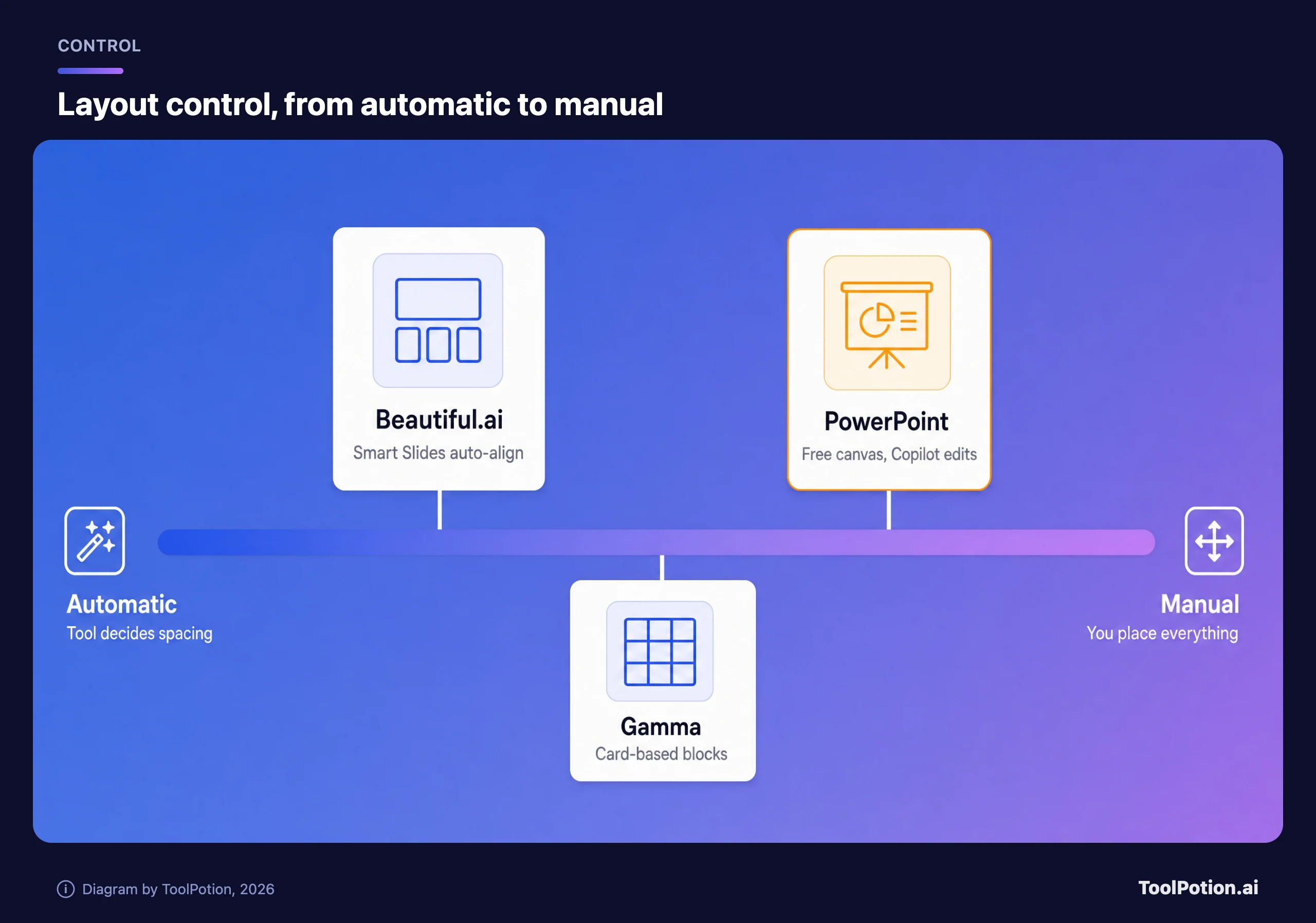
That sets a clean rule. If you hate dragging boxes around, the automatic end is a gift. If you've ever been told "move that logo two pixels left," it's a trap. Beautiful.ai's comparison with Copilot says Copilot's layouts are static and need manual formatting after the AI draft. That's a rival's view, though it matches how the tool works, since Copilot edits a normal slide you can then adjust by hand.
Copilot has its own gaps. Microsoft's support page says controls for presentation length, tone, style and image preferences were rolling out to Frontier and Insider users first, and that referencing files in agent mode was still coming. When it builds from a Word document, it works best with files under 24 MB and does better when the document uses Word styles.
Collaboration
Real-time editing is table stakes now. PowerPoint has sharing and live collaboration even on the free web version. Beautiful.ai puts live co-editing, version control and locked slides on Teams, and Enterprise adds audit logs and SSO. Gamma says on its own site that you can share with a team and collaborate on the same project in real time (Gamma). Beautiful.ai's comparison page argues Gamma surfaces fewer governance controls such as SCIM and audit logs. That's a rival's view.
Gamma's Pro plan adds analytics and advanced sharing. Beautiful.ai's Teams plan lists viewer and slide analytics plus engagement alerts. If knowing who opened your deck matters, either works. If governance matters, Beautiful.ai's Enterprise tier and Microsoft 365's admin tools are the two with named controls.
Where each one struggles
Gamma: credits and slide counts
The free plan gives 400 credits at signup and caps a single prompt at 10 slides. Plus raises that to 100 slides per prompt with 1,000 monthly credits. Gamma says the credits used by an action vary with the AI model and the length or complexity of the generation, so you can't predict a month's worth from a slide count. Heavy weeks with image generation are where the meter bites. Pro gives 4,000 credits.
Beautiful.ai: no free tier and a tight frame
There's no free plan, only a 14-day trial, and the monthly option for one project costs about three times the annual per-month price. On the plus side, the Pro plan lists unlimited AI content generation, so there's no credit meter to watch. The cost is the constrained layouts.
Copilot: licensing and the quality of the first draft
You need the right Microsoft 365 plan, and the right one differs for individuals and businesses. Microsoft also notes that Copilot may not appear at all if your organization's settings block it. It tends to do what the template allows, so a messy template gives a messy deck.
Pick this if
- You make decks in a company PowerPoint file and your company pays for Microsoft 365 with Copilot: use Copilot. Start from the company template so it keeps your layouts.
- You want to go from notes to a presentable draft in minutes, and the deck mostly gets read as a link or PDF: use Gamma, starting on the free plan.
- You present often, hate fixing alignment, and need brand rules enforced across a team: use Beautiful.ai, and budget for annual billing.
- You're a solo consultant on a tight budget who already needs Microsoft 365 for email and files: Personal at $99.99 a year likely covers the job.
- You live on exports into other people's PowerPoint files: weigh the export caveats above before choosing a generate-first tool, or use a converter like CopySlides.
Some people split the work: Gamma or Beautiful.ai for the first draft, then PowerPoint for the final polish. That works, provided you test your own export first. Other tools worth a look include Presentations.AI, which also builds branded decks from documents and URLs, and Canva for design-led decks. PowerPoint add-ins like Decky AI skip the export step the same way Copilot does.
Frequently asked questions
Is Gamma or Beautiful.ai cheaper?
Gamma, at the entry level. Plus is $9 per seat per month billed annually or $12 monthly, against $14.50 annually for Beautiful.ai Pro. Gamma also has a free plan, while Beautiful.ai only offers a 14-day trial.
Can Gamma export to PowerPoint?
Yes. It exports to PPTX, PDF and PNG. Tables and speaker notes stay editable, but slide masters appear blank and some effects fall back to simpler styles, per Gamma's help center.
Do I need a Microsoft 365 subscription for Copilot in PowerPoint?
Yes. Copilot comes with Microsoft 365 Personal, Family or Premium for individuals, with Business plans that include it for companies, or as an add-on to an eligible Business plan. The free PowerPoint web app doesn't list AI.
Which one is best for brand consistency?
Beautiful.ai puts brand styling on every plan and adds locked slides and shared libraries on Teams. Copilot is strongest if you already have a company PowerPoint template, since it reuses that file's layouts.
Can I mix these tools?
You can, and it's common. Draft in Gamma or Beautiful.ai, export to PPTX, finish in PowerPoint. Check a few real slides after export first, because fonts, masters and effects are where the differences show.