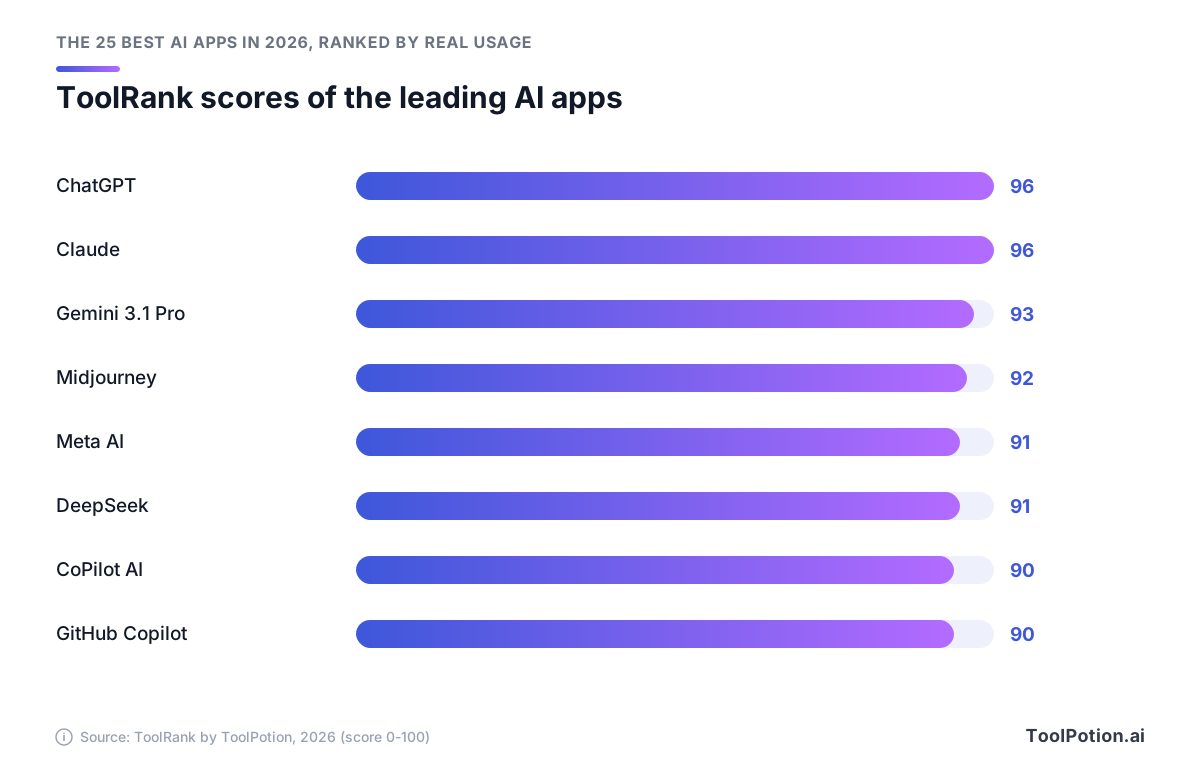
The best AI apps of 2026 start with ChatGPT, #1 on our board with a ToolRank score of 96. Claude is level on 96 at #2, and Gemini 3.1 Pro comes third at 93.
Those ranks come from our leaderboard, which ranks 8,805 AI apps and publishes the top 250. With that many to pick from, choosing is the hard part.
After the leaderboard below, you'll find quick picks for six common needs and short reviews of every top-10 app. For Claude, Midjourney and GitHub Copilot, the reviews include prices from each vendor's own pricing page.
The top 25 AI apps on our 2026 leaderboard
- # 1Top PickClaudeAI AppClaude is Anthropic's AI assistant designed for problem solvers. It provides tools for generating code, visualizing data, and creating content across various platforms, enhancing productivity for users in diverse fields.96ToolRankElite
- # 2Runner UpGoogle GeminiAI AppGoogle Gemini is an AI assistant designed to help with writing, planning, and brainstorming tasks. It leverages generative AI to provide assistance across various creative and organizational needs. Users can interact with Gemini for support in generating ideas and structuring information.94ToolRankElite
- # 3Third PlaceGitHub CopilotAI AppGitHub Copilot is an AI-powered code completion tool that assists developers by suggesting code snippets and functions. It integrates seamlessly with popular code editors, enhancing productivity and reducing development time.93ToolRankElite



- 4Microsoft CopilotAI AppMicrosoft Copilot is an AI companion designed to inform, entertain, and inspire users. It provides advice, feedback, and direct answers to queries. This AI tool aims to enhance productivity and creativity by assisting with various tasks, making it a versatile digital assistant for everyday needs.92ToolRankElite
- 5DeepSeekAI AppDeepSeek AI is your intelligent assistant for coding, content creation, and file reading. It allows document uploads and supports long-context conversations, providing expert help in AI and natural language processing tasks.92ToolRankElite
- 6Meta AIAI AppMeta AI is a versatile AI assistant designed to help users accomplish tasks, generate free AI images, and find answers to questions. It can solve complex math problems, offer feedback on workout form, and review essays, making it a powerful tool for productivity and creativity.91ToolRankElite
- 7MidjourneyAI AppMidjourney is an independent research lab focused on exploring new mediums of thought and enhancing human imagination. With a team of 60, they aim to create beautiful AI models that inspire creativity and reflection on our future.91ToolRankElite
- 8Perplexity — AI Answer EngineAI AppPerplexity is a free AI-powered answer engine that delivers accurate, trusted, and real-time answers to any question, making information retrieval efficient and straightforward.91ToolRankElite
- 9GrokAI AppGrok is an AI assistant from xAI that handles text and voice chat, image and video generation, real-time web search, and coding. It suits anyone wanting a general-purpose AI with live answers from the web and X.91ToolRankElite
- 10Alexa PlusAI AppAlexa Plus is an advanced AI assistant that allows for natural conversations and multitasking. Available for free with Amazon Prime, it enhances your experience across various devices, making everyday tasks easier and more efficient.90ToolRankElite
- 11character.aiAI AppCharacter.ai is an AI chat app that allows users to interact with millions of AI characters. It empowers creativity and storytelling, offering endless adventures and connections within a vibrant community.89ToolRankElite
- 12ElevenLabs AI Voice GeneratorAI AppElevenLabs offers a powerful AI voice generator and voice agents platform. Create lifelike speech, clone voices, and generate audio in over 70 languages. Utilize secure APIs and SDKs for seamless integration into your projects, empowering creators and enterprises with advanced synthetic voice technology.80ToolRankElite
- 13LovableAI AppLovable's AI App Builder empowers users to create apps and websites rapidly through conversational prompts. Describe your vision, and the AI transforms it into a working prototype. Refine with feedback and deploy with a single click, making app development accessible without deep coding expertise.79ToolRankStrong
- 14SunoAI AppSuno is an AI music generator that turns a text prompt or your own lyrics into complete, original songs with vocals, lyrics, and full production in under a minute, across every genre.79ToolRankStrong
- 15RunwayAI AppRunway is an AI-powered platform that enables creators, filmmakers, and artists to generate and edit video, images, and audio. It offers a comprehensive suite of tools designed to enhance creativity and streamline workflows for individuals and teams.78ToolRankStrong
- 16CursorAI AppCursor is an AI coding agent designed to enhance productivity by transforming ideas into code. It automates repetitive tasks and supports software development with advanced features, making it an essential tool for developers aiming to build ambitious software efficiently.78ToolRankStrong
- 17DeepLAI AppDeepL's AI-first platform offers advanced translation for text, files, and voice, alongside an API for seamless integration. Trusted by millions, it ensures accurate, secure, and high-quality multilingual communication, helping businesses enhance global reach and efficiency with specialized language tools.77ToolRankStrong
- 18Bolt AI BuilderAI AppBolt AI Builder empowers you to create websites, apps, and prototypes by simply chatting with AI. It handles complex coding tasks, integrates with design systems, and offers enterprise-grade infrastructure, allowing product builders to focus on their vision and launch products faster.77ToolRankStrong
- 19Leonardo.AiAI AppLeonardo.Ai is a generative AI platform for creating images, art, and video. It offers tools for generating visuals from prompts, animating static ideas, and editing existing media with precision. Designed for creators, marketers, and businesses, it aims to scale content production and enhance creative output.77ToolRankStrong
- 20Gamma AI Presentation MakerAI AppGamma is an AI-powered design partner for creating presentations, websites, social media content, and documents. It requires no coding or design experience, enabling users to generate polished, shareable content quickly from ideas or existing outlines. Export options and real-time collaboration are key benefits.77ToolRankStrong
- 21HeyGenAI AppHeyGen allows users to create realistic AI videos in minutes by inputting text, images, or audio. It offers various features for video generation, including narration, captions, and animations, making it ideal for creators and businesses alike.77ToolRankStrong
- 22Google AssistantAI AppGoogle Assistant is a virtual assistant powered by AI, designed to help users perform tasks, answer questions, and control smart devices. Available on over a billion devices, it integrates with numerous apps to enhance productivity and convenience.76ToolRankStrong
- 23QwenAI AppQwen Studio provides extensive capabilities in chatbot functionality, image and video understanding, image generation, document processing, and web search integration. It is designed for users seeking advanced AI tools for various applications.76ToolRankStrong
- 24LumaAI AppLuma AI is a creative platform designed for video generation and image creation, utilizing advanced AI models. It streamlines creative workflows, enabling users to generate, edit, and refine multimedia content efficiently. Ideal for agencies and brands looking to enhance their creative processes.76ToolRankStrong
- 25HiggsfieldAI AppHiggsfield is an AI-native creative suite for generating images, videos, and voice content from text prompts or references. It is built for creators, marketing agencies, and filmmakers of any skill level.76ToolRankStrong



















How ToolRank works
ToolRank is ToolPotion’s proprietary ranking engine.
It continuously evaluates hundreds of signals across the open web — real traffic and popularity, audience and community strength, authority and longevity, adoption and engagement — processing millions of data points to place every tool where it has earned to be.
Every AI type is measured by its own tailored model: what proves traction for a SaaS app is not what proves it for an open-source framework or a creator channel. Missing a platform never counts against a tool — ToolRank judges the evidence that exists.
No paid placement. No self-reported numbers.
Quick picks: the best AI app for each need
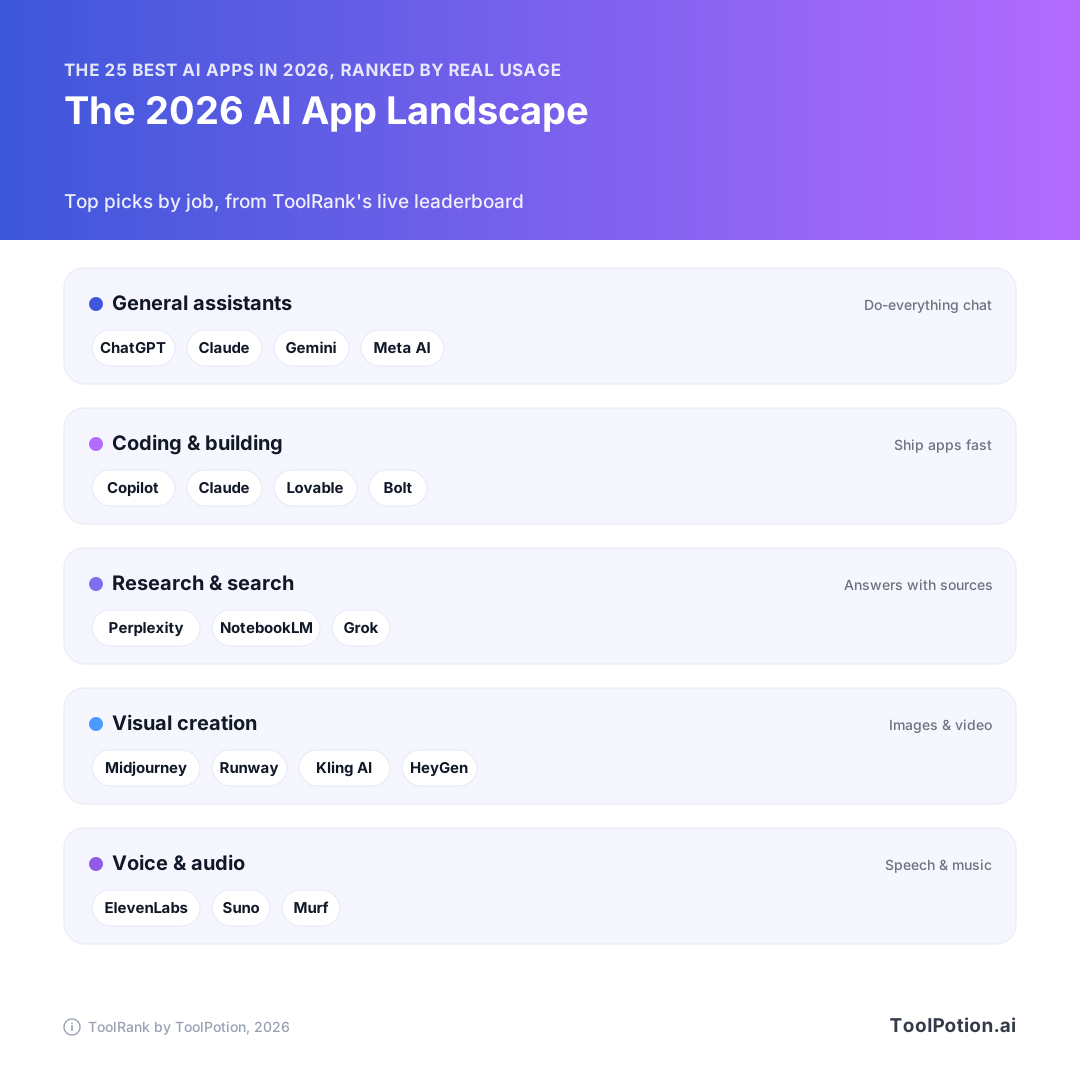
Seven of the top 25 are general-purpose chatbots with overlapping features, so start with the job you need done. Each row below is our pick for that need, with a board fact behind it.
| Need | Pick | 2026 board | Why it's the pick |
|---|---|---|---|
| Best overall | ChatGPT | #1, ToolRank 96, elite | It handles writing, coding, deep research, image generation and voice chat in one app, and it has a free tier. |
| Writing, analysis and long projects | Claude | #2, ToolRank 96, elite | It keeps memory across conversations and runs on web, desktop, iOS and Android. |
| You already live in Google | Gemini 3.1 Pro | #3, ToolRank 93, elite | It works with Google apps and has a 1M-token context window. |
| Free fact lookups | Perplexity | #9, ToolRank 90, elite | It's free to use and returns real-time answers. |
| Images | Midjourney | #4, ToolRank 92, elite | It's the only dedicated image generator in the top 25. |
| Coding | GitHub Copilot | #8, ToolRank 90, elite | It's the only dedicated coding assistant in the top 25. |
If you'll only pay for one subscription, make it ChatGPT or Claude. They're tied at 96, so choose based on the work you do most. Claude is the better fit if your days are spent on long drafts and documents. ChatGPT makes more sense if you also want image generation and voice chat in the same app.
If you won't pay at all, start with ChatGPT's free tier for general use, add Perplexity for real-time lookups and use Meta AI for free images.
Need something more specific, like music or video? Scroll the leaderboard above, or jump to the picks for ranks 11 to 25 further down.
What the 2026 top 25 tells you
Read the leaderboard above as two groups. Ranks 1 to 12 are all elite tier, and ranks 13 to 25 are all strong tier. The gap between the two groups tells you more than any single rank does.
Twelve elite apps, then a clear drop
| Group | Ranks | Tier | ToolRank scores |
|---|---|---|---|
| Top 12 | #1 to #12 | Elite | 96 to 89 |
| Next 13 | #13 to #25 | Strong | 79 to 76 |
ChatGPT and Claude share first place at 96. Below them the scores bunch up. Meta AI and DeepSeek both score 91, and all four apps from #7 to #10 score 90, including GitHub Copilot and Perplexity. A higher rank doesn't always mean a higher score, so treat apps a few places apart as level. Pick between them on fit.
Then the scores drop. Alexa Plus is the last elite app, at #12 with 89, and ElevenLabs Voice Generator is the first strong-tier app, at #13 with 79. That 10-point gap is the real dividing line on the 2026 board. No two neighboring apps inside either group are more than 3 points apart.
Strong tier is still rare company. The average ToolRank across the board is 62.9, so Higgsfield, at #25 with a score of 76, is more than 13 points above it.
About ToolRank
ToolRank is ToolPotion's own ranking of AI tools, and it's kept current throughout the year. Placement can't be bought. You can browse every ToolRank leaderboard, including boards for students, marketers and video editors.
What changed for AI apps in 2026
Spending tripled, and most U.S. AI users now pay
Consumer AI spending more than tripled, from $12 billion in 2025 to $40 billion in 2026. In the U.S., 55% of AI users now pay for at least one AI product, up from 3% a year earlier (Menlo Ventures).
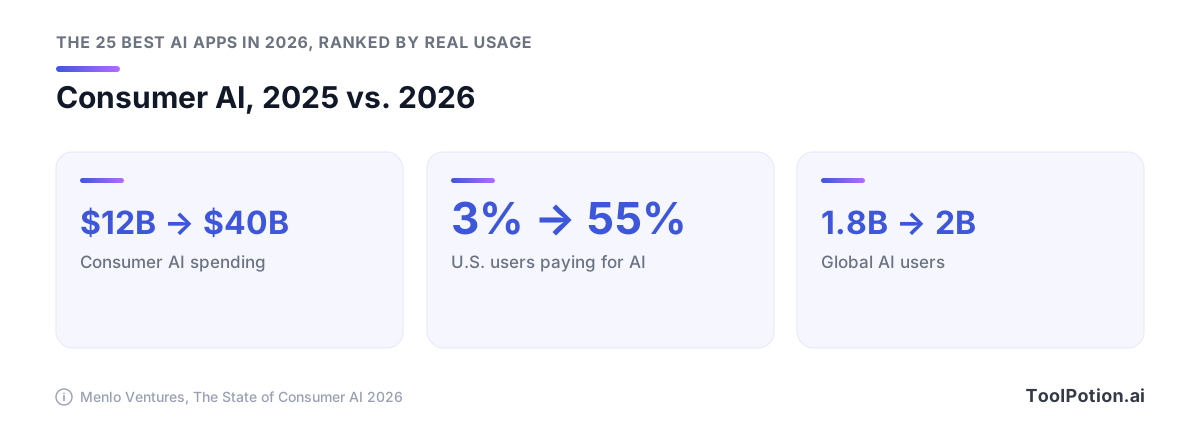
The number of users grew much more slowly. Global AI users rose from 1.8 billion to 2 billion, an 11% gain. The spending is also lopsided: the top 14% of spenders, who pay $100 or more a month, account for 60% of it (Menlo Ventures). If your AI bills top $100 a month, you're in that small group.
Half of U.S. adults have used an AI chatbot, and 44% have used ChatGPT (Pew Research Center). OpenAI's reach shows up in its own numbers too. ChatGPT had 900 million weekly active users in February 2026, up from 400 million a year earlier (TechCrunch).
Gemini passed 1 billion monthly users
Google's Gemini app crossed 1 billion monthly active users on August 11, 2026, up from 400 million a year earlier (TechCrunch).
That's a monthly count, so keep it apart from ChatGPT's weekly figure. Someone who opens an app once in 30 days counts toward a monthly total but may never show up in a weekly one.
The model improved in the same year. Gemini 3.1 Pro launched on February 19, 2026 with three thinking levels, and it brought Deep Think capabilities, which had been Ultra-only, into the standard model. It scored 77.1% on ARC-AGI-2, more than double Gemini 3 Pro's score (Google). It's the only Google app in the top 12.
Assistants started finishing multi-step tasks
Meta's update is the clearest example. Muse Spark 1.1, announced July 24, 2026, let Meta AI make plans, connect to email and calendar, draft slides and complete multi-step tasks without re-prompting (Meta). The month before, Meta added AI Mode to Facebook. It answers plain-language questions with summaries built from public posts, Groups and Reels (TechCrunch).
When you compare assistants now, ask what each one can finish by itself and which of your accounts it can connect to.
Pricing moved to credits and usage tiers
GitHub Copilot moved every plan to usage-based AI Credits on June 1, 2026. One credit costs $0.01, and the number of credits a request uses depends on the model and the tokens. Code completions and next-edit suggestions stay free and unlimited on all paid plans (GitHub Docs). If you mostly use autocomplete, you won't use up credits. If you chat with pricier models, keep an eye on your balance.
The big AI assistants, reviewed
Pick the assistant that fits the apps you already use. The seven below are the general-purpose assistants in the top 10, and all of them are elite tier. They mostly differ in which apps they connect to and how much use you get before you hit a limit.
ChatGPT: best all-rounder
OpenAI's ChatGPT puts writing and brainstorming help, image generation with a thinking mode for complex prompts, and deep research that turns web sources into structured reports in one app. Voice chats can include video, and higher tiers add more Codex access for coding. More than 50 million consumers and over 9 million business users pay for it (TechCrunch).
All those modes take a while to learn, and it can feel like too much when you only want a quick answer.
Claude: best for writing, analysis and long projects
Anthropic's Claude writes and edits content, searches the web, and generates code and data visualizations. It also remembers context across conversations, so it's a good fit for a report or codebase you'll keep coming back to over weeks. You can use it on web, desktop, iOS and Android.
Pro costs $17/month billed annually or $20/month billed monthly. Max costs $100/month for 5x Pro usage or $200/month for 20x, and limits apply per 5-hour session (Claude pricing). A long day of drafting or coding can use up your Pro allowance, so if that happens most days, move to the $100 Max tier instead of paying for a second assistant.
Gemini 3.1 Pro: best for Google users and deep research
Google's Gemini 3.1 Pro has a 1M-token context window that takes very long files in one go, and Deep Research writes full reports. It connects to Google's apps, so it can summarize your email. It also makes video with Veo 3.1 Lite and comes with 5 TB of cloud storage.
If your email and files live outside Google, you lose most of what makes it stand out.
Meta AI: best free option for images and everyday help
Meta AI (#5, 91) makes images from text prompts for free, works through complex math problems, reviews essays and answers questions across topics. Since the Muse Spark update, it can also plan multi-step tasks and connect to your email and calendar.
DeepSeek: best for long documents and coding help
The DeepSeek chatbot app launched on January 10, 2025 (DeepSeek), and in 2026 it's #6 with a ToolRank of 91.
It's built for working with text. You can upload documents and keep long-context conversations going, which makes it useful for long reports you need explained or code you're trying to debug. Its board listing doesn't include image or voice tools, so run it as a second app next to a broader assistant.
CoPilot AI: an assistant with Microsoft 365 integration
At #7 with a ToolRank of 90, CoPilot AI drafts content and generates images, and it can help with research. It's on desktop and mobile as well as the web.
According to its listing, it integrates with Microsoft 365 apps. That makes it the first one to check if your documents and email already live there. Outside Microsoft 365, it has less to set it apart from the two apps at the top of the board. Don't confuse it with GitHub Copilot (#8), a separate coding assistant, and check the tool page before you subscribe.
Grok: best for following X and breaking news
xAI's Grok rounds out the top 10 with a ToolRank of 90. It pulls live answers from the web and from X, which helps when you're following breaking news, though posts on X can be wrong, so check the sources behind an answer before you repeat it. It also handles text and voice chat, generates and edits images, makes video, and writes and debugs code.
The specialists in the top 10, reviewed
Three apps in the top 10 each do one job. If images or code fill most of your week, pay for the specialist before you add a second chatbot subscription.
Midjourney: best for image generation
Midjourney is #4 with a ToolRank of 92, the highest-ranked app in the top 10 that isn't a chatbot. It's built for high-quality images with personalization, so use it when image quality matters more than having pictures inside a chat app.
Skip Basic. Plans are Basic at $10, Standard at $30, Pro at $60 and Mega at $120 a month, with 20% off if you pay yearly and 3.3, 15, 30 and 60 fast GPU hours. Unlimited Relax Mode starts at Standard, and only Pro and Mega include Stealth Mode, which keeps images private when you're doing client work (Midjourney docs). If you get paid for design work, budget $60 a month.
GitHub Copilot: best for developers
GitHub Copilot ranks #8 with a ToolRank of 90. It suggests code and whole functions as you type in editors like Visual Studio Code, and it works with many programming languages.
The Free plan gives you 50 requests a month. Pro costs $10 and includes $15 in AI Credits. Pro+ costs $39 and includes $70 in credits. Business is $19 per user and Enterprise is $39 per seat (GitHub Docs). If you mostly accept inline suggestions, which don't use credits, Pro at $10 is enough.
Perplexity: best for free fact lookups
Perplexity is #9, with a ToolRank of 90. It's free to use, it answers questions with real-time information, and it connects to other services.
Open it when you need to look up a fact, check a claim or get a quick read on a topic. For long drafts or creative projects, go back to Claude or ChatGPT.
Ranks 11–25: more of the best AI apps of 2026 for specific jobs
After the top 10, the board is mostly specialists. Of the 15 apps from #11 to #25, only two are general helpers, and both are voice assistants for your home and phone. Pick from this half by task. From #13 down, the scores sit close together: the 13 strong-tier apps all score between 76 and 79.
Characters, voice and music
character.ai is #11 with a ToolRank of 89 and elite tier. You can chat with millions of AI characters or create your own. It's built for storytelling and creative writing, so it won't help much with work tasks.
The ElevenLabs voice generator is #13 with a score of 79. It makes lifelike speech in over 5,000 voices and 70+ languages, and it can clone and dub voices. Only clone a voice if its owner has agreed, and check your local law before you publish anything.
If you want music, pick Suno (#14, 79). Give it a text prompt or your own lyrics, and in under a minute you'll get a full song with vocals and production.
Video and AI avatars
Video has more apps in the top 25 than any other creative category, with five. Try Runway first. It's #16 with a score of 78, the highest of the five, and it both generates and edits video.
The other four each score 76. HeyGen (#22) makes realistic AI videos from text or images, with narration and captions. Kling AI (#23) turns prompts into video with native audio and characters that stay consistent from shot to shot. Luma AI (#24) is built for agencies and brands, and Higgsfield (#25) is a creative suite that makes images, video and voice from prompts.
Building apps, slides and research notes
Lovable (#15, 79) and Bolt (#18, 77) both build apps and websites while you chat with them. Lovable turns your description into a working prototype and deploys it in one click. Bolt is aimed at product teams, with support for design systems. If you're building a prototype on your own, start with Lovable.
The Gamma presentation maker (#20, 77) turns an idea or outline into slides or documents, and you don't need any design skills. NotebookLM (#21, 76) is a personal research assistant that helps you learn a new topic.
Home assistants and translation
Alexa Plus is #12 with a ToolRank of 89. That's tied with character.ai for the highest score in this half. It holds natural conversations and can handle several requests at once on Echo devices, and Prime members in the U.S. get it free (About Amazon).
Google Assistant (#19, 77) answers questions and controls smart devices, and it runs on over a billion devices. If your smart home already runs on Google, stay with it. If your home already has Echo speakers, get Alexa Plus.
For translation, DeepL (#17, 77) is the only translator in the top 25. It translates text and files, and developers can add it to their own apps through its API.
How to choose the right AI app for you
Pick one general assistant first, and add a specialist only when a specific job keeps needing more than that assistant can do. For the ChatGPT-or-Claude decision and a free setup, use the quick picks at the top.
You can also choose by role. There are separate boards for the best AI tools for students, AI tools for content creators, top AI tools for marketers and AI tools for business owners.
If you already use Google, Microsoft, Meta or Amazon
Use the assistant from the company whose apps or devices you already use.
| You already use | Main pick | 2026 rank and ToolRank | Why it fits |
|---|---|---|---|
| Google apps | Gemini 3.1 Pro | #3, 93 | Works with Google apps and has a 1M-token context window. Add NotebookLM (#21, 76) for research notes. |
| Microsoft 365 | CoPilot AI | #7, 90 | Lists integration with Microsoft 365 apps and runs on web, desktop and mobile. |
| Meta's apps | Meta AI | #5, 91 | Free image generation, plus multi-step tasks across email and calendar. |
| Amazon Prime | Alexa Plus | #12, 89 | Free with Prime in the U.S. and works on Echo devices. |
If you make images, video or audio
Get Midjourney for images and Runway for video, or Kling AI if you need native audio and consistent characters from shot to shot. For voice work, use ElevenLabs. For full songs with vocals, use Suno.
If you code or build apps
If you write code yourself, get GitHub Copilot.
If you'd rather describe an app and have AI build it, Lovable scores higher at 79, and Bolt (77) is the one to try if you need to work within an existing design system. Build the same small project in each and keep the one you'd rather keep editing.
Worth a look: ranks 26 to 40
Ranks 26 to 40 on the 2026 board are mostly single-job tools. Check them if one task keeps coming up in your week.
For writing and meetings, QuillBot (#28) paraphrases your writing and checks grammar. Otter.ai (#30) is a meeting notetaker with real-time transcription and automated summaries. Descript (#33) lets you edit video and audio by editing text.
Creators get two more options. Synthesia (#36) turns text into business videos presented by AI avatars, and Udio (#37) makes songs from text prompts.
Yuanbao (#26) is Tencent's all-in-one assistant, built on its Hy3 model for document processing and writing in different styles. OpenEvidence (#34) gives evidence-based medical answers to healthcare professionals. It's a reference tool for clinicians and doesn't replace advice from your own doctor.
To keep going past #40, the full board lists all 250 ranked apps, or you can browse every AI app in our directory and search by task.
Frequently asked questions
What is the best AI app in 2026?
ChatGPT. It's #1 on the 2026 Top 250 AI Apps board with a ToolRank score of 96 (elite tier). Claude matches that 96 at #2, and Gemini 3.1 Pro is #3 at 93.
Is ChatGPT or Claude better for everyday use?
They're tied at 96 in 2026, so it depends on your work. Claude suits days spent writing, coding or working with data, and ChatGPT suits you if you also want image generation and voice chats with video.
What is the best free AI app?
ChatGPT's free tier covers general use. Perplexity is free for real-time answers, and Meta AI makes images from text prompts at no cost. Developers get 50 requests a month free on GitHub Copilot.
Which AI app is best for making images?
Midjourney, #4 on the 2026 board with a ToolRank score of 92. We'd pick Standard at $30 a month, the cheapest plan with unlimited Relax Mode, and client work that has to stay private needs Pro or Mega (Midjourney docs). If you don't want to pay anything, Meta AI generates images for free.
Are paid AI app subscriptions worth it in 2026?
We'd start with one paid plan. Paying is common now: 55% of U.S. AI users paid for at least one AI product in 2026, up from 3% in 2025. Choose the plan that matches your main work, such as Claude Pro for writing or GitHub Copilot Pro for code, and add a second only when that plan keeps falling short.
How many people use AI apps in 2026?
About 2 billion people use AI in 2026, up 11% from 1.8 billion in 2025. ChatGPT's weekly users and Gemini's monthly users are in the 2026 changes section. ToolRank ranks 8,805 AI apps in 2026 and publishes the top 250.