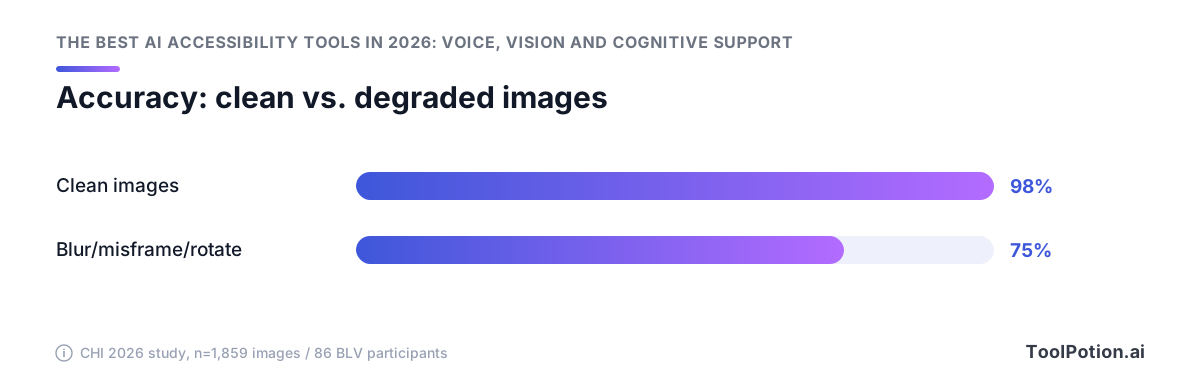
The best AI vision model tested in 2026 got 98% of product images right when the photo was clean, and 75% once ordinary blur, rotation or misframing showed up (CHI 2026 paper). That gap decides everything below. It's why blind users install Be My AI and Seeing AI and still keep a human on speed dial, and why only 8% of blind and low-vision people rate AI descriptions "extremely accurate" while 79% use them anyway (AFB).
Captions are worse off. Just 4% of deaf and hard-of-hearing users call AI caption accuracy extremely accurate, and 64% still prefer human captioners (AFB).
So this guide does what the roundups don't: verified September 2026 prices, an honest map of what costs $0, and what actually breaks.
The accuracy ceiling every AI accessibility tool runs into
Every tool in this roundup shares one limit, and it's the number you should evaluate them against: AI description works well enough to use every day, and not well enough to trust without checking. Knowing how big that gap is tells you when free software covers you and when you still pay a human.
98% on clean images, 75% on real ones
A CHI 2026 Honorable Mention paper put numbers on it. The best vision-language model tested captioned product images with 98% accuracy when the photo had no quality problems, then dropped to 75% overall once ordinary blur, misframing or rotation showed up (arXiv). That study ran on 1,859 annotated product images with 86 blind and low-vision participants, so the degraded condition isn't a stress test. It's how a blind photographer's photos usually come out, because you can't frame what you can't see.
A quarter of your grocery labels come back wrong, and the model won't tell you which quarter.
What blind and deaf users actually rate the output
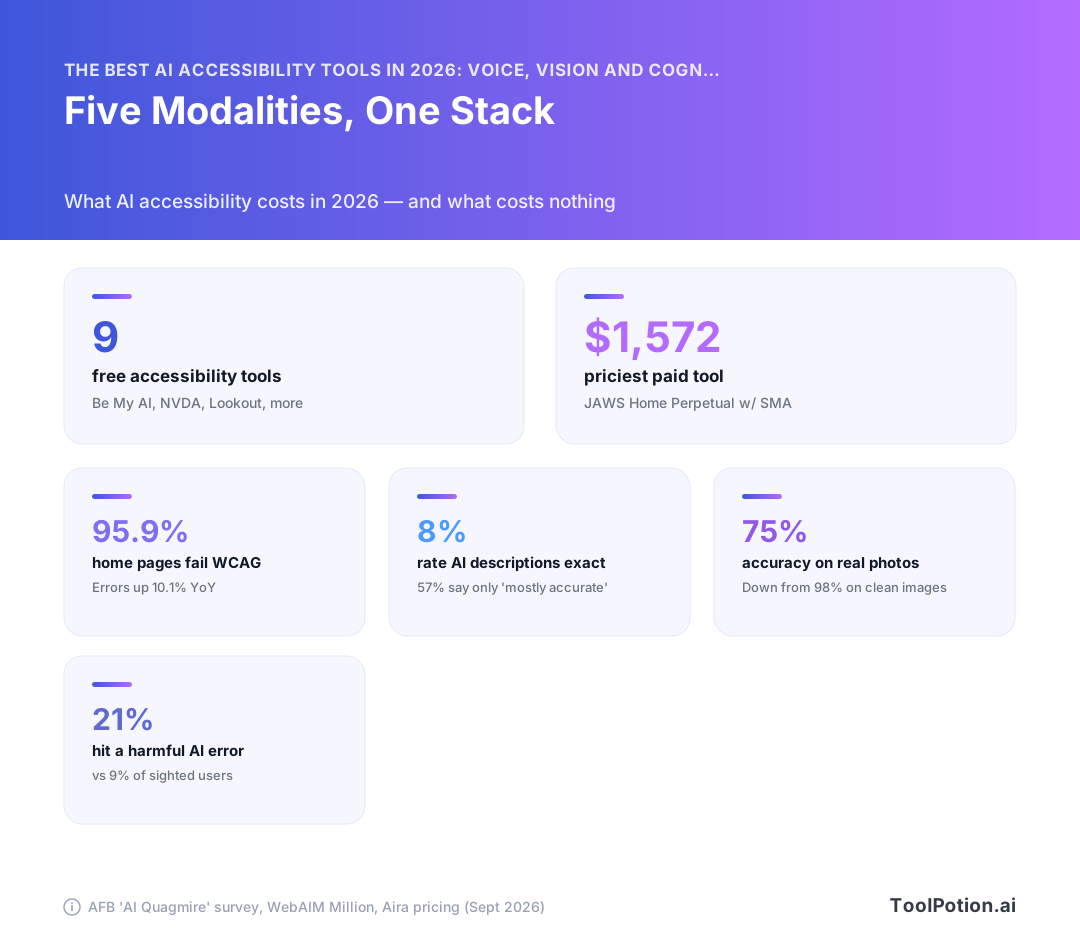
The American Foundation for the Blind's March 2026 report found 79% of blind and low-vision respondents use AI visual descriptions, 51% of them daily, and 93% use them to read text (AFB). Adoption is settled. Confidence isn't: only 8% called the descriptions extremely accurate, 57% said mostly accurate, and 21% reported hitting a harmful AI mistake, against 9% of sighted users, with examples running to tax filing errors and dangerous medication instructions (AFB).
Captions are worse. Among 842 caption users, 4% rated AI caption accuracy extremely accurate and 64% said they'd rather have human captioners (AFB).
Why the gap decides what you should pay for
Use the free tier as your default and treat the 25-point drop as your escalation rule. Anything with a consequence attached (medication, legal mail, money, a stranger's face at your door) goes to a human on the same tool you already have open. That's the split we apply to every pick below, and it's the one thing most of the wider AI app landscape we track never states out loud.
AI vision and image description: Be My Eyes, Seeing AI, Lookout, Aira
Install Be My AI first. It's free, it's inside the app that already has nearly a million blind and low-vision users, and since 6 July 2026 it runs on the desktop too (Be My Eyes).
Be My AI and the free desktop expansion
Be My Eyes launched Be My Eyes for Mac and Be My Eyes Workplace for macOS at the National Federation of the Blind convention in Austin, and the personal version costs nothing (Be My Eyes). That matters because desktop is where the expensive text lives: PDFs, scanned invoices, inaccessible dashboards. The failure mode is the one from the accuracy ceiling above. Ask it to read a medication label and it will read a medication label, confidently, whether or not it got the dosage right.
Meta glasses, Ally Solos and hands-free calling
On 11 March 2026, Be My Eyes and Meta put accessibility calling on Ray-Ban Meta and Oakley Meta glasses. You say "Hey Meta, Be My Eyes with [name]" to reach a trusted contact or a trained rep at Tesco, Hilton, Sony, Amtrak, NatWest or Zain, and all of it is free to the glasses user (Be My Eyes). Hands stay on your cane or your cart.
You're still paying for the hardware, of course. Ally Solos glasses run $699, which is the cheapest entry into always-on wearable description this year.
Google Lookout and Guided vision
Android users get Lookout free, and the September 2026 Android Drop added Guided vision, which pipes your camera into Gemini Live and talks you through reframing, panning and centering the shot. It works on Android 9 and later wherever Gemini is available, triggered from Accessibility shortcuts, the TalkBack menu or Gemini App Settings (Google). The framing coaching is the interesting part, since bad framing is exactly what drops model accuracy off a cliff.
Google's own warning deserves repeating: Guided vision "can make mistakes" and is "not intended as a medical device, mobility aid, or substitute for safe-travel guides" (Google). Don't navigate with it. That caveat covers every tool in this section, whatever the marketing says.
When you still want a human: Aira's interpreter minutes
Aira's Access AI and Verify tiers are free, and paid plans start at $26 a month for 20 minutes with a trained human interpreter (Aira). Twenty minutes sounds thin until you use it the way it's meant to be used: as the escalation path when the AI hedges, garbles a number, or describes a form you can't afford to get wrong. Budget it for tax paperwork, prescriptions and unfamiliar airports, not for reading your mail.
So the shortlist is Be My AI plus Lookout or Seeing AI on your phone (all $0), Be My Eyes for Mac on the desktop, and $26 a month held in reserve for a human. More options in our AI mobile apps directory, though most of them aren't built for this.
Live captioning for deaf and hard-of-hearing users
Captioning is where AI accessibility is weakest, and deaf users say so plainly. Among 842 caption users in the American Foundation for the Blind's 2026 survey, just 4% called AI caption accuracy "extremely accurate" and 64% said they'd rather have human-generated captions (AFB). Compare that to the 8% of blind users who rate AI descriptions extremely accurate. Both numbers are low. The caption number is half.
Ava, Otter and the $15–$17/month tier
Two products define the paid consumer tier and they're priced within $2 of each other. Ava Community runs $14.99/mo and is built for face-to-face conversation, with speaker labels. Otter Pro is $16.99/mo and is built for meetings you want a searchable transcript of afterward (our directory tracks 245 real-time transcription and translation tools, and most of them are Otter with a different logo).
Otter's free tier gives you 300 minutes a month, which covers a few classes or standups and nothing more. If you're picking one and your use case is a live conversation in a noisy room, take Ava. If it's a scheduled Zoom call you'll want to re-read, take Otter.
Apple's on-device subtitles for any uncaptioned video
The free option got better in May 2026. Apple's on-device speech recognition now auto-generates subtitles for any uncaptioned video on iPhone, iPad, Mac, Apple TV and Vision Pro, and the same release added a FaceTime sign language interpreter API and Name Recognition across 50+ languages (Apple). It runs locally, so it works on the untranscribed lecture recording a colleague emailed you. For personal media and one-way video, this replaces a paid subscription outright.
Why 64% still prefer a human captioner
AI captions fail on the things that matter most in a room: crosstalk, accents, proper nouns, technical jargon, and anyone speaking over anyone else. 54% of caption users rely on captions daily (AFB), so those failures land constantly rather than occasionally.
Book CART when getting a word wrong has a cost you can name. Medical appointments, legal proceedings, job interviews, your own performance review, any class you're being graded in. Use the $15 app for standups, casual calls and recorded video.
Voice control and speech input when your speech or hands don't cooperate
If you drive a computer by voice, 2026 was the year the memorized command grid started to die. You used to have to know the exact button label, or turn on numbered overlays and read them out. Now you can describe what you want.
Apple's natural-language Voice Control
Voice Control now takes descriptions of on-screen elements instead of exact control names. You can say "tap the guide about best restaurants" or "tap the purple folder" and it works out the target (Apple). The useful side effect: it routes around apps whose developers never wrote accessibility labels, which is most of them. It's free with the OS, and it's the first thing to try before you spend anything.
Talon: free public release vs the ~$25/month beta
Talon's public release costs nothing and its beta channel runs about $25/month (our directory pricing check, September 2026). Pay for the beta if you're doing full-time hands-free coding and want current features. For everything else the free build is enough, and you can find more general AI assistants that take voice commands if you only need dictation and app launching rather than a full scripting layer.
Voiceitt for non-standard speech
Mainstream speech recognition fails on dysarthric, slurred or otherwise atypical speech, which means every free option above is closed to you. Voiceitt trains on your voice specifically and costs $49.99/month or $600/year (Voiceitt). That's the steepest per-user price in this whole roundup, and it's still the right buy if standard ASR can't parse you, because the alternative isn't a cheaper tool. It's no tool.
Eye tracking that drives a wheelchair
Vision Pro eye tracking can now control power wheelchairs through the Tolt and LUCI alternative drive systems in the U.S., over Bluetooth or a wired connection (Apple). No mainstream headset has done that before. The headset price keeps this niche for now, but the direction matters: gaze input is moving from menu navigation to physical mobility.
Reading and cognitive support: screen readers, summarizers and task breakers
The screen reader you use in 2026 is the same one you used in 2020, with a model bolted on the side. That's the pattern across this whole layer. Nothing has replaced the reading stack; AI has been added as a command inside it, usually as an extra keystroke you press when the built-in text output isn't enough.
NVDA 2026.2 and the AI Content Describer add-on
NVDA is free and open source, and 2026.2 shipped as the current stable release. Cost of entry: nothing. Compare that to JAWS Home Annual at $104.50, or $1,572 for the perpetual license with SMA (pricing verified September 2026). For most people reading documents and browsing, that difference buys you very little.
The AI piece isn't in the core. It's an add-on: AI Content Describer sends the focused image, screenshot or camera frame to a vision model and reads the description back inside NVDA. You bring your own API key, so the running cost is per-request instead of per-month. It handles the case NVDA can't: an unlabeled image, which is 16.2% of all images on the top million home pages (WebAIM).
Narrator plus Copilot on Windows
Narrator has image description built in and Copilot sitting next to it (Microsoft), and it costs nothing because it's already installed. If you're on Windows and new to screen readers, start here, then move to NVDA when you hit the limits.
Speechify, goblin.tools and the ADHD/dyslexia stack
goblin.tools is free and splits a task you're stuck on into steps. Speechify's free tier reads text aloud; Premium runs $29/month (pricing verified September 2026), which is real money for text-to-speech your OS already does. Pay it for the voice quality, not the feature list. For the summarizing half of this stack, general AI summarizers do the same job at lower prices, and our directory lists 229 of them.
AAC gets its first real AI release, cautiously
Augmentative and alternative communication is the one modality where vendors had every reason to move slowly, and did. AAC apps speak for someone. A wrong prediction in a screen reader wastes ten seconds. A wrong prediction in an AAC app puts words in a nonspeaking person's mouth, in front of their family, their teacher or their doctor.
PRC-Saltillo's four apps: off by default, consent-gated
PRC-Saltillo shipped its first AI features across four iOS AAC apps in 2026, and the shipping decisions matter more than the features: the AI is disabled by default and gated behind explicit consent (PRC-Saltillo). You turn it on. Nobody turns it on for you, and no update flips it on quietly during a school year.
That's the right default, and it's worth understanding why it isn't timidity. AAC users are disproportionately minors and disproportionately supported by people who configure the device on their behalf. Defaults-off is the only setting that keeps that choice with the person doing the talking.
AssistiveWare PolyPredix
AssistiveWare's PolyPredix takes the same shape from the other end: a prediction model built for how AAC users actually construct sentences rather than a general text model dropped into a grid (AssistiveWare). Prediction is the safest place to put a model in AAC. It suggests, and the user still picks every word.
What $249.99 one-time still buys
Proloquo2Go remains $249.99 as a one-time purchase (verified September 2026). Compared to the rest of this roundup, that's the only place where a four-figure-adjacent price looks cheap over a decade of use. Voiceitt runs $49.99/mo, or $600/yr, which passes $249.99 inside of five months and keeps going.
If you're buying AAC in 2026, buy the vocabulary system and the support, then decide about the AI later. The AI is an option on top. It's priced that way, and it's defaulted that way.
Do mainstream built-ins make dedicated assistive tech redundant?
Mostly, for everyday tasks. If you're buying in 2026, start with what's already on your phone and spend money only where the free tier keeps failing you. That's a real change from 2023, when the free tier barely existed.
What Apple, Google and Microsoft now do for free
Apple's Image Explorer sits inside VoiceOver and describes photos, scanned bills and personal records systemwide, and Live Recognition lets you press the Action button, ask about what the camera sees, then ask follow-ups in your own words (Apple). Google's answer arrived in the September 2026 Android Drop: Guided vision pipes your camera into Gemini Live and talks you through reframing, panning and centering the shot, on anything running Android 9 or later (Google). Neither costs anything extra.
Guided vision's coaching matters more than the descriptions do. Bad framing is what breaks these models, so a tool that fixes the input beats one that apologizes for it.
Where the $699–$4,500 hardware still wins
Three cases, and they're narrow. Hands-free capture, where glasses beat holding a phone up: saying "Hey Meta, Be My Eyes with [name]" reaches a trusted contact or a trained rep at Tesco, Hilton, Amtrak or NatWest at no cost to the glasses user (Be My Eyes). Anything high-stakes, like medication or tax documents, where you want a human on the line. And control tasks the built-ins don't touch, such as Vision Pro eye tracking driving a Tolt or LUCI power wheelchair over Bluetooth (Apple).
For everything else, the phone in your pocket is the first try and the paid tool is the appeal. Expect that split to sharpen as more assistive features ship as AI agents rather than standalone apps.
The safety caveat vendors print themselves
Google says Guided vision "can make mistakes" and is "not intended as a medical device, mobility aid, or substitute for safe-travel guides" (Google). Read that as a category-wide disclaimer, not a Google one. No built-in on this list is rated for street crossings or obstacle detection, and none of them will tell you when they're wrong.
What everything costs in September 2026 — and what is genuinely free
You can build a working stack for $0 on hardware you already own. Be My AI, Google Lookout, NVDA 2026.2, Aira's Access AI, the Talon public release, Otter's 300 free minutes a month and goblin.tools all cost nothing, alongside the Apple, Google and Microsoft built-ins (verified pricing, September 2026).
The $0 tier is bigger than the paid one
That wasn't true three years ago. Free used to mean a stripped demo, and now it means the same model the paid tier calls.
Start there, use it for a month, and note where it breaks. If you never hit a wall, you're done spending.
Where the money actually goes: hardware and human minutes
Subscriptions cluster in a narrow band. Ava Community runs $14.99/mo, Otter Pro $16.99/mo, Speechify Premium $29/mo, Voiceitt $49.99/mo or $600/yr, and JAWS Home Annual $104.50 (Aira). One-time buys sit higher: Proloquo2Go is $249.99, Ally Solos glasses $699, JAWS Home Perpetual with SMA $1,572.
Aira is the one worth paying for, from $26/mo for 20 interpreter minutes (Aira). You're buying a trained human, which is exactly the thing the free tier can't fake when a description has to be right. Speech access is second: Voiceitt at $600/yr is a lot until you compare it to not being understood. Everything else on the paid list has a free substitute that's close enough for most weeks. If you want to compare candidates yourself, you can browse more assistive mobile apps in our directory.
Funding, insurance and the global access gap
All of this pricing talk assumes you have a smartphone and a data plan. More than 2.5bn people need at least one assistive product and roughly a billion are denied access, with access rates near 3% in some low-income countries against 90% in some high-income ones (WHO, 2022 base data).
Free apps don't close that. They move the cost to a $600 handset.
What AI still can't fix: broken websites and overlay snake oil
95.9% of home pages still fail WCAG
The web got worse in 2026. WebAIM's annual scan of the top one million home pages found 95.9% with detected WCAG 2 failures, up from 94.8% the year before, at an average of 56.1 errors per page (WebAIM Million). That error count rose 10.1% year over year, which reverses the slow improvement of the previous few reports.
Missing alt text is the biggest single reason your phone has to describe pictures at all. WebAIM detected 16.2% of all images with no alternative text, about 10.8 per page, on 53.1% of the pages it scanned (WebAIM Million).
So when Image Explorer or Be My AI describes a product photo for you, it's patching a gap a developer left open. Useful. Also a treadmill you didn't ask to be on.
Why overlay widgets aren't on this list
Two of the roundups currently ranking for this query recommend accessibility overlay widgets. Skip them. The FTC approved a final order in April 2025 requiring accessiBe to pay $1 million over its claims that its AI overlay made websites WCAG compliant (FTC). Hundreds of accessibility professionals have publicly refused to recommend overlay products, and screen reader users report they interfere with the tooling they already run. A one-line script can't repair markup that was never written.
Frequently Asked Questions
What are the best free AI accessibility tools in 2026?
Free covers most of what you need in 2026. Apple's May 2026 release put Image Explorer in VoiceOver and natural-language Voice Control into iOS at no cost, along with on-device subtitles for any uncaptioned video across iPhone, iPad, Mac, Apple TV and Vision Pro. Google's September 2026 Android Drop added Guided vision, which pipes your camera into Gemini Live and talks you through reframing, on Android 9 and later. Add Be My Eyes for Mac, which is free for personal use, plus NVDA 2026.2, Google Lookout and Aira's Access AI, and you can build a working stack for $0 before you consider a single subscription.
Is Be My Eyes still free, and what does Be My AI cost?
Both are free. Be My AI and the volunteer calling service cost nothing, and Be My Eyes for Mac, launched 6 July 2026 at the NFB convention in Austin, is free for personal use. The Meta glasses integration launched 11 March 2026 on Ray-Ban Meta and Oakley Meta hardware, letting you say "Hey Meta, Be My Eyes with [name]" to reach a contact or a trained rep at Tesco, Hilton, Sony, Amtrak, NatWest or Zain, and Be My Eyes states that "all of this functionality will be available at no cost to the glasses user." You pay for the glasses, not the service. Be My Eyes reported close to a million blind and low-vision users at that announcement.
Are AI captions accurate enough to replace a human captioner?
No, and deaf users say so more emphatically than blind users say it about descriptions. In the American Foundation for the Blind's March 2026 survey, only 4% of 842 caption users rated AI caption accuracy "extremely accurate" and 64% said they prefer human-generated captions, even though 54% use captions every day. Treat AI captions as the fallback for content that would otherwise have none, and budget for a human captioner on anything legal, medical or recorded for the public.
Do I still need JAWS or dedicated hardware if my phone has AI descriptions built in?
For casual description, the built-ins have largely closed the gap, and paying $1,572 for JAWS Home Perpetual with SMA or $699 for Ally Solos glasses on top of a free tier is hard to justify unless you have a specific reason (pricing verified September 2026 across the category). The reason usually shows up in accuracy. The AFB's 2026 report found only 8% of blind and low-vision users call AI descriptions "extremely accurate," and 21% have hit a harmful AI mistake, including tax filing errors and dangerous medication instructions, versus 9% of sighted users. Keep the free tools for everyday reading and keep a paid human service like Aira (from $26/mo for 20 interpreter minutes) for the documents where an error costs you money or your health.
Can AI vision apps be used for navigation or crossing the street?
No. Google says outright that Guided vision "can make mistakes" and is "not intended as a medical device, mobility aid, or substitute for safe-travel guides," and that warning applies across the whole AI-vision category, not just Google's version. The research backs the caution up: a CHI 2026 paper found the best vision-language model hit 98% accuracy on clean product images but dropped to 75% once ordinary blur, misframing or rotation appeared, which is exactly what a camera pointed at a street produces. Use a cane, a guide dog or a trained sighted guide for travel, and use AI vision for stationary tasks like reading a label.
Which AI accessibility tools work for non-standard speech or AAC users?
Voiceitt trains on non-standard speech patterns and runs $49.99/mo or $600/yr, which makes it the priciest single subscription in this category but the only mainstream option built for dysarthric speech (pricing verified September 2026). On the AAC side, PRC-Saltillo shipped its first AI release across four apps in 2026 with the AI features off by default and consent-gated, which is the right default for a communication device someone else may be configuring. Proloquo2Go remains a $249.99 one-time purchase with no subscription. If speech recognition is the barrier rather than speech production, Apple's 2026 Voice Control accepts descriptions like "tap the purple folder" instead of exact control labels, which also works around apps with missing accessibility labels.