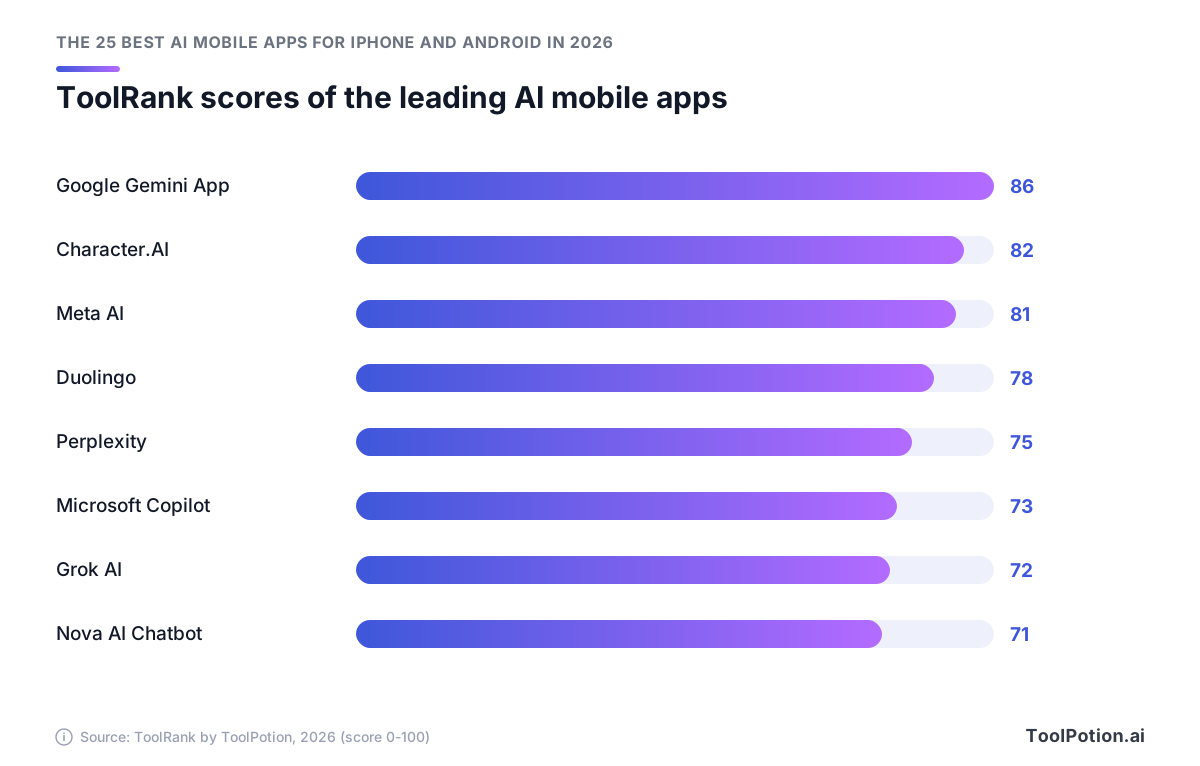
The best AI mobile app to install first in 2026 is Google Gemini. It's #1 on our Top 250 AI Mobile Apps board with a ToolRank score of 86 (elite tier), and the Gemini app passed 1 billion monthly active users this year.
Character.AI (#2, 82) and Meta AI (#3, 81) are right behind it, and both are elite too. If you don't want to pay, pick Meta AI. It's a free download with in-app purchases (App Store).
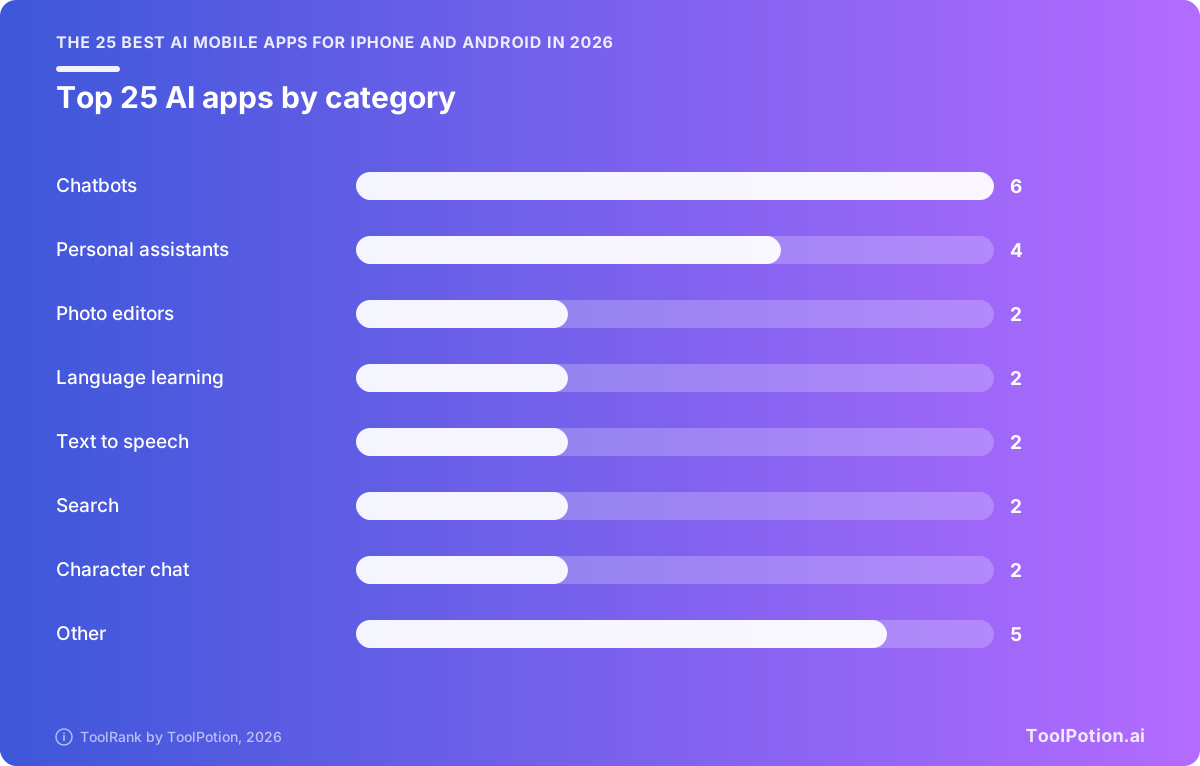
Our leaderboard ranks 461 apps. The picks and reviews below come from the top 25 for iPhone and Android, and the last section adds a few names from just below that.
The top 25 AI mobile apps on our 2026 board
- # 1Top PickGoogle Gemini App - AI Mobile AssistantMobile AppGoogle Gemini is an AI assistant app that helps users with various tasks, including study support and real-time problem-solving. It features interactive visualizations and allows users to upload their own study materials, enhancing the learning experience.89ToolRankElite
- # 2Runner UpMeta AIMobile AppMeta AI is your personal AI assistant designed to enhance productivity. This app helps users manage tasks efficiently while ensuring data privacy and security. With a user-friendly interface, it offers a seamless experience for anyone looking to optimize their daily activities.84ToolRankElite
- # 3Third PlaceNotebookLMMobile AppNotebookLM is a personalized AI research assistant that helps users understand any topic. It offers a user-friendly interface and powerful features to enhance productivity and streamline research processes.74ToolRankStrong



- 4Grok AI - Apps on Google PlayMobile AppGrok AI is a mobile application that allows users to answer questions and generate striking images using AI technology. It provides real-time data and is designed for productivity, making it a versatile tool for various tasks.73ToolRankStrong
- 5Nova AI Chatbot - AI Mobile AppMobile AppNova AI Chatbot is an AI-powered mobile application that allows users to interact with advanced AI models. Users can ask Nova to write anything, making it a versatile tool for various writing needs.73ToolRankStrong
- 6Doubao — AI Mobile AppMobile AppDoubao is an AI mobile app designed for users seeking innovative solutions. It offers unique features that enhance user experience and productivity, making it a valuable tool for various tasks.72ToolRankStrong
- 7Suno - AI MusicMobile AppSuno is an AI music maker and song generator that allows users to create unique music tracks effortlessly. With its intuitive interface, it caters to both novice and experienced musicians looking to explore new musical ideas.72ToolRankStrong
- 8Qwen Studio - Apps on Google PlayMobile AppQwen Studio is a personal AI assistant designed to enhance productivity. It offers features that help users manage tasks efficiently while ensuring data privacy and security. With millions of downloads, it is a popular choice for those seeking AI-driven assistance.72ToolRankStrong
- 9ElevenReader: Read Books AloudMobile AppElevenLabs Reader is an app that reads aloud eBooks, audiobooks, PDFs, and any text to speech. It offers a user-friendly interface and supports various document formats, making it ideal for users who prefer auditory learning or have visual impairments.71ToolRankStrong
- 10Vibe by Mistral (ex-Le Chat)Mobile AppVibe by Mistral (formerly Le Chat) is your AI agent designed for long-horizon tasks, seamlessly integrating your knowledge and tools to enhance productivity. This app is free to use and prioritizes user privacy by not sharing data with third parties.71ToolRankStrong
- 11PictureThis - Plant Identifier AppMobile AppPictureThis is a plant identification app that allows users to snap photos of plants to identify them and receive care tips. Ideal for novice and experienced gardeners alike, it enhances plant care knowledge and promotes gardening success.70ToolRankStrong
- 12Google LensMobile AppGoogle Lens is a mobile app that uses your phone's camera to search and explore the world around you. It helps identify objects, translate text, and find similar items, enhancing your interaction with the environment.69ToolRankStrong
- 13PhotoroomMobile AppPhotoroom is an AI-powered photo editing app designed for quick background removal and image enhancement. Ideal for resellers and casual users, it offers both free and premium features to create professional-looking visuals effortlessly.69ToolRankStrong
- 14CapCut - Video EditorMobile AppCapCut is a free video editing app that allows users to capture moments and create stunning videos with ease. It offers a variety of editing tools and features to enhance video quality and creativity.69ToolRankStrong
- 15Remini - AI Photo EnhancerMobile AppRemini is an AI-powered photo enhancement app that improves the quality of images by restoring details and reducing noise. It is suitable for enhancing both modern and vintage photos, making them clearer and more vibrant.69ToolRankStrong
- 16PhotomathMobile AppPhotomath is a mobile app that helps users learn math step-by-step. It provides solutions to math problems using a camera, making it easier for students to understand concepts and improve their skills.69ToolRankStrong
- 17ChatOn AIMobile AppChatOn AI is a versatile chatbot assistant designed for iPhone users. It offers multiple AI tools for tasks like coding, math, and writing, enhancing productivity with clear reasoning and fewer errors.68ToolRankStrong
- 18SpeechifyMobile AppSpeechify is a text-to-speech app that reads aloud books, documents, and PDFs. It offers a variety of voices and features like text highlighting and AI summarization, making it ideal for students and busy professionals who need to consume written content efficiently.67ToolRankStrong
- 19ELSA SpeakMobile AppELSA Speak is an AI-powered mobile app designed to help users practice English conversations. It offers personalized learning experiences and real-time feedback, making it an effective tool for language learners of all levels.67ToolRankStrong
- 20Kling AI: AI Image&Video Maker AppMobile AppKling AI is an innovative mobile app designed for creating AI-generated images and videos. It allows users to spark their imagination with various effects and features, making content creation accessible and fun for everyone.66ToolRankStrong
- 21Microsoft Copilot — AI Mobile AppMobile AppMicrosoft Copilot is an AI-powered mobile application designed to enhance productivity by providing intelligent assistance in various tasks. It integrates seamlessly with Microsoft tools, offering users a streamlined experience to manage their work efficiently.66ToolRankStrong
- 22BrainlyMobile AppBrainly is an educational app designed to assist students with homework and test preparation. It offers step-by-step explanations for questions, making it easier to understand complex topics. The app is free to use, with optional in-app purchases for enhanced features.66ToolRankStrong
- 23Microsoft SwiftKey AI KeyboardMobile AppMicrosoft SwiftKey AI Keyboard is an AI-powered personalized keyboard that enhances typing with gifs, stickers, and themes. It offers a unique typing experience tailored to individual preferences, making communication more engaging and fun.66ToolRankStrong
- 24Grammarly: AI Keyboard & Voice AppMobile AppGrammarly is an AI-powered keyboard and voice app that helps users write, dictate, edit, and improve their text. It offers grammar and spelling corrections, making writing clearer and more effective across various platforms.65ToolRankStrong
- 25Facetune: Photo & Video Editor AppMobile AppFacetune is a powerful photo and video editing app that utilizes AI technology to enhance images. It offers a range of tools for retouching and fine-tuning photos, making it ideal for users seeking subtle or dramatic edits.65ToolRankStrong













How ToolRank works
ToolRank is ToolPotion’s proprietary ranking engine.
It continuously evaluates hundreds of signals across the open web — real traffic and popularity, audience and community strength, authority and longevity, adoption and engagement — processing millions of data points to place every tool where it has earned to be.
Every AI type is measured by its own tailored model: what proves traction for a SaaS app is not what proves it for an open-source framework or a creator channel. Missing a platform never counts against a tool — ToolRank judges the evidence that exists.
No paid placement. No self-reported numbers.
Best AI mobile apps 2026: quick picks by need
Every pick in this table sits in the top 11 of the leaderboard above.
| Your need | Pick | Rank, ToolRank, tier | Why it wins |
|---|---|---|---|
| Best overall | Google Gemini | #1, 86, elite | Screen help and more than 70 languages in one app |
| Free assistant | Meta AI | #3, 81, elite | Free, with a 4.6 store rating and 100M+ downloads |
| Quick research | Perplexity | #5, 75, strong | Built for research and fact-checking, with a 4.6 store rating |
| Microsoft 365 users | Microsoft Copilot | #6, 73, strong | Free tier, and Microsoft 365 plans from $9.99/month add more Copilot usage (Microsoft) |
| Learning | Duolingo | #4, 78, strong | Short, game-like lessons with a free tier |
| Creators | CapCut for video, Suno for music | #9, 70 and #11, 70, both strong | CapCut's editor is free. Suno turns a text description into a song |
If you only install one app, make it Gemini. It's the only app in the top 25 with a ToolRank above 85.
Character.AI isn't in the table because it's a companion and roleplay app, and this list sticks to apps that help you get things done.
What changed for AI mobile apps in 2026
Four changes this year affect what you install and pay for. Plans got harder to compare, and Meta moved its assistant into your camera. Lawsuits reached two apps in our top 11, and China's biggest assistant is larger than its two nearest rivals combined.
Subscriptions got layered and more complicated
Google is the clearest example. At I/O 2026 it split AI Ultra into a $99.99/month tier and a $199.99/month top tier, replacing the single $249.99 Ultra plan, with AI Plus and AI Pro ($19.99/month) underneath (The Decoder). The top plan is now $50 cheaper, and there's a middle option if you don't need the most expensive one.
Google wasn't alone. CapCut restructured Pro in 2026 with more AI credits and storage (CapCut), and Doubao added paid memberships on top of free chat (Beijing News). Microsoft went the stricter way and caps AI credits each month on its cheaper Microsoft 365 plans (Microsoft Support).
Meta moved its assistant into the camera
Meta's 2026 app update (v278.0.0) added the Muse Spark reasoning model and Live AI, which answers questions about whatever your camera sees (App Store). You point your phone at something and ask about it.
Lawsuits now matter when you choose
Character.AI is #2 on the 2026 board with a ToolRank of 82, and it has a legal history you should know about. In 2026, Google, Character.AI and its co-founders agreed to settle several lawsuits from families who alleged chatbots contributed to self-harm and suicide among minors (CNN). If a teenager in your home uses companion apps, keep that in mind. No chatbot replaces a mental health professional.
The copyright fight over AI music is still open as well. In 2026, Universal and Sony widened their Suno lawsuit from 560 to 61,026 recordings, which pushes potential statutory damages past $9 billion. Warner settled in exchange for a licensing partnership (Digital Music News). If you plan to release Suno tracks commercially, keep an eye on that case.
Chinese AI apps went mainstream
Doubao had 345 million monthly active users in 2026, more than Qwen (166M) and DeepSeek (127M) combined. This year it also added paid memberships from 68 RMB/month up to 500 RMB/month for extras like long-document parsing and PPT generation, and core chat stayed free (Beijing News). On our 2026 board it's #10, with a ToolRank of 70.
Reviews of the leading AI mobile apps
These reviews cover the top 13 apps in the leaderboard above. Doubao and Qwen Studio share one because the board files both under AI personal assistants. Ranks and scores don't always move together: CapCut, Doubao, Suno and Qwen Studio hold #9 through #12, and each has a ToolRank of 70.
Google Gemini: best all-round assistant
Gemini can see your screen and help as you work, and it builds study notebooks from material you upload. It supports more than 70 languages and voice commands, so translation, troubleshooting and homework happen in the same app.
Pricing is where it gets confusing. Google sells three paid tiers, with Ultra split into two price points, and most people should stop at AI Pro for $19.99/month (The Decoder).
Character.AI: best for character chat (read the teen warning first)
You can build your own chatbot on Character.AI or talk to one someone else made. People use it for entertainment and creative writing, and it's handy for practicing a language in conversation too. The download is free, with in-app purchases.
Character.AI and Google agreed in 2026 to settle lawsuits over chatbot harm to minors (CNN). Before a teenager in your home uses it, set the app up together and check in often.
Meta AI: best free assistant with a live camera
Meta AI is free, has a 4.6 store rating and an estimated 100 million-plus downloads. Live AI, which answers questions about what your camera sees, and the Muse Spark reasoning model are why we'd pick it as the free assistant (App Store). Its ToolRank of 81 makes it the last elite-tier app in the top 25.
Duolingo: best for learning a language
Duolingo teaches through quick, science-based lessons that adapt to how you're doing, with game-like challenges to keep you motivated. There's a free tier, and people use it for test prep as well as everyday conversation. Its ToolRank of 78 at #4 is the highest strong-tier score in the top 25.
For speaking practice, add ELSA Speak (#23, ToolRank 65), which gives real-time feedback as you practice English conversations.
Perplexity: best for quick research on the go
Use Perplexity when you're researching a topic, checking a claim or looking something up while you're out. The app gives trusted answers to any question, holds a 4.6 store rating and sits at #5 with a ToolRank of 75. It encrypts data in transit and lets you request deletion of your data, which is worth knowing if your searches touch work topics.
Microsoft Copilot: best for Microsoft 365 users
If your documents already live in Word, start with Copilot (#6, ToolRank 73). It handles writing feedback and code, and it can make images too. You can use it for free. The paid plans are Microsoft 365 Personal at $9.99/month, Family at $12.99/month, Premium at $19.99/month and Pro at $99.99/month, and each step up gives you more Copilot usage (Microsoft).
Personal and Family come with 60 AI credits a month for tasks like Word edits and image generation, and unused credits don't roll over or refill mid-month (Microsoft Support). Heavy users should look at Premium instead.
Grok: best for real-time answers and image generation
Grok pulls live data into its answers and makes images, and it has a 4.9 store rating with more than 100 million downloads. It holds #7 with a ToolRank of 72. The free plan is generous but capped. SuperGrok costs $30/month and adds Grok 4.6, higher limits, and image and video generation, while SuperGrok Plus costs $100/month for 1080p video and much higher usage (x.ai).
That puts SuperGrok about $10 a month above Google's AI Pro, so compare the two before you upgrade.
Nova AI Chatbot: free-to-download writing help
Tell Nova AI Chatbot what you need, like an email or a report, and it writes it. The download is free, and it's #8 on the 2026 board with a ToolRank of 71.
Install from the link on our tool page so you get the app we ranked, and check the in-app price before you tap subscribe. For heavier writing, we'd still pick Gemini.
CapCut: best for short-form video
CapCut's free editor lets you trim clips, add music and filters, and export in high resolution. At #9 with a ToolRank of 70, it's the highest-ranked video editor on the board.
Pro costs $19.99/month or $179.99/year. After the 2026 changes, it includes 1,200 AI credits a month (up from 550) and 1TB of cloud storage (up from 100GB) (CapCut). Paying yearly saves you about $60 compared with twelve monthly payments. The free app covers trimming and music, and Pro earns its price once you're spending those AI credits every month.
Doubao and Qwen Studio: free-to-use personal assistants
Doubao, with 345 million monthly active users, keeps core chat free and charges for document-heavy work (Beijing News). Qwen Studio is free to use. It encrypts data in transit, doesn't share data with third parties, and lets you ask for your data to be deleted.
Doubao's paid plans are worth a look for building slide decks. Qwen Studio is the better choice when written privacy commitments matter more to you. Mostly working in English? You'll find more options among the top AI personal assistants.
Suno: best for making songs on your phone
Describe a song, and Suno generates the track for you to edit and refine. It's #11 with a ToolRank of 70. The free plan gives you 50 credits a day with no commercial rights. Pro costs $8/month and includes 2,500 credits, commercial rights and the v6 models, and Premier costs $24/month for 10,000 credits and Suno Studio (Suno).
Commercial use needs care while Universal and Sony's lawsuit against Suno stays open (Digital Music News). Get advice from a music lawyer before a track goes into a release or a paid ad.
Mistral Vibe (formerly Le Chat): best for long, multi-step tasks
Mistral's Vibe app is an agent for long, multi-step tasks that draws on your own knowledge and tools. It used to be called Le Chat. It's free to use and doesn't share data with third parties. At #13 with a ToolRank of 69, it's the first app on the board to score below 70.
The free plan limits how many messages and coding sessions you get. Pro costs $14.99/month, or $5.99 for students, and Team is $24.99 per user per month (Mistral).
How to choose the right AI app for your phone
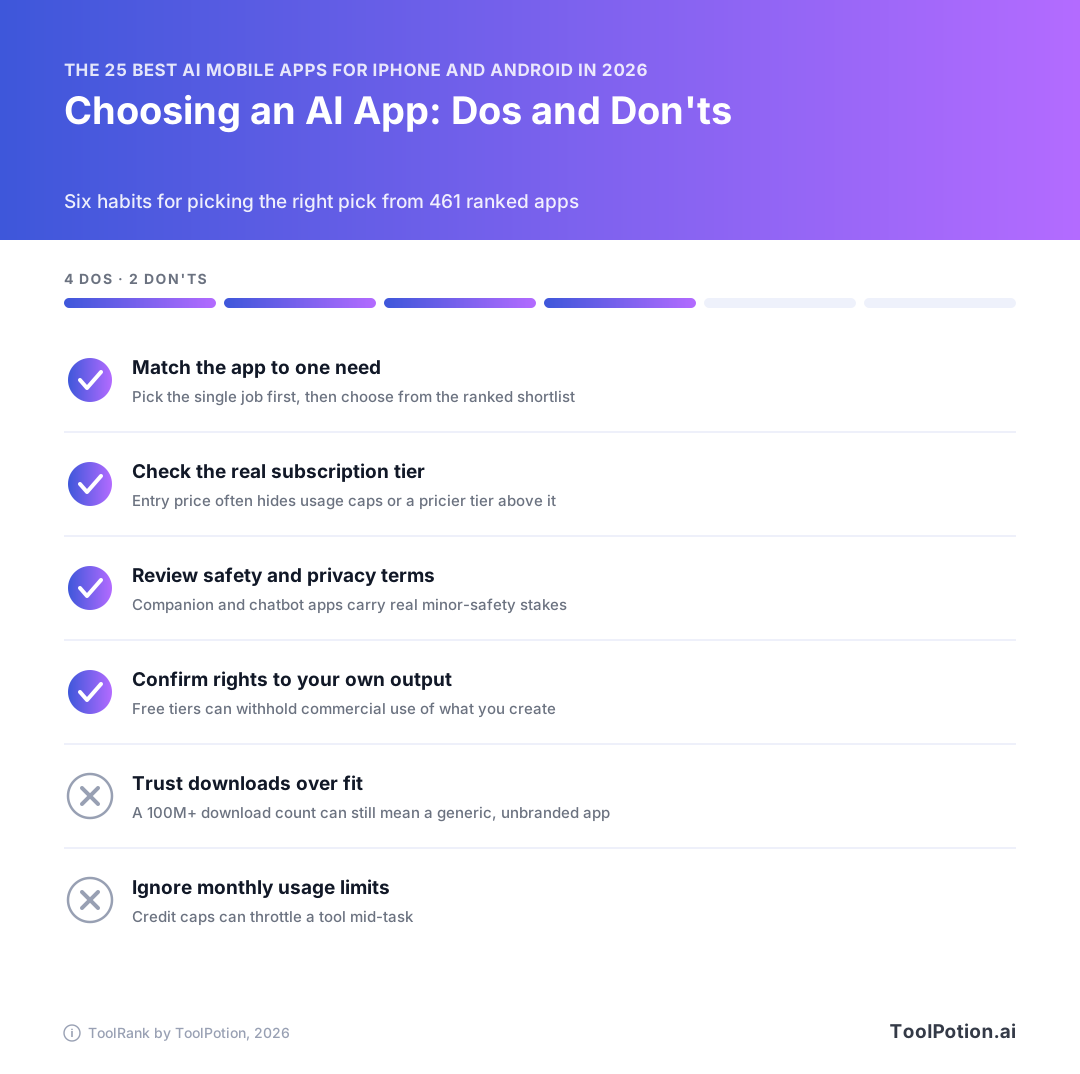
Most people need two apps: one general assistant and one specialist for the thing they do every day. Pick the assistant first, then use the leaderboard above to find the strongest app for your use.
If you want one assistant for everything
Install Gemini. Meta AI is the one to get instead if you won't pay for anything, since it's free.
If you already pay for Microsoft 365 or a Gemini plan
Use the assistant you already pay for before you add a second subscription. On Microsoft 365, start with Copilot (#6) and watch the 60-credit monthly cap on Personal and Family (Microsoft Support). If you already pay Google for AI Pro or Ultra, stay with Gemini.
If you're a student or learning a language
Get Duolingo (#4) for languages. For homework, pair Photomath (#19, ToolRank 66), which walks through math problems step by step from a photo, with Perplexity (#5) for research and fact-checking. Our board of the best AI tools for students has more options.
If you create photos, video or music
| App | 2026 rank (ToolRank) | Pick it for |
|---|---|---|
| CapCut | #9 (70) | Short-form video editing |
| Suno | #11 (70) | Songs from a text prompt |
| Photoroom | #17 (67) | Background removal for product photos |
CapCut comes first for anyone posting video. Online sellers will get more time back from Photoroom.
If a teenager will be using it
Keep teens off companion and roleplay apps like Character.AI (#2) and PolyBuzz (#21) unless an adult is closely involved. Character.AI's 2026 settlements over self-harm among minors are reason enough (CNN). For schoolwork, a general assistant or Photomath is a better fit.
Free vs paid: when an upgrade is worth it
Start on the free tier of every app. Upgrade only when you keep hitting a specific limit.
SuperGrok at $30/month is a lot to pay if you only chat. Students get the cheapest paid plan in this guide with Mistral's $5.99 student Pro tier. Most people need one paid AI plan at most, so if you're paying for two, cancel the one you open less.
Specialist apps from further down the top 25
Every app from #4 to #25 is in the strong tier, and from #14 down the scores only run from 68 to 64, so pick these by the task you need done.
Camera and photo apps
Google Lens (#14, ToolRank 68) is the one to keep on your home screen. Point your camera at a menu to translate the text, or at an object to find similar items. PictureThis also scores 68 at #16 and does one thing well: it names the plant in your photo and tells you how to care for it.
For product shots, Photoroom (#17, 67) removes backgrounds quickly and is built with resellers in mind. Remini (#18, 67) restores detail and cuts noise in old or blurry photos. If editing is most of what you do, the ranked AI photo editors board goes much deeper.
Apps that read to you
ElevenLabs Reader (#15, 68) reads eBooks and PDFs aloud. Speechify (#22, 65) adds text highlighting and AI summaries. Pick ElevenLabs Reader for long books and Speechify when you want the short version of a report before you listen to all of it.
Keyboards and chat apps
An AI keyboard works inside every other app on your phone. Microsoft SwiftKey (#24, 65) tailors typing to your preferences and adds gifs and stickers. Grammarly's AI keyboard (#25, 64) corrects grammar and spelling as you go and lets you dictate. For messages to clients or colleagues, Grammarly is our pick.
ChatOn AI (#20, 66) is an iPhone chatbot that bundles coding and math helpers into one app, though Gemini and Meta AI rank well above it for general use. PolyBuzz (#21, 66) is for character chat, so teens need the same adult oversight we'd want for Character.AI.
Just outside the top 25
If nothing in the top 25 fits what you need, look at #26 to #40 next. These seven apps from that range each do a specific job well.
- Kling AI (#26) makes AI images and video from your prompts.
- Brainly (#28) gives step-by-step homework explanations.
- Otter.ai (#31) turns voice notes and meetings into searchable text.
- DeepSeek (#33) is a free assistant that supports multiple languages.
- Poe (#35) puts answers from many AI bots in one app.
- RunwayML (#37) generates images and video on iPhone.
- Notion (#38) is an AI workspace where docs and databases sit alongside custom AI agents.
Try Poe if you can't decide between assistants, since you can ask several bots without switching apps.
To go further down the list, see the full top 250 ranking, or browse every AI mobile app in our directory.
About ToolRank
ToolRank is ToolPotion's own independent ranking, and no one can pay for a spot on it. We keep every board current through the year, so ranks can change after you read this. You can find all ToolRank leaderboards in one place.
Frequently asked questions
What is the best AI app for iPhone and Android in 2026?
Install Google Gemini first. It's #1 on the 2026 ToolRank board for AI mobile apps, with a score of 86 and an elite tier. The only other elite apps in the top 25 are Character.AI (#2, 82) and Meta AI (#3, 81). Character.AI is built for entertainment, so Gemini is the one to pick as an everyday assistant.
Which AI mobile apps are completely free to use?
Meta AI (#3) is our free pick, a free download with in-app purchases. Qwen Studio (#12) is also free to use, and CapCut's video editor is free for everyday trimming and music.
Is Google Gemini or Microsoft Copilot better on a phone?
Pick Gemini unless most of your work happens in Microsoft 365, since Copilot ranks five places lower at #6. Microsoft has a free Copilot tier, and Microsoft 365 Premium costs $19.99 a month, the same as Gemini's AI Pro plan. The cheaper Personal and Family plans cap AI use at 60 credits a month.
Are AI character chat apps like Character.AI safe for teenagers?
They carry real risks, so don't let teens use them without an adult paying attention. In 2026, Google and Character.AI agreed to settle lawsuits from families over harm to minors. Character.AI is still #2 on the 2026 ToolRank board, but a high rank doesn't mean the app is right for a particular teen. If your teen uses character apps, talk openly about what they're chatting about.
What is the best AI app for students?
Most students should start with Gemini, which builds personalized study notebooks from materials you upload. If math is the problem, add Photomath (#19). For languages, add Duolingo (#4). If you want a paid chatbot, Mistral's Vibe app (formerly Le Chat) has a Pro plan that costs $5.99 a month for students instead of $14.99.
Is it worth paying for an AI app subscription in 2026?
Pay when the plan is tied to something you make. Suno Pro at $8 a month is the tier that adds commercial rights, though Universal and Sony's lawsuit against Suno is still open, so check it before any release. CapCut Pro, at $19.99 a month or $179.99 a year with 1,200 monthly AI credits, makes sense if you edit video regularly. For general chat, we wouldn't pay at all: Meta AI is free, Copilot has a free tier, and a plan like SuperGrok at $30 a month is hard to justify for chat alone.