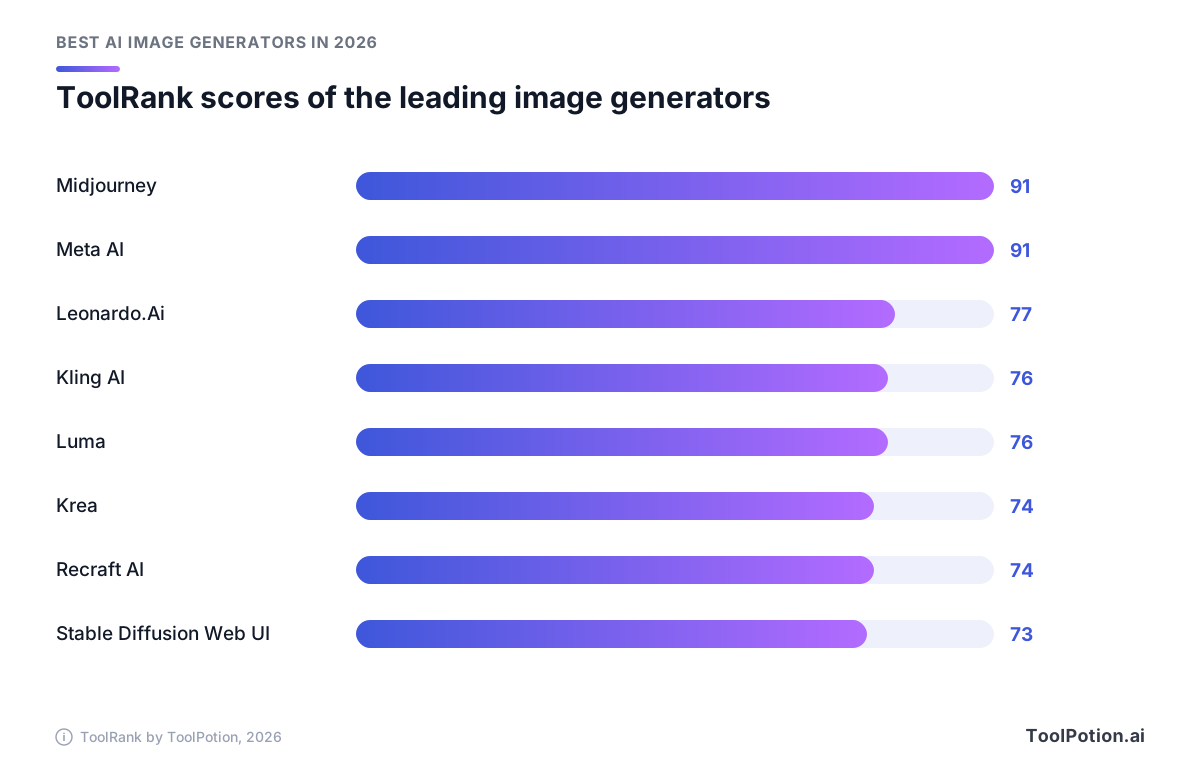
Midjourney and Meta AI tie at the top of the 2026 board with a ToolRank score of 91 each. Third place, Leonardo.Ai, sits at 77. That is a cliff, and it says a lot about the field: a couple of tools have become default choices, and everyone else is competing for a specific job.
Those jobs are what this guide is about. "Best" in image generation depends on what you're making: an ad with a headline in it, an illustration that has to match last year's campaign, a concept painting, a product shot. In 2026 the differences that matter are less about beauty (nearly every leader makes beautiful images) and more about who owns the output, whether the words come out spelled right, how much you can edit afterward, and what a month really costs.
The leaderboard below lists the top 25. Below we narrow it to a dozen worth your time, quote prices only where we could read them on the vendor's own page, and finish with a short way to choose.
The top 25 AI image generators right now
- # 1Top PickMidjourneyAI AppMidjourney is an independent research lab focused on exploring new mediums of thought and enhancing human imagination. With a team of 60, they aim to create beautiful AI models that inspire creativity and reflection on our future.91ToolRankElite
- # 2Runner UpLeonardo.AiAI AppLeonardo.Ai is a generative AI platform for creating images, art, and video. It offers tools for generating visuals from prompts, animating static ideas, and editing existing media with precision. Designed for creators, marketers, and businesses, it aims to scale content production and enhance creative output.77ToolRankStrong
- # 3Third PlaceAdobe FireflyAI AppAdobe Firefly is an all-in-one AI creative studio that enables users to generate high-quality content, including images, video, and audio, using over 30 AI models. It offers speed, control, and creative freedom for various creative projects.76ToolRankStrong



- 4LumaAI AppLuma AI is a creative platform designed for video generation and image creation, utilizing advanced AI models. It streamlines creative workflows, enabling users to generate, edit, and refine multimedia content efficiently. Ideal for agencies and brands looking to enhance their creative processes.76ToolRankStrong
- 5Kling AIAI AppKling AI offers a comprehensive suite of tools for generating videos, images, audio, digital humans, and creative effects. It supports text, image, and reference material inputs, enabling seamless content creation and inspiration realization.75ToolRankStrong
- 6IdeogramAI AppIdeogram is a generative media platform that offers purpose-built AI apps for image and video creation. Users can access major models through a unified API, enabling efficient workflows and collaborative projects for businesses and creative teams.75ToolRankStrong
- 7MiniMaxAI AppMiniMax is a leading AI technology company offering a range of AI-native products. It specializes in multimodal AI models for text, video, speech, music, and image generation, serving over 300 million users globally.74ToolRankStrong
- 8Krea: AI Creative Suite for Images, Video & 3DAI AppKrea is an AI creative suite that enables users to generate, edit, and enhance images, videos, and 3D assets in real time. With powerful tools and collaborative workflows, it caters to creatives and enterprises alike, offering a free plan to get started.74ToolRankStrong
- 9Recraft AIAI AppRecraft is an AI platform for generating and editing images, vector graphics and design assets. Recraft Studio combines Recraft's own models like V4.1 Flash with other frontier models for photorealistic images, editable vector art, mockups and custom styles, plus tools for upscaling, background removal and vectorizing existing images.74ToolRankStrong
- 10Freepik — The AI Creative PlatformAI AppFreepik is a comprehensive AI creative platform for generating images, videos, and audio. It offers a suite of tools for professionals and individual creators to produce high-quality content efficiently, and is the company behind the Magnific AI image upscaler.73ToolRankStrong
- 11SeaArt AIAI AppSeaArt AI is an all-in-one creativity community that empowers users to create stunning art, videos, and audio using AI tools. It fosters collaboration and inspiration among creators, making it easy for anyone to express their artistic vision.73ToolRankStrong
- 12Bing Image CreatorAI AppBing Image Creator is a free AI-powered tool that transforms text and images into stunning visuals. It offers quick and easy image creation and editing, accessible to anyone with a Microsoft Account.72ToolRankStrong
- 13Stable Diffusion Web UIGitHub RepoStable Diffusion web UI is a Gradio-based interface for Stable Diffusion models. It offers a comprehensive set of features for image generation, editing, and training, including advanced options for prompts, upscaling, and model merging. This tool empowers users to create and manipulate AI-generated art with detailed control.72ToolRankStrong
- 14ComfyUIAI AppComfyUI is a node-based AI creation engine for visual professionals, giving control over every model, parameter, and output by chaining models and processing steps on a visual canvas for images, video, 3D, and audio.65ToolRankStrong
- 15Muse ImageAI AppMuse Image is an advanced AI image generator by Meta Superintelligence Labs. It allows users to create, edit, and remix visuals using natural language prompts and agentic reasoning, making it ideal for creators and marketers.64ToolRankStrong
- 16CivitaiGitHub RepoCivitai is a GitHub repository that provides a collection of models and textual inversions. It serves as a resource for developers and researchers interested in exploring and utilizing AI models for various applications.64ToolRankStrong
- 17LiblibAIAI AppLiblibAI is a prominent AI creation platform in China, offering a community for sharing original AI painting models. Users can download over 100,000 models for free and utilize online AI drawing tools like webUI and comfyUI. The platform also supports online model training.58ToolRankSolid
- 18NightCafe AI Art GeneratorAI AppNightCafe is a free AI art generator offering multiple AI models for creating images and videos from text prompts. It fosters a supportive community with daily challenges, enabling users to explore, create, and share AI-generated art for fun or content creation.58ToolRankSolid
- 19Artlist StudioAI AppArtlist Studio is an AI-powered video production platform that offers creators full visual control over every stage of filmmaking. It integrates seamlessly with other Artlist tools, enabling high-end production with AI-generated video, image, music, and voice assets.57ToolRankSolid
- 20getimg.aiAI Appgetimg.ai is an AI creative platform for generating and editing images and videos. It offers access to over 33 leading AI models, simplifying the creative process by allowing users to describe their vision without complex prompt engineering. The platform supports consistent character and style replication, image editing, and team collaboration.57ToolRankSolid
- 21Niji-JourneyAI AppNiji-Journey is an AI-powered tool that creates custom anime illustrations. Developed by Spellbrush and Midjourney, it caters to diverse artistic needs, from chibi characters to dynamic action scenes, bringing users' visions to life.57ToolRankSolid
- 22Tensor.ArtAI AppTensor.Art is a free online platform for generating images and hosting AI models. Users can upload, download, and run various models, including Stable Diffusion and ControlNet, to create unique visuals effortlessly.57ToolRankSolid
- 23Qwen Assistant (千问)AI AppQwen Assistant is Alibaba's official AI tool designed to enhance productivity in work, study, and daily life. It offers AI search, web summarization, AI PPT creation, image generation, and transcription services to streamline creative and analytical tasks.56ToolRankSolid
- 24InvokeAIGitHub RepoInvokeAI is a creative engine for Stable Diffusion models, enabling professionals, artists, and enthusiasts to generate visual media using AI technologies. It features a WebUI and serves as a foundation for multiple commercial products.56ToolRankSolid
- 25CraiyonAI AppCraiyon is a free AI image generator, formerly DALL-E mini, that turns text descriptions into images in seconds across styles like photo, anime, illustration, and vector, with free and paid tiers.56ToolRankSolid














How ToolRank works
ToolRank is ToolPotion’s proprietary ranking engine.
It continuously evaluates hundreds of signals across the open web — real traffic and popularity, audience and community strength, authority and longevity, adoption and engagement — processing millions of data points to place every tool where it has earned to be.
Every AI type is measured by its own tailored model: what proves traction for a SaaS app is not what proves it for an open-source framework or a creator channel. Missing a platform never counts against a tool — ToolRank judges the evidence that exists.
No paid placement. No self-reported numbers.
Quick picks
- Best overall: Midjourney, #1 on the 2026 board at 91 (elite tier), for images that look finished from a one-line prompt.
- Best free option: Meta AI, also 91 and elite, because its new image model costs nothing for everyday use.
- Best for brand and vector work: Recraft AI, which can output editable SVG files straight from a prompt.
- Best for rights-conscious teams: Adobe Firefly, whose maker offers IP indemnification to eligible enterprise customers.
- Best for characters that must stay consistent: Kling AI, which takes up to ten reference images.
- Best if you want no subscription: ComfyUI, open source and free to run on your own machine.
What changed in 2026
Image models learned to think before they paint. Meta's Muse Image arrived in 2026 as the first image model from Meta Superintelligence Labs, and it plans a layout and looks up real-time web context instead of mapping words straight to pixels. Luma's Uni-1 does something similar with a different architecture: VentureBeat says it is not diffusion-based, keeps text and images in one interleaved sequence and reasons before and during image synthesis. The practical effect is fewer mangled hands and more images that do what the prompt said.
References became the main steering wheel. Describing a character in words never worked well. Handing the model ten photos of her does, and Kling's Image 3.0 now accepts up to ten (Kling). Muse Image blends several photos into one result.
Open weights also caught up. Ideogram released version 4.0 in 2026 as an open-weight model you can download, fine-tune and run on your own hardware, with bounding-box layout control on top of its long-running strength in text rendering. Commercial deployments need a paid license (Ideogram). That puts a model built for typography within reach of anyone with a capable machine, as long as client work runs under that license.
Finally, the rules showed up. The European Commission published its Code of Practice on marking and labelling AI-generated content in 2026, ahead of AI Act transparency duties that apply from the same year. If you publish in Europe, the watermark on your image is no longer decoration.
The tools worth a closer look
Midjourney: the look people pay for
It's #1 on the 2026 board with a ToolRank score of 91, elite tier, up from #2. Version 8.2 is the current default. It is an independent lab of about 60 people with no outside funding, which is odd in a field of billion-dollar rounds, and what that team ships is taste. Images look art-directed with little prompt effort, and personalization lets you pull that taste toward your own.
The catch is workflow. Midjourney is a place to make pictures, not a place to finish them, so expect to export into another editor for layout, text and brand work.
Rights are the other thing to read. Midjourney's plan documentation says companies making more than $1,000,000 a year in gross revenue must buy Pro ($60 a month) or Mega ($120). A studio past that line that signs up for Basic ($10) is on the wrong side of it.
Meta AI: free, and now a real image model
Also 91 and elite, at #2. Meta AI is an assistant first, so image generation comes bundled with chat, math help and essay review. What changed is the engine. Muse Image sits behind it, and Meta says using it is free for everyday creation, with paid tiers that raise generation limits (Meta). You can sketch markup directly on a result to change it, ask for text inside the picture, or restore an old photo. Muse Image also has its own entry at #13 with a score of 63, strong tier.
The limits are the usual ones for an app inside a social network. There's no brand kit and no vector export. And Meta pulled a feature that let people reference public Instagram accounts in prompts after users objected, so expect the rules to keep moving.
Leonardo.Ai: for people who iterate all day
At #3 it scores 77, strong tier. Leonardo.Ai covers generation from prompts or custom-trained models, editing that keeps the parts you liked, resolution upgrades, and animation of stills into short video. That mix suits content teams scaling out variations and product designers prototyping.
Plans are token-based, so the real cost per image depends on which models and features you choose. Read the token table on its pricing page before comparing it with flat-rate rivals.
Kling AI: when a still has to become a scene
Kling AI is #4 with a 76 (strong), and the board files it under video generators. Don't let that mislead you about its image side. Image 3.0 adds natural-language local edits, style transfer and multi-image blending, and an Image Series mode that produces connected storyboard-style frames from one starting picture. The Omni version outputs 2K or 4K directly (Kling).
If you never touch video, you're paying for a studio you won't use. If you do, it's one of the few places where the still and the animation come from the same hands. Our guide to the best AI video generators goes deeper on that half.
Luma: reasoning first, references everywhere
Another 76 and strong tier, at #5. Luma launched Uni-1 in 2026, and its pitch is price and reasoning: about $0.09 for a 2K image, against $0.101 for Google's Nano Banana 2, according to VentureBeat. The platform also lists Master Reference Assets for brand consistency and real-time collaboration, which matter more to teams than any benchmark.
Treat the headline claims with care. The benchmark wins over Google and OpenAI come from launch coverage, not from an independent test you can rerun.
Krea: real-time play with clear terms
Krea is #6 at 74, strong. It renders in real time as you draw, upscales, trains LoRAs and also does video and 3D. Its pricing is the easiest to read in this group. Free gives 100 compute units a day. Basic is $9 a month for 5,000 units, Pro is $35 for 20,000 and Max is $105 for 60,000, and the page says all of them, free included, allow commercial use (Krea).
Compute units are Krea's own currency, so run a normal week of work on the free tier before you buy. Pro is the first plan with every video model.
Recraft AI: the designer's pick
Recraft AI is #7, score 74, strong, and the board lists it as a design tool rather than a pure generator. V4 Pro makes 2048 by 2048 print-ready rasters, and V4 Vector writes editable SVG files directly from a prompt (Recraft). You can also build a custom style from your own uploaded images without training anything, which is the fastest route to illustrations that look like the same artist drew them.
Read the plan terms. Images made on the free plan are owned by Recraft, appear in a public gallery and aren't licensed for commercial use. Paid plans give you full ownership and commercial rights, keep images private, and the ownership survives cancellation (Recraft). For a freelancer that single distinction outweighs most feature differences.
Adobe Firefly: the cautious buyer's choice
Adobe Firefly is #8 on the board but isn't scored yet, so we won't put a number on it. It bundles tools like Generative Fill, Text to Vector and Generative Recolor. Adobe says outputs from its own Firefly models are safe for commercial use and that eligible enterprise customers can get IP indemnification for select outputs (Adobe). No other vendor reviewed here advertises that promise on the page we read.
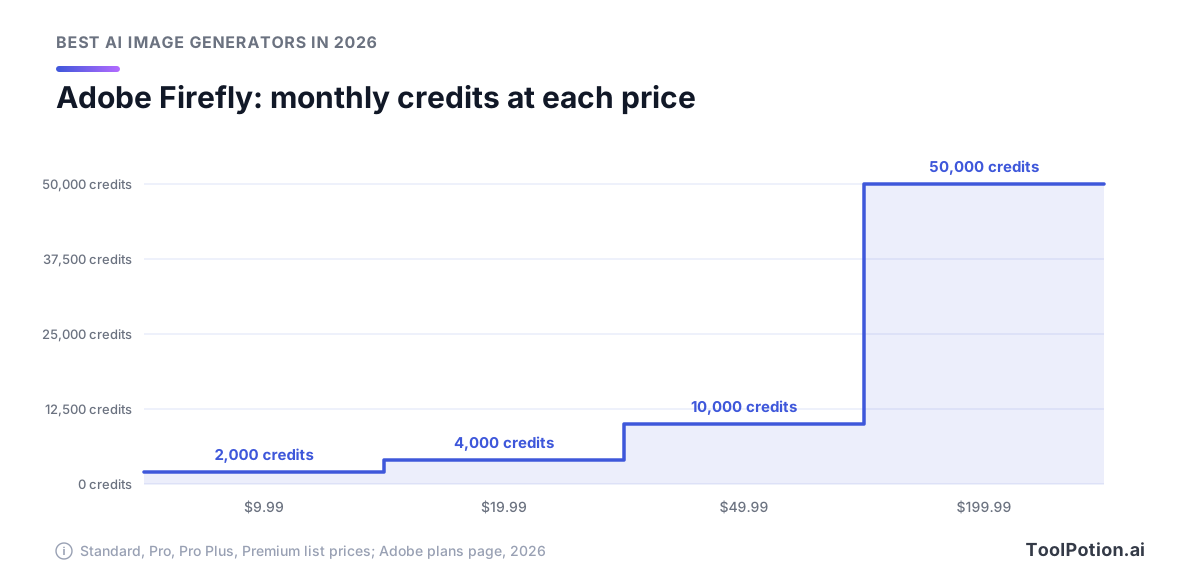
Plans run from Standard at $9.99 a month with 2,000 generative credits to Premium at $199.99 with 50,000. Credits don't scale in step with price. Premium costs twenty times Standard and delivers twenty-five times the credits, and Pro Plus at its regular $49.99 sits between them with 10,000.
One caution. The same page says paid plans also reach partner models from Google, OpenAI and others, while the commercial-safety language names Adobe's own models. Check which model you picked before you promise a client anything.
Stable Diffusion Web UI and ComfyUI: free if you own the GPU
Stable Diffusion Web UI is #9 at 73 (strong). It's a Gradio interface under the AGPL-3.0 license with text-to-image, image-to-image, inpainting, outpainting and LoRA support, and its repository says it runs on a 4GB video card (GitHub). ComfyUI is #14 at 62. It's a node canvas where you wire models and processing steps together, available as a desktop app you run yourself or as a cloud service, with a community that has built more than 60,000 nodes (Comfy).
Both are the answer when you want total control and no per-image bill. Nobody hands you a pipeline, though, and your commercial rights depend on the license of whichever model checkpoint you load, not on the app.
Freepik: a stock library with a generator attached
Freepik ranks #10 with a 73 (strong). Its pricing page now carries the name Magnific, formerly Freepik, and paid plans list a commercial AI license (Magnific). The product bundles image, video and audio generation with an upscaler, an editor and a background remover. No single piece is the deepest in its class. The value is not switching tabs.
Ideogram: text that reads like text
Ideogram climbed from #12 to #11 and scores 72, strong. Pick it when words are part of the picture: posters, social cards, packaging mockups. Its listing adds background removal, character consistency and a unified API, and the open-weight 4.0 model can be downloaded and run locally, though business use of the weights needs a paid license (Ideogram).
For a painterly concept board, others do more. For a flyer that has to say "Open Sunday" without a typo, start here.
What you can actually own
Rights come from the plan, not from the model. Recraft's free tier gives the company ownership, Midjourney's revenue rule steers bigger businesses to its priciest plans, Krea states commercial use on every tier, and Adobe's indemnity covers eligible enterprise customers only. Four vendors, four answers, and the table below sets the cells we could confirm side by side.
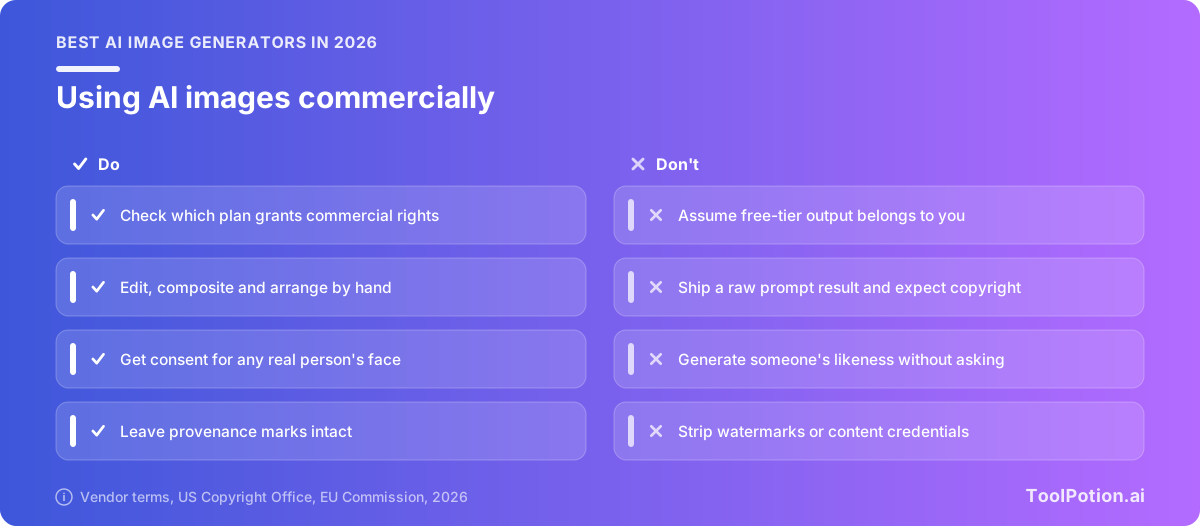
Ownership in the copyright sense is a separate question. In 2025 the U.S. Copyright Office concluded that, with current technology, prompts alone don't give users enough control over the output to make them its authors, while human selection, arrangement and edits to AI output can earn protection (U.S. Copyright Office). So a license lets you use an image, but a raw output may not give you exclusive rights. Editing it by hand strengthens your position.
Training data is unsettled too. In late 2025 the UK High Court rejected Getty's secondary copyright claim against Stability AI, holding the model weights weren't an infringing copy, and found only narrow trademark infringement tied to old watermarks (Cleary Gottlieb). Getty has since been given permission to appeal (Wiggin).
If a real person's face is in the image, get their consent and check the likeness law where you publish. That includes celebrities and colleagues, not only strangers.
How to choose
Start with what the image has to contain. If it has words in it, narrow to Ideogram, Recraft or Adobe Firefly. If it has to match a brand, you want Recraft's custom styles, Luma's reference assets or Firefly. If you only need something beautiful by lunch, Midjourney or Meta AI.
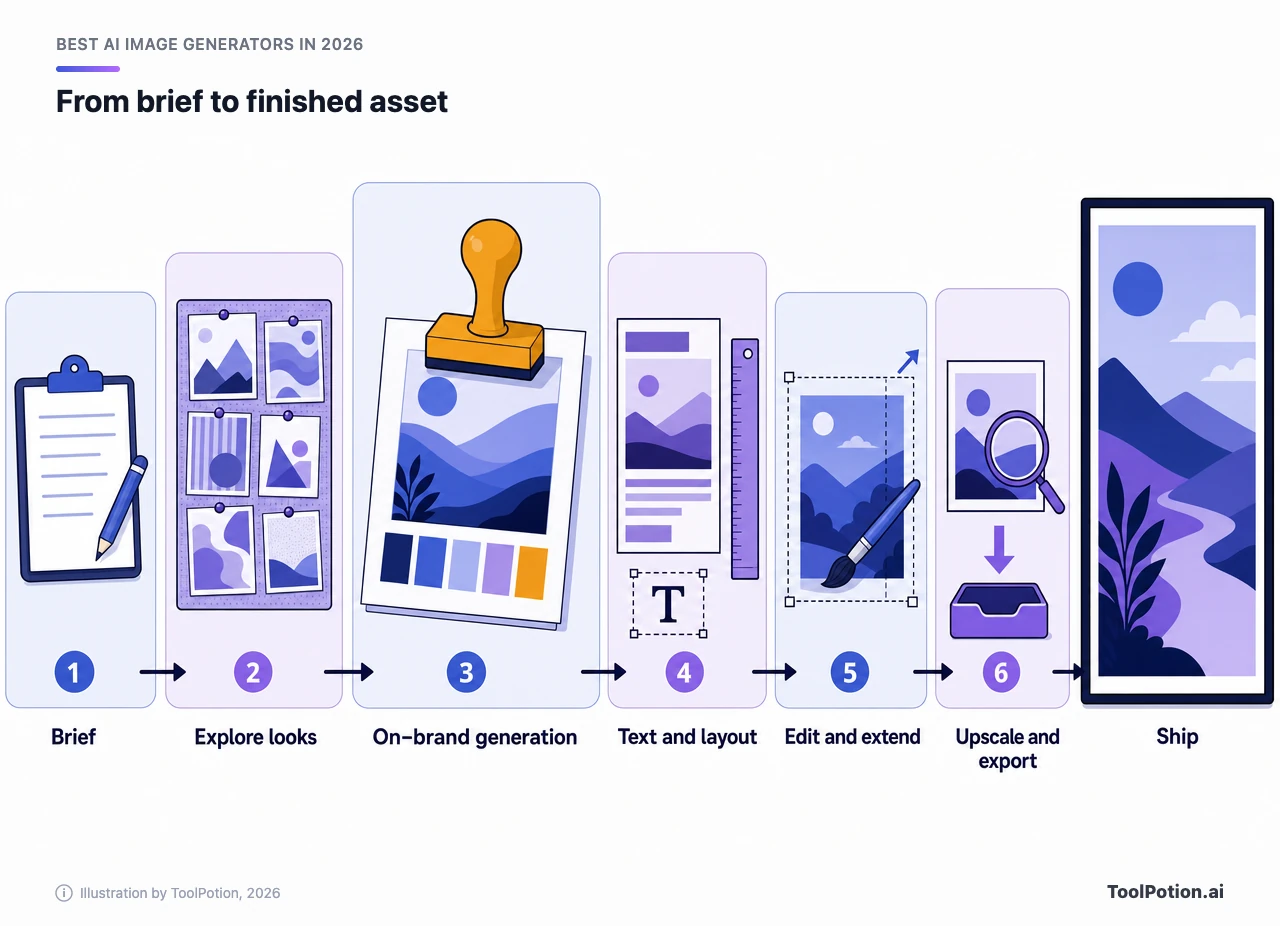
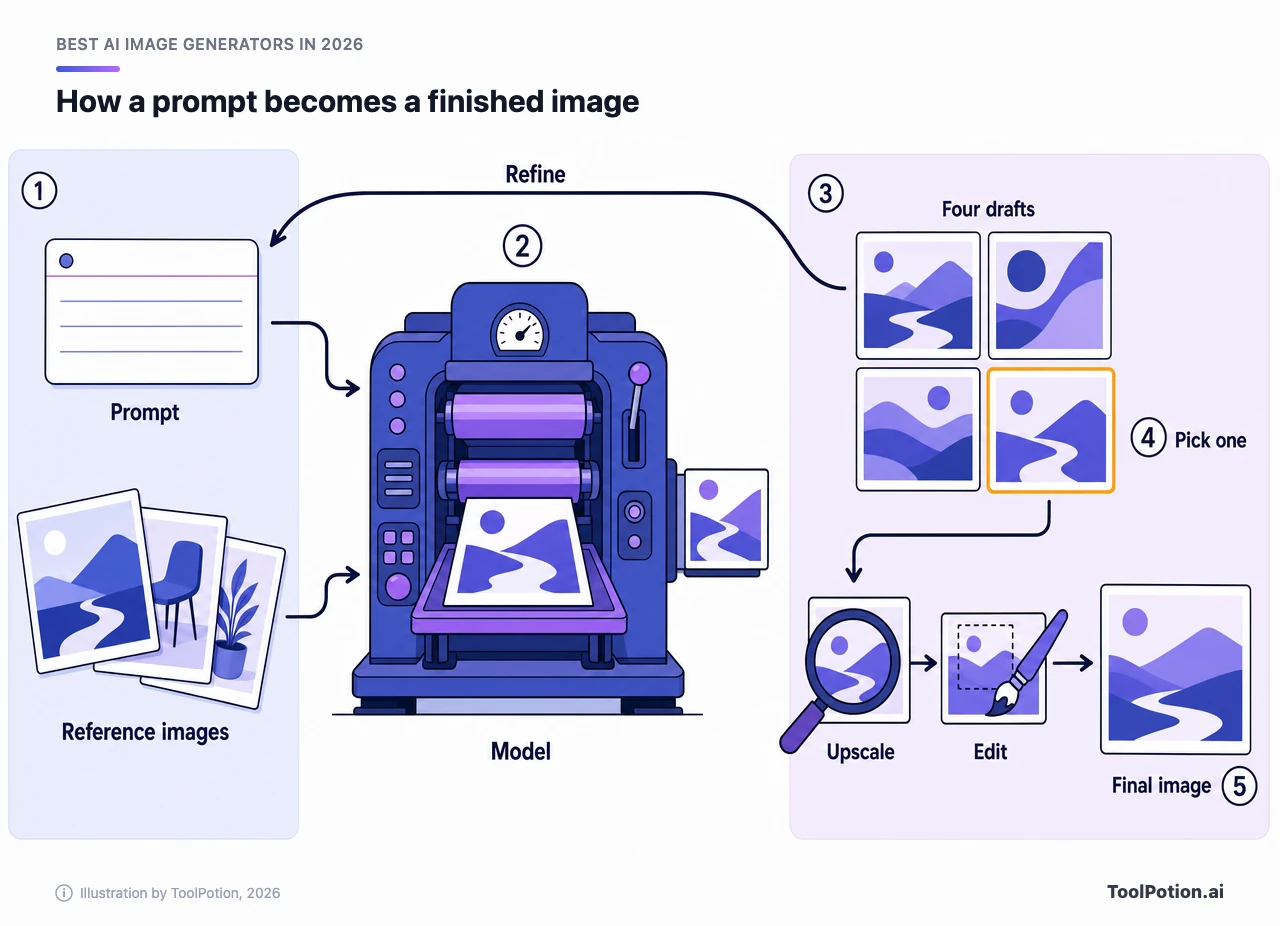
Real projects use more than one tool, and the workflow above shows why. Exploration is cheap and loose, so Midjourney or Meta AI fit there. The on-brand pass needs style control, which is where Recraft and Firefly earn their fee. Text and layout belong with Ideogram or a proper design editor. Edits and extensions are where Leonardo.Ai, Krea and the open-source tools shine. Our comparison of image generators and the guide to AI photo editors cover the last two stages in more detail.
Three questions will get most readers to a name. The tool below asks them.
Budget matters less than people expect. Krea's free tier and Meta AI cost nothing, Adobe starts under ten dollars, and the biggest lever is whether your plan includes the rights you need. Buy the plan whose license fits your client, then worry about the credits.
Specialised boards help if your work is narrow. See the lists for digital artists and social media graphics, or the anime art board if that's your style. The full directory of AI image generators goes well past the top 25.
About ToolRank
ToolRank is ToolPotion's independent ranking for AI tools, and placement on a board can't be bought. Each entry gets a score from 0 to 100 and a tier, and a few entries, like Adobe Firefly, are ranked before they're scored. Browse every list on the ToolRank leaderboards, or see this one on the full AI image generators board.
Rising and newer names to watch
Muse Image debuts at #13 with a 63, and given Meta's distribution it is the entry most likely to move. Ideogram's one-place climb to #11 is small, but it came in the same year as its 4.0 release. Raphael AI sits at #21 with a 53 as a free generator that routes between several models, and Reve at #22 pairs natural-language edits with a drag-and-drop editor.
Some older names have slid. NightCafe is now #15 (57, solid) after sitting at #7, Craiyon fell from #14 to #19 and StarryAI from #20 to #24. Just below the top 25, Bria (enterprise compliance), FLORA (a canvas for creative teams) and Draw Things (offline generation) are worth a look. For stylised and anime work, SeaArt AI at #12 and Niji-Journey at #16 are the obvious next stops. For multi-step pipelines that chain images with voice and video, our multimodal workflow guide is the place to start.
Frequently asked questions
What is the best AI image generator in 2026?
Midjourney and Meta AI tie at 91 on the 2026 board. Midjourney wins on look, and Meta AI wins on price (free). For design work with text or vectors, Recraft AI and Ideogram are better fits.
Is there a good free AI image generator?
Meta AI says Muse Image is free for everyday creation. Krea has a free plan with 100 compute units a day and commercial use stated on it. Recraft's free plan exists but its images belong to Recraft, so it isn't for client work.
Can I use AI-generated images commercially?
Usually yes on paid plans, but read the terms. Midjourney requires Pro or Mega for companies above $1 million in revenue, and Recraft's free tier excludes commercial use. Copyright over a raw output is a separate and weaker claim.
Which tool renders text inside images best?
Ideogram and Recraft are built around it, and Meta says Muse Image can add legible text. No model is safe for long copy, so proofread every word before you publish.
Midjourney or Adobe Firefly?
Choose Midjourney for the look and Firefly for the paperwork. Firefly sits inside Adobe's apps, states that its own models' outputs are commercially safe and offers indemnification to eligible enterprises.
Can I run an image generator on my own computer?
Yes. Stable Diffusion Web UI and ComfyUI are open source and run locally, and Ideogram has released open weights for its 4.0 model (business use needs a paid license). A modest graphics card is enough for the older Stable Diffusion models.
Do I have to label AI images?
In Europe, transparency rules for AI-generated content apply from 2026, and the Commission's code of practice covers marking and labelling AI-generated content. Elsewhere it depends on the platform and local law. Keep the provenance marks your tool adds.